
Quick Answer
Yes, you can work from campgrounds with wifi in the US if you assign each task to the right connection tier before you start. Keep shared campground access for low-stakes activity, run client delivery on your own cellular setup, and switch to a backup path when interruption is not acceptable. Validate from your actual campsite, in the same app and time window you will use for real work. For sensitive actions, proceed only after your required protections are confirmed active.
Why "Campground WiFi" is a Business Risk, Not an Amenity#
If you treat campground WiFi as part of your production setup, you are taking on delivery risk you do not control. Campground-specific performance and security should not be assumed, so the practical move is to treat both as unknown before deadline-dependent work.
A WiFi mention in a listing is not a service commitment. That distinction matters. A connection can be fine for light tasks and still be the wrong tool for a live client call, a final file handoff, or a login session that needs to complete cleanly the first time.
Reliability risk is really a timing risk#
The core issue is uncertainty at the moment the task matters. If you tie an important task to an unverified connection, you may find the limits too late. A call can become unstable midway through a review. A large upload can stall near completion. A two-step login can fail if the session keeps reconnecting. None of those failures has to be dramatic to hurt outcomes.
| Task | Test first | If unverified |
|---|---|---|
| Client meeting | Test a live call at that hour from your actual site, on the actual device, in the same app | A call can become unstable midway through a review |
| Final deliverable upload | Upload a smaller file to the same platform first | A large upload can stall near completion |
| Login-dependent task | Complete a noncritical sign-in before the real one | A two-step login can fail if the session keeps reconnecting |
Judge internet by task consequence, not by whether a page eventually loads. Before any deadline-dependent work, verify the exact path you plan to use from your actual site, on the actual device, in the same app or portal. If you have a client meeting at 3:00 p.m., test a live call at that hour. If you need to send a final deliverable, upload a smaller file to the same platform first. If the task depends on a login, complete a noncritical sign-in before the real one.
A good working rule is simple: if you cannot test it under real conditions, do not assume it will hold. Move the task to your own connection or relocate before the deadline starts.
Shared networks change your duty of care#
Shared WiFi raises a second issue: unknown security posture. You do not control how the network is managed, who else is on it, or what policies are enforced. That alone should change how you use it, even without making specific technical attack claims.
| Work type | Minimum standard | If only campground WiFi is available |
|---|---|---|
| Client portals | Your own private connection | Wait, switch connections, or reduce the task to something low impact |
| Contract signing | Your own private connection | Wait, switch connections, or reduce the task to something low impact |
| Bank or payroll access | Your own private connection | Wait, switch connections, or reduce the task to something low impact |
| Password manager changes | Your own private connection | Wait, switch connections, or reduce the task to something low impact |
| Admin dashboards | Your own private connection | Wait, switch connections, or reduce the task to something low impact |
| Legal or health related records | Your own private connection | Wait, switch connections, or reduce the task to something low impact |
Some work should not run on public campground WiFi unless you have a secured private connection in front of it. Think client portals, contract signing, bank or payroll access, password manager changes, admin dashboards, legal or health related records, and anything that would create real harm if the session were exposed or interrupted. For that class of work, your minimum standard is your own private connection. If all you have is the campground network, wait, switch connections, or reduce the task to something low impact.
There is also a quieter failure mode people underestimate: cleanup. A broken login can lock you out. A dropped session can create duplicate submissions. An interrupted upload can leave you arguing over which file version is final. In a different context, Idaho Parks' FY 2026 Financial Statement / Budget Status as of 12/31/2025 noted that year-to-date revenue comparisons to FY 2025 were adversely impacted after system-implementation disruptions. Different operation, same lesson: the outage is not the whole cost; follow-up work is part of the damage.
Use a consequence rule, not a hope rule#
| Task | If the connection fails | Failure consequence | Fallback action |
|---|---|---|---|
| Scheduled client video meeting | Audio or screen share breaks | Lost trust, reschedule, weaker meeting outcome | Switch to your hotspot or move before the meeting starts |
| Final file upload or handoff | Transfer stalls or fails | Missed deadline, version confusion | Test the platform first, then send on a private connection |
| Banking, payroll, contract signing, admin access | Login or session is interrupted | Lockouts, duplicate actions, sensitive exposure | Do not do it on shared WiFi without a secured private connection |
| Email, research, map checks, streaming | Slow or inconsistent access | Mostly inconvenience | Fine to use as a convenience layer |
Once you frame the problem this way, the next step gets easier. You do not need one magical connection. You need a tiered setup that matches the importance of the task, which is what the next section lays out.
For a step-by-step walkthrough, see A Freelancer's Guide to Dealing with Burnout.
The Connectivity Resilience Framework: A 3-Tiered System for 100% Uptime#
Use one operating rule: choose your connection by the business impact of the task, not convenience. This framework will not prevent every outage, but it helps you reduce avoidable disruption and keep a fallback ready.
| Tier | Task criticality | Acceptable interruption | Default connection | Immediate fallback action |
|---|---|---|---|---|
| Tier 1: Convenience | Low-stakes tasks (browsing, reading, non-urgent email, personal use) | Inconvenient but recoverable | Shared access, such as campground WiFi | Pause, retry, or move to a private connection if the task becomes important |
| Tier 2: Professional | Scheduled work where disruption hurts delivery (client calls, active collaboration, live cloud work) | Minimal interruption | Your private primary connection | Leave shared WiFi and continue on your private path |
| Tier 3: Failsafe | High-consequence work (sensitive sign-ins, time-bound submissions, sessions you cannot risk interrupting) | Interruption is not acceptable during the task | Your verified backup path | Delay, switch path, or relocate until the backup is confirmed |
Keep the boundaries strict: Tier 1 is convenience, Tier 2 is core delivery, Tier 3 is no-risk execution.
Before you begin, run this preflight:
- Classify the task by consequence if it fails halfway.
- Pick the tier before opening the app, portal, or meeting link.
- Verify the fallback path, not only the primary path.
For government portals, add one extra check before sharing sensitive information: confirm the site ends in .gov and uses https://. Also plan for source failure in your workflow, because even an official link can return Page Not Found.
Tier 1: The Convenience Layer (Using Campground WiFi Safely)#
Use campground WiFi only for tasks that are safe to interrupt. If failure would affect client work, sensitive accounts, or time-critical steps, move to Tier 2 or Tier 3 before you start.
| Task type | Acceptable risk on Tier 1 | Required safeguards | Fallback trigger |
|---|---|---|---|
| Browsing, reading, personal streaming | Slow or dropped sessions are manageable | Join only the network details provided by the host, keep VPN on, avoid sensitive logins | Repeated drops, unstable load behavior, or trust concerns about the network |
| Non-urgent downloads and updates | Delays are acceptable | VPN on, treat timing as flexible, keep it separate from deadline work | Stalled transfers or consistently unusable speeds |
| Client deliverables, live meetings, banking, official forms/portals | Not acceptable on Tier 1 | Do not run these on shared campground WiFi | Switch immediately to your private connection |
In short: Tier 1 is for convenience, not consequence. VPN use is required hygiene here, but it does not make shared WiFi a professional-grade default for high-impact work.
Before booking, run a quick verification pass:
- Check recent dated reviews, not historical averages. Review sentiment can be mixed, and a dated report can flag current issues (for example, a Sep 24, 2025 review describing WiFi as "totally inadequate").
- Ask the host for current status in your site area and whether there are active outages or service alerts.
- If you are entering a park area, check official alerts/conditions pages for current notices and date-stamped changes (for example, Date Posted: 1/5/2026 or Reopens 3/20).
Once onsite, validate first, then depend on it. Being close to the office is not a reliability guarantee; one report described poor WiFi even six sites from the office. Test with low-stakes activity on VPN, and the moment reliability or trust degrades, fall back to Tier 2.
Tier 2: The Professional Layer (Your Mission-Critical Cellular Hotspot)#
For client-facing, deadline-bound, or hard-to-redo work, use Tier 2 first. Your cellular setup is the default because you control the connection and can switch lines quickly when conditions change.
No single U.S. carrier is best everywhere, so treat multi-carrier coverage as standard operating practice if you work on the road regularly.
| Setup | Stability for work | Control | Field usability |
|---|---|---|---|
| Phone hotspot | Lowest for sustained sessions; better for short tasks. Hotspot caps are often in the 30-60GB range, and long use can hit thermal throttling. | Limited controls and easier to interrupt during normal phone use. | Fast to start and useful as a backup, not your primary line for critical work. |
| Dedicated hotspot | Better fit for recurring client work across campgrounds, highways, and towns. | Better separation from personal phone use, with clearer day-to-day management. | Strong portability/reliability balance; one 2026 comparison lists 10-15W draw and typical monthly examples around $40-95 (verify current terms before purchase). |
| Router setup | Can be a strong option if you run a more fixed, full-time rig setup. | Most configurable, but also the most to manage. | Best if you are willing to tune and maintain it in the field. |
When choosing hardware, prioritize field behavior over marketing: stable long-session performance, dependable tethering, practical admin access, and a path to external antenna support if you need it.
Arrival workflow#
Run the same checklist at each stop before your first meeting:
- Test both carrier lines where you will actually work.
- Run real tasks on each line (for example: join a short test call, upload a file, open a large cloud folder).
- Pick your primary line based on that location's performance, not habit.
- Fail over immediately if the primary repeatedly drops calls, stalls uploads, or degrades during active work.
- If both lines are weak, move to Tier 3 instead of forcing Tier 2.
Signal optimization sequence#
Start with placement, then add gear only if needed. Reposition the hotspot, retest, and keep the best location.
| Option | Use when | Note |
|---|---|---|
| Reposition the hotspot | Start here; move it to a window, higher shelf, or outside-facing spot | Retest and keep the best location |
| Antenna options | Service exists but is weak or unstable | Retest after each change |
| Tower-targeting tools | You need to guide antenna aim | Use them instead of guessing |
| Booster | Signal exists but indoor performance is poor | It cannot create signal where none exists |
If service exists but is weak or unstable, test antenna options and retest after each change. Use tower-targeting tools to guide your aim instead of guessing. Use a booster when signal exists but indoor performance is poor; a booster cannot create signal where none exists.
Choose plans by terms, not slogans#
Before you commit to a plan, verify these items on the provider page:
- Hotspot policy and allowance
- What happens after high-speed data is used
- Priority treatment during congestion
- Support responsiveness when service fails
For regular video calls, 30-60GB of high-speed hotspot data is a practical starting budget, then adjust to your workload. Keep a dated screenshot or PDF of the exact terms you selected. If a limit is unclear, verify the current plan limit in carrier or provider source records before using it in your work budget.
Related: How to Find Reliable Wi-Fi Anywhere in the World.
Tier 3: Satellite as Your Last-Resort Continuity Layer#
Use satellite as your last-resort continuity layer when work cannot tolerate interruption and Tier 2 is not enough. It is not a literal uptime guarantee, but it gives you a second path when weak tower coverage, known dead zones, or high-stakes delivery windows make cellular riskier than usual.
If your hotspot is stable and the task is easy to restart, stay on Tier 2. Move to Tier 3 earlier when the cost of a dropped session is higher than the added setup effort, power use, and operating cost. The goal is predictable delivery, not gadget stacking.
Location rules matter here. Your backup plan can still fail if your site is not legally usable long enough for the work. If you are working from BLM land, confirm whether you are in a Long-Term Visitor Area (LTVA).
In LTVAs, an Individual Special Recreation Permit is required from September 15 through April 15 each season. The cited draft business plan shows a long-term permit at $180 (valid up to 7 months) or a short-term permit at $40 (valid 14 days). Outside LTVAs, one-location camping is limited to 14 days in any 28-day period, which can force a move during active projects.
Do not assume your America the Beautiful Pass covers an LTVA ISRP. It does not. Keep a dated copy of the permit page, your receipt, and the rule text you relied on. If you need to confirm recreation-permit rules, recheck 43 CFR part 2930 in eCFR and note the displayed currency date (the cited page showed current to 3/18/2026, with Title 43 last amended 2/24/2026).
| Ownership or operating area | Verify before you commit | Operational tradeoff | Risk reduction |
|---|---|---|---|
| Satellite hardware | Current hardware pricing pending provider/source-record verification | Upfront spend, storage space, setup time, more gear to maintain | Adds a second connection path when cellular is unreliable or unavailable |
| Satellite service plan | Current plan pricing and terms pending provider/source-record verification | Recurring cost, terms can change | Lowers the chance that one coverage failure blocks delivery |
| Public land access and permits | LTVA ISRP season (September 15 through April 15); cited permit options are $180 long-term (up to 7 months) or $40 for 14 days | Permit admin and payment steps before work starts | Avoids compliance and payment surprises that can interrupt your stay |
| Site turnover outside LTVAs | Travel time, fuel, and schedule impact of the 14 days in any 28-day limit | More moves, more setup resets | Avoids planning critical work around a site you cannot hold |
Deployment checklist#
Before important sessions, run a quick preflight:
- Sky visibility check: Inspect the actual dish location. If terrain, trees, or structures interfere, assume risk and test early.
- Mount stability check: Confirm the setup will stay secure through wind, traffic, and normal movement around camp.
- Power-budget check: Confirm your power source can carry the full session without forcing a mid-call shutdown.
- Pre-session connection test: Connect early, run real tasks, and keep your cellular hotspot ready for immediate failover.
Go or no go#
- Stay on cellular: At least one carrier is stable and the task is restartable.
- Deploy satellite: Cellular paths are weak or inconsistent, the area is a known coverage problem, or the delivery window is high-stakes.
- Reschedule or relocate: Satellite fails sky/mount/power checks, or permit/stay limits create a likely mid-project move.
This tier is about continuity planning: fewer preventable disruptions and more predictable client delivery.
Your Mobile Office Security Protocol: A Non-Negotiable Checklist#
Once you have layered connectivity, use this checklist before you connect, before you work, and before you leave. Treat this as an operating template and verify each control against your own provider or security standard before relying on it for client work.
Before you connect#
Set one rule for any network you do not control, including campground WiFi: do client work only after you verify your approved connection protections are active according to your provider standard. If you cannot verify status, treat the session as non-sensitive.
If protection drops mid-session, pause client-data activity and resume only after you restore the approved state or switch to your own connection path. Keep this simple enough that you can apply it the same way every time.
Use a verification mindset, not an assumption mindset. FederalRegister.gov states its web display is not the official legal edition and directs users to verify against the official printed PDF version; apply that same discipline to your connection checks when work is sensitive.
Before you work#
Do not improvise device security in the moment. Confirm your pre-set baseline is active on each work device:
- Firewall status checked.
- Auto-update settings checked for system and core work apps.
- Password-manager workflow checked for unique credentials on critical accounts.
- MFA method for critical accounts checked against your approved standard.
- Screen-lock and remote-lock/remote-wipe readiness checked before travel.
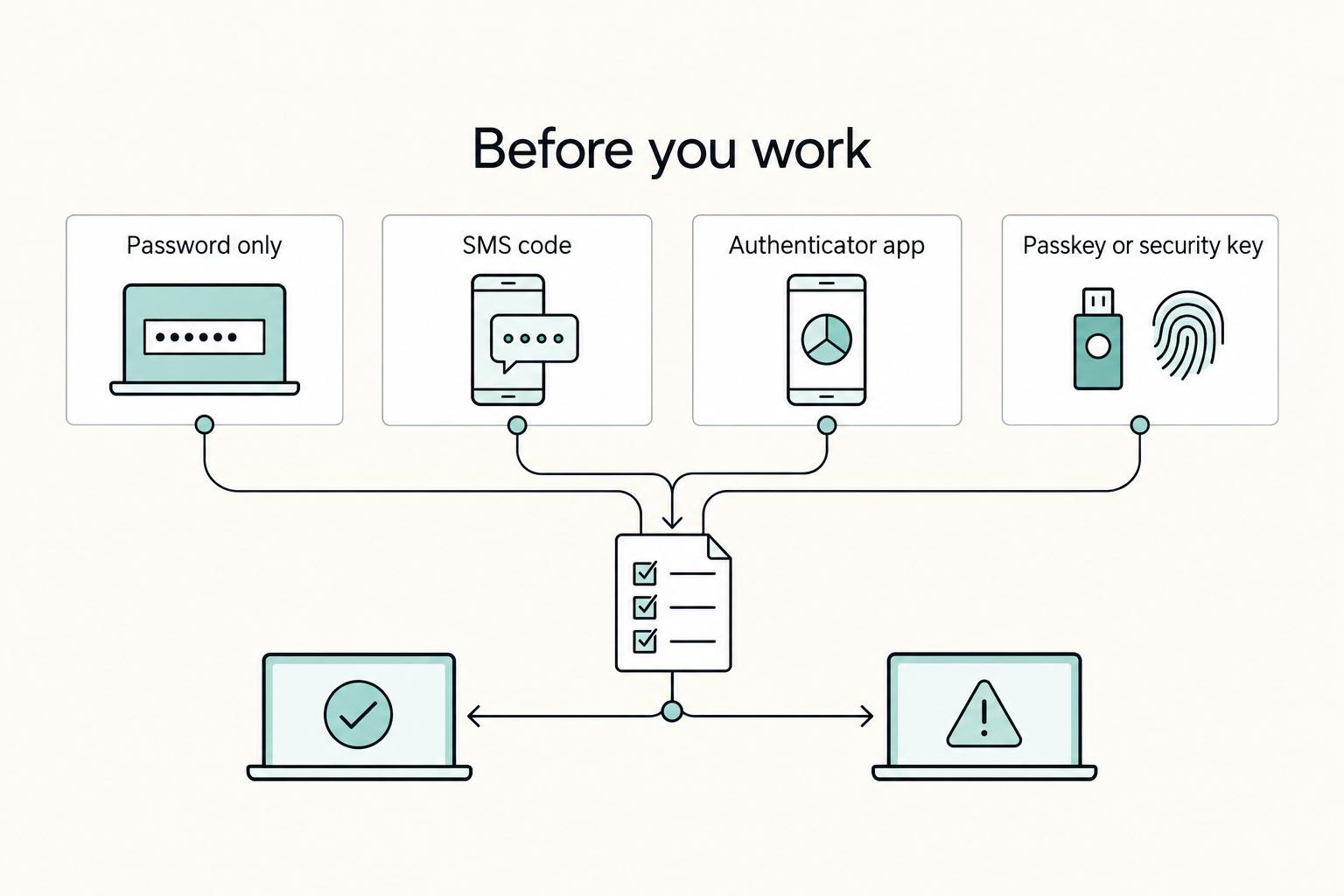
Use this chooser to set defaults quickly, then confirm what each service supports in your environment:
| Method | What to verify before relying on it | Usability tradeoff | Best use in your policy |
|---|---|---|---|
| Password only | Whether this is allowed for any account class | Lowest setup effort | Only where your policy explicitly permits it |
| SMS code | Enrollment, recovery flow, and number-change handling | Broad compatibility, extra recovery steps | Accounts your policy classifies as lower risk |
| Authenticator app | Backup/recovery setup and device transfer process | Moderate setup and backup overhead | Standard option for important accounts |
| Passkey or security key | Device/service compatibility and account recovery path | More planning for device and recovery lifecycle | Highest-priority accounts in your policy |
Before you leave#
Separate work and personal activity by default. Use separate profiles or accounts, keep client files in your approved encrypted cloud workflow where available, and grant access with least privilege.
If a device is lost or stolen, run a short response checklist:
- Lock or disable the device through supported account controls.
- Revoke active sessions for core work accounts.
- Rotate highest-risk credentials first.
- Review and reduce overly broad sharing access.
- Current incident-response contact path pending policy/source-record verification.
Conclusion: Treat Internet as an Operating Requirement#
You do not need to guess your way through work travel. Once you treat internet as an operating requirement instead of a campground amenity, you can reduce avoidable interruptions, recover faster when a connection fails, and set a clearer standard for what you can promise clients.
In practice, this setup changes three decisions. You plan your work around connection risk, not scenery alone. You treat campground WiFi as a convenience layer, not proof that your workday is covered. And you make backup decisions before arrival, so a dropped connection becomes a switch you already planned for, not a scramble during a deadline or call.
That also gives you a cleaner client-facing rule: if the task is time-bound, sensitive, or hard to recover from, use the connection you control. Keep public access for low-risk work, and keep your security habits active on any network you do not own. Test from your actual site after check-in, not only near the office, and confirm your VPN is connected before you open client tools. If the tunnel drops or the network stalls, stop sensitive work and move to your backup.
Before your next trip, do this:
- Define your primary connection for daily work.
- Set a backup path you can switch to quickly.
- Apply your security protocol, including VPN use and checking for secure HTTPS on official sites before sharing sensitive information.
- Test the full workflow before travel, including login, upload, call quality, and failover.
Remote work from campgrounds can be workable, but the order of decisions matters. Evaluate each stop by work requirements first, then by lifestyle preference. That is how you keep the freedom and lower the stress.
Frequently Asked Questions
Are campgrounds with wifi enough for remote work?
Usually not for client-critical work. Treat campground WiFi as Tier 1 convenience, then verify it on arrival with the password or instructions given at check-in and test from your actual site, not just the office or lodge area. Some campgrounds say access may not reach every campsite, and some reserve the right to throttle heavy use during peak hours. | Setup choice | Reliability | Security posture | Best-use scenario | | --- | --- | --- | --- | | Campground WiFi only | Lowest and location-dependent | Shared network with limited control; keep tasks low risk | Email triage, browsing, downloads you can pause | | Phone hotspot | Moderate | Connection you manage directly; follow your own security policy | Short work blocks, backup for a call or upload | | Dedicated hotspot | Higher for daily work | Separate work connection you control; follow your own security policy | Primary Tier 2 connection for regular remote work | | Hotspot + satellite | Potentially higher resilience, but not universal | Two separate connections you control; follow your own security policy | Critical work where downtime is costly |
When is campground WiFi acceptable to use?
Use it when the task is low risk and interruption is acceptable. Do not use it as your only option for deadlines, client calls, or anything time-bound if you can switch to your own cellular layer instead.
Should you always use a VPN on campground WiFi?
The campground disclosures here do not specify encryption standards or VPN requirements. Use your own security policy as the default, and avoid sensitive client work if your required protections are not active.
Do you need satellite as your backup?
Satellite can be a Tier 3 backup in some travel setups, but it is not a universal guarantee: some campgrounds in dense forest report that satellite reception does not work.
What should you verify before paying for any internet upgrade?
Recheck the exact offer first. One campground advertised a paid 25 mbps option as "New for 2022," with availability limited and an additional fee not listed. For your own gear, verify current hardware costs, plan costs, and upload requirements from provider, product, or source records before use.
Researched and edited by the Gruv editorial team. Gruv builds cross-border billing, payouts, and finance-operations software for global businesses.
Sources
- blm.gov/sites/default/files/docs/2024-09/Public%20Ro...trusted
- das.nebraska.gov/materiel/purchasing/6909Z1/RFP%206909%20Z1%2...trusted
- das.nebraska.gov/materiel/purchasing/6909Z1/RFP%206909%20Z1%2...trusted
- ecfr.gov/current/title-43/subtitle-B/chapter-II/subch...trusted
- energy.gov/sites/default/files/2026-03/final-ea-2291-so...trusted
- environment.fhwa.dot.gov/env_topics/other_topics/VIA_Guidelines_for_H...trusted
- federalregister.gov/documents/2026/01/08/2026-00121/reissuance-a...trusted
- fs.usda.gov/t-d/pubs/pdfpubs/pdf22232803/2223%E2%80%9328...trusted
Educational content only. Not legal, tax, or financial advice.
Related Posts

The 2026 Global Digital Nomad Visa Index for 50+ Countries
Start with legal fit, not lifestyle filters. The practical order is simple: choose a route you can actually document, then decide where you want to live. That single change cuts a lot of wasted comparison work and stops you from falling in love with places that were never a real filing option.

How to Find Reliable Wi-Fi Anywhere in the World
Reliable internet for work is an operating decision, not a speed-test hobby. You do not need the biggest headline plan. You need a connection that keeps a video call stable, finishes a cloud upload without stalling, and lets your collaboration app stay connected when the day gets busy.
The Best RVs and Campervans for Digital Nomads
If you're searching for the **best rvs for digital nomads**, do not start with brand hype or dealer roundups. Start with your workday. The wrong layout will cost you every day, even if the rig looks great on the lot.