
Quick Answer
Start by narrowing your offer, publishing a lean version, and qualifying leads before a call. A strong freelance website guide is less about visual polish and more about operational clarity: clear promise, proof tied to outcomes, and a contact path that filters fit. Keep site wording aligned with your SOW and MSA, then expand only when repeated objections show a true information gap.
Build Your Freelance Website as an Operating Asset#
Your website can help better-fit clients recognize themselves quickly and help poor-fit prospects opt out before you spend half a day untangling scope. When it does that well, you may get cleaner inquiries, fewer vague "can you also..." threads, and a shorter path from first visit to a real scoping conversation.
That is why it helps to treat your site as an operating asset, not a design trophy. A practical approach starts with the work you want to sell, not the pages you want to publish. Broad service menus can sound flexible, but they often create the opposite result: weaker positioning and more pressure to stay current across tools you may not even want to use. In crowded service categories, especially front-end design, that pressure gets sharper.
A practical build sequence is simple: define your offer, launch the leanest version that can support that offer, then expand deliberately. That helps you avoid writing pages for imaginary objections or presenting services you cannot support with proof.
- Define the offer first. Pick an area of expertise and state it in plain terms. The test is simple: can a stranger tell what you do, for whom, and what the output looks like?
- Launch lean. Start with a small site that makes the promise, shows relevant proof, and gives one clear next step. If you are still choosing a domain name, keep it easy to remember, use a
.comif one is available, and avoid dashes where possible. - Expand deliberately. Add pages when you can point to a clear gap in how your offer is understood, not just because the site feels too small.
One operator detail matters early: make sure your site language matches the deliverable you actually provide. If you do design-only work, a client may reasonably expect a shareable design URL or the design file itself. If you are not also building, launching, or maintaining the site, do not let your copy blur those lines. That mismatch can become scope friction later.
Another early failure mode is expansion without support. More pages, more industries, and more service lines can make you look less credible if the proof is thin or the offer boundaries are fuzzy. If you cannot back a claim with examples, process detail, or a clear deliverable, leave it out for now. You can always add it once the work is real and repeatable.
| Decision | Trigger | Main risk | Next action |
|---|---|---|---|
| Launch now | You can name one area of expertise, describe the core deliverable, and show enough proof to support one clear offer | Delaying because the site is not "complete" yet | Publish a lean version and watch what prospects ask about first |
| Expand now | A distinct offer or deliverable is not explained clearly on the current site | Adding pages that dilute focus or imply services you do not want to deliver | Add only the page that resolves that clarity gap, then re-check inquiry quality |
Before you go further, do one quick self-audit on your last few inquiries.
- Did they match the kind of work you actually want more of?
- Did they include enough context to scope without a long clarification thread?
If the answer to either question is no, fix message clarity and offer boundaries before you add more design, more pages, or more traffic. That is the logic the rest of this article follows.
Define the Two Jobs Your Website Must Do#
Use one rule for every page: it should either help the right client inquire, or reduce avoidable friction before a project starts. If it does neither, cut it.
A minimum viable site can be one page when a prospect can quickly understand your offer, see proof, and know the next step. Expand only when real inquiries repeatedly expose the same missing detail, not because the site feels small. Many prospects will not read long copy before they reach out.
Build qualification into your message, proof, and contact flow rather than leaving it to a discovery call. State the problem you solve, who you solve it for, and what output the client gets in plain language. Specialist positioning is usually more effective than broad generalist copy for attracting better-fit inquiries.
| Job | What to include | What "working" looks like | Common failure mode |
|---|---|---|---|
| Get qualified inquiries | Clear niche promise, relevant proof, visible contact path, concise offer description | Inquiries reference the service, problem, or example that matched their need | Broad "I do everything" messaging, weak proof, generic contact path |
| Lower pre-project friction | Delivery boundaries, short process summary, clear next-step expectations, scope/handoff clarity | Fewer pre-call clarification threads and fewer wrong assumptions about what is included | Vague deliverables, overpromising on-site, unclear post-inquiry process |
Your contact form should qualify, not just collect names. Ask for the minimum context you need to assess fit: project type, goals, timing, and a short summary. Then verify the live form and follow-up flow so leads do not quietly go cold.
Before you book calls, run a consistency check: make sure your site promises match your Statement of Work and Master Services Agreement language, so prospects are not sold one scope and contracted into another.
- Keep: it helps a good-fit prospect understand your offer faster.
- Keep: it fixes a misunderstanding you are repeatedly seeing in inquiries.
- Cut: it adds services, industries, or outcomes you cannot support with proof.
- Cut: its main purpose is making the site look larger, not making inquiries cleaner.
For a step-by-step walkthrough, see The Best Website Builders for Freelancers.
Pick Your Niche and Offer Before You Touch Layout#
Pick your niche and offer before you design anything. If you start with layout first, you risk polishing a message that is still too broad.
Treat this as step #1. Your niche is your marketing focus: either a specific client type, vertical niche, or a specific service type, horizontal niche. Narrowing your focus does not mean you can never take other work. It means your homepage stops trying to speak to everyone.
Draft your message in one pass#
Before you open a template, write one positioning line:
I help [who you help] by delivering [what you deliver]. I do not [what you do not do].
Keep the boundary line explicit. It keeps your offer from expanding into services you do not want to sell. If the draft still feels broad, answer these three questions before revising: Who is this person? What motivates them? What are their challenges?
Use this readiness check: if your "who" is vague and your "what" includes multiple services, pause layout and tighten the offer first.
Make each claim earn its place#
Use a simple proof check before claims go on your homepage:
| Homepage claim | Proof to have ready |
|---|---|
| You solve a specific business problem | Problem the client had |
| You can handle this type of project | Approach you took |
| You can deliver a practical result | Outcome you can describe |
If a claim does not map to problem, approach, or outcome, cut it or soften it. This keeps unsupported language off the page.
Audit your channels before layout#
Shape your message around the channels that already produce better-fit inquiries. Review recent inquiries and classify each by channel and fit.
| Channel | Lead-fit signal to validate | Control check | Follow-up signal to validate |
|---|---|---|---|
| Marketplaces | Do inquiries match the role category you target? (On platforms like Upwork, discovery is role-based.) | How much can you tune your profile to one service or buyer type? | How many low-context messages need clarification before a real conversation? |
| Referrals | Do referrers describe your offer the same way your site does? | How much can you influence what contacts send your way? | Do referred leads arrive with enough context to qualify quickly? |
| Direct outreach | Are you contacting the exact client type, motivation, and challenge you defined? | Can you choose audience and message precisely? | How much back-and-forth is needed before fit is clear? |
- Label recent inquiries as fit or non-fit by channel.
- Increase emphasis on channels that produce clearer-fit conversations.
- Rewrite homepage messaging around the audience and offer that keeps showing up.
- Keep only claims you can substantiate with proof.
Design can improve clarity, but it cannot define your offer for you. The same issue shows up on LinkedIn for Freelancers Who Want a Predictable Client Pipeline when the offer is still fuzzy.
Decide Between a One-Page Launch and a Multi-Page Build#
Choose the structure based on how much information your buyer needs to decide, not on how many pages your template can generate. If your offer is focused, start with one page and guide people through a linear scroll from offer to proof to contact.
A one-page site keeps essential information in one place, and same-page navigation can jump visitors to specific sections without loading new pages. That format fits a simple decision path, especially when most visitors can understand your offer without branching into multiple topics. It also matches how many people browse on phones, where scrolling is standard and mobile traffic represented 62.54% of worldwide website traffic in 2024.
| Format | Speed to launch | Message clarity | Maintenance load | When it starts to strain |
|---|---|---|---|---|
| One-page website | Faster when your scope is tight | Strong for one focused story and one main next step | Lower, because core content is centralized | When you need a blog, much deeper topic coverage, or more than one product |
| Multi-page website | Slower to set up, but better for larger content sets | Better when different topics need separate space | Higher, because content is distributed across pages | When complexity outruns your ability to keep pages useful and current |
Move to multi-page only when the information itself requires it. In practice, that usually means you need separate destinations such as Home, About, Services, Blog, and Contact, or you need deeper content across more keywords than one page can handle well.
Choose between Webflow and WordPress after this structure decision, not before. Your freelance sales funnel works better when the site structure is already clear.
Build the Conversion-Critical Pages in the Right Sequence#
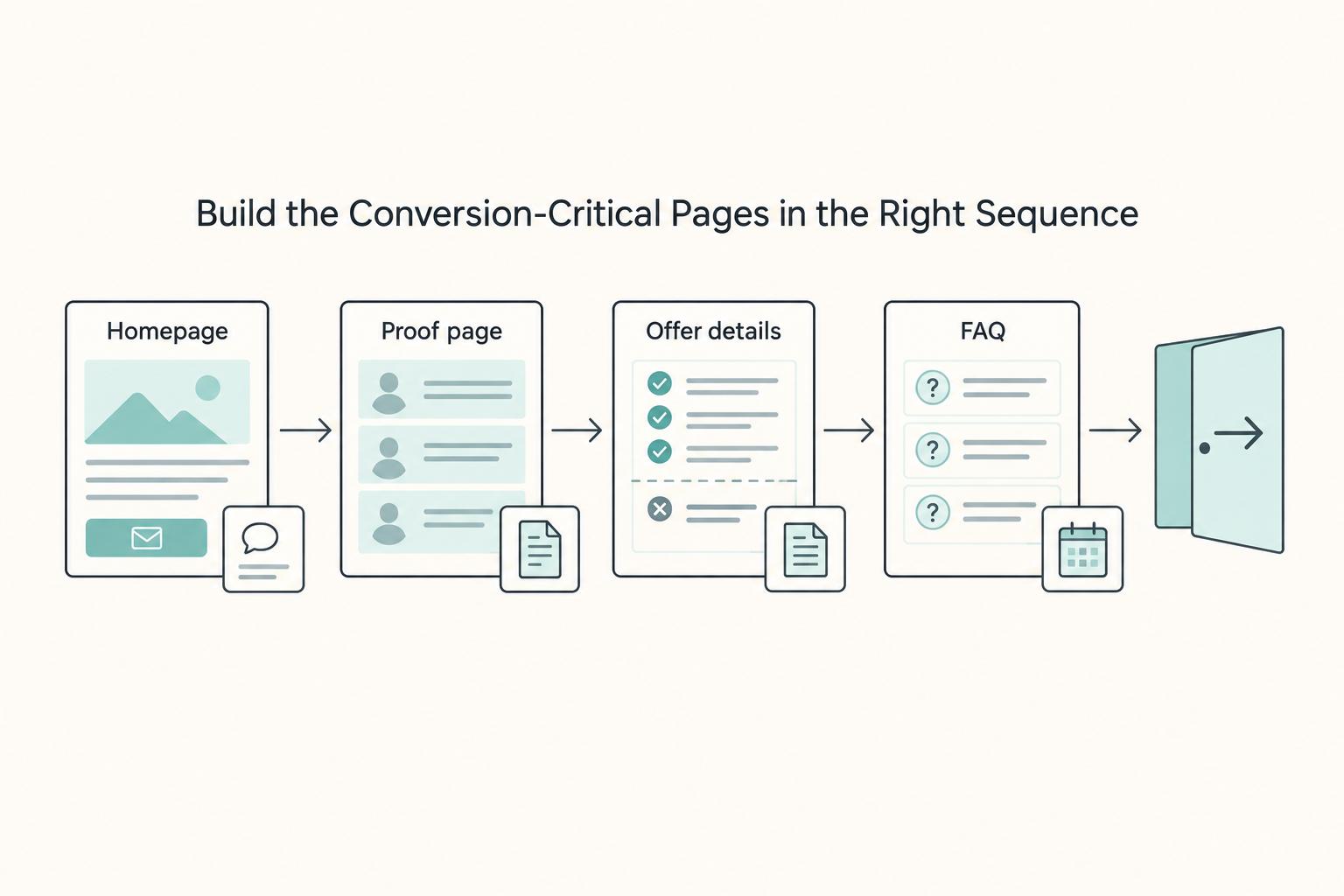
Build these pages in sequence so visitors get one clear path to action: homepage first, proof second, scope clarity third, objection handling fourth.
Start with the homepage. It should make your offer clear immediately: what you do, who it is for, and why your offer is the better fit, then move people to one Contact Form action. Keep one primary CTA in the hero. If you place competing actions such as "Book a call," "View work," and "Download guide" side by side, you add friction.
Next, add proof that matches your claims. For each core promise on the homepage, map one case study to the same structure: problem, approach, outcome. Show the outcome first, then explain the process. This strengthens trust and helps prospects self-qualify faster. If you want a tighter format, see How to Write Compelling Case Studies for Your Portfolio.
| Page type | Job | Required content | Primary failure mode |
|---|---|---|---|
| Homepage | Move visitors to one next step | Clear promise, audience fit, outcome framing, one Contact Form CTA, light proof | Looks polished but works like a brochure |
| Proof page or section | Support claims with evidence | Case studies mapped to problem, approach, outcome | Generic proof that does not help decisions |
| Offer details | Set scope expectations early | What is included, what is out of scope, and how changes are handled | Misaligned inquiries and avoidable scope friction |
| FAQ | Resolve recurring objections before calls | Direct answers to common fit, process, and timing questions | Repeating the same clarifications in every pre-call exchange |
Then make your offer-details page operational, not promotional. Define the problem you solve, set project boundaries, and state how scope changes are handled. Finish with an FAQ built from real pre-call objections you hear repeatedly.
If time is limited, protect what matters first: tighten homepage clarity and make sure your Contact Form path works before you expand secondary pages.
Your About Me page should support the offer, not compete with it.
Add Trust and Legal Boundaries Before You Scale Traffic#
Set boundaries before you scale traffic, or you will scale confusion with it. Clear expectations upfront help prospects self-qualify and reduce the misunderstandings that usually show up later around scope, timelines, revisions, and communication.
Use your site for pre-sale clarity, and use signed documents for full working terms. Keeping those aligned signals professionalism and keeps your sales-to-delivery handoff clean.
| Boundary area | Publish on your site | Confirm in signed agreements |
|---|---|---|
| Scope and inclusions | What your service includes at a high level, what is out of scope, and which project types are a fit | Exact deliverables, responsibilities, assumptions, and project-specific terms |
| Changes and feedback | What usually counts as a change in direction, when added requests may require revised scope, and how feedback is handled | Formal change approval steps and updated scope documentation |
| Confidentiality | A plain statement on handling sensitive information and when an NDA may be needed before deeper review | The confidentiality or NDA terms both sides sign |
| IP and portfolio use | A high-level note that usage and portfolio rights are finalized in contract | Agreed ownership, usage, and portfolio-rights terms |
Before promotion, compare these side by side: homepage copy, offer page, contact-flow wording, SOW template, and MSA draft. Fix mismatches now. If your site promises one thing and your documents describe another, you are creating an avoidable delivery risk.
Write self-qualification into the page#
Answer likely friction points directly in your copy. State what is included and what is not. For example: copy is included, brand naming is not; one core page type is included, full content migration is not.
Set change-request expectations in plain language. Explain that added page types, requests outside the agreed direction, or major late-stage shifts may require revised scope.
Set feedback expectations clearly too: whether you use review rounds, whether you need consolidated feedback, and how feedback delays affect timeline. "We'll figure it out" sounds flexible early, but it often leads to under-communication and delivery confusion once work starts.
If you handle sensitive material, add one sentence on when NDA review enters the process. If portfolio use matters, say that upfront and finalize terms in the agreement. For deeper guidance, read Negotiating Your IP: How to Retain Portfolio Rights for Your Best Work. Related: Best Freelance Portfolio Tools for a Website You Can Keep Updating.
Choose a Platform and Implement Without Locking Yourself In#
Choose the platform that helps you launch now without making future changes harder than they need to be. This is a workflow decision, not a loyalty decision: do you need a visual-first build you can ship quickly, or a content-focused setup that gives you more flexibility with more operational responsibility?
If your first version is a lean marketing site with a homepage, one service page, proof, and a clear contact path, Webflow is often a practical launch fit. If you already expect heavier publishing or deeper theme/plugin customization, WordPress may fit better. Rework usually happens when your day-to-day editing and maintenance needs do not match the platform you picked.
Choose for the work you actually need to do#
Webflow and WordPress are different implementation models. Webflow is visual-first and generates HTML/CSS/JS while you edit. WordPress is content-management-first and extends through themes and plugins.
| Implementation criteria | Webflow | WordPress |
|---|---|---|
| Publishing speed | Often strong for a fast first launch in one hosted environment | Can be fast, but depends more on theme setup and plugin choices |
| Editor handoff | Usually cleaner when you want a controlled editor for a limited set of pages | Often better when multiple people are publishing in a CMS-style workflow |
| Maintenance burden | Lower overhead in an all-in-one setup for simpler sites | More flexibility, with more responsibility across hosting, themes, plugins, and updates |
| Migration friction | You still need a content plan because visual layout and CMS structures may not transfer cleanly | Flexible, but plugin-heavy builds can create dependency issues during moves |
Use a simple decision rule: if your near-term goal is to publish quickly and learn from real inquiries, reduce setup drag. If your real need is ongoing content operations with more custom behavior, accept the added maintenance upfront.
Prevent content entanglement before it starts#
Lock-in usually comes from how your content is stored, not from the platform name. Keep your assets portable from day one:
| Asset | What to keep |
|---|---|
| Copy | Keep a neutral master in plain docs/text, organized by page and section. |
| Media | Store final files in a separate folder structure with filenames, alt text, and usage notes. |
| Forms | Maintain a field map for label, internal field name, and submission destination. |
| Metadata | Track titles, descriptions, canonical targets, and live URLs in one place. |
Use a lock-in prevention architecture#
Treat portability as an operating habit: keep neutral data formats where possible, keep URL patterns stable, log redirects when slugs change, and keep form/CRM field naming consistent. That keeps future migration closer to transfer work than rebuild work.
Run a pass/fail launch check#
Before promotion, test like an operator:
| Check | Pass if | Fail if |
|---|---|---|
| Mobile experience | Key message, proof, and CTA are easy to use on a real phone. | Layout breaks, key content is buried, or interaction is awkward. |
| Form delivery path | Test submissions arrive reliably and the next step is clear. | Routing is inconsistent, messages disappear, or spam handling breaks the flow. |
| Indexing readiness | Intended public pages are live, indexable, and have final metadata. | Noindex/draft settings or placeholder metadata remain. |
Keep client-facing costs transparent anywhere you mention pricing or pass-through fees, and verify any current disclosure requirement before you add it.
Once the site is live, platform-independent demand flow matters more than another round of design tweaks.
Run Lead Intake Like Operations, Not Inbox Roulette#
Treat intake as an operations pipeline: each stage should resolve one decision before you move forward, so you do not carry unclear requests into a call.
| Form item | Guidance |
|---|---|
| Project type | Ask for project type in plain language. |
| Timeline | Ask for timeline in plain language; use broad timeline bands such as less than 1 week, 1 week to 4 weeks, 1 month to 3 months, 3 months to 6 months, and ongoing. |
| Budget context | Ask for budget context in plain language; keep budget as a placeholder range until you confirm your current cutoff. |
| Follow-up consent | If you plan follow-up beyond the immediate reply, include a clear consent prompt such as Can we email you? |
| Your goal | What the prospect submits | Go or no-go for the next step |
|---|---|---|
| Check basic fit | Contact details, project type, timeline, budget context | Go if the request fits the services you actually offer and the timing is workable enough to discuss |
| Clarify scope | Discovery answers on goals, constraints, stakeholders, and urgency | Go if you can define the problem, likely deliverables, and decision path without guessing |
| Price and structure the work | Proposal feedback, preferred option, open questions | Go if scope shape, responsibilities, and pricing are clear enough to document |
| Lock expectations | Approved Statement of Work and Master Services Agreement | Go if deliverables, boundaries, and working terms match what you stated earlier |
Keep qualification gates, but phrase them for self-selection, not interrogation. Ask for project type, timeline, and budget context in plain language. Use broad timeline bands such as less than 1 week, 1 week to 4 weeks, 1 month to 3 months, 3 months to 6 months, and ongoing, and keep budget as a placeholder range until you confirm your current cutoff. If you plan follow-up beyond the immediate reply, include a clear consent prompt such as "Can we email you?"
Use this consistency checklist across your form, service page, proposal, SOW, and MSA to reduce scope drift:
- same service names
- same exclusions and revision limits
- same timeline language
- same client responsibilities
- same next-step expectations
Set internal service-level targets for routing speed and follow-up reliability, then validate them with recurring checks. After any form change, submit a test inquiry, confirm assignment, confirm autoresponse, and confirm field labels still map correctly in your workflow. If lead quality drops, troubleshoot in this order: fix proof and scope language first, tighten prompts second, and change CTA copy last.
Conclusion#
Your website is not a one-time design task. It is an operating asset. It should help the right buyers recognize themselves quickly, help the wrong ones opt out early, and keep your delivery promises consistent from first click to agreed scope. The practical move is still the same: launch lean, qualify fit early, then iterate from what real buyers keep showing you.
That matters because many website problems are not only website problems. If people visit but do not inquire, your offer may be vague. If you get calls but they are poor fit, your proof or intake may be too broad. If projects keep getting messy after the sale, your public promises may not match what happens in your proposal and delivery process. Fix the point of friction you can observe before you add more pages.
- Positioning clarity: Say who you help, what problem you solve, and what you deliver in plain language. If your headline could describe ten different freelancers, tighten it.
- Proof quality: Show relevant samples, case-style breakdowns, or examples that match the offer you want to sell. Remove claims you cannot support.
- Intake boundaries: Ask for project type, timeline, and budget context before you book a call. Repeated misfit inquiries usually mean your filter is too loose.
- Consistency with delivery process: Make sure the site language matches the way you actually scope and deliver work, especially around deliverables, exclusions, revisions, and client responsibilities.
Keep your acquisition mix diversified. Your owned site should stay active, but it should not be your only source of work. Referrals and word of mouth can be powerful, and direct outreach gives you another controlled path to conversations. Marketplace outcomes are mixed, so treat them as one option, not the foundation of your business.
Also remember that the site sits inside your business operations. If you are operating in the US, treat basic business admin seriously. Keep business and personal finances separate, and check any local licensing or renewal requirements that apply to you. A polished site will not fix weak back-office habits.
- Read your home page out loud and see if the offer and next step are clear in under a minute.
- Review your last few inquiries and note repeated objections, repeated misfit leads, and repeated scope friction.
- Fix the highest-frequency issue first, usually the headline, proof, or form fields.
- Only add new pages after the same buyer question keeps repeating.
You do not need a perfect launch. You need a site that tells the truth, filters for fit, and gets sharper with evidence. When you are ready to strengthen proof, How to Build a Freelance Portfolio Clients Trust is the next useful read.
Frequently Asked Questions
What should your site include before you try to get traffic?
Include four things first: a clear offer, proof, a contact path, and one next step. If a visitor cannot tell who you help, what you deliver, and how to start, more traffic can create more confused inquiries. Read the home page out loud and see whether the promise and CTA are obvious in a quick read.
Is a one page site enough when you are starting out?
Yes, if your offer is narrow and your proof is relevant. Launch the lean version first, then add service, FAQ, or case study pages only after repeated buyer questions show a real clarity gap. That can beat publishing thin pages you cannot maintain.
How specific should your niche be?
Be specific enough that someone can recognize themselves quickly. You do not need to lock yourself into one niche forever. You do need one clear entry point now, such as one service for one buyer type or one recurring problem. If your headline could fit ten different freelancers, tighten it.
What if you do not have client work to show yet?
Create samples and publish them on your own site. That can be a short case-style breakdown, a mock project, or a useful article that shows how you think. If you need a stronger proof format, build from this guide on How to Write Compelling Case Studies for Your Portfolio.
Should you rely on marketplaces or focus on referrals and direct outreach?
Marketplaces such as Freelancer can expose you to constant part-time and full-time opportunities, but they should be one channel alongside referrals, organic search, and direct outreach. A practical rule is to pick one strategy that could work and stick with it for about 1 month before deciding it failed.
What should you verify before using a marketplace?
Handle the operational basics first. On Freelancer, you need to confirm your email address, and users with incomplete profiles are not allowed to bid on projects. Also note the red flag here: fee details are not listed in the excerpt itself and are sent to a separate fees page, so verify costs before you price any bid proposals.
Why is your site getting visits but not inquiries?
Audit clarity before you change button copy. Check whether your offer matches the proof on the page, whether your contact form asks for project type, timeline, and budget context, and whether the CTA reflects the actual next step. If traffic is coming from search, remember that organic search can be a meaningful channel in broader business contexts. Your results still depend on your process and evidence, not on traffic alone.
Do you need legal or scope terms on the website itself?
This guide does not establish a universal requirement to publish full MSA or SOW terms on your site. What matters operationally is that your public promises match the documents you send later, especially on deliverables, exclusions, revision limits, and client responsibilities. If prospects keep misunderstanding what is included, fix the site language before you rewrite the contract.
Try a related tool
Researched and edited by the Gruv editorial team. Gruv builds cross-border billing, payouts, and finance-operations software for global businesses.
Sources
Includes 5 external sources outside the trusted-domain allowlist.
- benedict.edu/wp-content/uploads/2021/08/2021-2022%20Bened...trusted
- bppe.ca.gov/webapplications/annualReports/2024/document/...trusted
- freeup.net/blog/freelance-tips/how-freelancers-can-set-...external
- networksolutions.com/blog/one-page-vs-multi-page-websiteexternal
- noboringdesign.com/blog/webflow-vs-wordpressexternal
- termsfeed.com/blog/legal-freelancers-personal-websitesexternal
- twine.net/blog/create-a-freelance-website-guideexternal
Educational content only. Not legal, tax, or financial advice.
Related Posts

Build a Platform-Independent Freelance Business in 90 Days
Real independence is easy to describe and harder to build: if one account on Upwork, Fiverr, or another marketplace gets limited, your business should keep moving. Marketplaces can stay in the mix, but they should not control your pipeline, onboarding, or payment.

Retain Portfolio Rights Without Reopening the Whole Contract
If you want to **retain portfolio rights** without reopening the whole contract, treat ownership and portfolio permission as two separate legal decisions from your first redline. When those issues get bundled together, negotiations can stall.
How to Write Compelling Case Studies for Your Portfolio
Treat your case study as buyer decision evidence, not as a polished recap of work you enjoyed doing. To build trust, give the reader enough real context and proof to answer one question: should they trust your judgment on a project like theirs?