
Quick Answer
A strong client acquisition funnel with ConvertKit and Calendly qualifies leads before booking, sets expectations before the call, and keeps one clear post-call stage afterward. Use required invitee questions to capture budget fit, timeline, and challenge clarity, route weak leads to clarification or nurture, then sync clean subscriber records and tags in Kit before follow-up or invoicing.
Why a Funnel Optimized for Booked Calls Needs Tighter Intake#
A convertkit calendly funnel becomes risky when it optimizes for booked calls instead of qualified conversations. The fix is straightforward: tighten intake, route weak leads on purpose, and set expectations before the meeting so the call is not wasted on basic admin.
The principle is simple: your calendar should confirm fit, not discover fit for the first time. Calendly gives you a real gate here because required invitee questions must be answered before someone can book, and you can add up to 10 custom questions per event type. That does not mean you should use all 10. Calendly's own routing guidance is clear that more questions create more work for the invitee and can reduce bookings.
Qualify before the calendar gets involved#
If your form asks only for name and email, you are choosing to qualify manually later. A stronger intake asks about budget fit, timeline urgency, and the core challenge in a way that gives you signals you can act on.
| Weak question | Strong question | Signal captured | Action you take |
|---|---|---|---|
| What's your budget? | Which budget range best matches this project? | Budget fit | Proceed if it fits your offer, clarify if unclear, defer if obviously misaligned |
| When do you want to start? | Which option best describes your target start window? | Timeline urgency | Prioritize urgent and realistic opportunities, defer long-horizon leads into nurture |
| Tell me about your project | What is the single main challenge you want solved first? | Challenge clarity | Proceed if the problem is clear, clarify if broad or contradictory |
Use radio buttons or dropdowns when you want answers to drive routing logic, because those are the answer types Calendly supports for Routing Forms. Free text still helps with context, but it is weaker for automation and harder to sort consistently. Make your triage rule explicit:
- Proceed when budget fit is plausible, the timeline is concrete enough to plan against, and the challenge is clear.
- Clarify when answers are incomplete, contradictory, or so broad that you still do not know what help is being requested.
- Defer when there is no real timing, no fit with your offer, or the lead is clearly still researching.
If you use Routing Forms, the unqualified path should not dead end. Calendly supports a custom message for unqualified invitees, which is where you tell them what to do next instead of letting them book the wrong meeting.
In Kit, keep segmentation narrow at the start. Subscribers live in one list, and you organize them with tags and segments. Tag only the intake signals you will actually use, such as budget fit, urgency, and clarity, so later automations do not compete with each other.
Show professionalism before the first hello#
Pre-call communication should do a job, not just confirm a booking. Calendly supports email and text reminders before and after events, and it separates calendar invitations from email confirmations. That separation matters because those message types behave differently. A practical sequence looks like this:
- Booking confirmation
Purpose: confirm the slot and explain what the meeting is for.
- Preparation message
Purpose: send the agenda, any material they should review, and what you need them to bring. Timing checkpoint: set the send time to fit your own prep workflow.
- Reminder
Purpose: help reduce no-shows and make rescheduling easy if needed.
After setup, test every notification type. Make sure the invitee receives the calendar invite, the email confirmation, and any reminder you intended. A common failure is assuming one message covers everything when the calendar invitation and confirmation email are controlled separately.
If you plan to use SMS reminders, collect consent deliberately. Calendly supports required acknowledgments and optional opt-ins through custom questions, so your form should reflect that difference instead of treating all text messaging as implied consent.
Set preventive controls now#
Many front-end mistakes do not show up until later, when they create proposal delays, payment confusion, or compliance cleanup. The easiest place to fix them is intake.
| Control | What to confirm | If not ready |
|---|---|---|
| Handoff state | Define one next stage that triggers proposal follow-up | If scope is still fuzzy, do not send pricing yet; route them into clarification first |
| Record check | Confirm the contact record is matched correctly, intake tags make sense, and the meeting outcome is current | Verify that the right contact and tags arrived before any proposal or invoice step |
| Compliance wording | Current compliance wording pending qualified review | Do not improvise legal text in the moment |
Start with a clear handoff state after the call. If the conversation is a fit, define one next stage that triggers proposal follow-up. If scope is still fuzzy, do not send pricing yet; route it into clarification first.
Then add a record check before any proposal or invoice step. Confirm the contact record is matched correctly, intake tags make sense, and the meeting outcome is current. Kit can trigger automations from Calendly bookings, but you still need to verify that the right contact and tags arrived. This matters even more on Calendly's free-plan behavior, where historical import is one-time at install and ongoing sync of new contacts is paid-plan only.
Last, treat compliance wording as a review gate instead of improvising legal text in the moment. Verify any text reminder consent language or invoice wording from current compliance, contract, or platform records before use. The front end is where you prevent messy handoffs.
If you want a deeper dive, read The Best Email Marketing Platforms for Freelancers.
The Foundational Build: Connecting ConvertKit and Calendly#
Keep the build simple: one booking trigger, one subscriber record per email, a small tag taxonomy, and only the fields you will actually use.
Implementation checklist (in order)#
- Install the native connection in Kit from
Automate > Appsand connect Calendly.
If you use Calendly's free plan, treat install as a checkpoint: Kit documents a one-time historical import on install, not ongoing sync for new contacts.
- Start with one booking trigger in a single Visual Automation.
You can expand later, but starting with one trigger makes failures easier to spot and fix.
- Create required custom fields in Kit before mapping.
Kit ignores custom fields that do not already exist, so pre-create the fields for your intake data first.
- Use email as the record anchor and upsert path.
New email creates a subscriber; existing email updates that subscriber record.
- Apply tags only after create/update.
Tagging requires an existing subscriber, so sequence matters: create-or-update first, then tag.
- Keep tags small and non-overlapping.
Use one family for fit, one for urgency, and one for clarity. For fit labels, verify the segmentation bands from current source records before using them in automation.
| Event | Intent tag | Downstream action | Common failure mode |
|---|---|---|---|
| Booking completed | fit-[band] | Route to the correct prep path and priority queue | Multiple fit tags stay active and conflicting prep runs |
| Booking completed | urgency-[state] | Route to active follow-up or later nurture | Free-text intake produces inconsistent manual tagging |
| Booking completed | clarity-clear or clarity-unclear | Send either solution prep or clarification request | Old clarity state is not removed, so automation conflicts |
Tags should drive one clear next action. If two tags in the same family can be true at once, tighten naming or cleanup rules.
QA matrix before real traffic#
| Check | Pass | Fail |
|---|---|---|
| Dedupe | One email maps to one Kit subscriber and updates cleanly | Same person appears twice or history fragments |
| Reschedule/cancel handling | Reschedule stops obsolete path and starts the new path | Old and new reminders both fire |
| Conflicting intake answers | Contradictions route to review/clarification | Contact is treated as sales-ready anyway |
| Existing-list merge | Existing subscriber is enriched, not split | Booking creates a separate profile or wrong-field overwrite |
Pre-call sequence (configurable timing)#
Use one purpose per touchpoint so each message is easy to act on.
| Touchpoint | Timing checkpoint | Purpose | Expected outcome |
|---|---|---|---|
| Confirmation | Immediately after booking | Confirm slot and scope | Invitee knows what was booked |
| Prep message | Set to fit your prep workflow | Share agenda/materials and prep request | Invitee arrives prepared |
| Reminder | Before event | Reduce no-shows and surface meeting access | Invitee joins or reschedules cleanly |
You might also find this useful: How to Set Up Your First Sales Call Funnel Using Calendly and a Typeform Quiz.
Solving the "Post-Call Black Hole": From Proposal to Paid Invoice#
After the call, run one operating standard: keep exactly one current stage tag per contact, and update it immediately when prospect signals change. In Kit, that means add the new stage tag, remove older stage tags in that same family, and remove the subscriber from obsolete automations before any next message queues.
Use a tight post-call stage set: proposal-sent, follow-up-active, paused, won, lost. This matches Kit's forward-only event behavior, so your lifecycle stays directional instead of colliding across branches. If someone is misrouted, check the subscriber list at the current automation node and use Remove from Automation to reset their path cleanly.
| Prospect signal | Allowed stage tag | Automation action | Manual override condition |
|---|---|---|---|
| Proposal sent | proposal-sent | Add new stage tag, remove other stage tags, start proposal confirmation or next-step sequence | Scope, amount, or recipient details are still unverified |
| No reply after proposal delivery | follow-up-active | Start follow-up only if proposal-sent is present and no later-stage tag exists | Buying process includes extra approvers, procurement, or legal review |
| Revision or clarification requested | paused | Stop reminders, remove from active follow-up, hold until scope is clarified | Pricing terms or buyer authority is still unclear |
| Verbal yes or signed approval | won | Stop all proposal follow-up and trigger payment handoff tasks | Billing entity, signer, or amount does not match the approved record |
| Clear no | lost | Exit sales follow-up and keep record for reporting or later nurture | Reason is ambiguous and needs a human note |
Guardrails to prevent duplicate or stale sends#
Set strict entry criteria: follow-up starts only when a contact has one active post-call stage tag and is not tagged won, lost, or paused. Set strict exit criteria too: any transition to those later stages immediately removes the contact from active follow-up automations and queued follow-up sequences.
| Guardrail | Rule | Result |
|---|---|---|
| Entry criteria | Follow-up starts only when a contact has one active post-call stage tag and is not tagged won, lost, or paused | Contact can enter active follow-up |
| Exit criteria | Any transition to won, lost, or paused immediately removes the contact from active follow-up automations and queued follow-up sequences | Contact exits active follow-up |
| Calendly status check | Reschedules trigger both invitee.created and invitee.canceled, so check the latest status before sending reminders | Route active to continue; route canceled to pause or exit |
If your process includes another meeting, add suppression checks around Calendly status changes. Reschedules trigger both invitee.created and invitee.canceled, so check the latest status before sending reminders. Route active to continue; route canceled to pause or exit.
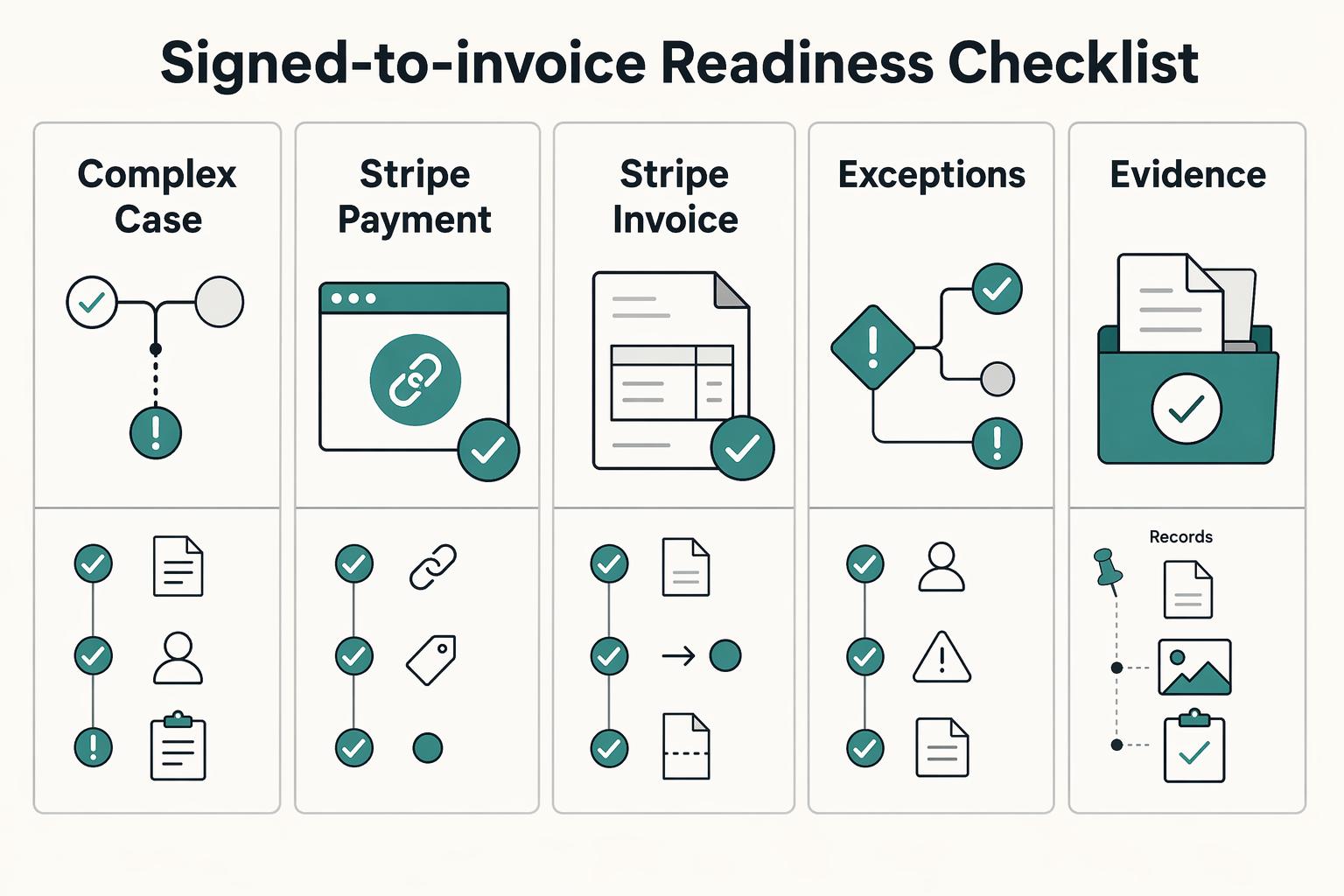
Signed-to-invoice readiness checklist#
Before sending anything payable, confirm readiness in this order:
| Checkpoint | What to confirm | Ready state |
|---|---|---|
| Record alignment | Client identity, billing email, amount, and current stage match across Kit and Stripe | Matched across Kit and Stripe |
| Stripe Payment Link | Open the exact link from the delivered email flow and confirm it is active and points to the correct offer | Active link to the correct offer |
| Stripe invoice | Do not treat draft as ready; finalization moves it to open and generates the payable URL and PDF | Invoice is open |
| Exception routing | Missing billing details, broken links, or unresolved policy text should route to manual review, not automation | Manual review before send |
| Customers choose what to pay | Confirm the documented default maximum of 10,000.00 USD fits your use case before relying on that flow | Maximum fits the use case |
Work through that table in order. For a Stripe Payment Link, open the exact link from the delivered email flow and confirm it is active and points to the correct offer. For a Stripe invoice, do not treat draft as ready; finalization moves it to open and generates the payable URL and PDF. Anything missing, including billing details, broken links, or compliance wording that has not passed qualified review, should route to manual review rather than automation.
Test this handoff in Stripe sandbox before go-live. If you use a "customers choose what to pay" Payment Link, confirm the documented default maximum of 10,000.00 USD fits your use case before relying on that flow.
If you are tightening the wider pipeline too, Build a Freelance Sales Funnel You Can Run in One Hour a Week is a useful companion. Related: A Guide to Calendly for Freelance Scheduling.
Audit weekly:
- contacts with more than one active stage tag
- subscribers still in follow-up after
won,lost, orpaused - invoice sends issued before Stripe invoice status became
open - broken, outdated, or deactivated payment links still referenced in live emails
Conclusion: You've Built More Than a Funnel - You've Built an Asset#
If your tests passed, you now have more than a booking funnel. You have three controls that cut avoidable waste: qualification before a slot is booked, expectation-setting before the call, and stage governance after the call. That is what turns a busy booking flow into an operational asset.
At the front end, the asset is your intake gate. Calendly required invitee questions must be answered before someone can book, and each event type supports up to 10 custom questions, so keep only the fields that actually drive scheduling or pre-qualification. Your verification step is practical: submit one minimal test booking and one complete booking, then confirm the right fields and Kit tags landed on the contact. An avoidable issue is collecting data that never affects routing, prep, or follow-up.
Before the call, your control is clarity. Whether you use the native Kit and Calendly app or Calendly reminder messaging, verify the reminder window from current platform settings instead of trusting memory. Also confirm the plan supports the sync you expect, because ongoing Kit sync requires a paid Calendly plan. If someone previously unsubscribed, do not sync them back in unless you have fresh consent.
After the call, your asset is stage discipline. Keep one current-stage tag, and remember Kit events only pull subscribers forward. On the money side, Stripe draft invoices are editable before finalization, but most details on finalized invoices are no longer changeable, so review before you send. For any tax or legal text, use wording only after qualified review instead of guessing. Before you call this finished, run this quick review:
- Field quality: every required question maps to a real decision, field, or branch
- Tag hygiene: one current-stage tag only
- Automation controls: confirm cancellation and reschedule paths handle reminders and follow-up as intended
- Invoice handoff readiness: client identity, amount, payment link, and draft invoice review are complete
If you want to tighten the scheduling side next, read A Guide to Calendly for Freelance Scheduling. If compliance wording or consent handling is your next blocker, get jurisdiction-specific advice before you automate sends. For a step-by-step walkthrough, see How to Integrate Calendly with Your Website.
Frequently Asked Questions
How should you connect Calendly to Kit first?
Go to Kit's native app area in Automate > Apps and follow the current Calendly setup prompts if available. Approve the requested permissions and test one real booking before you build follow-up. If the native setup captures the subscriber and trigger you need, stay there. If it does not pass a required booking signal after testing, use a connector fallback.
What should you check before you trust the sync?
Check permissions first, then confirm the booking trigger or tags are landing where your automation expects them. After that, verify whether your current plan supports the behavior you want. If a limit or feature is still unverified, document the current plan limitation from official platform records and stop the automation until you confirm it.
What emails should you send before a call?
Send a confirmation after booking and a 24-hour prep email, then stop the sequence if the meeting is canceled or rescheduled. That stop condition helps prevent stale reminders. If your calls use the same agenda, keep one sequence.
How should you tag someone after booking?
After a booking event, apply one current intent or stage tag only when there is no conflicting current-stage tag. Stop that path if a later-stage tag appears or the booking is canceled. If you need history, use notes or separate non-current tags instead of competing stage labels.
Should you branch by meeting type?
Branch only when the event type or intake field is reliable enough to trust without manual cleanup. If it is confirmed, send the matching sequence and stop it on rebook, cancellation, or stage change. If the difference between meeting types is small, keep one path and personalize the email copy instead.
Try a related tool
Researched and edited by the Gruv editorial team. Gruv builds cross-border billing, payouts, and finance-operations software for global businesses.
Sources
Includes 6 external sources outside the trusted-domain allowlist.
- docs.stripe.com/invoicing/integration/workflow-transitionstrusted
- support.stripe.com/questions/invoice-statestrusted
- calendly.com/scheduling/automated-communicationexternal
- developer.calendly.com/trigger-automations-with-other-apps-when-inv...external
- developers.kit.com/api-reference/subscribers/create-a-subscriberexternal
- developers.kit.com/api-reference/v3/tagsexternal
- help.calendly.com/hc/en-us/articles/14076808543511-How-to-add-...external
- help.calendly.com/hc/en-us/articles/4418606043927-How-to-creat...external
Educational content only. Not legal, tax, or financial advice.
Related Posts

The Best Email Marketing Platforms for Freelancers
Pick the platform you can still run on a busy Thursday, not the one that looks smartest in a comparison chart. For most freelancers, the decision is not about the longest feature list. It is about whether your email setup stays usable when client work piles up, your list grows, and you need to send without babysitting every step.

Calendly for Freelancers Who Want Reliable Booking-to-Payment Handoffs
Treat **calendly for freelancers** as your scheduling layer, not as full business control. The practical win is simple. You stop trading emails about times, protect your week with [real-time availability](https://calendly.com/blog/online-booking-system), and give clients one booking page that reflects the calendars you actually use. The limit matters just as much. Booking is only the front end of operations.
How to Deal with Jet Lag
**Jet lag can cut your decision quality right when your move demands your best judgment, so treat it as an operations problem, not just a sleep problem.**