
Quick Answer
Start with one webinar motion and buy only after a live workflow trial. For freelancers, that means testing registration, reminder delivery, join reliability on a second device, disconnect/rejoin behavior, recording recovery, replay delivery, and attendee export before paying. Compare candidates like Livestorm, Zoom Webinar, Demio, and GoTo Webinar only after that sequence is defined. If you sell access, keep invoice status in your payment system and use the webinar tool for access and attendance records.
You don't need "the best webinar software" - you need the safest operating choice for your freelance business#
Start with one rule: do not buy from rankings or feature pages alone. A safer choice is the platform that handles your main webinar job, fits the exact plan you can afford, and passes a proof test in your real setup.
- Pick one primary job first
Decide what this tool needs to do most often: lead generation, client training, paid workshops, or evergreen delivery. Webinar software is broad by design. One vendor describes it as software for communicating with large audiences through interactive events and on-demand video content. That is accurate, but not useful until you narrow the job. If your core use is lead capture, registration and follow-up matter more than fancy stage features. If it is client delivery, clean joining and dependable recordings matter more.
- Verify the plan, not just the product
Treat every must-have as plan-dependent until you confirm it on the pricing page, help docs, or in-app trial. Free plans and trials often restrict attendee capacity and event duration, so do not assume a test account reflects paid behavior. Common checks include capacity, recording and storage, automation, integrations, exports, and branding. Save screenshots of the exact plan page and the feature page you relied on. That gives you a record if the offer changes or if you need to justify the purchase later.
- Use outside sources as inputs, then trust your own test
Review sites help most with failure-mode discovery, not final judgment. For example, SoftwareSuggest says its listings reflect user recommendations, popularity, and client partnerships, and also notes that some product information is provided by vendors. Vendor roundup pages are useful for feature discovery, but they are still commercial pages. One webinar roundup from 2026 lists 19 platforms and also pushes sign-up and demo calls to action. Use a simple filter: check the ranking methodology, note the page's updated date when available, then run your own proof test before you commit. An update stamp like February 23, 2026 is a better freshness check than a generic "best tools" headline.
Connection problems are not theoretical. One cited survey result says 57% of respondents named connection issues as a top webinar concern. So your proof test should always include a second device, a drop-and-rejoin test, and a recording recovery check. If a vendor promotes browser-based access as lower friction, verify that claim in your environment instead of treating it as a guarantee.
| What to validate | How to validate it | Evidence to save |
|---|---|---|
| Join reliability | Register, join from a second device, leave, rejoin, and confirm host controls still work | Test recording, timestamped notes, screenshots of join flow |
| Recording and replay | Record a short session, end it, find the file, and send yourself the replay | Recording link, file location screenshot, replay email copy |
| Registration and reminders | Complete your own registration and wait for reminder emails | Confirmation email, reminder timing notes, registration page screenshot |
| Exports and integrations | Export attendee data and push a test contact to your CRM or list if you use one | Export file, field mapping notes, proof of contact handoff |
If you run webinars for two very different jobs, split tools only when the separation is real. Use one platform for lead generation if you need stronger marketing tools and handoff, and a different one for client delivery if frictionless attendance and recordings matter most. If those needs overlap, one tool is usually safer because it reduces the number of places things can fail.
Selection criteria + who this list is for (and not for)#
Use this list if you are choosing webinar software as an operator, not as a procurement team. It is built for solo or very small freelance workflows where you need a tool you can run yourself, test quickly, and trust in real delivery.
Fit vs not-fit checklist#
| If this sounds like you | This list is a strong fit | This list is not enough on its own |
|---|---|---|
| You run webinars directly | You are the presenter/operator (sometimes with one guest) and need a clean path from registration to replay | You need multi-layer procurement, security, or compliance approval before anyone can run a test event |
| Your webinar purpose is clear | You can name the next webinar job now: lead generation, client training, paid content, or pre-recorded delivery | You are still comparing tools before deciding what the webinar is for |
| You need practical ease-of-use | You want the simplest setup you can operate consistently | You can accept long implementation before value |
| You can test this week | You can run a real workflow test in your own browser, inbox, and device setup | You cannot run an end-to-end test before buying |
There is no universal winner. The right choice depends on your setup, and a poor fit can hurt both outcomes and trust.
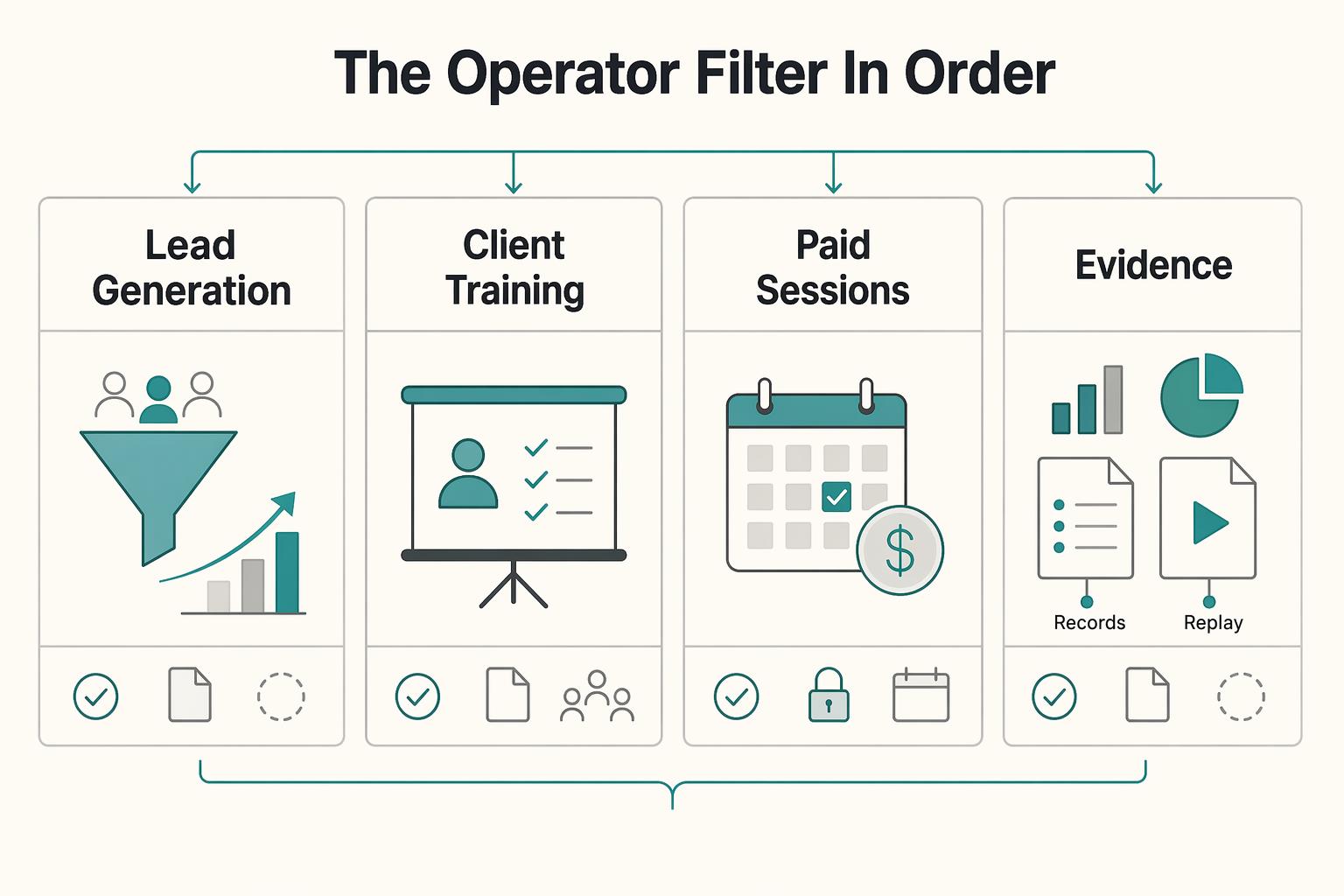
The operator filter (in order)#
| Order | Filter | What to verify |
|---|---|---|
| 1 | Setup friction | Pick the option you can get running fastest without extra support. |
| 2 | Workflow depth | Match features to your webinar purpose first, then add complexity only if you have time to implement it. |
| 3 | Ownership and exportability | Before committing, verify you can keep key outputs (like recordings and attendee data) in a usable format. |
| 4 | Reliability in real use | Test beyond the happy path: join, rejoin, and confirm the core flow still works. |
| 5 | Monetization-readiness | If you deliver paid content, test the full attendee experience before selling access. |
Run the filters in order, then use the webinar-job table below to narrow the field.
| Webinar job | Priority capabilities | Must-verify constraints | Default direction |
|---|---|---|---|
| Lead generation | Registration, reminders, follow-up, third-party integrations | Form flow, reminder delivery, attendee data handoff | Marketing-first webinar tools |
| Client training or delivery | Low-friction joining, stable live delivery, recording/replay | Join experience, replay handoff, operator workload | Delivery-first tools with simple access |
| Paid sessions | Access control, delivery flow, replay continuity | Purchase-to-access path, reminder path, replay delivery | Keep payment and webinar delivery as separate systems, then test both together |
| Pre-recorded/automated | Automation flow, replay experience, follow-up | What is truly automated vs manual, post-event data handling | Tools built around pre-recorded webinars |
If you run both lead-gen and client-delivery webinars, use one tool only when both workflows pass your tests. Split tools when marketing automation and low-friction client delivery pull in different directions.
Which webinar platform matches your use-case (live, lead gen, evergreen, or multi-stream)?#
Pick your platform by primary job, then eliminate tools that fail your risk checks. The wrong fit usually breaks in predictable places first: attendee caps (for example, 100 attendees), reminder flow gaps, registrant-data loss before CRM handoff, or unrecoverable recordings after a disconnect.
Classify your primary webinar motion first#
Answer these in order, and stop at the first clear yes:
| Question | If yes | Choose |
|---|---|---|
| Are you selling access? | Choose for paid workshops. | Paid workshops |
| Must sessions run without you live? | Choose for evergreen automation. | Evergreen automation |
| Is the goal pipeline or list growth? | Choose for lead generation. | Lead generation |
| Do you need multiple speakers or sessions? | Choose for multi-stream/event delivery. | Multi-stream/event delivery |
| Is this for existing clients, onboarding, or training? | Choose for client training. | Client training |
If you run more than one motion, prioritize the one that is hardest to recover when it fails.
| Scenario | Required capabilities | Common failure points | Proof-test action | Pass/fail rule |
|---|---|---|---|---|
| Lead generation | Registration, reminders, engagement tools (polls/Q&A/chat), CRM lead capture | Registrant data does not transfer cleanly, reminder timing is rigid, video quality drops mid-session | Build one real registration flow, register with a second email, join from a second device, export attendees, confirm CRM handoff | Pass only if registration, reminders, join flow, and export work without manual fixes |
| Paid workshops | Access control, reliable recording, replay delivery, attendance export | Payment succeeds but access fails, replay delivery breaks, support load spikes | Run one end-to-end test purchase and keep the receipt, access email, attendance log, and replay link | Fail if any buyer would need manual rescue for access or replay |
| Evergreen | Scheduled pre-recorded delivery, automated follow-up, replay path, exportability | "Automation" still needs manual work, follow-up logic is too limited, post-view export is weak | Publish one automated session, register yourself, attend once, miss once, compare what emails/replays fire | Pass only if attended and no-show paths behave differently in a usable way |
| Multi-stream | Session structure, speaker management, clear attendee routing, session-level reporting | Confusing room changes, weak speaker onboarding, reporting too muddy to act on | Build a two-session test event with one guest speaker and test session switching | Fail if you cannot explain attendee flow in one sentence |
| Client training | Low-friction joining, stable screen share, dependable recording, low operator load | Join friction, recording loss after reconnect, heavy hand-holding | Start recording, disconnect, rejoin, resume screen share, verify replay and attendance export | Pass only if a client could complete the session with near-zero support |
Use-case guidance with elimination rules#
For lead generation, keep only tools that prove a clean registration-to-CRM flow in your test. If reminder timing or data handoff breaks, eliminate it.
For paid workshops, treat access and replay reliability as the gate. Feature depth is secondary; if buyer delivery fails in testing, it is out.
For evergreen, verify what is truly automated versus manual. If a roundup shows pricing around $79/month, treat it as an unverified benchmark and check official vendor pricing before you budget.
For multi-stream, prioritize speaker and session operations over visual polish. If you cannot validate multi-session flow this week, delay the purchase decision.
For client training, prefer the simplest join experience that still gives you dependable recording and exportable attendance data.
After you select a platform, move to execution with How to Host a Webinar to Generate Freelance Leads. This section is selection logic only.
The comparison table you wish every roundup included (with plan constraints called out)#
Use this as a decision tool, not a feature-shopping sheet: pick the platform that fits your operating requirements, passes a live proof test, and adds the least manual cleanup to your repeat webinar workflow.
Plan details are often gated, roundup snapshots can age quickly, and some review lists disclose commission incentives. If your input data is weak, your decision quality will be weak too.
| Check area | What to record in your matrix | Pass if | Artifact to save |
|---|---|---|---|
| Use-case fit | Your primary job: lead generation, paid workshop, evergreen, multi-session, or client training | The platform handles that job without a workaround you already know you will avoid | One-sentence fit note + event setup screenshot |
| Plan constraints | Participation limit, lower-tier time limits, recording ownership/storage, automation, integrations, branding controls, exportability, replay handling. Mark each line plan-dependent, verify until confirmed | No workflow-critical item is locked behind a plan you are not buying | Plan page screenshot + plan name + date checked |
| Join experience | Browser-based join vs app requirement, guest speaker flow, host controls, screen sharing | A guest can join without technical delay, and screen sharing works cleanly | Test invite + guest notes + timestamped recording clip |
| Data sync | Registration capture, reminders, CRM/email/payment connections you rely on, attendee export | Registrant and attendee data land in the right place without manual patching | Confirmation email + reminder timestamps + CSV sample + destination record |
| Replay recovery | Recording continuity after disconnect, replay email flow, viewer access path | You can disconnect, rejoin, and still deliver a usable replay | Replay link + attendance log + failure note if anything breaks |
Reusable verification sequence#
Run every finalist through the same sequence so your comparison stays clean:
| Step | Pass/fail outcome | Artifact |
|---|---|---|
| Register like a real attendee (second email) and confirm join path | Pass if the registration and join flow are clear for your audience | Registration page screenshot + confirmation email |
| Run a live room test (second device + guest + screen share + host controls) | Pass if the core live flow works without troubleshooting detours | Guest test notes + short recording clip |
| Test duration risk and recovery (including disconnect/rejoin while recording) | Fail if plan limits or reconnect behavior break delivery or replay | Timestamped failure/success log + replay proof |
| Validate data trail (export + integrations you use) | Pass if exports and handoffs are usable without cleanup scripts or manual fixes | CSV export + integration destination proof |
If two finalists look close, choose the one with the cleanest evidence pack and the lowest manual overhead. That rule is stronger than chasing the loudest "best" claim.
Which webinar platform is easiest to start with (without breaking your workflow)?#
The easiest platform is the one that lets you complete your first full webinar loop with minimal surprises: registration, join, host control, recording, replay, and follow-up. If that loop fails, extra features do not help. A weak fit can cost you leads, credibility, and troubleshooting time during live events.
Use a strict definition of easy: reliable one-to-many delivery with registration and tracking, not the prettiest interface.
1. Run a browser-first pass/fail check#
Start browser-first to reduce room-entry friction, but verify each checkpoint before you trust it:
- Attendee friction: pass if a test attendee can register and join without unexpected downloads, permission loops, or confusing entry steps.
- Host control discoverability: pass if you can quickly find mute/remove, Q&A or chat, screen share, and recording controls.
- Guest readiness: pass if one invited speaker can join, get the right role, and share screen without rescue work from you.
- Room-entry consistency: pass if early, on-time, and late attendees each get a predictable join path.
Browser convenience can still trade off recording or repurposing options, so test the exact parts you rely on after the live session.
2. Prefer good defaults over customization#
Treat vendor positioning as a hypothesis. Validate it in your own workflow.
| Workflow step | Required capability | Verification action | If it breaks |
|---|---|---|---|
| Registration | Capture attendee details before the event | Register with a second email and save the confirmation | Lead capture gaps and manual list cleanup |
| Join flow | Consistent, low-friction room entry | Join from laptop and phone, early and late | Attendee drop-off before the session starts |
| Live delivery | Clear host controls and guest management | Invite one guest, switch roles, screen share, start recording | Live delivery errors in front of attendees |
| Replay continuity | Reliable recording and on-demand playback | Disconnect, rejoin, and confirm replay access | Weak replay follow-up and lost content value |
| CRM handoff | Clean transfer of registrant and attendee data | Export CSV or test CRM/email integration | Manual cleanup debt and broken follow-up segmentation |
3. Choose by evidence, not impressions#
Save proof from each finalist: registration confirmation, reminder trail, short recording clip, replay link, and one attendee export sample. Verify the exact plan constraints before purchase; for example, a cap like 100 attendees can block an event, and paid plans in comparisons often start around $79 per month.
| Artifact to save | Supports checking |
|---|---|
| Registration confirmation | Registration |
| Reminder trail | Follow-up |
| Short recording clip | Recording |
| Replay link | Replay |
| Attendee export sample | Tracking |
If two options feel equally easy, pick the one that works with minimal customization and still passes your failure drill and export checks. That is a stronger decision rule than chasing generic "best" claims.
Can webinar software help you monetize webinars without creating a tax/accounting mess?#
Yes, if you split responsibilities from the start. Let your webinar platform handle access, attendance, recording, and replay delivery, and let your payment system be the source of truth for invoice records and payment status.
Most monetization problems are handoff problems: payment is recorded in one place, access is managed in another, and support has no single trail when they do not line up.
| System owner | Required outputs | Common failure point | Verify before selling |
|---|---|---|---|
| Payment system | Invoice record, payment status, timestamps | You cannot quickly confirm what was paid and when | Run one test purchase and store the invoice record |
| Webinar platform | Registrant email, attendee status, recording/replay link | Paid attendee is not matched to the right session or replay | Run one test registration and confirm export fields match your order data |
| Your reconciliation sheet or database | invoice ID ↔ attendee email ↔ session | Mismatches across duplicate emails, transfers, or late registrations | Trace one order end-to-end: checkout, room access, replay |
Before launch, use a short checklist you can repeat every time:
- Capture purchase terms at checkout and save what the buyer agreed to.
- Maintain one order map:
invoice ID ↔ attendee email ↔ session. - Reconcile on a fixed cadence, not only when support issues appear.
- Complete your pre-event checklist and tech check with panelists 30-60 minutes prior to event start.
- Do not start the webinar until you are ready to go live with attendees.
If a paid-access or replay dispute comes in, use this support path:
- Pull the invoice record and confirm payment status.
- Match the buyer email to your webinar export.
- Confirm attendance/replay eligibility from your records.
- Resend access or reply with the record trail you found.
Finally, treat credential hygiene as monetization risk control: protect the accounts that touch money and attendee data, especially if others help run events. The Best Password Managers for Freelancers and Teams is a practical next step.
The best webinar software for freelancers (shortlist, with best-for + pros/cons + use-case)#
Pick by your primary operating job, not by a generic "best" label. Start with the use-case you run most, shortlist one platform per scenario, and only approve a purchase after plan-level workflow checks.
| Platform | Best for | Pros | Tradeoffs | Workflow fit check |
|---|---|---|---|---|
| Livestorm | Live lead generation | Strong candidate to test first when registration flow, reminders, and lead capture are central to your webinar process. | Free plans or trials can include attendee or duration limits, and connection issues are a common webinar failure mode. | Verify before you buy: the current attendee limit on your plan; recording download/export; branding controls; and whether CRM, calendar, email automation, and optional SSO handoff are native or third-party. |
| Zoom Webinar | Client training | Practical first candidate when your audience already joins Zoom easily and your priority is consistent attendance and clean follow-up records. | Familiar join flow does not prove your plan includes the branding, exports, or automation your workflow needs. | Verify before you buy: the current attendee limit on your plan; recording/export controls and attendee fields; branding controls; and CRM, calendar, email automation, and optional SSO handoff. |
| Demio | Evergreen/on-demand delivery | Useful candidate when automated or on-demand delivery is part of your core workflow, not a side feature. | Evergreen delivery breaks down when replay access, recording ownership, or reporting handoff is unclear. | Verify before you buy: the current attendee limit on your plan; recording download/export; branding controls; and CRM, calendar, email automation, and optional SSO handoff. |
| Your shortlisted finalist for repeated runs | Multi-session delivery | Keeps operations stable when the same workflow passes repeatedly across registration, live delivery, replay, and handoff. | Multi-session work fails when small plan constraints compound across events. | Re-verify the same four controls above for recurring use: attendee limits, recording/export control, branding, and integration handoff ownership. |
Roundups can help you discover options, but they are not purchase evidence. Some include affiliate disclosures, and some widely shared lists are years old, so treat them as a starting map only.
Use this decision sequence on every finalist:
- Run registration end to end and save the confirmation and reminder outputs.
- Host a short live test with a guest and force one realistic stress condition (fresh browser, mobile join, or weak connection).
- Export the post-event fields you actually use and match them to your CRM or email workflow.
- Confirm who owns each integration handoff (CRM, calendar, email automation, optional SSO).
- Approve only the option that passes all checks with the least operational friction.
The freelancer webinar runbook: pre-flight checks, failure handling, and post-event follow-up (copy/paste)#
Run this checklist before every event, and treat platform claims as unverified until your own test passes.
- Pre-flight: pass/fail checklist
| Check | Pass when | Fail when |
|---|---|---|
| Attendee journey | Registration submits, confirmation arrives, reminder link opens cleanly on desktop and mobile, and a guest joins from a fresh browser | Registration fails, emails do not arrive, links break, or join fails |
| Message and link rendering | Confirmation and reminder messages render clearly with working links | Formatting breaks, links misroute, or key details are missing |
| Data handoff | Registrant and attendance outputs land in your intended reporting/workflow location after test | Fields map incorrectly, data is missing, or export is unusable |
| Live roles and controls | Presenter, attendee comms owner, and live controls owner are assigned; chat/Q&A/polls are ready if supported | Ownership is unclear or controls are not ready |
| Recording and file ownership | Recording location, access, and export ownership are confirmed before go-live | Recording status, ownership, or access is unclear |
- Incident mini-playbook
Trigger this when attendees cannot join, the host cannot start cleanly, core live controls fail, or recording status is unclear. Assign one owner to troubleshoot and one owner to attendee updates. Send attendees a filled-in status note that names the issue, the channel to watch, and the exact next-update time. Define your backup delivery decision point before the event: recover live, reschedule, or send replay later only if a usable recording exists. After the event, log the trigger, decision, owner, and outcome.
- Save the right artifacts
| What to save | Why it matters | System of record | Retention note |
|---|---|---|---|
| Registration page screenshot or PDF + confirmation/reminder emails | Proof of what attendees saw and received | Client or event folder | Current retention policy pending contract or client policy verification |
| Registrant, attendee, and interaction export (if available) | Follow-up, reporting, and handoff checks | CRM or webinar reporting folder | Current retention policy pending contract or client policy verification |
| Q&A, chat, polls, and support notes | Issue review, objections tracking, and reporting context | Notes doc linked to the event | Current retention policy pending contract or client policy verification |
| Recording link or file location + ownership note | Replay handling and access control | Shared delivery folder | Current retention policy pending contract or client policy verification |
- Same-day follow-up sequence
Handle replay delivery and support replies first while context is fresh. Then update CRM or status labels using the signals you actually captured (for example, attendance or interaction signals if your platform outputs them). Finish with a short what-changed log: what failed, what you changed, and what changed in the runbook so the next webinar is easier.
For shared presenter or admin access, keep access-control discipline tight with one password process: The Best Password Managers for Freelancers and Teams.
Conclusion: pick the scenario first, then buy the tool - and run the same system every time#
Keep the decision loop boring: pick the scenario, shortlist two tools, verify the plan, then run the same proof every time. That is how you stop chasing a generic ranking answer and start choosing software that fits your real job.
| Scenario | Best fit | Operational tradeoff | Decision trigger |
|---|---|---|---|
| Live | Real-time webinar tool for launches, guest sessions, client training, and Q&A | More prep pressure, more room for off days, and repeated sessions eat calendar time | Choose live when the value depends on interaction, timing, or flexible delivery |
| Pre-recorded | Automated webinar software for stable sessions delivered on-demand or on a recurring schedule | Less flexibility in the moment, and you need to keep content current | Choose automation when you repeat the same session often and live delivery is wasting time |
| Hybrid | Mixed setup for businesses that run both live events and evergreen sessions | More complexity, and one tool may not cover both motions cleanly on your plan | Choose hybrid only if you truly have both jobs and can test each one separately |
The key judgment is simple: if you run one-off lead generation events and also repeat the same onboarding or demo session, treat those as two motions. Some teams use a medley of tools for exactly that reason. Do not force one platform to do both until you have proved the registration flow and analytics work for each mode.
Before you commit, run this checklist on both finalists:
- Build the registration or access flow with default settings and confirm lead capture is actually included on your plan.
- If integrations matter for your workflow, test the handoff and check that attendee data lands where you need it.
- Run a private session from a clean browser and note any join or access failures.
- Review registrant or attendee outputs and confirm performance tracking or audience analytics are usable.
Commit only after both finalists pass those checks cleanly.
Frequently Asked Questions
What is the best webinar software for freelancers?
Define the job first: lead generation, client training, paid workshops, on-demand delivery, or support for a bigger event. Then write down the few features you actually need, such as registration, polls, Q&A, recording, analytics, and CRM integration, and cut anything you will not use. Build a shortlist around that use case and test those tools side by side instead of chasing a generic “best webinar software” label.
Which webinar platform is easiest to start with?
Pick the easiest option when your main goal is to get a webinar live quickly without extra setup debt. Verify that your core workflow works end to end: registration, joining experience, streaming quality, recording, analytics, and CRM handoff. If two tools look similar, choose the simpler one, because simple tools often win when you need speed and reliability.
Can webinar software help me monetize webinars, paid workshops, ticketing, and replays?
It can support webinar delivery, including live and on-demand formats, but payment and access workflows still need to be validated in your setup. Before committing, test how paid access, replay delivery, and attendee follow-up actually work against your goals.
How do I choose between Demio, Zoom Webinar, Livestorm, and GoTo Webinar?
Compare tools only after you know whether you need a standalone webinar product or something that must also sit inside a larger event setup. Check workflow fit first, then streaming quality, analytics, CRM handoff, and the live or on-demand access flow you will actually use after the session. Also remember that roundups are time-sensitive snapshots, not permanent truth. Take your top two choices, run the same test event in both, and keep the one that creates fewer handoff problems in your real setup.
What features actually matter for lead generation webinars vs client training?
The answer changes with the job. For lead generation, focus on easy registration, clear calls to action, analytics, and whether attendee intent can move cleanly into your CRM or follow-up tool. For client training, focus on reliable joining, recording, replay delivery, and low-friction support. In both cases, make analytics and CRM handoff non-negotiable so follow-up does not stall.
Do I need automated webinars, and when is eWebinar a better fit than live tools?
Consider automation when on-demand delivery matches your offer. If your content changes often or depends on live Q&A, stay live. If the session is stable and repeatable, test an automated option against your goals before adding more live slots.
What should I verify in pricing plans, attendee caps, recording and storage limits, and integrations before committing?
Do this before you pay, because weak budget and feature checks can push you into overspending or paying for features you do not need. Verify the constraints tied to your workflow, especially attendee volume, recording and replay handling, analytics depth, and CRM integration. Write those checks into your buying note and fail any tool that cannot prove them in testing. If you need the execution side for prospecting webinars, use How to Host a Webinar to Generate Freelance Leads.
Try a related tool
Researched and edited by the Gruv editorial team. Gruv builds cross-border billing, payouts, and finance-operations software for global businesses.
Sources
Includes 6 external sources outside the trusted-domain allowlist.
- luc.edu/its/dms/webinars/preparingforyourzoomwebinar...trusted
- niehs.nih.gov/research/programs/ehlc/shared-languagetrusted
- courierpress.com/press-release/story/84329/silverback-webinar...external
- easywebinar.com/the-best-webinar-platforms-for-lead-generati...external
- elegantthemes.com/blog/resources/the-15-best-webinar-software-...external
- es.ewebinar.com/blog/demo-automation-software-for-small-busi...external
- eventcube.io/blog/best-webinar-platformsexternal
- ewebinar.com/blog/must-have-webinar-featuresexternal
Educational content only. Not legal, tax, or financial advice.
Related Posts

The Best Password Managers for Freelancers and Teams
A client asks for an urgent file, you open their portal, and the login fails. Ten minutes later your invoicing app wants a reset too. That is why your password setup is a business risk, not just a nuisance. Weak credential habits can turn one mistake into wider account access problems, then into delivery delays and cleanup work.

How to Host a Webinar to Generate Freelance Leads
**Treat your webinar as a repeatable pipeline system (capture, qualify, route, follow up), not a one-off event you hope generates leads.** If you run a business-of-one, you're the CEO. Your webinar should behave like an asset you can operate, not a performance you have to reinvent.
How to Ship Your Belongings Internationally on a Budget
There is no universal cheapest option. The lower-cost move usually comes from matching the decision to your own assumptions, then rejecting anything that fails a basic value test before you ask for final quotes.