
Quick Answer
Start with a pass/fail test, then choose among NordVPN, ExpressVPN, ProtonVPN, Surfshark, or Mullvad only if your core logins work twice on both laptop and phone. Run the same client-portal and payment task on shared Wi-Fi and a backup connection, and log reconnect delays or blocked routes. Remove any option that repeats a critical failure two times, then keep one primary setup with a documented fallback path.
Start Here and Pick a VPN Like an Operator#
Treat this as a pre-trip decision, not a travel convenience. Pick one setup you trust, configure it before departure, and run the same short checklist whenever you change locations. A VPN creates an encrypted tunnel, which matters when sensitive account activity happens on shared networks.
The practical move is to finish setup while you still control the environment. Test from home and from a second connection, and make sure you can recover quickly if the first path fails. If setup only works in one place, you are carrying hidden risk into travel days when you have less time and fewer good fallback options.
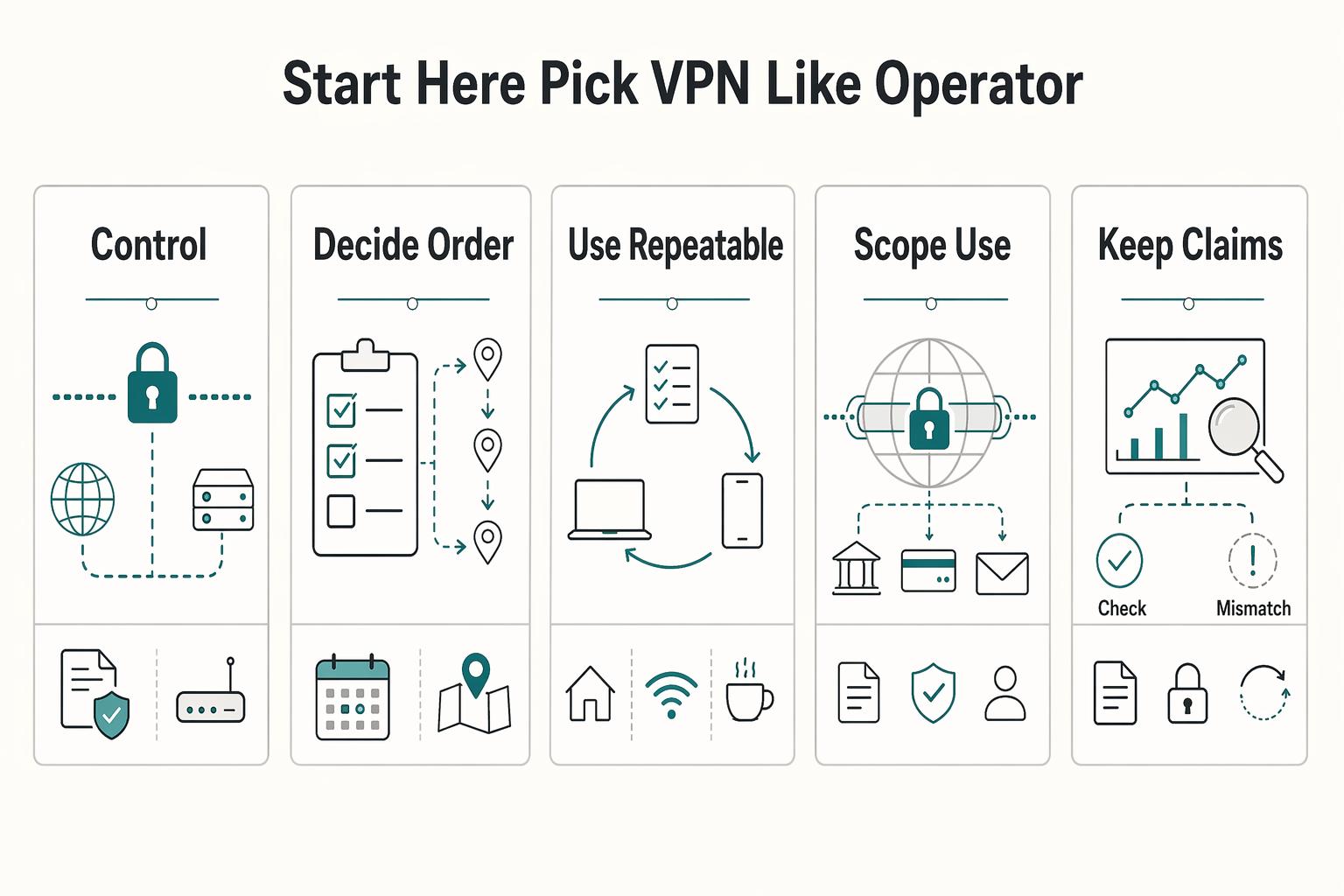
- Control first: Use a VPN as baseline protection, especially on shared networks where your traffic has less protection without it.
- Decide in order: Set criteria first, choose a provider second, then finish setup and testing before travel.
- Use a repeatable checklist: Confirm key work tasks on your normal connection and a backup path so network changes cause fewer surprises.
- Scope for this guide: Use this guide as a practical shortlist for comparison, not a verified ranking.
- Keep claims in perspective: Some 2025 roundups are explicitly narrower, including top-3 lists, and a personal VPN setup is also a valid option to evaluate.
Who This List Helps and How the Picks Are Scored#
This list is for independent professionals who handle client logins and payment tasks while moving between airports, coworking spaces, and hotels. The goal is to choose one provider you can trust under travel pressure, not chase a headline winner.
A VPN matters here for two practical reasons. It can reduce risk on open networks, and it can help with location-sensitive access when services are region-locked. If your only goal is the lowest price and you do not plan to validate anything, this method is not a fit.
Treat the scoring approach as a filter for bad fits, not a hunt for perfection. You are looking for the option that keeps your client work stable with the fewest surprises, not the option with the loudest marketing claims.
- Who this helps most: People who need stable access to client tools and payment tasks while changing locations.
- Who should skip it: Pure price-first buyers who will not validate setup and reliability on their actual devices. Free tiers can also carry hard limits, including data caps.
- How picks are scored: Each option is assessed on practical travel use, including reducing risk on public Wi-Fi, handling location-sensitive access to region-locked financial services, and staying usable where local blocking can affect online services.
- How to read confidence: Treat scores as directional, and note that a key comparison source in this space shows an update date of July 20, 2023.
and apply the same pass or fail checks before you commit to a full-term plan.
Quick Comparison Table You Can Scan in One Minute#
Provider-level ranking is not supported by the current evidence, so every provider-specific cell is marked Unknown on purpose. Inputs for this section are an acronym glossary, a college course listing, and conference proceedings from 2020, not VPN test records.
Use this table as a gate. If a cell is unknown, verify that point on your own devices before deciding. Then replace unknowns with your own evidence:
| Provider | Best for | Strengths | Tradeoffs | Setup friction | Restrictive-country confidence | Who should skip this option |
|---|---|---|---|---|---|---|
| NordVPN | Unknown | Unknown | Unknown | Unknown | Unknown | Unknown |
| ExpressVPN | Unknown | Unknown | Unknown | Unknown | Unknown | Unknown |
| ProtonVPN | Unknown | Unknown | Unknown | Unknown | Unknown | Unknown |
| Surfshark | Unknown | Unknown | Unknown | Unknown | Unknown | Unknown |
| Mullvad | Unknown | Unknown | Unknown | Unknown | Unknown | Unknown |
The table can still be useful even with unknown cells. It keeps your comparison criteria stable while you test, so your final choice is tied to observed behavior, not memory.
- Install each option on laptop and phone, then confirm sign-in works on both.
- On a shared connection, complete one client login and one payment-related login while connected.
- Switch to a backup connection and repeat the same two actions.
- Record pass or fail notes for policy clarity, encryption claims, reconnect behavior, and blocked routes.
If the same critical check fails twice, remove that option and move on.
NordVPN for Broad Coverage With Low Day-to-Day Friction#
Start with NordVPN if you want a low-friction candidate. The evidence is still directional, not definitive. A February 6, 2026 comparison of five popular VPNs describes it as strong on security and reliable across regions. The same comparison notes a tradeoff of higher cost on 1-year plans.
Treat it as a practical-fit candidate, not a guaranteed winner. The best choice still depends on your needs, work style, and travel routes.
- Best fit: People who want low setup overhead and steady day-to-day use while traveling.
- What to score: Security and privacy basics, reliability across countries, reliability across devices, and track record and trust.
- Main tradeoff: Potential budget pressure on 1-year plans.
- Confidence: A separate October 31, 2025 editorial piece also presents NordVPN as simple to set up and strong on speed consistency, but that is editorial language, not independent benchmark proof.
Do not rely on top-pick framing alone. Keep community chatter from Reddit or NomadFlag separate from your decision criteria.
A useful way to score this option is to focus on friction points that hurt real work days. Look for repeated reauthentication, route-specific blocks, or reconnect delays that force you to retry tasks. Those patterns can cause missed deadlines when you are switching locations.
Run this check before committing, and log results in one place so you can compare it cleanly with the next provider:
- Install and sign in on laptop and phone.
- On a shared hotspot, complete one client login and one payment-related login.
- Repeat the same two actions on a backup connection.
- Record pass or fail notes for reconnect behavior and any route-specific blocks.
If it passes critical checks twice and the 1-year cost fits your budget, keep it in your lead group. If not, move to the next option.
ExpressVPN for Fast Setup and Restrictive-Country Reliability#
Prioritize ExpressVPN early if fast setup and restrictive-network access are your top constraints, but treat the evidence as directional. The product travel pages state that it encrypts your connection, masks your IP address, and can help when firewalls or network restrictions limit access.
The key question is not the feature list. It is whether your core work apps keep working across primary and backup connections.
- Best fit: Deadline-driven travelers who need to get connected quickly across changing locations.
- What to verify: Reconnect behavior, access to core work apps, and login reliability on primary and backup connections.
- Operational signals: ExpressVPN markets servers in 105 countries, up to 14 devices on one account, and a 30-day money-back window for first-time users.
- External signal with caveat: ExpressVPN highlights a 2026 CNET number-one mention and also discloses affiliate compensation to review sites, so treat this as visibility, not proof.
The main tradeoff is marketing claims versus measurable gains on your exact routes. A first-person travel review can add context, but it is still personal experience, not a controlled benchmark.
If restrictive-country reliability is central for you, test this option on the same task sequence you depend on for client delivery. Do not stop at app connection status. Verify that your core portals open, authentication flows complete, and your backup connection can carry the same sequence without extra troubleshooting.
Validate it with a two-location check, then compare those notes against your second-best option:
- Install on laptop and phone, then force reconnects by toggling Wi-Fi twice per device.
- Complete one client-portal login and one payment-related login on an open hotspot.
- Repeat both actions on a backup connection in a second location.
- Record failed steps, reconnect delays, and blocked services.
If it passes twice in different locations, keep it in your final shortlist. If critical failures repeat, move on.
ProtonVPN for Security-First Buyers Who Want Clearer Privacy Posture#
Choose ProtonVPN when privacy posture, unlimited free data, and usability and support matter more to you than streaming speed. In the 2026 comparison used for this section, ProtonVPN and Windscribe are described as on par in security, privacy, and torrenting. Make the final decision from daily-use results, not broad claims.
| Attribute | ProtonVPN | Windscribe |
|---|---|---|
| Free data | Unlimited free data | 15GB monthly cap |
| Security, privacy, torrenting | On par in the 2026 comparison used for this section | On par in the 2026 comparison used for this section |
| Speed and streaming | Windscribe is framed as stronger here | Stronger for speed and streaming |
| Price | $2.99/month (save 70%) | $5.75/month (save 36%) |
| Score shown | 4.15 | 4.15 |
| Source caveat | Publisher discloses affiliate commissions while stating earnings do not affect reviews | Publisher discloses affiliate commissions while stating earnings do not affect reviews |
- Key differentiator: ProtonVPN is listed with unlimited free data, while Windscribe is listed with a 15GB monthly cap.
- Main tradeoff: The same write-up frames Windscribe as stronger for speed and streaming, while describing ProtonVPN as more user-friendly with better customer support.
- Price snapshot from that table: ProtonVPN at
$2.99/month (save 70%)and Windscribe at$5.75/month (save 36%). - Evidence caveat: Both are shown with a
4.15score there, and the publisher discloses affiliate commissions while stating earnings do not affect reviews.
This choice gets clearer when you score reliability and support response quality together. Privacy posture only helps if your day-to-day access remains stable, especially for logins tied to client communication or payments. If repeated reconnect issues appear, a lower-friction option may protect your work better in practice.
Use this pass or fail test before committing, then compare your notes side by side:
- Install ProtonVPN on your laptop and phone, then run it through normal work traffic.
- On an untrusted connection, complete one sensitive task, such as a client-portal login, and note reliability.
- Track reconnect delays, failed authentications, and support response quality.
- Compare those notes directly against another VPN you are testing.
Recommendation: choose ProtonVPN when privacy posture, unlimited free data, and usability and support are your top priorities and you can accept potential speed tradeoffs. Pair it with strict credential hygiene and a password manager setup so controls stay consistent.
Surfshark for Multi-Device Value When You Work Across a Full Stack#
Choose Surfshark when budget control and broad device coverage matter most. Its clearest case is reducing subscription sprawl across laptop, phone, and secondary hardware. One account is described as supporting unlimited devices, and Quick Connect is positioned as a one-tap way to connect.
The tradeoff is straightforward. A comparison published on October 31, 2025 frames Surfshark as stronger on affordability and device count, while NordVPN is framed as stronger on speed consistency. Convenience may be high, but consistency on variable travel networks still needs proof from your own tests.
The same material also supports Surfshark as a practical multi-device shortlist option. It is described as including built-in ad and malware blocking, plus MultiHop and rotating IP options as extra privacy features on tighter networks. A separate privacy roundup also labels it an affordable privacy pick. That supports a value-first position, not a guarantee of top performance on every network.
For this provider, a fair test uses true concurrent use. One-device checks can miss issues that appear only when several devices are active at once.
Pressure-test it with a real multi-device week, and keep notes by device so failures do not blur together:
- Connect at least four active devices on one account and run normal work traffic for five business days.
- On two different shared network environments, run one video call, one large file upload, and one admin login in the same hour.
- Track reconnect time, call drops, and upload retries per device, not just whether the app reports connected.
- Repeat the same tasks with your best alternative so the final decision comes from observed failures, not feature lists.
Recommendation: choose Surfshark when multi-device coverage and budget control are your main constraints, and keep it only if it passes concurrent-use testing on shared networks. If stable live calls are mission-critical, pick the provider that wins your side-by-side consistency test. Pair that with reliable hardware habits from your portable office setup so network and device choices support each other.
Mullvad for Minimalist Privacy and Fewer Marketing Claims#
Choose Mullvad when you want a privacy-first setup and can accept practical tradeoffs. One review says it has been on the market since 2009 and is still 100 percent founder-owned. It also says Mullvad removed subscription sign-up in 2022 to reduce stored identifying details.
The privacy case is concrete but limited. The same source set describes Mullvad as highly privacy-focused and notes legal context that Sweden does not require VPN providers to store logs. That is not a zero-risk guarantee, but it is a factor you can evaluate directly.
The main tradeoff is performance fit. A separate review warns that speeds may fluctuate unpredictably and frames Mullvad as a weaker fit for streaming-heavy use or broad server-scale expectations. If your week depends on stable calls and uploads, test carefully before switching.
This choice often comes down to your tolerance for those tradeoffs. If your priority is data minimization and clear privacy posture, it can be a strong candidate. If your priority is smooth performance under heavy travel variability, your test logs should carry more weight than preference.
Use this check before replacing your current provider, and keep timestamps so patterns are easier to verify:
- Run Mullvad on laptop and phone for five business days, including at least two shared-network environments.
- Each day, complete one sensitive action, such as a contract upload or finance-portal login, and one live call.
- Track reconnect delays, failed logins, and call drops with timestamps.
- Compare those results against your current provider notes.
A VPN can reduce exposure on open networks, but it is not complete protection on its own. Keep your existing security habits in place and judge Mullvad on measured reliability in your real work.
Recommendation: choose Mullvad if privacy focus and data-minimization choices matter more than consistently smooth performance or streaming fit. Keep it only if test logs show acceptable day-to-day stability.
Commercial VPN or Personal VPN Setup for Your Situation#
Choose between a commercial VPN and a personal setup based on trust, scope, and the operational load you can handle while traveling.
- Decision rule: Start with a commercial provider when you prefer relying on a third-party VPN service you trust.
- Decision rule: Choose a personal setup only when you are prepared to run and fix it yourself across changing networks.
- Core tradeoff: Control versus operational burden, not free versus paid.
Trust is the first filter either way. With any VPN service, a large share of your traffic goes through one provider, so trust matters as much as features. Rankings also conflict: one list recommends Surfshark, NordVPN, and Windscribe, while another publishes a top-five list and places NordVPN first. Treat that as a reason to test your own tasks, not copy a leaderboard.
Keep the technical layer simple. Commercial apps and personal setups commonly use the same protocol families, including IKEv2, WireGuard, and OpenVPN. Protocol labels alone are usually not enough to choose between options.
Confirm scope before deciding. Consumer VPN brands are not designed for directly linking a home PC to an office network. If office-network access is your core need, treat that as a separate architecture choice.
If you are comparing the two paths, make the maintenance work explicit before deciding. Write down who handles uptime, patching, and troubleshooting in each option, then choose the responsibility split you can support during travel.
Use this checkpoint list before committing to either path, and keep recovery steps short enough to execute under pressure:
- Login stability: Test critical client and finance logins on shared Wi-Fi and on a backup connection. Keep the option with fewer failed or interrupted sign-ins.
- App behavior on open networks: Check reconnect behavior after network changes, since open connections can expose traffic to interception attempts.
- Failure recovery steps: Simulate a failure and confirm you can restore a working connection quickly without fragile, hard-to-remember steps.
Recommendation: pick the option that fits your trust requirements and operational capacity, then test it on the networks and workflows you rely on.
Pre-Departure Setup Checklist That Prevents Most Travel Failures#
You can avoid many travel VPN problems if you test before departure. Run this checklist to reduce connection surprises on open networks and in destinations with restricted access.
| Step | Action | What to confirm |
|---|---|---|
| 1 | Install and sign in on every device you will travel with | You can open the app and connect on both laptop and phone |
| 2 | Enable core protections before testing | Turn on automatic connection and blocking traffic if the connection drops, if the VPN supports them |
| 3 | Test in real network conditions | Check behavior on airport, hotel, or cafe networks |
| 4 | Force reconnect events and run real tasks | Switch networks, sleep and wake devices, reopen the app, then run a meeting and a file upload |
| 5 | Document fallbacks and your evidence pack | Record the provider you chose, why you chose it, where you tested, known failure modes, and your backup connection method |
- Install and sign in on every device you will travel with. Set up laptop and phone before departure, then confirm you can open the app and connect on both.
- Enable core protections before testing. If your VPN supports them, turn on protections for untrusted networks, such as automatic connection and blocking traffic if the connection drops.
- Test in real network conditions. Check behavior on different environments you are likely to use, such as airport, hotel, or cafe networks, since these are often open and can be exposed to nearby sniffing attempts.
- Force reconnect events and run real tasks. Switch networks, sleep and wake devices, and reopen the app to confirm reconnect behavior, then run normal work actions you rely on, such as a meeting and a file upload.
- Document fallbacks and your evidence pack. Record the provider you chose, why you chose it, where you tested, known failure modes, and your backup connection method so decisions are not made under pressure.
Add one destination-specific check before each trip. Some locations can block major websites and messaging apps. A firsthand post dated Jan 20, 2026 about VPN use in mainland China reports mixed online opinions and variable in-country behavior. Treat route testing as part of setup, not an afterthought.
The documentation step is what keeps this process useful over time. Short notes are enough if they are concrete: what passed, what failed, what you changed, and what to do if the same failure appears again. Keep one page of reusable notes with your device list, logins, protection toggles, reconnect test steps, fallback trigger, and backup path.
Red Flags and Failure Modes Most Lists Skip#
Selection and planning gaps can still create VPN trouble even when an app installs cleanly. Use ranking pages and marketing copy to build a shortlist, then verify each option against your route and real work tasks before departure.
| Issue | Why it matters | What to do |
|---|---|---|
| Rankings without test context | Fastest or best labels are weak signals when route, device, and destination are missing | Keep a short test log of where and how you tested |
| Popularity treated as proof | Download counts, review totals, and star ratings do not prove reliability for your itinerary | Promote a provider only after your own connection and reconnect checks pass |
| Single-path planning on restrictive routes | A setup that works in the US or Europe may fail where stronger controls and DPI can disrupt standard connections | Define a backup path before departure with a clear switch trigger |
| Install-only confidence | A polished app listing or strong marketing claim does not prove performance on travel-style networks | Test before departure and confirm your normal work tasks still run reliably |
| Privacy language reviewed without usability proof | No-logs language and audit signals do not prove reliable access on your route | Review privacy posture and practical usability together, and document known failure modes with your fallback path |
- Red flag: rankings without test context. Labels like fastest or best are weak signals when route, device, and destination are missing. Performance, privacy posture, and access outcomes vary by context, so keep a short test log of where and how you tested.
- Red flag: popularity treated as proof. Download counts, review totals, and star ratings can help shortlist options, but they do not prove reliability for your itinerary. Promote a provider only after your own connection and reconnect checks pass.
- Failure mode: single-path planning on restrictive routes. A setup that works in the US or Europe may fail in countries with stronger controls, where traffic detection methods such as DPI can disrupt standard connections and stealth behavior may be needed. Define a backup path before departure with a clear switch trigger.
- Failure mode: install-only confidence. A polished app listing or strong marketing claim does not prove performance on travel-style networks. Test before departure and confirm your normal work tasks still run reliably.
- Risk control: privacy language reviewed without usability proof. No-logs language and audit signals matter, but policy language alone does not prove reliable access on your route. Review privacy posture and practical usability together, and document known failure modes with your fallback path.
Another common issue is treating soft failures as acceptable because tasks eventually complete. Repeated retries, slow reconnects, and intermittent portal access can still derail a travel day. If those patterns appear during testing, count them as decision signals, not minor annoyances.
If you cannot show successful pre-trip tests and a written backup path, do not rely on that provider for client-critical work.
Final Recommendation and Your Next Step#
Choose one primary provider now, then validate it against your real work routine before departure. The right choice is the one that fits your route and passes your tests, not the one with the strongest headline ranking.
- Choose using evidence quality, not ranking position. If you are comparing a shortlist of providers, treat any single list as a starting point. Prioritize sources that show method, disclose affiliate incentives, and show recency. One major comparison says it reviewed 41 providers and lists a last-updated date of 10 November 2025.
- Run a pass or fail check this week. Test paid-work tasks on laptop and phone across two connection types. Include shared Wi-Fi, where travel raises exposure risk, then re-check on mobile data, where surveillance or geo-blocks can still affect access. If stability or required access fails, switch before you leave.
- Make the decision repeatable. Write down what you tested, what failed, and your fallback. Revalidate before major travel or device changes so your setup stays dependable as conditions change.
Set a decision deadline before departure and freeze your primary choice once it passes your checks. Last-minute switching can add avoidable risk. Keep one backup option documented, but avoid changing your main setup unless your test evidence gives a clear reason. If you want to confirm what is supported for your situation, Talk to Gruv before you lock your plan.
If two options still look equal after testing, pick the one that gives you cleaner access to your client-critical tools.
Frequently Asked Questions
Do digital nomads really need a VPN or is it optional?
For traveling professionals, a VPN can be a practical baseline rather than a nice-to-have. Shared Wi-Fi in cafes, hotels, and coworking spaces is described as a common attack target, and VPN encryption is presented as a way to reduce that risk. If losing account privacy or access would disrupt paid work, make VPN setup part of your default travel prep.
Which VPNs are most often recommended for digital nomads right now?
Digital-nomad guides may publish commercial VPN shortlists, but do not assume any list establishes one verified winner across all situations. Use any top VPN list as a starting point, not a final decision, and choose from your own checks on your route and devices. A shortlist helps you move faster, but your test results should decide what stays in the final two options.
What should I check first before choosing between NordVPN, ExpressVPN, ProtonVPN, Surfshark, and Mullvad?
Start with one question: does the service work reliably for your actual travel use, not just in theory. At minimum, confirm it protects your connection on unsecured networks and supports access needs when location restrictions matter. Since this guide does not verify a ranking between these providers, hands-on testing should decide, and your most critical login flow should work twice without extra retries.
How much should restrictive-country reliability influence my final choice?
If your route includes tighter internet controls, reliability should be a primary factor. This section does not provide route-level results for restrictive-country performance, so your decision should come from destination-specific validation. When this is a core requirement, treat it as a hard gate in your decision, not a minor scoring category.
Should I use a commercial VPN or build a personal VPN setup?
Both paths are valid. The source guidance explicitly includes both commercial provider picks and an own VPN server option. Choose based on how much setup and ongoing management you can realistically handle while traveling, and favor lower-maintenance options when downtime risk is high.
What exactly should I configure before leaving my home country?
Set up your VPN before departure and verify it works on the devices and connection types you expect to use. Confirm it protects traffic on unsecured networks and supports any location-dependent access you rely on. Do this early enough to switch approaches if your first setup is unreliable, and include one backup connection path in your prep.
What is the fastest way to verify my VPN setup is production-ready for client work?
Run a short real-use check before you leave. Connect through the VPN on travel-style networks and complete your most important work tasks. Confirm stability and required access, not just that the app opens, and treat the setup as ready only when the same task sequence works on both your primary and backup paths.
Try a related tool
Researched and edited by the Gruv editorial team. Gruv builds cross-border billing, payouts, and finance-operations software for global businesses.
Sources
Includes 4 external sources outside the trusted-domain allowlist.
Educational content only. Not legal, tax, or financial advice.
Related Posts

The Best Password Managers for Freelancers and Teams
A client asks for an urgent file, you open their portal, and the login fails. Ten minutes later your invoicing app wants a reset too. That is why your password setup is a business risk, not just a nuisance. Weak credential habits can turn one mistake into wider account access problems, then into delivery delays and cleanup work.

The Best Gear for a Portable Home Office
Portable-office gear decisions are not directly tested in this guide, so use this as a practical framework rather than a proven standard.

The Freelance Payment Penalty: A Modeled Audit of Platform Fees, FX Spreads, and Payout Delays
The money rarely disappears through a single, easy-to-spot fee. The real loss is stacked. A marketplace takes its commission, a processor adds a charge for international cards, a bank or payment company converts the currency at a spread, a platform holds the funds before release, and a wire sheds a little to intermediaries on the way in. Each layer looks defensible on its own, but the worker feels the combined result as a smaller deposit and a later payday.