
Quick Answer
Shortlist exact locations that fit your receiving and forwarding needs, then compare full plan costs and recipient authorization. CMRA/RDI results describe classification, not bank approval or physical occupancy. Confirm mailing, formation and bank address roles with the relevant recipient or authority, and keep registered-agent duties separate. At a U.S. CMRA, complete USPS Form 1583 before relying on mail intake.
Start here if you want a mailbox that still works when your business grows#
If you are looking for the best virtual mailbox for nomads, the useful question is not who offers the cheapest scans. It is which service will still work when you are moving between countries, receiving packages, updating business records, and relying on the address for real admin.
- A mailbox for travel is not automatically a mailbox for business
A virtual mailbox gives you a physical address to receive mail and packages. That sounds simple, but the gap between marketing and day-to-day use is where people get burned. A digital mailbox can look polished, promise remote convenience, and still be a poor fit once you need a usable business address for bank forms, client documents, or LLC paperwork. If your setup needs to support more than occasional personal forwarding, address usability, package handling, and fee clarity matter more than a low starting price.
- The failure mode is often not mail scanning. It is address friction
Managing U.S. mail remotely becomes difficult when a mailing address is also expected to satisfy bank, formation or physical-workplace requirements. Define each address role before you buy. A mailbox provider can confirm receipt and forwarding; the bank or relevant authority decides whether that address meets its own requirements.
Your first checkpoint is simple: verify what the address can realistically do before you buy. If a provider cannot clearly explain how the location handles packages, forwarding, and business use, treat that as a red flag. A nice dashboard, cloud integration, or package consolidation may help later, but none of that fixes an address that causes problems upstream.
- You should leave with a shortlist, a decision method, and a setup checklist
This article is built to help you decide this week, not collect tabs for later. You will get a tight shortlist, a practical comparison method, and a setup checklist for the first 30 days so you can document what you bought and avoid easy misses.
Use provider pages to build a shortlist, then compare exact locations and plans. Public pricing is an input, not a guarantee of your final monthly cost: scans, forwarding, storage and location premiums can change the total.
If you expect your mail setup to support an LLC, compliance tasks, or customer-facing operations, start with the address and operating details. Price comes after that.
Who this list is for and how each mailbox is scored#
This list is for you if you have, or plan to form, a US LLC and need more than envelope scans. The key decision is whether you only need a mailing address, or a business address that can keep working when banking, vendor, and admin workflows depend on it.
It is not for occasional personal forwarding where continuity does not matter much. In that case, a low-cost option may be enough. If continuity matters, this scoring is intentionally stricter.
The five scoring criteria#
| Criterion | What to check | Article note |
|---|---|---|
| Address usability risk | Required address role, recipient acceptance and CMRA/RDI classification | A mailing address does not establish a physical workplace or replace a registered agent |
| Location fit | The exact street address | Evaluate that location directly rather than assuming every location under one provider behaves the same way |
| Mail operations | Scanning, storage, shredding, app access, and handling steps | If key handling details are vague, treat that as risk |
| Carrier handling | The carriers and shipment types you actually need | Reject gaps in required traffic; unused carriers need not be a disqualifier |
| Total cost clarity | Forwarding fees, scan limits, storage charges, and location-level differences | Use price after the first four checks |
- Address usability risk
A CMRA is a private business that accepts USPS mail for customers. That is normal for a virtual mailbox, not a defect to hide. Banks distinguish address roles: for example, Mercury accepts verifiable home or international working addresses for its physical-address requirement but excludes virtual addresses, CMRAs and registered-agent addresses there. Check the actual bank or authority rules for each role; a classification result alone cannot prove acceptance.
- Location fit
The exact street address matters more than the brand name. If your LLC depends on one address for recurring admin, evaluate that location directly rather than assuming every location under one provider behaves the same way.
- Mail operations
Score the operational basics: scanning, storage, shredding, app access, and how clearly handling steps are explained before purchase. If key handling details are vague, treat that as risk.
- Carrier handling
List the carriers and shipment types you actually expect, such as USPS letters, replacement cards or UPS packages. Confirm receiving and forwarding rules at the selected location. Missing a carrier you use is a practical gap; coverage for an unused carrier need not decide the purchase.
- Total cost clarity
Compare the full cost after address and handling checks: base plan, location premium, content scans, forwarding postage and handling, storage and any recipient charges. Request a worked quote for a typical month and one heavy-mail month rather than assuming the starting price covers both.
Before paying, collect the exact address and mailbox format, the recipient or authority requirements for each planned use, required carrier handling and a full fee table. CMRA/RDI output can document classification, but it is not proof that a bank accepts the address.
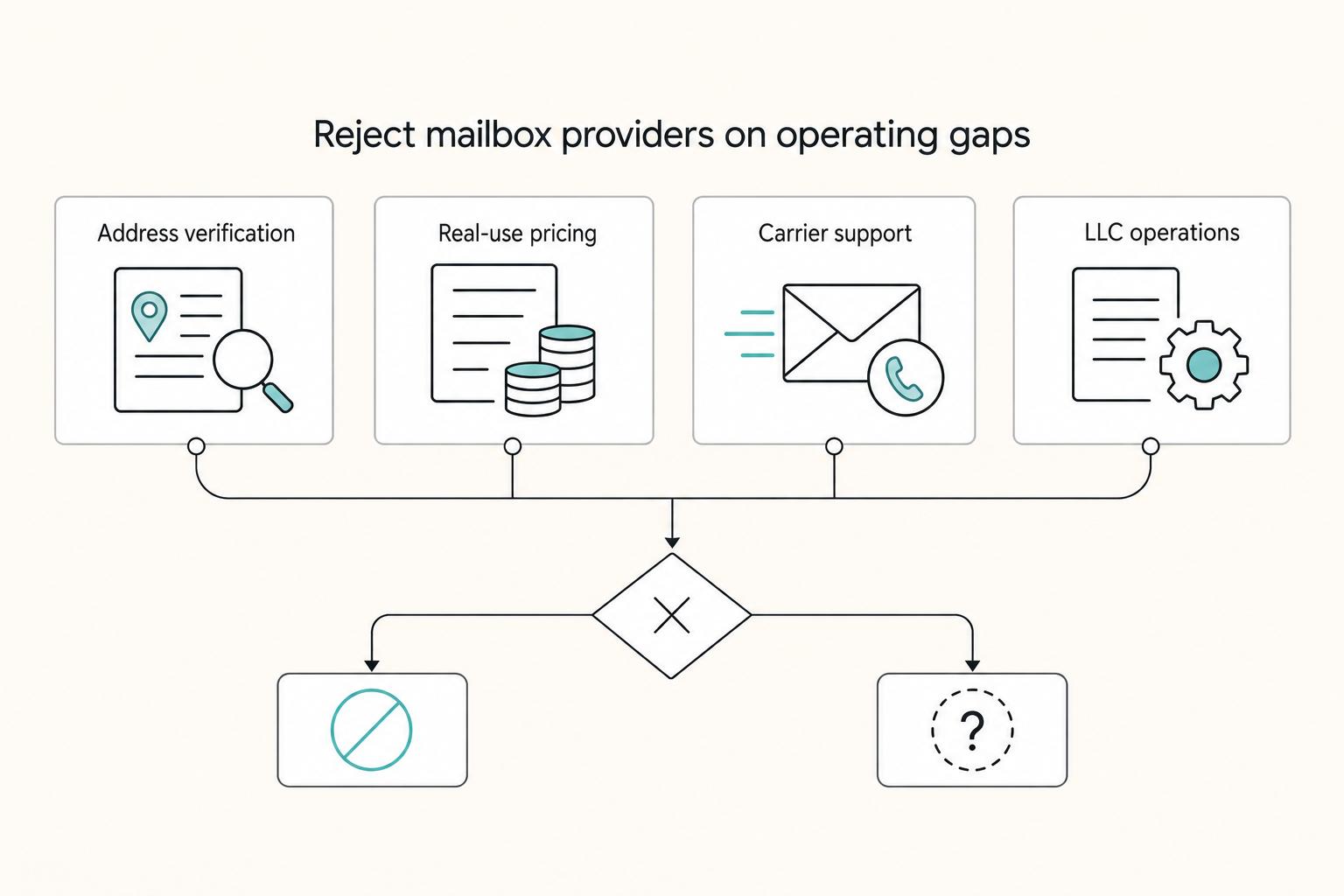
Red flags that should disqualify a provider before you compare features#
Disqualify options that cannot document the operating details your workflow requires before you pay. Apply the same address-role, fee and handling questions to each finalist.
| Red flag | What to look for | Action |
|---|---|---|
| No way to verify the exact address | You cannot review the exact street address and check its suitability for the required address role before signup | Treat that as a hard fail |
| Pricing is clear at the headline, unclear in real use | Forwarding, scans, storage, shredding, or location-specific charges are vague or hidden behind chat | Disqualify the option before feature comparison |
| Carrier support is marketed broadly but documented vaguely | The selected location cannot document handling for the carriers and shipment types you actually need | Treat that as a disqualifier |
| Nomad branding is strong, LLC operations detail is weak | Intake flow, scan timing, forwarding rules, hold windows, and setup requirements are unclear | Skip it |
- No way to verify the exact address
If the exact street address or mailbox format is withheld until after payment, stop. Review recipient and authority requirements for its intended role before purchase. CMRA/RDI checks can add classification information; a non-CMRA or commercial result does not demonstrate physical occupancy or guarantee bank acceptance.
- Pricing is clear at the headline, unclear in real use
A base monthly price is not enough on its own. If forwarding, scans, storage, shredding, or location-specific charges are vague or hidden behind chat, disqualify the option before you compare features.
- Carrier support is marketed broadly but documented vaguely
“We accept packages” is not enough operational detail. Require location-level receiving, storage and forwarding terms for the carriers and shipment types you actually rely on.
- Nomad branding is strong, LLC operations detail is weak
If sales messaging is polished but intake flow, scan timing, forwarding rules, hold windows, and setup requirements are unclear, skip it.
Side by side comparison for nomads and LLC operators#
These four providers publish useful starting facts, but price and service evidence is separate from downstream address acceptance. Compare the plan at the exact location, then confirm every required address role with the relevant recipient or authority.
| Provider | Potential fit | Published starting facts | What to verify at the chosen location | Address-role checkpoint |
|---|---|---|---|---|
| iPostal1 | Personal or business mail with a visible plan ladder | USD 9.99 personal, USD 14.99 business and USD 39.99 virtual-office monthly starting prices | Location premium, plan limits, scan and forwarding charges, recipient names and required carriers | Confirm mailing, formation and banking requirements separately |
| Anytime Mailbox | Discovery across states and countries | Location listings and personal/business mailbox options | Exact location price, included services, recipient authorization and forwarding rules | International locations have their own rules; U.S. CMRA authorization is not universal worldwide |
| Traveling Mailbox | Compare included envelope and content-scan allowances | Basic plan USD 15/month includes 40 incoming envelopes, 35 page scans and 3 recipients | Selected address pricing, overages, forwarding and required carrier handling | Plan allowances do not establish bank or formation acceptance |
| US Global Mail | Compare location-based plans and mail-volume needs | Plans are priced by location; unlimited exterior envelope scans, with content-scan allowances and extras | Exact address quote, included content scans, extra scan and forwarding charges | Confirm the intended address role independently of mail service features |
Ask for written receiving and forwarding terms for the carriers and shipment types you need at each finalist location. A provider-wide capability claim does not answer local storage, forwarding, package-size or exception questions.
Start with two providers whose locations and published plans fit your needs, then apply the same checks to both. Do not migrate business records until the exact address, required handling and relevant recipient acceptance are documented. For address setup context, see how to get a US business address as a non-resident.
iPostal1 for broad location choice and multi tier plans#
iPostal1 can be a useful first-pass option when you want broad coverage and a visible upgrade path. But the brand is not a shortcut around address verification. Its appeal is straightforward: you can start with a personal mail setup, move to a business-focused plan, and step up again if you want office-style extras.
What makes it easier to shortlist than many rivals is that the plan ladder is visible on the public page instead of buried behind sales chat.
| Plan | Stated use | Starting monthly price | Practical takeaway |
|---|---|---|---|
| Virtual Mailing Address | Personal or family digital mailbox | USD 9.99 | Lowest-cost entry if you mainly need remote mail management |
| Virtual Business Address | Business mail in your business name | USD 14.99 | The relevant starting point if your business needs a mailing address in its name |
| Virtual Office | Digital mailbox plus phone and fax | USD 39.99 | Worth considering only if you actually need the added communication layer, not just mail handling |
The plan ladder distinguishes personal mail, mail in a business name and office communication extras. iPostal1 markets business-registration use, but confirm the selected state or authority requirements yourself. A virtual business mailing address does not by itself establish physical operations or provide registered-agent service.
iPostal1 states it can receive mail and packages from USPS, FedEx, UPS, DHL and Amazon. Check the location’s rules for your actual deliveries and forwarding. Its starting personal plan includes 30 mail items per month; extra received items are USD 0.35 each, and content scanning, forwarding and storage can add charges. Compare the applicable business or office plan separately.
Because most detail here is provider-level, confirm the exact address you plan to use before you commit. Ask for written confirmation of location-level intake and forwarding terms, and keep any support replies about business-name mail and registration use at that address. A common failure mode is buying from the brand page, then finding the selected location terms do not match your registration or delivery needs. If you want fast shortlist breadth first and detailed validation second, iPostal1 is a good place to start.
Anytime Mailbox for international spread and location flexibility#
Anytime Mailbox is a practical shortlist pick when your priority is location flexibility across countries, but you should validate each address as its own operation. Its page structure supports that use case directly, with "Top US States," "Top Countries," and "See all locations" navigation, plus solution labels like Virtual Business Address and Mail Forwarding.
Geography-first browsing lets you start where you need mail service, then compare the location’s price, services and authorization requirements. Do not assume every address or country uses the same onboarding or handling rules.
What the flexibility gives you#
- Browse options by state and country instead of a narrow city-first flow.
- Keep optionality high if your base or travel pattern changes often.
- Match a listing's service category to your current setup before you commit.
What to verify before you pay#
- Confirm the exact street address details for the listing you plan to use.
- Save the listing evidence, including the address view and shown service category, before checkout.
- Get key handling details in writing for that specific location, especially anything that differs from general marketing copy.
Ask the selected location how it handles urgent originals, missed forwarding requests and oversized packages. Save the reply and support escalation path; those operating details are more useful than an isolated review score.
If your travel map changes often, compare Anytime Mailbox locations that fit your receiving and forwarding routes, then validate the exact operation before moving important mail.
Traveling Mailbox and US Global Mail for different mail volumes#
Traveling Mailbox publishes plan allowances for incoming envelopes, page scans and recipients. US Global Mail prices plans by location and distinguishes exterior envelope scans from content scans. Use those differences to quote your expected workload, then apply the same address-role and handling checks as for the other candidates.
| Use case | Priority | What to document |
|---|---|---|
| Personal-only nomad | Least recurring admin friction | One exact street address, one clear explanation of scanning or forwarding, and one written answer about what happens if you change countries again |
| Single-owner LLC | Document discipline over convenience | How mail should be addressed for your personal name and your company name, what documents they require, and the address screenshot, checkout terms, and written support replies |
| Banking-sensitive operator | The location that meets the actual bank’s rules for the particular address role | Keep classification output as a diagnostic; obtain bank requirements or confirmation and stage the migration |
Personal-only nomad#
For personal use, pick the option that creates the least recurring admin friction. You need one exact street address, one clear explanation of scanning or forwarding, and one written answer about what happens if you change countries again.
Ask each finalist the same three questions, save the replies, and compare response clarity. If support is vague before signup, expect more friction after signup.
Single-owner LLC#
For LLC use, confirm personal and company recipient names and the authorization needed for each. At a U.S. CMRA, USPS Form 1583 requires photo ID plus a separate address-verification ID; the same driver’s license cannot serve as both. Complete business details, list applicable recipients and follow the form’s signature-witness process with the agent, authorized employee or U.S.-commissioned notary, in person or by permitted real-time video. Separate personal adults require separate forms. Other countries may use different procedures.
Keep an evidence pack with the address screenshot, checkout terms, and written support replies. If name formatting, account naming, or document requirements are unclear, treat that as a warning.
Banking-sensitive operator#
If downstream acceptance is your top risk, start with the bank or authority’s requirements for the exact address role. Ask whether the proposed address and supporting documents satisfy them. CMRA/RDI output can explain classification, but passing a check does not establish workplace occupancy or approval.
Stage changes instead of migrating everything at once. Confirm lower-stakes acceptance first, then move high-impact records.
Keep mailing service and registered-agent duties distinct, and use documented requirements plus location-specific operating terms to choose. Related: Registered Agent vs Virtual Mailbox and How to Split Mail Correctly.
Your 10 step setup checklist before you pay and in your first 30 days#
Use this checklist to lock in one verifiable address, clear operating rules, and a documented first-month review.
-
Define the address job. Separate personal/company mailing, formation, bank legal/physical address and registered-agent duties. Ask the relevant recipient or authority which roles a mailbox can serve.
-
Choose one exact location before comparing plans. Treat each street address as its own setup. Record the full street line, suite or mailbox format, and the date you validated it.
-
Check classification and intended use before signup. Smarty CMRA/RDI output can document address classification. Confirm acceptance with the relevant bank or authority separately; the result is not approval or occupancy evidence.
-
Get name-format and intake rules in writing. Confirm personal and company recipient names and complete applicable authorization, including USPS Form 1583 and required IDs at a U.S. CMRA.
-
Snapshot the terms you are buying. Save screenshots of the plan page, checkout summary, and current terms or policy page.
-
Confirm carrier handling in writing. If carrier support matters for your use case, request written confirmation for the carriers you rely on, including USPS, FedEx, UPS, DHL, and Amazon where relevant.
-
Set forwarding and exception rules on day 1. Pick a default action for letters, packages, and time-sensitive mail, then save the settings confirmation.
-
Build a simple evidence pack. Keep exact address and format, classification output, recipient requirements or confirmations, plan terms, carrier replies, forwarding settings and support contacts.
-
Set governance checkpoints in week 1. Define your primary support path, backup channel, escalation trigger, and a 30-day review for billing, handling, and settings fit.
-
Tie mail operations to your calendar. Set scan and forwarding reminders for time-sensitive official mail. When changing or closing a U.S. CMRA, arrange mail transfer with the provider and notify senders directly; USPS change-of-address forwarding from the CMRA is unavailable. Update Form 1583 when required information changes.
Choose the mailbox that survives real operations, not just signup day#
Pick the mailbox that keeps working under real admin pressure, not the one with the best signup experience. The right choice is the one you can operate reliably while you are traveling, handling mail from your phone, and fixing issues quickly.
- Use a stricter standard than "looks legit"
A street-address mailbox can support remote mail handling, but it does not establish physical operations or bank acceptance. Keep the exact role requirements, location terms and support replies together so decisions rely on documented use rather than brand labels.
- Shortlist two providers, then verify one exact address per provider
Compare specific locations, not brand headlines. Before you buy, keep a simple proof set: the plan page you relied on, the exact address details, and written support replies on how your mail should be addressed and handled. Failures often come from the specific location choice, not the brand name.
- Make the final decision from limits and clarity, not promises
Choose using written plan limits, actual workload cost, required address acceptance and location-specific handling terms. Record unresolved questions before purchase and test scanning and forwarding with ordinary mail before relying on the service for urgent originals.
After you choose, migrate in controlled steps and keep your records organized. If you also need cleaner money movement and audit-ready payout operations as you grow, explore where Gruv can fit your stack where supported. You might also find this useful: The best 'virtual mailbox' services with check depositing.
Frequently Asked Questions
What is the best virtual mailbox for nomads in 2026?
Choose the exact location and plan that fit your address roles, mail volume and forwarding routes. iPostal1, Anytime Mailbox, Traveling Mailbox and US Global Mail publish different location and plan options. Compare them against the same workload and obtain required recipient acceptance separately from CMRA/RDI classification.
Can I use a virtual mailbox for both an LLC and everyday personal mail?
Possibly, if the plan covers both recipient names and the required authorizations are completed. Ask about personal and LLC name formatting and recipient charges before signup. At a U.S. CMRA, complete applicable Form 1583 business details and separate forms for personal adult users; see the intake guidance above for IDs and signature witnessing. Mail authorization does not settle formation or bank address requirements.
What is a Commercial Mail Receiving Agency and why does it matter?
A CMRA is a private business that receives USPS mail for customers, commonly using private mailbox numbers. Its mailing service requires customer authorization. A bank may permit a mailing address while excluding CMRAs from its physical-workplace requirement, so verify the particular address role rather than assuming acceptance from the street-address format.
How do I check CMRA and RDI status for a specific address?
Query Smarty US Address Verification with the exact address and mailbox format. Its dpv_cmra field reports CMRA status, while rdi indicates residential or commercial delivery classification. RDI does not describe zoning or prove physical business occupancy. Blank results can mean unverified or unknown status. Save the dated output as a diagnostic, then check recipient requirements separately.
Is a low monthly price enough to choose a provider?
No. Compare the exact plan’s included incoming mail, content scans, recipient names, storage, forwarding postage and handling. For example, Traveling Mailbox’s USD 15 Basic plan includes 40 incoming envelopes, 35 page scans and 3 recipients; a different workload or address can change the cost. Obtain a quote for your normal and heavy-mail months before choosing.
Which carriers should my mailbox support if I travel full-time?
Confirm receiving and forwarding for the carriers and shipment types you actually use, such as USPS letters or UPS packages. Ask about originals, cards, package limits, storage and forwarding at the selected address. Do not disqualify a plan solely for an unused carrier, or assume provider-wide coverage answers local handling questions.
What should I verify before I move my business address to a new mailbox?
Treat it as a migration: confirm the exact address and mailbox formatting, intended address roles with the relevant recipients or authorities, LLC name authorization, plan fees and required carrier handling. Save CMRA/RDI output as classification information, not acceptance proof. Stage important record changes and arrange forwarding plus direct sender notifications before closing the old mailbox.
Try a related tool
Researched and edited by the Gruv editorial team. Gruv builds cross-border billing, payouts, and finance-operations software for global businesses.
Sources
Includes 8 external sources outside the trusted-domain allowlist.
- about.usps.com/forms/ps1583.pdfexternal
- anytimemailbox.comexternal
- faq.usps.com/articles/Knowledge/Commercial-Mail-Receiving...external
- ipostal1.com/online-po-box.phpexternal
- smarty.com/docs/apis/us-street-api/referenceexternal
- support.mercury.com/hc/en-us/articles/28769699533588-Company-add...external
- travelingmailbox.com/pricingexternal
- usglobalmail.com/pricingexternal
Educational content only. Not legal, tax, or financial advice.
Related Posts

How to Get a US Business Address as a Non-Resident
The cheapest path is to verify first, then buy. You want an address setup that survives filings, onboarding, and daily operations, not just a clean signup screen.

The Freelance Payment Penalty: A Modeled Audit of Platform Fees, FX Spreads, and Payout Delays
The money rarely disappears through a single, easy-to-spot fee. The real loss is stacked. A marketplace takes its commission, a processor adds a charge for international cards, a bank or payment company converts the currency at a spread, a platform holds the funds before release, and a wire sheds a little to intermediaries on the way in. Each layer looks defensible on its own, but the worker feels the combined result as a smaller deposit and a later payday.

How to Respond to a Subpoena for Business Records
Move fast, but do not produce records on instinct. If you need to **respond to a subpoena for business records**, your immediate job is to control deadlines, preserve records, and make any later production defensible.