
Quick Answer
The best net worth tracking tools are the ones you can run consistently in a monthly review and reconcile against real statements. For freelancers and small teams, prioritize reliability, liabilities coverage, and exportability over hype. A budgeting lens helps with timing risk, while a net-worth lens helps catch debt drift. Pick one setup, verify it in a short pilot, and use it to drive monthly cashflow decisions.
Stop "tracking net worth" like a consumer app - build a cashflow-protection system you can run monthly#
Net worth tracking works best as a monthly close, either manual or automated, because it gives you clarity and control. Once you commit to tracking, stop treating the tracker like entertainment. Treat it like an operator's control panel: review on schedule, reconcile reality, then decide what changes next month.
Consumer tracking vs operator tracking (what changes)#
| Mode | What you track | Cadence | Output you want | What breaks first |
|---|---|---|---|---|
| Consumer app mindset | "Did my net worth go up?" | Random, reactive | Pretty charts | You ignore context and miss follow-up actions |
| Operator system | Assets and liabilities (and what moved) | Monthly, scheduled | A short decision list | Your process fails if you cannot reconcile what you're seeing |
You can run this system with manual updates or aggregation. One proven approach is simple: update an Excel spreadsheet at the end of every month. You trade automation for control and build a clean monthly history fast.
If you prefer automation, many modern tools pull data via APIs (Application Programming Interfaces) to read transactions securely from checking accounts, credit cards, and investment portfolios. If you connect accounts, treat security as a baseline requirement, not a bonus. Security features like 256-bit encryption are essential when connecting bank accounts.
The monthly review workflow (and a fast tool screen)#
Set a calendar block and run the same checklist:
- Confirm balances: cash accounts, credit cards, loans, investments. Write down anything that surprises you.
- Reconcile the story: identify what caused the biggest change since last month (income event, large expense, debt payoff, market movement).
- Save a snapshot: keep a copy of your month-end view (CSV/spreadsheet, when available) so you maintain continuity.
Keep the tool screen simple and tied to your review:
- If you want automated net worth tracking, consider tools that connect with bank/investment accounts like Personal Capital.
- If you want spending visibility, choose a budget app that tracks income, categorizes expenses, and monitors goals. Many budget apps also aggregate financial data from various accounts so you can see spending habits and net worth in one dashboard.
Hypothetical: your net worth stayed flat, but a liability balance climbed. The move for next month is not to start checking daily. It is to identify what drove the change, then adjust what you do next month based on that.
The 10-minute decision framework: selection criteria + who this list is for (and not for)#
Use a simple decision framework to narrow a messy set of options to the next workable step. If you run a monthly close or any recurring review, prioritize consistency first, then convenience.
Who it's for (and not for)#
This fits you if you operate like a business-of-one (or a small team) and you need your system to support decisions around timing and commitments, not just "interesting" trends. You want a monthly rhythm that surfaces risk early, and you care about seeing the impact on revenue, expenses, and cash flow, not just the headline number.
Skip this if you only want a one-time snapshot or you refuse any tooling and process on principle. In that case, commit to manual statements plus a spreadsheet, and call that your system.
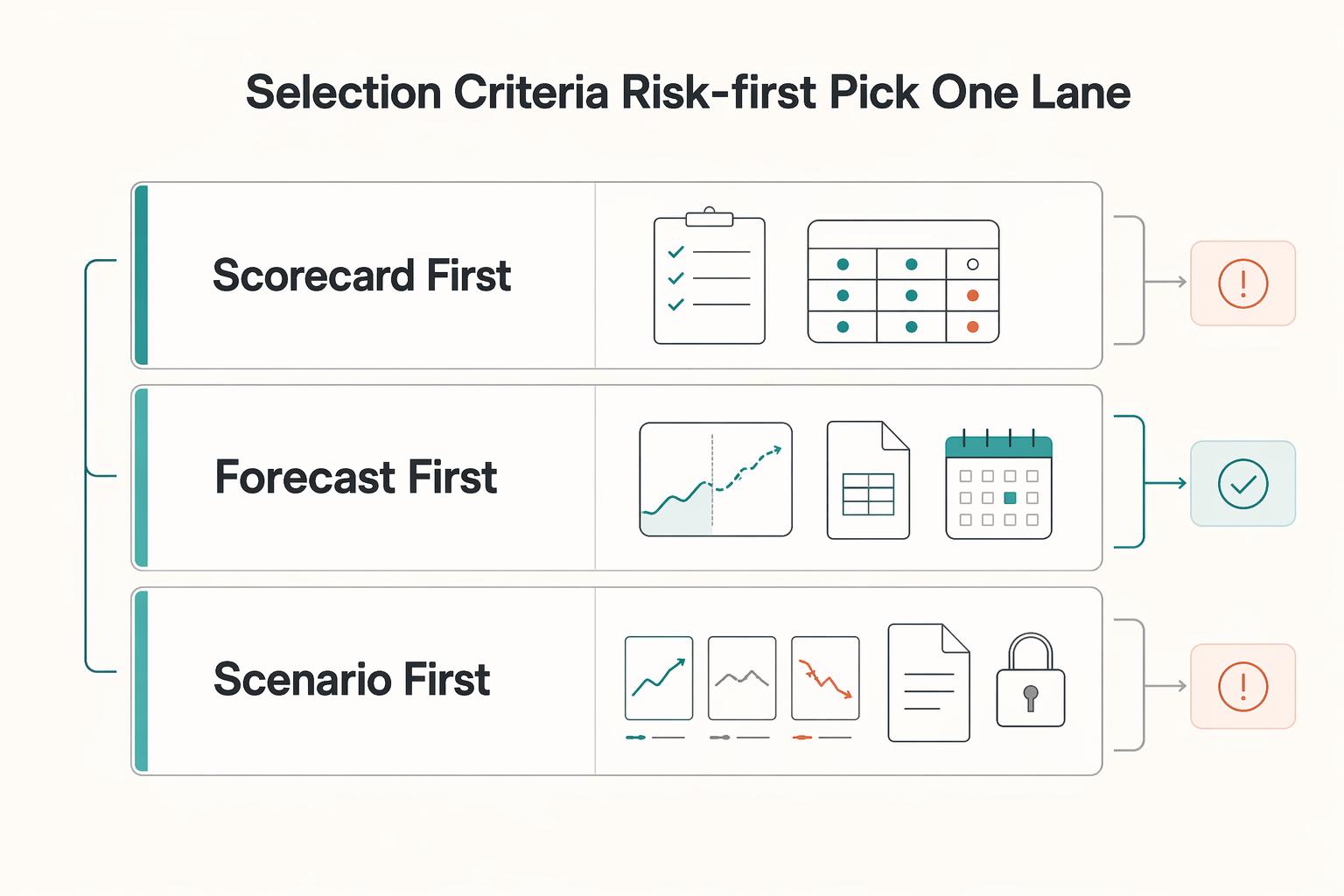
Selection criteria (risk-first) + pick one lane#
Run this quick screen on any candidate process or tool:
- Reliability over novelty: Will it stay consistent enough that you will actually review it monthly? If you cannot trust it, you will not act.
- One-page clarity: Can you quickly see the few inputs that drive decisions, especially cash flow, commitments, and what is due when?
- Audit trail: Can you export or capture the underlying numbers so you can reconcile what changed month to month?
- Early warning signals: Can you test basic what-if scenarios so timing risk becomes visible early, not after it becomes a problem?
| Lane | Choose this if you want | What you trade off |
|---|---|---|
| Scorecard-first | A lightweight monthly review that keeps you consistent | Less depth when the situation gets complex |
| Forecast-first | A simple financial model that forecasts performance using historical data plus future projections | More upkeep than a scorecard |
| Scenario-first | What-if scenarios to spot risks and opportunities early | More assumptions to manage and explain |
Hypothetical: everything "looks fine," but payments slip and obligations creep up. Pick forecast-first for 90 days, export monthly, and treat those exports as your control surface.
If you also pay internationally, pair that discipline with a payments workflow you can explain end-to-end (start here: A Guide to Using Wise for Payroll for International Contractors). Want a quick next step? Try the free invoice generator.
Comparison table: a quick scan of the best net worth tracking tools (and what's still unknown)#
Use this table to shortlist one option, then verify the details in your own workflow before you trust it with your monthly close. The point is speed: stop parsing paragraphs and start asking the right questions. Treat anything you have not personally tested as a hypothesis, not a promise.
| Tool | Best for | Tool type | Typical setup time | Account aggregation | Net worth trend views | Exports/CSV | Multi-entity support | Known migration risk | "Cashflow protection" fit |
|---|---|---|---|---|---|---|---|---|---|
| The Measure of a Plan Investment Portfolio Tracker (Google Sheets) | Spreadsheet-based investment portfolio tracking (free, per the publisher) | Spreadsheet (Google Sheets) | Varies (verify your setup effort) | Verify (typically manual unless you add your own integrations) | Verify | Verify | Verify | Unknown; depends on how you back up/version your sheet | Depends; verify whether your sheet makes liabilities + timing obvious |
| Buxfer | If you want bank syncing and reminders (per Buxfer's own claims) | App (verify) | Varies (verify) | Buxfer claims automatic sync with 20,000+ banks worldwide | Verify | Verify | Verify | Unknown; verify data portability/exports early | Buxfer claims bill reminders and alerts (verify fit for your workflow) |
| Help (Personal Capital) | Verify based on your workflow and reporting needs | Verify | Varies (verify) | Verify coverage for your institutions | Verify | Verify | Verify | Unknown; verify portability/exports | Depends; verify whether it keeps liabilities and due dates visible |
| Monarch | Verify based on your workflow and reporting needs | Verify | Varies (verify) | Verify | Verify | Verify | Verify | Unknown; verify portability/exports | Depends; verify whether it supports a consistent monthly review |
| Copilot Money | Verify based on your workflow and reporting needs | Verify | Varies (verify) | Verify | Verify | Verify | Verify | Unknown; verify portability/exports | Depends; verify whether it helps you spot spending drift early |
| Quicken Simplifi | Verify based on your workflow and reporting needs | Verify | Varies (verify) | Verify | Verify | Verify | Verify | Unknown; verify portability/exports | Depends; verify whether it surfaces bills and credit reliance clearly |
| YNAB | Verify based on your workflow and reporting needs | Verify | Varies (verify) | Verify | Verify | Verify | Verify | Unknown; verify portability/exports | Depends; verify whether it supports your cashflow control style |
| Kubera | Verify based on your workflow and reporting needs | Verify | Varies (verify) | Verify | Verify | Verify | Verify | Unknown; verify portability/exports | Depends; verify whether it supports balance-sheet reviews |
| PocketSmith | Verify based on your workflow and reporting needs | Verify | Varies (verify) | Verify | Verify | Verify | Verify | Unknown; verify portability/exports | Depends; verify whether it makes timing scenarios explicit |
| Range | Verify based on your workflow and reporting needs | Verify | Varies (verify) | Verify | Verify | Verify | Verify | Unknown; verify portability/exports | Depends; verify whether it turns planning into repeatable decisions |
| Tiller | Verify based on your workflow and reporting needs | Verify | Varies (verify) | Verify connectors, or manual import | Verify | Verify | Verify | Unknown; verify how you'll back up and migrate | Depends; verify whether your setup is actually maintainable |
Unknowns to verify in your jurisdiction/workflow (do this before you "choose")#
Before you choose, verify the parts that usually break monthly closes:
| Area | What to verify |
|---|---|
| Institution coverage and connection stability | Link your top 3 banks or cards first, then confirm balances against statements before you add everything else. |
| Pricing tiers and what they unlock | Confirm whether exports, history length, or multi-entity views sit behind a higher tier. |
| Data retention and portability | Run at least one CSV export early. Store it with your monthly close so you can switch later without losing continuity. |
| Comparison-article freshness and methodology | Check whether the page shows a recent update and explains its review process, then validate the claims yourself. |
| Community reality check (signals, not proof) | Sanity-check on Reddit and r/FIRE for your specific bank and region, then validate yourself. Treat external claims as unverified until you test them in your own workflow. |
The best net worth tracking tools for freelancers (ranked by cashflow protection, not popularity)#
Pick the tool that makes late payments, rising liabilities, and "silent fee drag" hard to ignore during your monthly close. "Best" only matters if you can defend the logic. Score each option on operational risk, then pick the safest default for your profile.
Scoring framework (make "best" claims testable)#
Use a 100-point score and only award points you personally verified in a 14-day pilot. Treat everything else as marketing. Platform transitions are a reminder that migration and continuity risk can break your process overnight.
| Criterion | Weight | What "pass" looks like in real life |
|---|---|---|
| Sync reliability (your institutions) | 30 | Your primary bank and top card stay connected for 2 weeks, balances match statements. |
| Liabilities coverage | 20 | Credit cards and loans show clearly next to cash so debt creep cannot hide. |
| Exports and audit trail | 20 | You can export a CSV you would actually file with your monthly close. |
| Review cadence support | 15 | The UI supports a consistent monthly review (not daily dopamine checking). |
| Migration and continuity risk | 15 | You can snapshot and leave cleanly (export early, store locally). |
Shortlists by profile (decide fast, then verify)#
These are starting points to compare, not "proven best" picks.
| Profile | Tools to compare | What to do |
|---|---|---|
| Solo service freelancer (simple stack) | Help (Personal Capital) or Quicken Simplifi | Confirm cash, confirm cards, export, then decide owner draw. |
| Creator with variable income | YNAB or PocketSmith | Use them for planning, then keep a separate net worth view if needed. |
| Small team with receivables and payouts | Monarch or Kubera | Prioritize clean exports so you can reconcile payouts and contractor costs. |
Tool-by-tool pilot checklist (run this before you commit)#
| Tool | Pilot check |
|---|---|
| Help (Personal Capital) | Verify the core loop: cash, liabilities, export. |
| Monarch | Verify your bank connections and the CSV export format you need for your close. |
| Copilot Money | Confirm platform availability for your setup and whether exports are workable for your workflow. |
| Quicken Simplifi | Validate rules, bill timing, and whether your debt accounts are covered the way you need. |
| YNAB | Test whether it supports your buffer habits (taxes, contractors) without creating extra manual work. |
| Kubera | Test whether it supports quarterly review exports you can actually use before big commitments like hiring. |
| PocketSmith | Validate scenario planning with one repeatable monthly scenario and confirm you can export the outputs you rely on. |
| Range | Keep your documentation and account records exportable so compliance work does not turn into a scramble. |
| Tiller | Build a reconciliation pack: statement totals, exports, and payout records. |
Add these workflow-specific checks where they matter:
- Help (Personal Capital): In your pilot, verify the core loop: cash, liabilities, export. If you send international contractor payouts, keep payout records and statuses easy to reconcile, for example by pairing your close exports with Gruv payout logs where applicable.
- YNAB: If you use it, test whether it supports your buffer habits (taxes, contractors) without creating extra manual work.
- Kubera: If you're considering it, test whether it supports quarterly review exports you can actually use before big commitments like hiring. See: Hiring Your First Subcontractor: Legal and Financial Steps.
- PocketSmith: Validate scenario planning with one repeatable monthly scenario, for example: "two invoices slip," and confirm you can export the outputs you rely on.
- Range: If you have cross-border complexity, keep your documentation and account records exportable so compliance work does not turn into a scramble. If you're a U.S. person, note that FinCEN Report 114 (FBAR) is used to report a financial interest in or signature authority over a foreign financial account, and you must file if the aggregate value of foreign financial accounts exceeds $10,000 at any time during the calendar year. It must be filed electronically using the BSA E-Filing System, and the deadline is generally April 15 with an automatic extension to October 15 (no request required).
- Tiller: If spreadsheets are your control layer, build a reconciliation pack: statement totals, exports, and payout records, especially useful if you use multiple Virtual Accounts where enabled. Hypothetical: if a client pays late, your sheet still shows the truth because you control the logic and snapshots.
Is a budget app enough for net worth tracking - or do you need a dedicated net worth tool?#
A budget app is enough when you need runway control right now. A net-worth-first tool matters when you need balance sheet accuracy and trendlines you can trust. The decision is not ideological. It is about your biggest risk this month.
The two-question rule (use this fast)#
Ask these questions in order, then pick the lane that reduces your biggest risk this month.
- Do I primarily need runway control this month? Choose a budgeting-plus tool. You want fast feedback on overspending, bill timing, and whether a late invoice forces you onto a card.
- Do I primarily need balance sheet accuracy and trendlines? Choose a net-worth-first tool. You want liabilities sitting next to cash and investments, so debt creep cannot hide behind a good revenue month.
Here's the operator-grade difference:
| Decision lens | Best when your risk is... | What you review monthly | Common safe-default approach |
|---|---|---|---|
| Budgeting-plus | Timing and behavior (late invoices, expense creep) | Upcoming bills, category spikes, cash buffer rules | Budget-focused categories and cashflow views |
| Net-worth-first | Drift and leverage (liabilities rising, long-term slippage) | Cash, total debt, net worth trendline, exports | Balance-sheet views with clean exports |
The "best of both" setup (a lot of invoicing businesses land here)#
For many freelancers, the practical answer is one budgeting lens + one net worth lens, or one tool that does both adequately. The condition is simple: you can keep exports clean for your monthly close.
Tie this directly to payment risk:
- If you accept card payments and deal with disputes, fees, or chargebacks, your budgeting lens must surface processor costs fast so you can protect runway. Use: Should Your Freelance Business Accept Credit Cards?
- Your net worth tracker (the balance-sheet lens) must keep debt visible, so you do not "finance" slow-paying clients with credit cards.
A simple hypothetical: you ship a project, the client pays late, and you float software and contractor costs on a card. Budgeting-plus tells you when runway tightens. Net-worth-first tells you when that float becomes a pattern.
Operational check: if you work across countries, keep your system capable of tax set-asides and any required compliance paperwork without turning into spreadsheet chaos. For U.S. taxpayers abroad, one example is the Foreign Earned Income Exclusion (FEIE). If you meet certain requirements, you may qualify, and eligibility generally involves having foreign earned income, a tax home in a foreign country, and meeting either bona fide residence criteria or the physical presence test (being physically present in a foreign country or countries for 330 full days during any period of 12 consecutive months). The FEIE maximum is adjusted annually (for 2025, up to $130,000 per qualifying person; for 2026, $132,900 per person), and it applies only if you file a U.S. tax return reporting the income. Build a dedicated "tax" bucket and store documentation alongside exports, regardless of which app you use.
Mint is gone - what changed with Mint → Credit Karma, and how do you migrate without losing continuity?#
Treat any tracker handoff as an operations change, not a login change. Your workflow can break before your raw data does. The goal is continuity: keep your trendline meaningful while you swap tools.
The real continuity risk (what actually breaks)#
When a tracker changes ownership, branding, data sources, or back-end connections, you might keep access to something, but you can lose consistency. That often shows up as category drift, duplicated accounts, missing liabilities, or a net worth line that no longer compares cleanly to last month.
Use this operator check:
| Continuity surface | What can change | What you do to stay safe |
|---|---|---|
| Account connections | Partial sync, missing accounts, duplicates | Reconnect one institution at a time and verify totals |
| Categorization rules | Rules reset or re-map | Rebuild only the rules you use in monthly review |
| Reporting cadence | Different defaults, different charts | Recreate your monthly close checklist before trusting charts |
| Net worth math | Liability handling differs | Validate debts and loans against statements, not the app |
What to export, reconnect, and recheck when you migrate#
Start by freezing your "last known good" baseline. Then migrate in a way you can explain later.
- Export before you touch anything. Pull an export (for example, transactions) and capture a snapshot of balances. Store them with your finance admin artifacts so you can defend decisions later (tax prep, underwriting, disputes).
- Reconnect accounts one institution at a time. Validate balances against your bank or card statements. If you also ingest payouts from Gruv, reconcile payout totals separately first, then confirm the tracker reflects the same cash movements.
- Rebuild a minimal chart of accounts for your monthly review. Track only: cash, taxes, receivables, debt, investments. Ignore everything else until these five stay stable for a full review cycle.
One hypothetical scenario: you relink a credit card and the app adds the same card twice. Your net worth drops "overnight." You did not get poorer. You got duplicated data.
What to recheck:
- Recurring transactions (subscriptions, retainers, loan autopay)
- Liability accounts (credit cards, loans, lines of credit)
- Loan payment splits (make sure payments map logically)
- Duplicated accounts after relinking (a common cause of false net worth swings)
Decision trigger: pick your next tool based on what you actually review each month (net-worth-first vs budgeting-first workflows), then rebuild rules intentionally so your new numbers compare cleanly to your old baseline.
The monthly net worth operating cadence that actually protects freelancer cashflow#
Run net worth tracking as a monthly owner's close, then use it to look forward so you avoid unexpected shortfalls. Tools matter, but cadence is the protection layer. Once you can trust the numbers, turn what you see into one or two concrete "get paid" moves.
The owner's close (balance sheet first, then cashflow reality)#
Start with a tight sequence you can repeat inside any tool (Help (Personal Capital), Monarch, Copilot Money, Quicken Simplifi, or a spreadsheet). If your tool supports it, connecting bank and credit accounts can help with real-time balance synchronization, but you still do the sanity check.
- Step 1: Confirm cash and last month's major flows. Verify cash balances across your business and personal accounts. Then scan for the handful of inflows and outflows that actually moved the month (client payments, taxes, rent, contractor payouts, large software bills). If an app shows a surprising swing, validate against the bank statement before you explain it.
- Step 2: Reconcile liabilities and check for stealth financing. Review credit cards, loans, and lines of credit. Your goal is simple: confirm you did not cover slow payments with debt without noticing. If debt climbs while cash feels "fine," treat it like an ops issue, not a vibes issue.
Close last month, then shift from tracking the past to predicting what happens next. A practical way to do that is to map what cash you'll have available months from now (for example, six months out), and pressure-test it with a couple of simple what-if scenarios that update when variables change.
Action thresholds + a cashflow protection checklist#
Define thresholds that force behavior, not vibes. Write them in plain language and attach a default action.
| Signal you review monthly | What you check inside your net worth tracker | Default operator action |
|---|---|---|
| Cash buffer falls below your target | Cash accounts and upcoming known outflows | Tighten invoice terms, pause discretionary spend, require a deposit on new work |
| Debt pressure increases | Total liabilities and minimum payments due | Freeze new tools and subscriptions, negotiate payment timing with clients |
| Fee drag creeps up ("financial friction") | Fees plus timing lags (for example, settlement delays and tax withholding timing) | Reprice, change payment method, or adjust payout cadence (see Should Your Freelance Business Accept Credit Cards?) |
| Concentration risk rises | Top 1 to 2 clients as a share of recent inflows | Shift pipeline time to diversification, update payment schedule before you accept more scope |
Hypothetical: you "feel" profitable, but your cards rise each month because two anchor clients pay late. Your monthly close catches it early. You switch new statements of work to deposits and milestone billing instead of quietly borrowing from your future.
Treat this cadence like basic financial control for a business-of-one: simple, consistent, and hard to ignore.
When "best app" lists disagree: the proof standards and red flags that keep you in control#
Treat every "best net worth tracker" ranking as a hypothesis. People now "search" inside AI tools like ChatGPT, Perplexity, and Claude, so you will get confident answers fast, even when the underlying proof is thin. The point is not to win an internet argument. It is to protect your monthly close.
Proof standards: what you ask before you trust#
You do not need perfect research. You need enough context to understand where the claim came from and what it is, and is not, based on.
Use these questions whenever a "best app" list makes a strong claim:
- Where does their knowledge come from? Do they show what they're relying on, or is it just a conclusion?
- What did they do vs what did they assume? Firsthand use, documented evidence, or a rewrite of other rankings?
- What incentives shape the page? If the page earns money when you click, treat the conclusion as a starting point, not an answer.
- What's missing or conveniently vague? If they cannot explain why something is "best," you cannot evaluate whether it's best for you.
Red flags + reality check (without drama)#
Instead of committing because a tool is trending this month, do a quick, boring spot-check on the parts you actually rely on.
- Start with a narrow slice of your real data and workflow. Keep the scope small enough that you can sanity-check it.
- Compare what the app shows against a record you trust. If the numbers disagree, you need clarity on what changed and why.
- Look for patterns across independent writeups, not one-off rants. Then validate the pattern yourself.
| Signal | What it usually means | Your safe default move |
|---|---|---|
| "Best app" with no sourcing or context | Confidence without proof | Downgrade the recommendation |
| Lots of superlatives, few specifics | Marketing language | Ask "based on what?" before you buy in |
| "Works for everyone" framing | Your edge cases are ignored | Treat it as unverified for your situation |
Hypothetical: you see net worth trending up, so you approve a contractor payout. Then you realize a client payment still sits pending elsewhere. Build your workflow so your source of truth stays explainable end-to-end, especially if your payments infrastructure runs through modular systems like Gruv (ledger events and payout status).
Conclusion: pick one tool, run one cadence, and make net worth a cashflow early-warning system#
Your goal with net worth tracking tools is not a prettier chart. It is better decisions. Pick one setup you can sustain and turn your tracker into a trigger for cash actions.
The operator default: one "snapshot" plus one "timing" view#
Treat net worth as the snapshot (assets minus liabilities). Treat a cash flow forecast as the timing layer: an estimate of future cash inflows, outflows, and overall liquidity. That split explains why you can look fine on paper and still feel squeezed.
Use this simple split:
| View | What it answers | What to do when it looks "off" |
|---|---|---|
| Net worth trend | "Am I drifting up or down?" | Validate balances, then adjust liabilities, buffers, and big commitments |
| Cash flow forecast (weekly) | "Will I run out of usable cash before money arrives?" | Tighten collections, delay noncritical payouts, reduce variable spend |
Keep the north star simple: track money coming in and money going out, then make timing visible before it becomes debt.
A light-touch cadence you can actually keep#
Run a recurring review on a schedule you will protect. Profit is often managed monthly, but cash moves daily, so a weekly cash flow projection helps you manage timing, not just totals, and can surface mismatches in when money is received versus spent.
Use this checklist:
- Confirm your real cash position (what hit the bank, not what you "earned"). Cash accounting tracks cash when it actually hits or leaves the bank.
- List your next committed outflows (the things you cannot dodge).
- List expected inflows and label them by confidence (expected, likely, uncertain).
- Decide one action: send reminders, require deposits for new work, pause discretionary spend, or renegotiate timing.
Hypothetical: if a client drags payment, your net worth might not move much, but your weekly projection can show the liquidity strain early, before you solve it with credit card float.
If you're rebuilding contractor workflows across currencies, keep your cash flow forecast grounded in what actually moves in and out of the bank (see A Guide to Using Wise for Payroll for International Contractors). Any tool can handle the snapshot; your cadence is what protects the business.
Frequently Asked Questions
What is a net worth tracking tool, and what does it actually calculate?
A net worth tracking tool typically helps you see your accounts in one place and calculates net worth as assets minus liabilities. Assets can include things you own (like cash or investments), while liabilities can include things you owe (like credit card balances or loans). Some tools also support manual tracking, which can be enough if you are optimizing for control and exportability.
Is a budgeting app enough for net worth tracking, or do I need a dedicated net worth tracker?
A budgeting app can work if you primarily need day-to-day spending control and cash allocation. A dedicated net worth tracker can be more useful when you want a cleaner balance sheet view across accounts and debts. If you feel torn, pick one behavior tool and one snapshot tool, then reconcile them periodically.
What changed with Mint, and where should former Mint users track net worth now?
If you used Mint and need continuity, look for a tool that supports bringing your Mint data over. For example, Neontra says you can import your data from Mint by following its instructions. Beyond that, test a few options and let your institution mix and workflow decide the outcome.
How do I choose a net worth tracker if I invoice clients and deal with late payments?
Choose a setup that keeps “money you earned” separate from “money you can actually use.” Depending on how your tracker handles it, you may prefer to keep receivables outside the net worth tool (in an invoicing system, spreadsheet, or ledger export) and treat the tracker as a view of what’s actually in your accounts and what you owe. When card fees and payment timing matter, build your review routine around your payments reality (see Should Your Freelance Business Accept Credit Cards?).
Which criteria matter most when “best net worth tracking tools” lists disagree?
Prioritize sync reliability for your banks, liabilities coverage, and auditability (exports) over chart polish. Run a short pilot: connect only core accounts, verify balances against statements, and watch for duplicates or missing liabilities. Use Reddit and r/FIRE as signal, then validate with your own reconciliation.
Can one tool track net worth and cashflow risk together (fees, debt pressure, payment timing)?
Sometimes, but you still need clear definitions. Net worth shows balance sheet drift. Cashflow risk is about timing and obligations, like fees, debt payments, and late client receipts. If one app blurs those, you risk false confidence, so keep a simple cash runway and obligations view alongside your net worth view.
How often should I update my net worth, and what should I do when it drops?
There is no single “right” cadence. What matters is using a schedule you will actually keep, whether that’s tied to statements, pay cycles, or periodic check-ins. If your net worth drops, first make sure the data is accurate (missing accounts, duplicates, stale balances) and then interpret the change through the basics: what moved on the asset side vs the liability side.
Try a related tool
Researched and edited by the Gruv editorial team. Gruv builds cross-border billing, payouts, and finance-operations software for global businesses.
Sources
Educational content only. Not legal, tax, or financial advice.
Related Posts

Hiring a Subcontractor for the First Time Without Costly Surprises
**Start with a risk-control sequence, not an ad hoc handoff.** As the Contractor, your goal is simple: deliver cleanly, control scope, and release payment only when the work and file are complete.
Should Your Freelance Business Accept Credit Cards?
Offer card payments, but stay in control of how money reaches you. The goal is not a smoother checkout screen. It is predictable cash you can use to run the business.

A Guide to Using Wise for Payroll for International Contractors
**Use Wise as the execution layer for payroll, then wrap it in your own controls so every cycle runs the same way with clearer fees and fewer avoidable delays.**