
Quick Answer
The best software for case studies is the stack you can run reliably from proof intake to publish, not the tool with the longest feature list. Start by separating case study creation tools from case management platforms, then score options on drafting quality, design output, publish flow, and update effort. A practical setup is one drafting layer, one design layer, and one QA check.
Build a Case Study System That Wins Clients Without Guesswork#
Treat case studies like a system, not a one-off design task, and you can win clients with consistency instead of guesswork. If you have searched for the best software for case studies, you have probably seen mixed lists that lump content tools together with legal case-management products. That overlap wastes time and leads to uneven outputs.
This article gives you a practical way to decide fast. You will get a decision framework, a comparison table, and an execution playbook you can run in a focused session to choose tools that fit your workflow. The goal is simple: stop the trial and error, choose a lean stack, and publish with clear standards.
Set the bar early: AI can speed drafting and feedback, and tools like Canva and Visme can tighten design consistency. But case studies build trust only when they show real customer outcomes you can verify. If a claim cannot survive a client check, it does not belong in the draft.
Category clarity matters just as much. Search for "case" software and you will surface products like Clio that serve law firm case management, not client-proof content. If your work depends on customer stories, choose a content workflow first. Then decide how you will package and publish it in your CMS or portfolio page.
Run this path for every new case study, so you keep output consistent:
- Clarify intent: Decide whether you need customer-proof content or operational case management.
- Score tools: Rate drafting control, structure quality, visual output, publish options, and update effort.
- Choose your stack: Pair one drafting layer with one design layer, for example writing plus Canva or Visme.
- Publish with a checklist: Confirm outcomes, permissions, and supporting evidence before each release.
Use this system once, then repeat it. That is how case studies become a dependable growth asset, not a random content project.
Who This List Is For and What Best Actually Means#
This list is for operators who want repeatable, proof-based case study production, not legal case-management work. Before you compare tools, lock in category fit. That keeps your portfolio process consistent from first draft to publish.
Use this list when your goal is client proof content#
| Profile | Use when | Key differentiator |
|---|---|---|
| Solo freelancer or small team | You publish case studies to win new work, not to run legal files | You value repeatable output across tools |
| Content workflow owner | You draft with ChatGPT or Narrato, then package in Canva or Visme for strong marketing design | You need speed without losing structure |
| Operator managing one pipeline | You want fewer handoffs, so HubSpot- and Narrato-style workflows focus on planning, drafting, and publishing in one flow | Operational simplicity beats feature sprawl |
Most readers here fit one of those three groups: a solo operator or small team using case studies to win work, a content owner who drafts in AI and packages the story in a design tool, or someone who wants a simpler HubSpot- or Narrato-style workflow with fewer handoffs.
Skip this list when your job is legal case operations#
If your search started in legal-operations forums, check category fit first. Tools like Clio and MyCase target legal-practice operations and case management for lawyers. They are built for legal operations, while the job here is turning verified client outcomes into persuasive proof content.
Use these five criteria throughout this article:
| Criteria | What good looks like | Fast rejection signal |
|---|---|---|
| Drafting speed | You move from notes to first draft quickly | You stall before a usable draft |
| Structure control | You can shape problem, approach, and outcome clearly | Template lock-in forces generic copy |
| Visual quality | Canva or Visme output stays clean and shareable | Layout fixes eat too much time |
| Publishing options | You can publish and update without friction | Final assets break across channels |
| Operational simplicity | Your stack stays easy to maintain weekly | Every update needs full rework |
Safe default rule: if a tool cannot reliably move you from notes to a usable asset without heavy rework in your workflow, it is not "best" for a business-of-one system. If you want help tightening message quality after tool selection, read A Guide to Using Case Studies to Win Freelance Clients.
Are You Choosing Case Study Software or Case Management Software?#
Choose case study software when your goal is publishable customer proof, and choose case management software when your goal is handling incidents, claims, or legal matters. Lock this in before you compare features. It protects your time and keeps your portfolio focused on assets that help you win work.
HubSpot Case Study Generator and Narrato belong to the content-creation lane. HubSpot is positioned around turning notes and transcripts into publishable case studies, and Narrato includes case-study drafting within a broader marketing-content workflow. Kissflow, Clio, and MyCase belong to the case-operations lane. They focus on case handling, legal workflows, investigations, and case records.
The cost of confusion shows up quickly. If you pick a platform because it appeared in a Reddit thread or an r/LawFirm discussion, you may end up with software built for legal or enterprise case operations. That still leaves you to structure the narrative, verify the outcome, and package the proof for client-facing use.
Run this fast filter before you shortlist#
| Filter | Case study software | Case management software |
|---|---|---|
| Primary job | Drafting and publishing customer stories | Managing incidents, claims, and investigations |
| Core objects | Proof points, story sections, and approvals | Legal matters, case files, and operational events |
| Final output | Publish-ready case study for your workflow | Internal case-resolution record |
| Daily user | Content operators | Legal and case-ops teams |
- Primary job: Does the product center on drafting and publishing customer stories, or on managing incidents, claims, and investigations?
- Core objects: Are you working with proof points, story sections, and approvals, or with legal matters, case files, and operational events?
- Final output: Do you get a publish-ready case study for your workflow, or an internal case-resolution record?
- Daily user: Will content operators use it every day, or will legal and case-ops teams own it?
Use a safe default rule: if the product centers on incidents, claims, or investigations like Kissflow, treat it as the wrong default for case study production. After you confirm category fit, you can layer design tooling without rebuilding your process. If a tool cannot move from notes to a credible, publish-ready story with minimal rework, drop it and continue.
The 10 Minute Scoring Framework You Can Run Before You Buy#
Use a weighted scorecard with hard pass-or-fail gates so you can choose tools on evidence, not vibes. Once you separate your requirements, scoring turns a noisy search into a controlled buying decision.
Score each option with one weighted matrix#
Run a simple decision matrix across your shortlist. Keep one scorecard per tool so you compare like for like.
| Lens | Weight | What to check | Key differentiator |
|---|---|---|---|
| Capture inputs | 25% | Can you ingest transcripts, interview notes, and CRM data? | Input readiness |
| Narrative quality | 25% | Can you shape clear challenge, solution, and results without generic filler? | Persuasive structure |
| Design output | 20% | Can your team produce clean supporting assets without bottlenecks? | Portfolio polish |
| Publish workflow | 15% | Can you edit, manage, and publish without tool-switching chaos? | Shipping speed |
| Maintenance effort | 15% | Can you update old case studies without rebuilding everything? | Operational durability |
Set one gate before you total the scores. If a tool falls below your minimum threshold on capture inputs, narrative quality, or publish workflow, reject it even if the weighted total looks good.
Apply quality and operations gates before you buy#
Build an evidence packet before you score final output:
- Transcript excerpts from calls or interviews
- Interview notes with approved outcome language
- CRM data when available
- Supporting artifacts prepared for stack review
Then run two final gates before you commit. First, a quality check: the draft must show a specific challenge, solution, and results. Cut vague statements immediately. Second, an operations check: your stack should let you draft, refine, and publish without painful handoffs.
A common failure mode looks like this: the first version reads smoothly but says very little. Run the gate, swap in verified proof points, and keep only claims you can defend. That discipline protects trust and keeps your system repeatable.
Quick Comparison Table for the Shortlist You Can Actually Use#
Use this table to shortlist options fast, then validate finalists in a live workflow trial. You already built your scoring rubric. This gives you a scan-first view so you can compare tools by output quality, confidence level, and workflow fit before you commit more time or budget.
| Tool | Best for | Key pros | Key cons | Concrete use case | Not ideal when | Confidence | Workflow fit |
|---|---|---|---|---|---|---|---|
| HubSpot Case Study Generator | Teams already using Content Hub | Available in Content Hub for a draft-to-publish workflow | Public pricing context is limited and provider-supplied | Turn notes or transcripts into a first draft in your existing HubSpot workflow | You require fully independent pricing detail before selection | Medium. Vendor-led claims with limited independent pricing context | Primary drafting and publishing. Grammarly, QuillBot, and Originality.ai stay support layers |
| Narrato | Operators who need structured drafts with brand voice control | Case-study drafting plus saved brand voice settings; 4.8/5 from 170 reviews | Quality still depends on strong source inputs and human review | Build a first-pass narrative, then hand off design | You expect publish-ready copy without human review | Medium-high. Product claims plus review-backed signal | Primary drafting. Pair with Canva, Visme, or Piktochart |
| ChatGPT | Teams testing a general AI drafting lane | Flexible prompt-based drafting for early versions | Independent benchmark data and full pricing-depth comparisons are limited | Convert interview notes into multiple draft angles for review | You want evidence-backed, apples-to-apples tool proof before shortlisting | Low. Useful workflow role, but verify independently before committing | Drafting assistant only. Grammarly and QuillBot support editing; Originality.ai supports QA |
| Canva | Repeatable marketing design for portfolio assets | 20,000 templates; 4.7 stars from 6897 verified reviews | Narrative depth depends on external drafting | Turn approved narrative into branded one-pagers and pitch slides | You need deep narrative generation inside the design layer | High for template scale and third-party review volume | Design primary. Pair with HubSpot, Narrato, or ChatGPT drafts |
| Visme | Branded layouts with visual customization control | Custom colors, fonts, and logos; 474 reviews signal solid usage | Smaller review volume than Canva; drafting still external | Package long-form story into polished visual assets | You need all-in-one drafting and publishing in one place | Medium-high. Mixed vendor feature claims and review signal | Design primary. Works with a separate drafting layer |
| Piktochart | Visual case-study presentation | Published G2 rating and review count: 4.4/5 (161) | Extra handoff can add operational friction | Convert validated results into skimmable proof graphics | You want a single platform from intake to final publish | Medium. Useful review signal, narrower evidence base | Design support layer. Pair with primary drafting plus final QA |
Unknowns: independent head-to-head benchmark data and full pricing-depth comparisons remain limited in available excerpts. Treat this table as a first filter, then run a live workflow trial before final purchase.
The Best Software for Creating Case Studies in 2026#
Pick one drafting engine, one design layer, and one QA check to get a stack you can actually run. With the shortlist in hand, stop comparing everything. Choose tools that move from raw proof to draft assets with minimal rework, then finish with human review. Pick by workflow fit, not brand popularity.
- HubSpot Case Study Generator
HubSpot fits teams that already work inside HubSpot. Breeze can turn CRM data and uploaded resources into a draft quickly, which can reduce handoff friction in publishing workflows. Keep one constraint in view: HubSpot currently allows case studies only with the default template, so plan a separate step for custom layout when brand control matters.
- Narrato
Narrato works best when you want structured AI drafting with repeatable templates. It supports multiple content formats, including case studies, and lets you choose an existing case study template or create your own. That flexibility speeds first drafts, but you still need strong interview notes and proof artifacts to avoid generic output.
- Canva and Visme
Use Canva or Visme when design quality matters in your freelance portfolio. Canva provides 20,000 templates, while Visme combines customizable templates with AI writing and design assistance plus a large design element library. Both tools package approved narratives well, but neither replaces narrative strategy at the drafting stage.
- ChatGPT with Grammarly or QuillBot support
This stack suits operators who want fast iteration and tight editing control. ChatGPT helps you draft and improve writing. Grammarly helps you tighten grammar, clarity, and tone. QuillBot helps with paraphrasing and grammar support.
- Piktochart with Originality.ai as a review layer
Choose this combo when you need skimmable visuals and a final confidence check before publishing. Piktochart focuses on fast AI-generated case study visuals, and Originality.ai adds AI detection, plagiarism checking, fact checking, and grammar checking. Finish the narrative in your writer, turn it into proof blocks here, then run the final review gate before you publish.
How Do You Run a Credible Case Study Workflow Every Time#
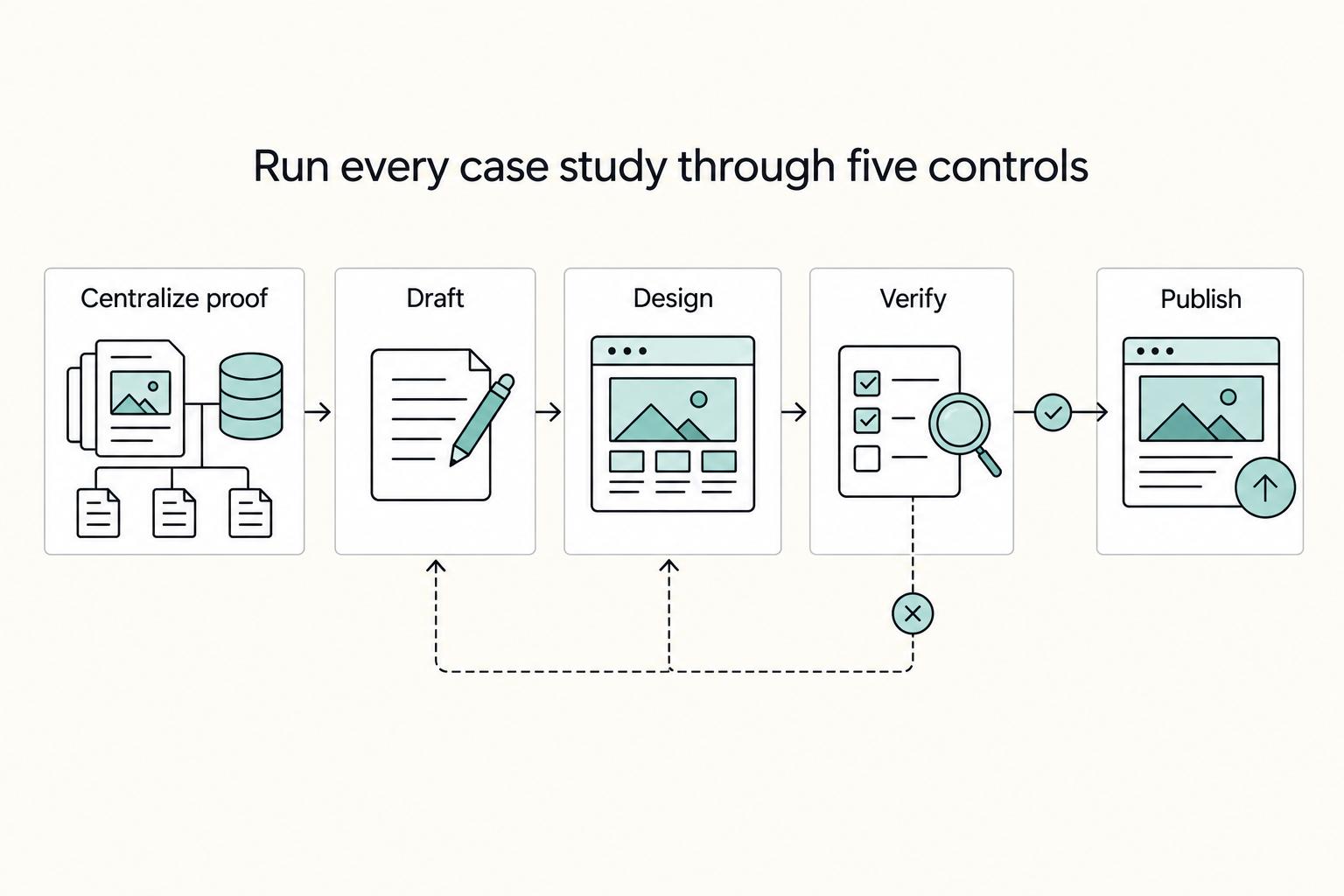
Run a fixed five-step workflow every time: centralize proof, draft, design, verify, then publish and maintain. Tools do not fail teams on features. They fail when the workflow is loose, approvals are fuzzy, and "publish" happens before proof is locked.
| Step | Main action | Key differentiator |
|---|---|---|
| Intake and proof lock | Collect interview notes, customer documentation, and outcome evidence in one working file set before anyone drafts copy | You eliminate conflicting versions before writing starts |
| Draft with role clarity | Use Breeze or another drafting tool to produce a first narrative from approved notes, then keep each major claim tied to a proof artifact | You gain speed without losing editorial control |
| Design for decision making | Move approved copy into your design tool, then package a skimmable story for proposals, sales pages, and portfolio assets | You turn one narrative into reusable assets across channels |
| Run a hard verification gate | Confirm outcome claims, timeline statements, and client permissions before publish | You protect trust before you optimize style |
| Maintain on a regular cadence | Refresh screenshots, tighten framing, and retire stale examples that no longer represent your work | Your portfolio stays current instead of drifting |
-
Intake and proof lock. Put interview notes, customer documentation, and outcome evidence in one working file set before anyone drafts copy. HubSpot frames this as a single source of truth problem, and that framing is right. You want one place to check facts and one place to resolve version conflicts.
-
Draft with role clarity. Use Breeze or another drafting tool to produce a first narrative from approved notes, then shape the language for audience and offer fit. Treat AI output as a draft, not a verdict. Keep each major claim tied to a proof artifact so your reviewer can confirm it quickly.
-
Design for decision making. Move approved copy into your design tool, then package a skimmable story for proposals, sales pages, and portfolio assets. If you publish in HubSpot, keep edit, manage, and publish steps in one place. File the piece inside your case study library, with industry filters when useful, so retrieval stays easy later.
-
Run a hard verification gate. Confirm outcome claims, timeline statements, and client permissions before you publish. Require explicit publish access controls where relevant, including View, Edit, and Publish permissions in HubSpot workflows. Use QuillBot as an editing support layer, not a fact checker.
-
Maintain on a regular cadence. Set a review rhythm based on deal flow and update volume. Refresh screenshots, tighten framing, and retire stale examples that no longer represent your work. HubSpot also supports performance analysis after publication, so use that signal to prioritize updates. If you want deeper execution prompts, use A Guide to Using Case Studies to Win Freelance Clients.
Choose a Stack You Can Operate Reliably and Publish With Confidence#
Choose a three-layer stack you can run every week, not the flashiest winner on a generic tools list. At this point you are not shopping. You are building a system. The right stack protects proof quality, keeps design consistent, and helps you publish on schedule.
Use one role per layer, then commit for a full cycle before you change anything.
| Layer | Option | Why it fits a reliable workflow |
|---|---|---|
| Drafting | HubSpot Case Study Generator in Content Hub | You can create case studies from source documents in minutes and keep work in Content Hub |
| Drafting | Narrato | You can draft around challenge, solution, and impact, then create custom AI templates for repeatable structure |
| Design | Canva or Visme | Both support customizable case study templates, and Visme adds AI writing and design assistance |
| QA | Originality.ai or Grammarly | Originality.ai offers fact, plagiarism, readability, and grammar checks, while Grammarly helps you generate text when you stall |
If you need a client-safe case study fast, do not improvise. Pull approved proof, draft in HubSpot or Narrato, package visuals in Canva or Visme, then run QA before you publish. That sequence is consistent, repeatable, and easier to maintain.
Use this closing checklist:
- Pick one drafting tool, one design tool, and one QA layer today.
- Run one complete case study from notes to published asset without switching tools midstream.
- Keep your checklist and comparison table open during production so you enforce the same standards each time.
- If you publish through HubSpot, test CTA variants and keep the higher-performing version.
- Improve one layer at a time after you review real output quality and workflow friction.
If you want a practical handoff after publishing, pair this workflow with How to Create a High-Converting Freelance Services Page. The goal stays simple: run a stable system, ship credible proof, then refine with evidence instead of guesswork.
Frequently Asked Questions
What is the difference between case study software and case management software?
Case study software helps you create marketing proof for sales pages and your freelance portfolio. Case management software is a different category focused on handling legal or operational cases, and in enterprise contexts can include incidents or investigations. Tools like Clio signal a different category from case study tools.
Can AI create a full case study or only help format verified client outcomes?
Use AI to draft structure and language, then verify every claim with your own records. ChatGPT can help, but it can be wrong and produce misleading output. Treat AI as a writing assistant, not a truth engine.
What should freelancers evaluate first when choosing case study tools?
Start with evidence quality, not feature lists. If you cannot map each outcome statement to notes, documents, and approvals, stop and fix inputs before drafting. Then write clear, specific, context-rich prompts so your tools produce usable first drafts.
Which features matter most for reusable portfolio assets and client pitches?
Prioritize reusable templates, brand controls, and export flexibility for proposals and portfolio reuse. Canva and Visme both offer customizable case study templates, and Visme highlights controls for brand colors, fonts, and logo. These features keep your marketing design consistent across every client-facing asset.
What is the minimum workflow to produce a credible case study quickly?
Run five steps: intake proof, draft, design, verify, and publish. Add a final testimonial check because FTC endorsement guides apply to testimonials in advertising. When a client asks for a rush publish, you can still move fast if your checklist already covers proof links, approval, and final wording review.
Is HubSpot Case Study Generator enough on its own or should I pair it with Canva or Visme?
Use HubSpot Case Study Generator alone when your current output quality already supports your goals. Pair it with Canva or Visme when you need stronger visual packaging for one-pagers, pitch assets, or a freelance portfolio refresh. Choose the smallest stack that meets your quality bar and your maintenance capacity.
How do I avoid generic AI writing when using ChatGPT, Narrato, or QuillBot?
Feed ChatGPT or Narrato specific source context and require a clear challenge, solution, and impact structure. Then use QuillBot to tighten phrasing while preserving original meaning and context, not to invent new claims. Finish with a human edit that checks outcomes, timelines, and client permissions before publish.
Try a related tool
Researched and edited by the Gruv editorial team. Gruv builds cross-border billing, payouts, and finance-operations software for global businesses.
Sources
Includes 3 external sources outside the trusted-domain allowlist.
- ecfr.gov/current/title-16/chapter-I/subchapter-B/part...trusted
- federalregister.gov/documents/2023/07/26/2023-14795/guides-conce...trusted
- canva.com/templates/s/case-studyexternal
- devopsschool.com/blog/top-10-case-management-tools-in-2025-fe...external
- kissflow.com/workflow/case/case-management-toolsexternal
Educational content only. Not legal, tax, or financial advice.
Related Posts

Georgia 1% Tax for Entrepreneurs Without Filing Surprises
Treat Georgia's 1% tax path as a compliance question first and a rate discussion second. The goal is a setup you can defend under review, not a shortcut that fails at filing time.

Use Case Studies to Win Better-Fit Freelance Clients
The point of case studies is not to sound impressive. It is to help a buyer approve you faster by lowering the risk they feel when hiring an outside specialist. When your proof is vague, scattered, or hard to verify, clients often default to someone whose work feels easier to trust.

How to Create a High-Converting Freelance Services Page
If you want fewer renegotiation loops, treat your page as a qualification tool, not a polished brochure. The goal is not more inquiries for their own sake. It is fewer vague inquiries that turn into messy delivery.