
Quick Answer
Shortlist PandaDoc for broader document/signing work, Proposify for agency proposal consistency and Better Proposals for a focused web-proposal process. Check the plan that actually includes your required approvals, integrations and document volume. Test the same sample proposal in each; an open event is not acceptance, and a signature is not a settled payment.
Choose proposal software around your actual sales workflow#
Pick proposal software based on your ability to produce a clear, retrievable "what was sent and what got accepted" record, not on how pretty the template looks. As a business-of-one, your proposal process is not admin. It is a control system for scope, timing, and cash.
Treat proposals like operational assets. That mindset helps prevent scope fights and payment confusion later. The goal is simple: build a repeatable workflow from draft to send to acceptance without reinventing it every time.
A proposal record should show the offer version, recipient, send date, accepted terms and any later change. View tracking helps you time a follow-up, but it does not prove that the client read, understood or accepted a clause.
Store the final offer and acceptance together so scope questions can be answered from the actual agreement. The useful comparison is whether each tool lets you retrieve that package without relying on a dashboard you may later lose access to.
What "clean ops" proposal software actually means (for independents and agencies)#
You want fewer revisions, fewer follow-up lapses, and fewer disputes. You get that when your proposal software reliably creates, stores, and surfaces proof points.
Use this operator-grade checklist to evaluate PandaDoc, Proposify, Better Proposals, or any other sales tools in your stack:
| Workflow step | Proof you want stored | Why it protects you |
|---|---|---|
| Draft | Version history (or at least a final snapshot) | Prevents "you changed it after I agreed" arguments |
| Send | A recorded send event (for example, a timestamp) | Helps you confirm what went out without digging through email threads |
| Track (if available) | View/open activity log (if available) | A follow-up signal, not proof of reading or acceptance |
| Approve (internal, if you use it) | Who approved scope and pricing | Stops quiet discounting and scope drift in agencies |
| Sign/accept | Signed copy or acceptance record | Records assent; work starts at the milestone your agreement requires |
Hypothetical: a client challenges your timeline after kickoff. You pull the exact sent version, the acceptance event, and the scope section. You respond calmly, not emotionally.
The 10-minute decision framework + week-one implementation checklist#
Get the system live fast, then tighten it after you see real behavior.
10-minute framework (safe defaults):
- Must-have outcomes: fast to send, easy to approve internally (if that's part of your process), easy to retrieve later.
- Integration posture: start manual, but if integrations matter to you, verify what is realistically supported (for example, CRM connections, Zapier-style automation, and when available, APIs/webhooks).
- Risk test: can you answer "what did they agree to?" without searching inboxes?
Week-one implementation checklist (so it sticks):
- Build 2 to 3 templates (retainer, fixed scope, discovery).
- Standardize scope language, assumptions, change requests, and payment timing.
- Define one storage rule (single client folder, consistent naming).
- Run one end-to-end test send to yourself on mobile.
Vendors change pricing and plan inclusions constantly. Treat anything labeled "included" as something to verify, especially things like eSignatures, API access, and CRM integrations.
If you want fewer operational fires and more breathing room, this is a practical way to get there (and protect your work-life balance in the process).
Who this list is for (and not for) + selection criteria that actually matter#
Use this list if you need a repeatable proposal workflow that produces a clean, exportable record and hands off cleanly into whatever you use for contracting, invoicing, and payment ops. The throughline is simple: record first. Every tool choice should make it easier to prove what was sent, what changed, and what got accepted.
This list fits service sellers with repeatable offers (and breaks down at the extremes)#
You fit the target profile if you sell services that naturally generate recurring proposals: monthly retainers, fixed-scope projects, or discovery plus delivery packages.
In that world, "best" means software that helps you create, send, and track proposals (a common definition in proposal management software guides). It also means you can retrieve the exact artifact later without inbox archaeology.
You do not need this list if either of these describes you:
- Ultra-low volume: you send 1 to 2 proposals a year, you can tolerate manual PDFs, and you already store signed copies consistently.
- Enterprise quoting complexity: you run CPQ-style pricing, multi-layer approvals, and strict discount governance. In that environment, dedicated CPQ and enterprise deal-desk tooling is often a better fit than freelancer-first proposal tools.
Hypothetical: you run a two-person studio. One person sells, one delivers. You need a system that captures the "yes," locks scope language, and creates a handoff so delivery does not guess what got sold.
Selection criteria: table stakes, differentiators, then the "Gruv lens"#
Start with table stakes. Then focus on the differentiators that reduce operational risk, especially if you plan to connect a CRM, Zapier, or an API/webhooks surface later (where available).
| Layer | What to look for | Why it matters operationally |
|---|---|---|
| Table stakes | Templates, reusable content blocks, send and view tracking, reminders, eSignatures (if offered), PDF export | Reusable content reduces the risk of sending obsolete scope or pricing, provided you maintain the master version. |
| Differentiators | Approval traceability, version history, deeper CRM integration (where supported), automation via Zapier (where supported), API or Webhooks access (where offered) | Creates a defensible timeline and reduces "who approved this price" confusion as you add collaborators. |
For the payment handoff, check whether acceptance can create the right invoice or deposit request and return a verified payment reference to your records. A virtual account is a receiving arrangement; a merchant-of-record service changes the commercial responsibilities involved. Neither is a universal proposal-software integration or a substitute for clear contract and payment states.
Score fast (1 to 5 each): speed-to-send, branding control, collaboration and approvals, CRM integrations, automation (Zapier/API), audit trail strength, and plan-fit cost. Weight it by stage (solo prioritizes speed and cost. Boutique agencies prioritize approvals and consistency. Scaling teams prioritize audit trail and automation).
What should you prioritize: speed, branding, CRM depth, or control?#
Prioritize the one constraint that will break your proposal workflow first (speed, branding, CRM depth, or control), then buy the minimum tool that reliably solves it. This helps you avoid overbuying "sales tools" features you will not implement, while still protecting the visibility you need later.
A 4-way decision tree (pick one primary)#
Start with what will break first. Proposal management software helps you create, edit, and manage proposals, and many tools also automate repetitive tasks, track proposal status, and integrate with CRM systems. That still does not tell you what to buy; your primary constraint does.
| Primary constraint | Optimize for | Evaluation test |
|---|---|---|
| Need "send today" speed | Automation, reusable content, central content library | Fastest path from draft to sent, with less copy-paste risk |
| Sell premium or creative work | Brand consistency and a professional, timely proposal experience | The proposal itself has to sell the work, not just describe it |
| Pipeline lives in a sales stack | Deep CRM integration and analytics | Create a draft from one deal, then confirm the correct client, amount and status are written back |
| Manage complex stakeholder deals | Tracking and visibility | Use several recipient roles and check signing order, approval authority and the retained activity record |
- If you need "send today" speed: optimize for automation, reusable content, and a central content library. You want the fastest path from draft to sent, with less copy-paste risk.
- If you sell premium or creative work: optimize for brand consistency and a proposal experience that helps you present professional, timely proposals. The proposal itself has to sell the work, not just describe it.
- If your pipeline lives in a CRM: test the actual fields and status sync, not just a logo on the integrations page. A wrong entity or duplicate deal can cause more work than the integration removes.
- If several people review the offer: test recipient roles, internal approvals and signing order. Engagement analytics are useful clues; they do not establish who had authority to accept.
Hypothetical: you run a small studio. If your bottleneck is "waiting on internal pricing sign-off," brand polish will not save you. Buy control first.
Build your must-have vs nice-to-have matrix (non-negotiables first)#
| Must-have (protects delivery and follow-through) | Nice-to-have (upgrade when friction appears) |
|---|---|
| Proposal status tracking | Deeper performance analytics and reporting |
| Analytics to measure effectiveness and engagement | More advanced automation beyond the basics |
| CRM integration (if you run a CRM) | Expanded content management beyond a core library |
| Central content library for brand consistency | Additional workflow polish once the core process is stable |
| Collaboration support | Broader sales-stack connections where they are actually used |
Define "control" in operational terms: who can edit shared content, how collaboration works, and what needs to happen before a proposal goes out. Treat proposal automation as a sales strategy, not just an admin tool, and you'll choose software that matches your actual client acquisition motion.
The shortlist: best proposal software in 2026 (with best-for picks)#
Pick the tool that gets you from draft to sent to tracked to signed with the least operational friction. Use this shortlist as a buyer's map: best-for fit, tradeoff, and a copy-this-week evaluation method.
Quick comparison table (scan first, then read the details)#
| Tool | Best for | Strength | Tradeoff to watch | Integration posture |
|---|---|---|---|---|
| PandaDoc | Broader document and signing workflows | Document editor, signatures, audit trail and optional workflow connections | Separate base plan, advanced controls and automation usage costs | Test the specific CRM/payment connection and purchased permissions |
| Proposify | Shared agency proposal content | Branded proposals, reusable content, tracking and signing | Advanced governance and API access are tier-dependent | Test the actual CRM mapping and approval route |
| Better Proposals | Focused web proposals | Web proposals, content library, signatures and engagement visibility | Basic seat/send limits; integrations and governance need higher tiers | Test export, follow-up and the chosen payment integration |
Best-for picks (and a use-case you can run this week)#
Treat the shortlist as an editorial fit map based on official product documentation, not a measured fastest or safest ranking. Use one core offer, retainer, rush variant, upsell and change-order sample across all three. Send to addresses you control and use sandbox payments; do not create fictitious live client agreements or charges.
- PandaDoc: test it when proposals sit alongside contracts and other signing workflows. For all five sample offers, check the sent copy, recipient roles, signature record and final export. Test any required approval and CRM route in the plan you intend to buy.
- Proposify: test it when agency consistency is the main problem. Reuse a scope section across two sample proposals, then try an unauthorized pricing edit and an approval request. Verify the chosen plan controls the change rather than merely recording it.
- Better Proposals: test it for a focused web-proposal flow. Open a fixed-scope sample on mobile, choose an optional line item, sign in the test workflow and retrieve the record. Check that the amount handed to the invoice/payment step matches the accepted selection.
One more filter: remove friction from the moment of trust#
Remove unnecessary steps for the client: mobile review, a clear acceptance action and the next payment instruction. Keep the underlying states separate. Capturing a payment method is not the same as collecting a deposit, and a proposal view is not permission to start work.
PandaDoc vs Proposify vs Better Proposals: which one fits your workflow?#
Pick the tool that matches how you run work, not the one with the most "sales tools" features. Your goal is a proposal process you can repeat, track, and defend when scope or price gets fuzzy.
Quick fit map (choose by workflow pain)#
| If your real problem is... | Choose | Why to test it | What you must verify before you commit |
|---|---|---|---|
| End-to-end flow from proposal to acceptance, plus future automation | PandaDoc | A broader authoring/signing platform with documented integrations and audit records | Confirm which eSignatures, approvals, and API access your plan includes (and what you can actually connect it to in your stack). |
| Inconsistency inside the agency (scope rewrites, pricing drift, brand chaos) | Proposify | A proposal-focused editor and reusable content can support standardization | Confirm roles/permissions and any approval mechanics you need for pricing guardrails. Confirm the specific integrations and any API options you'll rely on. |
| You need a lightweight system now and can tolerate some manual glue | Better Proposals | A focused web-proposal experience can suit a simple service offer | Do not assume integrations or reporting depth. Verify what tracking you get, what you can export or retain for your records, and how it fits into the rest of your workflow before you standardize on it. |
Hypothetical: a two-person studio keeps rewriting scope and changing prices. Test Proposify’s shared content and the actual plan’s control mechanisms first, then compare the same workflow in the other tools. Choose the option that prevents the specific mistake within budget; the product name alone does not guarantee a locked section.
Tie-breaker checklist (answer in order)#
- Do you need eSignatures inside the proposal tool, or can you route signature through another system?
- Do you need internal approvals, role permissions, and pricing guardrails before anything goes to a client?
- Do you need automation triggers (for example, an API when supported) to kick off downstream work after acceptance?
- Do you need audit-friendly retention, meaning you can keep the final version plus a clear activity record (what you sent, what they viewed, what they accepted) for your files?
Pricing reality check: what proposal software costs (and when to upgrade)?#
Budget for proposal software in capability bands (Starter, Team, Scale), then upgrade only when a real operational bottleneck starts costing you time, cash, or control. This keeps you stable when vendors change packaging and your workflow stays the same: create, send, track, and sign in one system.
Budget in bands (not sticker prices)#
Buy the minimum band that supports your current workflow and your risk tolerance, then verify the exact inclusions for any vendor you're considering.
| Band | What you're really buying | What to verify (varies by vendor) | Practical reason to pay |
|---|---|---|---|
| Starter (solo) | A unified place to create, send, track, and sign proposals | Digital signing, basic tracking/visibility, export/download options, document retention | Fewer manual formatting and signature steps at a sustainable proposal volume |
| Team (agency) | Fewer mistakes when proposals need frequent tweaks across people | Collaboration controls (roles/approvals), shared templates/content, consistency controls | Shared content and approvals can reduce pricing or scope drift |
| Scale (ops-heavy) | Operational control as volume and complexity increase | Automation/integrations, deeper reporting, permissions, auditability (if needed) | A maintained integration can remove repetitive handoffs; compare saved time with seat, usage and setup costs |
Current official pricing checkpoints — checked October 5, 2026#
| Vendor | Published USD price and billing | Limits or costs to resolve |
|---|---|---|
| PandaDoc | Starter $19/seat/month and Business $49/seat/month, billed annually; Free $0 | Free: five documents/month. Automation/API may require Usage Credits or add-ons. The page’s unlimited UI wording and document-overage FAQ need clarification for the purchased package. |
| Proposify | Basic $19/user/month annually or $29 monthly; Team $41 annually or $49 with quarterly billing; Business from $3,900/year | Send-limit section lists Basic 10/Team 30/Business 75 monthly sends plus overage, while a comparison row says unlimited. Obtain written clarification. Business lists roles, approvals and API. |
| Better Proposals | Starter $13/user/month annually or $19 monthly; Premium $21 annually/$29 monthly; Enterprise $42 annually/$49 monthly | Starter one seat/10 sends monthly; Premium unlimited seats/50 sends; Enterprise unlimited sends. Premium adds CRM/API/Zapier; Enterprise adds approvals/locking. Nudge is an optional $10/user/month add-on. |
Sources: PandaDoc pricing, Proposify pricing and Better Proposals pricing. Annual per-month figures are billing equivalents, not necessarily a cancellable monthly commitment. Confirm tax, currency, billing term, quota scope, add-ons and checkout price.
Worked budget example: one Better Proposals Starter seat at the published $13 annual-billing equivalent is $156 for 12 months, before tax and extras. Its 10-send monthly cap would not cover a 15-send month. Premium’s $21 equivalent is $252 for 12 months and lists 50 monthly sends; verify the current contract and any alternative rather than assuming volume averages erase a monthly cap.
Upgrade triggers, plan-fit traps, and a verification protocol#
Upgrade on pain, not features. Your real triggers usually look like this:
| Trigger | What to add | Why |
|---|---|---|
| You lose time to manual follow-ups | Better tracking and workflow support | Helps with opened-but-no-reply proposals |
| You see scope disputes | A more traceable digital process | Makes acceptance easier to prove later |
| Your team ships inconsistent proposals | Stronger template and content governance | Reduces inconsistency across proposals |
| Cash collection stays messy after acceptance | A verified acceptance-to-invoice/payment handoff | Check eligibility, processor charges and receipt status rather than assuming a saved payment method means collected cash |
Watch common plan-fit traps: limits and add-ons can show up in different places depending on the vendor and tier. Do not guess.
Verification protocol (freshness guardrail):
- Open the current pricing page for each finalist.
- Confirm your must-haves: digital signing, integrations you rely on, exports/auditability (if required), and role permissions (if you're a team).
- Screenshot the pricing page and plan comparison for your internal records.
Hypothetical: your solo workflow needs ten proposals a month and no internal approvals. Compare the relevant base plans and document limits. If teammates later require restricted editing or pricing approval, compare the actual higher-tier quote; Starter, Team and Scale here are capability bands, not identical vendor plan names.
Proposal ops risk layer: version control, audit trail, and payment handoff#
Treat every proposal as an operational control point with version control, auditability, and a clean path to payment, not as a pretty PDF. This is what protects you when a client disputes scope, timing, or what they thought they approved.
1) Build your "defensible record" package (minimum viable, every time)#
Save the final offer version and the actual acceptance record, then link any executed agreement and payment reference. This is a practical record trail, not a promise of legal admissibility or an immutable forensic chain.
Safe-default storage rule: save the final PDF plus proof of acceptance (for example, an activity log and any signature certificate your proposal software provides) in a client folder using a naming convention you do not break.
| Artifact to retain | What it records | Safe-default naming |
|---|---|---|
| Final proposal PDF | The exact offer sent | Client_Project_Date_Version.pdf |
| Acceptance log or activity trail | Events the tool detected; views alone do not establish acceptance | Client_Project_Date_AcceptanceLog |
| Signature certificate (if available) | Who signed and when (per tool output) | Client_Project_Date_SignatureCert |
Where your purchased plan supports approvals or content locking, test them before inviting collaborators. Otherwise use a documented manual review and restrict master-template editing. Keep one current master rather than relying on filenames alone to prevent changes.
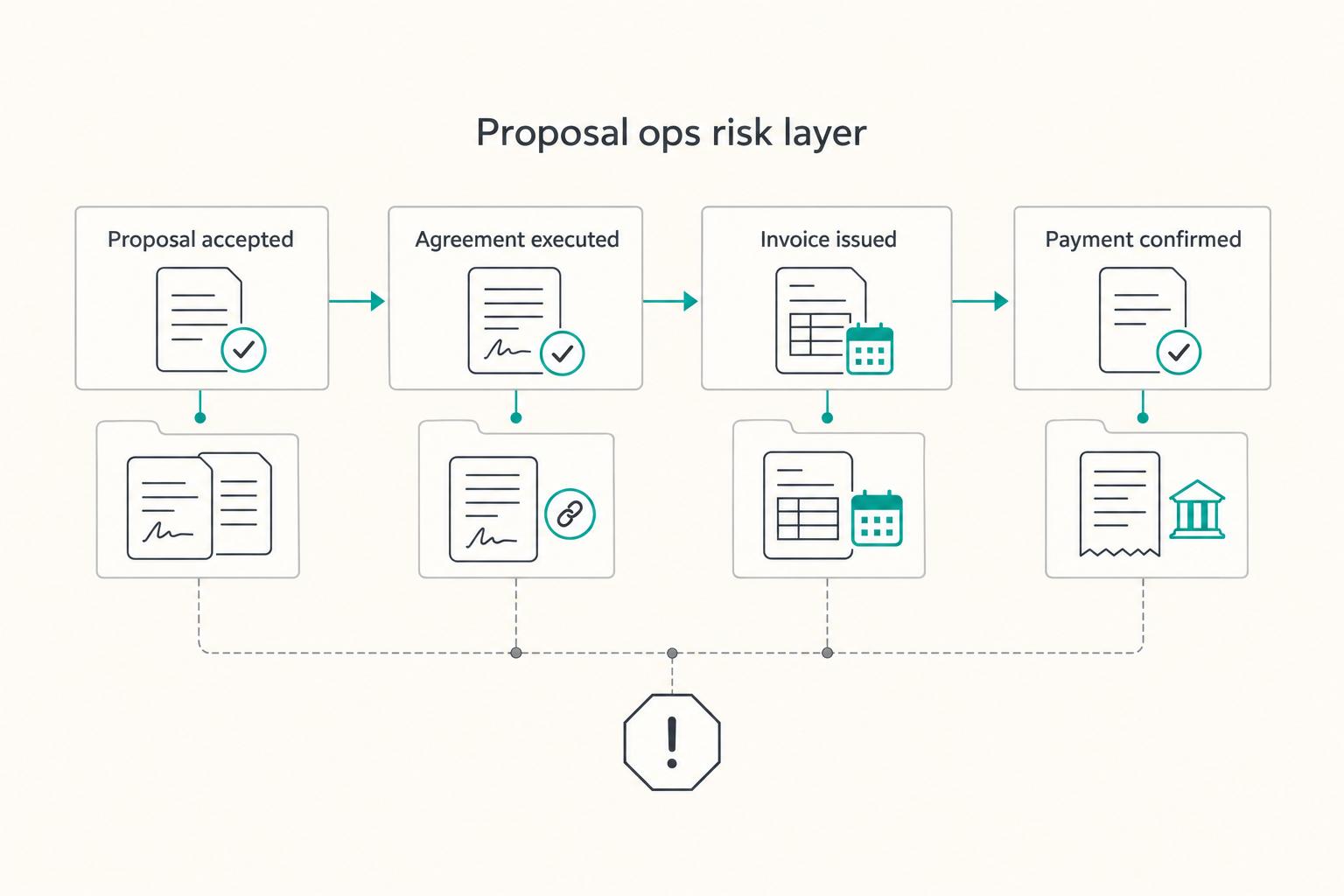
2) Create a chain of custody: proposal → agreement → invoice → payment confirmation#
Use stable proposal, agreement and invoice identifiers to connect the records. If a proposal is itself the executed agreement, retain that document once and link it rather than inventing a second signing step. A revised accepted scope needs the agreed amendment or replacement process.
| Stage | Record to save | Folder action |
|---|---|---|
| Proposal accepted | Acceptance log and signed copy | Capture and store them in the same folder |
| Agreement executed | Executed agreement | Attach or link it to the same folder |
| Invoice issued | Invoice ID and date | Record them in your CRM or client folder |
| Payment confirmed | Processor receipt or bank confirmation | Save the confirmation artifact |
Use this operator checklist:
- Proposal accepted (capture log and signed copy).
- Agreement executed (attach or link the executed agreement to the same folder).
- Invoice issued (record invoice ID and date in your CRM or client folder).
- Payment confirmed (save the processor receipt or bank confirmation).
Hypothetical: a client disputes an add-on. Retrieve the accepted version, authorization and linked agreement. If the add-on appears only in an unsigned revision, resolve that gap before invoicing it as accepted work.
3) Make acceptance-to-payment explicit (reduce avoidable payment risk)#
Define deposit terms inside the proposal or contract flow (amount, due date, refund rules), then hand off to invoicing and collection. If you work cross-border, decide how you will reconcile deposits, fees, and currency conversion.
Whatever your setup, you still need a clear internal reconciliation step and a stored confirmation artifact.
Keep the finance records the transaction requires#
Tax and invoice requirements can apply even to small deals. Keep the relevant supplier, tax treatment, currency, invoice and payment records, with access restricted where needed. The proposal tool may store part of this package; it does not automatically satisfy every local invoicing or retention rule.
If you need VAT context, use A Guide to VAT for UK Freelancers.
Week-one rollout checklist: launch clean in 5 days#
Launch the minimum viable proposal system first (templates, governance, one automation, and a clean handoff), then iterate once you see real client behavior. If you want a tight week-one plan, the 5 workdays below are a practical starting point you can stretch or compress.
Your week-one "MVP then iterate" plan (5-day example, operator-safe defaults)#
Start with a small template set and one controlled workflow. A five-day rollout is an illustrative schedule, not a guarantee that procurement, integration or legal review will finish that quickly.
Use this table as your week-one scoreboard:
| Day | Output you ship | "Done means" check |
|---|---|---|
| 1 | A small set of master templates | You can send a clean retainer, fixed-scope, or discovery proposal in minutes |
| 2 | Governance rules | You prevent accidental edits, pricing drift, and missing records |
| 3 | Pipeline connection | You remove at least one weekly manual step (logging, creating docs, follow-ups) |
| 4 | Acceptance-to-onboarding + payment | Create the deposit/invoice request after acceptance; release work only at the agreed payment or approved credit milestone |
| 5 | Pressure test + short SOP | You can prove what was sent, viewed, and accepted, then repeat it |
Day-by-day checklist (copy, paste, execute)#
- Day 1. Build your template spine (repeatability). Create a small set of templates (for example: retainer, fixed-scope, discovery) and lock the sections that protect scope: assumptions, timeline, out-of-scope, and change-order language. Decide where eSignatures happen, and define what "accepted" means (signed, paid deposit, or both). Write that rule inside the template so your future self does not renegotiate it mid-deal.
- Day 2. Set governance rules (prevent future mess). Assign roles: who edits templates, who approves pricing, and what needs a second set of eyes (especially with subcontractors). Set naming, storage, and retention rules so you can produce "reliable and verifiable records" when tax or finance questions show up later. Keep exports organized for VAT or other tax evidence where applicable (rules vary by jurisdiction).
- Day 3. Connect your pipeline (minimum viable automation). If you already run a CRM, connect it. If you do not, use a simple automation tool for one flow: create deal, generate proposal, log activity. Park deeper API work and webhooks for later. Start with one trigger you feel every week (like auto-creating a draft when a lead hits "qualified").
- Day 4. Build the acceptance-to-payment handoff. Generate the correct invoice/deposit request, link its ID and map processing, paid, failed and returned states. Assign owners to prepare the kickoff email, questionnaire and project board where the engagement needs them, but release work only at the agreement’s payment or approved credit milestone. Replaying the same event must not create another invoice or kickoff.
- Day 5. Pressure-test with a real client scenario. Send a proposal to yourself, open it on mobile, click every link, and confirm you can export the final artifact package (final PDF plus any activity log and signature evidence your tool provides). Hypothetical: your client accepts on their phone, then asks to "just tweak one line." Your SOP should tell you exactly whether you revise, re-send, and re-sign, or issue a change order. Finish by writing a short SOP: "How we send proposals" (tools, steps, timing, follow-up rules).
Choose a plan, test the workflow and review the result#
Write down the failure you need to prevent, then buy the smallest plan that addresses it. Trial success means the offer, acceptance and payment handoff work for your actual process, not merely that the template looks finished.
Use the actual proposal failure as your filter#
Choose the control that matches the problem. Security, mistaken edits and payment-state confusion require different checks; a generic claim of safety cannot replace them.
| Concept | What it protects you from | Plain-English decision rule |
|---|---|---|
| Unauthorized access | Client or pricing information reaching the wrong person | Test access controls and restrict private exports |
| Accidental edits | A teammate changing approved scope or price | Test locking/approvals or use a documented manual review |
| Broken handoff | An accepted proposal producing duplicate invoices or premature work | Replay a test event and check the agreed payment milestone |
Record each failed trial step, the responsible tool and the proposed remedy. A missing feature may justify a higher plan; a bad field mapping needs configuration rather than a larger subscription.
Ship the minimum system, then harden intentionally#
Operators do not pick perfectly. They pick, run, and tighten.
Use this rollout checklist as your safe default:
- Write the risk statement first. One sentence: "The failure I cannot accept is ___." If you cannot fill that blank, you do not understand the decision yet.
- Start with one repeatable path. Draft, review, send to yourself, accept in the test workflow, export and create the right invoice request.
- Test the failure you identified. Try a changed scope, unauthorized edit, duplicate event or failed payment and verify the response.
- Compare viable alternatives. If the chosen plan cannot meet the required control within budget, test another finalist rather than committing to a brand before the workflow works.
Hypothetical: you ship a process that reduces errors but still feels manual. Good. You just earned real data. Tighten the highest-risk seam next, not the loudest feature request.
Want to talk it through? Talk to Gruv.
Frequently Asked Questions
What is the best proposal software for freelancers vs agencies?
For a solo freelancer, test speed, signing and final exports first. For an agency, add shared content, pricing approvals and editing permissions. The shortlist gives fit suggestions rather than a universal winner. Select the plan that performs your real workflow and compare its total commitment.
What features actually matter most in proposal software (and which are just nice-to-have)?
Prioritize clear authoring, recipient review, an appropriate acceptance method and retrievable final records. Tracking is a follow-up aid, not proof of agreement. Integrations and API access become useful when they remove a specific repetitive step and you can maintain the status mapping.
How much does proposal software cost, realistically, and when should I upgrade plans?
Compare billing term, seats, document/send limits, automation credits, add-ons and tax. The dated price table gives starting points, while the vendor quote or checkout confirms the actual commitment. Upgrade for a measured bottleneck or required control, not because a higher tier sounds more professional.
PandaDoc vs Proposify vs Better Proposals: which should I choose?
Test PandaDoc for broader document/signing workflows, Proposify for agency proposal consistency and Better Proposals for a focused web-proposal process. Run the same offer and change-order samples through each, then compare the required plan, exports, controls and integration behavior. These are fit recommendations based on documentation, not a hands-on ranking.
Can proposal software reduce client disputes and payment risk - and how?
It can reduce ambiguity by retaining the offer and actual acceptance, but view analytics alone do not establish assent or prevent disputes. Keep signed scope, amendments and invoice links together. Define deposit and onboarding milestones so a signature, pending payment and confirmed receipt cannot be confused.
What should I set up in week 1 to launch proposal software without breaking my workflow?
Set up only what you need to ship proposals consistently: 2 to 3 templates, clearly defined scope sections, and a one-page SOP for sending and follow-up. Add governance (who edits templates, who approves pricing) so you do not renegotiate your own process mid-deal. Pressure-test on mobile and confirm you can export the final PDF plus any tracking or signature record your tool provides (if available). If you sell cross-border, keep your tax evidence tidy too (for example VAT documentation), and sanity-check your process with A Guide to VAT for UK Freelancers.
Do I need CRM integrations, Zapier automations, or API/webhooks on day one?
No. Start with a repeatable manual path, then add one connection when it removes a weekly task. Test required fields, failed events and duplicate handling. A product may offer an API while access or automated document creation is still charged separately; verify the purchased entitlement.
Try a related tool
Researched and edited by the Gruv editorial team. Gruv builds cross-border billing, payouts, and finance-operations software for global businesses.
Sources
Includes 6 external sources outside the trusted-domain allowlist.
- betterproposals.ioexternal
- betterproposals.io/pricingexternal
- pandadoc.comexternal
- pandadoc.com/pricingexternal
- proposify.comexternal
- proposify.com/pricingexternal
Educational content only. Not legal, tax, or financial advice.
Related Posts

Freelance Work-Life Balance That Holds Up in Real Weeks
If invoicing lands at 9pm and routine messages fill Saturday, start by checking where your time went. A workable freelance schedule needs room for delivery, client communication, admin, and recovery. Written hours and reply windows help clients plan, while capacity checks help you avoid promising work that only fits by giving up personal time.

VAT for UK Freelancers Without Filing Surprises
For a UK-established freelancer, VAT begins with the value and location of supplies, not profit or a marketplace tax setting. Check whether registration is compulsory, establish the effective date, then connect invoices, digital records and VAT returns.

The Freelance Payment Penalty: A Modeled Audit of Platform Fees, FX Spreads, and Payout Delays
The money rarely disappears through a single, easy-to-spot fee. The real loss is stacked. A marketplace takes its commission, a processor adds a charge for international cards, a bank or payment company converts the currency at a spread, a platform holds the funds before release, and a wire sheds a little to intermediaries on the way in. Each layer looks defensible on its own, but the worker feels the combined result as a smaller deposit and a later payday.