
Quick Answer
The best project management tools for freelance writers are the ones you’ll keep consistent while maintaining a single, audit-ready project record across scope, execution, evidence, and money. Use a simple scorecard, shortlist two tools, and pilot them on one live client project. For many writers, Trello (visual Kanban), Notion (project records + docs), Airtable (structured fields), ClickUp, Asana, or Bonsai can fit - depending on your workflow and collaboration needs.
Choose a project tool around your writing workflow#
Build one traceable system for scope, execution, and billing, and give each tool one clear job. Freelance writing ops is not "a writing project." It is overlapping deadlines, revision cycles, approvals, and payment triggers. When you can't reconstruct what happened, you lose time, margin, and sometimes trust.
You are the CEO of a business-of-one. Your ops system keeps delivery and cash flow predictable when work stacks up.
Project management for writers works best when you reduce app sprawl, not when you keep adding tools. An app audit is a review-and-cleanup pass on the apps you use. Too many apps can raise security risk, and spreading work across tools makes it harder to find what you need when you need it.
The operating framework#
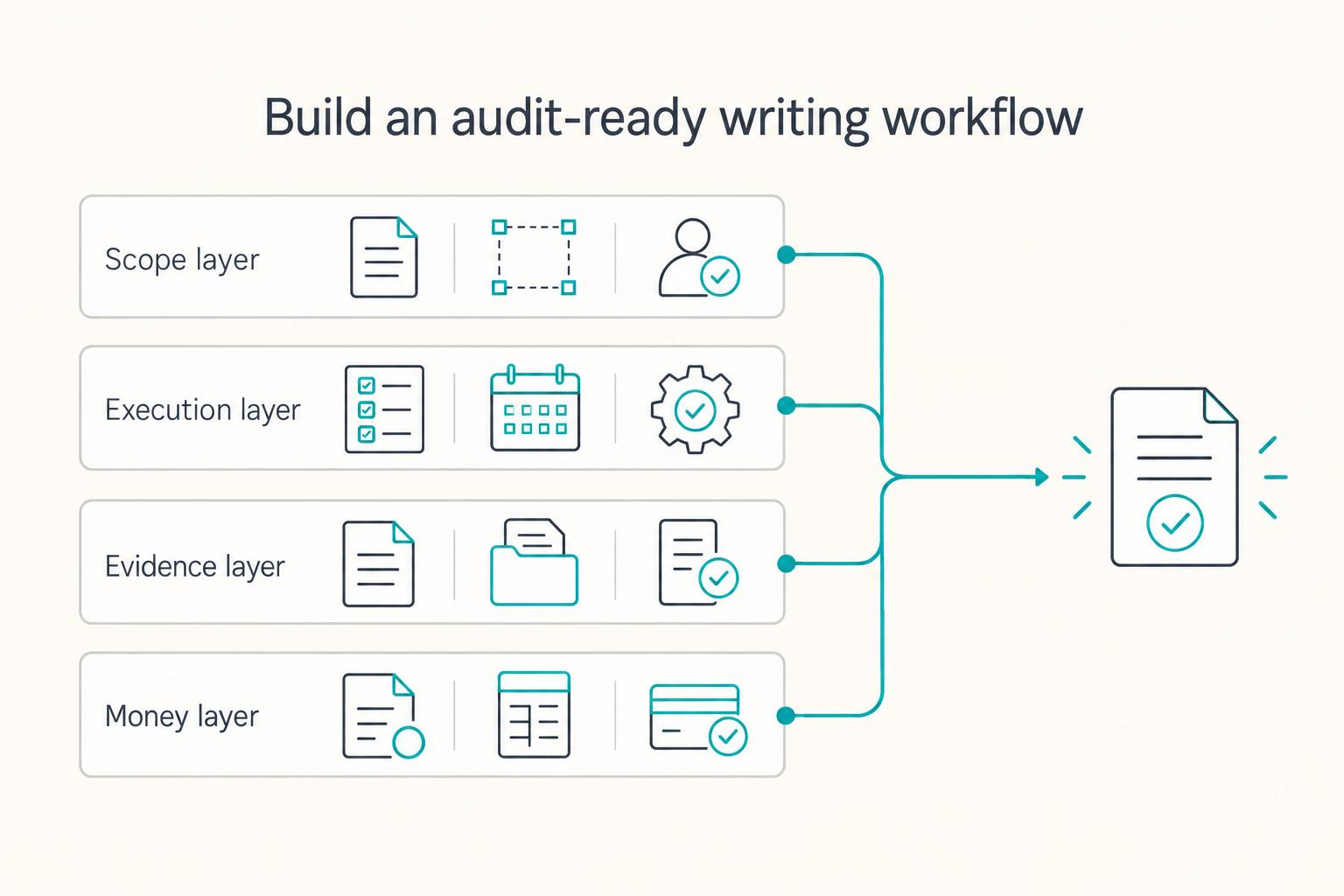
Use this four-part model to keep your workflow stable and your records easy to follow, even months later:
| Layer | What you control | Practical rule |
|---|---|---|
| Scope layer | Statement of Work (SOW), revision boundaries, approver | Define scope and change handling before drafting starts. |
| Execution layer | Tasks, due dates, revisions, approvals | Move every deliverable through the same status path every time. |
| Evidence layer | Source files, approval proof, final handoff | Keep one findable record for each project, not scattered notes. |
| Money layer | Invoice trigger, invoice ID, payment status | Tie delivery to invoicing so payment follow-up doesn't become a scavenger hunt. |
This model also keeps tool decisions honest. Trello is a visual task tool centered on Kanban boards, and its cards can include checklists, due dates, and attachments. That makes it strong for the execution layer.
But it doesn't natively handle invoicing, time tracking, contracts, or a client portal. Billable work may still require separate tools, and Power-Ups can add cost.
Your Client Project Record (minimum schema)#
Treat every assignment as one record you can open quickly. At minimum, include:
- Client name and primary approver
- Deliverable type and due date
- Current status and revision notes (as needed)
- SOW link and approval evidence link
- Source file link and final delivery link
- Invoice trigger, invoice number/ID, payment status
If a client challenges an invoice after extra edits, you do not debate from memory. You open the record, show the agreed scope, show the approval trail, and show what triggered billing. The point is not "more documentation." It is one version of operational truth you can find fast.
Minimum viable setup in Trello, Notion, and Airtable#
Start lean. Build one core workflow, then expand only when pressure exposes a real gap.
| Tool | Recommended setup | Key standard |
|---|---|---|
| Trello | Use a consistent board structure and a consistent card setup per deliverable | Definition of Done checklist |
| Notion | Keep project records in one place | Consistent format and status definitions across clients |
| Airtable | Keep project records consistent over time | Standardize the core info and status logic across projects |
Whatever you choose, standardize it. Trello needs a consistent board and card pattern, Notion needs one home for project records, and Airtable needs stable core fields and status logic.
That is the point of this guide: clear tool choices without tool sprawl, plus a practical system you can trust under deadline pressure.
The selection criteria: what "project management for writers" actually means (and who this list is for / not for)#
Project management for writers means choosing a flexible, collaboration-ready tool that keeps project work visible and shared work clear.
"Best" is not about the biggest feature list. It is about fit: a setup you will actually maintain, and that collaborators can understand without constant explaining.
Who this list is for and not for#
This list is for writers coordinating client briefs, drafting, revisions, approvals, and billing across several assignments. It focuses on collaboration and project records rather than manuscript outlining.
A task board will not solve a drafting bottleneck by itself. If you mainly need an outlining space or distraction-free editor, solve that need separately.
Use a 4-criteria scorecard before you compare tools like Trello, Airtable, ClickUp, or Asana#
| Criterion | What to check | Score rule | Why it matters |
|---|---|---|---|
| Auditability | Can you keep key project context, decisions, and the "current truth" in a place you can find later? | 1 = scattered, 5 = one clear home | Less time hunting for context under deadline pressure. |
| Repeatability | Can you reuse the same workflow for the same deliverable type without reinventing it? | 1 = rebuild every time, 5 = template-first | More consistency when workload spikes. |
| Access control | Can you share progress with collaborators while keeping sensitive notes private? | 1 = all-or-nothing, 5 = controlled sharing | Transparency without oversharing. |
| Portability + resilience | If your tool changes (plan, pricing, policies), do you have a workable fallback? | 1 = brittle, 5 = clear backup path | Fewer "tool drama" emergencies mid-project. |
Use one scoring method across every candidate. Then shortlist two and run them on real work, because "looks good in a demo" is not the same as "holds up in production."
Pre-commitment checks that prevent expensive surprises#
Shortlist two tools around your actual bottleneck, then test the same brief, revision request, client permissions, and export in each.
Before you commit, sanity-check the basics you will depend on day to day:
- How collaboration works (who can see what, and how updates happen)
- What's included at your plan level (so you're not building a system on missing pieces)
- Whether you can keep your records usable if you ever switch tools
The failure mode to avoid is a stack that looks organized, but spreads real project truth across disconnected places. A scorecard keeps your tool choice anchored to how you actually deliver work.
Related: How to Build a Sales Pipeline for Your Freelance Business.
The freelance writer project lifecycle (lead → archive) with the artifacts you must be able to find later#
Use a simple, phase-based record trail so you can retrieve key project decisions and artifacts later.
Tool choice matters, but the bigger win is consistency. Keep one "Client Project Record" that stays readable under deadline pressure and helps you answer "what changed, when, and why?" without digging through scattered messages.
Some practical project-management guides frame work in phases such as Initiation Phase, Definition Phase, and Planning Phase. You can apply the same phase mindset to editorial work. Treat it as a stable set of checkpoints that makes handoffs and approvals easier to track as projects overlap.
Example lifecycle map: what to produce at each checkpoint#
| Checkpoint | Core artifact (examples) | Decision gate (what you're confirming) |
|---|---|---|
| Lead and intake | Brief notes, key contacts, links to relevant assets | Who's involved, and who can sign off (if anyone)? |
| Scope and agreement | Scope summary, what's included/excluded, working assumptions | Are you and the client aligned on what "done" means? |
| Planning and production | Task plan, dependencies, draft/review plan | What's the plan, and how will you track status? |
| Review and approval | Version notes, comment resolutions, approval note | Has feedback been addressed and approval captured in your workflow? |
| Delivery and invoicing | Delivery checklist, delivery confirmation, billing note | Was the work delivered, and what triggers billing in your process? |
| Payment and archive | Payment status, closeout notes, archive location link | Is the project fully closed and easy to reference later? |
Build one Client Project Record and keep naming consistent#
A Client Project Record is a single index entry that points to the current truth. It should link to files, key decisions, status, and whatever "receipts" you rely on for delivery and billing.
Keep names consistent so you can search reliably later: project name, deliverable, date/version. Do that whether you track in a PM tool, a doc, or a spreadsheet.
Useful fields to track, as needed:
- Client
- Deliverable type
- Due date
- Status
- Revision count (if you track it)
- Approver/contact (if applicable)
- Billing reference (invoice ID/number, if you use one)
- Payment status (if you track it here)
- Link(s) to the scope/working agreement and primary files
Link the scope, current draft, feedback, approval, and invoice reference in the same project record so a changed deadline or disputed revision can be traced without searching unrelated threads.
Keep sensitive data out of your PM layer#
Treat your PM workspace as an index, not a vault. Store links, status, and decisions there. If your work involves sensitive credentials or private customer data, consider keeping that material in the secure system your business already trusts. Then reference it from the project record when appropriate.
If you're under an NDA or similar constraints, check what storage and sharing expectations apply and ask when unclear.
Tool decision scorecard + quick comparison table (pick the right lane in 10 minutes)#
Choose the tool lane that best supports a visible workflow, clear collaboration, and a single project record, and validate it with a small pilot. You already have a lifecycle and artifact checklist from lead to archive. Now you are choosing the lane that supports that system without creating extra admin overhead or hiding the work when deadlines hit.
A Kanban board can make active writing, client review, and blocked work visible. Set your own work-in-progress limits so the board helps you decide what to finish next.
The freelancer takeaway is simple: start with your current process, then improve it using explicit rules.
Weighted scorecard for a durable setup#
Use a simple scorecard and weight what you care about most. The goal is not a "perfect" tool. It is a setup you will keep consistent, so your record trail stays readable later.
| Criterion | Suggested weight | What a strong score looks like |
|---|---|---|
| Repeatable templates | High | You can run the same editorial workflow for each deliverable without rebuilding from scratch. |
| Client permissioning | High | Clients can see what they need without exposing internal notes. |
| Export and portability | Medium-high | You can move core records if your stack changes. |
| Workflow visibility | Medium | Status and blockers stay obvious at a glance. |
| Automation headroom | Medium | Your key reminders and handoffs run with minimal manual chasing. |
| Cost predictability | High | Collaboration growth does not create surprise operating costs. |
| Single source of truth discipline | High | One current project record captures the latest status, links to files, and key decisions. |
Quick comparison table (scan first, then pilot)#
This isn't a winner-by-default list. Treat it as a set of practical questions to run against the tools you're considering. Tool capabilities and sharing behaviors vary, and can change, so validate in your own pilot.
| Tool candidate | Quick evaluation question | Keep if this is true after one live project |
|---|---|---|
| Trello | In this tool, can you represent your workflow visually, with explicit "done means done" rules and your own WIP limits (even if you enforce them manually)? | Work stays visible, and bottlenecks show up early instead of surprising you at review time. |
| Notion | In this tool, can you maintain a single project record and keep decisions, notes, and file links tied to it without losing track of "current truth"? | Context stays findable, and you stop duplicating the same details across messages and docs. |
| Airtable | In this tool, can you keep the same core fields for every project so handoffs and reporting don't drift over time? | Your project records stay structured and consistent across clients and deliverables. |
| ClickUp | In this tool, can you run the workflow week to week without constantly redesigning the system to keep it usable? | The system stays stable under pressure, instead of turning into ongoing setup work. |
| Asana | In this tool, can collaborators keep ownership and next steps unambiguous in the day-to-day task flow? | Follow-ups move forward with fewer "who's doing what?" loops. |
| Bonsai | In this tool, if you want project tracking tied closely to business admin, does it match how you actually run delivery and admin? | Your project record and admin touchpoints stay connected in one routine you'll maintain. |
Use one consistent test case across candidates: same Statement of Work (SOW), same Definition of Done, same deadline pressure. Before you pilot, sketch a simple swimlane diagram so it's clear who does what and in what sequence.
In your winning lane, you should be able to answer a client's status question from one view. That view should show the owner, next action, and current state, without hunting across scattered threads or files.
Before you commit to any tool, lock the scope controls that prevent revision churn: deliverables, revision rounds, acceptance criteria, and a change-request rule. Draft a clean baseline you can reuse client-to-client with the SOW Generator.
The 6 best project management tools for freelance writers (2026 picks)#
Use this shortlist to pick one primary tool lane that matches your workflow, then confirm it with one live project.
These six tools cover different needs: simple boards, documents and project databases, structured records, task coordination, and project-linked business admin. The comparison below uses vendor plan pages; fit still depends on your workflow.
Kanban boards are a task-management view used in writing workflows, alongside sub-tasks and dependencies.
The six picks and when to use them#
| Tool | Useful fit | Plan check before buying |
|---|---|---|
| Trello | Visual board for drafts, review, blocked work, and delivery | Check board and collaborator limits, guest billing, custom fields, and paid views. |
| Notion | Project record beside briefs, notes, and documents | Check guest limits, sharing permissions, file limits, and database needs. |
| Airtable | Consistent records and views across many recurring deliverables | Check record limits, editable collaborator charges, automations, and export needs. |
| ClickUp | Tasks, dependencies, and time tracking in a configurable workspace | Check guest permissions, time tracking, automation limits, and paid features. |
| Asana | Clear task ownership and coordinated reviews | Check participant limits, project permissions, and whether needed workflow features require a paid plan. |
| Bonsai | Project work connected to contracts, time, and invoices | Check which plan includes project management, contracts, invoices, and client collaboration. |
For the pilot, use one article with a brief, draft deadline, consolidated revision round, client approval, and invoice trigger. Invite the client with limited access, change the review date, then export the record. Choose the tool that keeps those events clear with the least upkeep. If testing Bonsai, check whether its admin functions replace existing contract and invoice tools before migrating.
How to implement without chaos#
Keep the stack simple: one system of record, one execution surface, and one shared place where files live. Then templatize your repeatable deliverables so each project starts with the same essentials - your Statement of Work (SOW) and a clear Definition of Done - instead of rebuilding the workflow every time.
Pressure-test your setup with a real client question: "What's the status, who owns the next action, and what decision are we waiting on?" If you cannot answer from one view, without hunting across threads, downgrade the tool or narrow the scope. Keep narrowing until the workflow stays visible in live work.
If you want a deeper dive, read The Best CRMs for Freelancers to Manage Client Relationships.
How do you manage 6-15 active pieces without deadline collisions?#
Keep visibility across assignments and deadlines, then adjust quickly when deadlines or ownership changes. You picked your tool lane in the previous section. Now you need operating rules that keep your workflow steady when scope shifts, feedback lands late, or priorities change midweek.
Keep assignments, deadlines, revision rounds, and payment status visible together. When a client delays feedback, mark the item blocked and update the schedule instead of hiding the delay in an inbox thread.
1) Build a two-layer system: execution plus schedule (with a project record)#
Separate "what stage is this in?" from "when will I work on it?" so you do not rely on memory, or your inbox, to prevent collisions. Keep the setup simple enough that you will update it daily.
| Layer | Tool examples | What you track | Daily decision |
|---|---|---|---|
| Execution | Your task view (board or list) | Status, owner, dependencies | What moves today, what waits |
| Schedule | Your calendar | Dates and time you plan to protect for focused work and reviews | What gets protected on the calendar |
| Project record | Your project record (in your PM tool or a doc like Notion) | Deadlines, revision notes, payment status | What changed and why |
Treat timelines as living structures. When delays, new scope, or shifting priorities show up, re-sequence the plan instead of stacking more parallel work.
2) Add capacity rules before urgency takes over#
Set constraints you can follow consistently, especially when you're busy. The goal is to make "too much at once" visible early, before it turns into missed deadlines.
- Limit how many items you keep in active creation and active review at the same time (pick a number you can realistically finish).
- Flag work as blocked, for example, "Blocked," when it is waiting on a client or collaborator.
- When ownership shifts or deadlines move, decide immediately: reassign, defer, or renegotiate the sequence.
- Do a short end-of-day reset to confirm status, owners, and next actions are current.
If you use automation support, use it to monitor tasks, timelines, dependencies, and risk signals. Focus on deadline updates and ownership changes so you can rebalance workload before pressure builds.
3) Standardize intake so new work does not break your week#
Many collisions start when a "quick request" arrives without enough detail to schedule it safely. Use a consistent intake template, whatever tool you use, so every new piece enters your system with the basics captured. Useful basics to capture include:
- due date (or due window)
- revision expectations / notes
- payment status (if you track it)
A practical example: a client shifts a review date on one draft while another piece is nearing final edits. Because your execution view, schedule, and project record stay current, you can spot the conflict, update the sequence, and protect the work that needs uninterrupted time without silently overcommitting.
This is the core move: protect flow first, then optimize tools. Your content calendar stays credible when your system makes tradeoffs visible while work is in progress.
How do you stop scope creep and revision churn - without becoming the "difficult" freelancer?#
Create a clear scope baseline, make revisions trackable, and run every extra request through one consistent change process.
Scope creep is extra work added without matching changes to budget and timeline. It's commonly described as a common, irritating fact of life, especially when you're trying to stay helpful. The fix is not being rigid. It is using written scope and simple records so you are not renegotiating from memory.
1) Lock scope before drafting starts#
A scope baseline is a clearly defined project scope you use to judge proposed changes. Document that baseline in writing, for example, in a Statement of Work (SOW) or project brief. Keep it somewhere easy to retrieve, for example, Google Drive or Dropbox, and link it inside the relevant task/card in your PM tool.
Use this baseline checklist on every project:
- Deliverables and boundaries: what you will ship, and what's out of scope.
- Revision boundaries: what you consider a "revision" versus a bigger rewrite (define it in plain language).
- Scope-change process: a simple "propose → evaluate → approve" path before extra work starts.
- Package caps: define what's included, then offer an upgrade path when clients need more.
2) Turn revisions into measurable operations#
Revision churn is when misunderstandings and multiple client edits become a major time sink. It stops feeling personal when you can point to a shared system: what changed, which round you're in, and what "done" means. You are not arguing about effort. You are aligning on process.
| Control | How to run it | What it helps with |
|---|---|---|
| Revision count | Track a simple "revision count" in your system (spreadsheet, PM tool, etc.). | Makes the current round visible and easier to discuss. |
| Definition of Done | Attach one client-visible checklist to each task/card. | Clarifies what "complete" includes for that deliverable. |
| Approval capture | Capture approval in writing at the agreed review point. Invoice on the contract’s billing trigger; deposits, retainers, and time-based invoices need not wait for final approval. | Helps reduce ambiguity at handoff. |
3) Use a change request script that protects the relationship#
A scope-change process is a formal way to propose, evaluate, and approve scope changes. You do not need bureaucracy, just one repeatable template so the conversation stays calm and consistent:
- Request summary: what changed.
- Impact: what it does to timeline and workload.
- Commercial update: added fee or a package upgrade option.
- Approval step: client confirms, then you update the SOW reference (or your project record) and proceed.
If you want help framing the commercial step, use your pricing framework from Value-Based Pricing: A Freelancer's Guide.
Picture this scenario: a client asks for a fresh angle after prior edits. You thank them, point to the current baseline, send the change option, and move forward after approval. You stay easy to work with because your system is transparent, without quietly absorbing extra work.
How do you run delivery, invoicing, payment, and archiving as one workflow?#
Run delivery, invoicing, payment, and archiving as one continuous workflow with clear triggers and time-stamped statuses. You just locked down scope and revision control. Now run the money lifecycle with the same discipline, so the system does not fall apart at billing time or months later when you're trying to prove what happened.
When invoicing is treated like an afterthought, the work spreads across email threads, folders, and bank notes. Instead, keep one project record that links delivery proof, invoice details, payment state, and the archive location. That single source of truth is what turns disputes and tax prep into quick lookups instead of a scavenger hunt.
1) Define invoice triggers at the project level#
Set the trigger before work starts and keep it visible in your system of record.
| Trigger | Invoice when |
|---|---|
| On approval | After client approval lands in writing |
| On milestone | When a named milestone closes |
| On retainer date | On a fixed schedule |
Store the trigger, client/entity name, and invoice sequence in a system like Notion or Airtable. Keep files and receipts in a storage tool like Google Drive or Dropbox, then link them from the same project record so delivery to invoice to payment stays traceable.
2) Track a minimum money lifecycle record#
A "money lifecycle record" is a compact set of fields that lets you see invoice status and supporting artifacts at a glance. Use one consistent schema across every client so you do not reinvent your process mid-year.
| Field | Why it matters | Suggested location |
|---|---|---|
| Invoice # | Prevents duplicate billing and lookup errors | Notion or Airtable |
| Invoice date | Anchors timeline and follow-up | Notion or Airtable |
| Due date | Defines when you start collection actions | Notion or Airtable |
| Paid date | Closes the loop for reconciliation | Notion or Airtable |
| Payment method | Helps match activity and fees | Notion or Airtable |
| Receipt link | Proof without inbox digging | Google Drive or Dropbox |
| Tax form reference (if applicable) | Tracks what you requested/received (requirements vary) | Notion or Airtable |
Status stamps (sent, confirmed, received, reconciled) | Makes handoff and finance state obvious | Notion or Airtable |
If you do cross-border work, keep the same status flow and add timestamps to each checkpoint. Consistency matters more than complexity.
3) Archive with year-end readiness in mind#
Close each project with a simple archive packet: final deliverable link, final invoice, payment confirmation, and any tax-form references you tracked, if applicable. Keep sensitive identifiers in secure storage, and store only controlled references in your PM layer. If you're choosing tools for storage, you can also sanity-check a provider's security and data-privacy posture using resources like the CSA STAR Registry.
Picture this scenario: a client disputes whether they already paid an invoice. You open one record, point to delivery proof, the invoice number, the current status stamps, and the receipt link. That is the operational win: clean records protect cash flow and make tax time a lot less stressful.
The safe default: pick one lane, ship with it, and keep your records clean#
Pick one workflow lane, stick with it for a full delivery cycle, and keep client records secure and easy to retrieve. The goal now is commitment, not more comparison, so your setup stays steady under real deadlines and you can explain what happened later without digging through scattered threads.
A system you can maintain weekly beats a "perfect" system you keep redesigning. Tool-hopping creates noise and lost context. One lane creates more predictable execution, clearer handoffs, and fewer dropped details when a client asks for status, approvals, or billing history.
Pick one lane and commit#
Use one lane that matches your current complexity, and keep it long enough to learn what actually breaks. You can always change later, but only after you have run it through a real project from kickoff to close.
| Lane | Practical setup example | Key differentiator |
|---|---|---|
| Lean lane | A simple task board + a calendar + a shared file folder | Low friction for day-to-day execution and basic scheduling visibility |
| Structured lane | One "system of record" where every project lives | More consistency for recurring workflows and tracking fields over time |
| Ops lane | A work management tool with enforced templates | More control when ownership and dependencies change often |
Don't treat this as a ranking. Treat it as a decision rule: if your lane stays current, keep it. If it goes stale, simplify before you expand.
Keep records clean with a security routine#
Your system only works long term if records stay secure and retrievable. Most businesses keep sensitive personal information in their files, and if it falls into the wrong hands it can lead to fraud or identity theft, so safeguarding it is just plain good business.
Sensitive personal information is names, Social Security numbers, credit card or other account data that identifies customers or employees.
The FTC describes a sound data security plan as built on five key principles. Start by operationalizing principles like these in your workflow:
- Take stock: know what personal information you have in your files and on your computers.
- Scale down: keep only what you need for your business.
- Lock it: protect the information that you keep.
- Pitch it: properly dispose of what you no longer need.
Next-step implementation checklist#
Ship a baseline you can repeat, then tighten it as you learn:
- Keep one current project record per client deliverable (status, key decisions, files, and dates in one place).
- Standardize your SOW and Definition of Done for similar work so scope and acceptance are easier to confirm.
- Keep delivery, invoice, payment, and archive status together so you can answer questions without reconstructing the story.
- Re-run the security routine regularly to remove what you don't need and protect what you keep.
If cross-border payment and reconciliation work is part of your model, be careful with recordkeeping and confirm what your providers support before rollout. Keep the standard high: fewer moving parts, clear ownership, and clean records.
Frequently Asked Questions
What is project management for writers (in freelance work, not book writing)?
Project management for writers is the discipline of planning, organizing, and controlling work to hit goals within scope, budget, and timeframe. In freelance client work, it means coordinating people, tasks, timelines, and resources around deliverables, not just drafts. You can think of it as managing the full project lifecycle: initiating, planning, executing, monitoring, and closing.
How do freelance writers manage multiple projects at once without missing deadlines?
Use a system that shows what needs to be done, when, and who owns the next step. Capture every assignment in one place, keep statuses current, and separate execution from scheduled work on your calendar so you're not juggling deadlines in your head.
What's the best project management tool for freelance writers?
There isn't one universal "best" tool for every freelance writer. The right choice is the one that helps you coordinate people, tasks, timelines, and resources in a way you'll actually maintain. If you're unsure, score two candidates with the same criteria, then pilot them on one real project and keep the option that stays clearest under pressure.
Do writers need Trello or Notion?
No. You do not need a specific brand to run strong operations. You need a system that tells you what needs to be done, when, and who needs to do it. If Trello or Notion gives you that clarity, use it. If your current setup already does, improve the process before adding tools.
Trello vs Notion vs Airtable: which is better for an editorial calendar?
There's no single winner for every editorial workflow. Compare them by whether you can keep one current project record, see status clearly, and maintain consistent fields over time. The "best" editorial calendar is the one you will keep up to date and that your collaborators can read without extra explanation.
How do you track revisions and approvals with clients?
Agree on review points and revision rounds, capture feedback and approval in writing, and keep those records beside the current draft. Invoice according to the agreed trigger, including deposits, retainers, or time-based billing where applicable.
How long should freelancers keep contracts, approvals, and invoices (and what about Form W-9/W-8 or 1099 records)?
Record-retention expectations can vary depending on your situation and jurisdiction, so avoid guessing. Keep contracts, approvals, invoices, and related records organized, accessible, and securely stored so you can respond quickly if questions come up. If W-9/W-8 or 1099 paperwork is part of your workflow, track what you requested and received, and confirm current requirements using official guidance or a qualified professional.
Try a related tool
Researched and edited by the Gruv editorial team. Gruv builds cross-border billing, payouts, and finance-operations software for global businesses.
Sources
Includes 6 external sources outside the trusted-domain allowlist.
- ftc.gov/business-guidance/resources/protecting-perso...trusted
- airtable.com/pricingexternal
- asana.com/pricingexternal
- clickup.com/pricingexternal
- hellobonsai.com/pricingexternal
- notion.com/pricingexternal
- trello.com/pricingexternal
Educational content only. Not legal, tax, or financial advice.
Related Posts

Value-Based Pricing for Freelancers Under Real Payment Risk
Value-based pricing starts with the client’s expected benefit and willingness to pay. It still needs a deliverable, scope and payment agreement you can perform. Use a discovery phase when the benefit or effort is too uncertain to support a defensible quote.

Best CRM for Freelancers Who Need Reliable Client Follow-Up
If your client work is solid but your admin lives across email, notes, calendar alerts, and a spreadsheet, your CRM choice will succeed or fail on operations, not features. That is why so much advice on the **best crm for freelancers** misses the real issue. The main risk is not choosing a tool with too few buttons. It is choosing one that looks polished in a demo but still lets follow-ups slip when work gets busy.

How to Build a Sales Pipeline for Your Freelance Business
Before you turn this into a detailed freelance pipeline playbook, pause for a source-quality check. The available evidence here is a [Scribd listing](https://www.scribd.com/document/958783827/The-FP-a-Handbook) for **FP&A Handbook: Financial Planning Guide**, not a verified, fully reviewed operations standard.