
Quick Answer
Choose the best universal travel adapter only after you verify route plug fit, device voltage needs, and a fallback power option. Ceptics GaN 70W can serve as a shortlist anchor rather than an automatic winner. Any missing model, port, or converter detail should stay Unknown until verified. Finish with a pre-departure load test and an arrival failover check before you rely on the setup for work.
Stop Guessing and Pick the Right Adapter Setup in 10 Minutes#
Your goal is simple: leave this section with one primary power path and one backup path for client-critical devices. If any key detail is missing, mark it Unknown until verified and do not make that gear part of your default kit.
Start by building the decision around your real trip, not a generic roundup.
-
Map the trip and device stack. Write down every stop on your route and every device you cannot afford to lose during work. For each device, capture the exact documentation you plan to rely on and leave compatibility details, product limitations, and open questions Unknown until they are verified against the current model, destination, device label, and source records. The point is discipline. You are matching gear to a real trip, not to a generic roundup.
-
Set your authority order before deciding. Do not infer final setup choices from packaging language, marketplace titles, or one-off recommendations. Define which documents count as your primary references and which are secondary. If those sources do not line up, treat the setup as unresolved. A screenshot folder or a note with links becomes your evidence pack. It saves you from last-minute guesswork.
-
Lock the default kit before you pack. Pick one primary path and one backup path only after both have written verification behind them. A common failure mode is calling something a backup when it depends on the same unverified listing or the same single point of failure as your main setup.
| What your evidence shows | Classify it as | What to do next |
|---|---|---|
| Your chosen primary sources align and key details are complete | Verified candidate | Keep it in your shortlist and test before travel |
| Sources conflict or rely on individual/unsupported claims | Unresolved | Mark Unknown until verified |
| Critical details are missing | Hold and verify | Do not use it for critical devices yet |
If rankings or roundup pages conflict, treat that as unresolved input, not a decision signal. Use this locked setup to judge buying criteria so you can compare candidates without redoing the whole check.
This pairs well with our guide on The Best Debit Cards for International Travel.
Selection Criteria That Decide a Good Buy for Your Work Trips#
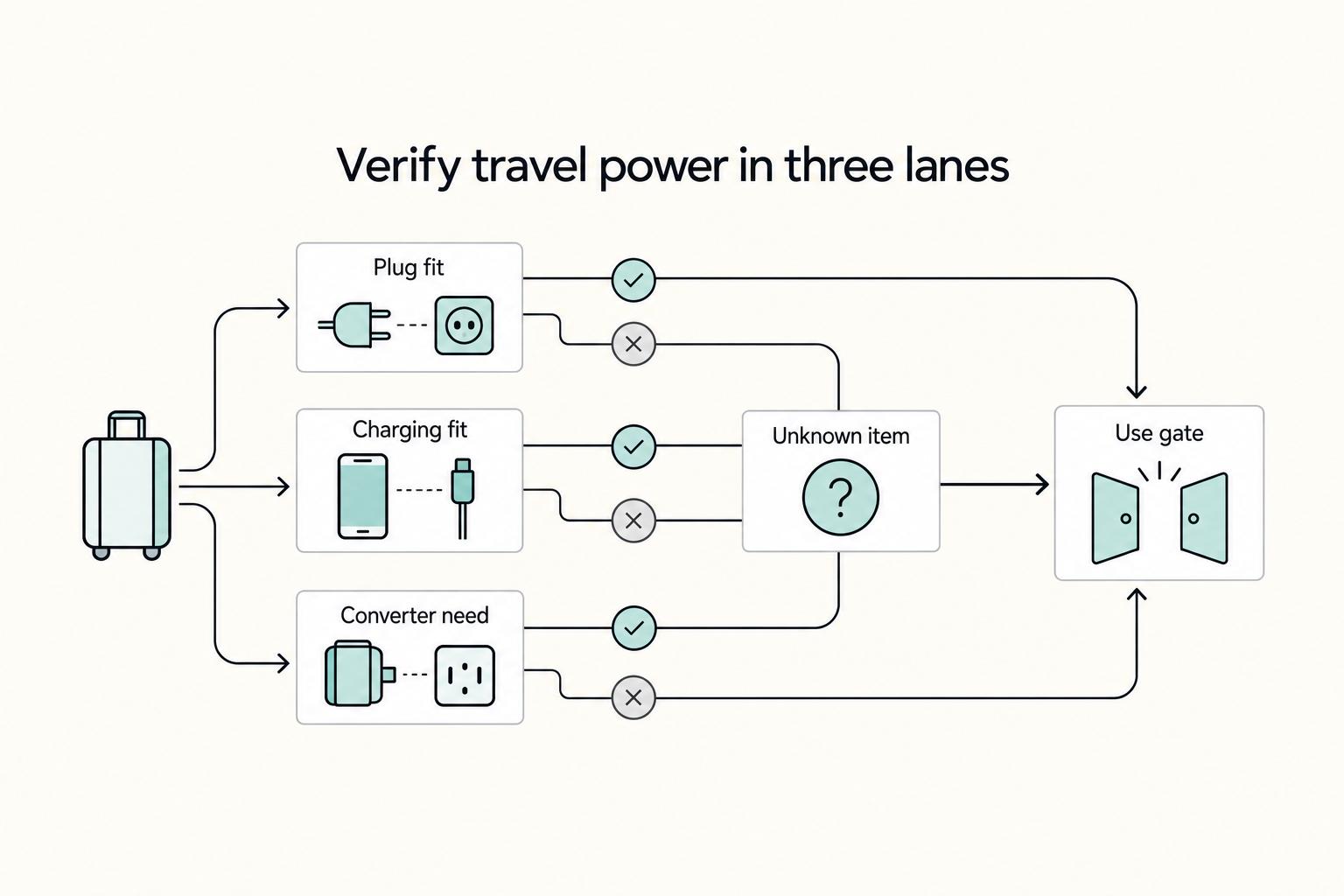
A good buy is one you can verify for your route and device stack. Review each option in separate lanes: plug fit, device-fit charging, and converter requirement. If any critical detail is missing, mark it Unknown, lower confidence, and pause buy or use for client-critical gear.
| Review outcome | Route fit | Device-mix fit | Converter requirement status | Listing clarity | Confidence and action |
|---|---|---|---|---|---|
| Fully verified | Coverage claim maps to your trip stops | Port mix and stated output match your active devices | Device docs support adapter-only use, or you have a separate converter plan | Manufacturer and listing details align | High confidence. Buy or pack as primary/backup |
| Partly specified | Broad coverage claim, but trip mapping is incomplete | Some port/output detail, but not enough for your real load | Unclear | Vague wording | Medium confidence. Hold until verified |
| Critical specs missing | Unknown | Unknown | Unknown | Missing plug, port, or output detail | Low confidence. Do not buy or use for critical devices |
Use these pass/fail checkpoints in order:
- Route plug fit: Pass only when you can map coverage claims to your itinerary. "12 out of 15 global plug types" is useful, but it is not country-by-country proof. If route mapping is unresolved, record route plug fit as Unknown until it is verified against current destination and source records.
- Device-mix fit: Pass only when the listed port mix matches what you need to charge at the same time. "3 USB-C ports and 2 USB-A ports" is concrete; "charges multiple devices" is not.
- Charging capacity: Pass only when the stated output supports your heaviest work device. Specs like 45W PD or 65W are comparable checkpoints; missing wattage stays unresolved.
- Converter requirement status: Pass only when your device documentation confirms destination-voltage use as-is, or you have a separate converter plan. Do not treat "universal" as proof of voltage conversion. If unclear, keep converter requirement status Unknown until the device label and current destination power records are verified.
- Evidence quality: Pass only when at least two inputs align. Weight device-maker docs and product pages above editorial roundups. Editorial lists can help discovery, but they are not final proof on their own.
We covered this in detail in The Best Business Travel Insurance for Digital Nomads and Executives.
Do You Need a Travel Adapter or a Power Converter?#
Decide the function first: plug fit or voltage change. A travel adapter (also called a power adapter) helps your plug fit the outlet, while a converter/transformer handles voltage. If you skip that gate, you can bring gear that fits the wall but still gets the wrong power.
Your key check is the INPUT voltage label on each device or charger.
| Operational decision | What to verify | If verified | If unclear |
|---|---|---|---|
| Adapter-only for critical devices | Check each device or charger INPUT label against the current destination power standard after verification. If it shows 100-240V, this is commonly adapter-only. | Use an adapter for plug fit and treat this as your primary path for that device. | Mark it Unknown and do not use it as a critical path yet. |
| Adapter plus converter for single-voltage items | Confirm the item is 120V only or 220V only, then verify the destination differs. | Use an adapter plus a converter/transformer for that specific item. | Hold and verify before packing or use. |
| Hold and verify before use | Missing label, unreadable print, or conflicting specs between device hardware and seller page. | Delay use until you have a clear label photo or manufacturer spec. | No-go for client-critical gear. |
Before you fly, run this risk checklist:
- Check each device and each charger separately.
- Treat missing voltage specs as unresolved, not "probably fine."
- Do not assume "universal" means voltage conversion.
- Keep unknown-spec gear off live outlets, especially for critical work devices.
- Wrong voltage can overheat and burn out equipment.
Once plug fit and voltage conversion are separated, product comparisons become much more reliable. Related reading: The Best Portable Keyboards for Travelers.
The Best Universal Travel Adapter Picks by Work Scenario#
Choose by your work context and failure tolerance, not by a single "best" label. Use roundup picks to build a shortlist, then verify before you buy or rely on anything for client work.
Use Travel + Leisure's 2026 roundup as a category shortlist source (for example, "Best Overall" and "Best Kit," with on-page snapshots of $25 and $28). Variety is also useful as an input and discloses affiliate commission. Treat both as inputs, not final proof.
| Work scenario | Provisional shortlist input | Device load check | Outlet coverage and converter check | Backup path requirement | Verification status |
|---|---|---|---|---|---|
| Client-critical operator | Start with recent category picks (for example, "Best Overall") | List what must charge at the same time | Confirm your route coverage and confirm whether any item needs converter handling | Required | Medium until listing details and your device checks align |
| Carry-on minimalist | Start with compact, multi-country options | Keep only the ports you actually need | Verify route fit; do not assume "multi-country" covers every stop | Recommended | Medium if coverage details are clear; Low if vague |
| Multi-device remote worker | Start with picks that include USB and AC options | Test your real simultaneous charging load | Prioritize route fit first; treat converter need as a separate check | Required | Medium until port and fit details are confirmed |
| Traveler with a potentially incompatible device | Treat adapter picks as secondary | Split low-risk items from the one risky item | Make converter need its own decision before use | Required if mission-critical | Low until details are verified |
| Unknown handling | No pick yet | If load fit is unclear, mark Unknown | If coverage or converter detail is missing, mark Unknown | Do not use as primary or backup | Defer purchase/use pending verified details |
Use one rule throughout: editorial lists, affiliate roundups, and brand pages help you shortlist, but they do not complete the decision. If a key detail is missing, mark it Unknown, lower confidence, and move to the next option.
Shortlist, verify, stress-test#
| Step | Action | Grounded detail |
|---|---|---|
| Shortlist | Prefer recent, clearly labeled roundup pages | Travel + Leisure shows Updated on January 14, 2026; Variety shows May 21, 2025 8:54am PT |
| Verify | Check the exact product listing details you need for your trip | Compare them against your own device requirements |
| Stress-test | Run your real charging sequence before departure | If one failure breaks your setup, choose a different scenario fit |
- Shortlist
Prefer recent, clearly labeled roundup pages. Travel + Leisure shows Updated on January 14, 2026; Variety shows May 21, 2025 8:54am PT.
- Verify
Check the exact product listing details you need for your trip and compare them against your device requirements.
- Stress-test
Run your real charging sequence before departure. If one failure breaks your setup, choose a different scenario fit.
If you want the practical answer, pick the row that matches your trip and risk tolerance, then complete the three-step check. For related gear planning, read our 2026 laptop guide for digital nomads.
Which Adapter Is Right for Your Travel Profile?#
Choose the setup that matches your route pattern, charging load, and failure tolerance, not the loudest roundup winner. Start with those three inputs, pick a kit archetype, then verify exact listing details before you buy.
Model rankings vary, so treat them as inputs, not proof. WIRED's 2025 roundup featured the Ceptics GaN 70W Universal Travel Adapter and listed Tessan GaN Universal Travel Adapter as runner-up, while Minimalist.travel called Epicka its current favorite.
| Kit archetype | Portability | Redundancy | Multi-device support | Verification burden |
|---|---|---|---|---|
| Single verified universal adapter | High | Low unless you add a second path | Medium, depends on confirmed layout | Medium |
| Universal adapter plus separate backup charger/path | Medium | High | Medium to high | High |
| Regional plug-adapter set | Low to medium (sets add bulk) | Medium if you carry several pieces | Usually limited unless paired with your own chargers | Medium |
| Simplest verified adapter plus separate converter handling where needed | Medium | Medium | Depends on your chargers and the risky device | High |
If this is you, use this setup logic:
- Nearby-country minimalist
Use route pattern as the first filter: nearby-country travel may let you skip a universal adapter, while farther or more unusual trips are more likely to need one. Choose the smallest verified setup for your route. If details are missing, keep current port mix and country fit pending until you verify the exact model page and current destination records.
- Multi-stop route changer
Default to a universal adapter, then verify country fit on the exact listing. Regional plug-adapter sets can add bulk, and airport or electronics-store sets can cost more than needed. If coverage is unclear, mark it Unknown and move on.
- Multi-device remote worker
Plan for simultaneous charging, not marketing labels. Write your real nightly charging stack first, then choose only after the current port mix and AC-socket need are verified against the exact model listing and your device stack. Flimsy or bulky designs are a practical risk in this profile.
- Client-critical operator or single-voltage carrier
Do not rely on one unit as both primary and backup if failure would hurt delivery. Use a verified primary path plus a separate backup path, and handle any converter need as a separate decision. If adapter-versus-converter details are unclear, treat the listing as Unknown.
Use this purchase sequence every time: classify trip complexity, map simultaneous charging demand, then choose backup depth based on business impact if primary power fails. If listing details conflict or stay incomplete, do not force a pick; mark Unknown and default to the simplest verified setup plus separate converter handling where needed.
You might also find this useful: The Best Travel Yoga Mats.
Why Do Top Sites Disagree on the Best Universal Travel Adapter?#
Treat roundup winners as inputs, not final decisions. With more than 15 plug types worldwide and country-level voltage differences, different sites can land on different "best" picks and still be useful.
Rankings usually diverge for practical reasons you can verify: update cadence, audience assumptions, and how clearly a guide separates adapter needs from converter needs.
| Decision check | What you verify | Pass if | Mark Unknown if |
|---|---|---|---|
| Route fit | Your exact country list and plug types (for example Type I, G, C/E/F, A/B) | The listing explicitly covers every stop | Coverage is implied, not stated |
| Device load | Your real charging stack for work | Port mix and charging setup match your actual devices | Port/output details are missing or unclear |
| Adapter vs converter gate | Each must-carry device against destination power requirements | You are not treating a voltage issue as a plug-shape issue | The listing blurs adapter and converter claims |
| Failure backup | What happens if your primary unit fails | You have a separate backup path for critical gear | One device handles everything |
| Listing clarity | Exact model identity on the seller page | Name/specs are consistent and easy to confirm | Names, images, or claims conflict |
Use this short pre-purchase check before you buy:
- Match your route against the listing, country by country.
- Verify each must-work device before assuming adapter-only is enough.
- If one failed charge would affect your work, add a separate backup path.
- After verification, keep the unit in your luggage to reduce forgetfulness risk.
That is how you handle conflicting rankings without guesswork: keep one framework, flag unclear details as Unknown, and buy only when the listing passes your route and power checks. Next, tighten the rest of your setup with The Best Gear for a Portable Home Office. Related: The Best Travel Backpacks for Digital Nomads.
What Should You Verify Before You Board the Flight?#
Use this as a hard verification gate: if any critical item is still Unknown, do not treat your setup as ready.
| Check | What you confirm | Evidence | Go / No-Go result |
|---|---|---|---|
| Model identity | You can identify the exact product and variant, not a generic label | Product title, photos, and specs match one model name (for example, Ceptics GaN 70W Universal Travel Adapter) | GO if all identifiers match. Unknown if naming or variant details conflict |
| Route fit | Your exact itinerary is covered by what the product page actually states | Your route list matched against stated coverage on the listing | GO if each stop is clearly covered. NO-GO if coverage is only implied. Unknown if any stop cannot be verified |
| Adapter vs converter gate (per device category) | You checked each category separately: phone, laptop, tablet, camera charger, watch charger, hair tools | Device/charger labels plus clear product-function language | GO if each category has a clear power path. Unknown if listing language blurs adapter vs converter |
| Primary charging path | Your main path supports your highest-priority work device first, then the rest | Packed adapter, chargers, and cables you will actually use | GO if the full sequence works with what you packed. NO-GO if one missing part breaks the chain |
| Backup charging path | You have an independent recovery path if the main one fails | Separate charger, second adapter path, or another independent option | GO if backup is packed and usable. NO-GO if everything depends on one block |
Hair tools are a separate risk check. You typically cannot use a hairdryer through a travel plug adapter, so treat that as not verified unless you have clear, device-specific proof.
Failure drill on arrival#
| Order | Action | Check |
|---|---|---|
| 1 | Charge your most important device on the primary path | Start with the primary path |
| 2 | Add other devices in your planned overnight order | Use the planned overnight order |
| 3 | Simulate failure once by switching from primary to backup | Test the backup path |
| 4 | Confirm you can recover quickly without changing your work plan | No change to your work plan |
- Charge your most important device on the primary path.
- Add other devices in your planned overnight order.
- Simulate failure once by switching from primary to backup.
- Confirm you can recover quickly without changing your work plan.
Your final gate#
GO when model identity is exact, route fit is proven, each device category has a clear adapter-versus-converter decision, and both primary and backup paths work in practice. NO-GO when any critical device still depends on broad marketing claims, unclear model details, or an untested fallback.
For a step-by-step walkthrough, see The Best Portable Power Banks for Digital Nomads.
Build Your Power Setup Like an Operator, Not a Shopper#
Use this as your final pre-trip gate: you are not choosing a headline winner; you are approving a setup that passes three checks and includes a tested fallback for critical devices.
| Pass | What to verify | Pause if |
|---|---|---|
| Pass 1: Route plug fit | Map your actual stops and verify plug fit for each one | Country detail is not fully confirmed |
| Pass 2: Adapter vs converter | Check each device or charger label individually; use the label checkpoint such as Input: 100-240V | The label does not clearly support the destination voltage range |
| Pass 3: Purchase-signal credibility | Validate the listing like a part match: title, photos, and specs should describe the same product and function | Title, photos, and specs do not describe the same product and function, or affiliate or advertising roundup pages are being treated as proof |
- Pass 1: Verify route plug fit
Map your actual stops first, then verify plug fit for each one. Countries do not share one outlet standard, and there are over 15 plug configurations in use globally, so do not assume one adapter covers every stop. Treat mixed-outlet destinations as mixed; for example, Thailand sources describe multiple socket types and sometimes more than one in the same room. If country detail is not fully confirmed, keep current plug-standards context pending until it is verified against destination and source records before buying or packing.
- Pass 2: Decide adapter vs converter for each device
Check each device or charger label individually. A travel adapter changes plug shape only; it does not convert voltage. Use the label checkpoint (for example, Input: 100-240V) to confirm whether plug fit alone is enough. If the label does not clearly support the destination voltage range (such as 110V vs 220-240V), treat that device as needing a converter decision before use, because the wrong choice can damage electronics.
- Pass 3: Verify purchase-signal credibility
Validate the listing like a part match: title, photos, and specs should describe the same product and function. Treat affiliate or advertising roundup pages as inputs, not proof. Do not rely on accommodation backup; some properties may have adapters, many will not.
GO: route plug fit is confirmed, each critical device has a clear adapter-versus-converter decision, and your fallback charging path is tested. NO GO: any critical device is still Unknown, adapter/converter language is unclear, or your fallback is only "the hotel might have one."
Once this is complete, use The Best Gear for a Portable Home Office as an optional next-step checklist. For adjacent travel-risk planning, see The Best Emergency Communication Devices for Off-Grid Travel. If you need program-specific support details, Talk to Gruv.
Frequently Asked Questions
What is the best universal travel adapter overall right now?
Start from the assumption that there is no single winner for every traveler. WIRED currently labels Ceptics GaN 70W Universal Travel Adapter as its overall pick and Tessan GaN Universal Travel Adapter as runner-up, while Pack Hacker uses a multi-item gear list format, and both approaches can be reasonable when criteria and update timing differ. Before you buy, run the same four checks every time: exact model identity, clear function, confirmed route fit, and a real backup charging path. If any one of those stays unclear, mark it Unknown and move on.
Do I need a travel adapter, a power converter, or both?
Destinations can differ in both plug types and voltage. Treat those as separate checks and verify device by device. If your phone is clear but your camera charger or hair tool is not, only that device is Unknown. If a device's exact conversion requirement is not clearly documented in your inputs, keep it Unknown instead of guessing.
Why do major review sites show different top picks?
Assume they are answering slightly different questions. A ranked roundup, a tested review, and a gear list can all surface different products without any of them being wrong. Your job is to ignore the headline winner until it passes your four buying checks on your actual route. If the page does not give you enough detail to do that, the result is Unknown, not "probably fine."
What is the lightest universal travel adapter for one-bag travel?
Do not chase a "lightest" label unless the exact weight is clearly stated and tied to the exact model. A smaller unit only helps if it still fits every stop on your route and supports your overnight charging order. Check three things together: route plug fit, the number of devices you charge first, and whether one missing cable breaks the setup. If any of that is unclear, mark the listing Unknown and keep comparing.
How should I choose an adapter for a multi-device remote work setup?
Choose for charging sequence first, not shelf appeal. Put your most important work device on the primary path. Then add the rest in the order you actually need them overnight, and pack one backup path that does not depend on the same single block. Run that plan device by device, and mark any unclear power requirement Unknown before travel. Once your primary and backup charging plan are set, align the rest of your kit with The Best Gear for a Portable Home Office.
Is a larger model too bulky for minimalist travel?
Judge bulk against your bag and workload, not against a generic "minimalist" label. A bigger adapter may still be the better pick if it removes a second charger or simplifies your night-one recovery plan. The real red flag is carrying one bulky unit that still leaves route fit, charging order, or backup readiness unresolved. If you cannot prove those three points, the size debate is secondary.
What should I check on Amazon before buying a universal adapter?
Verify the listing like you are auditing a part number. Make sure the title, photos, and specs all point to the same exact model, such as Ceptics GaN 70W Universal Travel Adapter, instead of a vague family name or shifting variant. Then confirm four things before checkout: model identity match, function clarity, route plug fit, and backup-path readiness. If the page blurs adapter versus converter language, or if the images and specs disagree, treat it as Unknown and do not buy off the thumbnail.
Can I trust roundup links and product recommendations?
Use them as inputs, not as proof. Some publishers explicitly say they may receive compensation or earn an affiliate commission, which tells you the page is monetized but does not settle whether the model fits your route and devices. Keep your own four-point check in front of you, and verify each critical device label yourself. If the recommendation is strong but the product details are thin, your answer is still Unknown.
Try a related tool
Researched and edited by the Gruv editorial team. Gruv builds cross-border billing, payouts, and finance-operations software for global businesses.
Sources
- access-board.gov/icttrusted
- azahcccs.gov/Resources/guidesmanualspolicies/eligibilityp...trusted
- chartercollege.edu/wp-content/uploads/2025/02/Charter-College-C...trusted
- cvcc.edu/policies-and-procedurestrusted
- dot.ca.gov/-/media/dot-media/programs/design/documents/...trusted
- farmingdale.edu/courses/index.shtmltrusted
- federalregister.gov/documents/2025/12/05/2025-22014/the-safer-af...trusted
- govinfo.gov/content/pkg/CHRG-116hhrg35381/html/CHRG-116h...trusted
Educational content only. Not legal, tax, or financial advice.
Related Posts
The Best Laptops for Digital Nomads in 2026
If you want smoother travel days and fewer support headaches, start with proven laptop families instead of whatever is newest. For most people working remotely, the right machine is a light, dependable one that handles documents, calls, research, and browser-heavy work without fuss. Move up only when your week regularly includes sustained CPU or GPU load such as long exports or local builds.

The Best Gear for a Portable Home Office
Portable-office gear decisions are not directly tested in this guide, so use this as a practical framework rather than a proven standard.

The Freelance Payment Penalty: A Modeled Audit of Platform Fees, FX Spreads, and Payout Delays
The money rarely disappears through a single, easy-to-spot fee. The real loss is stacked. A marketplace takes its commission, a processor adds a charge for international cards, a bank or payment company converts the currency at a spread, a platform holds the funds before release, and a wire sheds a little to intermediaries on the way in. Each layer looks defensible on its own, but the worker feels the combined result as a smaller deposit and a later payday.