
Quick Answer
Choose by route and failure tolerance, not by brand hype. For the best esim for digital nomads, shortlist Airalo, Nomad eSIM, Holafly Plans, Roamless, Google Fi, plus an international SIM card fallback, then verify `*#06#` EID visibility, carrier unlock status, hotspot terms, validity start, and calling method before checkout. If your work is uptime-sensitive, lock both a primary and a backup before departure.
The Best International SIM Cards and eSIMs for Digital Nomads#
There is no universal winner here. The right pick depends on your route, your work needs, and how much setup risk you are willing to absorb. In most cases, you can narrow the field to Airalo, Nomad, Holafly, Roamless, Google Fi, or a physical international SIM card fairly quickly once you use the right filters.
This guide is for remote professionals relocating or staying abroad for longer stretches, not for short vacations. If your income depends on stable connectivity, the real question is not "Which brand is best?" It is "Which option fits my route, my device, and my tolerance for failure, and what is my backup if it goes wrong?"
That distinction matters. Fast activation is useful on travel days, but speed by itself is not a reliability plan. A digital setup can reduce border-crossing friction, yet that only helps if compatibility is confirmed first and the plan behaves the way you actually work. What looks easy in an airport lounge can feel very different once you are taking calls from an apartment, tethering through a laptop, or moving between neighborhoods and transit routes.
Treat rankings as leads, not verdicts. Some comparison content in this category is partner-authored or provider-authored, and some of it is built to drive conversions more than to protect your uptime. That does not make it useless. It just means you should verify destination-specific terms and technical details before you pay. That extra step is usually cheaper than fixing the wrong plan after arrival.
A strong final choice should give you three things at the same time:
- Fast enough activation for travel days.
- Predictable behavior during your actual work routine.
- A fallback option that is ready before something fails.
If one of those is missing, you are still researching.
The easiest way to use this article is in three passes:
- Use the comparison table to cut your list to one or two options.
- Run the decision checklist before you pay.
- Follow the post-landing sequence so small activation issues do not hit in the middle of client work.
A quick shorthand for the shortlist:
- Airalo / Nomad / Holafly / Google Fi: Narrow these by destination fit, plan validity, and device support in the places where you will actually work.
- Roamless: Its own materials describe no-expiry pay-as-you-go and in-app calling, but terms still need a fresh check before you rely on it.
- International SIM card: Keep this as a fallback when eSIM support is uncertain, and expect a little more setup friction.
One practical habit improves almost every decision in this category: pick the backup at the same time you pick the primary. People often postpone that step because the main line feels good enough during research. Then the first real problem shows up when they are already in transit, under deadline, and trying to troubleshoot on borrowed Wi-Fi. That is the avoidable version of this problem.
So read the shortlist with the right standard. You are not looking for the most popular option. You are looking for the option that best matches your route, your device, and the way you work under normal conditions and under mild failure. The next section shows how these picks were judged, so you can pressure-test the recommendations instead of taking them on faith.
How this list chooses winners and who should use it#
This list is built as a scorecard, not a popularity contest. The goal is not to reward the loudest brand. It is to measure each option against the same decision points, then pick the one that best protects continuity for how you actually travel and work.
| Criterion | Check | Why it matters |
|---|---|---|
| Coverage footprint | Check where you actually work, not just where you land | A plan that feels fine at the airport or in one city can perform differently in the place where you spend your working hours |
| Pricing model | Compare fixed-validity bundles with top-up options | Fit your movement pattern without constant repurchasing or wasted balance |
| Plan validity | Confirm when validity starts and when it ends | If a plan starts too early, you can burn useful days before your first real work session |
| Hotspot support | Verify tethering terms for your exact plan and destination | Do not assume laptop hotspot use is included unless it is clearly stated |
| Calling capability | Keep data needs separate from voice and SMS needs | Some plans are data-only, which may be fine, but only if you have already decided how calls and texts will work |
Trust in this category comes from method, not one persuasive review. Large travel sites and comparison sites often disclose affiliate relationships, so Reddit threads, r/digitalnomad posts, YouTube reviews, and vendor blogs should all be treated as useful inputs, not final proof. You are looking for consistency across checks. If the same caveat keeps showing up in different places, pay attention. If a claim appears only in provider material, keep your confidence lower until you verify it yourself.
The first gate is not price. It is compatibility.
Dial *#06#, confirm that an EID appears, and confirm that your phone is carrier unlocked. Many iPhone, Pixel, and Galaxy models released since 2018 can support eSIM, but not all do, and not every version behaves the same way. That is why compatibility should be settled before you compare pricing, country lists, or plan marketing. If the phone cannot take the setup you want, everything else is noise.
Setup also varies more than many buyers expect. One provider may offer quick QR activation, while another may involve manual APN entry or a one-device install limit that matters if you change phones. Those details look minor when you are reading product pages at home. They stop feeling minor when you are troubleshooting after landing.
Once the device gate is clear, use a two-stage filter.
Stage one is elimination. If compatibility is unclear, hotspot behavior is unclear, or your calling path is unclear, remove that option for now. You can always revisit it later, but it should not be your first choice for work-critical travel. The most common buying mistake in this category is not choosing a terrible plan. It is choosing a plan with one unanswered question and assuming it will work itself out later.
Stage two is comparison. For the options that remain, weigh coverage, pricing model, and validity against your route and work pattern. That sounds obvious, but it is where most bad purchases happen. People compare headline prices without checking whether the plan expires too quickly, starts too early, or leaves them improvising for calls and tethering.
Here are the five criteria used in every recommendation:
- Coverage footprint: Check where you actually work, not just where you land. A plan that feels fine at the airport or in one city can perform differently in the place where you spend your working hours.
- Pricing model: Compare fixed-validity bundles with top-up options. The goal is not the lowest headline price. The goal is a model that fits your movement pattern without constant repurchasing or wasted balance.
- Plan validity: Confirm when validity starts and when it ends. If a plan starts too early, you can burn useful days before your first real work session.
- Hotspot support: Verify tethering terms for your exact plan and destination. Do not assume laptop hotspot use is included unless it is clearly stated.
- Calling capability: Keep data needs separate from voice and SMS needs. Some plans are data-only, which may be fine, but only if you have already decided how calls and texts will work.
Those criteria are not theoretical. They map directly to the problems that actually interrupt work. Coverage problems show up when you settle into your apartment or coworking space. Pricing model problems show up when you keep topping up a plan that looked cheap at checkout. Validity problems show up when your paid days start earlier than expected. Hotspot and calling problems show up exactly when you need them most and least want surprises.
This approach is meant for people handling client calls, tethered laptop sessions, and multi-country transitions. It is less useful if you stay on one domestic network year round and rarely change countries. For a remote professional moving between places, though, this method is much more reliable than brand familiarity.
When two options look close, use one tie-breaker: choose the stronger fallback path, not the cheapest advertised plan. A small price difference matters less than the cost of being offline when you need to deliver work. That same logic carries into the comparison table, which is best used as a shortlisting tool, not as a final answer.
Quick comparison table you can scan before you buy#
Use this table to narrow the list to one or two candidates, then verify the exact details on the checkout page for the plan you want.
The confidence column reflects how solid the support is, not a guarantee of real-world performance in your exact location. The material behind these summaries includes broad comparisons, sponsored content, affiliate content, and provider-authored claims. That is enough to build a shortlist. It is not enough to skip verification.
A simple way to use the table well is this:
- Compare only the rows that match your travel pattern.
- Ignore brand familiarity until you read the caveats.
- Treat "Not clearly established" as a prompt to verify, not as a harmless blank.
| Option | Best for | Plan model | Hotspot | Calling | Key caveat | Evidence confidence | Verify before checkout |
|---|---|---|---|---|---|---|---|
| Airalo | Frequent country moves where broad availability matters | Regional/global model is discussed; one source cites 190+ countries | Confirm with the provider | Confirm with the provider | Heavy data users may need frequent top-ups | Medium-low | Confirm every destination on your route, tethering terms, validity start, and top-up behavior |
| Nomad eSIM | Readers comparing another travel eSIM option in the shortlist | Appears in comparison/listing context, but plan-level detail is limited here | Confirm with the provider | Confirm with the provider | Verify reliability details directly with the provider | Low | Confirm destination match, tethering policy, activation method, and expiry trigger on the exact plan page |
| Holafly Plans | Readers comparing travel eSIM brands side by side | Comparison/listing context is present, but exact model rules are not established | Confirm with the provider | Confirm with the provider | Rankings reflect comparisons that include sponsored and affiliate sources | Low | Verify validity window, tethering terms, and activation method before payment |
| Roamless | Readers comparing additional options alongside larger brands | Mentioned in list and comparison context only | Confirm with the provider | Confirm with the provider | No neutral feature proof here | Low | Verify destination support, expiry behavior, and support path if activation fails |
| Google Fi | Users who want a baseline to compare against travel eSIM apps | Not established | Not established | Not established | Verify plan-level details with the provider | Very low | Verify destination behavior, tethering terms, and line rules before relying on it |
| International SIM card | Backup path when eSIM compatibility is uncertain | Physical SIM route; may require dual-SIM-capable hardware to avoid swapping | Varies by carrier and country | Varies by carrier and country | Setup friction can be higher, and arrival-day no-signal cases are reported | Medium | Confirm device compatibility for your intended SIM setup, plus destination fit, validity timing, and activation steps |
The last two columns do most of the work. The caveat column tells you where the likely failure mode sits. The verification column tells you what to check before money leaves your account. That keeps the decision grounded in execution instead of marketing language.
A low-confidence row is not always a "no." Sometimes it just means the option belongs in the maybe pile until you confirm the exact plan page. That matters with travel connectivity because a good plan model can still be the wrong purchase if the destination, validity, or tethering terms do not fit your trip.
When two rows still look similar, go back to the same tie-breaker from the methodology section: take the option with the better fallback path. In practice, that usually means clearer destination fit, clearer hotspot rules, and a clearer plan-validity start. With that filter in place, the provider-by-provider recommendations become much easier to use.
Airalo is best for short, frequent country hops#
Airalo makes the most sense if you move often and care more about setup speed than squeezing every bit of value out of each plan. It is a mobility-first choice for short, frequent country changes.
One comparison presents Airalo as usually cheaper with wider coverage than Nomad and points to broad destination reach. That is enough to earn it a shortlist spot for consultants, freelancers, and founders who move quickly between markets and want a familiar activation path each time they land. The appeal is not that it wins every category. It is that it reduces repeated decision-making when your route keeps changing.
What makes it practical is the combination of country and regional plan selection, arrival activation, and straightforward top-up behavior. If your travel pattern looks like two weeks here, three weeks there, that simplicity can matter more than deep plan customization. You do not want to relearn the whole process every time you cross a border.
A good fit usually looks like this:
- Best fit: Short stays across multiple countries where route flexibility matters.
- What works well: Country or regional plan selection, arrival activation, and straightforward top-ups.
- What can fail: Speed can vary by country, and support can be slow.
For frequent movers, every extra step compounds. A provider that is easy to buy, easy to reactivate, and easy to top up can remove a lot of friction over the course of a year. If your route is fluid and your time is expensive, convenience has real value.
The tradeoff matters just as much. A mobility-first setup can become a poor fit when you stop moving long enough to care about deeper plan economics or more stable local behavior. If you are settling into one city for a heavier work block, broad availability matters less than how the line behaves in the exact places where you spend your day. That is where people sometimes overpay for convenience or mistake familiarity for suitability.
The main risk is overconfidence after one successful stop. A plan that worked smoothly in one country can feel very different in the next, even when the app experience is familiar. That is why you should treat first-week performance as a live test, not proof of universal reliability. The common failure mode here is assuming that because activation was simple on the last leg, the next leg will be equally smooth.
In practice, Airalo is easiest to justify when constant movement is your main problem. If you are not staying long enough in each place to optimize around local carrier details, a provider with broad availability and quick reactivation can save time. But if your workload is heavy and predictable in one place, speed of setup alone is less valuable than consistent day-to-day performance.
Before departure, write down your fallback. If day-one performance drops below your work needs, decide in advance whether the next step is buying a local physical SIM, switching to your backup eSIM, or moving urgent tasks onto another connection. That way, you are not spending a full afternoon troubleshooting while client deadlines pile up.
Keep your confidence calibrated. This section relies on comparison-style and affiliate-monetized content, so treat the ranking as directional. Airalo belongs on the shortlist for frequent hops. It should not be your excuse to stop checking destination fit, validity timing, tethering terms, and backup options before payment.
Nomad eSIM is best for budget-aware travelers who still want broad coverage#
Nomad is easiest to justify when saving money is part of a deliberate plan, not a vague hope that a cheaper option will somehow be good enough. It is a budget-first choice for travelers whose route is stable enough to support that decision.
In the available material, Nomad appears in a comparison of multiple travel eSIM providers. That supports shortlist inclusion, not a performance verdict. You may see value signals tied to outside reviews in snippets elsewhere, but they are not included here, so this recommendation has to stay narrower and more cautious.
The practical appeal is straightforward. If you already know your next region, your schedule is not changing every week, and your monthly data use is moderate, cost planning becomes realistic. Under those conditions, choosing a cheaper option can be a rational decision. If your route shifts constantly or your workdays are data-heavy, the savings can disappear quickly if you need repeated top-ups or a second provider to stabilize things.
Nomad tends to fit this profile:
- Best fit: A freelancer following a stable regional route with moderate data use.
- Setup practicality: App or QR activation can reduce pre-departure and arrival friction.
- Coverage tradeoff: Lower price does not guarantee strong rural performance.
- Work continuity check: Verify tethering and confirm your phone can store multiple eSIM profiles.
That last point matters more than it sounds. A budget-friendly primary becomes less attractive if it leaves you with no clean backup option or forces awkward line management on the device you use for work. If your phone setup is already tight, that can turn a low-cost plan into a high-friction one very quickly. Cheap is only cheap if the rest of the setup stays simple.
Nomad works best when you already know roughly how you travel and how much data you use. If you have that self-awareness, a lower-cost plan can be a smart operational choice. If you do not, it is easy to buy on price and then spend the next week patching over the gaps with extra purchases.
For income-critical work, budget should be one criterion, not the only criterion. A cheaper plan that drops during client delivery can cost more than a slightly more expensive plan with clearer fallback options. That does not make Nomad a bad choice. It just means you should buy it for the right reason: predictable travel and controlled usage, not blind optimism.
One practical checkpoint before paying is to look past the headline price and ask three plain questions. When does validity start? What happens when balance or data runs out? Can you tether the way you expect on the route you are actually taking? Those answers usually matter more than the first number on the page.
If you are leaning toward Nomad, do one last check on validity timing and top-up behavior before you prepay. Those details often decide whether a budget plan stays budget-friendly after the first week. And if uptime matters, pair it with a backup before you travel. If your route gets less predictable or your data needs go up, the next option is often a better fit.
Holafly Plans are best for high-data remote workers who want one recurring setup#
Holafly belongs on the shortlist when your work routine puts sustained pressure on data use, but the support here is not strong enough to make a sweeping reliability claim. Treat it as a plan-shape candidate first, not a guaranteed winner.
A provider-authored comparison dated October 15, 2025 lists Holafly at 113 countries, Unlimited • 1-90 days, and a $9.90-$353.99 range. That is useful for planning because it gives you a rough sense of reach, duration, and price spread. It is not independent benchmark proof, so it should guide your questions, not end the decision.
The reason people look at Holafly is straightforward. Some work weeks are built around calls, large uploads, long tethered sessions, and regular travel. In that kind of routine, plan simplicity can matter more than optimizing every gigabyte. If you do not want to keep micromanaging top-ups, an unlimited-style structure can be easier to live with, provided the terms match how you actually work.
The shortlist case looks like this:
- Plan shape: Unlimited-style data with a bounded 1-90 day window.
- Setup checkpoint: The same table marks Holafly as
New eSIM per plan, so repurchasing may require repeated installs. - Cost envelope: The quoted price range is wide.
- Evidence confidence: Core comparison content is provider-authored, and some creator content includes sponsorship or affiliate incentives.
That repeated-install point is easy to miss, and it changes the convenience story. If what you really want is one recurring setup with as little fiddling as possible, needing a new eSIM per plan may matter more than the headline data model. It does not automatically rule Holafly out, but it does mean you should judge convenience by the whole process, not by the offer page alone.
This is also the option where you should test your actual routine early. Plans that look generous on paper can still feel restrictive if your day-to-day use does not line up with the fine print or the real behavior in your location. A remote worker who spends hours on calls and tethered laptop sessions should not wait until a high-stakes client day to see how the line behaves.
A simple first-week check is enough. Run your normal call schedule, your normal upload pattern, and your normal tethering habit on the plan you bought. If any one of those feels unstable, bring the backup online before it affects delivery. This is not paranoia. It is just good sequencing.
Holafly is most reasonable for remote workers with heavy recurring data use who value simpler plan choices over constant per-GB optimization. That can be a very sensible trade if your usage really is heavy and repetitive. It becomes less sensible if your route is irregular, your work is lighter than you think, or repeated setup starts to annoy you.
So keep the promise in proportion to the evidence. The plan shape is attractive for high-data work. The operational details still need checking, especially validity window, tethering terms, and activation method. If uptime matters, add a backup line before departure, including a physical SIM option if that is the cleanest fallback for your device.
Roamless is best for irregular travel and no-expiry balance control#
Roamless stands out when your travel rhythm is uneven and you do not want unused balance to evaporate between trips. If your year is a mix of travel bursts and quieter home-base periods, its model is easier to justify than a plan that keeps pushing you back onto the purchase screen.
Roamless is described as a one-profile setup with install-once behavior and broad destination coverage. The key appeal is no-expiry pay-as-you-go credit for stop-start schedules. That is a clear fit for people who may travel heavily one month, barely move the next, and then head out again without wanting to rebuild the whole setup each time.
The product shape matters here:
- RoamlessFlex: Pay-as-you-go balance drawdown with no expiry.
- RoamlessFix: Fixed data with a 30-day window, including a cited 5GB example.
- Calls and tethering: Described as available through app credit and hotspot support.
- Activation flow: Install once, then choose usage mode before travel.
That combination can be easier to live with than repeated bundle purchases if your calendar is irregular. It reduces wasted balance risk and can make pre-trip prep lighter because the profile is already in place. For someone who values flexibility more than a fixed monthly pattern, that is a meaningful advantage.
This is the clearest case where your travel cadence should drive the purchase. If you move in bursts and then stop for long stretches, no-expiry logic is naturally appealing. It lets you keep the setup ready without feeling like you have to consume a plan before the clock runs out. That is not just about cost. It is also about mental overhead.
The limits matter just as much. Traditional SMS and local numbers are not included, true unlimited data is not offered, and support may be lean. If your work requires always-available voice fallback, decide that voice path before relying on this as your only line. The convenience of no-expiry credit does not answer the separate question of how urgent calls and texts will work when the data layer is under pressure.
A useful operating habit with Roamless is to check balance status and your calling path before every travel block, not after landing. That small review can cut down on last-minute setup when your first workday starts quickly. It also keeps the no-expiry advantage from turning into false confidence. Stored balance helps, but only if the profile, destination support, and calling method still match the trip you are about to take.
This is also where people sometimes confuse flexibility with completeness. Flexible balance is excellent for irregular movement. It does not automatically mean the line can replace every other connectivity need. If you need traditional SMS, a local number, or a stronger support path, build around those gaps instead of hoping they will not matter.
Confidence here should stay moderate. The core details are useful for decision-making, but comparisons against other named providers still need a fresh check before you make this your long-term default. If you like the install-once, no-expiry model, use it with clear expectations and a separate voice or fallback plan where needed. That leads naturally to the next point: even now, older or more conventional options still earn their place.
Google Fi and physical international SIM cards still matter in specific cases#
Do not write off Google Fi or physical SIM cards just because app-based travel eSIMs are easier to buy. When delivery depends on uptime, a second path still matters, and sometimes the less fashionable option is the one that keeps you moving.
This is the section people skip, and it is often where the setup breaks. They compare app interfaces, plan marketing, and checkout simplicity, then forget to plan for failure. A more reliable setup starts by deciding what your primary path will do and what your backup path will do before departure, not after the first bad activation.
Detailed Google Fi plan claims are not supported here, so the honest treatment is narrow. Use it as a baseline to compare against travel eSIM apps, not as an assumed winner. The same goes for physical international SIM cards. They are not always the cleanest everyday solution, but they can be the right fallback when eSIM compatibility is uncertain or when you want a recovery option that does not depend on the same setup path as your primary.
That independence matters. If your main line is an app-based digital setup, a physical fallback can reduce shared points of failure. You are not relying on the same installation process, the same line behavior, or the same assumptions. In practice, that can be more valuable than a slightly better-looking app.
A practical way to think about the choices:
- One ongoing primary line: Can fit people who want one billing relationship.
- App-first eSIM options: Useful when quick digital activation matters.
- Secondary fallback path: Useful if your primary setup fails or underperforms on your route.
The right answer is not always to replace one with the other. Often it is to assign jobs clearly. Let one option handle primary data, let another cover recovery, and make sure your calling path is settled before you leave. That setup is less elegant on paper than a single all-in-one solution, but it tends to behave better in real life.
Before you buy anything, verify the terms that actually affect work continuity: hotspot policy, calling availability, limits hidden behind unlimited language, refund terms, and how support works if activation fails. Those are the details that show up during stressful moments. City performance can also differ from highway, park, or transit performance, so avoid making your whole decision based on the most convenient location on the route.
If your workday includes laptop tethering, test that path explicitly. If your workday includes urgent calls, make sure the calling method is clear even when your data line is unstable. People often assume they will sort that out later. Later is usually when they are already under pressure.
Red flags before departure:
- One untested data path and no backup.
- Unclear unlimited terms on caps or hotspot use.
- Tethering dependence without hotspot validation.
- No clear support route during your working hours.
- Assumption that public Wi-Fi will cover urgent work.
If any of those are true, fix them before flight day. Solving them after arrival costs more time, more attention, and usually more money.
The practical takeaway is simple. Do not think in terms of trendy versus outdated. Think in terms of failure isolation and recovery speed. Sometimes Google Fi will be the reference point that helps you compare more clearly. Sometimes a physical SIM card will be the backup that saves the week. Either way, the point is not purity. The point is uptime.
Once you frame the choice that way, the decision usually gets much faster. You are no longer trying to crown one universal winner. You are choosing a primary, choosing a backup, and verifying the few details that actually decide whether the setup will hold.
Use this 15-minute decision checklist before departure#
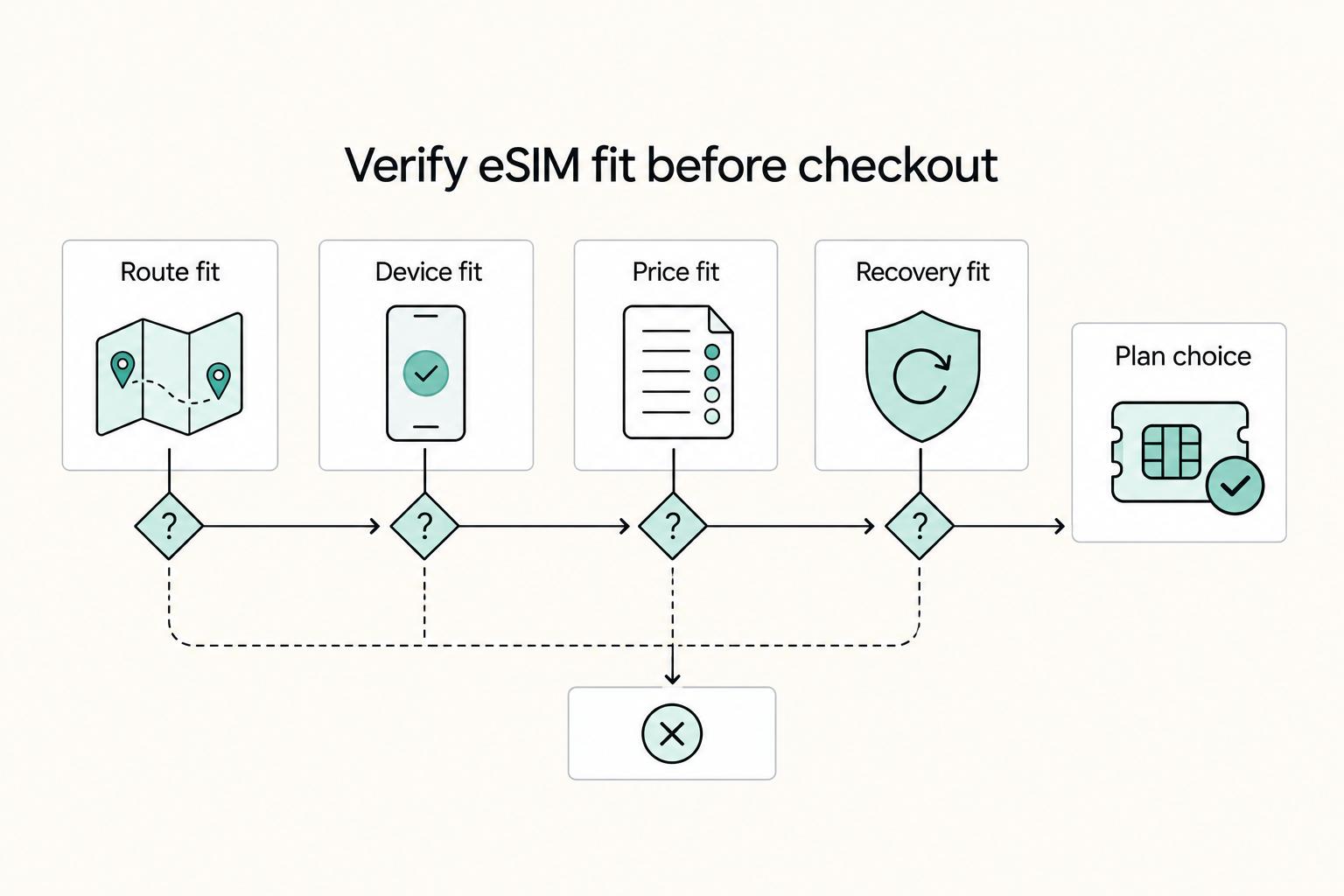
The goal is simple: decide route fit, device fit, pricing fit, and recovery fit before checkout. If you can do that clearly, most bad purchases fall away.
This checklist is the bridge between research and execution. It is short on purpose. Many connectivity failures do not happen because the product is terrible. They happen because one basic check was assumed instead of confirmed. Familiar brands cause this all the time. People skip the boring step because they think they already know how it works.
Work through the list in order:
- Map route and stay length first. List where you will work, not just where you land. Coverage that works in a major city can behave differently on highways or in parks, so shortlist only plans that fit your real route.
- Confirm compatibility and tethering needs. Validate eSIM support before you drop physical SIM options, and check hotspot behavior for your actual setup.
- Match pricing to travel pattern. Irregular schedules often fit reusable pay-as-you-go logic. Heavy daily use may fit unlimited-style plans if the caps and hotspot terms still work for you.
- Run one pre-payment checkpoint. Confirm hotspot terms, calling availability, unlimited-plan limits, and the support route if activation fails.
If you only do one thing with this list, do not move to the next step until the current one has a clear answer. A vague answer is usually a hidden problem. "Probably works" is not a real answer for a device check, a calling plan, or a hotspot rule.
To keep this usable under time pressure, write the answer to each step in one note before you pay:
- Primary provider and plan type.
- Backup provider or physical fallback.
- Activation trigger and validity start.
- Calling method if the plan is data-first.
- Support path if activation fails.
That note does two jobs. First, it reduces rework when something goes wrong after arrival. Second, it gives you a clean reference if a teammate, partner, or assistant needs to help troubleshoot while you are in transit. You do not need a long document. A short, clear note is enough.
It also pays off on the next leg of the trip. If your route changes or your usage pattern shifts, update the note before the next move. That keeps you from rethinking the whole decision from scratch every time. Over a long travel year, that habit saves more stress than most people expect.
Here is the practical checkpoint that matters most: if any one of the four big questions is unresolved, do not force the purchase just because you are tired of researching. Pause, keep a backup active, and buy only when the failure path is clear. Most rushed decisions feel efficient in the moment and expensive a few days later.
This is also the point where marketing language loses its power. Once you have route, device, pricing model, and backup written down, half the flashy offers stop looking relevant. You are no longer buying a brand. You are buying a fit.
Before you pay for any plan, sanity-check your destination connectivity and fallback options.
Execute in order after landing and avoid common failure modes#
Buying the plan is only half the job. Arrival is where theory turns into execution, and this stage protects your income.
| Step | Action | Follow-up |
|---|---|---|
| Arrival sequence first | Activate the eSIM, then test mobile data, hotspot, and one work-critical app | If data does not attach, use Airplane Mode for 30 seconds, turn it off, and wait 2-3 minutes for registration |
| Check device settings before blaming coverage | On iPhone, confirm the travel line is Active and selected for cellular data; on Android, confirm the eSIM is enabled and preferred | If QR setup fails, use manual installation details and verify APN settings |
| Run first-week checks in real conditions | Test in the apartment, coworking space, and transit settings | Watch for activation delays, tethering limits, and location-to-location differences |
| Escalate early if incidents keep affecting work | Switch provider or bring your backup online | Do not repeat the same fixes |
Treat post-landing setup like a short operating procedure, not a casual app task. A plan can look perfect on paper and still fail in the first hours because of registration lag, a settings mismatch, or carrier behavior that was never obvious during checkout. The fix is usually not complicated, but the order matters.
Start with the arrival sequence:
- Arrival sequence first. Activate the eSIM, then test mobile data, hotspot, and one work-critical app. If data does not attach, use Airplane Mode for 30 seconds, turn it off, and wait 2-3 minutes for registration.
- Check device settings before blaming coverage. On iPhone, confirm the travel line is Active and selected for cellular data. On Android, confirm the eSIM is enabled and preferred. If QR setup fails, use manual installation details and verify APN settings.
- Run first-week checks in real conditions. Test in the apartment, coworking space, and transit settings. Watch for activation delays, tethering limits, and location-to-location differences.
- Escalate early if incidents keep affecting work. Switch provider or bring your backup online instead of repeating the same fixes.
That sequence sounds basic, but it solves a common failure mode: random troubleshooting with no order. If you start changing everything at once, you learn nothing and lose time. If you follow the sequence, you can usually tell whether the issue is registration, settings, coverage, or plan mismatch.
The first test after landing should not be social browsing or a speed test obsession. It should be the three things that map to your work: data attachment, tethering if you need it, and one app you rely on. That gives you a real answer quickly. If all three work, great. If one fails, you already know where to focus.
The first week is where assumptions get corrected. A connection that feels fine in one location may fail in another, so validate the exact places where your work happens before the first important meeting. Test where you live, where you work, and where you move between those two points. That is the pattern that matters. Good performance in one convenient place does not mean the route as a whole is stable.
Another useful rule is to change one thing at a time. If you toggle multiple settings, reinstall, switch lines, and move locations all at once, you will not know which action actually helped. That makes support conversations worse and repeat problems harder to diagnose.
Keep a small evidence pack while you do this: screenshots of plan terms, activation status, and support chats. It will not guarantee an outcome, but it can help when you need to explain what happened or push support toward the right issue. A simple folder on your phone is enough.
For troubleshooting, keep each incident record short and consistent:
- Time
- Place
- App affected
- Action taken
That is enough. If the same issue repeats, you will have a clearer pattern and better support conversations. It also keeps frustration from turning into vague memory. When work is involved, specifics beat feelings.
A dropped client call with only one active path is not just bad luck. It is a process failure, and the fix is to change the setup that same day and retest before the next work block. That may mean switching to your backup, buying the local fallback you planned for, or simply stopping the experiment with a plan that is not holding up.
The goal after landing is not to prove you made the perfect purchase. It is to stabilize the setup fast, learn what is actually happening, and keep work moving. If you approach arrival that way, most small issues stay small.
Make your choice now and avoid brand-hype mistakes#
Choose by travel pattern and work risk, not by brand heat. The right move is to pick one primary plan that matches your route, then lock a backup before departure.
No provider is a universal winner, and some recommendation content in this category is commercially influenced. Use brand roundups to build a shortlist, then validate the fit for where you will actually work, especially outside major-city comfort zones. That is the difference between a fast purchase and a resilient one.
When you are stuck, make the smallest decision that reduces the biggest risk. In this category, that usually means three things: confirm compatibility, confirm plan behavior, and confirm a fallback path before you pay.
Use these final checkpoints:
- Match plan type to travel pattern. Country plans fit short single-country stays, regional plans fit multi-country trips, and broader or global plans fit frequent cross-border movement.
- Pass compatibility checks before checkout. Dial
*#06#, confirm an EID appears, and confirm your phone is not network locked. - Plan for real constraints. Many travel plans are data-only, so decide in advance how calls and texts will work.
- Set backup before you board. Keep a second path ready, such as your existing SIM for calls and texts while your eSIM handles data.
Once the connectivity choice is made, execution discipline matters just as much. Keep your setup note, install before travel, activate on arrival, and escalate early if reliability issues keep affecting work. That is the unglamorous part, but it is also the part that prevents most avoidable failures.
If you want one clean deadline, make the decision and lock both primary and backup before your move. That gives you time to test, adjust, and still leave with a setup you trust. A good decision here is not the one that feels exciting. It is the one that keeps you online when the trip gets less than ideal.
Run the checklist once, choose your primary, and lock your backup before departure. For daily execution after arrival, use How to Stay Productive While Working from a Cafe, and for cross-border admin prep, use How to Get an ITIN as a Non-Resident.
If you want a deeper dive, read Automating Your Freelance Finances: A Zapier Workflow for Connecting Stripe.
If your move includes visa deadlines, pair your eSIM decision with the Digital Nomad Visa Cheatsheet so your setup timeline stays realistic.
Frequently Asked Questions
What is the best eSIM for digital nomads right now?
There is no single winner for every route and work style. Different providers and plan models can fit depending on coverage and risk tolerance. Choose for your route and keep a backup path. The decision gets easier when you stop ranking brands globally and start ranking fit for your next trip or work block. A good option on one route can be a weak option on another route.
Which eSIM is better for long-term nomads, no-expiry pay-as-you-go or monthly subscription?
No-expiry pay as you go can be a better fit for irregular travel because balance does not expire between trips. Fixed-validity plans are cleaner when travel is predictable. Decide by cadence first, then verify terms before purchase. If your calendar changes often, no-expiry plans can lower the risk of unused balance expiring. If your schedule is stable, fixed-validity plans can be easier to budget and monitor.
Airalo vs Nomad eSIM vs Holafly vs Roamless, what actually changes in day-to-day use?
The main differences are validity windows, calling and hotspot behavior by destination, and how often you repurchase or top up. Some published comparisons are commercially influenced. Recheck destination-specific terms before payment. In day-to-day work, these differences usually show up as friction points: plan expiry timing, hotspot or calling limits, and whether you need a backup path for continuity.
Can I rely on one global eSIM only, or should I always carry a backup?
If uptime matters, do not rely on one path. A second eSIM provider or local physical SIM option is a practical backup. Redundancy lowers the chance of being fully offline. A backup is not overengineering when client delivery depends on connectivity. It is a basic risk control.
How do I choose an eSIM before relocating abroad instead of taking a short trip?
For relocation, prioritize compatibility and reliability over promo pricing. Confirm eSIM support, then recheck destination-specific terms right before purchase. If available, keep your home number active while using local data. Relocation planning should also include a simple activation and escalation note so setup decisions are not made under pressure after landing.
When does a physical international SIM card make more sense than an eSIM?
Use a physical SIM as fallback when compatibility is uncertain or setup fails after landing. It is also useful on higher-risk itineraries where outages are costly. You may not need it every trip, but it is a practical contingency. Physical fallback is especially useful when your phone behavior is uncertain or when you cannot afford a long troubleshooting window after arrival.
Is Google Fi a better fit than travel eSIM apps for remote professionals?
Use the same decision checks either way: compatibility, destination terms, reliability, and backup planning. Keep a secondary path regardless of your primary. The practical goal is not proving one brand superior. The goal is making sure your chosen setup survives real work conditions.
Try a related tool
Researched and edited by the Gruv editorial team. Gruv builds cross-border billing, payouts, and finance-operations software for global businesses.
Sources
Includes 5 external sources outside the trusted-domain allowlist.
- dailydreamtravel.com/best-esim-for-digital-nomadsexternal
- rentremote.com/blog/best-esim-for-digital-nomadsexternal
- roamless.com/blog/best-esim-for-digital-nomadsexternal
- thebitjoy.com/blogs/blog/best-esim-for-digital-nomads-remo...external
- thebitjoy.com/blogs/blog/best-esim-for-digital-nomads-remo...external
Educational content only. Not legal, tax, or financial advice.
Related Posts
Automating Your Freelance Finances: A Zapier Workflow for Connecting Stripe, QuickBooks, and Wise
Cleaner books and fewer month-end fire drills come from sequence, not software. Run this in the right order: structure, compliance, accounting architecture, then automation.

How to Stay Productive While Working from a Cafe
Treat a café session like a shipment, not a mood. Before you order, write down one deliverable and one proof-of-completion artifact. If you cannot name both, you are setting up a busy session, not a useful one.

How to Get an ITIN as a Non-Resident
**Approach an ITIN with an IRS-first sequence: verify your identifier path, prepare a complete Form W-7 package, then submit by mail or in person.** If you run a business of one, treat it like an operations workflow. Make one clear identifier decision, build one clean package, and skip the guessing.