
Quick Answer
Start with a Workspace-centered stack, then add tools only where native apps stop covering a real operating need. The best google workspace add-ons are the ones that tighten one weak link in your process, such as lead tracking in Gmail, proposal-to-delivery handoff in Docs and Drive, or invoice preparation from Sheets. Check compatibility in Marketplace, confirm permissions and deletion policy, and skip any install that does not improve a specific workflow outcome.
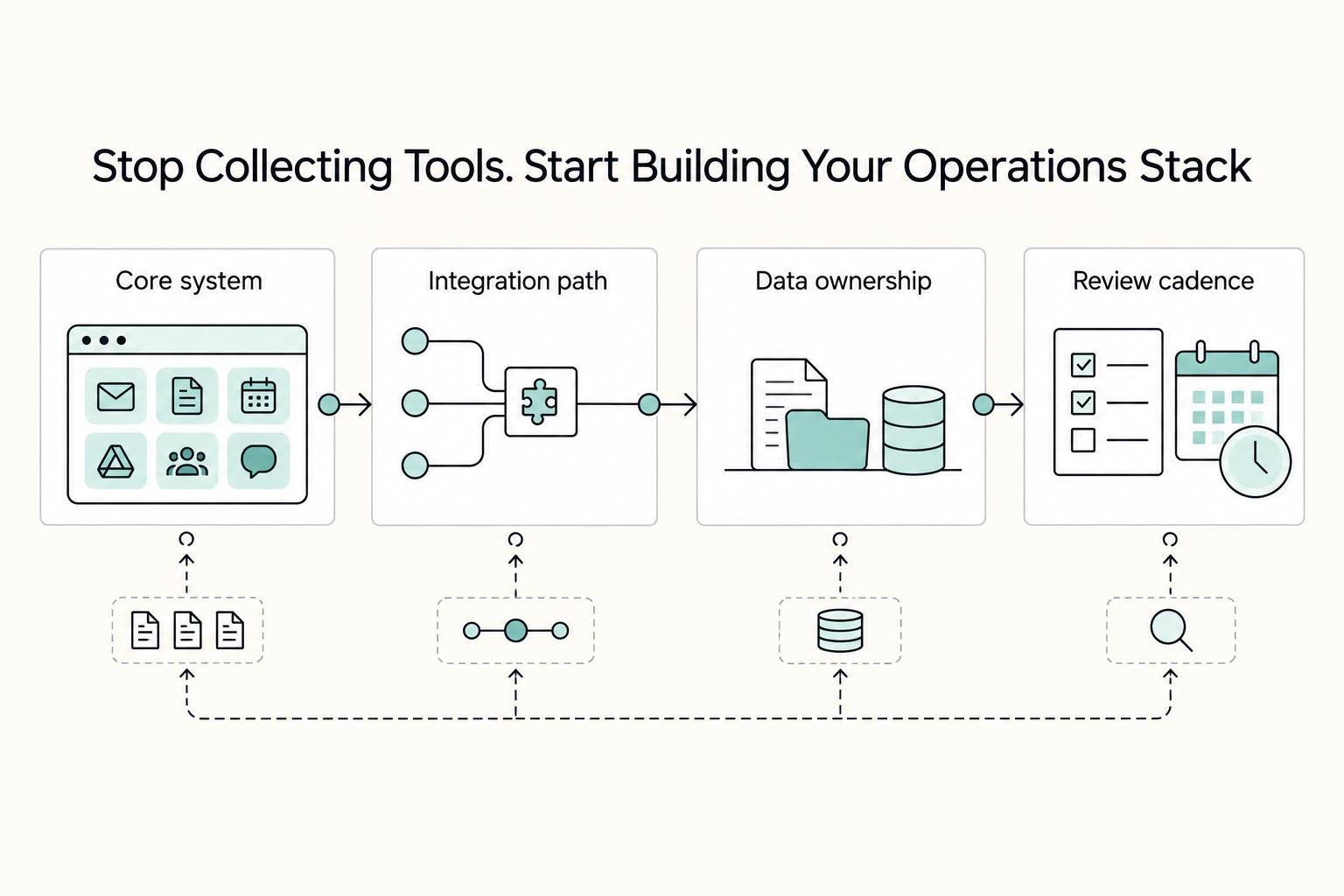
Stop Collecting Tools. Start Building Your Operations Stack.#
A practical way to choose Google Workspace add-ons is to build around Workspace first, then pick one primary tool for each operating category. Adding apps one by one often creates seams instead of a stack. Those seams usually show up as handoff gaps between inbox and project tools, scattered records across files and apps, and extra effort to review installs and access.
| Filter | What to check | Grounded detail |
|---|---|---|
| Core system | Decide where the work actually lives first | Examples given: Gmail for lead handling; Sheets for finance tracking |
| Integration path | Confirm the app works inside the product you use | Check the Marketplace "Works with" filter for Gmail, Docs, Sheets, or Drive |
| Data ownership | Prefer tools that keep the working record close to Workspace | The article warns that Google Sheets add-ons are not the same as browser extensions |
| Review cadence | Check how current the guidance is before trusting a recommendation list | A roundup published January 8, 2026 is described as a better starting point than a page still labeled 2022 |
| Decision area | Disconnected app collection | Intentional Workspace-centered stack |
|---|---|---|
| Workflow ownership | Unclear handoffs between inbox, docs, PM, and billing | One primary tool per operating category |
| Data continuity | Copying, retyping, and scattered records | Fewer jumps between Gmail, Docs, Sheets, and Drive |
| Admin overhead | Multiple logins, settings, and support points | Fewer places to review installs and permissions |
| Risk control | Harder to trace where work broke | Easier to verify fit, access, and update status |
Before you install anything from the Google Workspace Marketplace, run it through a simple four-part filter. Core system: decide where the work actually lives first, such as Gmail for lead handling or Sheets for finance tracking. Integration path: confirm the app works inside the product you use by checking the Marketplace Works with filter for Gmail, Docs, Sheets, or Drive. Data ownership: prefer tools that keep the working record close to Workspace instead of trapping key context in a browser-only layer. That matters because Google Sheets add-ons are not the same as browser extensions, and treating them as interchangeable is an easy setup mistake.
Review cadence: check how current the guidance is before you rely on a recommendation list. A roundup published January 8, 2026 is a better starting point than a page still labeled 2022. Then verify the install path yourself. In Sheets, go to Extensions > Add-ons > Get add-ons. If part of your process must work on iPhone or iPad, do not make a Sheets add-on the only way that task gets done.
Before you move on, do three quick checks:
- Define your operating categories: acquisition, delivery, finance, and security.
- Map each category to one primary add-on, not three overlapping ones.
- Flag any tool that lacks a clear workflow role, mobile fallback, or compatibility check.
If you're comparing Google Workspace add-ons, browse Gruv tools.
Turn Gmail & Docs into Your Client Acquisition Engine#
If you want leads to move reliably, run acquisition inside Gmail and Docs with clear handoffs rather than ad-hoc tracking. Google Workspace is strong for communication, but it does not include a native CRM, so pick a Google Workspace Marketplace option that works with Gmail and confirm compatibility with Google Calendar and Google Drive before you commit.
How do you build a pipeline with entry, exit, and owner rules?#
Use a Gmail-connected CRM so activity stays with the lead record and stalled deals surface early. Spreadsheets can store contacts, but they do not automatically log email activity or clearly show where deals are stuck.
Keep your pipeline simple and explicit. For each stage, define:
- What moves a lead into the stage
- What must be true before it exits
- Who owns the next action
Before you offer a call, run a lightweight qualification check on lead quality, urgency, budget fit, and decision-maker access. A quick high/medium/low view is enough to prioritize outreach; if urgency is weak or decision-maker access is unclear, keep progressing in email first.
How do you make your Google Doc proposal usable after the sale?#
Treat your proposal as the first delivery document, not a one-time sales file. In practice, that means clear scope, a visible approval path, and a handoff you can reuse without rework.
| Proposal area | Weak Docs workflow | Strong Docs workflow |
|---|---|---|
| Scope clarity | Broad service description with few limits | Named deliverables, exclusions, assumptions, and timing documented in the file |
| Approval path | Approval buried in an email thread | One current Google Doc, clear approval step, and a named owner for revisions |
| Handoff readiness | Proposal archived after approval | Core details reused for kickoff, including goals, files, timeline, and client inputs |
If you want to turn proposal or intake content into a questionnaire, Form Builder for Docs is one Marketplace option. It builds Google Forms from Google Docs content and supports importing questions, question-and-answer pairs, and images. Use the preview step before import to verify parsed fields and questions so intake does not go live with broken structure. Its listing shows an update date of February 26, 2026.
How do you set scheduling rules that protect delivery capacity?#
Your booking flow should qualify demand, not just fill your calendar. Add buffering, collect brief intake prompts before confirmation, and route requests to the right meeting type based on fit.
Also confirm where booking data lands. Keep the calendar event, intake answers, proposal doc, and lead record connected closely enough to avoid manual copying. That clean handoff is what lets you move into delivery without losing context.
Is Your Project Delivery System as Professional as Your Work?#
A professional delivery system moves every request through one shared project hub from intake to final update. If work is split across email threads, scattered comments, and memory, you will look reactive even when your output is solid. Use add-ons that convert inbox requests into owned tasks, keep status visible, and make review handoffs traceable.
| Delivery area | Reactive delivery | Systemized delivery |
|---|---|---|
| Visibility | Progress is buried in threads and side messages | One hub tracks tasks, owners, due dates, status, and review handoffs |
| Turnaround reliability | Work starts when someone remembers | Requests are turned into tasks from Gmail with owner and due-by at intake |
| Revision control | Feedback is split across email, calls, and file comments | One current file is tied to explicit review stages and checklist checkpoints |
| Stakeholder communication | Updates happen only when someone asks | Client-visible updates come from the same hub used to run the work |
How do you turn inbox requests into owned work?#
Set one non-negotiable rule: if it matters, turn it into a task from the inbox. Asana for Gmail supports converting emails into tasks, assigning owners, and setting deadlines without leaving Gmail. Trello for Google Workspace supports the same intake flow in card form, including labels, due dates, and checklists.
| Tool | Inbox-to-work action | Noted detail |
|---|---|---|
| Asana for Gmail | Converts emails into tasks | Supports assigning owners and setting deadlines without leaving Gmail |
| Trello for Google Workspace | Supports the same intake flow in card form | Includes labels, due dates, and checklists |
| Flowlu | Presents project tracking alongside Workspace tools | Its Marketplace listing mentions Google Drive, Calendar, Docs, and Sheets and shows an update date of December 22, 2025 |
To keep intake clean, require these fields before work starts: source email, owner, due-by date, status, and review handoff. This keeps vague requests from entering delivery without accountability.
How do you make reviews in Docs and Slides consistent?#
Define status labels before execution and use them the same way across the hub and client updates. Keep the set short so handoffs stay clear and everyone can tell what is active, in review, waiting, or complete.
For Docs and Slides deliverables, run three quality-control checkpoints every time:
- Clarity pass: Confirm the recommendation, decision, or next action is easy to follow.
- Consistency pass: Check naming, headings, dates, numbers, and linked references against the current project record.
- Final approval pass: Confirm approver, final version, and where client feedback should be captured.
These are operating checkpoints, not native product features. Add them to the task checklist so final edits do not drift across versions.
How do you triage multi-stakeholder requests without losing the audit trail?#
Use a lightweight triage frame on each incoming request: priority, owner, due-by, and resolution state. Resolution state can stay simple (open, waiting, resolved, closed) as long as everyone uses it consistently.
Then enforce one rule for communication hygiene: if it is not updated in the project hub, it is not an official status update. That keeps delivery records clean and makes the handoff into billing and compliance much easier in the next stage.
The Most Important System: Getting Paid Correctly and Staying Compliant#
Your finance system should make payment records easy to trust and easy to review. You do not need a heavy accounting stack inside Google Workspace, but you do need one consistent path from invoice draft to monthly close.
| Finance task | Manual finance workflow | Workspace-centered automation |
|---|---|---|
| Error risk | Relies more on copy-paste and memory | Lower in practice when you use locked templates, formulas, and required fields |
| Payment speed | Slows down when details are missing or need rework | Often smoother when invoices come from one current sheet and are sent promptly |
| Audit readiness | Evidence can end up split across inboxes and folders | Stronger when invoice data, source files, and approvals point to one record set |
| Reconciliation effort | Month-end matching is usually more manual | Lighter when invoice logs, transactions, and categories stay aligned |
How should you invoice from Sheets?#
Start with a controlled sheet, not an improvised template. Google Sheets add-ons are third-party tools, and Google Workspace Marketplace is the standard place to get them. A 2026 marketplace roundup (updated December 10, 2025) includes Zoho Invoice as an invoicing-related example, but your template discipline matters more than any single tool.
For cross-border work, use a must-have invoice field block and mark local legal items for verification:
| Must-have invoice field | What to include |
|---|---|
| Entity details | Your legal/business name, address, contact email, plus the client's legal name and billing address |
| Tax IDs | Your tax ID/registration number (if applicable) and client tax ID where needed, marked [verify locally] |
| Invoice basics | Invoice number, issue date, service period, line items, quantity or hours, rate, subtotal, tax line [verify locally], total due |
| Currency and terms | Billing currency, exchange note (if used), payment terms such as Net days (verify the standard term locally), late-fee note (verify locally) |
| Remittance data | Bank name, account holder, IBAN/account number, SWIFT/BIC or other routing details, or approved payment link |
Before you connect billing data, verify setup and lifecycle basics. In Sheets, install from Extensions > Add-ons > Get add-ons, and expect to grant permissions. Also confirm you are using current Marketplace add-ons or web integrations, not legacy Chrome app formats, since older Chrome apps have been deprecated.
How do you track billable time you can actually use?#
Track time in the same structure you use for delivery so you can use it for both invoicing and pricing decisions. A practical loop is simple: log time by project and task category, review entries before invoicing, then compare actuals against estimate while the project is still active.
Keep categories stable and lightweight (for example: research, meetings, production, revisions, admin, client communication). That consistency helps you spot scope drift early, especially when revisions or coordination start consuming margin.
Workspace automation can support this loop when it removes duplicate entry. Add-on trigger/action patterns can handle reminders and sync data across platforms, so verified hours can feed your invoice sheet without retyping. If your estimates still depend on memory, benchmark from your last three completed projects and update future quotes from actuals. For pricing strategy, see Value-Based Pricing: A Freelancer's Guide.
How do you handle monthly financial tracking so accountant handoff is easy?#
Monthly close should be repeatable first, advanced second. Keep revenue, expenses, and supporting evidence mapped to one monthly folder and one summary sheet so someone else can follow your records without decoding your inbox.
Use a short close checklist:
- Confirm invoices issued
- Mark invoices paid or outstanding
- Match incoming payments to invoice numbers
- Categorize expenses
- Attach receipts or source files
- Flag items needing tax or accountant review
For expenses, choose stable categories and keep them stable month to month. For documentation, store each invoice PDF/export with its source agreement, proof of delivery, payment confirmation, and receipt image in one place. This record discipline makes the next control layer easier, because contracts, backups, and secure handling of sensitive data are easier to run when the financial trail is clean.
Related: The Best Zapier Workflows for Freelancers.
Standardize contracts, test restores, and classify what you share#
If you do only three things here, standardize your contract workflow, test restores on a schedule, and classify information before sharing. The goal is simple: prove what was agreed, recover critical assets, and limit exposure of client data.
| Area | Weak control | Stronger control |
|---|---|---|
| Contract control | Terms are scattered across email threads and ad hoc edits | One approved template, one signature route, one signed-copy location, and a client evidence folder |
| Recovery readiness | Google Drive is your only live copy and restores are untested | Defined backup scope, limited recovery access, recurring restore tests, and written recovery steps |
| Client-data handling | One sharing method is used for every file | Information is classified first, then shared with encrypted email, restricted links, or a secure portal based on sensitivity |
How do you keep contracts defensible?#
Use one approved agreement path every time. Keep a single template in a controlled Google Docs folder, generate copies from that template only, route signatures through one standard path, and store the signed file with related proposal versions, approvals, and change records in the client folder.
This avoids a common breakdown: template drift, signed files buried in inboxes, and no clear record of the accepted version. If scope or pricing decisions happen on calls, capture that record deliberately. Google Meet recording can save discussions to Google Drive, and Live Captions support clearer records; before important calls, check Settings > Audio > Suppress Background Noise so the saved file is usable.
How do you set up backups that support continuity?#
Define recovery before there is an incident. Include not just files, but also the key user accounts that control access to contracts, deliverables, and finance records. Workspace asset management includes resources like user accounts, and weak asset management can disrupt operations and productivity.
If you use a third-party backup tool, confirm what it captures and how restores actually run. Then perform recurring test restores on low-risk items and log the date, result, and steps. Keep recovery permissions bounded to specific owners/admins, and document who executes recovery tasks if access is lost. If your plan includes Google Vault, treat it as a governance/eDiscovery layer, not a replacement for restore testing.
How do you choose secure communication by information class?#
Do not send every kind of information the same way. Start with classification, then pick the least-open method that still fits the material and client expectations.
| Information class | Examples | Recommended method |
|---|---|---|
| Routine information | Status updates, scheduling, non-sensitive drafts | Use restricted link sharing with named recipients |
| Sensitive information | Contracts, pricing, nonpublic plans, identifiers | Use encrypted email or tightly restricted file sharing |
| Highly sensitive or client-mandated information | For example, finance or proprietary materials | Use the client's secure portal when available |
Before sending, confirm the file is set to Restricted and that recipients actually need access. In managed environments using AI features with client material, include an admin review step against the Google Workspace Privacy Hub.
Use this same governance checklist across acquisition, delivery, finance, and risk controls: template, folder location, owner, sharing rule, recovery note, and review date. Review tools on the same cadence so permissions and recovery practices stay current.
If you want a deeper dive, read A Guide to Using Google Workspace for Your Freelance Business.
Tighten the handoffs between the tools you already run#
Your goal is not more tools. It is tighter handoffs across the tools that already run acquisition, delivery, financial records, and recovery, so work moves with fewer jumps and clearer ownership.
- Acquisition stack: Keep lead context in Gmail from first inquiry to next step, so stage, follow-up, and contact history stay with the conversation.
- Delivery stack: Keep approved scope, drafts, redlines, and final files in Docs and Drive, so delivery decisions do not get lost across threads and side notes.
- Financial stack: Turn approved scope or time records from Sheets or Gmail into invoice-ready records your accountant can use, with fewer copy/paste breaks between estimate, invoice, and payment tracking.
- Risk mitigation stack: Keep signed files, sharing controls, consent checkpoints, and recovery checks tied to the same client folder, so you can verify what happened instead of relying on memory.
Browser extensions can still help daily focus. StayFocusd, for example, sets per-site time budgets; use that as a personal productivity layer, not as your client record system.
| Aspect | Disconnected tools | Integrated Workspace stack |
|---|---|---|
| Workflow continuity | Context breaks between inbox, docs, sheets, and storage | One client trail across Gmail, Docs, Sheets, and Drive |
| Error risk | More retyping, missed fields, and lost approvals | Fewer manual handoffs and clearer source records |
| Decision visibility | Status lives in separate tabs and memory | Next action and document state are easier to verify |
For your first system pass:
- Map every tool that touches leads, proposals, signed agreements, invoices, and backups.
- Identify one broken handoff where data is retyped or context gets lost.
- Assign one integration fix inside Workspace before adding anything new.
- Verify access permissions, sharing settings, and one backup restore check before rollout.
Frequently Asked Questions
Can you run your business on Google Workspace without extra tools?
Yes, to a point. Google Workspace offers business-grade services beyond Google’s free consumer apps, but you should only add a tool when native Gmail, Docs, or Sheets no longer covers a real need. If a tool does not clearly improve acquisition, delivery, payment handling, or recovery, leave it out.
How should you choose a finance or invoicing add-on?
Pick for record quality first, convenience second. You want clean invoice fields, reliable exports into your accounting process, and clear privacy and deletion policies before you connect client or billing data. A common failure mode is a polished invoice that still misses details your client needs, which slows payment and creates cleanup work later.
What makes a secure client workflow inside Workspace?
Use three checks every time: one approved contract route, one sharing rule based on information class, and one tested recovery path. In practice, that means the signed copy, proposal, redlines, and approvals live in the same client folder, sharing is set intentionally before access is granted, and you log restore tests instead of assuming recovery works. If you plan to make any legal or regulatory claim about records, signatures, or retention, verify current policy and regulatory status before rollout.
Is a Gmail CRM add-on actually worth it?
Yes, if leads disappear in threads or follow-ups depend on memory. A CRM inside Gmail is most useful when it shows deal stage, next action, and contact history right where your sales conversations happen. If you only manage a handful of active opportunities and already review them weekly, a spreadsheet may still be enough.
Are add-ons secure enough for client work?
Treat each install like vendor review, not like a casual browser download. Check the permissions you are granting, and read the vendor’s privacy policy and deletion policy before rollout. If the vendor cannot explain what data it stores, how it is removed, or who can access it, do not connect it to sensitive client work.
What should you do when a tool makes compliance or enforceability claims?
Ask for current documentation, then confirm whether the underlying policy or regulation is current before you rely on the claim. As a practical checkpoint, look for both the “up to date as of” and “last amended” stamps in the reference material. One example source shows 3/18/2026 and 3/06/2026 as separate dates. Also remember that eCFR material is described as authoritative but unofficial, so do not treat it alone as your final legal answer.
What is the difference between an add-on and a Chrome extension?
Use add-ons when you need workflows inside Workspace apps like Gmail, Docs, or Sheets, so the integration point stays tied to the task. Treat browser extensions as a separate tool choice, and apply the same permission, privacy, and data-deletion checks before rollout.
Try a related tool
Researched and edited by the Gruv editorial team. Gruv builds cross-border billing, payouts, and finance-operations software for global businesses.
Sources
Includes 6 external sources outside the trusted-domain allowlist.
- ecfr.gov/current/title-10/chapter-II/subchapter-D/par...trusted
- uscc.gov/sites/default/files/2025-11/2025_Annual_Repo...trusted
- bitcot.com/google-workspace-studio-automationsexternal
- deimos.io/blog-posts/the-best-google-workspace-add-ons...external
- divergeit.com/blog/google-workspace-asset-managementexternal
- forbes.com/sites/jackkelly/2024/10/24/top-google-worksp...external
- insightly.com/blog/best-crm-for-google-workspaceexternal
- itgenius.com/blog/best-chrome-addons-and-extensions-for-g...external
Educational content only. Not legal, tax, or financial advice.
Related Posts

Value-Based Pricing for Freelancers Under Real Payment Risk
Value-based pricing works when you and the client can name the business result before kickoff and agree on how progress will be judged. If that link is weak, use a tighter model first. This is not about defending one pricing philosophy over another. It is about avoiding surprises by keeping pricing, scope, delivery, and payment aligned from day one.
Google Workspace for Freelancers Who Want Cleaner Operations
If you want cleaner operations, set up a business workspace early. You are deciding where client records, files, calendar history, and account ownership will live. You are also deciding whether those things stay inside the business or remain mixed with your personal life.
The Best Zapier Workflows for Freelancers
If you want the best [Zapier workflows](https://zapier.com/blog/tips-for-powerful-zapier-workflows) for freelancers, stop collecting one-off automations and start treating them like operating controls. The point is not convenience. It is fewer broken handoffs, cleaner records, and less business risk as your client load grows.