
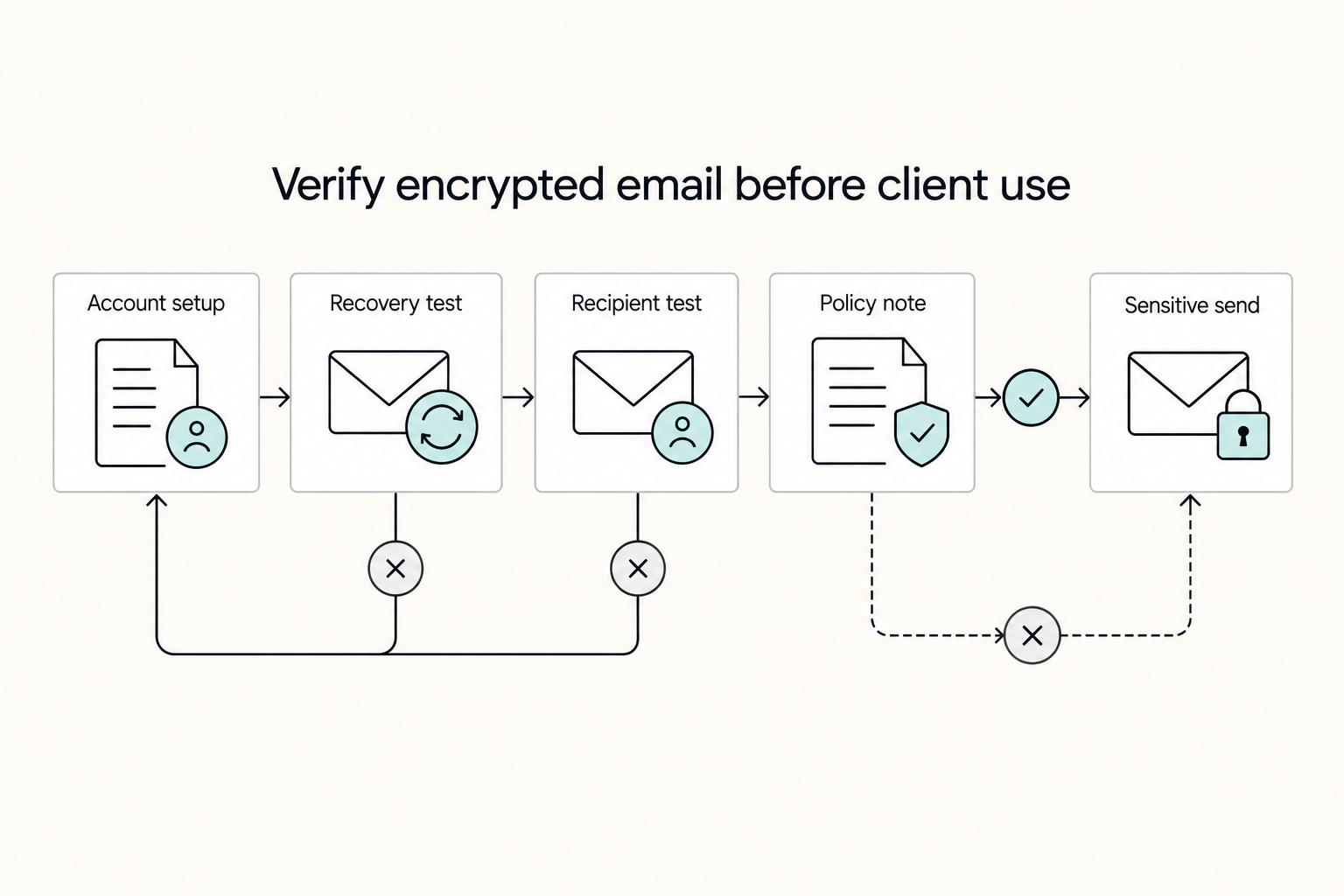
Quick Answer
Start by piloting Proton Mail, Tutanota, and Mailvelope against one rule: external recipients must open, reply, and continue the thread without extra coaching. For most freelancers, the best email encryption tools are the ones that pass that completion test in live communication, not the ones with the longest feature sheet. Keep Gmail or Microsoft Outlook only if your plugin route proves dependable, and do not go live until recovery actions and first-week checks are documented.
What to Look for in an Email Encryption Tool#
You can choose an email encryption route, test it in a real exchange, and keep contract and invoice threads moving.
For freelancers, sensitive material usually sits in email: contracts, invoices, customer records, and sensitive files. The common failures are simple: a wrong recipient, a compromised mailbox, or accidental forwarding. The best tool is the one your clients can use reliably, not the one with the longest feature list.
Most internet email still runs over SMTP, and email is often transmitted between servers in plain text. TLS protects mail in transit, but it does not preserve confidentiality after delivery or forwarding. That is the gap your setup has to close.
Keep this review focused on options you can test and deploy in practice. Your first goal is not a perfect setup. It is a route that works end to end with real people: send, open, reply, forward, and continue the thread.
Start with this orientation before the deeper comparison:
- Proton Mail: One route to evaluate. Week-one check: verify external recipients can open, reply, and forward.
- Tutanota (Tuta): One route to evaluate. Week-one check: run the same open, reply, and forward test.
- Mailvelope: One route to evaluate. Week-one check: confirm both sides can complete a full send and reply cycle.
- PGP client options: Higher-control route with more key-management responsibility. Week-one check: document key handling before live client use.
Use one rule for every option in this list: if external recipients cannot reliably complete a thread, it is not your primary setup yet.
Who This List Is For and Not For#
This list is for independent professionals who need encrypted client communication they can use day to day. The real test is simple: can recipients open, reply, and continue without extra hand-holding?
| Need | Start with |
|---|---|
| Fast client adoption | Routes that minimize recipient setup and friction |
| Keep your current inbox identity | Policy-control routes inside Gmail or Microsoft 365 first |
| Stronger control for sensitive work | Key management, audit logs, and policy enforcement before convenience features |
| Execution, not theory | Real recipient completion, then refine |
Use this quick filter to decide where to start:
- You want fast client adoption: Start with routes that minimize recipient setup and friction.
- You want to keep your current inbox identity: Evaluate policy-control routes inside Gmail or Microsoft 365 first.
- You need stronger control for sensitive work: Prioritize key management, audit logs, and policy enforcement before convenience features.
- You want execution, not theory: Choose based on real recipient completion, then refine.
If you send confidential client materials regularly, this shortlist fits day-to-day use. If your client mix is mostly non-technical, recipient experience should outweigh advanced controls in the first rollout.
This list is not for deep enterprise procurement or full-suite email security buying processes. It is also not a certification or lab-ranking guide, and it does not make independent test claims beyond the sources used here.
A practical boundary: your best choice depends on the encryption model you need, whether that is end-to-end encryption, gateway or portal encryption, or policy-based controls. If recipient setup must stay minimal, start with native-provider routes. If keeping your current inbox is non-negotiable, test compatible Gmail or Microsoft 365 paths first. Related: A Guide to Financial Therapy.
Selection Criteria That Actually Matter for Freelancers#
Choose in this order: client friction, daily usability, setup complexity, recovery risk, then privacy depth. If your most common client cannot complete an encrypted exchange, that option is not your default.
- Client friction (pass/fail first): Validate completion, not just successful send from your side. If clients cannot reliably open, reply, and continue, fail it and move on. It is easy to mark a route successful after one internal test account works. External recipient completion is the real gate.
- Daily usability: Pick a route you can repeat under deadline pressure. In key-based encryption, contacts use your public key to send protected mail, and you use your private key to read it. If the send steps are easy to skip when you are rushed, expect inconsistent use in real projects.
- Setup complexity: Keep tradeoffs explicit by separating native routes from add-on routes. In this guide, treat dedicated encrypted providers as one path and add-on key-based encryption in an existing inbox as another. Complexity is acceptable only when it buys you a requirement you truly need.
- Recovery risk and trust checks: Before you migrate, document key handling and account recovery steps. Treat directory or list visibility as a compatibility signal, not a security endorsement. If recovery steps are vague, treat that as a deployment blocker rather than a post-launch cleanup item.
- Privacy depth (last): Compare deeper controls only after the first four checks pass. For sensitive work, prioritize controls you will maintain, including policy enforcement that can monitor, flag, and sometimes prevent violations. Depth you cannot run consistently becomes paper value.
Use a simple evidence note while testing: what passed, what failed, and what needed manual support. That note gives you a clean basis for final selection instead of relying on memory from scattered test messages.
Final filter: treat list placement as context, not proof. Security claims can change, so review a provider security history before you commit.
Quick Comparison Table You Can Scan in 60 Seconds#
Use this as a go-or-no-go filter, not a ranking. If a field is unknown, treat it as risk until your week-one pilot proves it in real client threads.
| Option | Best for | Client friction level | Setup effort | Platform coverage (Windows, macOS, Android, iOS, Linux) | Main risk | Can I keep Gmail/Microsoft Outlook as primary inbox? | What to verify first week |
|---|---|---|---|---|---|---|---|
| Proton Mail | A private-provider route when you want encrypted, privacy-focused email by default. | Unknown until clients can open, reply, and continue without help. | Unknown until you test your real process. | Unknown until you verify it in your own pilot. | Assuming privacy benefits are enough without validating recipient completion. | TBD after pilot | Run real client tests for open, reply, and forward across your most common recipient types. |
| Tutanota (Tuta) | A private-provider route when you want encrypted, privacy-focused email by default. | Unknown until recipient behavior is validated in normal work. | Unknown until you test onboarding and recovery in practice. | Unknown until you verify it in your own pilot. | Choosing based on positioning instead of thread completion under deadline pressure. | TBD after pilot | Test encrypted send and reply with at least one non-technical client and one internal account. |
| Mailvelope | Unknown until your own pilot confirms fit. Treat as a pilot-only option. | Unknown until you validate it. Measure with your own client mix. | Unknown until you verify it in your own pilot. | Unknown until you verify it in your own pilot. | Unknown until you verify it in your own pilot. | TBD after pilot | Confirm whether two-way encrypted exchange and readable follow-up work in your common client mailbox types. |
| Thunderbird + PGP stack | Unknown until your own pilot confirms fit. Treat as a pilot-only option. | Unknown until you confirm it. Validate through pilot execution. | Unknown until you verify it in your own pilot. | Unknown until you verify it in your own pilot. | Unknown until you verify it in your own pilot. | TBD after pilot | Validate message delivery, reply continuity, and support burden in a small pilot before live client traffic. |
Use the table as a shortlist tool, then decide with your own pass log. Unknowns are not neutral; they usually turn into support burden once real clients are involved.
If two options still look similar, choose the one that passed with fewer retries, fewer follow-up explanations, and fewer recovery questions from recipients. If inbox behavior or recovery steps are unresolved, it is not ready to be your primary route.
Proton Mail Best for Low Friction Encrypted Client Communication#
Start with Proton Mail if you want private-by-default email for client communication. It is end-to-end encrypted, with messages encrypted on the user device before reaching servers, and a zero-access model where the provider states it cannot read message content.
The following details apply:
- Proton Mail is presented in reviewed secure-email comparisons, including a 30-day review and a business options list that also includes Tuta.
- One reviewed source says it was tested across Windows, macOS, iOS, Android, and Linux.
- FitGap highlights privacy and security strengths plus cross-platform usability.
Treat these points as risks or unknowns until your pilot resolves them:
- Verify current PCMag and ZDNET rankings directly on their sites.
- Pricing tier boundaries are unclear here. A starting price of
EUR 3.49is listed, but tier detail is not established. - Migration ease from Gmail or Outlook and recovery UX quality are not established.
- FitGap also flags interoperability friction with standard email, plus limits around enterprise integrations and storage or feature depth.
A low-disruption pilot looks like this: keep active legacy threads where they are, start only new sensitive exchanges on the new route, and ask each recipient to complete one live reply before you send confidential attachments. That gives you a clean acceptance gate without forcing a hard cutover.
If recipients pass quickly, expand usage to new proposals, contracts, and billing messages. If recipients stall, keep Proton Mail as a candidate and move to the next option without forcing adoption during live deadlines.
For a consultant moving new projects off legacy Gmail threads, use a staged rollout: start with new client engagements, keep the old channel as fallback, and expand only after recipients can complete encrypted threads without extra coaching.
Tutanota and Tuta Best for Privacy First Freelancers Who Accept Stricter Workflows#
If you're evaluating Tutanota or Tuta, treat this as a fit test, not a proven winner. If a short recipient onboarding script keeps failing with your client mix, switch to a lower-friction option.
The following is supported:
- Unencrypted email can be intercepted as it moves across multiple servers.
- Provider choice is purpose-driven, not one-size-fits-all.
- Security basics like encryption and
2FAshould be verified before rollout. - Migration and end-to-end encryption setup are distinct tasks.
The following has not been independently verified:
- A verified
TutaversusProton Mailwinner. - Repeated
IdentillectorRedditrecommendations forTuta. - Specific migration, interoperability, pricing, or plan-limit details for
Tuta.
Treat this route as a fit question, not a brand question. If your clients can complete the first encrypted exchange with minimal help, a stricter setup may still be practical. If every new client needs repeated guidance, the support cost may outweigh the benefit for day-to-day communication.
Before broad rollout, test with two real recipient profiles from your own mix: one who is comfortable with security tools and one who is not. Record where setup instructions fail, then decide whether that friction is acceptable for your workload.
Practical use case: an independent advisor with recurring sensitive communication can pilot Tutanota for new engagements, keep legacy threads as temporary fallback, and require one successful encrypted reply before moving sensitive exchanges. If clients repeatedly fail that first step, switch routes instead of forcing adoption.
Mailvelope Best for Keeping Gmail or Outlook While Adding OpenPGP#
Mailvelope is a practical middle path if you need to keep Gmail or Microsoft Outlook and add OpenPGP-based protection without a full provider migration.
This route works for three concrete reasons:
- It is presented as a browser add-on for webmail, including Gmail and Outlook, so you can keep using your current inbox.
- It is positioned for common business environments like Google Workspace and Microsoft 365.
- It is described as an OpenPGP-based extension and supports
PGP/MIME, which can help with standards-based workflows across mixed setups.
Expect more setup effort in three areas:
- You still need to complete key generation, contact keyring setup, and encrypted send and receive checks.
- The extra steps can add coordination overhead, especially if recipients have not completed key exchange.
- Installation alone is not success. Verified encrypted exchange is the pass-or-fail point.
Execution detail matters here. Set up keys, exchange public keys with a test contact, verify one encrypted reply, and then move a limited set of sensitive client messages to the new method. Keep non-sensitive coordination in normal mail until encrypted exchange is consistently passing.
A practical failure mode here is treating installation or a single test as complete rollout. Require the same pass gate for every live client: successful open and successful reply from the expected address.
Concrete use case: a designer with long-running client history in Gmail can roll this out gradually by keeping legacy threads in place. For new sensitive work, use a short onboarding sequence: generate keys, exchange public keys, and confirm one encrypted reply before sharing sensitive edits.
If you cannot enforce that onboarding and verification step reliably, consider a simpler encrypted email setup first.
OpenPGP Client Stack for Advanced Control Across Devices#
Use a full key-based stack only if you want tighter cross-device key control and are ready to manage keys as an ongoing responsibility, not a one-time setup.
Start with the core model, then choose interfaces on top of it:
- Use
GnuPGas the core.GnuPGis an open-source implementation of the OpenPGP standard that can encrypt and sign emails, files, and communications, and is compliant withRFC 4880. - Treat clients as a separate layer. Client interfaces can sit on top of the same key model: public key for encryption and private key for decryption. Confirm specific client support details with the relevant authority.
- Manage key policy as an ongoing practice. The grounded model includes revocation, expiration policies, and web-of-trust flows, which matter for long-term client work.
Before you commit, run this platform fit check as pass or fail:
| OS | What is established here | What you still need to verify |
|---|---|---|
Windows | GnuPG cross-platform support is stated. | Key import, encrypted send, encrypted reply, and signature verification in your chosen client. |
macOS | GnuPG cross-platform support is stated. | Same checks, plus backup and restore on a second machine. |
Linux | GnuPG cross-platform support is stated. | Same checks, plus consistency between terminal and GUI paths if you use both. |
Android | Confirm with the relevant authority. | Client availability, key handling, and a successful encrypted reply loop before live use. |
iOS | Confirm with the relevant authority. | Client availability, key handling, and a successful encrypted reply loop before live use. |
Trust discipline still applies. Keep independent validation and audit checks for client directories as separate steps before using any route for sensitive traffic.
A practical record for this route should include active keys, expiration timing, revocation steps, backup location, restore notes, and the date of your latest restore test. Keep that record current, because access recovery depends on it.
Another useful boundary is to avoid mixing many clients too early. Start with one primary client per device class, confirm consistent send and reply behavior, and add others only when needed. That keeps troubleshooting simpler.
Failure mode to avoid: tool sprawl. Running multiple clients without a single key inventory and recovery record can make lockouts and client response harder to manage.
Decision Checkpoints for Choosing Provider Versus Plugin#
Treat provider versus plugin as a risk decision. Pick the option clients can complete reliably and that you can verify before connecting live accounts.
| Checkpoint | What to verify | If it fails or needs caution |
|---|---|---|
| Route fit | Set a simple primary route for non-technical or fast-moving clients | Keep a fallback route defined so later changes stay tied to real requirements |
| Trust validation | Check the exact SOC 2 language and which of the 5 Trust Service Principles are covered | Treat "SOC 2 certified" as a red flag |
| Client usability | Run one full encrypted exchange with the client before approval | If the client cannot complete it without extra support, that route is backup-only |
| Device coverage | Test your real desktop and mobile setup, not a generic compatibility claim | If a critical device breaks the process, keep that route as fallback until fixed |
| Recovery and week-one verification | Approve only with a written recovery plan, then verify outcomes in week one | If recovery steps are unclear or failures repeat, do not keep it as the primary route |
Use this pass-or-fail sequence to avoid premature rollout:
- Route fit (pass/fail): For non-technical or fast-moving clients, set a simple primary route. If you must connect a third-party tool to
GmailorMicrosoft Outlook, treat that as higher access risk and document why it is still the right route. Keep a fallback route defined so later changes stay tied to real requirements. - Trust validation (pass/fail): Treat
SOC 2 compliantas a claim that should map to an independent CPA audit report. TreatSOC 2 certifiedas a red flag because SOC 2 is not a certification program. Check which of the 5 Trust Service Principles are covered, and remember SOC 2 reports are not all equal. Save the exact language you reviewed so your decision is auditable later. - Client usability (pass/fail): Run one full encrypted exchange with the client before approval. If the client cannot complete it without extra support, that route is backup-only. Capture where the exchange failed so you can improve instructions or switch routes quickly.
- Device coverage (pass/fail): Test your real desktop and mobile setup, not a generic compatibility claim. If a critical device breaks the process, keep that route as fallback until fixed. Device claims from marketing copy are not a substitute for your own test.
- Recovery and week-one verification (pass/fail): Approve only with a written recovery plan, then verify outcomes in week one. If recovery steps are unclear or failures repeat, do not keep it as the primary route. Recovery confidence should be proven before high-stakes messages depend on it.
Keep your decision note short and practical: route selected, why it passed, what failed in alternatives, and what would trigger a future switch. Use a primary-plus-backup model with one default path for most clients and one fallback path for exceptions.
Client Communication Rules That Prevent Encryption from Stalling Projects#
Projects stall less often when you standardize client instructions, verify the first exchange, and document the route before sensitive files move. If the first exchange is vague, delays and risk rise quickly.
- Kickoff template with channel boundaries
Send the same kickoff note to every client at the start. State which email address you will use, what must stay in encrypted email, and what can remain in plain email until setup is complete. Name sensitive items directly: contracts, client communications, and confidential attachments. Keep this message short enough to skim so clients do not miss the first required action.
- First-message verification before sensitive sends
Do not send sensitive documents until the client completes a verification step: receive your encrypted test message, open it, and reply from the expected address. If that does not happen, pause contracts and confidential attachments. This helps prevent sensitive files from being sent before setup is confirmed.
- Exception handling for setup issues
If a client cannot complete the encrypted flow, switch to your predefined backup route instead of troubleshooting inside an active deal thread. Re-send clear setup steps and keep sensitive content paused until verification passes. If retry fails again, keep that thread for non-sensitive coordination only until a guided retry is completed, so both parties know the next step.
- Per-client recordkeeping rule
Log each client route choice, onboarding status, MFA status, verification outcome, and last successful encrypted exchange date. Consistent documentation can reduce repeated setup failures and support clearer handoffs when someone else needs to step into the thread.
One Sitting Setup Checklist With Verification Steps#
Use one focused session to finish setup, verification, and documentation before any sensitive client exchange.
- Pick one primary tool and limit scope for this week. Choose one workflow, then set up one desktop and one phone you actually use for client deadlines. Keep the choice practical: align it with your requirements and recognized best-practice standards, such as NIST, and confirm the tool uses current ciphers and protocols. If you use Enigmail, make sure both Thunderbird and GnuPG are in place first.
- Run a controlled test before live client threads. Send an encrypted message to a secondary account, open it, and reply. If your setup depends on recipient-side extensions, verify the recipient can decrypt and respond in their environment. Completion means readable content, expected reply behavior, and continuity when the thread moves between your selected devices.
- Require three go-live checkpoints. Confirm encrypted send and receive works on both selected devices. Document a recovery path you can follow without guessing. Save reusable client setup instructions that a non-technical contact can complete. If any checkpoint fails, treat the route as backup until fixed.
- Capture a lightweight evidence pack while you test. Keep one dated note with your chosen tool, platform setup notes, recovery notes, and first successful encrypted test record. If you send large files, also note whether your setup can handle that volume reliably. This turns ad hoc testing into a repeatable baseline.
- Set follow-up reviews now. Add a first-week review to check failed sends, client confusion, and retries. If adoption is weak, switch to your backup path and update instructions immediately. Add an annual complete email security audit reminder to catch vulnerabilities over time.
If repeated friction continues, stop forcing the same route. Keep one primary path, keep one backup path, and require a passed verification test before sending contracts, payment details, or confidential attachments.
Pick One Route and Deploy It This Week#
Choose one route this week. Start with the option that best fits your current email system while still passing your minimum security checks. Escalate only when that route fails a clear checkpoint. The right choice is the one clients can complete reliably in real exchanges.
| Route | Use when | What to verify |
|---|---|---|
| Route A: Keep your current inbox and add encryption controls | Compatibility with your existing email setup is the priority | It encrypts content in delivery, requires authentication for access, supports your communication compliance needs, and passes external recipient completion before rollout |
| Route B: Move sensitive threads to a provider mailbox | Route A does not meet your confidentiality needs | Apply the same completion test and minimum checks, and keep scope narrow during the first rollout |
| Route C: Add more complexity only when Routes A and B fail requirements | A documented requirement failed in earlier routes | Keep one acceptance gate across all options: encrypted delivery, authenticated access, compliance fit, and recipient completion in real communication |
- Route A: Keep your current inbox and add encryption controls.
Use this first when compatibility with your existing email setup is the priority. Approve it only if it encrypts content in delivery, requires authentication for access, and supports your communication compliance needs. Then verify external recipient completion before rollout. This route is often easier to trial when it preserves inbox identity and thread habits.
- Route B: Move sensitive threads to a provider mailbox.
Use this when Route A does not meet your confidentiality needs. Standard email paths can expose messages in transit across multiple servers, while zero-knowledge designs encrypt messages on-device before they reach servers. Apply the same completion test and minimum checks so the comparison stays fair, and keep scope narrow during the first rollout.
- Route C: Add more complexity only when Routes A and B fail requirements.
Escalate only after documenting which checkpoint failed in earlier routes. Keep one acceptance gate across all options: encrypted delivery, authenticated access, compliance fit, and recipient completion in real communication. Complexity should solve a documented requirement, not chase features.
Your success metric is simple: secure communication that clients can complete without delaying work.
Take the next step now:
- Pick one route from your shortlist.
- Run the checklist and complete one external verification exchange.
- Send one verified encrypted client test message before sharing sensitive attachments.
Frequently Asked Questions
What is the best email encryption tool right now for freelancers?
There is no single best option for everyone. The right pick depends on your deployment model: end-to-end encryption, gateway or portal delivery, or policy-based controls in your current mail environment. Keep the option that you and your recipients can use reliably in real exchanges. A practical way to decide is a short pilot with your real client mix.
What are the strongest alternatives to Proton Mail?
There is no automatic strongest alternative without testing your own client mix. Compare options by usability, recipient friction, and fit with your required deployment model. Before committing, verify compatibility because encrypted products are not always interoperable. When two alternatives seem close, choose the one recipients complete more consistently with less support.
Do I need to switch from Gmail or Outlook to use email encryption?
Not always. Some solutions let you apply one-click encryption while staying in Gmail or Outlook, which can reduce adoption friction. TLS protects messages in transit, but not necessarily confidentiality after delivery or forwarding, so validate recipient open/reply/forward behavior before rollout. If inbox continuity is a hard requirement, start by testing add-on options in your current mail environment.
Is a tool listed on OpenPGP.org automatically trusted or audited?
An OpenPGP.org listing alone does not mean a tool is trusted or audited. Treat directories as discovery tools, then verify trust and audit requirements directly before using any route for sensitive traffic.
Proton Mail vs Tutanota for freelancers which one should I choose first?
Choose based on completion outcomes, not brand preference. Pilot both with your typical client profile and keep the one that passes with less friction in normal use. A practical tie-breaker is support effort: keep the route that reaches reliable completion with fewer recipient instructions.
What is the easiest setup for client communication with minimal friction?
Usually it is the option that preserves existing inbox habits and avoids extra portals, new accounts, or added passwords for recipients. Validate with one external flow: send, open, reply, and forward. Keep a primary path that recipients can complete reliably under real deadlines. Minimal friction does not mean minimal security.
Try a related tool
Researched and edited by the Gruv editorial team. Gruv builds cross-border billing, payouts, and finance-operations software for global businesses.
Sources
Includes 5 external sources outside the trusted-domain allowlist.
- articles.zelt.ae/the-15-best-email-encryption-tools-for-linux...external
- devopsschool.com/blog/top-10-email-encryption-tools-features-...external
- london.wordcamp.org/2017/session/encrypt-all-the-things-practica...external
- mailhippo.com/top-free-hipaa-compliant-email-encryption-to...external
- slashdot.org/software/email-encryption/f-freelanceexternal
Educational content only. Not legal, tax, or financial advice.
Related Posts

The Best Gear for a Portable Home Office
Portable-office gear decisions are not directly tested in this guide, so use this as a practical framework rather than a proven standard.
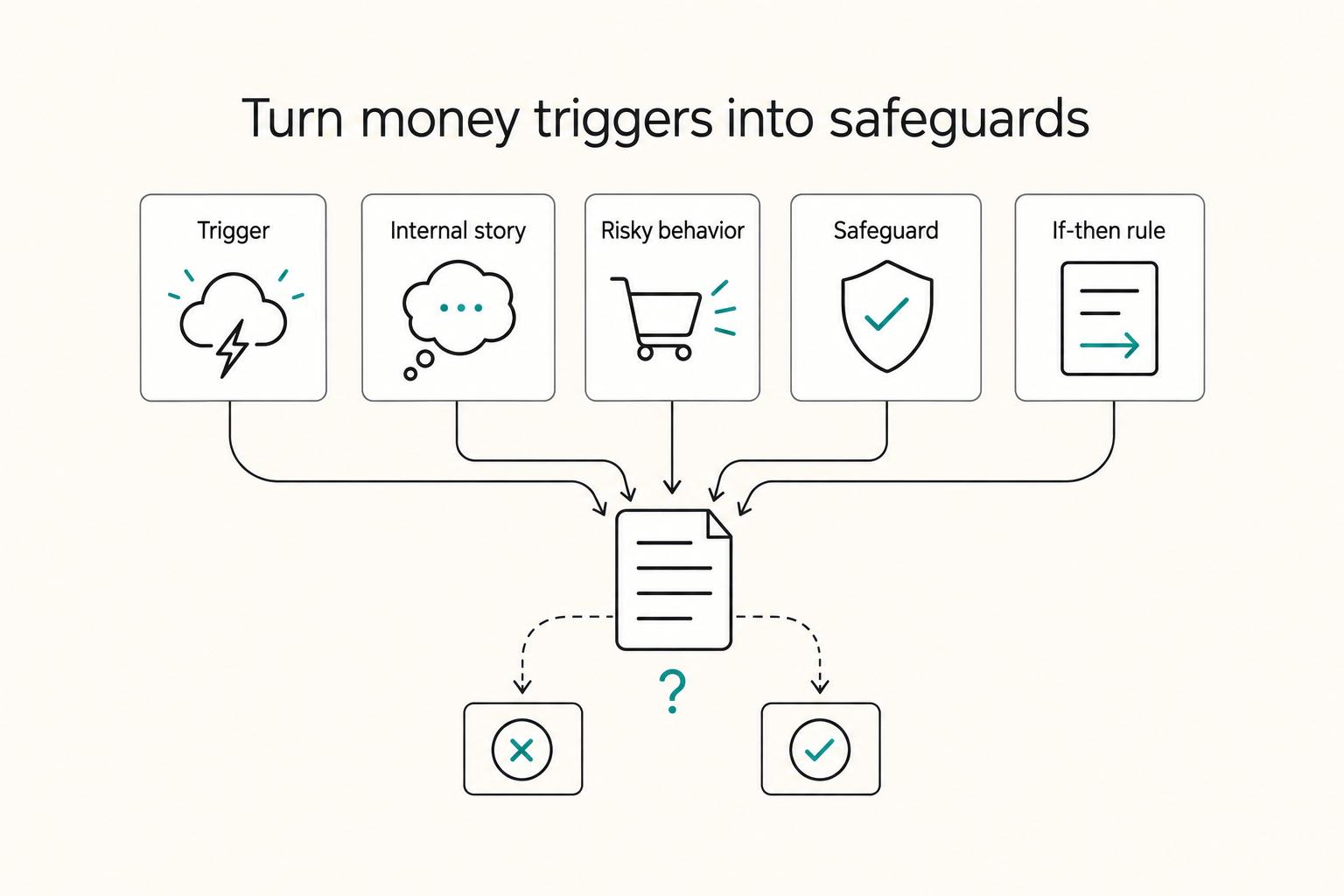
A Guide to Financial Therapy
**Treat money emotions as an operational risk, then install default rails that keep your invoicing and terms clean even when you feel pressure.** If invoicing feels heavier than it should, you might not be looking at an accounting problem. You might be looking at a pattern that shows up inside your ops.

The Freelance Payment Penalty: A Modeled Audit of Platform Fees, FX Spreads, and Payout Delays
The money rarely disappears through a single, easy-to-spot fee. The real loss is stacked. A marketplace takes its commission, a processor adds a charge for international cards, a bank or payment company converts the currency at a spread, a platform holds the funds before release, and a wire sheds a little to intermediaries on the way in. Each layer looks defensible on its own, but the worker feels the combined result as a smaller deposit and a later payday.