
Quick Answer
Choose the best saas customer support software by stage fit first, then prove it in a live pilot before you commit. The right pick is the one that keeps ownership clear, preserves context across channels, supports dependable reporting, and stays manageable for weekly admin. Use pass/fail guardrails for reassignment, escalation, permissions, and integration behavior. Expand only after those checks hold under real ticket pressure.
You are not choosing software only, you are choosing your operating system for customer trust#
When you compare the best saas customer support software, start with one question: when a customer issue changes hands, who owns it next? A shared inbox can work when one person reads and replies to everything. It can start to crack when onboarding questions, account requests, and product issues arrive across multiple channels and need triage and reassignment.
| Requirement | What to validate | Risk if missing |
|---|---|---|
| Ownership model | A visible owner is present at every step, with a clear handoff path when another person steps in; test onboarding, account, and product cases | Ownership disappears after reassignment |
| Queue discipline | Triage, prioritization, and status tracking separate urgent problems from lower-risk requests | The queue becomes first come, first served |
| Channel continuity | Thread history stays connected across email, live chat, phone, Slack, Teams, or Discord, ideally with unified inbox and CRM context | Context resets at each hop and handoffs get sloppy |
| Reporting visibility | Performance tracking shows where service is breaking by queue, owner, or channel | You cannot see backlog patterns or handoff delays and end up managing by anecdote |
A shared inbox is often a place to read and respond together. A ticketing tool goes further by helping you track, prioritize, and resolve requests consistently. The break point is not always volume alone. It is often the moment a chat turns into an email follow-up or a request needs input from another team. Before you compare brands, validate these minimum requirements:
- Ownership model
Every conversation should have a visible owner and a clear handoff path when another person steps in. Check this with sample cases, such as one onboarding question, one account issue, and one product problem. If ownership disappears after reassignment, that is a real risk.
- Queue discipline
You need triage, prioritization, and status tracking, not just a busy inbox. The real differentiator is whether your team can separate urgent problems from lower-risk requests before the queue becomes first come, first served.
- Channel continuity
Customers may contact you through email, live chat, phone, or even Slack, Teams, or Discord in B2B support. Verify whether thread history stays connected across those touchpoints, ideally with unified inbox and CRM context. If context resets at each hop, handoffs get sloppy fast.
- Reporting visibility
You need performance tracking that shows where service is breaking, by queue, owner, or channel. If you cannot see backlog patterns or handoff delays, you will manage by anecdote.
If a tool misses one of these four, move on. Migrating later is time-consuming, expensive, and disruptive. The practical next step is to turn these requirements into a simple scorecard, then build a shortlist that fits your stage and your risk tolerance. For a related framework, see Best ABM Software for Solo Operators.
Which support software is right for your current stage and your risk tolerance?#
Choose for stage fit, not brand reputation. The right platform is the one you can run cleanly now, then expand before ownership and handoffs start breaking.
Use a weighted scorecard before demos so your priorities are explicit. If everything is treated as equally important, nothing is prioritized well.
Score your current operating needs first#
Set your weights, then evaluate each option against the same criteria:
| Criterion | What "pass" looks like | What to verify in trial |
|---|---|---|
| Ticket ownership | A clear owner is visible at every step, including reassignment | Reassign a live test case and confirm owner, status, and history remain clear |
| Channel fit | Your active channels are supported with usable continuity | Run one issue through each channel you use and check whether context stays connected |
| Reporting usefulness | You can see queue health, handoff delays, and owner patterns | Confirm reporting works without manual spreadsheet stitching |
| Integration reliability | Context survives when work moves across tools | Test one handoff out of support and one return; check what context stays attached |
| Admin burden | Your team can maintain rules and permissions consistently | Have the likely admin update routing and permissions without outside help |
A practical checkpoint is simple: can you categorize work, assign ownership, track next actions, and report on outcomes? If not, the score should reflect that risk.
Validate the actual plan tier before selecting#
Do not select a tool based on a generic demo. Validate routing, permissions, and governance controls on the exact tier you plan to buy, and confirm what is truly included versus upgrade-only.
Apply pass/fail guardrails#
| Guardrail | What it means | Action |
|---|---|---|
| Safe default | Clear ownership, connected context, usable reporting, and manageable weekly admin | Pick this option |
| Upgrade trigger | Context starts dropping across handoffs, routing logic no longer matches your queues, or permission control becomes too loose for your workflow | Move up |
| Hard disqualifier | Ownership becomes unclear after reassignment or handoffs break context continuity | Reject this option |
- Safe default: pick the option that gives clear ownership, connected context, usable reporting, and manageable weekly admin.
- Upgrade trigger: move up when context starts dropping across handoffs, routing logic no longer matches your queues, or permission control becomes too loose for your workflow.
- Hard disqualifier: reject any option where ownership becomes unclear after reassignment or handoffs break context continuity.
Before deeper feature comparison, run one workflow test: customer email in, internal collaboration in Slack, then customer reply out through Gmail. Pass only if context stays intact and one accountable owner is visible end to end.
You might also find this useful: The Best Software for Sales Compensation Management.
Your 10 minute shortlist using one comparison table#
Shortlist to two finalists now, then trial those two hard. This market is crowded, and even 2026 buyer roundups still span 11, 12, or 18 tools depending on the source, so your goal is to cut weak fits quickly before demos or AI-heavy messaging blur the decision.
Use one validation lens across every tool: ownership continuity, channel fit, integration reliability, and weekly admin effort to maintain the setup.
| Tool | Best-fit team shape | Workflow strength to test | Operational tradeoff | Plan-tier caveat | Validate first |
|---|---|---|---|---|---|
| Help Scout | Teams prioritizing shared-inbox simplicity | Shared inbox flow with clear ownership | May feel limiting if you later need deeper routing/reporting controls | Confirm current pricing, included features, and plan limits before purchase | Reassign twice and confirm owner, status, and history stay intact |
| Pylon | Teams considering account-context-led support workflows | Whether support context survives reassignment and cross-team handoff | Fit can vary by channel mix and handoff pattern | Confirm current pricing, included features, and plan limits before purchase | Test one handoff from support to another team and back |
| Zendesk | Teams handling omnichannel complexity at scale | Omnichannel workflow under heavier routing/governance needs | Higher admin overhead can become a real operating cost | Confirm current pricing, included features, and plan limits before purchase | Check owner continuity after channel change and rules execution |
| Intercom | SaaS teams testing a messenger-led support motion | In-product conversation flow and ownership continuity | Cost and operational complexity can grow with usage | Confirm current pricing, included features, and plan limits before purchase | Test messenger-to-email continuity with one visible owner |
| Freshdesk | Teams prioritizing broad ticketing coverage with value | Core ticketing flow, routing, and queue visibility | Advanced controls may depend on higher tiers | Confirm current pricing, included features, and plan limits before purchase | Verify routing, reassignment history, and queue views on your intended tier |
| Front | Teams considering collaborative inbox operations | Collaboration speed without losing direct accountability | Shared visibility can blur ownership if assignment discipline is weak | Confirm current pricing, included features, and plan limits before purchase | Confirm one accountable owner remains visible at every step |
| Plain | Teams evaluating technical customization workflows | Flexibility of workflow design for your actual queue needs | Non-technical adoption may be slower | Confirm current pricing, included features, and plan limits before purchase | Have a non-technical teammate triage three cases unaided |
| HubSpot Service Hub | Teams evaluating support inside an existing CRM-centered stack | Whether support context appears where your team already works | Value drops if your day-to-day operations live elsewhere | Confirm current pricing, included features, and plan limits before purchase | Check what context is native vs. what needs extra setup |
| Gmelius | Teams evaluating an email-centered support workflow | Lightweight handling of ownership and handoff inside email-heavy operations | Channel depth and governance may cap out earlier | Confirm current pricing, included features, and plan limits before purchase | Verify whether ownership and history remain clear after reassignment |
Use clear pass/fail labels#
Choose now: Passes one real cross-channel workflow test end to end, keeps one accountable owner visible after reassignment, preserves usable history/context, and lets your likely admin change one routing or permission rule without outside help.
Revisit later: Passes core support workflow, but you would be paying for depth your current team will not operate yet, or carrying admin overhead you do not need now.
No for now: Fails any core check (ownership continuity, channel fit, integration reliability, or maintainable admin effort), or you cannot verify your actual plan tier clearly from pricing tables, knowledge base docs, and fine print.
Run one cross-channel check before you commit#
Test your real path, not the clean demo path. If you use Intercom for onboarding chat and Gmail for technical follow-up, run that exact route: create one issue, assign an owner, add internal context, move to email, then return the response to the customer. It passes only if the next teammate can immediately see current owner, full timeline, and next action due.
Save screenshots of owner field, timeline, routing settings, and the exact plan page you intend to buy. This pairs well with our guide on The Best E-Discovery Software for Small Businesses.
Best options when your top priority is speed simplicity and lower admin load#
Choose this lane only if you can keep support simple every week: one unified inbox, one accountable owner, and no context split across three places and four browser tabs.
| Tool | Best-fit team | Where it breaks first | What to verify |
|---|---|---|---|
| Help Scout | Lean teams that want fast adoption with low weekly admin | When ownership, routing, or reporting starts spreading into extra systems | Reassign one live conversation twice and confirm owner, history, and next action stay obvious without extra tabs |
| Freshdesk | Teams that need more structure now but still want low maintenance | When your required controls are inconsistent across the setup you actually run | Test your real queue views, routing handoffs, and basic permission flow with your normal support volume |
| Gmelius | Teams that want to keep execution centered on their existing inbox workflow | When channel handoffs or governance needs add coordination overhead | Run a real reassignment and confirm one accountable owner remains visible from start to close |
| Pylon | Teams where account context must stay close to support execution | When context and support history drift apart during handoffs | Run one support-to-other-team-to-support loop and confirm context continuity without manual chasing |
- Help Scout
Best-fit team: lean teams that want fast adoption with low weekly admin. Why it stays lightweight: only if your real workflow keeps ownership and timeline in one place. Where it breaks first: when ownership, routing, or reporting starts spreading into extra systems. What to verify in trial: reassign one live conversation twice and confirm owner, history, and next action stay obvious without extra tabs.
- Freshdesk
Best-fit team: teams that need more structure now but still want low maintenance. Why it stays lightweight: only if your day-to-day queue and routing can be run by your team without constant tuning. Where it breaks first: when your required controls are inconsistent across the setup you actually run. What to verify in trial: test your real queue views, routing handoffs, and basic permission flow with your normal support volume.
- Gmelius
Best-fit team: teams that want to keep execution centered on their existing inbox workflow. Why it stays lightweight: only if reassignment and follow-up stay clear for the next teammate. Where it breaks first: when channel handoffs or governance needs add coordination overhead. What to verify in trial: run a real reassignment and confirm one accountable owner remains visible from start to close.
- Pylon
Best-fit team: teams where account context must stay close to support execution. Why it stays lightweight: only if that context reduces clicks instead of adding another place to check. Where it breaks first: when context and support history drift apart during handoffs. What to verify in trial: run one support-to-other-team-to-support loop and confirm context continuity without manual chasing. If CRM visibility is central to that workflow, use the same test logic with your CRM stack in The Best CRMs for Freelancers to Manage Client Relationships.
Use one upgrade trigger: leave this lightweight lane when owner continuity or routing reliability starts to feel fragile week to week. For a Gmail-plus-Slack pass/fail test, one owner must remain visible before, during, and after handoff, with full thread history preserved; if that fails once in trial, treat it as a no-go for now. Apply the same continuity standard in adjacent support surfaces, including community workflows, before buying into expansion paths such as The Best Community Platforms for SaaS Businesses.
Best options when your top priority is scale integration depth and control#
Use this lane when one customer thread already crosses support, success, product, and CRM. If you cannot keep a single accountable owner and clean handoffs across those teams, control depth matters more than a lightweight inbox.
At this stage, treat every vendor profile as a validation exercise, not a feature checklist. APIs are the common live app-to-app path, webhooks handle event triggers, and ETL moves cleaned data between systems, but you still need to test end-to-end behavior in your own stack. With many teams now operating across 100+ SaaS apps, stale or siloed data is a normal risk when integrations are assumed instead of verified.
| Tool | Best-fit operating model | Control/integration advantage to validate | Likely implementation burden | Plan-tier validation point |
|---|---|---|---|---|
| Zendesk | You run structured queues with clear ownership and formal escalation paths. | Potential fit for stricter control patterns and broader app connectivity. | Higher admin overhead as rules, permissions, and reviews expand. | On the tier you would buy, verify role-based permissions, routing logic flexibility, escalation ownership after reassignment, and usable audit history. |
| Intercom | You handle support in close coordination with onboarding and product usage flows. | Potential to keep support and product context closer during active conversations. | Cross-team complexity when chat, email, and follow-up ownership split. | On your target tier, test one thread from intake to escalation and confirm owner, notes, and next action remain clear. |
| Front | Support, success, and sales share customer contact and need fast collaboration. | Potential coordination speed without losing thread continuity. | Accountability drift if decisions move into side comments and manual workarounds. | On the intended tier, validate permission boundaries, reassignment history, escalation ownership, and reporting exports for review workflows. |
| HubSpot Service Hub | CRM is already your system of record and support should run from the same customer context. | Potential continuity of customer history across service and lifecycle work. | Process lock-in if support must bend around CRM choices you do not need elsewhere. | On the tier you would purchase, test real objects, ownership rules, and reporting views with sample records from your process. |
| Plain | Product-heavy B2B support where internal triage and external updates must stay aligned. | Potential alignment between support conversations and product follow-up. | Handoff risk if context drops between intake, triage, internal chat, and status updates. | On your target tier, run one real issue through that full path and confirm single-thread ownership still holds. |
Before you choose, run a cross-tool dependency test with your actual CRM, product issue tracking, internal chat, and reporting workflow. If routing ends up split across multiple places or agents keep switching tabs to reconstruct context, you are adding complexity rather than gaining control.
Not yet if you still run a simple operation (for example, one queue, a small channel mix, and no dedicated admin owner). Wait until upgrade triggers are consistent: stale data between tools, repeated manual status chasing, or handoffs that visibly break context. For a step-by-step walkthrough, see The Best Analytics Platforms for SaaS Businesses.
How do you evaluate AI support features without creating operational risk?#
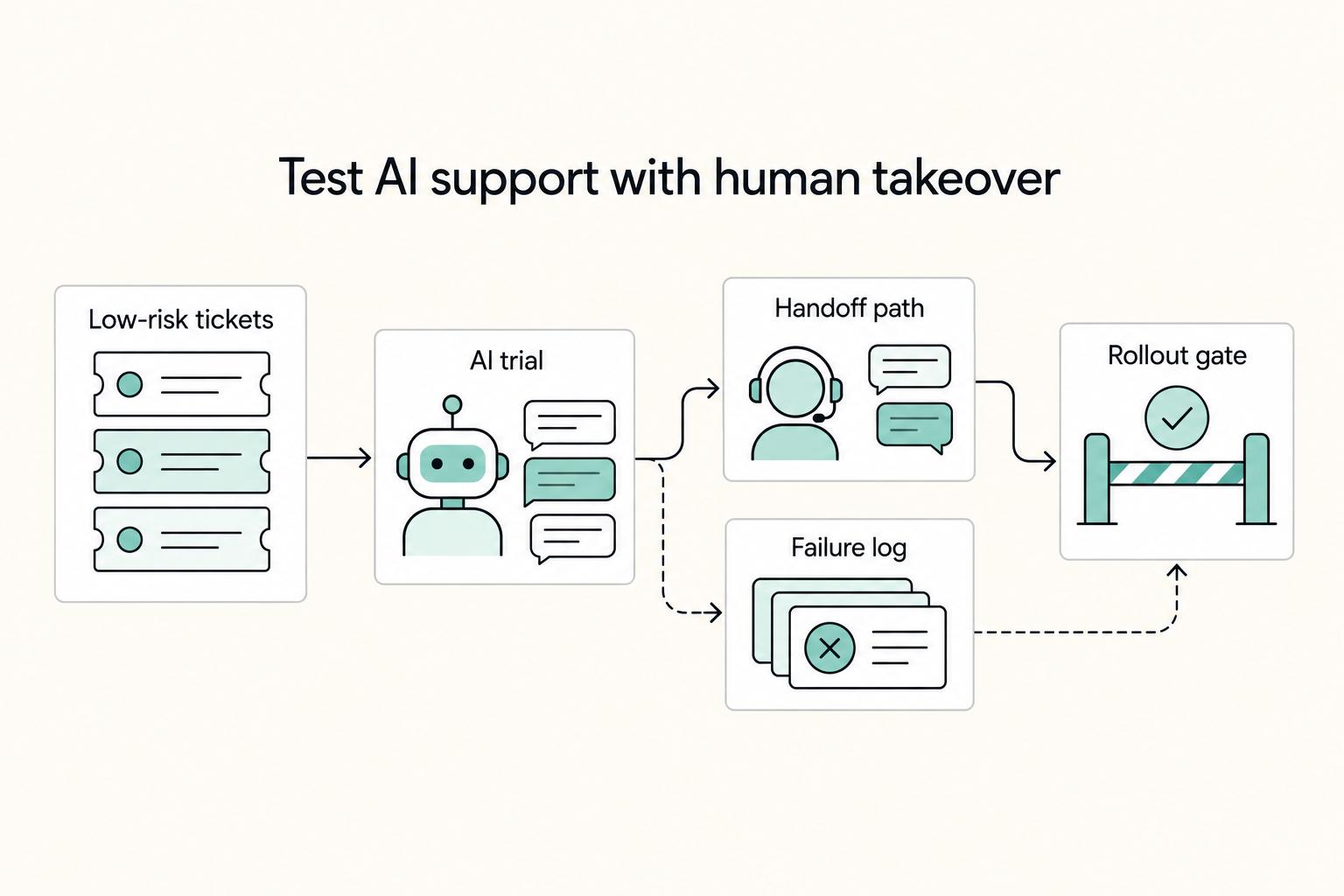
Treat AI as a separate go/no-go decision: you should only roll it out when controlled ticket trials show clean handoffs, clear ownership, and auditable behavior. That discipline matters because one 2026 source cites PwC data showing 56% of companies saw neither cost reduction nor revenue increase from AI initiatives in the prior year.
Use a dual-lane scorecard across every shortlisted platform, and block rollout if either lane fails.
| Lane | What to observe during trial | Pass signal | Fail signal (block rollout) |
|---|---|---|---|
| Operational execution | Escalation reliability, context transfer, and post-case reporting on AI-touched tickets | Human escalation reaches a named owner, thread context arrives intact, and AI actions are reviewable/exportable | Customers hit loops, agents must rediscover context, or AI actions cannot be audited clearly |
| Governance and risk controls | AI service scope, data flow mapping, third-party model/API/dataset dependencies, and decision-impact contract terms | Scope and limits are explicit, data categories and flows are documented, dependencies are disclosed, and material-decision disclaimers are acceptable for your use case | Capability labels stay ambiguous, data use remains unclear, or broad accuracy/bias/reliability disclaimers would govern material support decisions |
Roll out in stages so you can stop safely:
- Start with low-risk onboarding FAQs and simple status questions in chat or email.
- Assign one support owner, review transcripts weekly, and pause the pilot if loops or bad summaries appear.
- Expand to product troubleshooting only after escalation and context transfer stay stable in practice.
- Keep tighter human review for troubleshooting, since context loss creates repeated back-and-forth.
- Move billing, account access, and disputes last; before expansion, confirm data definitions (Customer Data, Output Data, Model Training Data, Derived Data) and, where relevant, opt-in terms, anonymization standards, and revocation rights for model-improvement use.
- Set rollback conditions in advance for each stage: unclear ownership, broken handoff context, or missing audit visibility.
Use this handoff test on real tickets. A good handoff is when an onboarding chat becomes a billing dispute, the full thread transfers to the billing owner, and the customer sees one accountable human next. A risky handoff is when the customer repeats everything and no clear owner appears.
Complete and store this scorecard with your AI risk assessment artifact before enabling broader automation. If you want adjacent planning context, see The Best OKR Software for Small Businesses and browse Gruv tools.
How do you migrate from one help desk to another without service disruption?#
If you own this cutover, run it like a production change. Use a phased go-live with a pilot first, keep the old system in read-only mode as fallback, and move channels only after signoff. That caution is practical: one source cites 83% of data migration projects as failing or exceeding budget or timeline.
| Checkpoint | Pre-cutover readiness check | In-flight monitoring signals | Rollback trigger | Post-step signoff |
|---|---|---|---|---|
| Pilot cutover | Back up tickets, customer records, and settings. Validate field mapping and configuration with a small sample before moving a pilot group. | Monitor ticket creation, assignment, and replies in real time during low-volume hours. | New cases stop routing cleanly, replies fail, or mapped fields are no longer reliable for agents. | Pilot group can resolve live cases end to end, and the legacy desk is still available in read-only mode. |
| Data and dependency mapping | Audit and standardize records to remove duplicates and stale data. Build a migration inventory covering moved data objects and the automations, integrations, permissions, and reporting views tied to them. | Spot-check live records against the inventory to confirm owners, tags, statuses, and connector behavior. | Hidden dependency failures appear (for example, notifications, syncs, or reporting views) before a channel move completes. | Inventory is updated with what moved, what was intentionally left behind, and what must be fixed before the next channel. |
| Governance lock | Set one decision owner, one approval path for change requests, and a temporary freeze policy for automation edits during cutover. Confirm admin access in both systems. | Route issue reports through one channel so decisions stay fast and config drift does not spread. | Unapproved rule edits start, ownership becomes unclear, or conflicting fixes land in both systems. | Freeze stays in place until the step is accepted and the decision owner records the result. |
| Controlled channel sequencing | Move one channel or queue at a time, starting with lower-risk traffic. Keep scope to goal-aligned data rather than every legacy record. | Check whether volume, handoffs, and customer replies are stable before moving the next channel. | A channel-specific connector or automation fails and forces agents to split work across both desks. | Channel is stable, agents have one working path, and customer-facing routing is consistent. |
Two controls prevent most surprises. First, in SaaS, the provider runs infrastructure, but you still own mapping, permissions, connector behavior, and cutover decisions. Second, hidden failures usually show up in dependencies, not just exports, so keep the inventory current after each step.
Prepare three short runbooks before go-live:
- Integration outage: Owner: support lead. Trigger: connector or sync failure. First action: pause noncritical automations and route priority cases to human triage.
- Duplicate handling: Owner: queue manager. Trigger: duplicate case creation during cutover. First action: assign one responder and merge or suppress duplicates using your platform rules.
- Customer comms: Owner: incident sender. Trigger: visible delay or channel inconsistency. First action: publish a short notice with expected response behavior and the correct reply path.
Before moving the next channel, run a continuity test: start a live conversation, force a connector failure mid-thread, and confirm handoff speed, context preservation, and customer-facing consistency. Need the full breakdown? Read The Best HRIS Software for Small Businesses.
Choose the tool that reduces future rework not just this month's pain#
The best saas customer support software is the one you can run cleanly now and re-evaluate before complexity forces a disruptive switch. If you cannot prove ownership, permissions, integration fit, reporting visibility, and reliable AI-to-human handoff in a live pilot, treat that as a no-go.
| Decision move | What to check now | What to validate in pilot | What should stop the purchase |
|---|---|---|---|
| Stage fit first | Match the tool to your current support motion, not the org chart you hope to have. Confirm your real channels, team size, and whether a unified inbox is enough or you already need tighter routing and governance. | Run real conversations through triage and reassignment. Confirm the platform helps your team triage requests, track performance, and deliver consistent service. | Tickets bounce between people, context gets lost, or specialist handoffs need workarounds. That is a signal of siloed operations and reporting blind spots. |
| Set criteria before demos | Use one fixed rubric before any demo: channel fit, integration fit with existing tools, role permissions, reporting, and AI handoff behavior. | Keep evidence during trial: owner/status screenshots, role-based permission tests, integration sync results, and one forced AI escalation. If you are EU-facing, verify GDPR and EU-hosting fit early. | The vendor cannot show what AI is native vs paid add-on, session-based packaging is unclear, or role controls are too loose. |
| Pilot before commitment | Choose one low-risk support path and define success before testing. You are validating operating fit, not interface polish. | Test one simple request, one onboarding issue, and one escalation. Force human takeover and confirm the next person sees full context, not just drafted text. | Human takeover drops context, backend AI actions are implied but unproven, or costs shift once add-ons/session usage are included. |
Set your re-evaluation signals now, even if you do not upgrade today. Re-check when workflow complexity rises, permission exceptions become routine, or reporting no longer supports weekly review without manual stitching. Name the actual channels, weekly specialist handoff volume, and share of cases needing manual tagging or cross-tool lookup.
If you are choosing between Help Scout and Zendesk this week, run the same process in both: same rubric, same low-risk channel, same pilot cases. If Help Scout keeps ownership and reporting clear with lower admin load, keep it. If Zendesk is the first tool that reliably handles permissions, broader integrations, and escalation visibility, accept the extra setup now to avoid a costly late switch.
Next step: write your one-page scorecard before your next demo and do not change it mid-process. If pricing structure becomes the tie-breaker, pressure-test it with Value-Based Pricing: A Freelancer's Guide.
Frequently Asked Questions
What is the best SaaS customer support software for a small team?
There is no single best tool for every small team. If you are founder-led, mostly email-first, and need fast adoption with low admin burden, choose the lightest tool that gives you clear ownership, permissions, and basic reporting now. Upgrade when handoffs start failing, you add more channels, or setup questions and advanced issues need different people to work the same customer history. In your trial, assign five real conversations, reassign two, and confirm you can still see owner, status, and reply history without confusion.
Help Scout vs Zendesk vs Intercom which should I choose and when?
There is no universal winner across these three, so choose by stage fit and workflow needs. If your support motion is simple, prioritize low admin overhead. If you need tighter permissions, stronger integration fit, and clearer reporting visibility, prioritize those requirements. If support, onboarding, and direct customer messaging are tightly connected in how you work, prioritize a tool that preserves context across those motions. In each trial, route one simple question, one onboarding issue, and one escalation, then check who owns it, how fast a human can take over, and whether full context stays visible.
Which features are non-negotiable before switching support tools?
Choose now only if the tool covers your real channels, keeps conversation context visible, supports role-based permissions, fits your existing integrations, and lets you report on queue health. Upgrade later if you can answer customers today but cannot see bottlenecks, cannot control who can edit what, or cannot connect support activity back to the rest of your stack. Build a fixed checklist before demos and score every tool against the same ownership, escalation, permissions, integration, and reporting criteria.
How do I choose support software that scales without creating operational risk?
Choose for the team you actually have, not the org chart you imagine, because the wrong fit creates admin friction and tool fatigue fast. Upgrade when you truly need tiered or specialized roles, an omnichannel support strategy, and full conversation history across channels so setup, billing, and technical issues can move between people without losing context. In your trial, pass one customer issue from first response to a specialist and confirm ownership stays clear, escalation is reliable, and reporting still shows the full path.
How should I evaluate AI support features safely before full rollout?
Choose AI for narrow, low-risk cases first, with a clear human takeover path and visible reporting on what the automation handled, escalated, or failed. Expand only when you can prove escalation reliability, preserved context, and clear accountability, because if immediate support is not available when needed, churn risk can rise. Test real edge cases in trial, force an escalation, and check whether the human receives enough context to resolve without making the customer repeat themselves.
Is a Gmail native setup enough or should I move to a full help desk now?
Stay Gmail-first only if your volume is low, one or two people handle most replies, and you can still keep one clear owner per conversation. Move to a full desk when you need self-serve support, a knowledge base, more than one main channel, or reliable reporting on who answered what and what got missed. Audit one week of inbox traffic and verify you can name the owner, current status, and next action for every customer thread.
How can I reduce migration risk when replacing my current support stack?
Switch only when the new tool supports your critical controls in real workflows: clear ownership, stable permissions, workable integrations, dependable escalation, and reporting visibility. Wait if you cannot name a decision owner or cannot show that agents will still see full customer context when issues move between people or channels. Run a limited pilot and confirm new tickets, reassignment, replies, and reports behave as expected before expanding.
Try a related tool
Researched and edited by the Gruv editorial team. Gruv builds cross-border billing, payouts, and finance-operations software for global businesses.
Sources
Includes 6 external sources outside the trusted-domain allowlist.
- das.nebraska.gov/materiel/purchasing/120277%20O3%20REBID/Gene...trusted
- integratedata.wisc.edu/wp-content/uploads/sites/1158/2019/10/Intero...trusted
- bland.ai/blogs/best-customer-support-toolsexternal
- chatarmin.com/en/blog/ai-intelligent-customer-support-toolsexternal
- conductorone.com/guides/best-grc-solutionsexternal
- crescendo.ai/blog/saas-customer-service-outsourcing-platf...external
- domo.com/learn/article/best-saas-integration-platformsexternal
- floik.com/blog/faq-toolsexternal
Educational content only. Not legal, tax, or financial advice.
Related Posts

Value-Based Pricing for Freelancers Under Real Payment Risk
Value-based pricing works when you and the client can name the business result before kickoff and agree on how progress will be judged. If that link is weak, use a tighter model first. This is not about defending one pricing philosophy over another. It is about avoiding surprises by keeping pricing, scope, delivery, and payment aligned from day one.

Best CRM for Freelancers Who Need Reliable Client Follow-Up
If your client work is solid but your admin lives across email, notes, calendar alerts, and a spreadsheet, your CRM choice will succeed or fail on operations, not features. That is why so much advice on the **best crm for freelancers** misses the real issue. The main risk is not choosing a tool with too few buttons. It is choosing one that looks polished in a demo but still lets follow-ups slip when work gets busy.

Freelance Sales Qualifying That Protects Your Time and Pipeline
You do not need to become more persuasive to stop bad-fit projects from taking over your week. You need a repeatable way to decide who gets your time, who gets a proposal, and who gets a polite no. That's what freelance sales qualifying is for. It protects your calendar and pipeline value by stopping low-fit leads earlier.