
Quick Answer
Choose the best scheduling apps for freelancers by workflow fit, not popularity. Start with your booking model, required post-booking actions, and timezone exposure, then shortlist tools that match those needs. Calendly is a common low-friction start but its free plan is limited to one event type, while Cal.com supports unlimited events on free. Keep Google Calendar or Outlook as your schedule source of truth, and test one full client-side booking flow before publishing links.
The Best Calendar and Scheduling Apps for Freelancers (2026 Edition)#
Your scheduler is an operations layer, not just a booking link. It determines whether clients can self-book, whether buffers actually protect your day, and whether confirmed meetings land cleanly in Google Calendar or Outlook instead of creating cleanup work later.
Treat this as a shortlist, not a winner-takes-all ranking. Many freelancer setups use two layers: a client-facing scheduler for booking and a calendar system as the source of truth. Google Calendar is usually your schedule view, while external appointment scheduling often lives in a dedicated booking tool.
| Tool | Role in your stack | Best for |
|---|---|---|
| Calendly | Client booking | Sharing a booking link, letting clients pick a slot, and syncing to Google or Outlook |
| Calendar.com | External appointment scheduler | Scheduling external appointments |
| Google Calendar | Calendar system | A free, team-friendly calendar and day-to-day schedule view |
| Outlook Calendar | Calendar system | Keeping your schedule in Outlook when your booking tool syncs there |
One practical warning up front: in practice, booking is often where the automation stops. Calendly handles scheduling well, but free-plan customization and advanced workflows are limited. Connecting bookings to intake or follow-up steps may still require Zapier or manual copy-paste.
Before you send any link, test it in a private browser window, verify availability rules, confirm meeting buffers, and make sure any intake questions appear at booking.
How to read this guide#
If you are building from scratch, read straight through. If you already have a calendar and only want to replace the booking layer, jump to the profile-matching section and use the later framework to narrow the right fit quickly. If you want a deeper dive, read The Best Note-Taking and Knowledge Management Apps for Freelancers.
Stop Picking an App at Random - Here Is the Framework That Matches the Right Tool to Your Workflow#
Do not pick by brand name first. If your bookings create confusion, missed handoffs, or manual follow-up, the problem is system fit, not app popularity.
This guide is for solo, client-facing work where you need booking plus a dependable personal calendar. If you are solving team round-robins or enterprise scheduling policy, use a different framework.
Use this operating lens: scheduling is one workflow across client intake, calendar integrity, and payment handoff. With 24 hours in a day, a setup that needs constant maintenance is an expensive setup.
Stress-test your system with one real booking path: from link click to confirmed event. Flag every step where you still copy, paste, explain, or reconcile by hand. Rigid setups usually fail when plans change, not in the demo.
You should leave with three things:
- Tool category clarity: whether your core problem is client booking, calendar planning, or personal time planning.
- Decision sequence: the three-question diagnostic that surfaces fit before feature and pricing noise takes over.
- Practical shortlist logic: how to compare ideal use case and tradeoffs so you choose a low-friction setup you can maintain.
Use that order: identify the tool category first, then apply the three-question diagnostic before you choose a platform.
What Is the Difference Between a Scheduling App and a Calendar App?#
Use the layers for different jobs: clients book through the scheduling layer, you manage capacity in the calendar layer, and you can optionally plan your own follow-through in a task layer.
| Layer | Who uses it | What it controls | Use this when |
|---|---|---|---|
| Scheduling app | Your client or lead | Booking rules, availability windows, confirmations, reminders | You want people to self-book 24/7 from a link instead of emailing time options back and forth. |
| Calendar app | You | Your full schedule view, accepted events, blocked focus time | You need one place to see everything, protect deep-work blocks, and avoid double-booking pressure. |
| Task planner | You only | Your execution plan after meetings are on the calendar | You need to decide what work happens when, without exposing that planning layer to clients. |
Your scheduling app is outward-facing: you share a booking link, the client picks a slot, and the event syncs with your calendar. Strong schedulers also send confirmations and reminders, update availability automatically, and can trigger workflow automations.
Your calendar app is inward-facing: it is the full schedule view where you protect non-meeting time. That is why Calendly and Google Calendar are not substitutes in most setups. Calendly is centered on booking-page control, while Google Calendar is centered on schedule management, and its appointment scheduling is included with a Workspace account.
Common failure patterns#
If you still send manual invites for client intake, your booking layer is under-implemented. Fix it by testing your booking link in a private window and confirming the full flow works without manual follow-up.
If you try to protect deep work inside the booking tool, move that control to your calendar first. Block time in the calendar, then let your scheduler read that availability.
Once you spot the missing layer, use the next section's three diagnostic questions to choose the right product in that layer.
Answer These Three Questions Before You Choose Any Tool#
Start with your workflow, not an app list. These three questions tell you what kind of setup you actually need.
1. Do you want clients to book themselves, or do you want to keep proposing times?#
If you want less back-and-forth, use self-booking. A shareable link lets clients pick a slot and get confirmed without an email thread, and you can reuse the same setup each time.
Manual time proposals can still work when meetings are infrequent or highly custom. The model usually starts to break when you keep repeating scheduling emails or rescheduling because availability changed between messages.
Use a quick reality check: open your booking link in a private browser window and try the full flow as a client. If you cannot get from link to confirmed event cleanly, your setup still depends on manual coordination.
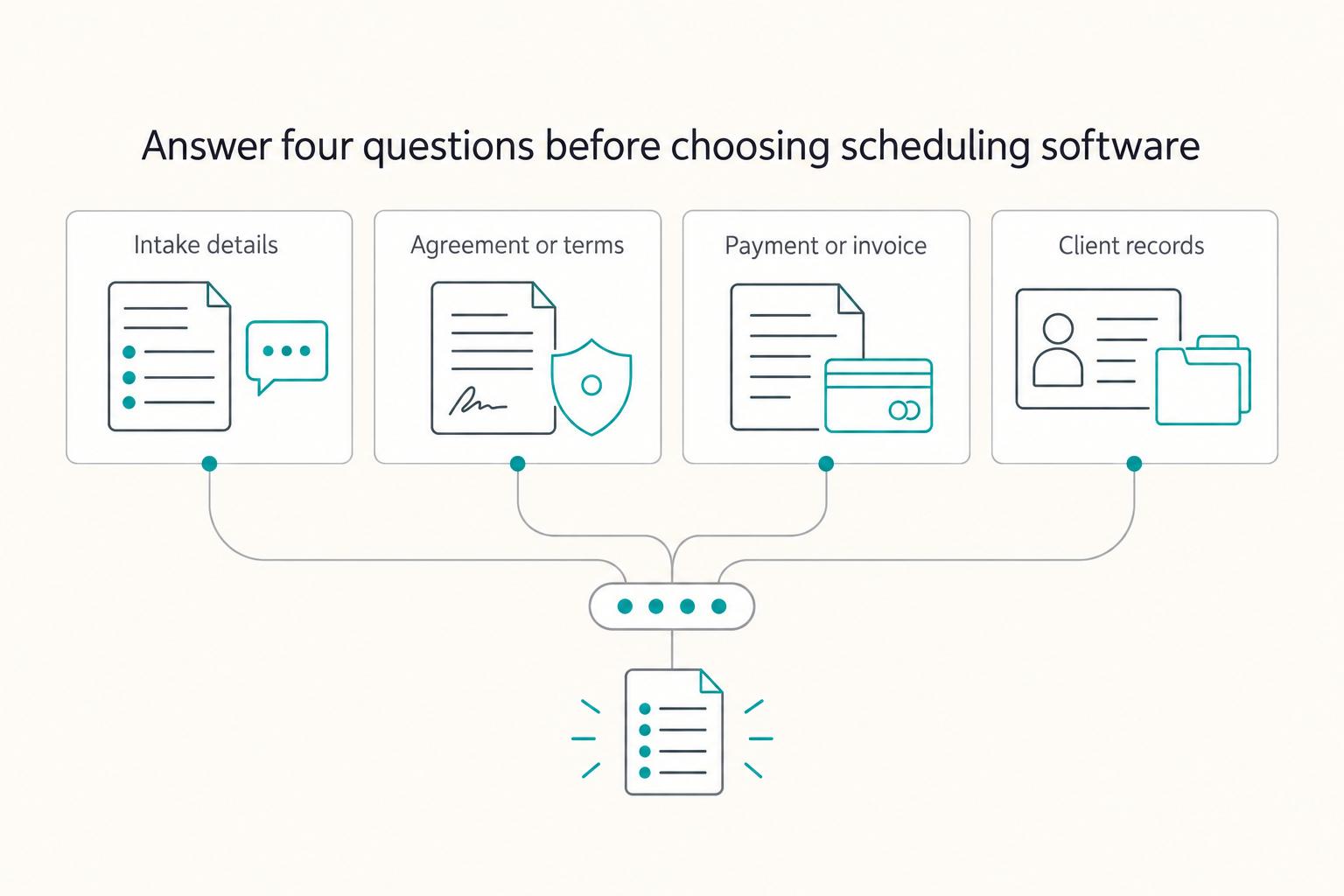
2. What has to happen immediately after someone books?#
Treat booking as the start of an operating chain, not the finish line. Decide which handoffs need to happen right away: intake, terms visibility, payment or invoice prep, and record creation.
| Handoff after booking | Automate this when | Manual is still acceptable when |
|---|---|---|
| Intake details | You need context before the call or ask the same questions each time | Calls are exploratory and you can collect basics live |
| Agreement or terms visibility | You want terms shown at booking, before time is reserved | You send custom agreements later for high-touch engagements |
| Payment or invoice draft | The meeting is paid, fixed-scope, or prepay-based | You bill later and volume is low |
| Client records | Bookings need to feed CRM, invoicing, or project tracking | You manage a small client load and can log details manually |
This is where booking-only tools and connected workflows diverge. A tool can schedule well but still leave you to handle contracts, invoicing, and project records elsewhere with weak handoffs.
Keep the contractual checkpoint practical: show or link your terms in the booking flow so expectations are visible before confirmation. For deeper contract context, see A Guide to Non-Solicitation and Non-Compete Clauses.
3. Will the client see the right time, the right confirmation, and the right invite from their timezone?#
For cross-border work, timezone handling needs to be tested from the client view. Confirm that the booking page, confirmation message, and calendar invite all show the same time consistently.
Run a client-view test before you share links broadly: switch your device or browser timezone, book a test meeting, and review every step. Watch for unclear timezone labels, mismatched confirmation details, or invite inconsistencies.
Once you have clear answers to these three questions, you can move to profile matching and choose a tool based on fit, not brand noise. Related: The Best Calendar Apps for Freelancers Who Juggle Multiple Projects.
Which Scheduling App Fits Your Profile?#
Pick the profile that matches your workflow, not a universal "winner." Your best fit depends on four grounded signals: customization and flexibility, calendar syncing, timezone-safe availability, and whether you need payment at booking.
If a tool cannot sync reliably with your Google, iCloud, or Outlook calendar, treat it as a weak fit from day one. And if your post-booking handoff still lives in manual email threads, the booking link alone will not fix your process.
| Your profile | Start with | Fit signals | Likely constraint | Setup effort | Handoff risk |
|---|---|---|---|---|---|
| You book a lighter volume and mostly need straightforward self-booking | Calendly or Brevo Meetings | Self-booking, calendar sync, confirmations, and reminders cover most of your needs | You may hit limits once you need heavier intake, payment at booking, or more complex flows | Low | Medium if key details are still captured after the meeting |
| You book across multiple timezones and care about the client booking experience | SavvyCal | You need clear availability rules and consistent timezone presentation across booking, confirmation, and invite | You may still need separate tools for intake, payment, or downstream records | Medium | Medium unless your post-booking process is very light |
| You sell defined sessions and need context or payment before time is reserved | Simplybook.me or Setmore | Booking is the start of delivery, so reminders, confirmations, intake, and payment flow matter more | More configuration means more chances to misconfigure before launch | Higher | Lower after clean setup, higher if published without end-to-end testing |
You want a clean booking link and minimal setup#
Start with Calendly or Brevo Meetings when you want clients to self-book and cut the scheduling back-and-forth, without building a heavy workflow. Use case: you run discovery calls, and you mainly need slot selection, confirmations, reminders, and calendar sync automated. You still handle proposals, contracts, and invoicing manually after the call. First setup step: connect your calendar, whether that is Google, iCloud, or Outlook, then run a private-window test booking.
You work across timezones and need the booking flow to feel clear#
Start with SavvyCal when cross-timezone booking clarity is a daily requirement. Use case: you schedule calls across regions and need the scheduling exchange, confirmations, and reminders handled consistently. You still manage prep, follow-up notes, and billing manually. First setup step: change your device or browser timezone, run a test booking, and verify the displayed time matches across the booking page, confirmation, and invite.
You need booking to trigger intake and/or payment before the meeting#
Start with Simplybook.me or Setmore when a booking should do more than reserve time. Use case: you sell structured sessions and want service selection, basic intake, reminders, confirmations, and possibly payment handled at booking. You may still manually review responses, update your records, and send custom engagement documents. First setup step: decide what is mandatory at booking, whether that is intake, payment, or both, then test the full path before publishing.
Before you publish any booking link, run one checkpoint regardless of profile: make sure your engagement terms are visible or linked in the booking flow itself.
Does Your Scheduling Setup Hold Up for International Clients?#
For international clients, treat scheduling as an operations-risk check, not just a convenience feature. Your baseline is automatic time zone detection plus calendar syncing, followed by a quick end-to-end test to confirm the booking page, invite, and confirmation stay clear outside your own timezone.
A scheduler should reduce back-and-forth, place meetings into open slots, and include conferencing details in the booking flow. If timezone handling is unclear, the failure is practical: your client reads the wrong time and misses the call.
Use this pre-send check before you share any booking link#
- Verify local-time rendering
Open the booking page in a private window or from a device set to another timezone. Run one test booking and confirm the slot appears in the viewer's local time.
- Verify invite timezone and join details
Check the calendar invite itself, not only the confirmation page. Make sure timezone display is obvious and the meeting link details are easy to find.
- Retest after availability or event changes
Re-run the same test after edits to event types, booking windows, buffers, or recurring availability. Small configuration changes can break a previously clean flow.
Common cross-border failures and fixes#
| Failure | What happens | Fix |
|---|---|---|
| Misread call time | The client has to manually convert time | Use automatic time zone detection and validate from a different timezone before sharing |
| Unclear meeting link details | The slot is booked, but the client still asks where to join | Keep conferencing details in both the invite and confirmation |
| Confusing next step after booking | Confirmation says only "booked" and leaves process unclear | Add one plain next-step line in confirmation copy about what you send next, what they should prepare, and whether agreement or payment follows |
| Workflow | Timezone handling | Invite clarity | Confirmation workflow | Record trail support |
|---|---|---|---|---|
| Manual email scheduling + calendar invite | Weak | Mixed | Weak | Weak unless threads are saved consistently |
| Scheduler with automatic time zone detection | Strong | Mixed to strong | Mixed | Moderate if confirmations are retained |
| Scheduler + synced calendar + saved intake/confirmation records | Strong | Strong | Strong | Stronger paper trail for operations |
Keep three operating rules in place for cross-border work: put agreement visibility directly in booking or confirmation, retain intake, confirmation, and invite artifacts as your record trail, and keep jurisdiction terms explicit in your contract workflow.
Once this is stable, move to the next handoff: turning confirmed bookings into payment across borders with less friction and fewer fee surprises.
How Do You Connect Scheduling to Getting Paid?#
A confirmed slot is not a finished sale. Treat booking as the trigger for three steps in order: Intake -> Agreement -> Payment.
Use booking as your workflow trigger#
Set your scheduler so each booking lands in an open calendar slot and sends confirmation automatically, then immediately starts your intake step. If the meeting is booked but you still need manual follow-up just to understand scope, you have already added delay.
| Step | Recommended timing | Risk if delayed |
|---|---|---|
| Intake | Immediately after booking | If you still need manual follow-up just to understand scope, you have already added delay |
| Agreement | In the same flow, or send it right away as the next action | Waiting until after the call increases the chance of unpaid scoping and slower collection |
| Payment trigger | Define it before client calls begin | If the handoff is not predefined, you are rebuilding it manually each time |
After intake, surface your agreement in the same flow, or send it right away as the next action. If you wait until after the call, you increase the chance of unpaid scoping and slower collection.
Then define your payment trigger before client calls begin: payment at booking, deposit after booking, or invoice after the call. The key is to predefine the handoff so you are not rebuilding it manually each time.
Pick the payment connection model on purpose#
| Payment model | Best-fit use case | Operational risk | Admin load |
|---|---|---|---|
| Prepay at booking | Fixed-scope sessions with clear pricing | Lower collection risk; only works when price/scope are clear upfront | Low |
| Deposit-first | Work that needs commitment before full delivery | Medium risk if deposit terms or timing are unclear | Medium |
| Invoice-after-call | Discovery-first or variable-scope engagements | Higher risk of delay, missed payment, and follow-up loops | Higher |
Judge tools by handoff quality, not feature pages#
Use practical criteria: intake capture quality, payment-integration reliability, and whether your records are easy to retain across booking and payment steps. Integrations with workflow tools, including Stripe, matter because they reduce manual handoffs.
| Tool | Stated note |
|---|---|
| Calendly | Free plan supports one event type |
| Cal.com | Free plan supports unlimited events and can require approval before events are finalized |
| Google Calendar appointment scheduling | Simple, but weaker on automation/customization than dedicated scheduling tools |
| Notion Calendar | Manual availability blocking and repeated custom-link sending can create handoff friction |
Minimum viable revenue ops checklist#
Before you finalize your setup, run a test booking and make sure you can retain:
- booking confirmation
- agreement evidence
- payment proof
- a reconciliable audit trail across booking, confirmation, and payment records
Related reading: The Best Personal Finance Apps for Freelancers.
Do You Need a Paid Scheduling App?#
Upgrade because your current setup creates repeat admin work, not because a paid badge looks more professional. If clients can book in four or five taps, your calendar sync is reliable, and your payment handoff stays intact, staying on free is a solid decision.
Use workflow friction, not vague growth, to decide. In most cases, the right paid plan is the smallest one that removes a recurring workaround.
| Criteria | Free-plan fit | Paid-plan fit | Tradeoff to watch |
|---|---|---|---|
| Setup overhead | One booking link, one simple service, basic calendar sync | Multiple booking types, more rules, more customization | More options can create clutter if you do not prune old event types |
| Client experience | Straight booking flow, acceptable branding, basic confirmations | Stronger branding control, cleaner intake, smoother confirmations | Better polish is only worth paying for if clients notice it |
| Automation depth | You can manually send reminders, intake, or follow-up links | Automatic reminders, confirmations, and booking-triggered actions | Automation only saves time if you test each trigger end to end |
| International reliability | Mostly domestic bookings, low timezone risk | You depend on smart availability for time zones, buffers, and focus hours | Poor timezone handling is worse than limited automation |
| Bookkeeping readiness | You can tolerate a manual invoice or payment step | You need a tighter payment handoff and fewer missed records | Paid features do not fix weak reconciliation habits |
Stay on free when the work is still simple#
Stay on free if your booking flow is still one service, one meeting type, and one calendar. In that setup, your scheduler is already doing the core job: reducing email back-and-forth, placing events into open slots, and handling cancellations or reschedules with less manual messaging.
Use this quick self-audit:
- Meeting type complexity: one booking page, one duration, little need to collect appointment reasons or quick survey answers
- Automation needs: manual reminders or manual post-booking emails are still manageable
- International exposure: few cross-border bookings and no repeated timezone confusion
- Payment handoff: you can still connect the right payment or invoice step without chasing
Run one private-window test booking. Confirm calendar sync works with Google, iCloud, or Outlook, and make sure the booking path feels short and obvious.
Upgrade when manual fixes keep repeating#
Upgrade when you are patching the same issue every week. If you keep copying details into invoices, manually sending reminders, or fixing timezone mistakes, a paid plan can buy back time and reduce avoidable errors.
Common upgrade signals:
- Multiple meeting types: discovery, paid consults, and project check-ins need different rules
- Automation depth: you need reminders, confirmations, and booking-triggered actions instead of manual follow-up
- International reliability: smart availability must handle time zones, buffers, and focus hours
- Branding control: your booking page now needs to reflect your business
- Payment handoff: you want intake and payment steps closer to the booking moment
When comparing Calendly, SavvyCal, Cal.com, Setmore, or SimplyBook.me, treat plan limits and product capabilities as unresolved until you check each provider's current pricing and product pages. Review meeting-type limits, branding controls, payment support, and automation depth before you choose.
Your Operating Checklist: Set Up a Scheduling Stack That Scales#
A scheduler only helps if your setup holds up in a real booking. Poor setup brings back the same manual-coordination problems: reschedules, mix-ups, and missed windows. Use this checklist to make your setup dependable before you send it to clients.
Before You Send Your First Link#
Use this as a launch checklist, then repeat it during reviews.
-
Answer fit questions first. Confirm how many people you need to schedule at once, how complex your work is, and what you can support budget-wise. Then decide what should happen immediately after a booking is confirmed. Outcome: your booking flow matches your actual operation, not just your calendar.
-
Set one source of truth for availability. Connect your scheduler to the one calendar you manage daily, then block focus time, travel time, and personal holds there first. Outcome: one accepted booking creates one event in the right calendar, without manual copying.
-
Run a client-view link test in a private browser window. Complete one full test booking as if you were a first-time client. Outcome: you verify what the client sees, including timezone display, slot visibility, buffer behavior, meeting location, and confirmation messaging.
-
Run a second timezone check for cross-border work. Open the same page from a browser or device set to another timezone. Outcome: you confirm the booking view before relying on it for international scheduling.
-
Place the next step in the confirmation path. If your process needs intake, agreement review, or payment instructions, add that to the confirmation page or confirmation email. Outcome: the handoff happens at confirmation instead of becoming manual follow-up.
Save a simple test record: one booking-page screenshot, one confirmation email, and one calendar entry.
Connect the Full Stack#
Once booking works, make the handoff explicit and keep the workflow in one place.
| Handoff model | Admin load | Cash-flow predictability | Implementation complexity |
|---|---|---|---|
| Prepayment at booking | Lower | Stronger | More involved |
| Invoice after meeting | Higher | Weaker | Simpler |
-
Choose one handoff model. Decide whether payment happens at booking or after the meeting, then configure your flow around that choice. Outcome: less ambiguity and fewer missed follow-ups.
-
Match booking to your agreement process. If clients can self-book from a public link, place terms and process steps before or immediately after confirmation. Outcome: clients see the process in order.
-
Review scale triggers on a cadence. Re-check workload size, project complexity, budget fit, and whether monthly flexibility or long-term contracts still match your demand. Outcome: your setup scales with your workload instead of adding avoidable overhead.
Once this handoff is stable, move to your next layer: payment and invoicing infrastructure. This pairs with Best To-Do List Apps for Freelancers Who Need Operational Control.
Frequently Asked Questions
What is the best free scheduling app for freelancers?
There is no single winner for everyone. Start with the free option that gives you one clean booking link, solid calendar syncing, and a booking path that takes only four or five taps. Before you commit, check the provider's current free-plan limits on its site. Test one live booking from a private browser window before you send the link to a real client.
What is the difference between a scheduling app and a calendar app?
A scheduling app is the client-facing layer that lets people book time with you, updates availability, and helps prevent double bookings. Your calendar app is your internal source of truth where confirmed meetings land and where you block focus time. Treat them as connected tools, not substitutes, and make sure the booking actually writes to the calendar you use every day.
How do I share a scheduling link with clients?
Put the link where the client is already deciding to take the next step, such as your proposal, inquiry follow-up, or email signature. Then click it yourself in a private browser window and confirm the timezone display, available slots, confirmation page, and any conferencing link are all correct. Send the link only after you have walked the full path as if you were the client.
What scheduling apps work best for freelancers with international clients?
Brand matters less than behavior here. You need smart availability that accounts for time zones, buffer times, and focus hours, and you need to verify that from the client side because timezone mismatch is a common failure mode. Test the same booking page from a device or browser set to a different timezone before you rely on it for cross-border client meetings.
Do I need a paid scheduling app as a freelancer?
Not automatically. A free plan is enough until you keep doing the same manual fix every week, like sending reminders yourself, managing too many meeting types by hand, or cleaning up timezone mistakes after the fact. Upgrade only when the subscription removes repeat admin work you can name clearly.
How do scheduling apps connect to invoicing and payments?
Scheduling tools are built around booking first, while invoicing and payment steps usually depend on your integrations and setup. The better question is what should happen immediately after the slot is confirmed: intake form, agreement, payment request, or all three. Map that handoff in order, because booking should pass cleanly into intake, agreement, and payment rather than stopping at a calendar invite.
What should I verify before I trust automations and integrations?
Check reminders, confirmations, and any triggered follow-up task one by one, because a feature list is not proof that your setup works. If you depend on Zoom, Slack, Stripe, or CRM integration, confirm the exact connection in the current plan docs before relying on it. Run one end-to-end test booking and save the confirmation email, calendar entry, and any payment or intake record as your evidence pack.
What should I look for in a scheduling app as a freelancer?
Keep the shortlist practical. Start with calendar syncing, a clean booking flow, and timezone handling. Then add buffer controls, reminders, and intake or payment integrations only when bookings need to trigger the next business step. | Priority | Feature | Why it matters | When this matters | |---|---|---|---| | 1 | Calendar syncing | Keeps bookings aligned with the calendar you actually use and lowers double-booking risk | From day one | | 2 | Clean booking flow | Reduces email back-and-forth and makes it easy for clients to self-book 24/7 | From day one | | 3 | Timezone handling | Lowers the risk of missed or wrongly timed meetings for international work | As soon as clients book across time zones | | 4 | Buffer and focus-hour controls | Protects you from back-to-back calls and overexposed availability | Once your week has multiple calls | | 5 | Reminders and confirmations | Cuts manual follow-up and keeps confirmation steps consistent | When admin starts repeating | | 6 | Intake, payment, and app integrations | Helps booking hand off to follow-up workflows, conferencing, CRM, or payment steps | When your service has more than a simple call behind it | If you only need one booking link and one calendar, stop at the top of the table. Once bookings need to trigger the next business step, the lower half matters much more.
Try a related tool
Researched and edited by the Gruv editorial team. Gruv builds cross-border billing, payouts, and finance-operations software for global businesses.
Sources
Includes 6 external sources outside the trusted-domain allowlist.
- uscc.gov/sites/default/files/annual_reports/2009-Repo...trusted
- wise.com/gb/blog/the-best-tools-for-international-fre...trusted
- aclanthology.org/2025.sicon-1.pdfexternal
- betterproposals.io/blog/best-tools-for-freelancersexternal
- buildops.com/resources/contractor-scheduling-softwareexternal
- cal.com/blog/best-scheduling-appsexternal
- emailtooltester.com/en/blog/best-scheduling-appexternal
- forbes.com/advisor/business/software/best-scheduling-appsexternal
Educational content only. Not legal, tax, or financial advice.
Related Posts

Non-Solicitation vs Non-Compete for Freelancers and Consultants
Choose the narrowest restrictive covenant that protects a real risk and still lets you keep earning. For freelancers and consultants with multiple engagements, broad restrictions can cut off pipeline long before any dispute starts.

The Freelance Payment Penalty: A Modeled Audit of Platform Fees, FX Spreads, and Payout Delays
The money rarely disappears through a single, easy-to-spot fee. The real loss is stacked. A marketplace takes its commission, a processor adds a charge for international cards, a bank or payment company converts the currency at a spread, a platform holds the funds before release, and a wire sheds a little to intermediaries on the way in. Each layer looks defensible on its own, but the worker feels the combined result as a smaller deposit and a later payday.

How to Respond to a Subpoena for Business Records
Move fast, but do not produce records on instinct. If you need to **respond to a subpoena for business records**, your immediate job is to control deadlines, preserve records, and make any later production defensible.