
Quick Answer
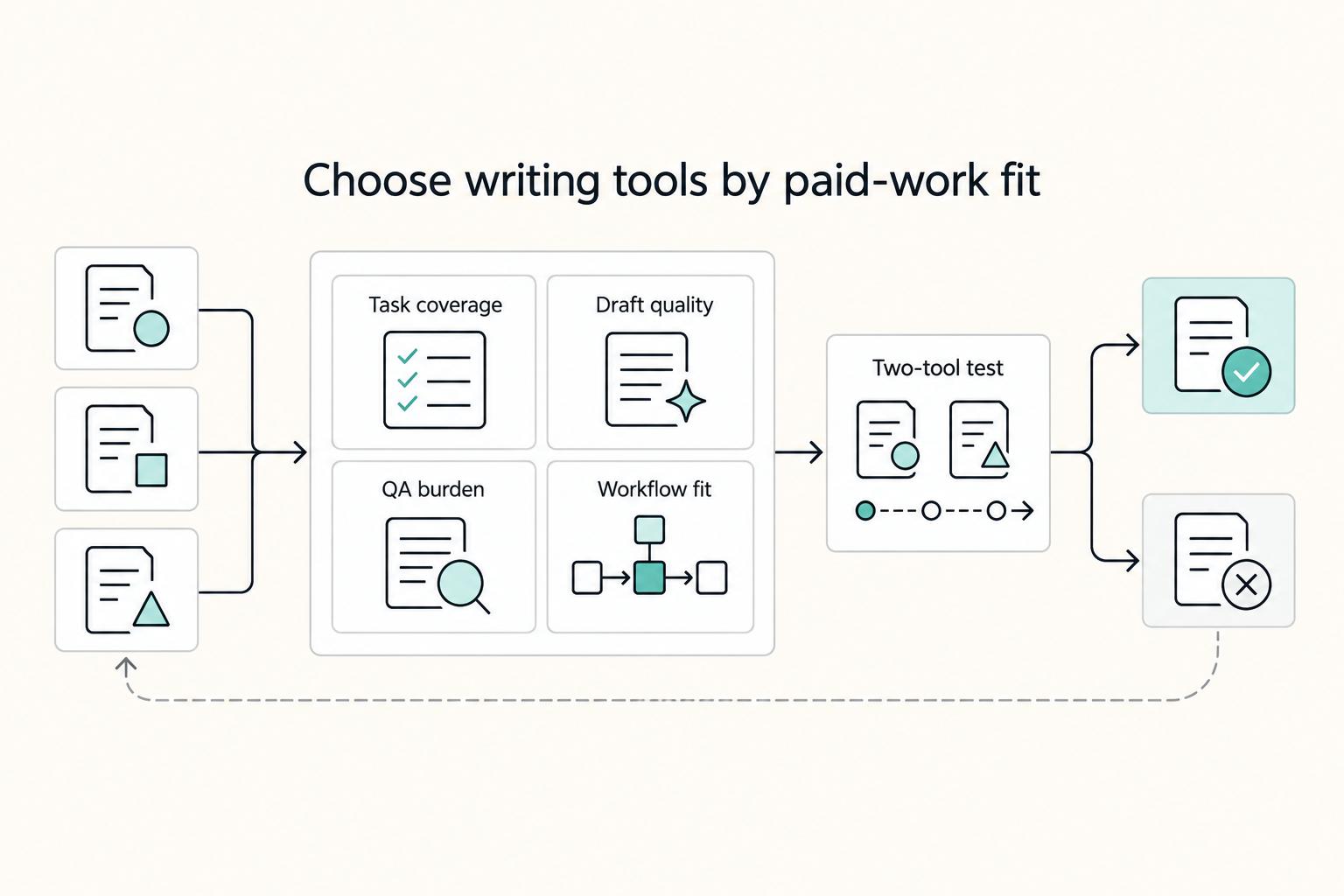
Pick the best ai writing assistants by testing a two-tool setup: one main draft tool and one polish tool. Start with a 30-minute evaluation, compare output on the same brief, and keep only the pair that survives a repeatable review gate for claim accuracy, tone fit, and clarity. For many freelancers, a practical starting mix is ChatGPT or Jasper for drafting, then Grammarly or Wordtune for final cleanup.
Introduction and how to use this list in 30 minutes#
Pick for fit, not hype. There is no universal winner in AI writing tools for freelancers, and broad roundups do not change that. One review covered 29 tools across six categories. Another listed 27 tools for 2026. Useful context, but your real decision is narrower: which pair helps you deliver paid client work with less rework this month?
For most freelancers, a two-tool stack is enough to make that decision quickly. Choose one primary drafter and one polisher. Then test both under your actual delivery conditions, not tidy demo conditions. That keeps responsibility clear. If the output drifts, you can see which step introduced the problem and fix that step instead of guessing across four apps.
Use this 30-minute decision pass before you commit to anything.
- Spend 8 minutes mapping your last month of assignments. Split mixed-format work from repeatable work.
- Spend 10 minutes drafting the same live brief in two candidate drafters.
- Spend 7 minutes stress-testing rewrites by asking each candidate for a shorter version in the same voice.
- Spend 5 minutes polishing in your normal editor and checking whether one human review pass is enough.
Capture test notes in one place while the details are fresh. For each trial, log the assignment type, first-pass strengths, recurring drift, and final fix time. That turns a vague preference into usable evidence. When two options feel close, the one that needs fewer repeat corrections usually wins over a month of deadlines.
A common failure mode is testing on atypical assignments. If you evaluate with work that is easier than your usual client load, almost every tool can look good. Test on ordinary assignments with the same interruption level, approval pressure, and turnaround expectations you handle every week.
Keep your criteria practical. Durable delivery matters more than novelty. Clean edits matter more than features you may never use. Fewer surprises under revision pressure matter more than a polished demo output.
If your assignments are mixed, start with a general-purpose drafter and keep one consistent polish step. If your assignments are narrow and repetitive, test a specialist drafter, but keep the same final QA step so quality does not swing week to week. That gives you a stable baseline before you expand your stack.
Once the 30-minute pass is done, move straight into a stricter scorecard. The next section gives you that scorecard so you can compare options by client outcomes, not interface preference.
If you want a related pricing and client-positioning read, see How to Negotiate a Higher Rate with a New Client. If you want to pick tooling after this review, Browse Gruv tools.
Selection criteria for freelancers who deliver client work#
For paid client work, score candidates on live briefs or skip the exercise. Gut feel is fast, but it hides costs that only show up in revisions. The strongest assistant is the one that stays predictable when deadlines, edits, and stakeholder comments all hit at once.
| Checkpoint | What to score |
|---|---|
| Draft quality | Is the first pass structurally usable, or does it need major rebuilding before line edits? |
| Rewrite control | Does the tool follow constraints without drifting from your meaning? |
| Voice consistency | Can it hold one client tone across multiple prompts? |
| Speed to usable draft | How fast do you reach edit-ready copy under normal deadline pressure? |
| QA support | Does your review pass catch clarity, tone, and claim issues before handoff? |
| Process fit | Can you move draft to final document with minimal cleanup? |
Score each candidate against the same brief using six checkpoints.
- Draft quality: Is the first pass structurally usable, or does it need major rebuilding before line edits?
- Rewrite control: Does the tool follow constraints without drifting from your meaning?
- Voice consistency: Can it hold one client tone across multiple prompts?
- Speed to usable draft: How fast do you reach edit-ready copy under normal deadline pressure?
- QA support: Does your review pass catch clarity, tone, and claim issues before handoff?
- Process fit: Can you move draft to final document with minimal cleanup?
Weight those checkpoints by business impact, not convenience. If your retainers depend on tone reliability, give voice consistency and rewrite control more weight. If your margins depend on turnaround, emphasize speed to usable draft and rewrite burden. A weighted score usually exposes the real tradeoff faster than a flat average.
Start with a hypothesis, then let results overrule it. Pick an initial candidate based on your typical assignment mix. Keep it only if your scorecard still supports it after real client work.
Also separate model capability from product usability. Two tools can draw on similar model strengths and still behave differently in day-to-day production. Some freelancer comparisons focus on six tools, while broader March 2026 roundups cover many more. Your own scorecard is still the stronger decision artifact because it reflects your brief style, your revision load, and your handoff requirements.
One practical guardrail is to score after a cooling period, not immediately after generation. Right after a draft appears, speed can look better than it is. After your usual edit pass, hidden cost becomes obvious: structural rewrites, tone repair, and claim verification time.
Keep one hard risk gate for every candidate: a repeatable human review pass before submission. A practical minimum is a documented check for claim accuracy, tone fit, and sentence clarity, with Grammarly where it helps. If a candidate repeatedly fails this gate, drop it even if the first drafts feel fast.
When speed is close, use rewrite burden as the tie-breaker. Count paragraphs that needed structural changes, not just line edits. Drafts that look quick but require structural surgery are often slower in real delivery than slightly slower drafts that only need polish.
With that scorecard in place, the comparison table below becomes genuinely useful. Without it, the table is just opinions in another format.
Quick comparison table of the top AI writing assistants#
Use this table as a shortlist, not a ranking. The role labels are starting hypotheses for testing, nothing more. Your QA process decides what stays.
| Tool | First role to test | Strong when | Watch for | Pairing note |
|---|---|---|---|---|
| ChatGPT | Primary drafter | Mixed assignments and fast direction-setting | Generic output if prompts are vague | Keep one polisher fixed during pilot |
| Jasper | Primary drafter | Recurring retainer work with strict voice expectations | Output can feel generic without strong brand inputs | Keep one polisher fixed during pilot |
| Copy.ai | Ideation and first-pass drafting | Campaign angle generation and rapid option volume | Fast output can be mistaken for final-ready copy | Expand winning angle in primary drafter |
| Anyword | Short-form performance specialist | Ad and social variants where response prediction matters | Long-form depth is not its strongest role | Pair with long-form drafter |
| Writer | Policy-sensitive drafting | Compliance-heavy environments needing tighter controls | Governance still depends on your approved inputs | Keep manual policy check mandatory |
| Writesonic | SEO production drafter | Throughput-focused content production under deadline | Intent drift if prompts are broad | Keep argument-depth review step |
| Rytr | Budget starter drafter | Early-stage freelancing with simple assignments | Quality swings with weak prompts | Use extra rewrite step for key sections |
| Grammarly / Wordtune | Polishing and QA | Final clarity, tone, and rewrite cleanup | Not a replacement for primary structure | Use at end of process, not at start |
The narrower role labels are intentional. They keep you from over-testing one tool for every job in week one. Once a tool proves itself in its first role, you can expand scope in a controlled way and measure whether quality still holds.
Read each row with one question in mind: what job are you assigning first? People often misjudge tools by testing them against work they were never assigned to do. A fair role match gives you cleaner results.
Save both the raw draft and the delivered version for every test case. The gap between those versions usually tells you more than first impressions. A polished-looking first pass can still create heavy cleanup after your standard QA pass.
One-week pilot#
A one-week pilot is enough if you keep the setup stable. The goal is not to test every feature. It is to learn which pair produces the least rework under normal client pressure.
| Pilot element | Requirement | Threshold |
|---|---|---|
| Tool setup | Pick two primary drafters from the table and one polisher you already trust | One-week pilot |
| Test briefs | Use two live briefs for each pair: one long-form assignment and one short-form assignment | Two briefs per pair |
| Tracked metrics | Track time to usable draft, number of major rewrites, and final QA issues | One shared note |
| Human review | Require one human review pass before submission every time | Every submission |
| Decision point | Make a keep-or-drop decision after seven days | Seven days |
| Drop rule | If a tool fails your QA gate twice in that week, remove it from the stack | Two QA gate failures |
- Pick two primary drafters from the table and one polisher you already trust.
- Use two live briefs for each pair: one long-form assignment and one short-form assignment.
- Track three checkpoints in one shared note: time to usable draft, number of major rewrites, and final QA issues.
- Require one human review pass before submission every time.
- Make a keep-or-drop decision after seven days. If a tool fails your QA gate twice in that week, remove it from the stack.
Avoid constant prompt changes during the pilot. Keep the brief structure stable so you are comparing tool behavior, not prompt noise. If you do change prompts, log exactly what changed and why.
Test inside normal work conditions. Client pings, interruptions, and context switching should be part of the evaluation. If a stack only works in ideal quiet blocks, it is fragile in production.
During the pilot, protect one more control variable: your final review sequence. If you keep changing the polish order while testing drafters, you lose clean attribution on where quality improved or declined.
At the end of the week, commit to one pair and move forward. Endless testing feels productive, but it often delays actual quality improvement. The pair that creates the least rework under real pressure is usually the right next choice.
ChatGPT for versatile drafting and research prep#
If your workload changes shape every week, ChatGPT is the safest first tool to test. Its main value is coverage across many writing tasks, not perfect first-pass copy every time.
It is especially useful for getting from a blank page to a direction quickly. Common freelancer uses include brainstorming, quick-answer development, short drafting tasks, research prep, summarizing dense material, and outline creation. When assignments shift across formats in the same week, that flexibility can reduce setup friction.
Keep the workflow simple and repeatable on real briefs. Start from your notes or source material. Request an outline plus key points. Expand into the required format. Then run a constrained rewrite with explicit audience, tone, and structure instructions. Move the result into your editor and finish with a separate grammar and style pass before handoff.
Prompt continuity matters more than most people expect. If each prompt changes the target reader or tone, quality can look unstable even when the tool is not the main problem. Use one short brief template that includes audience, desired voice, banned phrases, required sections, and length intent.
Keep that template in one place and update it only when the same feedback repeats across assignments. One-off changes create noisy output and make quality shifts harder to diagnose.
For factual discipline, keep support notes beside the draft while you work. If a claim cannot be tied back to your brief materials during review, generalize it or remove it before polish. That small checkpoint keeps clean language from hiding weak support.
The tradeoff is straightforward: broad instructions often produce generic copy. Another limitation is lighter built-in support for long-term source management and project organization. A common failure mode is accepting a clean first pass that still sounds interchangeable with any article in the niche. Counter that with one revision pass focused only on specificity before you start line edits.
If you need one practical starting point this week, ChatGPT is a reasonable primary drafter. Pair it with a strict final checklist. If quality still misses, fix input discipline first before you reconsider the stack.
Jasper for repeatable brand voice across multiple clients#
Jasper makes the most sense when repeat retainer work pays the bills and voice drift is expensive. In that setting, consistency usually matters more than open-ended exploration.
Its practical advantage is structure around repeat production. Jasper positions itself around purpose-built agents and Content Pipelines, which can help when you deliver similar assets each month. That pattern is useful when clients expect stable tone across blog posts, email copy, and landing pages delivered close together. Some agency-focused coverage also presents Jasper as a stronger fit for larger marketing teams, so you should validate fit against your own workload before committing.
Input quality still sets the ceiling. One 2026 alternatives review noted that output can feel generic, so treat brand guidance as mandatory, not optional. Keep one reusable brand-input document for each retainer with voice rules, audience anchor, structure guardrails, and your final quality checks.
Use that document in every brief. When clients send edits, update it before the next assignment. That creates a feedback loop that reduces repeat tone fixes over time.
A useful add-on is a short redline archive. Save the edits clients make repeatedly and convert them into clear do and do-not rules for future briefs. That gives you cumulative quality gains without adding more tools.
Verify pricing right before purchase. 2026 comparisons show conflicting snapshots, including $39/month, $59/month, $125/month for three seats, and Pro at $69/month. Treat those figures as historical snapshots, not current guarantees.
The decision rule is simple. If most of your revenue comes from repeat retainers, Jasper is worth serious testing as a primary drafter. If assignments change weekly across unrelated formats, keep a general-purpose primary and use Jasper only if your scorecard proves the gain.
Copy.ai for fast campaign ideation and first drafts#
Copy.ai earns its place when angle generation is the bottleneck. It can produce a lot of options quickly, but you should not treat it as a final-draft substitute.
That role lines up with at least one 2026 practitioner review: strong for first-pass copy and breaking writer's block, weaker when used alone for full long-form delivery. Copy.ai is also described as automation-oriented for sales and marketing tasks, with support for longer drafts.
Use a clear handoff sequence. Generate options in Copy.ai. Pick the angle that best matches the brief. Expand that angle in your primary drafter with explicit audience and structure constraints. Then tighten the language in Wordtune before final approval.
Keep the pass-or-fail check binary. A draft passes only when clarity, specificity, and client voice all hold. If one fails, revise before handoff. The common trap here is false confidence from speed, where quick output starts to look like finished work.
You can reduce waste by separating raw options from approved direction in your notes. That small distinction prevents rough ideas from slipping into client-facing copy unchanged and makes review faster.
Another useful habit is saving rejected angles with one short reason for rejection. Over time, that gives you a practical pattern library of what your clients do not want, which can shorten future ideation cycles.
Treat pricing as time-sensitive. One February 2026 comparison listed self-serve at $29/month. Confirm current plans before committing so your margin assumptions stay accurate.
Anyword for ad and social copy with performance focus#
Anyword is a specialist tool, and it works best when short ad and social copy is the actual job. It is much less convincing as your only long-form writing tool.
Its defining feature is performance-oriented scoring. Anyword's predictive score is designed to estimate likely response before publication, and comparison writeups describe that feature as informed by A/B test data. That can help you prioritize variants quickly when launch timing is tight.
Treat predictive metrics as directional, not definitive. You will see strong accuracy and engagement-lift claims in marketing and comparison pieces, but outcomes still depend on channel, audience, and execution quality. Use the score as one input into judgment, not a substitute for judgment.
A practical split usually works best. Use Anyword for launch-week variant testing in short-form channels. Use your long-form drafter for educational content that needs structure and argument depth. If you also need high option volume before tuning, use Copy.ai for ideation and reserve Anyword for performance triage.
Keep a short post-launch feedback note for each campaign. Comparing predicted and actual performance over time helps you calibrate how much weight to give the score in future decisions.
One comparison article highlights native integrations with Meta, Google Ads, and email marketing platforms. If integrations are part of your buying decision, confirm they match your current stack before you commit.
If your workload depends on short-form conversion testing, Anyword can be a primary specialist. If most assignments are long-form education, keep it in a secondary role.
Writer for stricter compliance and policy-sensitive content#
For policy-sensitive work, tighter controls matter more than faster drafting. In this category, defensible wording beats raw speed.
In regulated work, precision, compliance, and security are baseline requirements. Guidance in this area presents AI assistants as useful for generating, editing, and optimizing content, while enterprise-focused guidance warns that consumer-grade tools can create data exposure and visibility risk.
Use a strict sequence on every assignment. Define approved and prohibited claims before drafting. Draft with those constraints visible in the brief. Reconcile exploratory wording back to approved language. Then run a final clarity pass to remove ambiguity before submission.
Pre-approve sensitive language blocks whenever possible. If a phrase is high risk, include the approved wording directly in the brief and reuse it consistently. That reduces late-stage policy edits and lowers the chance that a polished sentence still fails review.
Keep a simple change log for policy-sensitive projects. Record what wording changed, why it changed, and who approved the final version. That record helps resolve disputes quickly and makes future edits safer.
A compliance-focused platform does not guarantee legal or regulatory compliance on its own. Final delivery should pass only when terminology, risk-sensitive phrasing, and client policy notes fully align. If those inputs are incomplete, pause and clarify before drafting more copy.
Writesonic for SEO-focused production under deadlines#
When SEO throughput is the constraint, Writesonic deserves a real test. It is a practical candidate for high-volume production, but it still needs a disciplined review layer to protect quality.
A February 19, 2026 comparison describes Writesonic as an all-in-one platform with SEO-focused features such as competitor analysis and internal linking. It also positions the tool for high-volume article production. Another process-focused review says it can generate outlines, introductions, and full drafts, and describes more than 80 tools aimed at search-oriented production. The same context notes Semrush and WordPress integrations as practical advantages.
The right way to use it is with a three-step quality gate. First, generate the outline and first draft in Writesonic with clear intent and audience inputs. Second, review argument quality and thin sections in your primary drafting flow. Third, finalize readability and duplication cleanup in a dedicated edit pass.
That split works because each stage has one job. Stage one creates structure and speed. Stage two checks logic, depth, and weak claims. Stage three sharpens clarity and consistency before handoff. When one stage tries to do everything, revision time usually goes up.
Before publishing, check that headings and transitions still match the original search intent you assigned in the brief. Fast production can create structurally clean drafts that drift semantically, especially in middle sections where the argument starts to flatten.
The decision checkpoint is direct. If throughput is your main constraint, test Writesonic as a primary drafter while keeping both review steps mandatory. If nuance and argument quality are the bigger constraint, keep your general-purpose drafter primary and use Writesonic mainly for outline acceleration.
Also guard against intent drift under pressure. Fast generation can quietly shift topic focus when prompts are broad. Lock intent and reader profile at the top of each brief before you generate.
Rytr for budget-sensitive freelancers getting started#
Rytr is a sensible entry point when budget is tight and the work is straightforward. It helps you start quickly, and it also makes it easier to see when an upgrade is justified.
Because the product is highly prompt-driven, output quality moves with input quality. One 2025 snapshot listed a free plan at $0 with 10,000 characters/month, a paid entry plan at $9/month, and an unlimited plan at $29/month. Use those as reference points and verify current pricing before deciding.
The main upside is accessibility for newer freelancers. Reviews describe a beginner-friendly interface, templates for common tasks, support for more than 30 languages, and a built-in plagiarism checker. Treat that checker as screening support, not legal protection.
For client delivery, keep the sequence tight. Draft first-pass sections in Rytr. Rewrite key sections in your primary drafter for clarity and flow. Run final polish before handoff. Approve only after voice match, claim clarity, and filler removal checks pass.
Set boundaries in advance so quality does not drift. Decide which sections may stay close to first pass and which sections always require deeper rewrites. That keeps costs manageable while protecting the parts clients evaluate most heavily.
Define your upgrade trigger before problems pile up. If revision loops keep expanding or tone corrections become routine, your time cost may already be higher than the price gap to a stronger primary tool.
If revision rounds keep growing, avoid stacking extra rewrite tools. In many cases, upgrading your primary drafter saves more time than adding another editing loop each week.
Grammarly and Wordtune for polish, rewrites, and final QA#
Treat Grammarly and Wordtune as the last line of defense, not the place where a weak draft gets rescued. Structure and argument should be built upstream. These tools are strongest when you need cleaner language, steadier tone, and fewer avoidable errors before delivery.
Keep role separation clear. Your primary drafter generates direction and structure. Your polisher improves readability and consistency. Since language models can still produce factual errors, claim verification remains a human responsibility at the end.
Use each tool for the job it handles best.
- Wordtune: strongest for human-sounding rewrites and flow improvements once the draft is directionally right.
- Grammarly, including Grammarly Rewrite Beta: strongest for clarity, tone tuning, and final grammar cleanup before handoff.
Keep the editing order stable so quality control stays predictable.
- Draft in your primary assistant.
- Rewrite for flow in Wordtune.
- Run final clarity and tone checks in Grammarly.
- Deliver from the final handoff document.
Use a compact final QA checklist before submission.
- Check tone against client style notes.
- Remove repetition and near-duplicate lines.
- Simplify dense sentences for first-read clarity.
- Verify each concrete claim against brief sources.
- Complete final formatting in the handoff document.
Do not reverse this order unless you have a specific reason. If grammar checks happen before rewrites, later rewrites often reintroduce issues you already fixed. A stable order protects time and makes the process easier to audit.
Another useful safeguard is separating meaning edits from sentence edits. First confirm that each paragraph says the right thing. Then polish how it says it. Trying to do both at once can hide errors and increase revision loops.
When deadlines compress, this final stage is still non-negotiable. Drafts can look clean and still miss tone, clarity, or claim precision. A short final pass catches those misses before they turn into client comments.
If you track edits, label them by intent in comments, such as tone, clarity, or claim check. That habit makes feedback easier to map and gives you better evidence for improving prompts over time.
Conclusion and the stack to pick this week#
Pick a lean stack this week and run it with enough discipline to learn something from it. One primary assistant plus one polishing tool is enough to improve delivery quality when the review process is consistent.
Keep tool roles separate. General drafting tools, specialist production tools, and polish tools solve different jobs. Treating them as direct substitutes usually leads to bad decisions and extra rework.
Start with a simple plan:
- Choose one primary assistant, such as
ChatGPTorJasper. - Pair it with one polisher, such as
Grammarly. - Run a short pilot using the same scorecard on every deliverable.
Use a basic decision matrix to keep selection objective: tool name, category, monthly starting price, and best-fit use case. Then track draft time, revision count, tone fit, and claim-check pass rate. Keep the pair that stays consistent with the least switching cost.
Before you lock the stack, review one completed client project from brief to final handoff and note where edits piled up. That review usually reveals the real bottleneck, whether it is ideation speed, structural drafting, or final polish quality. Once the bottleneck is clear, tool choice gets much easier.
Set a short review cadence after adoption so small issues do not harden into expensive habits. If the same failure appears across several assignments, adjust either the brief template or the role split before adding more tools.
If you want a clean start this week, run one sequence on your next assignment and repeat it before changing anything. Brief with constraints. Draft in one tool. Polish in one tool. Finish with the same QA checklist. That consistency is what makes quality trends visible and decisions reliable.
For next steps, apply the same selection logic to broader delivery operations in our guide to using AI without scope, compliance, or payment chaos. Then review legal boundaries in AI and Copyright: Legal Implications of Using AI Content in Client Work.
Frequently Asked Questions
What is the best AI writing assistant for freelancers?
There is no single best tool for every freelancer. The right choice depends on your core use case because these tools are built for different jobs. Keep it simple: one primary drafter, one polisher, and evaluation against real client work. If your stack passes your QA gate consistently, it is a better choice than a more complex stack that looks stronger on paper.
Is ChatGPT enough on its own for paid client work?
Treat it as one part of delivery, not the full process. Drafting, rewriting, and final QA are separate jobs, and paid work often benefits from all three. Add a dedicated polish and review pass before handoff. If you skip that step under deadline pressure, you may see more edits later.
What is the difference between an AI model and an AI writing tool?
An AI model is the underlying language engine. An AI writing tool is the product layer that applies that engine to specific writing tasks, often using LLM and NLP capabilities. Compare tools by task fit, not brand familiarity. This distinction keeps buying decisions grounded in the actual job you need done.
Which tools are best for rewriting and polishing drafts?
Wordtune is positioned for writing enhancement and rewriting. Grammarly is positioned for writing enhancement and grammar checking. A practical sequence is rewrite first, then final grammar checks. Keep that sequence consistent so quality checks stay repeatable across clients.
How should I choose between affordability and specialization?
Start with your dominant use case, then set a monthly budget cap. A comparison table dated Dec 3, 2025 listed entry pricing from $9/mo to $69/mo, with examples like $20/mo and $39/mo. Treat those prices as snapshots and verify current plans. If your margin is tight, protect the essentials first and delay extra tools until revision load justifies them.
Can AI writing assistants replace a freelance writer?
Not fully for client-facing work. A common critique is that many tools are built to generate content, not help it perform. Your role is still to make judgment calls, shape quality, and ensure final output meets client expectations. For legal boundaries, see AI and Copyright: Legal Implications of Using AI Content in Client Work.
What is the minimum two-tool stack to start safely this week?
A practical starting point is two tools: one drafter and one polisher. For polish, use Wordtune for rewrites or Grammarly for grammar checks, then keep the pairing stable for a short pilot week. Adjust only if revision load or quality results show a clear gap. Frequent tool swaps during the pilot can hide the real cause of quality changes.
Try a related tool
Researched and edited by the Gruv editorial team. Gruv builds cross-border billing, payouts, and finance-operations software for global businesses.
Sources
Includes 5 external sources outside the trusted-domain allowlist.
- aitoolsdigest.com/blog/best-ai-tools-for-freelancers-2026external
- emailvendorselection.com/best-ai-writing-toolsexternal
- leadrpro.com/blog/anyword-vs-copy-ai-best-ai-writing-tool...external
- oreateai.com/blog/writesonic-vs-jasper-navigating-the-seo...external
- rescrito.com/en/top-ai-content-assistants-comparisonexternal
Educational content only. Not legal, tax, or financial advice.
Related Posts
How Freelancers Use AI Without Scope, Compliance, or Payment Chaos
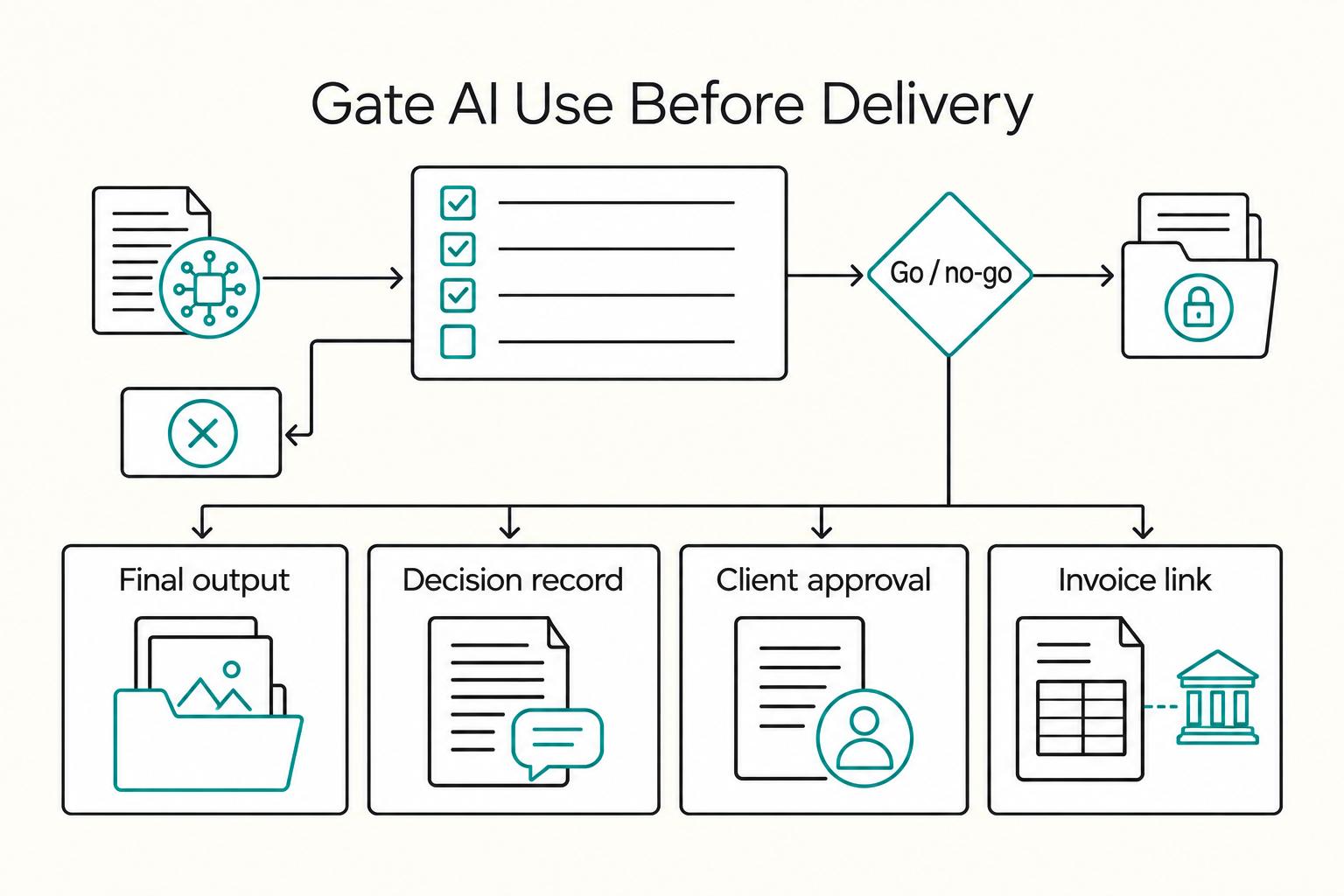
If you are hunting for more **AI tools for freelancers**, stop and put controls in place first. One practical setup is `Acquire -> Deliver -> Collect -> Close-out`, with each AI action checked through `Data`, `Client Policy`, `Quality`, and `Money`. If a tool has no named job, no clear data boundary, and no record you can retrieve later, it probably does not belong in your stack.

AI Content Copyright Issues in Client Work Contracts
You can use generative AI in client work, but only if copyright risk is treated as a delivery requirement from day one. The practical question is not whether you can use AI. It is whether you can defend human contribution, ownership intent, and jurisdiction before production starts.

How to Negotiate a Higher Rate with a New Client
When you try to **negotiate higher rate new client** work, do not treat it like a confidence test. Treat it like deal design. The uncomfortable part is rarely saying your number out loud. The real damage usually shows up later, when you agree to a loose setup and your effective rate gets squeezed by avoidable rework, delays, and misalignment.