
Quick Answer
For high-value global clients, the best accounting software is usually not one product but a three-layer stack. Use QBO or Xero as the ledger for transaction accuracy, add a compliance layer for non-ledger risks like FBAR tracking, and use a practice layer to assign tasks, request documents, and record closure evidence.
The Compliance-First Tech Stack: A Guide for Bookkeepers Serving High-Value Global Clients#
If you serve cross-border clients, you are not just choosing software to post transactions. You are deciding whether your stack can protect cash flow, filing deadlines, and compliance risks that standard bookkeeping screens may not catch. In practice, the right choice is often not a single app. It is a stack built for control.
| FBAR item | Detail |
|---|---|
| Trigger | Foreign accounts that cross the FBAR trigger of $10,000 at any point in the year. |
| Form | FBAR uses FinCEN Form 114. |
| Due date | April 15. |
| Extension | Automatic extension to October 15. |
| Record retention | Retain supporting records for five years. |
The blind spot is usually practical, not dramatic. A ledger can show balances, invoices, and reconciliations while still missing obligations that sit outside the chart of accounts. A client can have foreign accounts that cross the FBAR trigger of $10,000 at any point in the year. That filing is separate from the federal tax return and uses FinCEN Form 114. If nobody is checking that rule, the books can look clean while the compliance calendar is already off.
Think about the stack in three layers:
- Ledger layer
This is your record base: transactions, reconciliations, account balances, and multicurrency activity. Tools like QuickBooks Online Accountant let you review client books, edit transactions, and fix issues. Its books review tool focuses on incomplete transactions, reconciliations, and account balances. The boundary matters. It keeps the financial record accurate, but it does not replace obligation tracking.
- Compliance layer
This is where you track rules, dates, and evidence. Think FBAR due April 15, with an automatic extension to October 15, plus the need to retain supporting records for five years. You need a place to verify jurisdiction rules, document thresholds once confirmed, and store proof before a deadline turns into a cleanup job.
- Process layer
This is how work gets handed off and closed. If multicurrency is enabled in QuickBooks Online, it cannot be turned off, so review that setup before you go live. This layer makes sure a flagged issue becomes an assigned task, a document request, and a confirmed filing step.
The next sections walk through that logic layer by layer, including how to compare ledger options without sliding back into tool hype. Done well, this approach can reduce payment and compliance surprises and give you a stronger advisory position built on control, not promises. If you want a deeper dive, read Value-Based Pricing: A Freelancer's Guide.
The Danger of the Domestic Lens#
If domestic-first reviews are your main filter, you will likely pick for familiarity, not for control. That can leave cash-flow protection and compliance workflow reliability exposed. Many roundups state their scope directly, such as "solutions used by US companies today," so treat them as local buying guides, not universal guidance for cross-border client work.
| Test | What to check | Why it matters |
|---|---|---|
| Risk blind spot test | Check what the review optimizes for. If it mainly rewards network fit, accountant familiarity, and app support, it may miss multi-currency operations, cross-border invoicing rules, and account-aggregation monitoring across banks and fintech platforms. | If it does not address non-ledger exposure, it is prioritizing convenience over risk control. |
| All-in-one myth test | Map what stays inside the ledger versus what gets rebuilt in spreadsheets. | If consolidated reporting, review checks, or exception handling live outside the core system, accuracy depends on workarounds instead of a unified architecture. |
| Value framing test | Separate bookkeeping depth from client-workflow needs, and confirm whether the reviewer validated plans, trials, and pricing on official vendor pages. | A roundup last reviewed on March 22, 2026, with pricing checked on March 21, 2026, shows its verification posture. |
- Risk blind spot test
Start by checking what the review actually optimizes for. If it mainly rewards network fit, accountant familiarity, and app support, it may miss what you need for multi-currency operations, cross-border invoicing rules, and account-aggregation monitoring across banks and fintech platforms.
Ask whether the evaluation covers non-ledger exposure or only transaction speed. If it does not give you a place to verify current aggregate-balance thresholds and penalty language from official records before use, it is prioritizing convenience over risk control.
- All-in-one myth test
Assume a single app will start to break down as client complexity grows. A transaction-first, single-entity setup can work early on, then fail when reporting and controls need more structure.
Map what stays inside the ledger versus what gets rebuilt in spreadsheets. If consolidated reporting, review checks, or exception handling live outside the core system, you have a reliability gap. In that setup, accuracy depends on workarounds instead of a unified architecture.
- Value framing test
Treat "lowest subscription cost" as one input, not the decision rule. Low-cost-first choices can reduce long-term bookkeeping headroom when your real bottleneck is process reliability.
Use two checks: separate bookkeeping depth from client-workflow needs, and confirm whether the reviewer validated plans, trials, and pricing on official vendor pages. A roundup last reviewed on March 22, 2026, with pricing checked on March 21, 2026, at least shows its verification posture.
Once you run these tests, the "single best tool" framing usually falls apart. A better evaluation model is a stack: ledger, compliance layer, and practice workflow. For a step-by-step walkthrough, see Best Accounting Software for Small Agencies That Protects Cashflow.
Build the Stack in Three Layers: Ledger, Compliance, and Practice#
Build this as a three-layer operating model, not a single software pick: ledger for record accuracy, compliance for exception monitoring, and practice for execution ownership.
| Layer | Job to be done | How to evaluate fit | What must happen next |
|---|---|---|---|
| Ledger (QBO or Xero as examples) | Keep transaction records accurate through coding, reconciliation, and current balances. | Check reconciliation reliability, integration depth, and whether data moves out cleanly without spreadsheet rework. | Clean transaction data is available to downstream monitoring and task workflows. |
| Compliance (Gruv as an example) | Monitor non-ledger rules, detect exceptions, and maintain an audit-ready follow-up trail. | Use four checks: risk fit, integration depth, workflow friction, and handoff reliability. Confirm connector availability and market coverage for your stack first. | Exception detected -> owner assigned -> client action requested -> closure evidence logged. |
| Practice (QBO Work, Karbon, Keeper as examples) | Route work to completion with ownership, due dates, client requests, reminders, and documented closure. | Verify whether jobs, ownership, and client communication stay visible end to end. Recheck Keeper feature specifics in current help docs because older docs are deprecated. | Requests are sent, responses captured, reminders run, and completion is recorded in-system. |
Use this decision framework for each layer before you buy or expand: fit, integration depth, workflow friction, and handoff reliability. If any one is unclear, treat it as a verification gap, not a "good enough" decision.
Quick checkpoint before the ledger comparison:
- Clear job boundary per layer
- Verified integration path between layers
- Low-friction client handoff path
- Closure evidence captured and retrievable
Once those roles are locked, compare QBO and Xero against your global workflow requirements, not general popularity. We covered this in detail in The Best Tax Research Software for Accountants.
Layer 1: Choosing Your General Ledger (QBO vs. Xero Under a Global Microscope)#
Choose the ledger you can validate in real client workflow, not the one with the stronger marketing story. QBO and Xero can both work as Layer 1, and neither should be treated as full cross-border compliance coverage on its own.
Your ledger job is transaction integrity and usable reporting controls, then clean handoff into the rest of your stack. If data ends up spread across disconnected tools, you lose the concise view you need to manage risk.
| Workflow outcome | What to verify in QBO | What to verify in Xero | Red flag if you cannot confirm |
|---|---|---|---|
| Multi-currency posting | Confirm QBO multi-currency posting in a sample client month with foreign-currency invoices, bills, and bank activity. | Confirm Xero multi-currency posting using the same sample month and close flow. | Staff must use side spreadsheets to explain routine foreign-currency activity. |
| Revaluation handling | Confirm QBO revaluation handling, including how adjustments appear in reports and review logs. | Confirm Xero revaluation handling, including review visibility and export clarity. | Adjustment logic is not traceable during review. |
| Reporting clarity | Test whether management and accountant-facing outputs match without manual stitching. | Run the same test with identical date ranges and structure. | Different reviewers produce different answers from the same books. |
| Integration reliability | Confirm connected reporting/compliance tools pull real-time data and preserve an audit trail. | Confirm the same connector behavior and failure visibility. | Sync failures are found only near filing or review deadlines. |
| Team adoption friction | Run a short pilot with the people who reconcile, review, and request documents. | Run the same pilot with the same tasks and timing. | Demo flow looks easy, but month-end execution slows down. |
Choose QBO when existing operations already run there#
Choose QBO when your staff habits, client workflows, and adjacent tools are already centered on it, and your pilot proves the global scenarios you handle actually work. The tradeoff is clear: you gain continuity and speed, but you still need proof that month-end close, reporting handoff, and downstream syncs hold up without manual patching.
Choose Xero when international workflow is central#
Choose Xero when cross-border activity is a core part of the client profile and you are willing to validate the surrounding reporting and operational stack around it. The tradeoff is the change effort: even if ledger workflows look clean, adoption and connector changes can create short-term friction.
For project-based clients, include one extra check: can you see WIP, utilization, and job-level financial performance early enough to act, instead of discovering later that a project lost money?
Fit-check for lighter ledgers#
A lighter ledger can be fine for simpler profiles with clear boundaries. If cross-border complexity rises, or you cannot keep a concise view without disjointed systems, re-check whether that tool should remain your Layer 1 core.
| Validation step | What to confirm |
|---|---|
| Sample month | Test a real sample month, not only demo data. |
| Outputs and handoff | Verify reporting outputs, audit trail visibility, and export handoff quality. |
| Downstream sync | Validate at least one downstream tool that must pull real-time data. |
| Team pilot | Have the actual bookkeeper and reviewer run the same pilot tasks. |
| Manual workarounds | Flag any step that depends on side spreadsheets, duplicate entry, or manual explanation. |
| Project-based work | Confirm early visibility into WIP, utilization, and job-level performance. |
Before moving to Layer 2, run this same checklist for each client profile. Related: How to Manage Bookkeeping for Your Freelance Business.
- Test a real sample month, not only demo data.
- Verify reporting outputs, audit trail visibility, and export handoff quality.
- Validate at least one downstream tool that must pull real-time data.
- Have the actual bookkeeper and reviewer run the same pilot tasks.
- Flag any step that depends on side spreadsheets, duplicate entry, or manual explanation.
- For project-based work, confirm early visibility into WIP, utilization, and job-level performance.
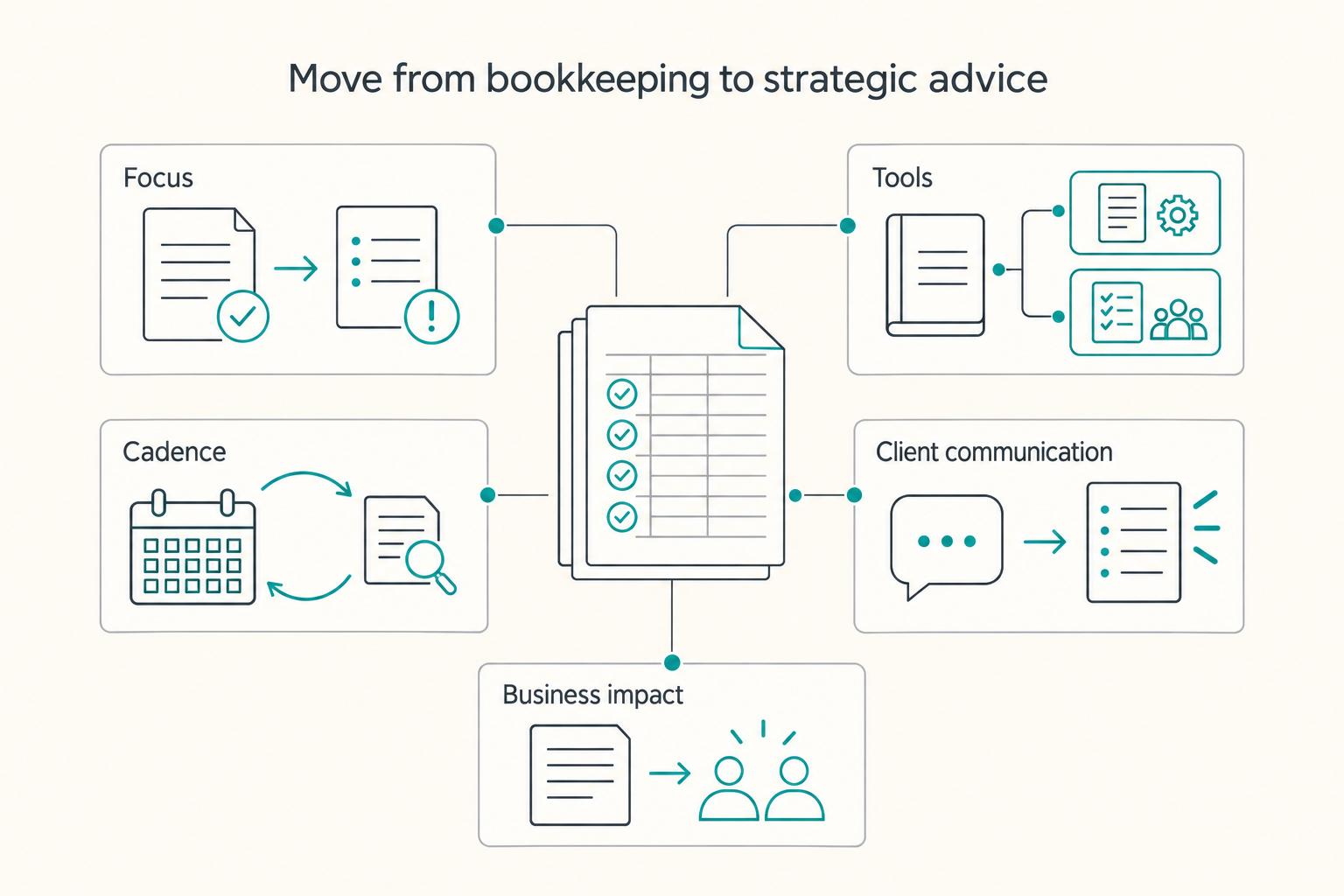
From Bookkeeper to Indispensable Strategic Advisor#
You become more valuable when you treat clean books as the baseline, then give clients clear next actions before issues become expensive cleanups. Historical accuracy still matters, but your day-to-day role shifts from reporting what happened to helping the client decide what to do next.
Think of the ledger as the rear-view mirror: essential, but not enough on its own. You still review what posted and what cleared, then pair that review with non-ledger checks and a short action plan the client can act on.
| Dimension | Old model | Advisory model |
|---|---|---|
| Focus | Reconcile, close, and report past activity. | Close the books, then flag what needs action next. |
| Tools | One ledger does most of the work. | Ledger plus a compliance workflow, and a practice workflow when follow-up starts slipping. |
| Cadence | Mostly month-end or quarter-end. | Recurring close rhythm plus a recurring risk-and-evidence review. |
| Client communication | "Books are done." | "Books are closed. Here is what is verified, what is missing, and what decision is pending." |
| Business impact | Solid bookkeeping, often price-compared. | Higher-trust support built on earlier issue detection and clearer ownership. |
Use cloud-based access as intended: you and the client, or their accountant, work from the same up-to-date dataset. If you run QuickBooks Online, use it as the central operations hub and review bank-feed categorization before finalizing the close. Also keep in mind that software value depends on setup and ongoing management, not the tool alone.
Keep boundaries clear. Free or low-cost tools can cover baseline tasks like invoicing, expense tracking, and bank reconciliation, but free plans can still add friction through user limits or paid add-ons. When a question requires interpreting a legal or tax rule, document it and escalate to the appropriate specialist instead of guessing.
How to apply this next week#
- Add a recurring advisory pass
After each close, run a short review for ledger exceptions, missing evidence, and open non-ledger items, then issue a simple action list.
- Send one decision-focused update
State what is verified, what still needs support, and what requires specialist review.
- Package the work as an ongoing review layer
Position your service as repeatable operational guidance around the books, with clear escalation boundaries.
Frequently Asked Questions
What is the best accounting software for clients with international income?
Usually, it is not one product. Use a stack: a ledger for posting and reporting, a compliance layer for non-ledger risk, and a practice layer for follow-up and review. Test one real month in QBO or Xero and confirm Gruv connector fit during evaluation.
Does QuickBooks or Xero track tax residency days?
Do not assume your ledger will track tax residency days. Clean books do not show whether a client has crossed a residency or filing trigger. Track physical presence in a dedicated compliance layer and store the jurisdiction rule in the client file once it has been verified.
How do you handle FBAR work without turning it into spreadsheet chaos?
Handle FBAR outside the ledger with a documented foreign-account inventory. It is an annual report due April 15, with an automatic extension to October 15. Maintain a foreign-account list, monitor against the verified threshold, and keep statements or account records that support balances and ownership.
What is the right stack for digital nomad clients?
Use three layers, not one app. Nomad clients create transaction issues in the ledger and location-based risk outside it. Pair QBOA or Xero with Gruv where enabled, and add Karbon or Double when month-end close, review, and client chasing start slipping between tools.
Should you choose QuickBooks Online Accountant or Xero for your firm?
Choose based on operating fit you can verify, not a generic winner. QBOA is built for accountants and says you can manage your work, clients, and practice under one login, while Xero positions shared cloud collaboration through its partner program as a core benefit. Run the same close tasks in both and flag any step that requires duplicate entry, unclear exports, or side notes outside the books.
Do you still need Karbon or Double if your ledger already has accountant features?
Often, yes. Ledger features help with the books, but practice management tools handle review status, client communication, and close coordination across many files. Verify whether Karbon or Double covers the handoffs you actually miss, and remember older Keeper docs can be stale because Keeper is now Double.
How do you keep invoices compliant for EU or other cross-border clients?
Do not rely on a default invoice template and assume it is fine everywhere. Required fields, customer treatment, and supporting records can depend on jurisdiction and current tax rules outside the ledger's core posting job. Have a specialist review your invoice template, add a jurisdiction checklist to the client file, and keep the supporting evidence pack with each invoice.
Are Wave or FreshBooks good enough for foreign-income clients?
They can be fine for simpler profiles, but you should not start there for high-value global work without a pressure test. Wave is positioned as a free starting point for freelancers, consultants, and small businesses, and FreshBooks explicitly targets freelancer use. Use them only when entity structure, reporting needs, and cross-border exposure stay light, then set a review point before manual workarounds start multiplying.
When should you escalate to a tax or legal specialist?
Escalate when you are interpreting residency, filing obligations, invoice law, or anything that requires regulated advice rather than software setup. A PTIN is only a baseline requirement, and paid preparers have differing levels of skills, education, and expertise. Ask who is giving the advice, what credential they hold, and what exact issue they are signing off on.
Try a related tool
Researched and edited by the Gruv editorial team. Gruv builds cross-border billing, payouts, and finance-operations software for global businesses.
Sources
Includes 5 external sources outside the trusted-domain allowlist.
- bsaefiling.fincen.gov/file/fbartrusted
- irs.gov/businesses/small-businesses-self-employed/re...trusted
- irs.gov/tax-professionals/choosing-a-tax-professionaltrusted
- accountanttoolkit.com/best-bookkeeping-software-for-solo-accountantsexternal
- assetvantage.com/blogs/best-alternative-family-office-account...external
- bigtime.net/blogs/project-accounting-softwareexternal
- central.xero.com/s/article/About-multicurrencyexternal
- docs.keeper.app/ixiZ-what-is-keeperexternal
Educational content only. Not legal, tax, or financial advice.
Related Posts

Value-Based Pricing for Freelancers Under Real Payment Risk
Value-based pricing works when you and the client can name the business result before kickoff and agree on how progress will be judged. If that link is weak, use a tighter model first. This is not about defending one pricing philosophy over another. It is about avoiding surprises by keeping pricing, scope, delivery, and payment aligned from day one.

Freelance Bookkeeping for Faster, Safer Client Payments
Control over cash starts with records you trust. When entries are current, categorized, and easy to trace, you spot risk earlier and make calmer decisions about follow-up, spending, and month close.

How to Write a Book as a Freelancer Without Scope Drift
The book needs a defined job and a defined boundary before you draft. In this cycle, give it one job: either support your client book services, or strengthen your own authority book so your niche, offer, and sales conversations become clearer.