
Quick Answer
Verify scope before you cut: confirm the plan allows client work, clear synchronization and master use for the exact track, and review distribution for possible public-performance needs. Save proof the same day you license, including the certificate, asset ID, transaction reference, and the terms version you relied on. Deliver those records with the final export and invoice line items so later recuts or channel changes can be reviewed quickly. For U.S. projects, weak records can raise infringement exposure, including statutory-damages ranges.
Your Music Choice is a Business Decision, Not Just a Creative One#
When you pick music or SFX for client work, you are making a rights and delivery decision as much as a creative one. In motion design, a strong track is unusable if you cannot show permission for that exact asset in that exact project.
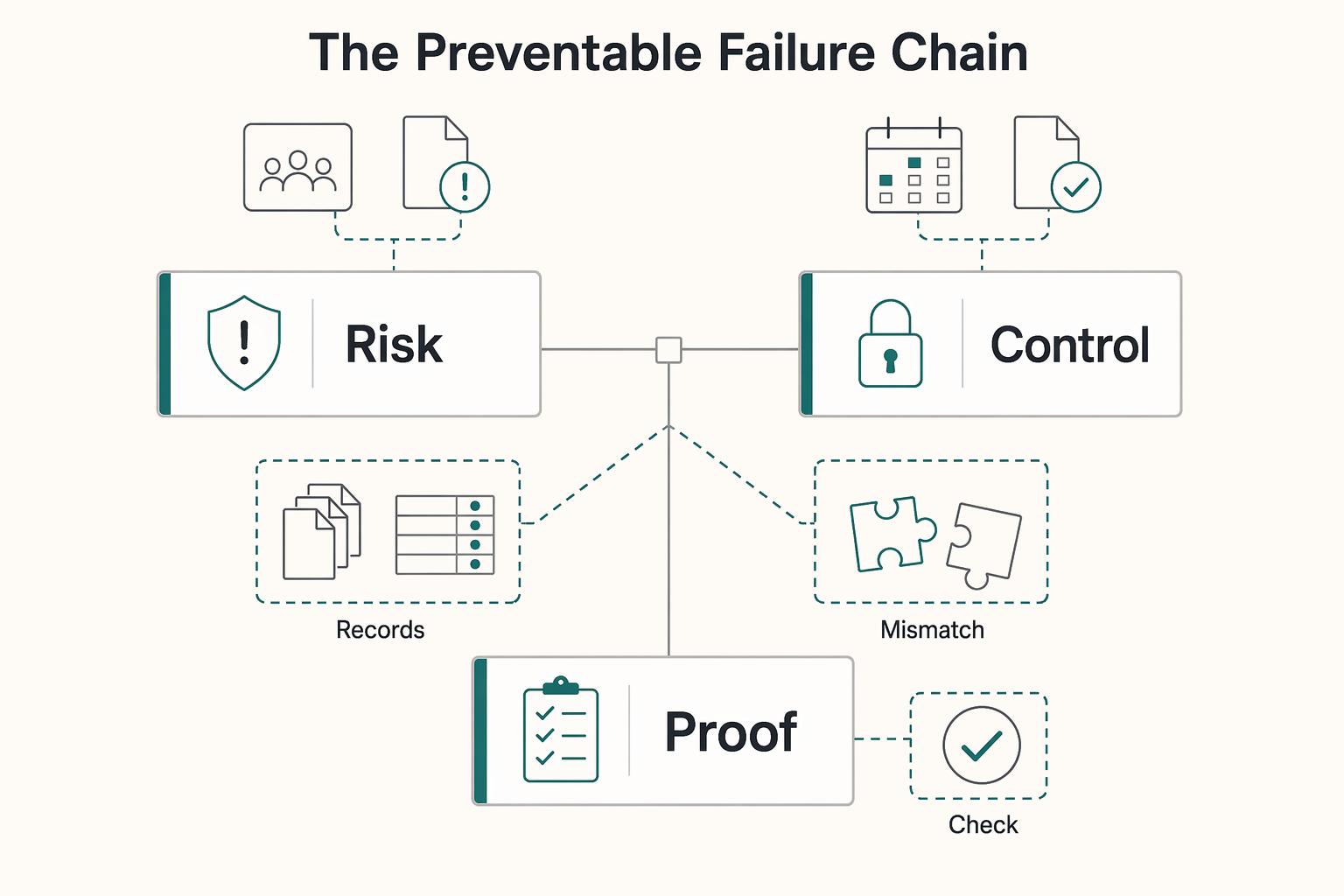
Most failures come from a short list of preventable mistakes: the wrong plan scope, the wrong license scope, or missing proof. Treat clearance as part of production, not something you clean up at the end.
Think in terms of what can go wrong#
The first risk is simple delivery failure. You finish the edit, get approval, and then realize the plan did not cover client or commercial use. Before you edit, confirm that the plan tier explicitly covers client or commercial projects.
The second risk is infringement exposure for you and your client. For pre-recorded songs, you will likely need two licenses, and sometimes a third. You need synchronization for the composition and master use for the recording, and in some cases public performance depending on distribution. If content is streamed or broadcast from a website, app, or station, public performance licensing can apply. Do not assume that downloading, trimming, or remixing removes licensing requirements.
The third risk shows up after delivery, when a missing record becomes a legal or business problem. U.S. statutory damages can be $750 to $30,000 per work, and up to $150,000 per work for willful infringement. Keep asset-level proof for every licensed item.
Know what you are actually clearing#
| License or right | Allowed use | Common misuse pattern | What you must verify before client use |
|---|---|---|---|
| Synchronization license | Pair a musical composition with visual content | Assuming a download automatically includes sync rights | Confirm permission to sync the composition to video for intended commercial or client use |
| Master use license | Use a specific sound recording in audiovisual content | Clearing the song conceptually, but not the exact recording used | Confirm rights for the exact recording in the final edit |
| Public performance license | Covers public-performance scenarios, including certain streaming or broadcast uses | Assuming sync plus master always cover distribution | Confirm who publishes and whether that channel triggers public-performance licensing |
| Client or commercial plan scope | Platform permission under that plan's terms | Using a personal or social plan for paid client work | Verify plan name and scope; for example, Artlist Social excludes client or commercial work, while Pro states client or commercial coverage |
| Per-project stock license | Use tied to one registered project | Reusing one licensed item across unrelated client projects | Verify project-level registration; Envato Elements requires a new license per new project, created while subscription is active |
Do not use "free" as a clearance test. No copyright notice does not mean free use. With Creative Commons material, you still need to verify whether third-party rights are involved.
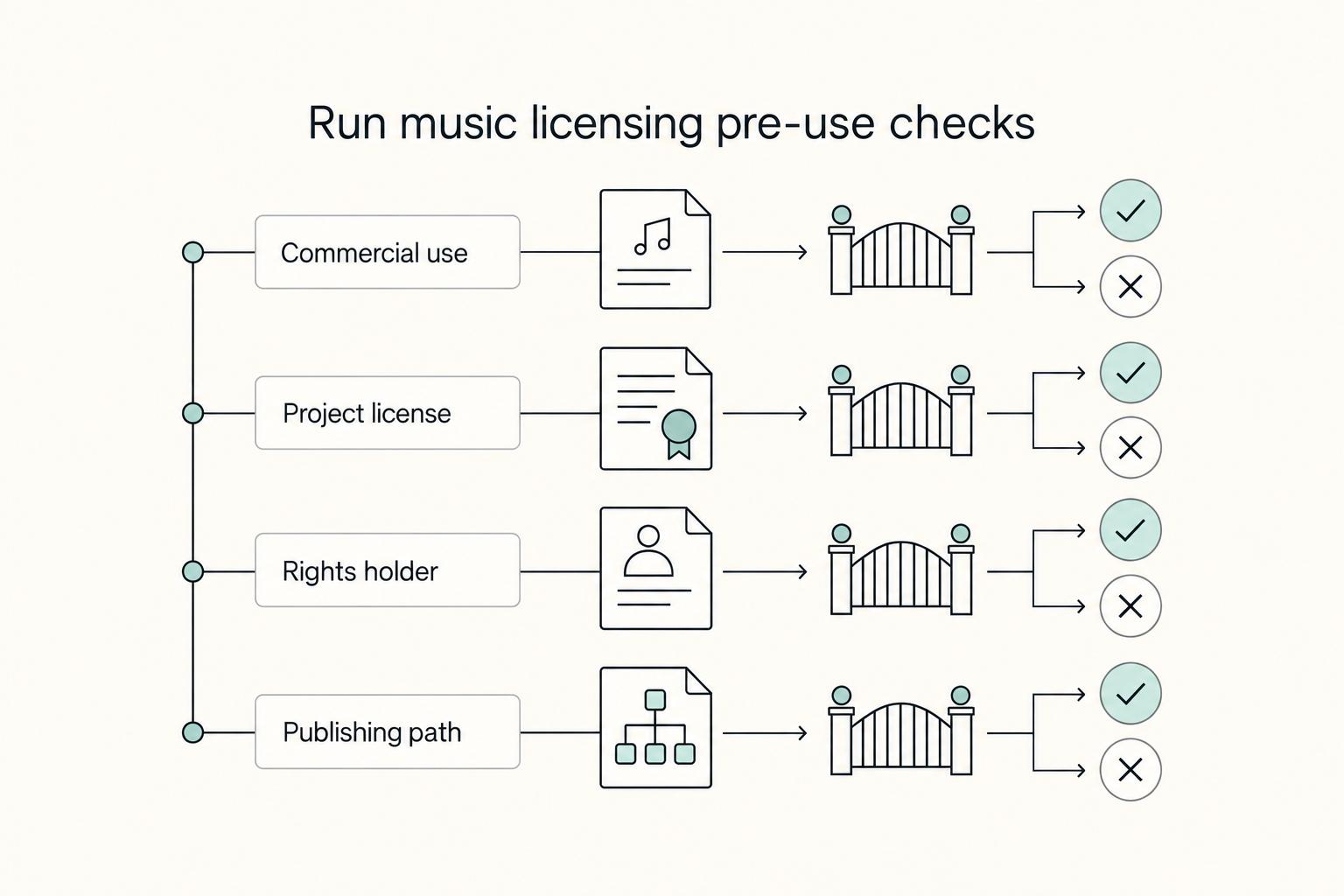
Run this pre-use check before you download#
Use this as a stoplight check before anything touches the timeline. If any answer is unclear, stop and resolve it before editing.
| Step | Question |
|---|---|
| 1 | Is this client or commercial use, or personal use? |
| 2 | Is this asset licensed for this specific project? |
| 3 | Can you identify the current rights holder for the exact material used? |
| 4 | Who will publish, and does that distribution raise public-performance questions? |
Understand the liability chain#
The current rights holder grants permission for the exact material used. The platform documents plan and license scope. You select, register, and embed the asset in the deliverable. Your client then relies on that clearance when publishing.
Use a strict handoff rule: if you cannot tie each asset to project scope, plan scope, and license proof, do not ship it. Give the client individual asset certificates as part of delivery so the usage record is defensible. Related: A Guide to Music Licensing for Video Projects.
How to Choose Your Licensing Model: A Risk vs. Scalability Framework#
Choose your model based on one practical question: can you prove the permission path for this project if scope changes later? If the project needs speed and repeatability, choose the option you can document consistently. If it needs tighter control or is more likely to draw legal scrutiny, choose the option where you can verify terms before delivery.
Subscription model#
With a subscription model, documentation quality is the main control. The exact rights and limits are vendor- and plan-specific, so do not assume default permissions from model labels alone.
Before you use any asset, verify the current terms from an official or otherwise authoritative copy, and keep a record of the version/date you relied on. Keep a full record set for each asset: asset ID, download or purchase record, project mapping, and the terms version used at the time of use.
For contract alignment, define who procures the plan, whether licensing costs are pass-through or bundled, and who approves terms before production.
Single-track model#
With a single-track model, keep the same verification discipline at the asset level. Do not assume expanded distribution, reuse, or new channels are covered unless verified in the current terms or written approvals.
Keep the asset-level paper trail and approval trail so campaign expansion becomes a formal review event instead of an assumption.
For contract alignment, require client approval before purchase, list the cost separately, and state that expanded usage can trigger a new approval cycle.
Custom score model#
With a custom score, the contract text is the primary control surface. Ownership and usage rights are agreement-specific and should not be assumed without explicit language.
Set ownership, usage scope, deliverables, revision handling, and approval gates in writing before production starts. If those terms are unclear, escalate early instead of trying to solve it during production. If you need ownership-language support, use Work for Hire vs. Assignment of Rights: A Freelancer's Guide to Owning Your IP.
For contract alignment, assign a procurement owner, define milestone approvals, and document pass-through costs and the signoff process up front.
| Model | Ideal use case | Ownership or control | Transferability | Revision risk | Client handoff friction | Escalation trigger to legal review |
|---|---|---|---|---|---|---|
| Subscription | Case-specific; use only if you can keep complete records | Verify current official terms | Verify current official terms | Case-specific; reassess when scope changes | Case-specific; depends on record quality | Official/current terms cannot be verified, or scope expands beyond documented permission |
| Single-track | Case-specific; use only if each asset can be reviewed and documented | Verify current official terms | Verify current official terms | Case-specific; reassess when scope changes | Case-specific; depends on record quality | New use is not clearly covered in verified current terms |
| Custom score | Case-specific; use only if agreement terms are explicit before production | Agreement-specific; verify signed contract text | Agreement-specific; verify signed contract text | Case-specific; depends on contract clarity | Case-specific; depends on contract and records | Ownership, usage rights, or contributor terms are unclear before work starts |
If you want a quick rule, choose the model you can document and verify most reliably for the current scope and likely expansion paths.
Whichever model you choose, keep only defensible records. Save the official version of any legal text you rely on, not an unofficial prototype or XML view. For Federal Register material, keep the linked official govinfo PDF and verify it against an official Federal Register edition. Version-check terms so you do not treat historical pages as current ones. Inclusion in a database is not, by itself, an endorsement of legal licensing guidance.
Your Asset Clearance Process: Contract, Proof, and Handoff#
The simplest reliable process has three parts: lock authority in the contract, save proof the day you license, and hand over a clearance package the client can review without you. In motion design work, clearance issues usually surface when scope changes, a claim arrives, or the client runs an internal review and the records are incomplete.
Set the contract rules first#
Set the clearance rules in the contract before you use any track. If no limitation applies and a license is required, your agreement should say who procures it, who can approve it, and what records you will deliver.
| Clause | What to state |
|---|---|
| Licensing responsibility | State whether you procure third-party assets, the client procures them, or you only recommend options for approval. |
| Procurement authority | If you accept platform terms for a client or company, confirm in writing that you have authority to bind that party. |
| Pass-through billing treatment | State whether licensing costs are billed at cost, marked up, or bundled; if pass-through, itemize them. |
| Delivery scope for clearance records | Define the exact handoff package, not a vague promise like "licenses if available." |
Keep the ownership language precise. Platform licenses generally grant use rights, not ownership. Your contract should reflect licensed use within scope plus delivery of proof records.
Build the asset file on the same day#
Build each asset file on the same day you download or purchase. Waiting until final delivery makes it harder to reconstruct terms snapshots, transaction references, or version history.
For each asset, keep:
- Provider-issued license or certificate copy
- Purchase or download confirmation
- Asset ID or transaction reference
- Project mapping showing where it is used
- Dated copy of the terms you relied on
Platform-specific proof to keep:
- Envato Elements: license certificate and Item License Code
- Artlist: individual asset certificate, which Artlist recommends as proof of coverage
Use a sortable naming pattern such as Client_Project_AssetType_Provider_AssetID_LicenseDate_v1. It is not legally required, but it prevents version confusion. Store terms snapshots in a locked project archive, not only in a creative folder. If terms are updated later, the dated record helps support your original clearance decision.
Hand off a clearance package the client can use#
Your handoff package should let the client's producer, legal, ops, or finance contacts verify clearance quickly without reconstructing the project.
| Package item | What it proves | Client-side reviewer | If missing before launch |
|---|---|---|---|
| Asset register | Which tracks or SFX are in the final deliverable, with source platform and project mapping | Producer or marketing lead | Reconcile final edit against timeline; replace or remove any unlogged asset |
| License or asset certificates | Asset was licensed and tied to a specific account or transaction record | Legal, operations, or compliance owner | Pause launch or swap asset until proof is retrieved |
| Terms snapshot with license date | Terms relied on at time of clearance | Legal or procurement | Pull archived copy; if unavailable, re-review current terms and decide on re-clearance |
| Invoice or purchase record | Who paid and how procurement was handled, including pass-through | Finance or procurement | Reissue or correct billing records before release |
| Channel registration or usage log | Claim-prevention or reporting setup, for example Clearlist or cue-sheet tracking in film/TV workflows when requested | Channel owner, producer, or distributor contact | Complete registration or log before publish |
Run two final checks before launch: confirm every asset in the final export matches the register, and dispute platform claims only when you are confident you hold the necessary rights.
Exception path#
Exceptions are where rushed teams usually break the process, so treat them as new clearance events. If the client supplies an asset, require their proof before use and mark it as client-supplied in the register. If there is a last-minute track swap, treat it as a new asset and clear it separately. If you deliver multi-channel cutdowns, verify that each reuse stays within licensed use, obtain any new project-specific license required by the platform, and complete any required channel registration for claim prevention.
| Scenario | Required action |
|---|---|
| Client supplies an asset | Require their proof before use and mark it as client-supplied in the register. |
| Last-minute track swap | Treat it as a new asset and clear it separately. |
| Multi-channel cutdowns | Verify that each reuse stays within licensed use, obtain any new project-specific license required by the platform, and complete any required channel registration for claim prevention. |
To turn your clearance package into reusable contract language, use the Freelance Contract Generator.
Who Owns the License? Protecting Yourself and Your Client#
Use this as a practical default: if the client needs the cleanest long-term reuse position, make sure the paperwork clearly says who holds the license and what reuse is allowed. If you buy on the client's behalf, do it with written authority and records that show how rights were obtained. Use your own creator subscription only for clearly bounded deliverables where the limits are documented up front.
This matters because paying for creative work usually gives permission to use it, not copyright ownership. Without a written transfer, copyright stays with the creator. In the UK-framed source, that remains true even for commissioned, paid client work. So when a client says, "We paid, so we own it," the practical answer is that they may have usage rights, but ownership moves only through written assignment.
The practical decision rule#
- Choose client purchases directly when the project is likely to be reused across teams, vendors, edits, or long timelines.
- Choose you purchase in the client's name only when you have written authority and can deliver clear proof records.
- Choose your creator account or subscription only when usage is clearly limited and those limits are documented in writing.
Say the creator-subscription boundary plainly#
If you license through your own account, your client may receive only the usage rights granted in that license. Your client does not get copyright ownership of the underlying asset unless there is a written assignment. Scope limits should be stated in writing so later reuse can be checked against the agreed terms.
| Setup | License holder | Permitted reuse outcome | Transfer limits | Required proof | Your residual risk after handoff |
|---|---|---|---|---|---|
| Client purchases directly | Client | Reuse depends on license terms | License rights can be narrower than copyright ownership | Purchase/license records and dated terms | Lower if usage and records stay aligned |
| You purchase in client's name with written authority | Client | Similar outcome when paperwork clearly shows the client as licensee | Authority and document quality control the outcome | Written authority, purchase/license records, dated terms | Low to medium if authority or proof is incomplete |
| You license through your own creator account | You | Client reuse may be limited to the rights granted through your license | Client is not copyright owner of the underlying asset by default | Scope terms in writing, plus retained license/proof records | Highest, because later ownership or scope questions route back to your records |
Bill it so the record is defensible#
Keep the paper trail clean by itemizing third-party licensing separately from your creative fee.
Motion design services- concept, edit, animation, revisionsThird-party license procurement (pass-through)- music or SFX acquisition costClearance administration- asset log, proof archive, handoff package
This does not transfer copyright or fix a bad license, but it makes procurement and responsibility easier to trace.
Verification checklist (if ownership or scope is questioned)#
If a claim shows up, go back to the basics and verify the records you would need to produce under pressure. Before delivery and before publish, confirm:
- Whether rights were licensed or assigned in writing.
- Who is identified as the license holder in the agreement and purchase records.
- What reuse the written terms allow, and where limits apply.
- You archived dated copies of the terms you relied on.
- You retained proof records, including certificate or download confirmation, transaction reference, asset ID, and project mapping.
If ownership or scope is likely to be scrutinized later, keep any signed transfer documents and dated proof copies with the project archive.
For a step-by-step walkthrough, see The legal difference between 'licensing' your IP and 'assigning' your IP.
From Creative Task to Strategic Advantage#
Once you decide who the license sits with, the next move is operational: make scope, approvals, and handoff explicit. The shift is simple but important. You are no longer saying, "I picked a track." You are saying, "I documented how this asset can be used."
In practice, use this checklist:
- Set intended use before asset approval.
- Record exactly which track or SFX was approved for that use.
- Hand over the records tied to the delivered cut.
- State in writing where your responsibility ends and when reuse or recuts require review.
| Approach | Client concern | Your deliverable behavior | Practical business impact |
|---|---|---|---|
| Creative task only | "Does this sound right?" | You deliver the edit and leave licensing context mostly implicit | Later review can depend on memory and scattered files |
| Strategic risk management | "Can we use this as planned, and what changes trigger re-review?" | You confirm scope, log approvals, preserve asset records, and define post-delivery boundaries | Review teams can work from a clearer record for legal and operational checks |
This is not admin for its own sake. Title 17 Chapter 1 is organized around copyright subject matter and scope. The Copyright Office's July 2021 unclaimed-royalties report includes a two-year procedural checkpoint after initial designation of the Mechanical Licensing Collective, and recommendations aimed at reducing unclaimed royalties were informed by written comments and public roundtables. Your project is not the Mechanical Licensing Collective, but the process lesson is the same: if asset identity, approved use, and timing are unclear, later reuse decisions are harder to document clearly.
Before delivery, run one last checkpoint. Confirm the final export uses the approved asset version, and confirm your archive ties that asset to the project, date, and intended use. Problems often surface later, when someone asks for a recut, channel expansion, or vendor handoff without your original records.
- Proposal line: "I will confirm licensing scope against intended use, document approved third-party assets, and provide a clearance handoff at delivery."
- Handoff line: "Attached are the asset records for the delivered version and approved use context. Please request review before any reuse, re-edit, or channel expansion."
We covered this in detail in A Freelancer's Guide to Content Licensing and Syndication.
If you want client invoicing and payout records in one operational flow, explore Gruv for Freelancers.
Frequently Asked Questions
Who should hold the license for client work?
There is no single universal rule here for who must be the named licensee. Use the licensee setup the agreement allows, then keep ownership and approval records with the final cut. Check current terms before delivery, and add a license holder field to every proposal and kickoff brief.
How do you prove a track or SFX was properly cleared?
Create a short clearance handoff that ties each asset to the delivered version: asset title or ID, source, date captured, intended use, and invoice reference. Keep the exact terms or record you relied on at approval time, not just a live link, so your file shows what applied then. A one-page template can be enough if you use it consistently across projects.
Can you use a personal license for client work?
Do not assume coverage either way. If the scope is unclear, pause approval and confirm rights that match the project use before delivery. Add client use confirmed to your asset-review checklist.
Can one subscription cover multiple clients?
Treat multi-client use as conditional, not automatic. Confirm the allowed use for each client project and keep the exact clause you relied on in the project file.
Are past projects still covered after your subscription ends?
Do not assume later reuse is automatically covered. If reuse comes up later, such as recuts, new channels, or pulling audio into a different deliverable, run a fresh license check before release. Tag each delivered cut with account status and delivery date so that review is easier later.
How should you show music or sound effects licensing on the invoice?
No single legal invoice format is established here. For clarity, separate third-party asset charges from creative labor in your records. If you paid for the asset, show a dedicated licensing line; if the client paid directly, record that in the project file and handoff notes.
Try a related tool
Researched and edited by the Gruv editorial team. Gruv builds cross-border billing, payouts, and finance-operations software for global businesses.
Sources
- berklee.edu/berklee-now/news/music-licensing-101-how-to-...trusted
- cde.ca.gov/re/pn/fd/documents/pestandards.pdftrusted
- congress.gov/committee-report/105th-congress/senate-repor...trusted
- copyright.gov/circs/circ16a.pdftrusted
- copyright.gov/engage/musicianstrusted
- ecfr.gov/current/title-37/chapter-II/subchapter-A/par...trusted
- federalregister.gov/documents/2023/08/10/2023-14925/determinatio...trusted
- govinfo.gov/content/pkg/PLAW-118publ42/html/PLAW-118publ...trusted
Educational content only. Not legal, tax, or financial advice.
Related Posts

Work for Hire vs Assignment of Rights for Freelancers
A freelance agreement is not just about price and scope. It decides who controls the rights in the work. If the ownership language is loose, rights can move earlier than you expect, cutting down your control once the work is delivered or used.

Germany Freelance Visa Application Path for Freiberufler and Gewerbe
Choose your track before you collect documents. That first decision determines what your file needs to prove and which label should appear everywhere: `Freiberufler` for liberal-profession services, or `Selbständiger/Gewerbetreibender` for business and trade activity.
Music Licensing for Video Projects Without Scope Mistakes
On a client project, you are not just choosing background music. You are managing delivery risk and legal risk. For **music licensing for video**, start with three checks: what your Statement of Work (SOW) says, who the license holder of record is, and whether the license actually covers this project's use.