
Quick Answer
Start by treating YouTube Analytics as a decision system: Tier 1 for trend direction, Tier 2 for CTR-plus-retention diagnosis, Tier 3 for business fit. Check source paths first, then decide whether the first fix is packaging, opening flow, or audience targeting. Save a dated before-state for title, thumbnail, retention points, and traffic sources, and only scale topics after inquiry or booking evidence supports the move.
Review your channel in three levels: health, diagnosis, business fit#
If you try to interpret everything in YouTube Studio at once, it is easy to react to noise. One practical way to review your channel is in three levels: health first, diagnosis second, business fit third.
That order matters. The same video can look strong in one tier and weak in another. A spike in views can mean reach, not relevance. Strong audience retention can mean the content works for viewers, but you still need to confirm it supports your business goals. The point is not to collect more numbers. It is to decide what to change, what to leave alone, and what to stop funding with your time.
| Tier | Purpose | Primary questions answered | Typical misread | Best next action |
|---|---|---|---|---|
| Tier 1 | Quick health snapshot | Are top-level trends moving in the right direction? | Treating one metric shift as a full verdict on one video | Check trend direction, then move to Tier 2 before making edits |
| Tier 2 | Performance diagnosis | Did the title/description earn the click? Did the video keep attention after the click? | Changing content when the real problem is packaging, or rewriting metadata when the structure is the issue | Pair CTR with retention signals and fix the weaker side |
| Tier 3 | Business-fit review | Are the viewers and traffic patterns aligned with your business goals? | Assuming traffic-source shifts automatically mean better leads | Compare traffic patterns with actual inquiries, offers, and service demand |
Tier 1 health metrics#
Treat Tier 1 as a fast scan, not a place to make big decisions. Use YouTube Studio on a fixed cadence. At channel level, use Analytics from the left menu. For a specific video, open Content and select Analytics on that video. At this level, you are looking for clear movement, not final answers.
What this tier cannot tell you is why something changed. A top-line increase does not tell you whether packaging improved, whether the topic had stronger demand, or whether viewers stayed long enough to get value. If something moves here, do not panic. Move to Tier 2.
A practical checkpoint is to leave a one-line note for each video. Something like "reach up, CTR flat, check retention" is enough to keep you from treating every number as a crisis.
Tier 2 performance levers#
The useful diagnosis starts when you read CTR and audience retention together. CTR tells you whether people clicked. Retention graphs show whether the video held attention after the click.
Read them in sequence. If CTR is weak and retention looks solid, the issue is probably the promise more than the substance. Start with metadata. Keep titles clear, avoid misleading wording, and make sure the description sets context quickly.
If CTR is strong but retention drops early, the packaging may be overselling or the opening may not match the promise. In that case, do not only rewrite metadata. Adjust the content flow so the core value arrives earlier and more clearly.
One habit that improves decisions quickly is capturing a dated before-state before you change anything: title, description opening, CTR, and the retention graph. Without that baseline, it is hard to tell what actually improved.
Tier 3 business fit#
This tier answers the business question: is this audience useful for the business you are actually building? Traffic sources help, but only as signals. They do not prove lead quality on their own.
Pair traffic-source patterns with audience-profile match and real business outcomes. Are the people watching your service videos the same kinds of people who send inquiries, book calls, or ask about the offer you want to sell? If not, the video may still be good content, but it may be a poor investment for your next round of production.
Also note platform limits while you interpret this tier: some dimensions, including geography, traffic sources, or gender, can be limited, and some reports may not be available on mobile.
That is the decision rule at the top of the pyramid: keep investing in videos that attract the right viewers and support real service demand. Treat everything else as a test, not a strategy. For related reading, see A Freelancer's Guide to LinkedIn Marketing and A Freelancer's Guide to Keyword Research.
Translating Vanity Metrics into Business Intelligence#
Use a simple sequence for every metric: signal -> diagnostic check -> business decision. Views and subscriber spikes are useful prompts, but they are not proof of lead quality or ROI by themselves.
If a video moves, open YouTube Studio, click Analytics in the left sidebar, and check attention, source quality, and follow-up behavior before you change content or scale the topic.
Read traffic sources like entry paths#
Treat each traffic source as an entry path that should trigger one next check and one next action.
| Traffic source type | What it usually indicates | Check next | First action |
|---|---|---|---|
| YouTube Search | Viewers may have clearer intent | Do these viewers hold watch time and move toward your service CTA? | Make the next step explicit for intent-led viewers, for example a service page or consultation path. |
| Suggested videos | Your video is being evaluated beside related videos | Does retention hold early, or drop quickly after the click? | Align the opening with the title/thumbnail promise. |
| Browse features | Broader distribution and discovery exposure | Are these clicks producing sustained attention or shallow views? | Strengthen progression to a related video or playlist. |
| External | Visits from posts, sites, or referrals | Which placements produce stronger watch quality and downstream action? | Tag placements, compare outcomes, and keep promoting stronger sources. |
Review source changes with CTR, retention, and watch time together. A large source is not automatically a high-value source. If you also track behavior outside YouTube, The Best Analytics Tools for Your Freelance Website can help connect video traffic to downstream actions.
Audit subscriber quality, not just growth#
Subscriber growth is only useful when audience fit supports the work you want to sell. Run a monthly check: compare audience signals with inquiry or booking patterns, then label the month match or mismatch.
If it is a match, keep the topic family and make the CTA more direct for service demand. If it is a mismatch, change the topic angle and CTA so you filter for buyer-relevant demand instead of generic engagement.
Log a dated note with the audience signal, CTA used, and inquiry pattern that followed. That keeps growth decisions tied to evidence instead of assumptions.
Standardize your pattern diagnosis#
Use fixed pattern rules so the same signal leads to the same first move.
| Pattern | What it indicates | What to change first |
|---|---|---|
| Low CTR + solid retention + solid watch time | Content is stronger than packaging. | Test title/thumbnail first; avoid rewriting the core video before packaging tests. |
| High CTR + sharp drop in the first 15 seconds + weak watch time | The click promise and opening are misaligned. | Rework the opening so delivery matches the promise immediately; avoid clickbait-style packaging that causes fast drop-offs. |
| High CTR + stable early retention + weak total watch time | The opening works, but momentum drops later. | Tighten the middle structure, cut repetition, and move payoff earlier before metadata edits. |
That is the shift from vanity metrics to business intelligence: each signal triggers a check, and each check produces a decision.
You might also find this useful: YouTube Sponsorships for Creators Who Want to Get Paid on Time.
How to Calculate the True ROI of Your YouTube Content#
True ROI is only defensible when you can connect YouTube activity to tracked business outcomes. If you cannot, treat ROI as unproven.
1) Define your ROI target and full investment before running numbers#
Choose the outcome you are trying to prove first. Reach metrics like views and subscribers can show exposure, but they do not prove business value on their own.
Build total investment from a full cost checklist so you do not miss hidden effort:
- Your production hours priced at your working rate
- Tools and software
- Contractors (editing, design, research)
- Distribution effort (posting, email placement, repurposing)
- Revision overhead (reshoots, thumbnail swaps, description updates)
If your current goal is visibility, you can run a simple check: Total Investment ÷ Organic Views Generated = Cost Per View.
2) Collect attribution evidence you can defend#
Use trackable paths at the video level where possible, including video-specific CTA links in descriptions or pinned comments, plus intake tagging and CRM source notes. Pair those with UTM or promo-code data and traffic-source patterns to confirm whether YouTube sessions reached lead-capture actions, for example form submissions or call bookings.
Keep two buckets separate:
- Attributed revenue: conversion is connected to a specific YouTube path with evidence
- Assisted influence: YouTube engagement happened, but conversion completed later through another channel
Both matter, but they carry different confidence.
3) Run the review with context checks#
Check the audience retention graph around your CTA or offer moment. If viewers drop before the offer appears, weak ROI may be a placement issue rather than a topic failure.
Also avoid over-trusting short windows. A 30-day measurement window can miss delayed YouTube impact; in campaign contexts, one source reports it may capture only 40-60% of total value.
| Input quality | What you have | Decision confidence |
|---|---|---|
| High-confidence | Video-specific CTA links, form tags, CRM source notes, attributed deals | Strong enough for scaling and budget moves |
| Partial | Some tracked leads, but delayed conversions or inconsistent source capture | Directional only; test before scaling |
| Weak attribution | Views, subscribers, general inquiries, no source trail | Do not claim ROI yet; fix tracking first |
4) Decide the next action#
If ROI is positive with strong attribution, scale the topic, format, and CTA path that produced it. If ROI is mixed, keep the core topic and test packaging, CTA placement, or follow-up flow. If ROI stays negative after a fair measurement period, stop repeating that version and rework targeting, format, or call to action before reinvesting.
Related: How to Create a YouTube Channel to Showcase Your Freelance Skills. Related: How to Create a Brand Style Guide for a Client.
Your Content Decision Matrix: A Framework to De-Risk Your Next Video#
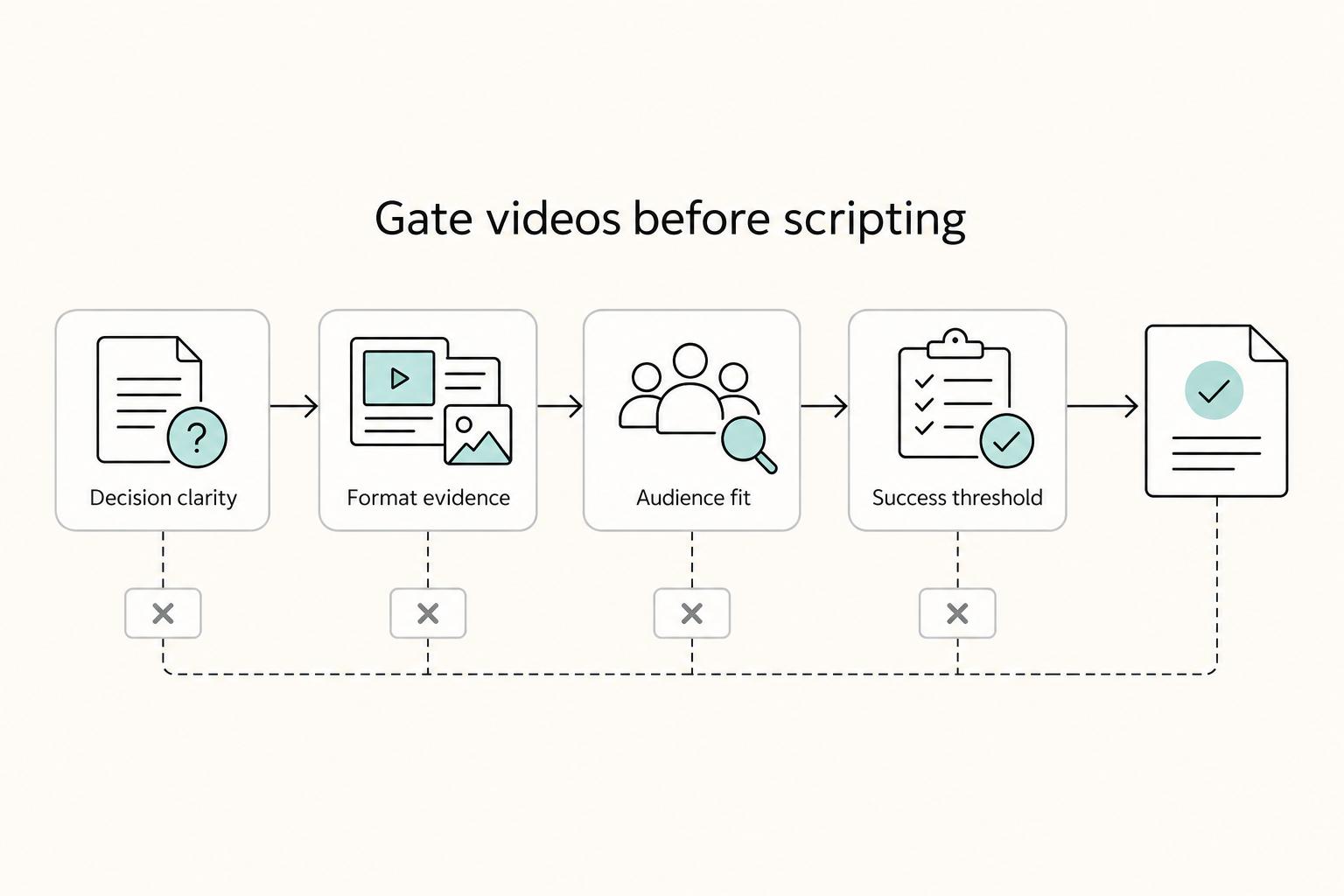
Use this matrix before scripting to make a clear go/no-go decision with evidence, not momentum. If evidence is weak across your key lenses, pause the idea and re-scope it before production.
Keep the decision window tight: focus on choices you need to make in the next 30 to 90 days. Track each candidate in a one-page Decision Backlog with: Decision, Why Now, Hypothesis, Metric Threshold, Deadline, Owner, Risks, Next Step. Keep a maximum of three active priorities and review for 15 minutes every Monday.
Pre-production workflow (before scripting)#
- Define the decision and success threshold first
Write the specific decision, your hypothesis, and the threshold that would count as success before you start scripting.
- Validate format using performance signals together
Review view duration, CTR, and engagement together to spot which hooks and formats are actually working on your channel.
- Validate audience fit to your business objective
Use demographic/interest reports plus traffic-source data to confirm who is entering your funnel and how.
- Pressure-test with public competitive signals when needed
If the topic is contested, map 15 to 25 channels or accounts across direct peers, algorithmic neighbors, and attention substitutes to reduce blind spots.
| Validation lens | Evidence source | Go signal | Risk if ignored |
|---|---|---|---|
| Decision clarity | Decision Backlog fields (decision, hypothesis, threshold, deadline, owner, risks, next step) | Decision is specific and time-bound within 30 to 90 days | Work drifts into open-ended research |
| Format evidence | CTR, view duration, engagement read together | Repeated pattern supports your planned hook/format | Good topic underperforms due to weak delivery choices |
| Audience fit | Demographic/interest reports + traffic-source data | Entering audience matches the segment you want to serve | Views increase but business relevance stays weak |
| Success threshold | Predefined metric threshold tied to one decision | You can approve, revise, or stop quickly at review | Endless iteration without a clear stop/scale rule |
This matrix is for de-risking the next decision, not predicting certainty.
For a step-by-step walkthrough, see How to optimize your 'YouTube Videos' for search. For a related planning workflow, see A Freelance Designer's Guide to Presenting Work to Clients.
Conclusion: Make the next publishing decision with evidence#
Your job is not to guess what happened. Your job is to make the next publishing decision with evidence. YouTube Analytics is a free, built-in tool in Creator Studio, but the real value is not more dashboard time. It is a tighter loop: identify the signal type, choose one action, make one change, then review the result against your normal baseline.
Keep the diagnosis simple so each condition points to one next move. If CTR is weak, it often points to a packaging issue, so refine the promise, thumbnail, or query match. If people click but audience retention drops early, it often points to a delivery issue, so rewrite the opening or structure. If watch time holds but the traffic source mix or audience profile looks off, treat it as an audience-fit problem and narrow the topic or CTA.
Before you edit anything, save a dated before-state. Capture the title, thumbnail, traffic sources, CTR, retention at the intro and CTA, watch time, and the business outcome you wanted. One practical review order is Content, then Audience, then Research when topic choice is still unclear. The common failure mode is not missing one metric. It is letting too many metrics blur the decision.
For the next upload, keep the sequence this plain:
- Define the intended viewer, search intent, and CTA in one line.
- Capture the before-state in your notes before making edits.
- Diagnose the result as packaging, delivery, or audience fit.
- Change one variable only on the next video or revision.
- Review the same fields after enough data accumulates.
- Log one lesson that will affect the next decision.
If you want the same evidence-first discipline beyond YouTube, read The Best Analytics Tools for Your Freelance Website. Related planning workflow: A Guide to Notion for Freelance Business Management.
Frequently Asked Questions
Which metrics should you prioritize first?
Start with impressions and CTR for the promise, then review viewer behavior after the click. In YouTube Studio, open Analytics from the left navigation and review your current baseline before acting. Do not borrow a universal "good" number here. Keep the current benchmark pending until it is verified against the creator's own current baseline in YouTube Studio and the source records behind the plan before use.
How should you think about ROI on a video?
Treat analytics as input, not proof by itself. Compare the video's real cost in time and hard expenses against the value of leads, enquiries, or sales it influenced. Then judge the quality of those outcomes, not just the volume. If a video pulls attention but attracts weak-fit prospects, that is still a poor return.
How can you use YouTube Analytics for lead generation?
Start with videos getting traction from YouTube Search, because search can reflect clearer problem intent than broad recommendation traffic. Then check viewer behavior around your CTA, demo handoff, or offer mention. If viewers drop there, fix the transition or offer path before you make the topic broader. For the packaging side, this guide pairs well with How to Optimize YouTube Videos for Search as a Business Owner. | Pattern you see | Action to take | | --- | --- | | High impressions, weak CTR | Rework title and thumbnail so they better match the query | | Strong CTR, weak early engagement | Rewrite the opening and get to the problem faster | | Solid engagement, weak lead quality | Narrow topic scope and tighten the CTA to your actual buyer |
What does CTR actually tell you?
CTR is a packaging signal, not a verdict on the whole video. YouTube Search looks at how well the title, description, and video content match the query. It also considers engagement for that search. If clicks are weak, verify query match before blaming the topic.
How do you verify you are reaching the right audience?
Look for audience usefulness, not just reach. Check whether the videos attracting attention also produce the right enquiries, bookings, or sales conversations, and log that in your decision backlog. One red flag is that a video can be strong and still miss Home exposure, because not all content is eligible to be recommended there.
Try a related tool
Researched and edited by the Gruv editorial team. Gruv builds cross-border billing, payouts, and finance-operations software for global businesses.
Sources
Includes 4 external sources outside the trusted-domain allowlist.
- etd.ohiolink.edu/acprod/odb_etd/ws/send_file/sendtrusted
- fastinfo.unm.edu/agents/training/aug09_crm_analytics.pdftrusted
- pmc.ncbi.nlm.nih.gov/articles/PMC9302924trusted
- pmc.ncbi.nlm.nih.gov/articles/PMC8889516trusted
- blog.mean.ceo/social-media-metrics-tracking-dashboardexternal
- funnelyt.com/blog/five-youtube-metrics-for-driving-busine...external
- improvado.io/blog/youtube-analytics-guideexternal
- intellspot.com/youtube-analytics-business-intelligenceexternal
Educational content only. Not legal, tax, or financial advice.
Related Posts

LinkedIn for Freelancers Who Want a Predictable Client Pipeline
Treat LinkedIn as two jobs you run at the same time: a credibility check and a conversation engine. If you only chase attention, you can get noise. If you only send messages, prospects may click through to a thin profile and hesitate.
How to Create a YouTube Channel to Showcase Your Freelance Skills
Treat this like a business decision, not a creator identity project. Your goal is to publish videos that attract qualified inquiries instead of random attention.

The Best Analytics Tools for Your Freelance Website
Start with one sequence and keep it boring. Decide the business question. Choose one primary reporting source. Verify tracking against the origin. Then review it on the same day each week. That order matters more than which tool wins your shortlist.