
Quick Answer
Yes - use Vercel when you want fast frontend shipping, but put controls in place before client launches. Start from its three-step setup (CLI, optional agent setup, deploy), then add your own release discipline: branch-to-environment ownership, staging checks, environment variable review, and named production approval. Keep a deployment record that links the URL, Git commit, approver, and rollback owner so a bad config edit does not turn into a client incident.
Deployment speed is not release control: define environment rules and ownership before client traffic#
If you are evaluating vercel for frontend deployments, the short answer is that it can feel fast to get a site live. The real decision is whether that setup will still feel controlled when a client launch, a late change request, or a bad config edit raises the cost of mistakes. A quick first deploy is useful. It is not the same as a release process you can trust.
The platform presents initial setup as a short path. Its getting-started documentation describes deployment in three steps: install the CLI, add agent support if you use an AI coding agent, and deploy. That simplicity is part of the appeal. For independent professionals, the first operator lesson is simple: treat that three-step flow as the starting line, not the model you will rely on for paid work.
The broader positioning is not the part that will save you in production. On its homepage, Vercel says, "Build and deploy on the AI Cloud," and describes its offering as developer tools plus cloud infrastructure to build, scale, and secure the web. That tells you how the company wants to be understood. It does not tell you who approves production changes, how you separate development from staging, or how your team should handle release ownership. Those are your decisions, and they matter more than the marketing line once client traffic is involved.
A useful early checkpoint is to verify exactly how your setup path starts before teammates pile in. The getting-started docs include a separate agent setup note for Claude Code or Cursor, which means even the initial connection path can vary depending on how you work. It is also worth confirming you are reading current docs. When release behavior affects clients, stale assumptions are a quiet risk.
A failure mode to watch for is confusing "easy to deploy" with "safe to operate." That is where undocumented environment behavior, loose permissions, and ad hoc variable changes can create production surprises. If you remember one thing from this guide, make it this: before your first client-facing launch, define your environment rules and ownership in plain English, even if the first deploy felt effortless.
This guide continues at that level. We will look at where the platform fits well, where you should pause and verify details for yourself, and how to set branch rules, protection controls, and repeatable release checks. The goal is simple. Keep speed from coming at the cost of control. Related: How to Calculate ROI on Your Freelance Marketing Efforts.
What Vercel is good at and what it is not#
Vercel is strongest when you want low-friction frontend delivery on a predictable cadence, and it is not a complete answer for cost, hard limits, or release governance decisions.
Its frontend documentation says many frontend frameworks are supported with zero configuration. That is the right fit when you want fewer setup steps and a cleaner path to repeatable releases. Before you promise speed, confirm your stack is on that supported list.
Its regions documentation also supports the performance case: a global CDN with 126 PoPs in 94 cities across 51 countries, plus 20 compute-capable regions, with content and compute positioned close to users and data. That can help with latency and delivery reach. It does not define who approves production changes, how you prevent environment drift, or how costs behave for your workload.
Use Vercel for predictable frontend shipping, then validate operating constraints separately. As a practical check, review the frontend support docs and the regions page (last updated March 5, 2026) before you lock in your release model.
Decide if Vercel fits your client delivery model#
Use Vercel when your delivery model benefits from Git-driven shipping and preview-heavy review, and pause the decision if you need a proven dev-to-staging-to-production promotion system documented end to end. Vercel covers Git integration, preview deployments, and automatic staging-oriented workflow cues, while a fair side-by-side comparison with Netlify is not available.
| Client delivery pattern | Workflow fit | Review friction | Operational risk signals |
|---|---|---|---|
| Fast-turn marketing or brochure sites | Vercel covers Git integration, preview deployments, and simple repo onboarding. Netlify fit is unknown. | Usually low when stakeholders can review preview URLs quickly. | Risk increases if release-candidate ownership and final production approval are not explicit. |
| Ongoing product work with frequent internal review | Vercel can work well because branch previews support frequent checks. Netlify cannot be reliably assessed from this material. | Moderate as preview volume grows and decisions get noisier. | Watch for "lots of previews, unclear promotion rule" between environments. |
| Strict governance with formal promotion gates | Do not assume fit from previews alone. Confirm environment controls, team permissions, deployment visibility, and rollback behavior in your actual setup. | Higher due to handoffs and approval requirements. | Highest risk is unclear authority on who can promote, approve staging, and execute rollback under pressure. |
Decision rule: if your team depends on strict development-to-staging-to-production discipline, choose the platform where those guardrails are clearest and easiest to enforce in day-to-day work.
Keep unknowns labeled as unknowns. Pricing structure details, hard runtime constraints, and edge-case architecture limits are not established, so avoid treating them as settled in client proposals. For commercial framing around these delivery choices, read Value-Based Pricing: A Freelancer's Guide.
Set branch and environment governance before first launch#
Set your governance rules before the first client-facing deploy. Vercel gives every deployment a unique URL for live preview, which is great for review, but previews become risky when promotion rules are not written down.
| Term | Meaning | Process note |
|---|---|---|
| Development environment | where day-to-day work lands first | Define once in the README or release notes |
| Staging environment | where you validate what you may ship | Define once in the README or release notes |
| Production environment | the live, customer-facing version | Define once in the README or release notes |
| Deployment | the result of a successful build | Technical outcome, not automatic release approval |
Define your terms once in the README or release notes and use them consistently:
- Development environment: where day-to-day work lands first.
- Staging environment: where you validate what you may ship.
- Production environment: the live, customer-facing version.
Also define deployment clearly: on Vercel, a deployment is the result of a successful build. Treat that as a technical outcome, not automatic release approval.
Write the promotion rule in plain English#
Map your branch strategy to environments in language anyone can follow. The branch names are your operating choice, but the promotion decision must be explicit: who can promote to staging, who can approve production, and what evidence is required. Vercel's production checklist recommends teams be familiar with how to stage, promote, and rollback deployments, so your process should make those three actions unambiguous.
Require checks that create evidence#
Use a short, repeatable gate before each promotion:
- successful build result
- smoke check on key user paths
- environment variable review for the target environment
- named owner sign-off
Record the exact deployment URL reviewed, the target environment, and the approver. That single audit trail is what keeps incident response practical.
| Branch name | Deployment target | Required checks before promotion | Rollback owner |
|---|---|---|---|
feature/* | development environment | Build succeeds, quick smoke check, reviewer confirms scope | Feature developer with lead informed |
release/* | staging environment | Build succeeds, staging smoke check, environment variables reviewed, release owner approves | Release owner |
main | production environment | Staging approval recorded, production variables reviewed, final owner sign-off | Technical lead or named production owner |
Document the rollback path too#
Do not treat rollback as implicit. Vercel's production checklist calls for an incident response plan with escalation paths, communication channels, and rollback strategies, so each production promotion should already name who can trigger rollback and where that call is made.
If a rule is undocumented, treat it as active risk. Most client-facing incidents start with ambiguity, not drama: unclear release candidate, environment mismatch, or unverifiable approval.
Configure repository and deployment plumbing with fewer surprises#
Start with one repository-to-project path, verify it works end to end, and only then add team or project complexity.
| Area | Make explicit | Record or compare |
|---|---|---|
| Repository connection | One repository as the source of truth for the frontend; intended branch creates a deployment in the intended project | Repository, branch, project, and deployment URL |
| Build behavior | Where build behavior is controlled and who can change it | Commit, config file or settings page touched, and approver |
| Environment variables | A per-environment list of variable names, owners, and change notes | Compare the expected variables for the target environment before promotion |
Prove the repository connection before you scale it#
- Pick one repository as the source of truth for the frontend.
- Commit to the intended branch and confirm it creates a deployment in the intended project.
- Record the repository, branch, project, and deployment URL together in your release note or README.
If more than one project can deploy from the same codebase, label each project's role clearly and remove duplicates until you actually need them.
Make build behavior visible and reviewable#
For a Next.js frontend or another React frontend, decide where build behavior is controlled and who can change it. Keep that explicit: versioned project files, project settings, or both.
When build behavior changes, log one evidence trail: the commit, the config file or settings page touched, and the approver. This keeps deployment behavior auditable instead of guesswork.
Treat environment variables like controlled configuration#
Treat environment variables as controlled configuration, not ad hoc fixes. Keep a per-environment list of variable names, owners, and change notes tied to a release or issue.
Before promotion, compare the expected variables for the target environment against the deployment you are approving so environment drift is easier to catch.
Use Sitecore documentation patterns, including navigation entries like SitecoreAI, as references only when your stack actually matches that context.
Plan for monorepo frontend and backend conflicts early#
If your ReactJS frontend and Node.js backend share one monorepo, decide early whether one deployment target should own both or whether you should split targets before routing and build rules become fragile. The risk is not either model by itself; the risk is a half-shared setup where nobody can clearly explain what controls production behavior.
A monorepo is strongest when shared code is the real advantage and you keep one source of truth. Teams do report coordination gains from that setup, but that does not mean one combined deployment target stays simple forever. Treat deployment (code pushed) and release (user-visible change) as separate decisions, even when both apps live in one repo.
Decide what actually ships together#
Keep a single deployment target only while frontend concerns remain dominant and backend behavior is still easy to reason about. If backend routing logic, API handling, or service-specific environment variables start driving most deployment complexity, split responsibilities.
Use this one-page checkpoint before committing to either model:
- frontend app location in the monorepo
- backend service location in the monorepo
- which paths should resolve to frontend assets vs backend responses
- which environment variables belong to each service
- who approves changes to
vercel.json
Make vercel.json a reviewed contract#
Treat vercel.json as a reviewed contract for routing and build behavior, not a convenience file. For each change, record the commit, expected deployment result, and one route test that proves behavior.
| Failure mode | What it looks like | What to verify |
|---|---|---|
| Incorrect route matching | Frontend paths hit backend logic, or API paths fall through to static handling | Test at least one known frontend route and one backend route after each config change |
| Wrong build output path | Deployment succeeds but serves missing or stale frontend assets | Confirm expected build artifact location before promotion |
| Hidden environment mismatch | Frontend and backend read different variable sets across staging or production | Compare variable names by service and environment before release |
If route-matching debates start taking longer than feature work, treat that as a signal to split frontend and backend deployment targets while keeping shared code in the monorepo.
Add minimum professional controls before client traffic#
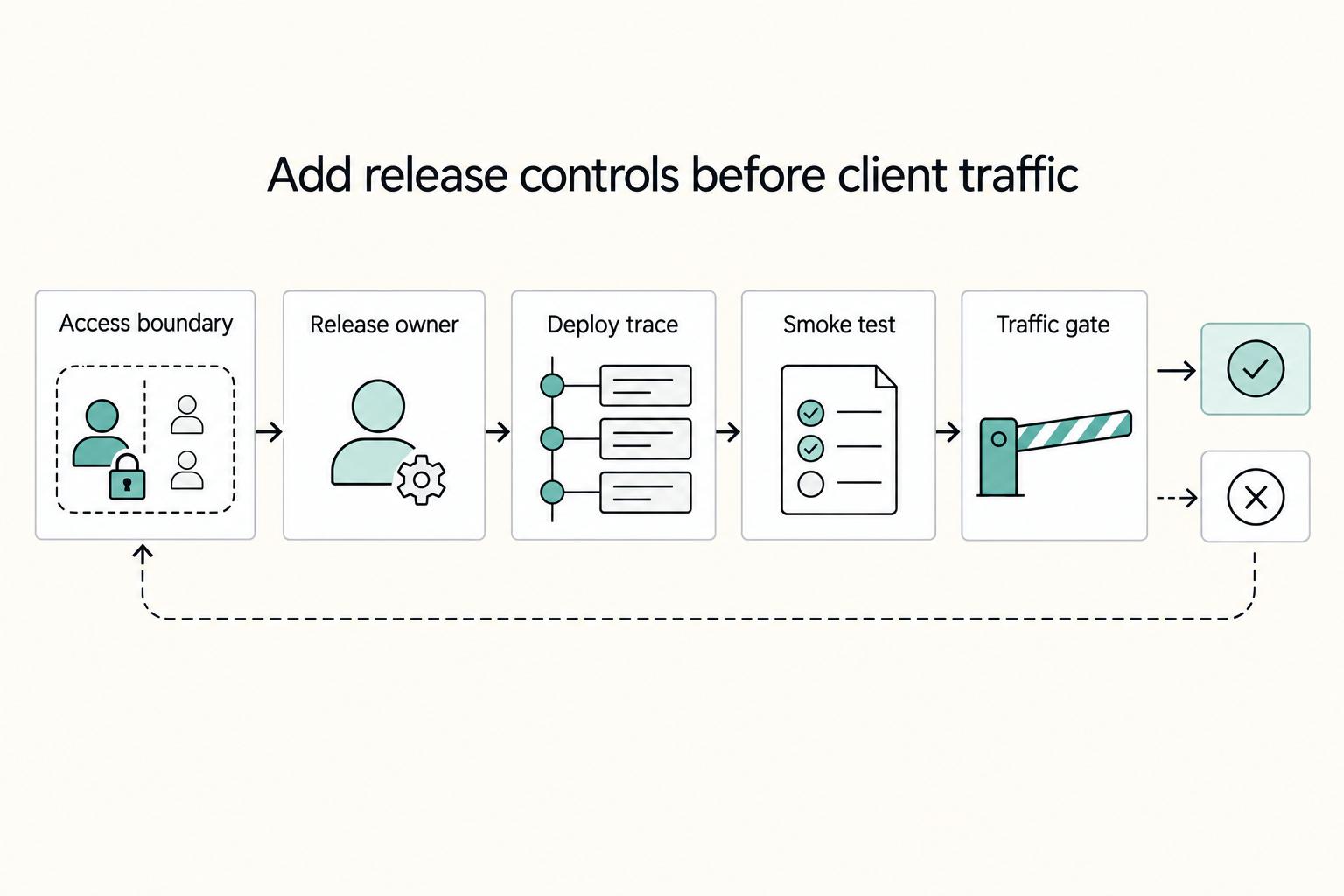
Before client traffic, set three controls: limit access to non-production surfaces, name release owners, and keep a deploy trace log.
Use Vercel Deployment Protection for preview, draft, and staging surfaces, then verify access behavior from a browser session that should not have casual access. If access is broader than intended, treat that as a control gap to fix before sharing links. On a platform that combines hosting, CDN, security, and compute, exposure issues are usually process failures, not frontend defects.
Assign explicit ownership for both staging environment and production environment transitions. Even if one person currently does both, name the owner for each transition so approval is unambiguous. If your team cannot answer "who approved this production move?" in one sentence, your release control is incomplete.
Keep a lightweight incident log tied to Git and deployment IDs. This stays practical as deployment volume increases, especially given Vercel's listed daily deployment limits (100 on Hobby, 6000 on Pro). Record:
- date and environment
- Git commit hash
- Vercel deployment ID
- release approver
- symptom observed
- rollback or fix applied
This prevents a common failure: multiple similar builds, client impact, and no fast way to identify the exact change.
Use pre-launch and post-launch checklists on every release#
Use the same checklist on every release so you catch branch, environment, and build-output mistakes before users do.
| Release phase | Key checks | Grounded note |
|---|---|---|
| Pre-launch | Confirm the deployment path; verify a Preview deployment on a non-production branch; confirm the target environment; review environment variables; validate build output | Vercel's defaults are Local, Preview, and Production |
| Release | Require explicit approval before moving from staging environment to production environment; run smoke tests on key user paths; confirm rollback readiness | Name the last known good commit and who can approve redeploying it |
| Post-launch | Monitor key production paths; log defects with commit linkage; classify root cause as code, config, or process | If two releases in a row fail the same checkpoint, pause feature work and fix release process debt first |
Pre-launch#
- Confirm the deployment path is the one you intended (Git, CLI, Deploy Hooks, or REST API).
- In a Git workflow, push a small commit to a non-production branch and confirm a Preview deployment appears with its own URL.
- Confirm the target environment in plain terms: Vercel's defaults are Local, Preview, and Production.
- If your team uses staging environment, verify which branch or Custom Environment maps to it before promotion.
- Review the environment variables that matter for this release, since values can differ by environment.
- Validate build output, especially after build-config or output-path changes. A missing, empty, or invalid output directory will fail the build.
Release#
- Require explicit approval before moving from staging environment to production environment.
- Run smoke tests on the key user paths for this release.
- Confirm rollback readiness by naming the last known good commit and who can approve redeploying it.
Post-launch#
- Monitor key production paths, not just deployment status.
- Log defects with commit linkage and classify root cause as code, config, or process.
- If two releases in a row fail the same checkpoint, pause feature work and fix release process debt first. That is a team rule, not a Vercel requirement.
Related reading: A Guide to Using Wise for Large International Money Transfers.
Conclusion#
Vercel can be a strong choice when you want reliable frontend shipping, but that only holds up professionally if you add visible release rules around it. The practical takeaway is simple: treat deployment as a controlled business decision, not just a successful build.
What matters most is that the platform gives you a documented place to manage deployments across the dimensions you actually use in real work. In the Deployments dashboard, Vercel says you can manage current and previous deployments "regardless of environment, status, or branch," and the documented actions include filtering, redeploying, and manually promoting a deployment to production. That is the useful control point. If you are handling client traffic, make that dashboard view part of your release check, not something you open after the deploy finishes.
A good operating rule is this: if nobody can clearly say which branch is being released, which environment it targets, and who approved it, you are not ready for production, even if the site looks fine in preview. Your verification checkpoint should be concrete. Filter by branch, status, and deployment environment, confirm the intended deployment record, and save the deployment ID with the matching Git commit before you call the release done. That one habit can make rollback and incident review less chaotic.
The common failure is not that the platform is unusable. It is that teams move faster than their release discipline. Local success does not prove hosted success, and undocumented environment behavior can show up at the worst possible time. If the dashboard process becomes too manual, Vercel documents the CLI and REST API as alternative management paths, but those are worth adding only after your approval and verification steps are already stable in plain language.
There is also an important boundary to keep in mind. Vercel describes its approach as a specialized frontend cloud, and one of its public resources says enterprise frontend teams must meet stringent security and compliance expectations. That signals the platform is designed with those concerns in mind. It does not remove your responsibility to define access, review changes, and confirm what your own client work requires.
So the better move is not blind trust in platform convenience. It is disciplined clarity. If a requirement around pricing, limits, architecture fit, or compliance is still unclear, mark it as unknown and validate it deliberately through current docs or a small proof deployment before it becomes part of your production process. Even the managing-deployments documentation, last updated February 27, 2026, should be treated as a checkpoint, not a substitute for your own operating rules.
Frequently Asked Questions
What is Vercel for frontend deployments in plain terms?
In plain terms from the official getting-started page, it is a way to deploy an app using a defined setup flow. In that flow, setup is framed in three steps: install the Vercel CLI, add agent support if you use an AI coding tool, and deploy. Whether this speeds shipping depends on how well you control branches, config, and release approval.
How should I structure development, staging, and production on Vercel?
If your team needs a structure, use a simple promotion model: development for daily work, staging for release validation, production for client traffic. Treat that as a team rule, not a confirmed official requirement. Your checkpoint is simple: confirm the intended code revision produced the expected deployment, then review the environment variables that could change behavior for that release.
Can I deploy a frontend and a Node.js backend from the same monorepo on Vercel?
Possibly, but do not assume one monorepo should become one deployment target just because the code lives together. If build paths, routing, or environment ownership start getting hard to explain in one sentence, split frontend and backend responsibilities before client traffic makes the ambiguity expensive. Treat this as something to prove with a test repo first, not a pattern to trust by default.
What minimum controls should I enable before a client-facing launch?
At minimum, restrict casual exposure of non-production URLs, name one release owner, and record the deployment reference, Git commit, and last known good rollback commit. Run smoke tests on the few user paths that matter most, then verify the release came from the correct source branch. One real failure mode to guard against is build parity: there is at least one public report of an app building locally but failing on Vercel, so do not treat a local pass as final proof.
When should I use `vercel.json`, and what mistakes does it prevent?
Use vercel.json when deployment behavior needs to be explicit and reviewable instead of left to assumptions, especially in a monorepo or when routes and build output are easy to misread. Its practical value is making intent visible in one document so teammates can catch path confusion before production does. The exact supported fields and behaviors still need to be checked in current docs before you rely on them.
What key details are still unknown from current public summaries and must be validated directly?
Do not rely on summaries alone for pricing, quotas, runtime limits, exact dev, staging, and production governance behavior, or guaranteed frontend-plus-Node.js monorepo patterns. The getting-started page was marked Last updated September 24, 2025, which is useful, but it still does not answer those operating details. If any of those points affect a client contract or architecture choice, validate them in the live docs or with a small proof deployment before you commit.
Try a related tool
Researched and edited by the Gruv editorial team. Gruv builds cross-border billing, payouts, and finance-operations software for global businesses.
Sources
Includes 8 external sources outside the trusted-domain allowlist.
- annjose.com/post/v0-dev-firsthandexternal
- dev.to/themachinepulse/why-i-chose-monorepo-archite...external
- news.ycombinator.com/itemexternal
- stackoverflow.com/questions/78543051/how-to-change-branch-in-v...external
- stevekinney.com/courses/enterprise-ui/deployment-and-release...external
- strapi.io/blog/epic-next-js-15-tutorial-part-10-fronte...external
- thenewstack.io/introduction-to-vercel-frontend-as-a-service...external
- thisdot.co/blog/how-to-run-end-to-end-tests-on-vercel-p...external
Educational content only. Not legal, tax, or financial advice.
Related Posts

Value-Based Pricing for Freelancers Under Real Payment Risk
Value-based pricing works when you and the client can name the business result before kickoff and agree on how progress will be judged. If that link is weak, use a tighter model first. This is not about defending one pricing philosophy over another. It is about avoiding surprises by keeping pricing, scope, delivery, and payment aligned from day one.
How to Calculate ROI on Your Freelance Marketing Efforts
If you want ROI to help you decide what to keep, fix, or pause, stop treating it like a one-off formula. You need a repeatable habit you trust because the stakes are practical. Cash flow, calendar capacity, and client quality all sit downstream of these numbers.
The Best Cloud Hosting Providers for SaaS Startups (AWS
**Pick your cloud hosting by minimizing risk first, then tuning for features.**