
Quick Answer
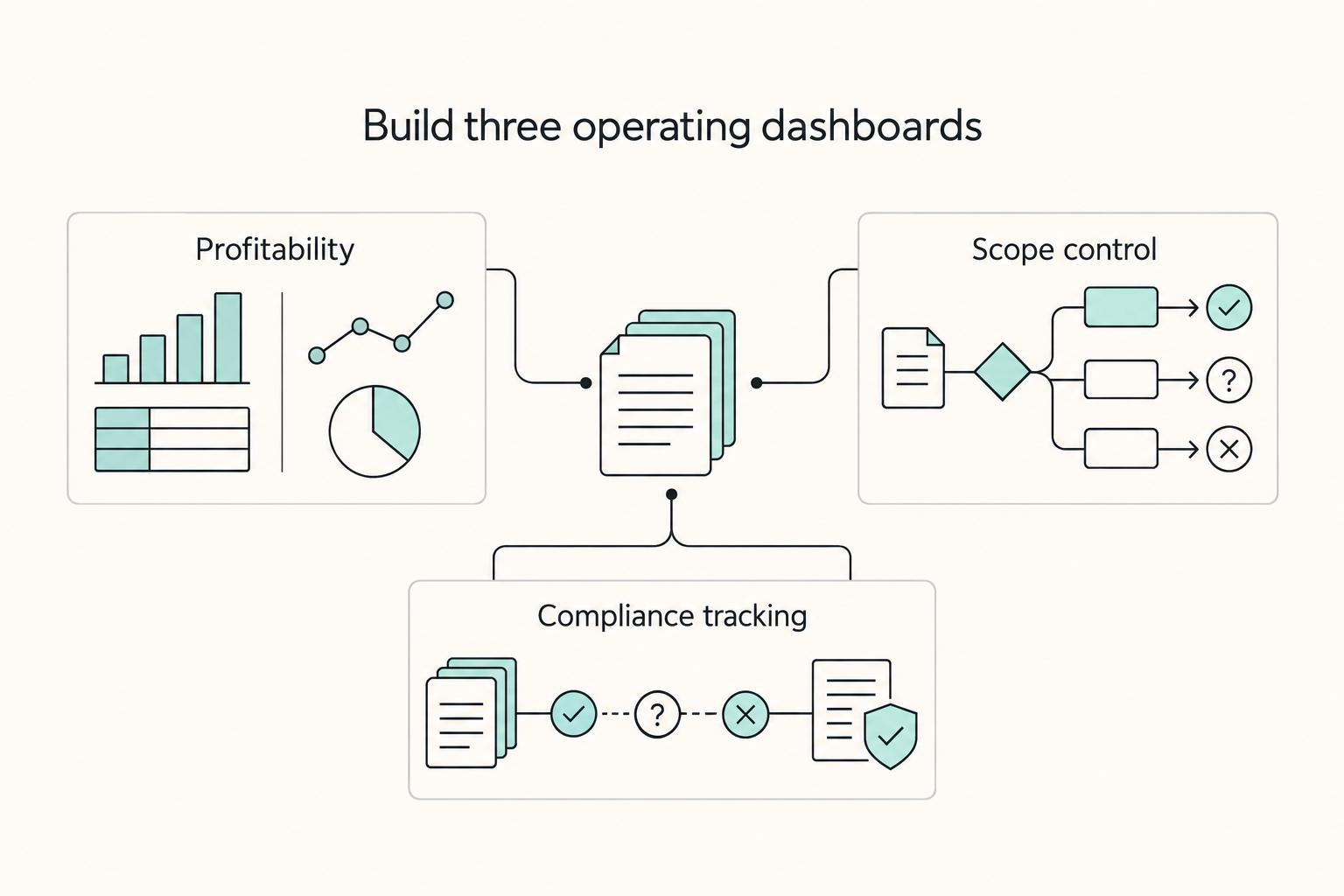
Use notion rollups and relations to connect your core business databases, then surface decision-ready summaries in one dashboard. Start by linking records across `Clients`, `Projects`, `Invoices`, and `Time Tracker`, then add rollups for totals, latest activity, or burn visibility. Use formulas for row calculations and relation-list filtering once the links are stable. For independent professionals, this setup helps you spot profitability issues, scope drift, and compliance review needs earlier without relying on scattered notes.
Treat Notion as the control surface for a solo business#
Treat Notion like the control surface for a real business, not a nicer to-do list. If you work solo, your setup should answer three questions quickly: Which clients are worth protecting? Where is project burn slipping? What parts of your operating obligations need review? A task-only workspace can show what needs doing, but it often cannot support those decisions on its own.
The pain is usually obvious even without a benchmark. You bounce between notes, task views, invoice drafts, and client messages just to rebuild basic context. Client details live in one place, project history in another, and billing facts somewhere else. Burn against a retainer can stay fuzzy until the work is already over budget. Operational visibility turns reactive when key records and reminders are not tied back to the work they affect.
Templates can supply a useful starting layout, but inspect their actual databases before adopting them. Check whether client, project, invoice and time records have a clear home and whether summaries use live linked records rather than manually copied totals.
| Decision area | Task-list Notion setup | Operating-system Notion setup |
|---|---|---|
| Profitability | You see tasks completed, maybe even project status, but revenue and effort sit in separate places. Profit discussions depend on manual review. | You connect client, project, time, and invoice records so profitability can be reviewed from one place. |
| Scope control | Work gets marked done, but there is no clear view of how much contracted work is already consumed. Scope drift is easy to spot late. | You can compare planned work against logged work or deliverables at the project level before a renewal or change request. |
| Compliance tracking | Reminders live as isolated tasks or calendar entries, with little context about why they matter. | You keep the related records and reminders in one connected view so review is less reactive. |
The practical recommendation is simple. Design around source records first, dashboard pages second. Give each core object one home. A client should not exist as one entry in a CRM template, another in a project tracker, and a third in an invoice page. Your first checkpoint is whether every important number on your future dashboard traces back to a specific record you can open and verify.
The three dashboards worth building#
Once your source records are clean, these three views turn a busy workspace into something you can actually run the business from:
| Dashboard | Outcome | Input data |
|---|---|---|
| Client Profitability Engine | Review which clients appear commercially healthy and which ones need repricing, tighter scope, or a different service mix | client records; project records; tracked time or effort; invoice or revenue entries |
| Scope Creep Shield | See whether a project or retainer is staying inside the agreed boundary before the relationship gets tense | project scope; estimated or contracted units; logged work; deliverables completed; current project status |
| Global Compliance Monitor | See where your recorded activity is accumulating and what needs review, instead of piecing it together from memory | activity logs; location or jurisdiction notes you maintain; any compliance reminders relevant to your workflow |
What to watch for before you build#
The most common failure mode is a polished homepage full of manual numbers. It looks organized, but every update depends on you remembering to edit summary blocks by hand. The page goes stale fast. Another trap is copying a creator template because the preview looks right, then discovering it was built for a different business model.
Before you commit to any template, duplicate it and inspect the actual databases and properties. If you cannot explain where the client record lives, where project effort is logged, and where supporting operational notes will be stored, you are still shopping for layout, not making an operating decision. The next section covers the technical foundation that matters here. First make sure your source records connect cleanly, then build the three blueprints in sequence. If you want a deeper dive, read A Guide to Notion for Freelance Business Management.
Connect records first, then summarize them#
Start with the link, then summarize it. In practice, a rollup only returns useful values when the related records are connected first.
A Relation links database pages, including pages in the same database. A Rollup aggregates a selected property through a relation. A Formula evaluates a row and can also traverse related pages with list functions; it is not limited to local numeric fields.
| Property | Use it when you need to | What it needs first | Common setup mistake |
|---|---|---|---|
| Relation | Link records between two databases | A target database and records to connect; self-relations are possible. | Pointing to the wrong database |
| Rollup | Summarize values from related records | A relation plus a target property in the related database | Expecting values before records are linked, or choosing the wrong property/calculate setting |
| Formula | Compute a value inside one row | Correct property names/types and, where needed, related page lists. | Using display filters as if they changed formula or rollup inputs. |
A practical warm-up with Projects and Tasks#
Build this in a short sequence:
- Create
ProjectsandTasksdatabases. - In
Tasks, create aProjectrelation toProjects; turn onShow on Projectsand name the reciprocal relationTasks. Limit each task’sProjectrelation to one page if that matches your model. - Add a
Donecheckbox in Tasks and a numericDone Scoreformula:if(prop("Done"), 1, 0). - In Projects, add Task Completion as a rollup of the Tasks relation and numeric Done Score property.
- Choose Average and format as percent; three related tasks with one Done should show about 33.3%. Check the no-task case separately rather than treating it as completion.
Link three tasks to one project and mark one Done. Confirm the project’s Tasks relation contains those same three pages and the rollup updates. Relations between different databases are one-way by default; the reciprocal property must be enabled for this project-side setup.
If the result looks off, run a quick check:
- Empty rollup: confirm the records are actually linked.
- Wrong-looking values: confirm the relation targets the intended database.
- Missing useful fields in the picker: confirm the source property type is the one you intended.
- Totals/counts not matching expectations: review the rollup's calculate setting.
This same pattern powers the next blueprints. Profitability, scope control, and compliance all depend on the same sequence: connect the right records, then summarize the right property so your dashboard answers decisions instead of just storing notes.
For a step-by-step walkthrough, see How to Create an 'Anti-Burnout' System Using Notion and Google Calendar.
Build a client profitability view from linked records#
Use this blueprint to make client decisions from connected data, not guesswork. A Clients + Invoices + Time Tracker structure can give you a practical profitability view when your links and labels stay consistent.
| Database | Required | Optional |
|---|---|---|
| Clients | Client Name | any notes you actually use |
| Invoices | Client relation; Amount; Currency; Invoice Date; Status; Amount Received | Invoice ID; Paid Date; reporting-period fields |
| Time Tracker | relation to Clients; Date; Hours | Billable; Project; Work Type |
Use one reporting currency or separate totals by currency. Invoice amount is billed value; Amount Received is cash collected. Neither automatically equals recognized revenue or profit. Keep the metric label, reporting period and cost basis explicit.
Data hygiene rules:
- Link every invoice to exactly one client.
- Link every time entry to a client before your week closes.
- Keep status labels and billable labels consistent over time.
- If a field is often blank, remove it or make it required.
| Metric | Notion setup (relation/rollup/formula) | Decision it supports | Common failure mode |
|---|---|---|---|
| Cash collected | On Invoices, maintain Amount Received; on Clients, roll up its Sum through Invoices. | Compare collection against effort for the same period. | Summing mixed currencies or treating every issued invoice as paid. |
| Time signal | Relation to Time Tracker + rollup of Hours | Which clients consume most delivery capacity | Time entries missing a client link |
| Collected cash per hour | if(prop("Total Hours") > 0, prop("Cash Collected") / prop("Total Hours"), 0) | Reprice or investigate collection/scope; zero hours needs review. | Comparing mismatched periods or reading a zero-hours placeholder as valid. |
| Estimated contribution | Collected cash less maintained direct-cost inputs; specify cash basis and exclusions. | Review direct-cost coverage. | Calling it accounting profit without overhead, accruals and other relevant costs. |
| Capacity signal | Formula placeholder using your billable/non-billable tags | Whether admin/support work is crowding paid delivery | Inconsistent billable tagging |
Example: two same-currency invoices are $2,000 and $1,000, but only $2,000 has been received. With 40 matched-period hours, Cash Collected/Total Hours is $50/hour, while billed value/hour is $75/hour. Create reciprocal Invoices and Time Entries relations on Clients and roll up Amount Received and Hours with Sum. A filtered dashboard view does not filter the records used by a rollup; for a period or status subset, use explicit source helper values or a relation-list formula filter.
Put these linked views on one dashboard page so you can review them together instead of switching views and skipping upkeep. Then act on relative signals across your own client list:
- Low signal: tighten scope, reset expectations, or rework pricing.
- Mid signal: monitor delivery drag and clean up workflow friction.
- High signal: protect quality and consider packaging the offer more deliberately.
If pricing model is the core constraint, continue with Value-Based Pricing: A Freelancer's Guide.
Related: A guide to using Notion 'Databases' for freelance project management.
Check whether sold time is outpacing project progress#
Use this view to answer one operating question: are you consuming sold time faster than the project is progressing? Keep it simple and checkpoint-driven so you can decide early, not explain late.
On Projects, create numeric Hours Sold and reciprocal Time Entries relation. In Time Tracker, calculate Burn Hours with if(prop("Billable"), prop("Hours"), 0) and roll up its Sum as Hours Used. Calculate Hours Remaining as prop("Hours Sold") - prop("Hours Used"). Decide which categories the agreement consumes; some retainers include admin time.
Before you build#
Set your input rules first so the burn view stays trustworthy:
- Use a short, fixed set of time-entry categories.
- Define your
Billableflag once and apply it consistently. - Keep project statuses consistent (for example: active, paused, complete) so paused work is not misread as healthy progress.
Test 20 sold hours against 15 eligible logged hours: remaining is five and consumption is 75%. Compare with deliverable progress separately; 75% time consumed does not mean 75% of the work is complete. Mark missing/zero budget as Needs Review instead of displaying a reassuring percentage.
| Hours sold | Hours used | Hours remaining | Burn status | Recommended next action |
|---|---|---|---|---|
| Confirmed and current | Updating from linked entries | Consistent with current scope | On track | Continue normal check-ins and keep logging discipline |
| Confirmed and current | Rising faster than delivery progress | Dropping faster than expected | Burn risk | Reconfirm scope, reprioritize requests, and surface tradeoffs now |
| Missing, disputed, or outdated | Any value | Unclear or misleading | Unreliable | Pause dashboard-led decisions until budget, links, and status rules are corrected |
Guardrails for edge cases:
- Empty budget: treat burn status as invalid until budget is confirmed.
- Paused project: avoid reading low usage as success; paused logging can hide risk.
- Apply the agreement’s counting rules: exclude internal time only when it does not consume the contracted budget; track effort separately for contribution analysis.
If the dashboard and real delivery disagree, audit the inputs first: duplicate logs, missing project links, or inconsistent labels are common causes.
When burn risk appears#
Act immediately with a clear sequence:
- Pause new requests until current scope is restated in writing.
- Send a short update on completed work, remaining work, and what any added request would displace.
- Confirm the escalation trigger from current operating records before using it.
- Decide the path: reduce scope, add hours, or reprice.
- Feed the outcome into your profitability workflow and, if pricing is the root issue, into Value-Based Pricing: A Freelancer's Guide.
If your issue is formula design rather than scope decisions, review A guide to using 'Formulas' in Notion.
Track travel days against your verified thresholds#
Use this dashboard as an early-warning system, not a legal conclusion. If you travel often, keep trip records separate from jurisdiction rules so the data stays auditable and the page does not drift into legal advice.
Use Travel Log and Jurisdiction Rules with a two-way relation so rule records can summarize linked trips. Include rule type, period/window, counting method, verified source and check date—not just a country threshold. Separate annual, rolling and multi-year tests. A simple all-time day sum cannot determine tax residence or immigration permission.
| Field | Where it lives | Why it matters | Data owner | Common input errors |
|---|---|---|---|---|
Entry Date | Travel Log | Starts the stay record used in day counting | You or assistant | Wrong timezone, wrong year, blank date |
Exit Date | Travel Log | Closes the stay so the record can be counted consistently | You or assistant | Left blank after travel, return date entered as departure date |
Jurisdiction | Travel Log relation to Jurisdiction Rules | Connects each trip to the rule set it should roll up into | You | Missing relation, wrong country/region selected |
Rule / Window / Verified Threshold | Jurisdiction Rules | Stores the verified limit used for risk checks | You, after advisor confirmation | Copying an online example; using an outdated value; treating an unverified threshold as ready for dashboard decisions |
Days in Country | Travel Log formula | Calculates stay length using your documented counting method | Notion setup owner | Formula changed without review; open trips treated as final |
Days Used | Jurisdiction Rules rollup | Sums only the related trips allocated to that rule’s relevant window; split trips at period boundaries where necessary. | Notion setup owner | Broken relation; overlapping entries double-counted |
Risk Meter | Jurisdiction Rules formula/display | Shows progress against the verified threshold | Notion setup owner | Pulling from wrong threshold field; display looks clean while inputs are wrong |
Build the page like an operator#
Keep both databases on one hub page so you can review raw entries and the summary together. This relation-and-rollup setup reduces copy-paste risk and helps prevent quiet drift like misaligned relations, inconsistent tags, and unreliable totals.
Document the verified day-counting method and period allocation. A trip crossing year-end may need split records for annual totals; rolling or weighted multi-year tests need more than a simple Sum. Mark open trips provisional and review overlapping records. Same-day travel rules differ by legal test, so an internal convention cannot substitute for the applicable rule.
Review rhythm#
Run this page on a fixed cadence:
| Review checkpoint | Checks |
|---|---|
| Weekly data hygiene check | clear blank exit dates, missing relations, and overlapping trips |
| Pre-travel check | confirm the destination jurisdiction exists, the threshold is verified and current, and your counting-note still matches advisor guidance |
| High-risk escalation | if your meter enters your warning band, stop relying on the dashboard alone and confirm the rule with a qualified advisor before acting |
If the data is incomplete or the rule is unverified, treat the meter as a prompt to investigate, not a decision.
For another workflow buildout, see How to Automate Client Onboarding with Notion and Zapier.
Conclusion: One connected workspace you can review and trust#
You do not need more scattered lists. You need one place where your client records, project activity, notes, and compliance checks connect cleanly enough that you can review them and make decisions early. That is the real value of a connected workspace: clearer visibility, earlier risk signals, and more reliable tracking from linked records instead of memory.
A useful test is simple: can you open your dashboard and trust it as your single source of truth, or are key answers still buried in separate pages and notes? Notion itself frames this well with the idea of a home base database for meetings and docs. When your databases are customized with the right properties, filters, and sorting, organized documentation stops feeling like admin overhead and starts holding projects together.
| Before | After |
|---|---|
| Client revenue, time, and notes live in separate places | Client records pull the summaries you need into one view |
| Scope changes are noticed late, usually after margin slips | Related task and project data make changes easier to spot early |
| Compliance tracking depends on memory or manual checking | Key compliance records stay visible in a dashboard you can review on a schedule |
The payoff here is practical, not abstract. Review the dashboard regularly, act on flags before they become expensive, and use connected data to decide which clients need attention, which projects are drifting, and where your records need cleanup. A common failure mode is still bad input. If links or properties are wrong, summaries can become misleading across views.
Your next pass should be short and concrete:
- Finalize the connected databases across the three blueprints and confirm key records are easy to access.
- Validate summary fields against source records with a few manual spot checks.
- Keep data hygiene tight by using one home base database, clear properties, and consistent filtered views across pages.
This pairs well with our guide on How to Create a Project Timeline in Notion.
Frequently Asked Questions
What is the simplest way to think about a relation vs. a rollup?
A relation is the connection between records in two databases. A rollup pulls a selected property through that connection so you can display or total it somewhere else. In plain English, connect first, summarize second.
Do you need both every time?
No. Use a relation to connect pages and a rollup when you need a summary. Two distinct databases are common, but self-relations can link pages within one database. A rollup still needs a relation, a source property and a calculation.
What are practical use cases if you work independently?
Use a relation to connect Meeting Notes with Clients so each client page shows the right notes without copy-paste. Connect Tasks with larger Projects so you can see how task estimates contribute to delivery at the project level. You can also keep raw records in one database and pull only the fields you need into a client or project summary.
Can you build a lightweight CRM with this?
Start with Clients, Meeting Notes and Projects. Create each relation and enable its reciprocal property where both sides need links. Add a sample meeting note, link it to the correct client and verify it appears in that client’s reciprocal relation.
What usually goes wrong when you build a CRM or client tracker this way?
An incorrect link produces incorrect summaries. With a two-way relation enabled, relationship changes appear on both sides; one-way relations do not automatically create a visible reciprocal property. Check a small set of links before adding more fields.
How should you share dashboard data with clients without exposing everything?
Filters and hidden properties organize a view; they are not access controls. For a small client portal, share a separate sanitized database or page containing only approved client data, without links to internal records. If using actual database/page/property permission rules, verify plan availability and inherited/broader grants, then test as the invited guest. Keep internal margin, tax and other-client records private.
What is a good boundary between client-facing and internal data?
Expose progress, deliverables, dates, and agreed task status. Keep internal comments, margin math, personal reminders, and notes about other clients out of the shared layer. If you are unsure whether a field belongs, leave it internal and add it later only if the client actually needs it.
Will too many relations or rollups slow things down?
Complex formulas, many relationships and large datasets can make a workspace slower or harder to maintain. Start with a small sample, then test the views you actually use at realistic volume. Remove unnecessary summaries and keep source types consistent; there is no universal row count that guarantees performance.
Try a related tool
Researched and edited by the Gruv editorial team. Gruv builds cross-border billing, payouts, and finance-operations software for global businesses.
Sources
Includes 2 external sources outside the trusted-domain allowlist.
Educational content only. Not legal, tax, or financial advice.
Related Posts

Value-Based Pricing for Freelancers Under Real Payment Risk
Value-based pricing starts with the client’s expected benefit and willingness to pay. It still needs a deliverable, scope and payment agreement you can perform. Use a discovery phase when the benefit or effort is too uncertain to support a defensible quote.

A Guide to Notion for Freelance Business Management
If your workspace feels busy but fragile, you do not need more pages. You need one connected system. Treat your freelance business like a business-of-one and use Notion as the control layer that connects client decisions, delivery, and billing in one place.
The 3-Stage Notion Setup for Freelance Project Management
If your client work is spread across docs, inbox threads, task lists, and billing notes, you are not really managing delivery. You are reconstructing context every time a question comes up. A linked Notion setup will not fix every delivery problem, but it can give you one place to verify scope, status, and key project details before a handoff gets messy or a client update gets vague.