
Quick Answer
Notion formulas calculate from database properties: fees and hours, invoice dates, goal amounts, or linked tasks. Build one useful view first, such as unpaid invoices with an aging label. Use explicit property types, handle missing dates before comparing them, and test a normal record, an incomplete record, and a deadline boundary. The examples below connect those formulas to a weekly business review.
Scope one operating dashboard before you build it#
If you run a one-person business, one operating dashboard is usually more reliable than a pile of disconnected pages. The goal is practical: pull project data, cash visibility, follow-up obligations, and admin tasks into one place so fewer things slip through the cracks.
Connect the records you already use: projects, invoices, clients, tasks, and admin dates. A dashboard is useful when it answers a specific question, such as which invoices need a follow-up or which projects consume more hours than expected. Keep those questions visible as you build.
Start with one dashboard page and a few linked database views. Each view should show the source record, its calculated signal, and a next action. You can expand the model after you have checked its results against actual invoice and time records.
| Generic Notion setup | Business-of-One OS |
|---|---|
| Separate pages for tasks, notes, and admin | Connected databases with shared records |
| Answers "what am I working on?" | Answers "what is moving, blocked, unpaid, or due?" |
| Updated when you remember | Checked in a weekly review view |
| Easy to start, hard to trust | Harder to set up, easier to verify |
Use this checklist before you build.
- Setup scope: one dashboard page only, not a full company wiki
- Core databases: projects, tasks, clients, invoices or revenue items, admin tasks
- Must-have properties: owner, status, due date, next action, linked record, a clear health or priority flag
- Weekly habit: one review to confirm overdue items, unpaid items, and missing dates
Keep incomplete records in a visible intake view, even when they have no client or due date yet. Assign a next action to fill the missing fields before those records enter your decision views.
What to get right before you build formula logic#
Before you build revenue, risk, or timeline logic, lock in four basics: properties, constants, operators, and functions. If these are unclear, your dashboard can look organized while still giving you unreliable signals.
Start with structure: keep information in related master databases, then surface it through filtered views. In practice, your formulas should read from stable properties in your core databases, not one-off pages.
The four parts you actually use#
Properties hold your operating data, and formulas depend on them. If names or inputs are inconsistent, formula outputs will also be inconsistent.
| Part | Role | Key caution |
|---|---|---|
| Properties | Hold operating data that formulas depend on | Inconsistent names or inputs make outputs inconsistent |
| Constants | Fixed values you define once and reuse | Distinguish a business preference, such as a seven-day reminder window, from an external rule that needs its own scope and source |
| Operators | Connect logic and calculations | Grouping conditions incorrectly causes many logic errors |
| Functions | Calculate from properties, branch on conditions, combine text, and format dates | Use them to turn raw fields into usable status signals |
Constants are values used directly in an expression, such as 7 in a seven-day reminder window. If a value varies by client or project, store it in a Number property instead. A review window you choose for yourself is different from a legal threshold; keep the latter with its jurisdiction, rule period, and source.
Operators connect logic and calculations. You use them to compare values, combine conditions, and run arithmetic; many logic errors start here when conditions are grouped incorrectly.
Functions do the heavy lifting. Use them to calculate from other properties, branch on conditions, combine text, and format dates so your records become usable status signals instead of raw fields.
Pick the output type based on the decision you need to make next.
| If you need to... | Best output type | Why it fits | Common failure mode |
|---|---|---|---|
| Show a status signal | Text | Easy to scan in views | Using text where you later need numeric sorting or math |
| Run calculations | Number | Supports totals, ratios, and comparisons | Mixing words into a value that should stay numeric |
| Trigger risk flags or gates | Boolean | Fast yes/no filtering for attention | Writing long warnings instead of a clean true/false check |
| Drive timeline logic | Date | Supports date comparisons and scheduling behavior | Converting dates to text too early |
A practical rule: use Boolean for attention flags and keep values numeric as long as you still need math.
Use the editor like a test bench#
Treat the formula editor as a test bench, not a one-shot writing box. Building and checking logic in small steps usually gives you faster debugging, fewer logic errors, and formulas you can maintain.
Before you reuse a formula, validate it:
- Test one normal record, one missing-value record, and one edge case near your threshold or deadline.
- Manually verify one record so you confirm the output is actually correct.
- Confirm the output type matches the job (text, number, Boolean, or date).
- Check dependency fields first, especially relation and rollup inputs.
Minimum toolkit before Module 1#
- Core databases are in place and related where needed.
- Key properties are present and named consistently across databases where possible.
- Any formula using cross-database data already has working relation and rollup inputs.
- You can clearly separate raw input fields from computed output fields.
If you set this up now, Module 1 becomes implementation work instead of schema cleanup. Related: A Guide to Notion for Freelance Business Management.
Module 1: How Can You Build a Real-Time Revenue & Profitability Hub?#
Build this hub in three steps: project profitability, invoice aging, and client value. Keep inputs explicit and outputs readable so you can trust what you act on.
Step 1: Build project profitability with guardrails#
In Projects, create Number properties named Project Fee, Tracked Hours, and Project Expenses, plus a Checkbox named Inputs Reviewed. Check that box after confirming the fee, expenses, and time log are complete. Effective hourly return is fee less project expenses divided by hours; it excludes tax and overhead you have not entered.
Create a Boolean formula named Profitability Ready: prop("Inputs Reviewed") and prop("Tracked Hours") > 0. Then create a Number formula: if(prop("Profitability Ready"), (prop("Project Fee") - prop("Project Expenses")) / prop("Tracked Hours"), 0). Filter reporting views to Profitability Ready checked: the fallback 0 is a placeholder for an incomplete row, not a measured return. Notion treats empty(0) as true, so do not use empty(Project Fee) to reject a reviewed zero-fee project.
For a hypothetical project with a $2,000 fee, $200 expenses, and 30 hours, the result is $60 per hour. Change hours to 0: the readiness flag must turn off and the row must leave profitability reporting. A reviewed zero-fee project with $50 expenses and 5 hours should produce −$10 per hour. Check expenses were entered once and all amounts use the same reporting currency.
Step 2: Standardize invoice aging before you automate reminders#
In Invoices, use a Checkbox named Paid and a single, date-only Due Date property. Check Paid when the invoice is fully paid; partial payments still leave an unpaid balance to follow up. The aging formula below gives paid status priority, then catches missing dates before assigning an aging label.
| Status | Basis | Note |
|---|---|---|
| Paid | Paid checkbox checked | Overrides date comparisons |
| Needs date | Unpaid and Due Date empty | Complete the source field |
| Overdue | Due Date before today() | Due today is not yet overdue |
| Due Soon | Due Date from today through seven days ahead | Seven days is an example reminder preference |
| Current | Due Date later than seven days ahead | Keep the agreed due date on the invoice |
Use ifs(prop("Paid"), "Paid", empty(prop("Due Date")), "Needs date", prop("Due Date") < today(), "Overdue", prop("Due Date") <= dateAdd(today(), 7, "days"), "Due Soon", "Current"). The seven-day window is a reminder preference, not a change to payment terms. On October 5, 2026, an unpaid October 4 invoice is Overdue, October 5 and October 12 are Due Soon, and October 13 is Current. A paid invoice stays Paid; a missing date stays Needs date.
Step 3: Track client value with relations and rollups, not duplicated formulas#
Create a Client relation in Projects pointing to Clients, and enable Show on Clients so the reciprocal project relation is available there. Add a rollup in Clients: select that project relation, choose Project Fee, and calculate Sum. Name the result Contracted Fees. It is agreed project value, not collected cash or profit. To report collections, relate actual payment records and sum received amounts separately. Never sum different currencies without a documented conversion into one reporting currency.
A rollup gives you a simple configured total; relation-aware formulas can also filter or calculate across linked pages. Choose the approach you can inspect easily. For example, a Tasks relation can count unfinished work with prop("Tasks").filter(current.prop("Status") != "Done").length(). Use your actual status option, and review unlinked tasks separately so a zero count does not hide missing links. See Using Notion Rollups and Relations for a Smarter Freelance Dashboard.
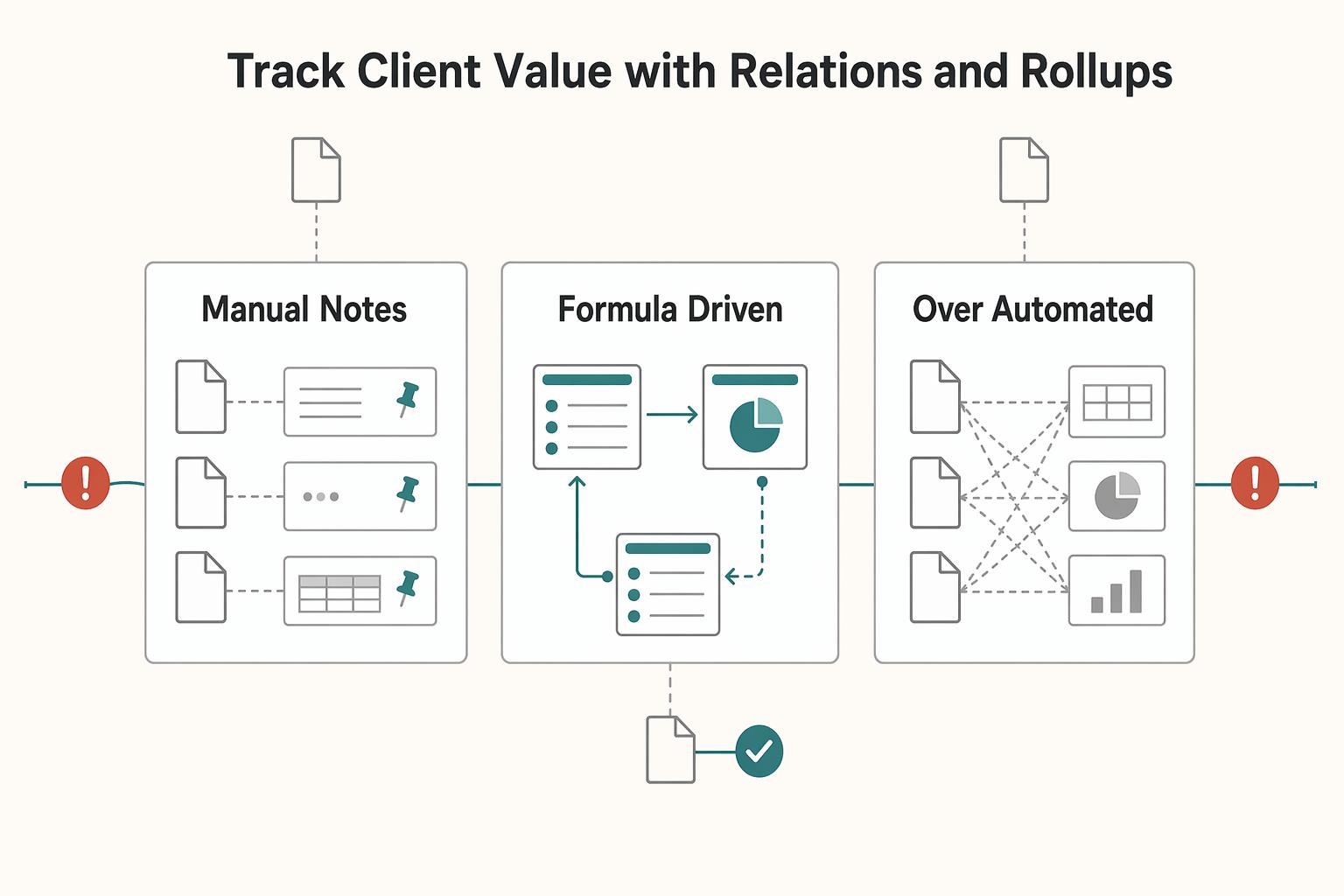
| Approach | Decision quality | Follow-up consistency | Reporting readiness |
|---|---|---|---|
| Manual notes and spreadsheets | Varies by memory and cleanup habits | Easy to miss overdue invoices or incomplete projects | Slow to compile and hard to trust |
| Formula-driven hub with clear inputs | Applies the same rules across records | Statuses stay tied to source fields | Faster review in one financial overview |
| Over-automated, hard-to-edit setup | Logic gets harder to inspect when results look wrong | Teams stop updating fields when workflows feel rigid | Output may look polished but is harder to audit |
If follow-ups are scattered across clients, connect the same records to a Notion CRM view rather than entering them again.
Module 2: Log trips and calculate exposure windows in one place#
Use a trip log to keep dates and supporting records together. Its formulas can count intervals and surface records for review, but a day count alone does not determine tax residency, visa permission, or tax-benefit eligibility. Those decisions also depend on the applicable rule and your circumstances.
This extends Module 1: clean source fields matter even more here, because one bad date or inconsistent tag can distort every downstream result.
Build one auditable trip log first#
Start with one Trips database as your source of truth. Each record should represent one stay, with normalized Country and Region tags, Entry Date, Exit Date, and helper properties such as Trip Days, Calendar Year, Lookback Start, Needs Review, and Evidence Linked.
Normalization is the control that matters most here. If one record says Spain, another says ES, and another says Schengen, your counts stop being reliable. Pick one country standard and one region standard, then use them everywhere.
Create a text formula for an inclusive stay-day count: ifs(empty(prop("Entry Date")), "Needs entry", empty(prop("Exit Date")), "Open trip", prop("Exit Date") < prop("Entry Date"), "Check dates", format(dateBetween(prop("Exit Date"), prop("Entry Date"), "days") + 1)). Use separate date-only fields. October 1–3 gives 3; an absent exit gives Open trip; an exit before entry gives Check dates. This counts both endpoints for your log, not automatically for every legal rule.
Run three trackers from the same data#
Once the trip log is reliable, the same dataset can run three reviews without duplicate records:
| Tracker | Data used |
|---|---|
| Jurisdiction review | Closed trip dates split by country and calendar year; rule notes kept separately |
| Regional rolling-window review | Dates clipped to the review window, with overlapping stays removed |
| Foreign-presence review | Evidence of location and the day-count convention required by the applicable rule |
- Tax residency tracker
For a calendar-year jurisdiction review, split a December 30–January 2 stay into two dated segments before summing: two days in each year under the inclusive log convention. Grouping a whole trip by its entry year would place all four days in the wrong total. Preserve the original trip link so the split can be traced.
- Regional visa-limit tracker
For a rolling-window review, intersect each stay with the window first: use the later of entry and window start, and the earlier of exit and review date. A stay wholly outside contributes zero. Remove overlapping dates before totaling; simply summing full Trip Days can count dates outside the window or count one day twice. Keep an unfinished trip visible for update rather than treating it as a zero-day stay.
- Expat tax-eligibility tracker
A foreign-presence review needs location evidence and the relevant counting convention. The inclusive trip-log formula does not establish qualifying full days or eligibility by itself. Keep reviewed rule notes with the record, and leave an eligibility decision unmade when the required facts are incomplete.
Use the documented date functions for the interval you have defined. Add fields for Rule Source, Rule Period, Reviewed On, and Rule Reviewed. A Boolean formula such as not prop("Rule Reviewed") can surface unfinished rule review without presenting an unverified threshold as a conclusion.
| Approach | Reliability | Audit readiness | Decision speed |
|---|---|---|---|
| Manual notes, calendar memory, scattered docs | Easy to miss overlaps and partial stays | Weak, because records are fragmented | Slow, often after risk grows |
Single Trips database with helper properties and flags | More consistent counting from one input model | Stronger, because dates and evidence stay together | Faster weekly decisions on travel and filing follow-up |
| Over-centralized setup with no review habit | Looks tidy until one bad field affects everything | Poor if results cannot be traced or challenged | Fast, but overconfident |
One risk to manage is single-point failure: if your only trip log is wrong, every flag is wrong. Add simple resilience, such as backup views, evidence links, or periodic exports, while keeping the model readable.
Before relying on any flag, run this checklist:
- Keep the rule source, jurisdiction, counting convention, and effective period alongside the record.
- Check sample trips that cross a year or window boundary, overlap another stay, or have no exit date.
- Schedule a recurring review with a date and a specific next action; export a dated copy when you need a retained record.
For a step-by-step walkthrough, see A guide to using Notion 'Databases' for freelance project management.
Module 3: What Does Your Performance & Growth Dashboard Look Like?#
Once your finance and compliance data is reliable, your next job is to prove your time is creating results. Keep this module anchored to three metrics: time mix, timeline agility, and goal progress. If one metric is unclear, fix its definition before you add new views.
In Notion, this matters because formulas run as a property across database rows, not as one-off spreadsheet cells. When you change a definition, outputs update across the database. That only helps if your metric definitions stay consistent and reusable.
Time mix you can actually manage#
Your billable vs non-billable KPI is only trustworthy when every entry is tagged the same way. Set one rule: each entry gets exactly one category, and category meanings do not drift. You do not need a universal taxonomy, but you do need your own written rules.
Treat uncategorized time as a visible category, not a blank. If uncategorized entries appear, clean them first, then read the KPI. If your ratio moves away from your current benchmark, inspect which categories expanded and decide what to change in workload mix, client work design, or operating overhead.
Timeline agility without brittle automation#
Use one explicit base date, for example Project Start Date, and calculate downstream dates from that anchor or a clearly documented dependency. Keep the logic readable so replanning does not break your timeline.
For a two-week planning deadline with a blank-date fallback, use if(empty(prop("Project Start Date")), prop("Project Start Date"), dateAdd(prop("Project Start Date"), 2, "weeks")). Both branches return dates. October 5 becomes October 19; shifting the start to October 8 moves it to October 22; an absent start remains blank. Add a filtered view for missing starts rather than inventing a deadline.
| Metric | What it tells you | Management decision | Corrective action |
|---|---|---|---|
| Time mix | How effort is split between revenue-producing and support work | Whether to protect focus time, adjust work design, or reduce overhead | Resolve uncategorized entries, then review category shifts |
| Timeline agility | Whether plans still hold after date changes | Whether delivery dates and assumptions are still realistic | Check missing base/dependency dates and update assumptions |
| Goal progress | Whether strategic work is advancing | Whether to reallocate effort across priorities | Compare progress to your current benchmark and drop inactive goals |
Create Number fields Current Amount and Goal Amount, and a Checkbox Inputs Reviewed. A Boolean Goal Ready formula is prop("Inputs Reviewed") and prop("Goal Amount") > 0. For the numeric ratio use if(prop("Goal Ready"), prop("Current Amount") / prop("Goal Amount"), 0), then display that number as a percentage or bar. Filter out rows without Goal Ready before reporting. A confirmed 30 out of 100 is 30%; confirmed zero progress is 0%; a missing or zero goal needs input rather than a success or failure label.
If your current cadence is weekly, use this checklist:
- Clear uncategorized time entries.
- Review items with missing base or dependency dates.
- Check each scorecard against your current benchmark.
- Record one concrete action tied to one metric for next week.
Pair the weekly time review with an anti-burnout calendar routine if capacity needs a clearer limit.
Conclusion: Review the signals and decide what to do next#
Once the formulas are trustworthy, your job gets simpler. Review the signals, decide what matters this week, then trigger the next action in finance, record-keeping, and workload planning instead of hunting through scattered pages.
An overdue invoice needs a follow-up based on its unpaid balance and agreed terms. A trip review needs dates, evidence, and the rule used to count them. A rising count of unfinished linked tasks gives you a reason to check capacity, but also check for tasks missing their project relation. Keep the signal and its source visible so the next action follows from the record.
| Before dashboard behavior | After dashboard behavior | What you do next |
|---|---|---|
| You notice payment issues late | Overdue items surface from a due-date formula | Chase the invoice or revise the plan for the month |
| You rely on memory for key dates | Elapsed-time checks show what needs review | Open the record, verify dates, add the missing document |
| You guess whether workload is manageable | Related-task counts show open work by project or client | Pause new work, reprioritize tasks, or renegotiate scope |
A good checkpoint before you trust any decision: confirm the source property type and the formula result type are actually compatible. A common failure mode is a formula that looks right but still needs troubleshooting because the inputs and result type do not line up.
The lowest-friction next step is to implement one formula chain in your live workspace today: a due-date status, a date review counter, or a related-task count. Test it on three real records, fix any input issues, then expand from there. That is the practical heart of a strong setup.
This pairs well with our guide on How to Create a Project Timeline in Notion.
Frequently Asked Questions
How do you calculate days between two dates?
For elapsed days, use dateBetween(prop("End Date"), prop("Start Date"), "days") after checking both Date fields are present and ordered correctly. October 1–3 gives 2 elapsed days; the inclusive trip-log convention gives 3 by adding 1. Do not substitute one convention for the other when a rule specifies how to count dates.
How do you make an automatic overdue status?
For a single date-only Due Date, use ifs(prop("Status") == "Done", "Done", empty(prop("Due Date")), "Needs date", prop("Due Date") < today(), "Overdue", "On track"). Match your exact status label. Done overrides the date, missing dates produce Needs date, yesterday is Overdue, and today is On track. Use now() instead of today() only when you intend to compare a specific deadline time.
How do you auto-calculate a due date like NET 30 or two weeks after start?
For an agreed 30-calendar-day offset from Invoice Sent, use if(empty(prop("Invoice Sent")), prop("Invoice Sent"), dateAdd(prop("Invoice Sent"), 30, "days")). For two weeks after Start Date, use the same guard with that Date property and 2, "weeks". These formulas calculate the offset you enter; they do not decide whether a contract counts from sending, receipt, acceptance, or business days.
How do you build a progress bar for goals or budgets?
Create Number fields Current Amount and Goal Amount, and a Checkbox Inputs Reviewed. A Boolean Goal Ready formula is prop("Inputs Reviewed") and prop("Goal Amount") > 0. For the numeric ratio use if(prop("Goal Ready"), prop("Current Amount") / prop("Goal Amount"), 0), then display that number as a percentage or bar. Filter out rows without Goal Ready before reporting. A confirmed 30 out of 100 is 30%; confirmed zero progress is 0%; a missing or zero goal needs input rather than a success or failure label.
Can you pull data from another database into a formula?
Use a Relation property first, then a Rollup or a relation-aware formula pattern. For example, if Tasks is a relation, you can count unfinished related records with length(prop("Tasks").filter(current.prop("Status") != "Done")). If it fails, confirm that Tasks really is a relation and that the related database has a Status property with a "Done" value.
Why does a formula return the wrong kind of result or fail when you use rollups?
Because formula types are different from property types, and rollup output depends on how that rollup is configured. A rollup can return different kinds of values based on its setup, so do not assume it is ready for math just because it looks readable. Fix this first by opening the rollup settings and checking what it returns before you use it inside another formula.
What should you do first when a formula still will not behave?
Strip it back to one input at a time inside the Formula property editor and confirm each property returns what you think it does. Then test your if() branches separately so each condition behaves as expected. If it still fails, use Notion's common formula errors troubleshooting guide as your next step.
Try a related tool
Researched and edited by the Gruv editorial team. Gruv builds cross-border billing, payouts, and finance-operations software for global businesses.
Sources
Includes 2 external sources outside the trusted-domain allowlist.
- notion.com/help/formulasexternal
- notion.com/help/formula-syntaxexternal
Educational content only. Not legal, tax, or financial advice.
Related Posts

Value-Based Pricing for Freelancers Under Real Payment Risk
Value-based pricing starts with the client’s expected benefit and willingness to pay. It still needs a deliverable, scope and payment agreement you can perform. Use a discovery phase when the benefit or effort is too uncertain to support a defensible quote.

A Guide to Notion for Freelance Business Management
If your workspace feels busy but fragile, you do not need more pages. You need one connected system. Treat your freelance business like a business-of-one and use Notion as the control layer that connects client decisions, delivery, and billing in one place.
How to Use Notion as a CRM
Use **notion as a crm** only if you want a setup you can keep current every week, not one that looks good right after setup but then drifts. The real value is not the template or the dashboard. It is whether your client records stay easy to scan, quick to update, and reliable enough to drive follow-ups without guesswork.