
Quick Answer
Use a digital garden for freelancers as working documentation, not as a branding exercise. The article’s core method is to publish clear process terms and decision notes, then keep that language consistent across proposals, statements of work, and client emails. That helps prospects self-qualify, reduces ambiguity before kickoff, and makes your thinking reusable across sales and delivery.
Four Jobs to Test With Public Notes#
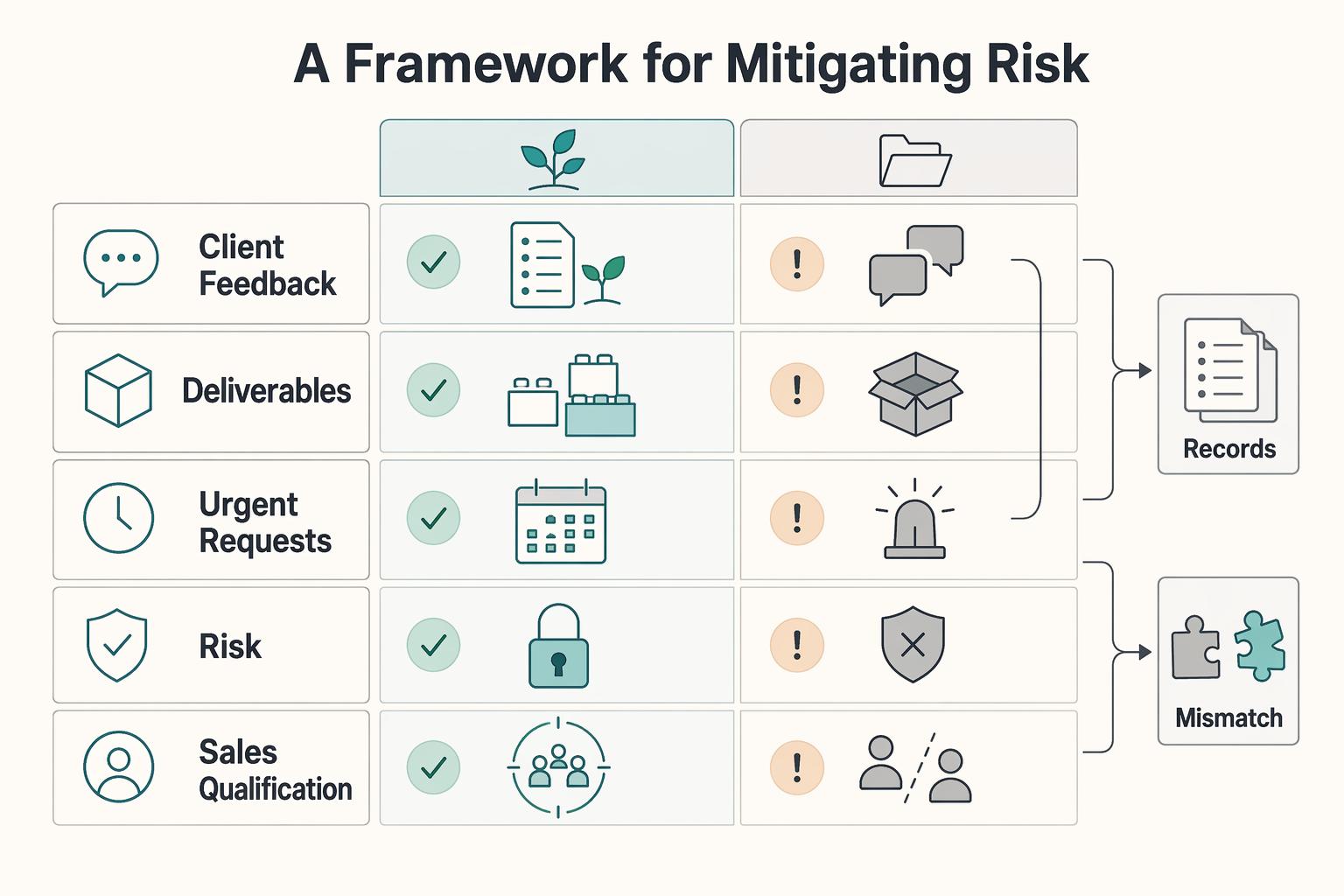
Treat this as an operating model you can test this week, not a promise that publishing alone will reduce disputes or raise your rates. The move is simpler: use a public body of notes to make your terms, reasoning, and reusable knowledge easier for the right people to inspect before they hire you.
| Topic | Condition | Prompt detail |
|---|---|---|
| Client feedback | Within the agreed number of business days of each submission | Delivered as one consolidated response |
| Deliverables | For this engagement | Include [list]; source files / working files are [included or excluded] |
| Urgent requests | Before the agreed turnaround window | Subject to availability and may be quoted with a separate priority fee, confirmed in writing before work starts |
A portfolio still matters, but it answers a narrower question: what have you made before? A garden can answer a different one: how do you define the work, make decisions, and keep your own knowledge usable over time? That shift matters if your goal is cleaner sales conversations and less ambiguity around scope, process, and fit.
| Decision area | Static portfolio | Garden-style publishing | What to verify before relying on it |
|---|---|---|---|
| Risk control | Shows finished work after the fact | Can publish definitions, process notes, and boundaries in advance | Check that your proposal, statement of work, and public pages use the same terms |
| Sales qualification | Shows taste and examples | Can show how you think, what inputs you need, and what you will not do | Review discovery calls: are prospects already using your language and asking better questions? |
| Pricing narrative | Anchors attention on outputs | Can anchor attention on judgment, tradeoffs, and decision quality | Make sure each note states the problem, options considered, and why you chose one path |
| Long-term asset value | Archive of past projects | Reusable library of notes, examples, and definitions | Confirm you can export your content, keep your URLs, and back up the raw files |
You can treat this model as four jobs to test with public notes: reduce ambiguity, screen for fit, preserve useful thinking, and stay operationally manageable. You may not need a huge body of writing to do those jobs.
You need a small set of pages that do clear work for the business: a few definitions, a few process notes, a few decision writeups, and a way to keep them current. The point is not volume. The point is that a prospect should be able to see, before kickoff, how you work and where your boundaries sit.
Shield. Your first job is not to sound smart. It is to remove ambiguity. A practical standard here comes from formal drafting: Public Law 118-47, the Further Consolidated Appropriations Act, 2024, starts with clear checkpoints such as "Sec. 1. Short title" and "Sec. 2. Table of contents," and it narrows what "this Act" refers to unless stated otherwise. Borrow the habit, not the style. Define your terms, scope what each page refers to, and avoid vague labels that can stretch later.
Use short public notes for the points that usually create confusion: revision rounds, feedback windows, file formats, meeting cadence, response times, and what counts as an urgent request. Then mirror that language in your client-facing documents. A simple checkpoint: click every link from your proposal and SOW before you send them. If a page title changed, the URL broke, or the wording differs from the contract, you have created the ambiguity you were trying to remove.
The practical sequence matters here. First, write the public note in plain language. Second, copy the core wording into your proposal and SOW instead of paraphrasing from memory. Third, check that your email summary uses the same terms. Fourth, click through the exact links a client will see. That sequence sounds small, but it is where the shield effect comes from. A public page only helps if it uses the same language as the documents that actually govern the engagement.
This is also where solo operators can create accidental risk. They explain one thing on a call, another thing in an email, and a softer version on a public page because they are trying to sound flexible. That flexibility can read as uncertainty. If "revision round" means one consolidated response on the public page but turns into scattered comments across several days in practice, the note has not reduced ambiguity. It has documented it. The same goes for "urgent," "included," "source files," and "turnaround." These are not abstract branding words. They are operating terms, and they work best when they stay stable everywhere a client encounters them.
A useful test is to read your own materials as if you were a rushed prospect comparing two providers. Could you tell, quickly, what happens after a draft is delivered? Could you tell how feedback should be sent? Could you tell whether working files are included? Could you tell how an urgent request is handled? If the answer is no, your public notes still need work.
Here are three drafting prompts you can adapt for your own documents. They are not legal clauses, and you should verify enforceability and wording for your jurisdiction before treating them as contract language.
- "Client feedback will be delivered as one consolidated response within the agreed number of business days of each submission."
- "Deliverables for this engagement include [list]. Source files / working files are [included or excluded]."
- "Requests needed before the agreed turnaround window are subject to availability and may be quoted with a separate priority fee, confirmed in writing before work starts."
You can treat those prompts as seeds for a small public glossary. One page can define what you mean by a round of revisions. Another can explain how and when feedback should be delivered. Another can spell out what a deliverable includes and what it does not. That way, when a prospect asks for clarification, you are not inventing the answer on the spot. You are pointing to a documented position that your proposal already reflects.
Filter. If you want better-fit inquiries, publish decision notes, not just polished outcomes. A useful note explains the problem, the constraints, the options you rejected, and the tradeoff you accepted. That does more than a gallery caption, and it can support a clearer pricing narrative because you are showing judgment, not just output. The practical test is straightforward: after someone reads two or three notes, can they tell what kind of client you work well with and what kind you do not?
This is where a garden can be more explicit than a static portfolio in sales conversations. A portfolio image or finished deliverable may prove taste, but it rarely explains what the client needed to decide, what inputs made the work possible, or what conditions would have made the project a poor fit. A short decision note can do all of that without turning into a long case study.
It can say, in effect: here is the problem, here are the constraints, here is the option I did not choose, and here is why. That gives a prospect language for understanding your process before they ask for a proposal.
If this filtering is working, you may notice narrower questions in early conversations. You may also see fewer "everything at once" requests because your notes already signal how you break work into parts. Some prospects may self-select out if your boundaries do not match what they want, which can be useful. A garden can then do part of the qualification work before the first call.
To keep these notes useful, resist the urge to make them read like polished essays. A strong decision note can be brief. What matters is structure. Lead with the problem. Name the constraints. State the options considered. Explain the tradeoff accepted. End with the implication for the client or project. If a note skips those pieces and jumps straight to the finished outcome, it becomes another portfolio caption. If it includes them, it starts doing sales and fit-screening work.
You can also use these notes to make non-fit visible without sounding defensive. If a project depends on delayed feedback, unclear ownership, or shifting decision-makers, your notes can show how that affects process and results. You do not need a generic "who I work with" manifesto. A few grounded notes that consistently show your preferred conditions are usually more credible and easier to trust.
Asset. The long-term value is not a guaranteed traffic curve. It is whether your writing becomes reusable company property for a business of one. Notes can feed proposals, onboarding docs, talks, and future service pages if you keep them findable and current.
One concern raised in creator communities is that answer engines may absorb the value of original writing without sending much traffic back. So do not judge this practice by pageviews alone. Judge it by reuse, clarity, and whether it shortens the path from first visit to a qualified conversation.
That changes how you should write and maintain the garden. If the asset is reuse, every note should be written so you can lift it into another business document with minimal cleanup. A note about feedback windows should be close enough to proposal language that you can reuse the wording. A note about deliverables should be specific enough that it can support onboarding. A note about a decision tradeoff should be clear enough that it can become part of a service page or discovery conversation later. When a note can only live as a standalone post, it has less asset value than one that can appear in several places without being rewritten.
Findability matters just as much as writing quality. Notes buried in a messy structure become dead inventory. If you cannot quickly locate the page that defines an urgent request or explains your review process, you will stop reusing it and go back to writing one-off explanations in email. That is why stable URLs, sensible internal links, and a small structure matter. The asset is not just the text. It is the text plus the ability to retrieve it when you need it.
A simple maintenance rule helps here: every note should either be current, merged, or retired. Current means you would still send it to a prospect today. Merged means its useful parts now live in a stronger page. Retired means you no longer rely on it and it should not silently contradict your current practice. Stale notes are not neutral. They can create a trust problem if they present a process or boundary you no longer follow.
This is also where a small evidence pack helps. Keep a short set of notes, sanitized examples, and decision writeups that you know are current and safe to share. When a prospect asks how you work, you do not need to improvise a long explanation or send them through your entire archive. You can send the few pages that best explain your definitions, process, and judgment. That makes the asset operational instead of merely archival.
Workshop. Tool choice should follow your operating needs, not the other way around. Start with four questions. Who owns the raw files? How much upkeep can you tolerate? How much control do you need over publishing? Do privacy or compliance rules require stricter separation between private drafts and public pages?
If ownership matters most, prioritize tools with clean export and simple backups. If low maintenance matters most, consider a hosted option, but read its export docs, privacy policy, and publishing limits first. If you handle sensitive client material, keep private notes and public notes separate by design, not by habit. That is where personal knowledge management stops being a content hobby and becomes operationally useful.
The easiest mistake here is choosing a setup for identity reasons instead of operational reasons. A flexible tool can look attractive until you realize you do not have the energy to maintain it. A hosted option can feel convenient until you discover that export or backup is awkward. Neither choice is wrong by default. The useful question is whether the system lets you publish reliably, retrieve what you need, and keep public and private material properly separated.
A short test period can expose friction. Try publishing one month of notes before you commit to a larger structure. Notice what feels manual, what breaks, and what you avoid doing because it takes too many steps. If adding a note requires a lot of repeated setup, that friction will compound. If backups are unclear, treat that as an operational risk. If it is too easy to blur private and public material, that is a signal to redesign the workflow, not trust yourself to remember later.
Separation by design is especially important if you handle client material. Public notes are where generalized reasoning, definitions, and sanitized examples can live. Private notes are where raw notes, source material, and anything covered by confidentiality should stay. You do not want a workflow where publishing means manually stripping out sensitive details every time under deadline pressure. A safer pattern is to keep the raw material in a private space from the start and only move sanitized, intentional summaries into the public system.
Control should also be judged in ordinary business terms. Can you export your content? Can you keep your URLs stable? Can you back up the raw files? Can you update a page without friction when your process changes? If the answer to those questions is weak, the garden may still work as a publishing experiment, but it is a weaker business asset.
Conclusion: Stop Building a Resume, Start Building Your Moat#
If you are deciding whether to do this, keep the portfolio, but start treating your public notes as business infrastructure. A digital garden is not a badge of seriousness. It can be a practical way to make your judgment visible before a prospect hires you and to keep that thinking reusable instead of buried in old emails, proposals, and call notes.
| Cadence | Action | Details |
|---|---|---|
| Immediate action | Publish one page | Define how you work, what is included, and what is out of scope |
| Near-term habit | Turn one recent project decision into a short note each week | For the next month |
| Ongoing review | Once a quarter | Audit stale pages, fix links, and merge overlapping notes |
The Shield, Filter, and Asset idea can be a useful lens if you use it as a set of checks in your own business. For a Shield check, ask whether a prospect can read your definitions, process notes, and boundaries before kickoff, and whether your contract language matches those pages. For a Filter check, ask whether discovery calls focus on fit, constraints, and decisions instead of re-explaining basics. For an Asset check, ask whether one note can be updated, linked, reused in proposals, and turned into durable content instead of being rewritten from scratch each time.
The missing piece is often not writing skill. It is operational discipline. You need a repeatable way to publish a note, decide whether it belongs in public, link it from the right client document, and review it later. Without that, the garden becomes another pile of content. With it, the garden starts behaving like a small body of working documentation that supports clearer communication and reuse.
Keep the tradeoff in view: this takes maintenance, and it does ask you to step away from day-to-day work long enough to publish, review, and prune. The failure mode is easy to spot. If your links break, your examples go stale, or your public position no longer matches how you actually work, the garden becomes a trust problem, not an asset.
That is why a boring checkpoint is usually the most reliable. Click every public link. Reread your core pages on a regular cadence (for example, quarterly). Keep a small evidence pack of notes, sanitized examples, and decision writeups ready to send.
If you want this to stay manageable, start with the pages that do the most operational work. Begin with your definitions and process boundaries, because they support the shield function immediately. Then add a few decision notes, because they help filter conversations. Only after that should you worry about a larger archive or a more elaborate structure. Build from the notes you are likely to reuse, not from the ones that feel most impressive to publish.
Start with the pages that do the most operational work:
- Immediate action: publish one page that defines how you work, what is included, and what is out of scope.
- Near-term habit: turn one recent project decision into a short note each week for the next month.
- Ongoing review: once a quarter, audit stale pages, fix links, merge overlapping notes, and tighten your positioning with A Freelancer's Guide to Building a Personal Monopoly.
Frequently Asked Questions
Can this reduce risk in your client operations?
It can make expectations clearer, but do not assume it directly reduces risk. A practical use is keeping the same definitions across your proposal, SOW, and client emails, then checking linked pages before you send a contract.
Can it help you justify higher fees?
It may support a clearer pricing conversation, but there is no verified premium-rate uplift in this material. Focus on making your judgment visible: the problem, constraints, rejected options, and the tradeoff you chose.
Should you build this instead of a portfolio?
Usually, no. A portfolio shows finished outcomes, while a garden shows how your thinking evolves over time. Keep your strongest portfolio pieces, then add notes that explain inputs and decisions.
Will it help with SEO discoverability?
Possibly, but treat that as a bonus, not the business case. The grounded benefit is that garden notes are meant to be iterated, refined, and sometimes merged over time. Use clear titles, stable URLs, and sensible internal links, then evaluate against your own goals.
How much maintenance should you expect?
Expect ongoing manual work in some setups. In one 11ty implementation, posting was mostly manual and series setup was manual and multi-step. Test your workflow with a small batch of notes first, and check update friction before scaling.
What should you publish publicly, and what should stay private?
There is no universal public-versus-private rule in this evidence. Set boundaries case by case, and separate public notes from private source material when needed.
How do you keep the structure manageable as it grows?
Keep the structure simpler than your ideal taxonomy. One practical pattern is to keep posts in one input folder and route output by plot using front matter (for example, a sub key), so organization stays consistent as content grows.
Try a related tool
Researched and edited by the Gruv editorial team. Gruv builds cross-border billing, payouts, and finance-operations software for global businesses.
Sources
Includes 3 external sources outside the trusted-domain allowlist.
- govinfo.gov/content/pkg/PLAW-118publ47/html/PLAW-118publ...trusted
- krex.k-state.edu/bitstream/handle/2097/19028/ScottStebner2015...trusted
- marcom.purdue.edu/about/our-teamtrusted
- osuit.edu/academics/files/25-26-catalog-osuit-11-13.pdftrusted
- taxpayeradvocate.irs.gov/wp-content/uploads/2026/01/ARC_Publication-2...trusted
- briefingsdirectblog.com/search/label/digital%20transformationexternal
- fromjason.xyz/p/freelance/from-jason-2-0-is-an-11ty-powere...external
- hpaonline.com/event/2026-hpa-tech-retreatexternal
Educational content only. Not legal, tax, or financial advice.
Related Posts

Georgia 1% Tax for Entrepreneurs Without Filing Surprises
Treat Georgia's 1% tax path as a compliance question first and a rate discussion second. The goal is a setup you can defend under review, not a shortcut that fails at filing time.

How to Manage Your Personal Brand as a Freelancer
Your brand is not a mood board. Think of it as the experience people have of your work: the promise you make, the proof you can show, and the way you present yourself across client touchpoints. Get that clear first, and your fit is easier to read from profile to proposal.
A Freelancer's Guide to Building a Personal Monopoly
Start by defining one narrow buyer problem before you polish your bio. If a buyer cannot tell what you solve, more visibility can just spread ambiguity.