
Quick Answer
Choose a tool that consistently captures defensible records first, then evaluate billing flow. The best time tracking software for billable hours should let you log A-P-T detail, keep clear billable flags, preserve searchable history, and export date, duration, client, project, and notes without data loss. Prioritize setups where invoice lines can be traced back to task-level evidence, so disputes, approvals, and month-end reviews do not depend on reconstruction.
Pillar 1: How to Create an Indisputable, Audit-Proof Record of Work#
If a client challenges an invoice, or you need to support a tax position later, vague timers will not help. The goal is simpler: keep records that make disputes easier to resolve, invoices easier to justify, and your file easier to explain when someone asks, "What exactly happened here?"
1. Use A-P-T on every entry#
A-P-T is a strong internal rule for supportable time logs: record the Action, name the Project, and tie it to a Task or reference point. It is not a legal standard. It is a habit that makes each entry readable to someone who was not involved. That is the test that matters when a client, accountant, or reviewer looks back later.
| Weak entry | Defensible entry |
|---|---|
| "Client work" | "Drafted homepage copy revisions for Acme website relaunch, based on client comments in Brief v3" |
| "Meeting" | "Led kickoff call for Acme relaunch, confirmed scope for homepage, pricing page, and contact form" |
| "Revisions" | "Implemented round 2 edits to Q2 investor deck, updated slides 8 to 14 after client markup" |
| "Dev work" | "Fixed checkout validation bug in client store, tested guest checkout flow, ticket REF-214" |
The difference is not style. It is proof value. Weak entries force you to rebuild the story later from memory. Strong entries explain themselves and point to evidence you can still retrieve months later.
2. Capture five things in every time entry#
To make this stick, have every entry answer the same five questions before you stop the timer or close the day. That consistency matters more than any dashboard.
| Field | What to capture |
|---|---|
| Action | What you did, in a verb-first phrase like drafted, reviewed, fixed, outlined, tested, or presented |
| Deliverable context | Which deliverable, phase, or output the work moved forward |
| System reference | A task ID, ticket number, calendar event name, folder path, or document version |
| Billable status | Billable or non-billable, chosen deliberately rather than filled in later |
| Supporting artifact | The email thread, meeting invite, submitted file, comment log, or commit that backs up the entry |
When you assess a time tracking tool, judge it first on whether it helps you capture those five items reliably. Start with vendor-neutral criteria: editable notes, project and task fields, a clear billable flag, searchable history, and exports you can keep.
If you use a tool, the principle does not change. Use whatever project fields, task associations, notes, tags, or comments it provides to store the reference ID and breadcrumb to proof. The tool is the container; your logging habit is what makes the record hold up.
A good daily checkpoint is simple: review the day before close of business. Make sure each entry names a deliverable, includes a reference, and can be backed by something outside your memory if it is ever questioned.
3. Set billable rules early and keep compliance evidence separate from legal conclusions#
You need a written rule set for billable versus non-billable time. Without one, profitability analysis gets distorted and your records get weaker when clients and advisers need clarity. Use a simple operating rule set:
| Rule item | Handling |
|---|---|
| Directly advances contracted client work | Mark billable only when it directly advances contracted client work |
| Approved client communication tied to that work | Mark billable when it is tied to that work |
| Proposals | Mark non-billable unless your agreement explicitly says otherwise |
| Internal admin | Mark non-billable unless your agreement explicitly says otherwise |
| Bookkeeping | Mark non-billable unless your agreement explicitly says otherwise |
| Marketing | Mark non-billable unless your agreement explicitly says otherwise |
| General professional development | Mark non-billable unless your agreement explicitly says otherwise |
| Reclassifying time at invoice stage to hit a number | Do not do this; if an exception is real, note who approved it and where |
That classification issue gets more sensitive once you work across borders. For U.S. taxpayers looking at the Foreign Earned Income Exclusion, the physical presence test looks for 330 full days in 12 consecutive months. A full day means 24 consecutive hours beginning and ending at midnight. Those days do not have to be consecutive, but if you miss the requirement, the test is not met even when the reason feels unavoidable. Your logs can help support where you were and what work you performed, but they do not prove eligibility on their own. You still file a U.S. return reporting the income.
A practical risk is rebuilding logs from your calendar at month-end. That can strip out task detail, miss non-billable overhead, and create weaker date records around travel. For cross-border work, keep a small evidence pack with your time export, calendar, travel records, contracts, tickets, and deliverable files.
If permanent establishment, tax home, or local registration rules could be in play, label entries with location and work nature. Then verify the jurisdiction-specific criteria with a qualified adviser in the countries involved.
Related: How to Invoice for 'Billable Hours' vs. 'Project Fees' in QuickBooks.
Pillar 2: Why Your Invoicing Workflow Is Your Biggest Liability#
Your invoicing workflow is a risk control system: it either converts clean records into cash, or creates delays, rework, and avoidable exposure. Treat it as operations, not admin. When time entries, client data, tax treatment, and invoice drafts live in separate places, data gaps and manual errors tend to appear at the exact point where clients and finance teams review your work.
1. Build from one source of truth#
The safest workflow keeps tracked time and invoice output connected from start to finish. In practice, that means hours, project, task, billable status, and invoice lines stay linked, so you are not rebuilding facts from memory at month-end. Memory-dependent billing is where small activities get missed and underbilling creeps in.
When you compare tools, evaluate the invoicing path as hard as you evaluate the timer. Prefer setups that keep client, project, billable status, and invoice data unified, or tightly connected with clear traceability. If audit readiness matters, a natively integrated, shared-data setup is generally stronger than bolt-on sync.
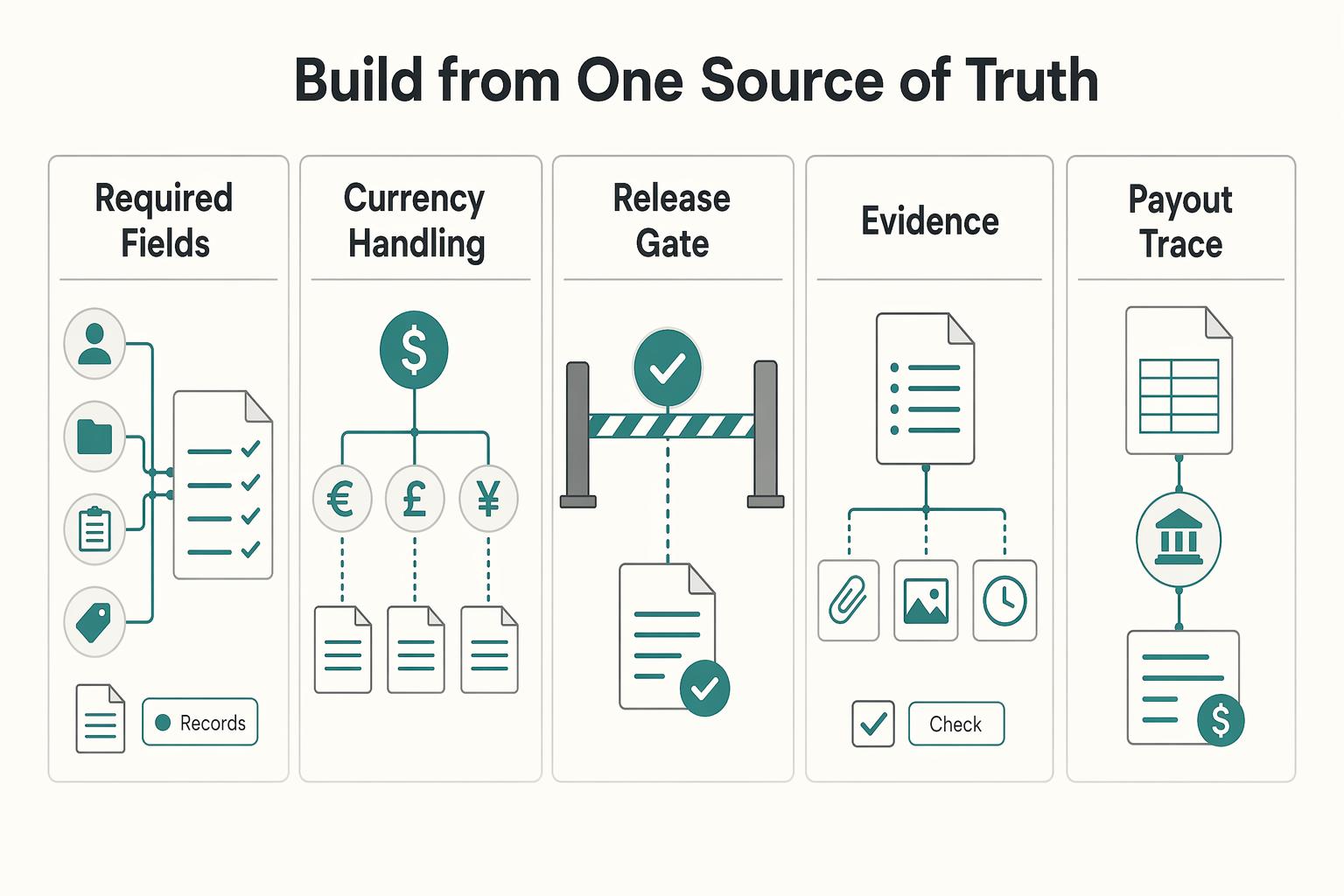
| Control area | Generic workflow | Compliant workflow |
|---|---|---|
| Required fields | Free-text invoice with basics only | Standard template tied to your required-fields checklist |
| Currency handling | Default currency copied across clients | Currency validated against contract and client billing instructions |
| Tax treatment | Added manually at send time | Reviewed per client and engagement before approval |
| Approval readiness | Follow-up questions handled in email threads | Approval can happen from one complete record |
| Audit traceability | Invoice lines do not map cleanly to work records | Each line maps to tracked time, task context, and supporting artifacts |
The key test is simple: can someone move from an invoice line to proof without asking you to reconstruct the month?
2. Make compliance review a pre-send gate#
Use a short pre-send gate on every invoice so the critical checks happen before delivery. You do not need a complex system, but you do need a repeatable checklist tied to the client record.
| Pre-send check | What to confirm or save |
|---|---|
| Client tax identity | Confirm using the verification process your jurisdiction, adviser, or client finance team requires |
| Required invoice fields | Confirm required invoice fields for your location and the client's approval workflow |
| Cross-border wording | If needed, leave the wording unresolved until the required review is complete, then finalize the approved text |
| Verification trail | Save billing instructions, contract terms, relevant tax correspondence, and the approved invoice version with the invoice record |
Before sending, ask one direct question: can you show why this client was billed this way, in this currency, with this tax treatment, using records you still have? If not, fix the file first.
3. Turn tracked time into invoice lines before scope drift turns into conflict#
Map tracked time to invoice lines while work is still in progress, not after delivery. Group entries by deliverable or milestone, roll up task-level support beneath each line, and compare actual hours or spend against the agreed budget. If your tool flags high burn rates or near-overrun conditions, use those alerts early.
Have a consistent change-order message ready before you hit submission. For example: "Work is tracking above the original estimate. Please approve the revised hours, fee, or scope limit before we continue." That is safer than burying extra time in a later invoice.
Automation should support a correct draft, not replace it. Define a reminder cadence in your process (pre-due, due-date, post-due), tie late-fee handling to signed contract terms, and keep one exception path for disputes: pause escalation, log disputed line items, set a response deadline, and continue collection on the undisputed portion.
One final control: if you handle client funds or retainers that must remain separate, do not treat them as ordinary revenue in the invoice trail.
For another systems-focused workflow example, see The Best Bug Tracking Software for Development Teams.
Pillar 3: How to Run a Weekly Operating Review with Your Time Data#
Once your records are reliable, use them as an operating dashboard each week, not just a billing archive. Run one repeatable review that helps you compare clients, shape offers, plan capacity, and communicate progress clearly.
- Build a client comparison view, not just a billing report.
Use one closed period and apply it to every client in the same way. You can treat this as an Effective Hourly Rate view, but keep it practical: one side-by-side picture of revenue, delivery time, support time, and scope behavior. Before comparing, clean tags and task labels so your inputs are consistent.
| Review line | High-touch client | Low-touch client |
|---|---|---|
| Revenue invoiced | Period total | Period total |
| Billable delivery time | Period total | Period total |
| Non-billable meetings/admin/rework | Period total | Period total |
| Scope changes (approved vs absorbed) | Period total | Period total |
| Decision this period | Keep, reprice, narrow scope, or exit | Keep, reprice, narrow scope, or exit |
- Turn repeated work into a productized-offer workflow.
Cluster similar projects first, then map your usual effort into time bands from your own tracked history. Next, set scope boundaries in plain language: what is included, what triggers change, and what assumptions must hold. Then run a simple price-testing loop on new deals, review outcomes, and refine. Keep this aligned with your positioning, because clients can push back on pricing that feels too high if your market narrative does not support it. Pair this with your Value-Based Pricing: A Freelancer's Guide.
- Run forecasting as a weekly operating cadence.
Pick one review day and update only three inputs: historical delivery time for comparable work, active pipeline with real commitment signals, and available capacity for your planning window.
- Historical delivery time: pull from verified past projects
- Active pipeline: use proposals or approvals you can validate
- Available capacity: use your next planning window once commitments are confirmed
If an opportunity is only verbal, keep it in upside, not plan.
- Send transparency reports that support renewals.
For ongoing clients, send a short summary with three blocks: outcomes delivered, time allocation by initiative, and upcoming risks or decisions that need client input. This keeps reporting useful and leadership-oriented without sounding defensive. Keep the summary tied to deliverables and approved scope changes so the narrative and record stay aligned.
You might also find this useful: How to Use Harvest for Time Tracking and Invoicing in a Small Agency.
Your Time Is Your Inventory. Protect It.#
Your time is billable inventory, so your tracking system should run your billing operations, not just log hours. Treat each entry as something you may need to bill, defend, and use for decisions later.
- From chore to defense
Track time as evidence, not memory. Clear, project-linked records are a first defense against scope creep and invoice errors, especially when billed time matches completed work. Weekly habit: Run a short end-of-week review to fix vague entries, add missing project links, and flag anything you cannot support with a file, message, or task record.
- From anxiety to control
Invoicing gets risky when you rebuild it from scattered notes. A tool that supports both live timers and end-of-day manual entry gives you a practical backup when your day changes fast. Weekly habit: Before sending invoices, compare tracked time to delivered work and correct mismatches first.
- From timer to billing engine
Logging alone is not enough if the billing step still breaks down. Prioritize software that helps you move from tracked time to paid invoices with low friction. Weekly habit: Complete a full invoice workflow regularly and confirm your records, invoice draft, and payment follow-up stay connected without manual patchwork.
If you are still choosing software, ignore list position and brand noise. Use capability criteria: defensible records, invoice reliability, compliance support you can verify, and decision-grade reporting. Reviews are useful, but only as one signal. For example, Capterra says it analyzed 35,879 verified reviews (including 24,893 from small businesses) and also notes sponsored profiles.
Implementation checkpoint
- Standardize now: entry detail standards, project naming, weekly record review, invoice pre-send checks, and the reports you use for pricing and renewals.
- Verify separately: jurisdiction-specific invoice and tax requirements before you finalize the billing workflow.
Once this is stable, use your data for the next two operating moves: improve pricing and improve how you run your week. Start with Value-Based Pricing: A Freelancer's Guide, then tighten execution with How to Manage Your Time Effectively as a Freelancer. For country/program-specific coverage checks, Talk to Gruv.
Frequently Asked Questions
How do I create an audit-proof timesheet?
No timesheet is truly audit-proof, but you can make your records easier to defend. One practical format is A-P-T: name the Action, the Project, and the Task or proof point it connects to. A solid entry includes what you did, which client or project it belongs to, what task or deliverable it ties to, and the date plus exact time spent. If you cannot match the entry to a file, approval, message, or task record later, it is probably too vague.
How should I judge the best time tracking software for billable hours?
Do not start with brand reputation. Score each tool on fit for your size and priorities, integration with the systems you already use, invoicing support, reporting depth, and export readiness. Before you commit, test one real month of entries and confirm the export keeps at least the date, duration, client, project, and notes intact.
Can time tracking software help with tax compliance?
It can support your records, but it is not the legal decision by itself. For the U.S. FEIE physical presence test, the IRS looks for 330 full days in a 12 consecutive months period, and a full day means 24 consecutive hours from midnight to midnight in a foreign country. You still need to report the income on your U.S. return, your tax home must be in a foreign country, and the 2026 FEIE maximum is $132,900 per person, so use your logs as evidence and the IRS Interactive Tax Assistant as a checkpoint.
What about international clients, PE risk, and VAT?
Your logs can help show where work happened and what services you performed, which may help when a qualified adviser reviews cross-border tax or invoicing questions. Keep the software choice practical: make sure it supports your invoicing workflow and preserves clean exports if questions come up later. Because PE and VAT treatment is jurisdiction-specific, confirm your obligations with a qualified local adviser before you rely on any single setup.
How should I track hours for a retainer agreement?
Track a retainer the same way you track hourly work, then review it against the fixed fee every month. Watch three margin drags in particular: extra revisions, unplanned meetings, and admin or follow-up that never made it into scope. If one of those keeps climbing, use reporting to reset scope before renewal instead of discovering the problem after your margin is gone.
Should I use a free time tracking tool?
A free tool is fine when your needs are still simple and you can export clean records. Upgrade when one of four things happens: you need invoice controls, recurring client reports, integrations that remove manual copying, or an export trail you would trust in a dispute. If you are rebuilding invoices by hand or patching together proof from different apps, you have already outgrown the free tier.
How much detail should I include in each time entry?
Include enough detail that someone else can understand the entry without your spoken explanation. A good shortcut is one concrete verb plus one specific deliverable or task, such as “revised landing page copy for Project X draft 2,” not “client work” or “marketing.” The usual failure mode is not under-tracking total hours, but using labels so broad that they cannot support an invoice, a write-off decision, or a renewal conversation.
Try a related tool
Researched and edited by the Gruv editorial team. Gruv builds cross-border billing, payouts, and finance-operations software for global businesses.
Sources
Includes 3 external sources outside the trusted-domain allowlist.
- dlcp.dc.gov/sites/default/files/dc/sites/DLCP/publicatio...trusted
- irs.gov/individuals/international-taxpayers/foreign-...trusted
- irs.gov/individuals/international-taxpayers/figuring...trusted
- scholars.law.unlv.edu/cgi/viewcontent.cgitrusted
- scholarship.law.gwu.edu/cgi/viewcontent.cgitrusted
- assignar.com/resourcesexternal
- capterra.com/time-tracking-software/s/small-businessesexternal
- casepulse.com/timekeeping-software-attorneysexternal
Educational content only. Not legal, tax, or financial advice.
Related Posts

Value-Based Pricing for Freelancers Under Real Payment Risk
Value-based pricing works when you and the client can name the business result before kickoff and agree on how progress will be judged. If that link is weak, use a tighter model first. This is not about defending one pricing philosophy over another. It is about avoiding surprises by keeping pricing, scope, delivery, and payment aligned from day one.
How to Manage Your Time Effectively as a Freelancer
Most freelancers struggle not because they work too few hours, but because they misallocate the hours they have—treating time as an infinite resource rather than a finite business asset with a real cost per unit. The solution is a three-layer operating system: a Time Budget Framework that commits hours to four categories before any client work is booked, a Weekly Operating Template that assigns those categories to specific calendar windows, and a monthly Admin Audit Checklist that reconciles invoicing, bookkeeping, and compliance records. Multi-client orchestration requires a WIP limit, dedicated client windows, and a capacity decision rule run before accepting new engagements. Together, these systems replace reactive decision-making with a repeatable structure that keeps delivery quality consistent, records audit-ready, and the freelance practice operationally durable.

The Freelance Payment Penalty: A Modeled Audit of Platform Fees, FX Spreads, and Payout Delays
The money rarely disappears through a single, easy-to-spot fee. The real loss is stacked. A marketplace takes its commission, a processor adds a charge for international cards, a bank or payment company converts the currency at a spread, a platform holds the funds before release, and a wire sheds a little to intermediaries on the way in. Each layer looks defensible on its own, but the worker feels the combined result as a smaller deposit and a later payday.