
Quick Answer
Use an internal teamspace for agency delivery and share a curated client portal with external guests. Keep scope versions, change requests and deliverable approvals together, with named owners and linked client confirmations. Separate client databases or configure Business/Enterprise page-level access without broader grants; filters and hidden columns are not access controls. Check the invited role and test unrelated links before kickoff, then remove access explicitly at the agreed trigger.
Beyond a Wiki: Why Your Agency Needs a System of Record#
If your client work lives in "notes mode," you will eventually spend time debating what was decided, where feedback landed, and which version people meant. A wiki helps your team remember prior decisions and explorations. A system-of-record approach makes it easier to trace what happened and keep work moving when scope, timing, or deliverables get fuzzy.
In practice, that means one place where decisions are easy to find, review requests are visible, and core project artifacts do not drift across docs, email, and chat. That does not make Notion a formal system of record. You can still structure your workspace that way if it holds the actual working pages and databases, not just reference notes.
Keep discussions attached to the deliverable page, use mentions to notify the responsible person, and keep a separate decisions log with dates and links. Notifications help people respond; they do not replace the approval record. Page history is useful for recovery within your plan’s retention limits, but an editable Notion page is not an immutable archive.
| Day-to-day work | Wiki behavior | System of Record behavior |
|---|---|---|
| Feedback | Notes are archived after the fact | Feedback lives on the working page so revisions and mentions stay attached to the work |
| Approvals | Someone says "approved" in chat | Approval is captured on the project page or database item your team actually uses |
| Change requests | Extra asks get buried in conversation | New asks are added to a dedicated project location and reviewed against the current scope |
Use this checkpoint: can you open one client area and find the current brief, latest deliverable, and revision trail without searching three tools? If not, you are likely still using a wiki-first setup. The usual result is scattered notes, inconsistent steps, and uneven quality.
Once you decide the workspace should hold the real record, the next job is setting boundaries so each client area stays clear, contained, and easy to run.
For a step-by-step walkthrough, see A guide to using Notion 'Databases' for freelance project management.
Separate Client Areas With Explicit Permissions#
Choose structure based on mistake impact, not convenience. If one accidental share would materially hurt a client relationship, default to isolation.
A workspace contains your agency’s people and content; a teamspace organizes work for a group inside it. Workspace members can have access through teamspaces and groups. External guests receive access to individual pages and their subpages. Use teamspaces for the internal delivery team and share a curated client portal with guests. These are different permission scopes, not interchangeable names. See Notion’s role definitions.
When each model is operationally safe#
Neither model is automatically safe. The safer option is the one that matches your team's real habits and limits the damage of an access mistake.
| Decision factor | Centralized Client Hub | Separate client areas |
|---|---|---|
| Operationally safer when | Client data sensitivity is lower and a small, disciplined team manages structure centrally | Client data sensitivity is higher, clients are higher-stakes, or many people will touch setup over time |
| Typical failure mode | Cross-client mixing from misplaced pages, broad sharing, or weak boundary discipline | Inconsistent setups between clients, duplicated structures drifting apart, or work happening outside the intended client area |
| Admin overhead tradeoff | Less upfront setup, more ongoing boundary discipline | More upfront setup, clearer day-to-day separation |
| Cross-client reporting tradeoff | Easier to run all-client views in one place | Usually requires a separate internal reporting layer |
| Breach blast-radius tendency | One structural mistake can expose more than one client area | Mistakes are more likely to stay inside one client area if separation is real |
| Better fit | High-volume, lower-sensitivity service delivery with strong operators | Higher-sensitivity, higher-scrutiny, or higher-trust engagements |
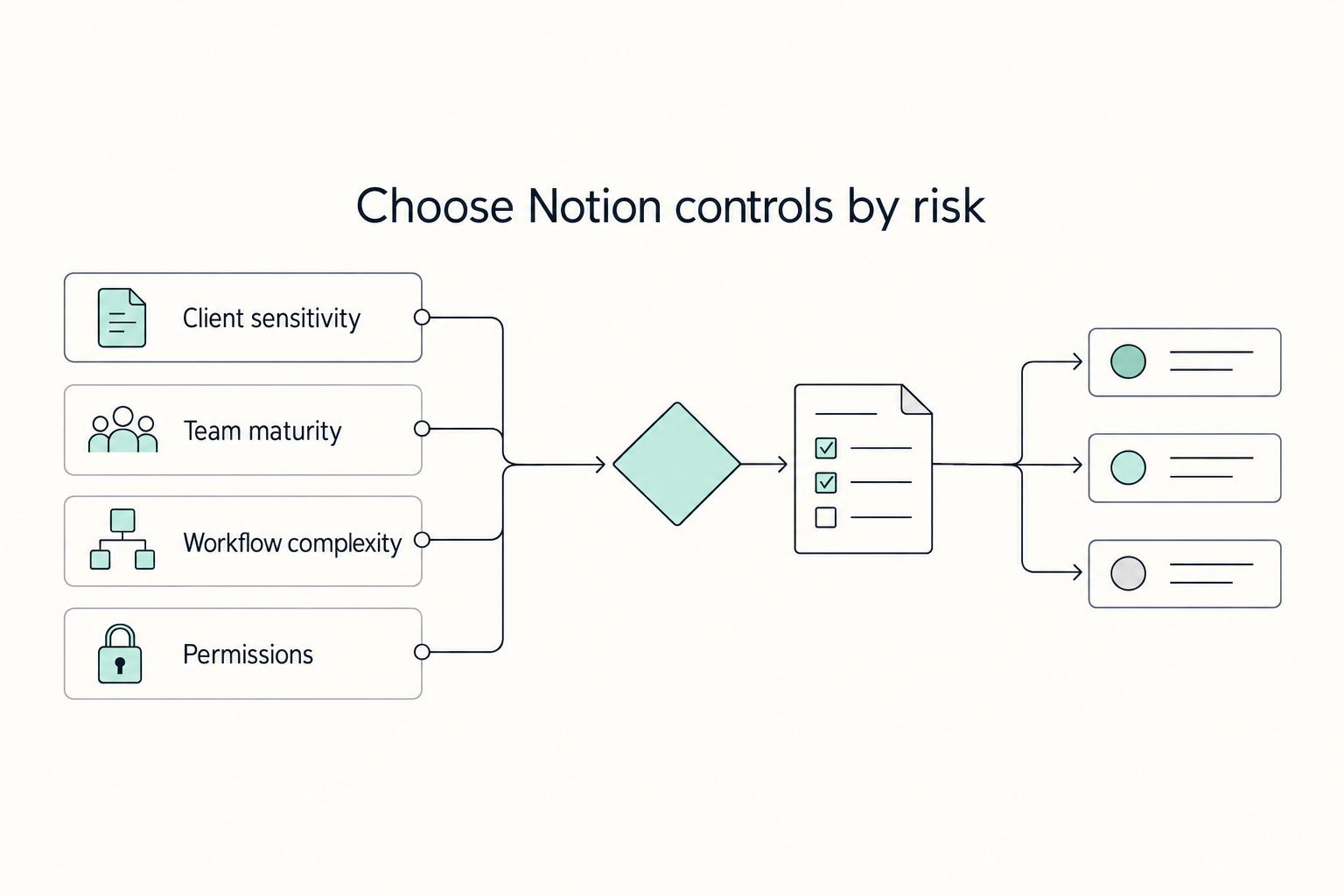
Use a four-part decision check#
Start with client sensitivity. For confidential strategy, pricing, contracts or personal information, separate client pages and databases from other engagements and internal notes. A separate teamspace can help organize the internal team, but its name alone provides no boundary. Keep passwords and API secrets in a dedicated credential manager rather than a client portal.
| Check | Signal | Takeaway |
|---|---|---|
| Client sensitivity | Confidential strategy, pricing, contracts or personal information | Separate client content and explicitly restrict access |
| Team maturity | People routinely create content in the wrong place, share links loosely, or skip naming rules | Do not rely on manual discipline alone |
| Workflow complexity | Operations depend on frequent cross-client resourcing views | A centralized model can be easier to run, but only with tight boundary governance |
| Permission management | Access will be changed by many hands | Isolation is usually the safer operating posture |
Then check team maturity. If people routinely create content in the wrong place, share links loosely, or skip naming rules, do not rely on manual discipline alone.
For cross-client resourcing, maintain an agency-only reporting layer. A database view filtered to Client A does not restrict access to Client B’s records if the guest has access to the underlying database. Hidden properties are also presentation choices. Use separate client databases, or Business/Enterprise page-level access rules on the source database with no broader grant that exposes all its records.
If many people change permissions, assign one internal access owner per client and require a check after moves, new links and invitations. With Business or Enterprise, private teamspaces are invisible to people who have not been added. Closed teamspaces remain discoverable by workspace members, and default teamspaces include all current and future workspace members. Do not make confidential client areas default teamspaces. Teamspace controls explain those differences.
Standardize with one Client OS Template#
Do not build each client area from scratch. Use one Client OS Template and apply it every time with the same required parts:
| Template part | Included items |
|---|---|
| Core records | client home; active projects; deliverables tracking; decisions log; change-request log; contacts/owners; archive |
| Access baseline | default visibility; who can manage sharing; naming rules that make boundaries obvious |
| Setup checklist | create from template; assign internal owner; review access list; run a least-privilege test; record who approved setup |
A template standardizes the records, but the copy still needs its own owner and access check. Duplicate into the intended client area, inspect inherited permissions, and remove sample links to other clients. If the template includes a Notion form, create a new form for your copy so submissions do not go to the original creator’s database.
Once the client boundary is checked, build the portal around scope, requests and approvals. For the commercial decision behind a scope change, see Value-Based Pricing: A Freelancer’s Guide.
Build the Client Portal Around Scope, Change Requests, and Sign-Offs#
Your portal should answer three questions quickly: what is in scope, how to request a change, and what is approved. Keep it simple on purpose so you get fewer ambiguous requests, cleaner approval records, and clearer handoffs between your team and the client.
| Portal part | Role | Key contents |
|---|---|---|
| Command Center | Client's first stop | current status; next key date; primary contacts; direct links to scope, change requests, and sign-offs |
| Contract and SOW Vault | Single source of truth for scope | signed contract; one clearly labeled current SOW; prior SOW versions archived by date or version label |
| Change Request database | Each request ends in a clear decision | request title and plain-language description; business reason; desired timing; related deliverable or scope area; impact note; decision and effective date |
| Deliverable Sign-Off ledger | Approvals are easy to verify later | deliverable name; linked project/SOW item; revision submitted; submission date; reviewer; approval states; acceptance evidence |
Use four working parts in one flow: Command Center, Contract and SOW Vault, Change Request database, and Deliverable Sign-Off ledger. Adjust labels and properties to match how your team works, while keeping client-visible records separate from internal cost, staffing and negotiation notes.
Your Command Center is the client's first stop. Show current status, next key date, primary contacts, and direct links to scope, change requests, and sign-offs. If a new stakeholder still asks where those items live, trim the page until the path is obvious.
Keep the signed contract and accepted SOW as versioned reference files, with one clearly labeled current version and earlier versions retained. Link each approved change to the affected SOW version. Keep the executed files in your controlled document store as well: locking a Notion page prevents accidental edits, but a person with edit or full access can unlock it. Page history and an Enterprise audit log can support investigation; neither makes the portal a permanent, tamper-proof contract archive.
Define the information each Change Request needs and who completes it. Calling a database property “required” does not enforce completion in ordinary table edits. For intake through a Notion form, mark the client questions Required in the form builder; have the agency review impact and decision fields before changing the request’s state. Web-link forms can accept anonymous submissions, so they are not by themselves proof of a named approver’s consent. Form setup covers required questions and sharing.
| Information needed for review | Owner | Decision enabled |
|---|---|---|
| Request title and plain-language description | Client | Clarifies what is being requested |
| Business reason | Client | Distinguishes priority from nice-to-have |
| Desired timing | Client | Surfaces scheduling pressure early |
| Related deliverable or scope area | Agency | Shows what current work is affected |
| Impact note (fee, timeline, effort) | Agency | Frames whether this fits current scope |
| Decision and effective date | Agency + client approver | Records approve, decline, or defer |
For the Deliverable Sign-Off ledger, use a parallel spec so you can verify approvals later:
| Spec area | What to track |
|---|---|
| Core properties | Deliverable name, linked project/SOW item, revision submitted, submission date, reviewer |
| Approval states | Draft, Submitted, Changes Requested, Approved, Superseded |
| Acceptance evidence | Authorized approver, exact deliverable version, approval date and linked confirmation accepted under the contract; an agency-edited status alone is not client consent |
For example, a client asks for an extra landing page under SOW v2. Record CR-014, link the affected deliverable, and propose an assumed $600 fee plus two working days. Keep it Proposed until the named client approver accepts those terms through the agreed approval channel. Then link that confirmation, set the effective date and reference SOW v3. A comment such as “looks good” on a design draft is not automatically approval of the extra fee or schedule.
- Command Center is first in hierarchy, with scope, changes, and sign-offs one click away.
- Client-facing databases support the intended actions without exposing other clients or internal records; editable property values are not mistaken for protected approval fields.
- Navigation labels are plain-language, not internal shorthand.
- Approved changes link to SOW versions, and approved deliverables link to acceptance evidence.
Once this flow is clear, move to access-control mechanics in the next section. We covered related workspace design tradeoffs in Notion vs. Coda: which is better for building internal tools?.
Grant, Test and Remove Client Access#
Treat client access as a controlled process, not a one-time invite: add clients as Guests, not Members, then verify what they can actually see before you consider onboarding complete.
The current sharing documentation distinguishes Full access, Can edit, Can comment and Can view. Full access includes resharing; Can edit does not. For databases, Can edit content preserves the database’s property definitions and views but still lets the user change record content and property values. It does not make an Approved status or fee field read-only. Keep controlled decision records in an agency-managed area, with client confirmation linked from the shared record.
Choose the access type with the smallest blast radius#
Start with one client entry page and inspect the permissions of its contents. Subpages normally inherit access, while direct shares can add another route. Notion applies the broadest access a person has, so reducing one grant will not cancel a broader grant from a parent, group or workspace.
| Setup choice | Exposure risk | Permission control | Common misconfiguration path |
|---|---|---|---|
| Guest invited to one curated client entry page | Usually easier to contain, provided its subpages and linked records are also checked | Tightest to review when all client access starts from one page | You skip visibility testing and assume sharing inherited correctly |
| Guest invited across multiple scattered pages | Medium, because access is harder to track | Fragmented and harder to audit later | Old shared pages stay exposed after scope or staffing changes |
| Member added to the workspace | Potentially broader access through workspace and default teamspaces | Broad and easier to misjudge over time | An external contact is treated like internal staff and sees more than intended |
Use Can comment for a reviewer who needs to discuss work, or Can view for someone who only reads. Give editing rights only where the workflow requires them. Business and Enterprise also offer database Can create access: people can submit new records without seeing others unless separately granted access. For existing records, open the source database → Share → Page-level access → Add a new rule, select a person or Created by property and an access level, then Create rule. Those rules apply across views, but a broader database grant still wins. Do not combine a restricted client view with a full-database invitation.
Onboard access like a controlled release#
- Verify identity. Confirm the exact email, the client’s authorized approver and the internal access owner.
- Inspect the entry page. Open Share, keep general access restricted to invited people, and check parent access, subpages, linked databases and any published web links.
- Invite the intended guest. In Share, enter the client email, choose the permission and review the role before Invite. Hover over the email to check the invitation details. Workspace policies, domains and guest limits can affect the result; an Enterprise restriction on guest invitations can cause an invitation to add a member instead. Resolve that with the workspace owner rather than accepting a broader role.
- Grant only needed actions. Prefer Can comment or Can view for reviews; reserve Full access for someone authorized to manage sharing.
- Test the actual client account. With the invited person or an authorized test guest, open the portal and permitted records, then try a direct link to an internal page and another client’s record. Both unrelated links should deny access. Test a submission and check which properties the client can change.
- Explain the workflow. Send the portal link, expected actions and agreed request/approval channels through your normal onboarding process.
- Record access ownership. Log email, role, shared pages, permission level, grant date, internal owner and removal trigger.
For a two-client check, invite Client A only to Portal A. Confirm A can comment on its submitted design, cannot open Portal B, and cannot read the agency-wide requests database from a copied link. If B’s record opens, inspect broader grants and replace the shared database route with separate client records or correctly configured page-level rules. Repeat the check after moving pages or changing sharing; a successful invitation does not prove the boundary.
Offboard access as part of project closure#
Track sign-off, handover, access removal and archival as separate closure checks. Set the removal trigger before kickoff. Revoke a departed or unauthorized stakeholder promptly even if commercial sign-off is still pending; the agency can keep resolving the outstanding work with the current authorized contact.
- Record final sign-off or the outstanding issue. Link the accepted deliverable version and confirmation; assign an owner to any unresolved obligation.
- Complete the agreed handover. Confirm which files and records the client receives, obtain acknowledgment where required, and retain the agency’s agreed record copy.
- Remove external access. For a guest with no remaining engagements, a workspace owner or membership admin can use Settings → People or Members → Guests and remove the guest from the workspace. If the guest still needs another project, remove only this project’s page shares and inspect separately shared subpages, database records and public links.
- Verify removal, then archive. Have the former guest’s permitted account or an authorized test account retry the old links. Disable unintended published links and keep the internal archive restricted. Archiving or moving the portal alone does not revoke every direct share.
Review guest access periodically and after staffing changes, pauses or closure. Keep approved exceptions with an owner and expiry or review date. Removal cannot recall copies already exported or downloaded, so agree document handling and retention expectations separately.
For assigning content owners and review stages within the same boundary, see How to Create a Content Workflow in Notion for a Marketing Team.
Keep One Client Hub With Explicit Access and Regular Review#
You get more consistent outcomes when your Notion setup works as one operating record, not a scattered set of pages, chats, and inbox threads. Put client requests, approvals, and team process knowledge in one hub, then keep ownership and access explicit.
In practice, confidence comes from repeatable controls: modular pages and databases, intentional permissions, and regular review. When information is fragmented, teams spend more time searching and are more likely to make avoidable mistakes. Keep operational content separate from evergreen reference content, and review for stale pages, bottlenecks, and outdated access.
| Area | Ad hoc workspace | Managed client workflow |
|---|---|---|
| Where work context lives | Split across messages and scattered docs | Centralized in one client operating hub |
| Access control | Visibility grows inconsistently | Permissions are set deliberately and rechecked |
| Scope and approvals | Changes and approvals are hard to trace | Change requests and sign-offs are captured in the client record |
| Knowledge continuity | Process lives in people's heads | Operational know-how is documented in reusable modules |
Use this before you call the setup complete:
- separate each client’s content and test permissions, including underlying databases
- log each change request against the current SOW
- link each deliverable sign-off to the authorized approver and exact version
- enforce your guest-only client access policy consistently, and verify access after each invite
Next, refine the databases and page structure so those checks are repeatable: A Guide to Notion for Freelance Business Management. For plan features and administrative controls, use Notion’s teamspace documentation and your workspace owner.
Frequently Asked Questions
How should you give a client access without widening scope by accident?
Share the curated client portal through Share with the exact external email and the minimum permission needed, usually Can comment or Can view. Confirm that the invitation is for a guest, inspect inherited and direct shares, and test access to both intended and unrelated records. A filtered view or hidden column does not restrict the underlying database. Record the access owner and removal trigger.
Guest vs Member: which choice deserves more caution?
Workspace membership deserves more scrutiny because access can come through groups and default teamspaces, which include all current and future members. Guests receive access to individual pages and their subpages. Use guests for ordinary external client reviews, and check the actual invitation role: guest limits, domain settings or Enterprise policies can change what an invitation permits.
Should you use a client teamspace or just a client portal page?
Start with a curated portal page for the external guest and use a teamspace to organize the internal delivery team when needed. Open teamspaces let workspace members join; Closed teamspaces are discoverable but require an invitation to join; Private teamspaces are visible only to added people and require Business or Enterprise. Guest page sharing still needs its own checks. Do not make a confidential client area a default teamspace.
Can a teamspace be truly hidden from everyone else in the workspace?
A Private teamspace is hidden from workspace members who have not been added, and is available on Business and Enterprise. Closed teamspaces remain discoverable even though joining requires an invitation. Review workspace-owner and organization controls, direct page shares and public links as well; the teamspace setting does not establish that no other access route exists.
What should your client portal include to keep scope and approvals clean?
Include the current contract or SOW, a change-request route, a deliverable approval record and handover/closure information. Link decisions to the exact version and named authorized approver. Follow the contract’s approval mechanism before starting an out-of-scope request; changing a database status yourself does not establish client acceptance.
How should you handle SOW revisions so the record stays defensible?
Create a clearly named draft for a major revision, retain the previously accepted version and link the accepted replacement to its change request and confirmation. Record which version was approved, by whom and when. Preserve executed documents outside the editable portal according to your record policy; page locking can be undone by editors and is not an immutable evidence control.
Can you convert an existing client area into a teamspace later?
Yes, if the page already belongs to a teamspace, you have Full access and the required teamspace-owner or workspace-owner authority. It cannot be a database or a page inside a database. A workspace setting can reserve creation to workspace owners. For an eligible page, hover over its name in the sidebar and choose ••• → Turn into teamspace, then review the new teamspace and page permissions before client use.
Try a related tool
Researched and edited by the Gruv editorial team. Gruv builds cross-border billing, payouts, and finance-operations software for global businesses.
Sources
Includes 2 external sources outside the trusted-domain allowlist.
Educational content only. Not legal, tax, or financial advice.
Related Posts

Value-Based Pricing for Freelancers Under Real Payment Risk
Value-based pricing starts with the client’s expected benefit and willingness to pay. It still needs a deliverable, scope and payment agreement you can perform. Use a discovery phase when the benefit or effort is too uncertain to support a defensible quote.

A Guide to Notion for Freelance Business Management
If your workspace feels busy but fragile, you do not need more pages. You need one connected system. Treat your freelance business like a business-of-one and use Notion as the control layer that connects client decisions, delivery, and billing in one place.
How to Create a Content Workflow in Notion for a Marketing Team
If your team is chasing updates across chat, docs, email, and a separate invoice sheet, the issue may be less about effort and more about having no single operating record. Ownership can get fuzzy, approvals can disappear into comments, and it becomes hard to see a clean line from brief to publish to billing.