
Quick Answer
Build one monitoring workflow around saas status pages, then connect it to your outage routine. Start with a dependency audit, flag Tier 1 tools, and track official incident signals in a single view instead of scattered tabs. When an alert appears, verify one blocked business action, record the vendor update time, and communicate only confirmed impact. That sequence helps you protect delivery quality and payment continuity during outages.
Your Business Runs on SaaS. Here's How to Stop It From Breaking.#
To keep SaaS outages from derailing your business, audit the tools that can stop work, monitor their status signals in one place, and use a short response routine when something fails.
When a core SaaS tool goes down, you do not just lose convenience. You risk operational delays and a day that turns into reactive support instead of planned work. This guide shows you how to prepare before an incident, make cleaner decisions while it is happening, and communicate credibly after it.
The shift is simple. Stop treating SaaS status pages as something you search for after a failure, and start treating them as operating signals. A status page shows the real-time state of a product's services and components during an incident. That matters because outages rarely stay neatly contained. In 2025, major cloud incidents were a reminder that one upstream problem can disrupt many vendors at once.
Your real checkpoint is not "is the tool up?" Ask, "Which component is affected, and does that touch client delivery, payments, messaging, or access?" Component-level updates matter more than a generic green homepage. They help you decide whether to pause work, switch to a backup, or send a client note now. Miss that, and the failure mode is predictable: your inbox becomes the incident channel, with clients asking some version of "is it just me?"
By the end of this article, you will have a repeatable way to stay ahead of that. First, you will map the tools that can actually stop work or disrupt critical workflows. Next, you will put their status signals in one place so you are not checking a pile of tabs during a problem. Then you will turn that visibility into a short response routine you can use under pressure. The goal is not to make outages disappear. It is to make your decisions faster, calmer, and easier to repeat.
Why Your SaaS Stack is Your Biggest Point of Failure#
Your biggest SaaS risk is operational: when login, billing, or dashboard issues block delivery, delay payment, or make you look unprepared before you even know what failed.
For you, status pages are decision tools, not just transparency pages. Clients care about outcomes, not which vendor broke first. Trust usually drops when delays and silence stack up.
The dependency risk is also shared across your stack. A major AWS us-east-1 outage on October 20th, 2025 reinforced a pattern many operators see: upstream failures can cascade into multiple SaaS products at once. So even tools that look independent can fail together.
When you read a status page, use this order:
- Current status: decide whether to pause, retry, or continue carefully.
- Component-level impact (when shown): confirm whether the affected part is the one you rely on, such as login, dashboard, billing, or API.
- Incident timeline/history (when shown): judge whether the issue is new, ongoing, or marked resolved.
That sequence prevents a common mistake: treating an overall "operational" label as proof your workflow is safe. User-facing failures can still hit login, dashboard, or checkout flows even when core servers appear online. Match the impacted component to the exact step that blocks your work.
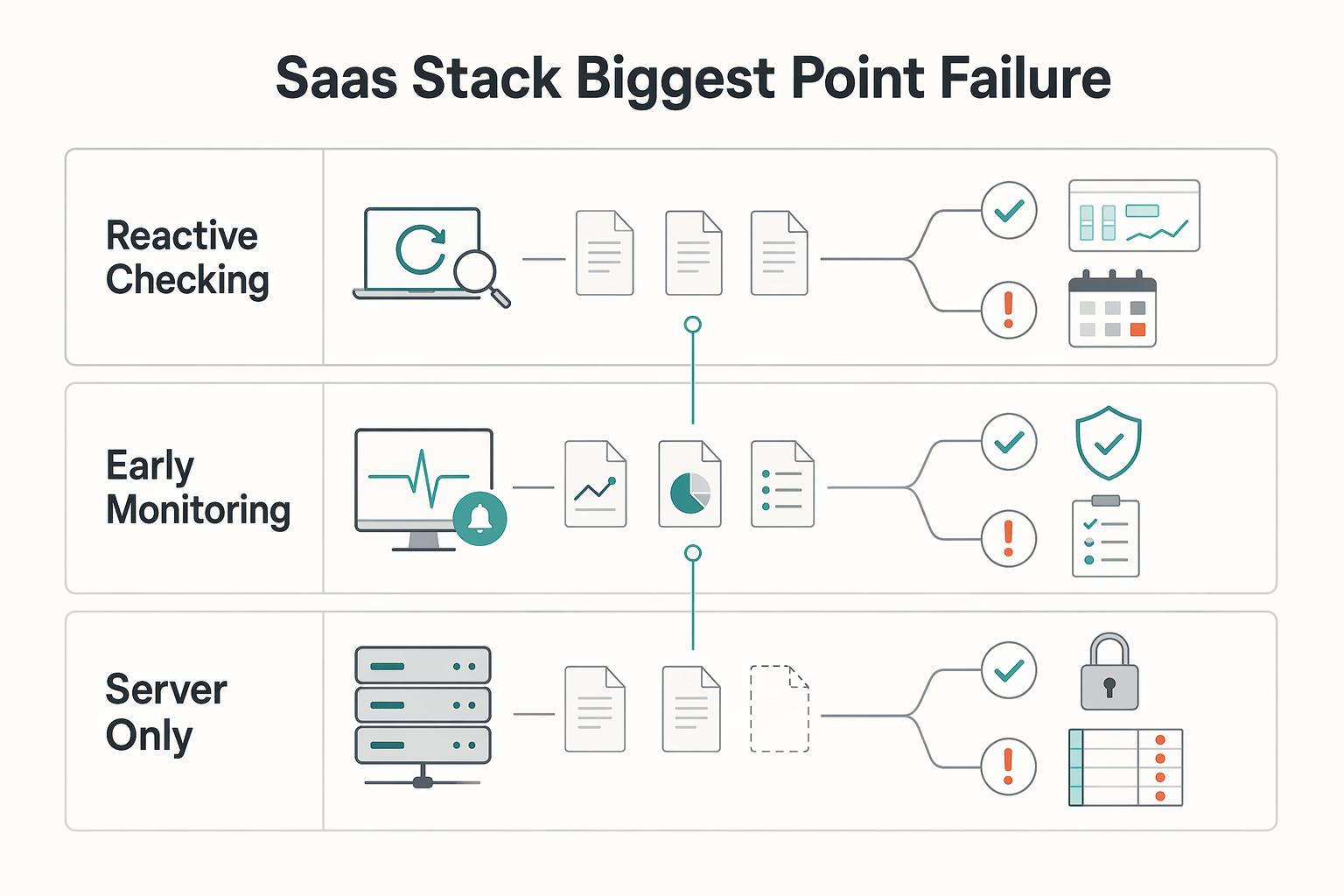
| Approach | What you do | What usually happens |
|---|---|---|
| Reactive checking | Open status pages only after client complaints | You lose time confirming impact, and your inbox becomes the alert channel |
| Early monitoring | Track official status signals and key user journeys in one place | You detect impact earlier and communicate before confusion spreads |
| Server-only view | Treat "online" as "working for users" | You miss failures in login, billing, or dashboard experience |
You do not need a huge observability stack, but doing nothing is still a decision. The practical middle ground is simple: identify the tools that can stop delivery or cash flow, then monitor those signals from the outside. That sets up the next step: audit your stack and choose what needs active watching.
Related: A Guide to Internationalizing and Localizing Your SaaS Product.
Step 1: The Dependency Audit - Map Your Mission-Critical Tools#
Start by classifying your tools by business impact, not by how often you use them. Your goal is a working Single Point of Failure inventory that shows what can stop delivery or cash flow, who owns each tool, and what backup you can use.
Use this quick tiering guide so you place each tool consistently:
| Tier | Business impact if down | Workaround availability | Owner/contact |
|---|---|---|---|
| Tier 1 | Work stops, revenue is blocked, or clients lose access to something critical | No practical workaround, or only a short manual stopgap | Person who detects issues first and can take immediate action |
| Tier 2 | Work slows down or becomes messy, but you can still deliver for a while | Manual workaround exists, but costs time or quality | Person who can switch to the backup process |
| Tier 3 | Disruptive but low immediate impact on client delivery or cash collection | Easy to pause or replace temporarily | Person who can defer without creating confusion |
For each app, ask: "What stops if this is unavailable?" and "Can I still deliver or get paid another way?" Those two answers usually tell you the right tier.
Build your single point of failure inventory#
Create a sheet with these minimum columns:
| Field | What to include |
|---|---|
| Tool | List each app in the inventory |
| Business function | Note what the tool is used for |
| Tier | Classify the tool by business impact |
| Official status page | Record the official vendor status page |
| Backup option | Record the backup you can use |
| Internal owner | Record who owns the tool internally |
These six fields are enough to turn scattered subscriptions into a usable system. If a Tier 1 tool has no official status page recorded or no backup option, treat that as a priority gap. For mission-critical services, keep backup providers pre-configured.
As you build the sheet, open each status page URL and confirm it is the official vendor page. Where available, note the components that matter most to your workflow, such as login, dashboard, billing, and public APIs.
Map the shared dependencies behind your core apps#
Also map upstream providers behind each Tier 1 and Tier 2 tool. At minimum, include third-party dependencies like payment and email APIs. If a vendor discloses them, also capture shared infrastructure such as cloud hosting or authentication services.
This step matters because user workflows can still break even when a provider's main service appears online. Shared upstream dependencies can create concentration risk across multiple core tools.
Before moving to monitoring setup, confirm you have:
- every Tier 1 and Tier 2 tool listed
- an official status page for each tool
- one internal owner for each tool
- one backup option for each Tier 1 tool
- upstream dependencies mapped for core apps
For a step-by-step walkthrough, see A Guide to Product-Led Growth (PLG) for SaaS Startups.
Step 2: Building Your Mission Control - Monitor All Your Tools in One Place#
Manual tab-checking does not scale. Build one monitoring workflow that watches your key status signals in one place, routes alerts reliably, and gives enough context to decide whether the issue is vendor-wide, tenant-specific, or likely inside your own setup.
This matters because blind spots are common in SaaS delivery: users can feel slowness or failed logins while internal dashboards still look healthy, and third-party dependencies make root cause harder to see. In modern stacks, one transaction can pass through dozens of services, so monitoring only individual vendor homepages leaves gaps.
| Monitoring approach | Source coverage quality | Alert routing options | Noise control | Incident context depth |
|---|---|---|---|---|
| Manual vendor-page checking | Low. Depends on memory and availability; shared dependency issues are easy to miss. | Limited. Usually page-by-page subscriptions, if any. | Low. Scattered emails or no alerting discipline. | Low. You only see what each vendor posts, when you happen to check. |
| Aggregator centered on official status pages | Medium. Centralized visibility across many services, but still limited to vendor-published updates. | Medium to high. Route to email and team chat where supported. | Medium. Filter by Tier 1 and Tier 2 services to keep signal high. | Medium. Good for declared incidents and history, weaker for undeclared user-impact issues. |
| Aggregator plus your own synthetic/API checks on critical flows | High. Combines vendor reports with direct checks on your key journeys. | High. Service-level routing and severity-based routing where supported. | High. Alerts tied to business-critical paths stay more practical. | High. Better visibility when users are impacted before a vendor formally declares an incident. |
For most independent teams, start with the middle option, then add synthetic or API checks only for the flows that directly block delivery or revenue.
Implement in one pass#
| Step | Action |
|---|---|
| 1 | Choose an aggregator that can cover all Tier 1 and Tier 2 services from your audit |
| 2 | Import every Tier 1 and Tier 2 dependency, including upstream providers you rely on |
| 3 | Map each service to an alert destination so the right person sees the right signal |
| 4 | Test alert delivery on every route you configure |
| 5 | Store monitoring configuration in a durable place; if you manage infra as code, keep monitoring config there too |
Set alert governance before the first incident#
Use one dedicated Slack or Teams channel as your operations control point, not a mixed inbox. Keep naming consistent, for example #ops-status or #vendor-alerts, and require a standard message shape: service, component if known, severity label, tenant scope if known, and official incident link.
Define ownership and escalation now, in plain terms:
- Every monitored service has one owner.
- Every alert carries a severity label your team understands.
- Every alert has a clear next handoff: verify, monitor, or prepare client communication.
That keeps the channel operational instead of noisy and sets up the next step: your outage playbook in Section 3.
We covered this in detail in How to Build a 'Glocal' Marketing Strategy for Your SaaS Product.
Step 3: Triage, Diagnose, and Communicate in the First 15 Minutes#
Use the first 15 minutes to make decisions, not to wait. Your goal is to confirm business impact, assign clear ownership, and send one accurate client update when work is blocked.
Even short disruptions can hurt during peak hours. Start from your Tier 1 inventory: if one failed tool stops delivery, billing, file access, or client communication, treat it as a single point of failure.
Detect and triage first#
When an alert hits, run this in order:
- Confirm one critical action fails. Test the business action that matters most right now, for example login, invoice send, project file access, publish flow, or a core API call.
- Check Tier 1 impact. If revenue, delivery, or a hard deadline is affected, move to active triage immediately.
- Assign owners. Set one severity decision owner, one communicator, and one person watching vendor updates. If you work solo, still write these roles explicitly.
- Set escalation conditions. Escalate internally if client-facing work is blocked, if scope is unclear, local vs broad, or if multiple Tier 1 dependencies are affected.
Before external messaging, capture three facts: alert time, failed action reproduced, and affected service or services.
Diagnose on the official page#
Next, check the vendor's official status page and record these fields when available:
| Field | What to record |
|---|---|
| Affected components | Record the affected components when available |
| Scope of impact | Record the scope of impact when available |
| Workaround signals | Record workaround signals when available |
| Next update timing | Record the vendor-stated cadence or timestamp when available |
| Incident URL | Save the incident URL |
| Latest vendor-update timestamp | Save the latest vendor-update timestamp |
If a field is missing, mark it as "not stated."
Then compare vendor status with your own test result. If you can reproduce the failure but there is no vendor acknowledgment yet, note that internally in plain language: issue reproduced, vendor acknowledgment pending.
Communicate clearly, then decide wait vs switch#
Do a short internal checkpoint before messaging clients: confirm who decides severity, who sends updates, and who monitors changes. Clear authority prevents conflicting responses.
If client work is blocked, send an early modular update:
Subject: Service disruption affecting [function]
Impact: Describe what is blocked or delayed
Workaround: Manual option, alternate route, or note that none is available at the moment
Next update: The vendor's stated next update time, or the time by which you will provide your own update
Owner: [Your name]
Then choose: wait for recovery or switch to backup. Base that choice on your Tier 1 inventory and actual fallback readiness.
| Situation | Wait and monitor | Switch to backup |
|---|---|---|
| Impact scope | Partial issue; core work continues | Tier 1 task is fully blocked |
| Workaround | Usable temporary workaround exists | No workable temporary path |
| Backup readiness | Backup is not preconfigured and tested | Backup is preconfigured, tested, and accessible |
| Time/risk tradeoff | Switching creates more confusion or rework than waiting | Waiting costs more time and blocks delivery or revenue |
An alternative tool on paper is not true redundancy. For each Tier 1 dependency, preconfigure and test fallback access before the next incident.
Related: The Best Customer Support Software for SaaS Businesses.
Your Practical System: Audit, Monitor, Act, and Keep It Current#
You now have a practical system: audit, monitor, and act. It will not remove SaaS dependency risk, but it lowers the chance that one outage turns into a missed deadline, a delayed $15,000 payment, or avoidable trust damage.
- Audit: Keep a current Single Point of Failure inventory that classifies each tool by revenue criticality and links to its official status page. Each time you add, replace, or retire a tool, update that record and confirm whether mission-critical tools have a preconfigured backup with an alternative provider.
- Monitor: Run one unified view of critical vendor status pages, with alerts sent to a dedicated Slack or Teams channel. Validate the workflow by checking that the right people receive alerts and that each alert links back to the vendor's incident detail.
- Act: Use a prepared 15-minute outage playbook and a pre-written client communication template. During an incident, verify the failed business action once, capture the latest vendor timestamp, and communicate only what you can confirm.
What you do next is maintenance: review your dependency inventory on a schedule you can support, validate alert routing at a workable interval, and refresh outage templates when tools, clients, or escalation contacts change. That is how you turn status pages into an operating control: lower exposure, faster response, and more reliable client communication when something breaks.
This pairs well with our guide on How to Build a Waitlist for Your SaaS Product Launch. Want to talk through the setup for your team? Talk to Gruv.
Frequently Asked Questions
How should you monitor multiple saas status pages without living in browser tabs?
Start with native vendor subscriptions for your highest-risk tools. Add an aggregator when you need one combined view across the rest of your stack. Vendor-hosted pages can be genuinely useful: PrinterLogic directs customers to status.vasion.com to see real-time instance status, set alerts, and drill into event details. If you only pick one path, choose the one you will actually maintain, and use the official incident page when you need the best available scope or component detail. | Monitoring path | Setup effort | Alert reliability | Operational visibility | |---|---|---|---| | Native vendor subscriptions | Low to medium | Depends on the vendor’s own alerting and whether the service offers subscriptions | Deep for that one tool, especially when the page includes instance or component detail | | Aggregator | Medium | Depends on the aggregator feed plus your notification integration | Broad cross-vendor view, useful when you want one page for many services | | Manual checks | Low at first, high to maintain | Only as reliable as your checking habit and timing | Weak unless you keep your own notes, screenshots, and incident links |
How do you send outage alerts into Microsoft Teams or another chat channel?
Use the integration your tool actually supports, then test it before you trust it. StatusGator publicly lists a Microsoft Teams integration, but you still need to confirm the basics yourself: the right channel, the right people in that channel, and whether the alert includes a link back to the incident page. A quiet, dedicated channel works better than dropping alerts into general chat where they disappear under normal conversation.
How do you tell whether an outage signal is good enough to act on?
Do not act on the banner color alone. A stronger status page often shows current status at the service or component level, lets you set alerts, and gives you event drill-down instead of a vague “operational” label. Before you send any client-facing note, verify the failed business action once, capture the incident link, and write down the latest vendor timestamp. If your test fails and the official page says nothing yet, say exactly that internally instead of guessing.
Should you also monitor the provider underneath the app, or just the app you pay for?
Watch both when the tool is Tier 1. Provider materials can tell you what they manage on their side. For example, Acumatica says its SaaS offering includes backups, software updates, continuous monitoring and tuning, plus disaster recovery, high availability, and 24/7 access. That helps you set expectations, but it does not prove your specific account is healthy, so keep your own test action and alert path.
What should you look for on a good public status page?
Look for three practical things: real-time status, service or component breakdown, and enough event detail to understand impact. If the page also lets you subscribe to alerts from the same place, that can shorten the gap between detection and response. If all you get is a generic page with no drill-down, treat it as a weak signal and confirm with your own test.
What if a vendor has no public status page at all?
Treat that as an operating risk, not a cosmetic issue. Ask support where incidents are announced, whether alerts are available, and what evidence they can share during a disruption. If the answers are vague, do not let that tool sit at the center of client-critical work without a fallback. After the incident, turn the final update and workaround into a short note in your own knowledge base so the next response is faster and cleaner.
Try a related tool
Researched and edited by the Gruv editorial team. Gruv builds cross-border billing, payouts, and finance-operations software for global businesses.
Sources
Includes 6 external sources outside the trusted-domain allowlist.
- das.nebraska.gov/materiel/purchasing/122125%20(O3)/Alivia%20B...trusted
- gsa.gov/system/files/Moderate-Impact-SaaS-Security-A...trusted
- 3l3c.ai/sg/blog/ai-business-tools-singapore/ai-outag...external
- acumatica.com/faqexternal
- blog.incidenthub.cloud/monitoring-saas-status-2026-complete-guideexternal
- catchpoint.com/digital-employee-experience/saas-monitoring-...external
- dev.to/aws-builders/aws-outage-exposed-your-saas-st...external
- dotcom-monitor.com/blog/saas-monitoring-best-practicesexternal
Educational content only. Not legal, tax, or financial advice.
Related Posts

Value-Based Pricing for Freelancers Under Real Payment Risk
Value-based pricing works when you and the client can name the business result before kickoff and agree on how progress will be judged. If that link is weak, use a tighter model first. This is not about defending one pricing philosophy over another. It is about avoiding surprises by keeping pricing, scope, delivery, and payment aligned from day one.
The Best Customer Support Software for SaaS Businesses
When you compare the **best saas customer support software**, start with one question: when a customer issue changes hands, who owns it next? A shared inbox can work when one person reads and replies to everything. It can start to crack when onboarding questions, account requests, and product issues arrive across multiple channels and need triage and reassignment.
How to Create a Knowledge Base for Your SaaS Product
Treat your SaaS knowledge base as part of your support system. As volume rises, answers often get scattered across docs, saved replies, and team chat. When guidance fragments, work slows down and small mistakes pile up.