
Quick Answer
Use one-way sync when Airtable is the record owner and Google Sheets is only for reporting, reviewer access, or dashboard visibility. Move to a dedicated two-way sync only when both sides need live edits, and validate match keys, conflict rules, and recovery steps in a sandbox before you touch live data.
Building a Secure, Scalable Airtable to Google Sheets Sync#
Your business data isn't just a collection of rows and columns; it's the central nervous system of your "Business-of-One." It dictates the accuracy of an invoice, the validity of a tax filing, and the confidence behind your strategic decisions. But when that data lives in disconnected silos like Airtable and Google Sheets, it creates a constant, low-level anxiety. A single manual copy-paste error can cascade into a significant compliance issue, turning a simple data transfer into a high-stakes liability.
This constant need for manual reconciliation - checking and double-checking that your Airtable base matches your Google Sheet - imposes an "admin tax" on your most valuable resource: your time. Every hour spent hunting for discrepancies is an hour you cannot spend on strategic, billable work. The stress of not fully trusting your own numbers creates a drag on your focus. When you can't be certain your data is consistent across platforms, you can't make informed decisions with the authority your business demands.
This is not another guide listing tools. This is a strategic playbook for building a secure, scalable, and resilient data workflow. We will move beyond simple convenience to establish a true data synchronization process that treats your information like the critical business infrastructure it is. The goal is to transform your tech stack from a source of anxiety into a fortress of control, making sure your method to sync Airtable and Google Sheets is a sound business decision that protects you from risk and frees you to do your best work.
Why a Simple One-Way Data Push Isn't Enough#
Making that sound business decision begins with a important mindset shift: you are not merely connecting two apps; you are building a foundational piece of your business's operational infrastructure. For a casual user, a broken Airtable-to-Google-Sheets connection is an inconvenience. For you, it is a direct threat to your operational integrity. A single point of failure can trigger a client dispute, a missed deadline, or a significant compliance error. We must therefore move beyond the language of convenience and adopt the framework of critical infrastructure, evaluating workflow automation not on its simplicity alone, but on its resilience.
The Hidden Cost of "Good Enough"#
The allure of a quick fix with popular platforms like Zapier or Make.com is understandable. You set up a rule: "When a new record appears in this Airtable view, create a new row in Google Sheets." It feels productive. But this simple, one-way data push is a compliance trap waiting to be sprung. It completely ignores the lifecycle of your data. What happens when you update the status of a project or correct a billable amount in Airtable? Without a true data synchronization process, the old, incorrect data remains untouched in your Google Sheet, creating a dangerous discrepancy. If you plan to keep an iPaaS in the stack, Use Zapier to Run a Reliable Freelance Tech Stack is the more operational follow-on.
This leads to several cascading problems:
- Data Corruption: One-way pushes can easily create duplicate records if a trigger fires more than once, cluttering your financial records and making reconciliation a nightmare.
- Overwritten Information: A hastily configured automation could overwrite important, manually entered notes or formulas in your Google Sheet with outdated information from Airtable.
- Loss of a Single Source of Truth: You now have two conflicting datasets. Which one do you trust for your tax filings? Which one is accurate for your client dashboard? The moment you have to ask this question, you've lost control.
The "Admin Tax" of Manual Reconciliation#
This lack of a reliable sync imposes that hidden "admin tax" on your business. Because you cannot fully trust your automation, you are forced to spend non-billable hours manually cross-referencing records, hunting for discrepancies, and fixing errors. The average error rate for manual data entry is around 1%, a figure that seems small until you consider the volume of data a successful business handles.
Let's quantify this tax with a conservative estimate:
| Task | Time Spent Per Week | Your Billable Rate | Weekly "Admin Tax" |
|---|---|---|---|
| Manually checking synced data | 1.5 hours | $150 / hour | $225 |
| Finding & fixing discrepancies | 0.5 hours | $150 / hour | $75 |
| Total | 2 hours | $300 |
That's $1,200 per month - or $14,400 per year - of your potential earnings spent on low-value, high-stress administrative work. This is the real cost of a "good enough" solution. It's the time, money, and focus drained away from the strategic work that grows your business. To eliminate this tax, you need a system built not just for convenience, but for absolute trust.
How to Assess a Sync Tool for Resilience and Integrity#
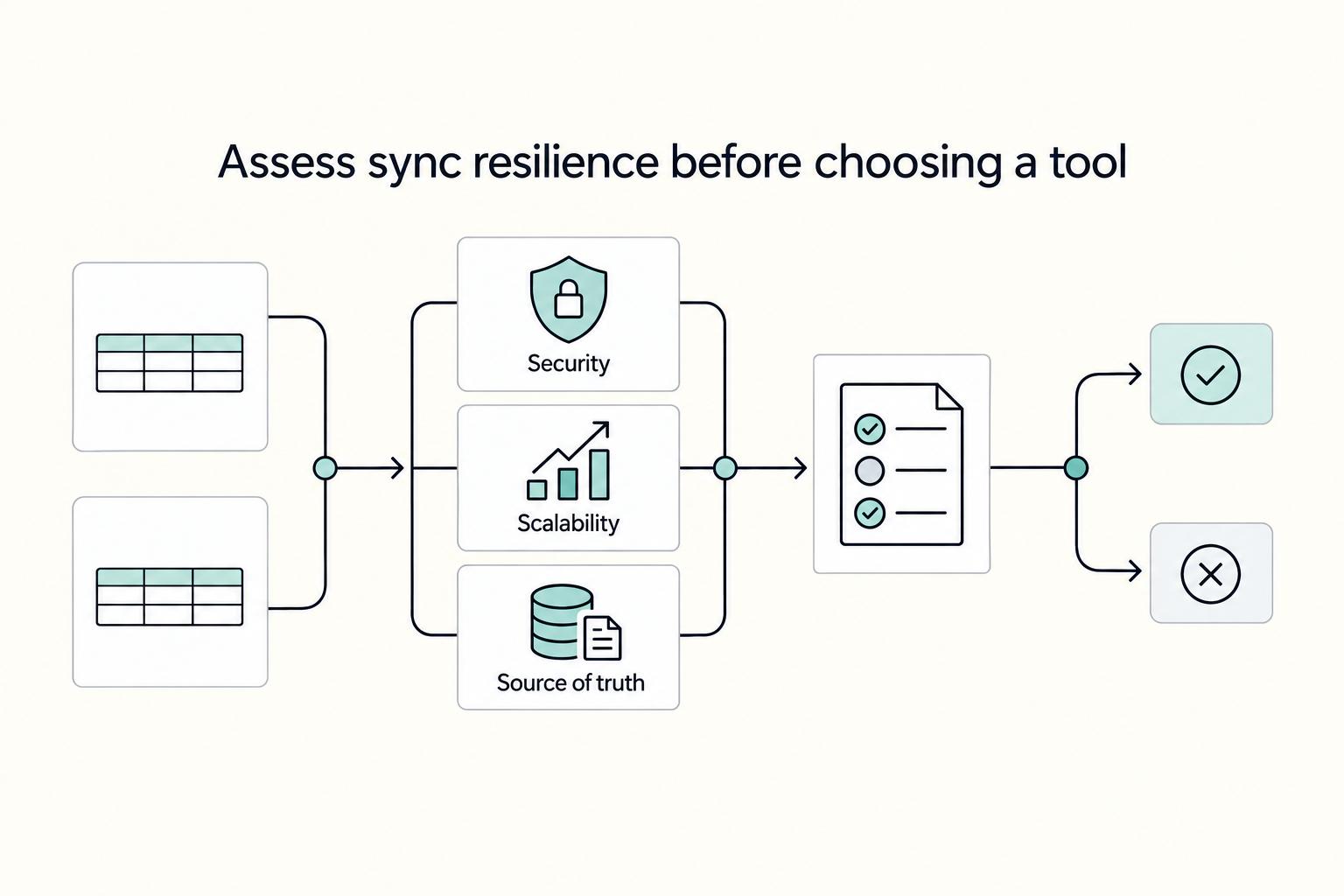
That $14,400 "admin tax" is a direct result of a system you cannot fully trust. To eliminate it, you must shift your evaluation criteria from convenience to control. A CEO doesn't choose critical infrastructure based on a five-minute setup time; they choose it based on its resilience and integrity. This is where the 3S Framework comes in. It's a simple but powerful mental model for assessing any data synchronization tool and making sure the solution you choose is an asset, not a liability.
Security: What Should You Check Before You Grant Access?#
Connecting a third-party application to your core financial and client data is a significant grant of trust. You are handing over the keys to your most sensitive information, and a weak link can expose everything. That is why third-party access deserves a real vendor-risk review, not a checkbox during setup. Check the permission model, the connection owner, and the recovery path before you turn anything on.
Here is a non-negotiable checklist for evaluating a tool's security posture:
- Authorization Protocol: Does the service use OAuth 2.0? This is the industry standard. It allows you to grant limited access to your data without ever sharing your actual account passwords with the third-party app. If a tool asks for your Google or Airtable password directly, consider it a major red flag.
- Granular Permissions: Can you control access at the field level or at least scope the base, view, and sheet you expose? Airtable's import flow is a useful checkpoint here because it forces you to decide exactly what data comes across. There is no reason to expose sensitive client notes or internal comments in a sheet used for financial reconciliation. The principle of least privilege - granting only the minimum necessary access - is fundamental to reducing risk.
- Data Retention and Encryption: How does the vendor handle your data? Look for clear policies on data retention. Are they storing your synced data on their servers, and if so, for how long? All data, both in transit (moving between apps) and at rest (stored on servers), should be protected with strong encryption standards like TLS 1.3 and AES-256.
Scalability: Will Your Workflow Grow With You or Break Under Pressure?#
The workflow automation that handles 10 clients a month may collapse under the weight of 100. Scalability isn't about planning for a distant future; it's about making sure your system remains reliable as your success grows. The primary technical difference here lies in how a tool checks for new data.
Many popular automation platforms use a method called polling. This means the service "polls" or asks your Airtable base at a set interval - say, every 5 to 15 minutes - "Is there anything new?" For non-urgent tasks, this is perfectly fine. The more strong alternative is a webhook-based sync. Instead of polling, a webhook acts as a notification system where Airtable early tells the sync tool about a change the instant it happens.
Here's how they compare for a Global Professional:
| Method | How It Works | Best For | Potential Risk for Financial Data |
|---|---|---|---|
| Polling | Checks for new data on a fixed schedule (e.g., every 15 mins). | Simple, non-urgent tasks like sending a "thank you" email. | Latency. A 15-minute delay could mean you're looking at an outdated P&L report without even realizing it. |
| Webhooks | Airtable sends an instant, real-time notification upon any change. | Mission-critical workflows like financial dashboards and compliance logs. | Complexity. Requires a more sophisticated setup, which dedicated sync platforms are built to handle. |
For a sync between Airtable and Google Sheets that you can rely on for business decisions, a webhook-driven, real-time solution is the professional standard.
Source of Truth (Integrity): Can You Trust Your Numbers, 100%?#
This is the heart of compliance anxiety. The ultimate goal is to create a single, unimpeachable source of truth. A simple, one-way "data dump" from Airtable to Google Sheets fails this test because it doesn't account for the lifecycle of your data. What happens if you update an invoice status in Airtable? Or worse, what if someone accidentally changes a number in the Google Sheet?
A true data synchronization solution is built to maintain integrity with specific, non-negotiable features:
- Two-Way Syncing: This is the cornerstone of a single source of truth. It means a change in Airtable updates the corresponding row in Google Sheets, and (if you choose) a change in Google Sheets can update the record in Airtable. This prevents data drift and ensures both systems are always aligned.
- Historical Data Sync: When you first set up the connection, the tool should be able to sync all your existing Airtable records, not just new ones moving forward. This is critical for establishing a complete and accurate financial ledger from day one.
- Conflict Resolution: What happens if the same record is changed in both Airtable and Google Sheets before the sync can run? A strong system needs a clear rule to resolve this conflict. Common policies are "Hub wins" (Airtable overwrites Sheets) or "Last write wins" (the most recent change is saved). Without this, you risk silent data corruption.
Choosing your sync solution with this 3S framework ensures you're not just connecting apps; you are building a resilient, trustworthy, and scalable foundation for your business operations.
Evaluating Your Options: A Strategic Breakdown of Key Sync Tools#
With the 3S framework as our lens, we can now critically examine the most common tools for the job. This isn't about finding a single "best" tool, but about aligning the tool's core architecture with the specific demands of your task. Each category of solution makes a different trade-off between convenience, flexibility, and integrity. Understanding these trade-offs is the key to making a CEO-level decision for your business.
Airtable Native Automations: The Controlled, One-Way Push#
Airtable's built-in automations are the most straightforward and secure starting point. When you trigger an automation to add a row to Google Sheets, the entire process happens within the Airtable network, minimizing your third-party risk.
- Security: This is a strong choice from a security standpoint. You are not granting external access to your base; you are using a native feature that inherits Airtable's own security posture.
- Scalability: Native automations are excellent for low-volume, non-urgent tasks. However, they are not designed for high-frequency updates and can be subject to delays, making them unsuitable for a live financial dashboard.
- Source of Truth: This is the most significant weakness. Airtable's native Google Sheets action can only add a new row. It cannot update or delete existing rows. If you change an invoice status in Airtable from "Sent" to "Paid," the original "Sent" row remains in your Google Sheet, and a new "Paid" row is added. This immediately creates data divergence, making it a simple data log, not a true synchronization.
iPaaS Platforms (Zapier, Make.com): The Powerful but Complex Workflow Builders#
Integration Platform as a Service (iPaaS) tools like Zapier and Make.com are the undisputed champions of flexibility. They are designed to connect thousands of applications with complex, multi-step, and conditional logic. If you need to sync Airtable and Google Sheets and then, based on a value in the sheet, create a calendar event and send a Slack message, an iPaaS is your best bet.
However, this flexibility comes at a cost to data integrity.
- Complexity Risk: Building a strong, two-way sync for financial data in an iPaaS is deceptively difficult. You have to manually build out every possible workflow: new records, updated records, deleted records, and changes originating from the Google Sheet. This complex web of automations can become brittle and hard to troubleshoot.
- Latency Issues: Many triggers for these platforms are polling-based, checking for new data every 1 to 15 minutes depending on your plan. For mission-critical financial data, this built-in delay can mean you are making decisions based on outdated information.
Dedicated Sync Platforms (Whalesync, Unito): The Specialists in Data Integrity#
This category of tools is engineered to solve one problem exceptionally well: maintaining a perfect, bi-directional source of truth between two applications. Platforms like Whalesync are not general-purpose workflow automation tools; they are specialists in true data synchronization.
Their entire architecture is built around the 3S framework:
- They handle the initial historical data sync, making sure a complete ledger from the start.
- They provide a true two-way sync, meaning an update in either Airtable or Google Sheets is reflected in the other.
- They have built-in conflict resolution to manage instances where a record is updated in both places simultaneously.
- They are typically built on webhooks for real-time, instant updates, providing the scalability needed for critical financial and client workflows.
For the Global Professional whose primary concern is the absolute, verifiable integrity of their financial or client data, a dedicated sync platform is the professional standard.
The Strategic Verdict#
The right choice depends entirely on the job to be done. You wouldn't use a screwdriver to hammer a nail. Likewise, you shouldn't use a simple logger when you need a resilient, two-way sync.
| Your Primary Need | Recommended Tool Category | Why It's the Right Choice |
|---|---|---|
| Simple, one-way logging of new records (e.g., form submissions). | Airtable Native Automations | The most secure and simple option for low-stakes tasks where a single source of truth isn't required. |
| Complex, multi-app workflows involving more than just Airtable and Sheets. | iPaaS Platforms (Zapier, Make.com) | Unmatched flexibility for orchestrating processes across your entire tech stack, provided you have the expertise to manage the complexity. |
| Bulletproof data integrity for a critical system (e.g., financial ledger, client CRM). | Dedicated Sync Platforms (Whalesync, Unito) | Purpose-built for creating a resilient, real-time, two-way sync that you can trust completely for mission-critical business decisions. |
Beyond Basic Syncs: Three High-Value Playbooks for the Global Professional#
Once you've aligned your strategy with the right category of tool, you can move beyond simple data connections and begin building true operational assets. The goal isn't just to sync data; it's to create resilient, automated systems that directly address your core anxieties around financial control, compliance, and growth. These are professional-grade playbooks designed to give you leverage and peace of mind.
Feed Airtable Data Into a Live Profit and Loss View#
Stop making critical business decisions using last month's numbers. This playbook transforms your Airtable project tracker into a live, CEO-level view of your business's financial health.
- The Setup: Your Airtable base is the command center, where you track projects, log billable hours, and record expenses. Use a dedicated sync tool to feed this raw data into a pre-built Google Sheets Profit & Loss template in real time.
- How It Works: The data synchronization populates the "data" tabs of your spreadsheet automatically. The main dashboard, with its charts and KPIs, pulls from this live data. Every time you update a record in Airtable - marking an invoice as paid or adding a new expense - your P&L statement in Google Sheets reflects that change instantly.
- The Professional Advantage: You gain the ability to see your net profit margin, track expenses against revenue, and understand your cash flow at a glance. This isn't just bookkeeping; it's early financial management that helps you to price projects more profitably and make smarter investment decisions with confidence. If the reporting layer will inform real decisions every week, pair this setup with How to Manage Freelance Bookkeeping.
Build an Automated Log of Tax-Relevant Activity#
Eliminate the frantic, end-of-year scramble to find receipts and justify expenses. This playbook creates a pristine, automated audit trail that will make you and your accountant breathe easier.
- The Setup: In your primary Airtable base, create a checkbox field named "Tax Relevant." When you log an expense, purchase, or any other transaction with tax implications, you simply check that box.
- How It Works: Configure a one-way sync that triggers whenever that "Tax Relevant" box is checked. The sync sends only the essential data (Date, Vendor, Amount, Category, Receipt Attachment) to a dedicated Google Sheet. Importantly, you share this sheet with your accountant with "Viewer" (read-only) permissions.
- The Professional Advantage: This system ends the "digital shoebox" chaos for good. It creates a perfect, contemporaneous log of all tax-relevant activities, saving you dozens of hours in administrative work and demonstrating an elite level of organization to your financial advisors. It also works better when you already have clean ownership boundaries such as the ones in Separating Business and Personal Finances.
Turn a Client Pipeline Into a Monthly Revenue Forecast#
Manage your client lifecycle with the clarity and foresight of a seasoned sales leader. This playbook uses Airtable's flexibility as a CRM and Google Sheets' reporting power to help you forecast revenue and manage growth. If you are still deciding where those operational records should live, compare the tool roles first in Airtable vs Notion vs ClickUp for Freelancers Building a Reliable Stack.
- The Setup: Use Airtable to build a simple client relationship manager (CRM). Track key deal information like the client's name, the deal stage (e.g., Prospect, Proposal Sent, Negotiation, Closed-Won), the projected contract value, and the expected closing date.
- How It Works: Set up a sync to push this pipeline data into a Google Sheet. While Airtable is excellent for data management, Google Sheets excels at flexible analysis and charting. In your sheet, you can build pivot tables to see the total value of deals in each stage or create a bar chart that forecasts your monthly revenue.
- The Professional Advantage: This automation provides a clear, shareable view of your business development efforts. You can confidently share the Google Sheet report with partners or mentors without giving them access to your entire operational base, moving you from reactively managing clients to early planning for future growth based on real data.
Your Pre-Flight Checklist: Mitigating Risk Before You Sync a Single Record#
These playbooks represent the strategic upside of a well-architected sync, but inspiration must be paired with disciplined execution. Before you connect any tool to your financial workflow, you must adopt the mindset of a systems architect. This pre-flight checklist is non-negotiable. It's designed to protect your data, your client relationships, and your peace of mind.
- Step 1: Backup Everything. Before you grant any new service access, manually export your Airtable base as a CSV file and download your Google Sheet as an Excel or ODS file. Store these files in a secure, offline location. This is your digital seatbelt. You will likely never need it, but the one time you do, you'll be deeply grateful.
- Step 2: Create a Dedicated Service User/API Key. Never connect a third-party tool using your primary Google account or personal Airtable login. Doing so gives the application the same broad permissions you have, dramatically increasing your security risk.
- For Google Sheets: Create a dedicated Google Service Account. This is a special type of account intended for an application, not a person. You can grant it specific permissions - like only being able to edit one specific Sheet - drastically limiting the "blast radius" if the key is ever compromised.
- For Airtable: Generate a new Personal Access Token. When creating the token, give it a specific name (e.g., "Gruv-Sync-Tool-Key") and, importantly, grant it only the scopes (permissions) it absolutely needs, such as access to a single base and the ability to read and write records.
- Step 3: Start with a Test Environment. Never test a new connection on your live business data. Duplicate your Airtable base and your Google Sheet to create an isolated "sandbox" environment. Use this safe space to run your initial sync, allowing you to identify any issues with field mapping, formatting inconsistencies, or logical errors before they can impact your actual financial records.
- Step 4: Understand the Tool's Error Handling. No data synchronization tool is infallible. Before you go live, you must understand how your chosen platform manages failures. Read the documentation to answer these critical questions: What happens if the sync fails? Will you receive an email alert? Does the tool automatically pause the sync, or does it skip the problematic record and continue? Knowing the platform's behavior during a failure state prevents panic and helps you create a reliable recovery plan.
Conclusion: From Connected Apps to a Resilient Business#
Answering these technical questions in the end leads back to a fundamental business principle: the systems you build must serve your strategy. The decision of how to sync Airtable and Google Sheets is not a minor technical choice to be rushed. It is a strategic decision about the operational resilience of your entire "Business-of-One." Making the right choice is the difference between building on a solid foundation versus a fragile one that cracks under the pressure of growth or the scrutiny of an audit.
This playbook is designed to shift your mindset from simply connecting tools toward architecting a resilient data infrastructure. True data synchronization is a core pillar of that resilience. It ensures that the information flowing between your core applications is accurate, consistent, and trustworthy - the bedrock of sound decision-making.
To truly move from a reactive freelancer to a early CEO, you must internalize these key shifts:
- From Convenience to Critical Infrastructure: Stop seeing your sync as a time-saving hack. Start treating it as the load-bearing plumbing of your business.
- From Data Dumps to a Source of Truth: A one-way push of information is not a sync; it's a memo. A professional-grade, two-way sync creates a single, reliable source of truth that eliminates the anxiety-inducing reconciliation that eats into your time.
- From "Set and Forget" to "Trust but Verify": The most strong systems are built with discipline. Adopting a pre-flight checklist isn't bureaucracy; it's professionalism. It's the deliberate practice of mitigating risk before it can impact your clients or your bottom line.
In the end, mastering your workflow automation isn't just about efficiency. It's about buying back your peace of mind. By thoughtfully choosing your tools and carefully implementing your connections, you are building more than a tech stack. You are building a fortress of control around your most critical business data, freeing yourself from compliance anxiety and creating the space to focus on the strategic, high-value work that only you can do.
Frequently Asked Questions
What is the most reliable way to sync Airtable and Google Sheets for business-critical data?
For data where accuracy and timeliness are non-negotiable, the most reliable method is a dedicated, two-way sync platform. These services are purpose-built for real-time data synchronization, ensuring that a change in one system is reflected in the other almost instantly. This is the professional standard for maintaining a true, single source of truth for financial records.
Is it secure to sync Airtable and Google Sheets with third-party tools?
Security depends entirely on your implementation and the tool you choose. A sync is secure if you follow critical steps like using dedicated service accounts with limited permissions. A properly configured sync using a vetted provider is significantly more secure than manually exporting and emailing CSV files.
When should I use Airtable's native automation vs. a tool like Zapier?
Use Airtable's native automation for simple, one-way 'fire and forget' tasks, like logging new form submissions to a sheet. Use an iPaaS tool like Zapier or Make.com when you need to orchestrate a complex, multi-step workflow across several different apps. For a simple but robust two-way sync between just Airtable and Google Sheets, a dedicated tool is often less complex and more reliable.
How can I prevent data loss or corruption when setting up a sync?
You prevent data loss by being disciplined in your setup process. 1) Always back up your data manually before starting. 2) Build and test your sync in a sandboxed environment using duplicated data. 3) Understand your tool's error-handling protocol so you can recover quickly from any failure.
What's the difference between a one-way and a two-way sync, and which one do I need?
A one-way sync sends data in a single direction (e.g., Airtable to Google Sheets) and is best for reporting or backups. A two-way sync keeps both systems updated, flowing data in both directions, and is necessary for creating a single source of truth for collaborative or critical financial workflows.
Can I sync specific views from Airtable instead of the entire base?
Yes, and you absolutely should. Most quality integration tools allow you to use a specific Airtable view as the trigger for your synchronization. This is a critical feature for both security and efficiency.
Which sync tools are best for handling a large volume of records without breaking?
For large volumes, look for tools built on webhook-based, real-time architecture rather than polling-based systems. Polling can be slow and may run into API rate limits with large datasets. Dedicated sync platforms are often architected to handle high volumes of updates efficiently.
Researched and edited by the Gruv editorial team. Gruv builds cross-border billing, payouts, and finance-operations software for global businesses.
Sources
Includes 8 external sources outside the trusted-domain allowlist.
- community.airtable.com/other-questions-13/sync-data-with-google-she...external
- coupler.io/google-sheets-integrations/airtable-to-googl...external
- on2air.com/resources/how-to-connect-airtable-and-google...external
- skyvia.com/blog/how-to-sync-airtable-to-google-sheetsexternal
- support.airtable.com/docs/importing-third-party-data-into-airtableexternal
- whalesync.com/connect/airtable-google-sheetsexternal
- workspace.google.com/products/sheetsexternal
- zapier.com/apps/airtable/integrations/google-sheetsexternal
Educational content only. Not legal, tax, or financial advice.
Related Posts

Value-Based Pricing for Freelancers Under Real Payment Risk
Value-based pricing works when you and the client can name the business result before kickoff and agree on how progress will be judged. If that link is weak, use a tighter model first. This is not about defending one pricing philosophy over another. It is about avoiding surprises by keeping pricing, scope, delivery, and payment aligned from day one.
How to Write a Follow-Up Email That Closes the Deal
**Run every freelance follow-up email like a mini sales process that turns uncertainty into one clear next step.** As the CEO of a business-of-one, your job is to turn messy inbox threads into clean decisions you can actually plan around.
Use Zapier to Run a Reliable Freelance Tech Stack
If your stack feels messy, the fix is usually not one more app. Zapier works best here as the connective layer in your business, so client work, paperwork, invoicing, and follow-up keep moving without you babysitting every handoff.