
Quick Answer
Use a semantic versioning guide as a release communication system, not just a numbering habit. Set MAJOR for compatibility-impacting changes, MINOR for additive work, and PATCH for narrow fixes, then align notes, changelog entries, and client messaging to that choice. The article’s core operating rule is simple: classify first, ship second, and never modify a released artifact after publication.
The Fear of the One-Line Fix That Breaks Everything#
You patch a bug that looks trivial and deploy it fast. Then you find yourself under rollback pressure while a client's users hit downtime, support messages pile up, and confidence slips. The real problem is not the one line of code. It is that the release gave no clear signal about what changed, how risky it was, or what the client should reasonably expect next.
For a solo operator, that turns an engineering mistake into a business risk. If every update looks the same, clients cannot tell a routine fix from a change that may affect integrations or behavior. That ambiguity creates the same kind of upgrade risk SemVer was designed to reduce: teams either freeze on exact versions (version lock) or upgrade too freely and get surprised by breakage (version promiscuity). The point of semantic versioning is to make the release number a communication contract first and a technical label second.
| Checkpoint | Ad hoc updates | SemVer signaled releases |
|---|---|---|
| Client expectation | "An update happened" | A release communicates expected impact in MAJOR.MINOR.PATCH, such as 1.4.2 |
| Change risk visibility | Risk is buried in a message or memory | Breaking-change signals are encoded in the version number |
| Incident response triage | Harder to tell whether to roll back, hotfix, or investigate usage changes | Release type and changelog provide an initial triage signal |
| Billing explanation | Harder to point to a specific shipped unit of change | Easier to reference a release number and notes, though versioning alone does not settle billing disputes |
One discipline makes this credible: once you release 1.4.2, do not quietly swap the package contents afterward. Released artifacts should stay unchanged. If the fix needs a fix, publish a new version and increment one number while resetting lower parts as required. That is what turns versioning into a promise instead of a label. From there, define exactly what MAJOR, MINOR, and PATCH promise to the client.
Related: A Guide to Continuous Integration and Continuous Deployment (CI/CD) for SaaS.
Your New Client Contract: Deconstructing the MAJOR.MINOR.PATCH Promise#
Decide what the version means before you publish it. Treat it as a client-facing risk label, and classify the release before it ships.
Use MAJOR.MINOR.PATCH as a promise backed by your API contract, changelog discipline, deprecation policy, and release notes. If a change sits in a gray area, choose the least misleading label and document your reasoning.
| Level | What your client should expect | Change scope | Your delivery obligation | When to use | Client communication channel | Typical artifacts |
|---|---|---|---|---|---|---|
| MAJOR | Update may require planning, testing, or code changes | Compatibility risk is present | State the risk and what clients may need to change | If the change affects compatibility or behavior clients currently rely on | Your normal release channel, plus direct notice to affected clients | Release notes, migration note, API contract update, changelog entry |
| MINOR | New capability is available and positioned as additive work | Scope expands without intentionally changing the client deal | Describe what was added and flag deprecations clearly | If you are adding functionality and checks do not indicate compatibility-impacting drift | Your normal release channel | Release summary, changelog entry, API spec update when relevant |
| PATCH | Existing behavior is being corrected or stabilized | Narrow fix, not a broad contract shift | State exactly what was corrected | If you are fixing defects and do not intend to change the client contract | Your normal release channel, often brief | Changelog entry, fix note, test evidence when useful |
1. MAJOR: if compatibility is affected, classify it as MAJOR#
Use a simple pre-release rule: if compatibility is affected, label it MAJOR. Make that call before release, not after support issues appear.
Quick check:
- If clients may need to change their implementation, classify as MAJOR.
- If your API contract changes in a client-impacting way, classify as MAJOR.
- If uncertain, choose the safer label and document the impact.
Make the checkpoint concrete. One practical pattern is to generate a Swagger API specification from tests and compare it with the last release. If that artifact shows client-impacting contract change, treat it as MAJOR and include migration guidance in release notes.
2. MINOR: use only when additive intent is backed by checks#
Use MINOR when you are shipping additive work and your evidence supports that classification. It is also the right place to announce deprecations early so clients can plan without immediate forced change.
Decision rule:
- If the change is additive and checks pass, classify as MINOR.
- If API/type checks fail in CI, stop and re-evaluate classification before release.
A practical checkpoint is CI that fails builds on API/type issues. That gives you an enforceable gate instead of relying on intuition.
3. PATCH: reserve for narrow fixes, not contract changes#
Use PATCH for targeted corrections and stability fixes. Keep the note precise so clients can see what changed without guessing.
Boundary rule:
- Do not label a compatibility-impacting change as MINOR or PATCH to reduce friction.
- If support status (such as LTS) needs to be communicated, put it in documentation or release notes rather than relying on the version number alone.
Once you can make these calls before release, implementation becomes straightforward: define checks, generate artifacts, and let CI enforce the promise.
For a step-by-step walkthrough, see A Guide to Errors and Omissions (E&O) Insurance for Software Developers.
SemVer in Practice: Your Framework for Trust and Risk Mitigation#
Use each version to drive the right client decision before you ship. In SemVer, the number is a communication signal, so your message, evidence, and scope boundary need to match the release type or you increase operational risk.
| Release type | Trigger condition | Client-facing message format | Required artifact | Expected client decision |
|---|---|---|---|---|
| MAJOR | Incompatible API or behavior change | Direct notice plus version-specific release notes with required actions. If the exact version, verification artifact, migration step, or notice window is not final yet, mark those details as pending instead of publishing placeholder text. | Contract or API diff, migration note, release notes | Plan the upgrade, test impact, approve separate scope if needed |
| MINOR | Backward-compatible functionality addition | Short release summary that names the version, feature, compatibility expectation, and any deprecations. If a detail is still unresolved, mark it as pending before client distribution. | Changelog entry, release notes, updated spec if applicable | Decide whether to adopt now or later |
| PATCH | Bug fix with no intended contract change | Brief fix notice in changelog or release notes that names the version, issue, intended compatibility impact, and any area consumers should verify. If those details are still unresolved, mark them as pending before client distribution. | Changelog entry, linked issue or defect record, test evidence | Usually no action beyond awareness or spot-checking |
1. Communication control#
Before release, decide what action you need from the client, then classify the version. During release, publish version-specific notes so someone upgrading to 1.4.2 can review that exact change set and required actions. After release, keep your client message aligned with your artifacts so the notes, changelog, and direct notice do not conflict.
When compatibility or configuration is affected, include a required-action section instead of a generic summary. A documented example shows why this matters: from 7.98.7, missing Custom Base URL configuration can cause a 500 error.
2. Evidence that supports renewals and pricing#
Keep an evidence pack for every release: a clear changelog entry, release notes with impact, issue linkage, and an acceptance record (for example, approved ticket, sign-off email, or client confirmation). This gives you operational proof of what changed and why the version label was appropriate.
| Evidence | Use |
|---|---|
| Clear changelog entry | Lets the reader see outcome and risk quickly |
| Release notes with impact | Shows what changed and why the version label was appropriate |
| Issue linkage | Part of the evidence pack for every release |
| Acceptance record | Approved ticket, sign-off email, or client confirmation |
Write changelogs so the reader can see outcome and risk quickly. "Bug fixes and improvements" is weak; a specific note about what was fixed and whether compatibility changed is stronger. Store this history deliberately, because some release-note sets move to end-of-life context after about 18 months, and you still need your own audit trail for renewal and pricing conversations.
If you want to connect this release evidence to commercial positioning, see Value-Based Pricing: A Freelancer's Guide.
3. Scope control you can reuse#
Use this playbook when a request sounds like "one quick change":
- Intake question: "Will this change alter an existing response, input rule, dependency, or behavior current consumers rely on?"
- SemVer classification:
- If compatibility is affected, classify as MAJOR. - If the change is additive and backward-compatible, classify as MINOR. - If it is a defect correction with no intended contract change, classify as PATCH.
- Escalation path:
- For MAJOR, move it into separately scoped work. - Use a simple handoff note: "This request affects compatibility and should be planned as a major version change." Attach only approved scope or contract language once it is available.
If you skip this and force a risky request into MINOR or PATCH, scope creep usually becomes support churn later.
For broader commercial tracking, read How to Calculate ROI on Your Freelance Marketing Efforts.
Three Tools for Managing Uncertainty Without Confusing Clients#
Once you have MAJOR, MINOR, and PATCH under control, these three tools help you manage uncertainty without confusing clients: 0.y.z, pre-release tags, and build metadata.
| Tool | Purpose | Safe use case | Client-facing signal | Common misuse to avoid |
|---|---|---|---|---|
0.y.z | Keep active-change work clearly separate from stable commitments | Early rollout where behavior is still being shaped | "Ready for evaluation, not yet a stable commitment" | Letting deep production dependence form before readiness gates are explicit |
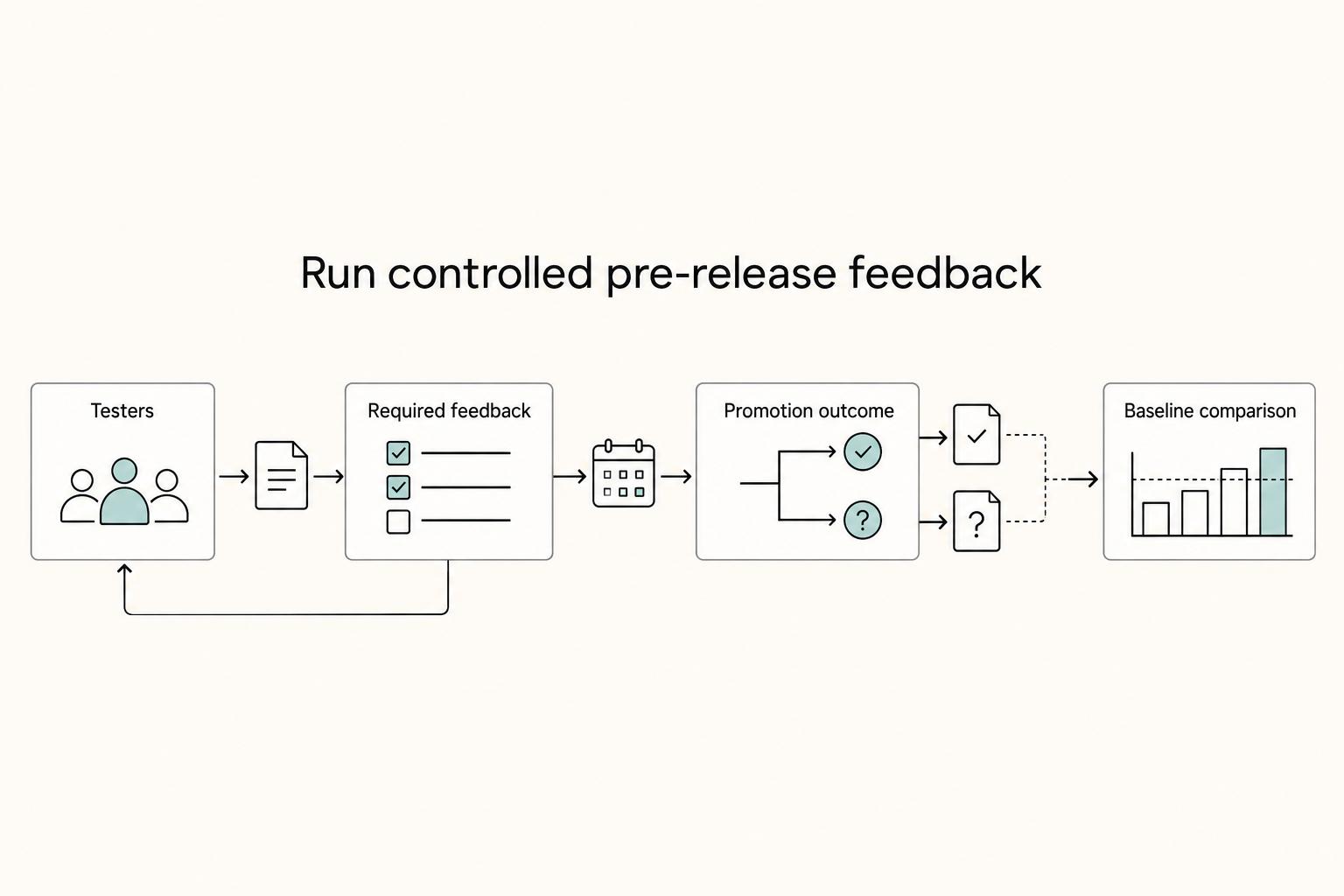
| Pre-release tags | Collect focused feedback on a release candidate before promotion | Controlled testing with defined checks against a baseline | "Test this candidate and report specific findings" | Broad distribution with no clear tester scope, feedback requirements, or promotion decision |
| Build metadata | Preserve traceability from a report back to the exact deployed artifact | Release handoff, incident triage, and environment verification | Usually internal; shared selectively when support context is needed | Treating metadata like a compatibility promise instead of a traceability record |
1. Use 0.y.z as a readiness control#
Use 0.y.z to signal that change is still expected, not to delay hard decisions indefinitely. To make this phase useful, define what evidence must exist before you promote: a preserved previous snapshot, a baseline evaluation dataset, and release notes that describe what changed and why.
When you discuss promotion, keep the rule explicit in your handoff notes: document the readiness criteria you have actually verified. This avoids implying a universal stability rule your evidence does not support and keeps client expectations aligned with your actual readiness checks.
2. Use pre-release tags to run a controlled feedback loop#
A pre-release is only valuable if it produces decision-ready feedback. Before you send one, define who is testing, what feedback is required, and what outcome would justify promotion. Ask testers to compare against a baseline so you can confirm both intended improvements and regression risk.
| Control point | Requirement |
|---|---|
| Who is testing | Define this before you send the pre-release |
| Feedback required | Define this before you send the pre-release |
| Promotion outcome | Define what outcome would justify promotion |
| Baseline comparison | Ask testers to compare against a baseline |
That discipline matters because a fix for one edge case can create regressions in others when comparison is weak. If feedback cannot clearly explain what changed, who it affects, and whether prior behavior held, keep the release in pre-release status.
3. Use build metadata to speed triage and improve communication#
Build metadata is your fastest path from "something broke" to "this is the exact artifact." Keep traceability fields with each deployment, such as repository commit reference, deployment environment label (for example, staging or prod), and, if your workflow already tracks it, a CI/CD run identifier. Pair that with authorship or commit-message context for cleaner handoff records.
| Field | Used for |
|---|---|
| Repository commit reference | Tie a report back to the exact deployed artifact |
Deployment environment label (staging or prod) | Confirm which artifact ran where |
| CI/CD run identifier | Traceability tied to the deployment, if your workflow already tracks it |
| Authorship or commit-message context | Cleaner handoff records |
This makes incident response and client updates more precise: you can quickly confirm which artifact ran where, and whether a reported issue maps to the same deployed build. Without that trail, regressions are harder to trace and support communication gets vague when clarity matters most.
You might also find this useful: A Guide to App Store Optimization (ASO) for Mobile Apps.
Conclusion: Stop Versioning Your Code, Start Versioning Your Promise#
If you want SemVer to help your business, treat every release number as a client promise, not just a repository label. That shift can create clearer release expectations, fewer surprise breakages, and better trust in how changes are handled.
-
PATCH like
1.4.2: in your release policy, use this as a low-risk signal that the existing contract should remain usable in current workflows. Keep communication brief and clear about what changed. -
MINOR like
1.5.0: use this for additive value where the existing agreement consumers rely on still holds. Make it explicit what is new and what remains compatible. -
MAJOR like
2.0.0: use this when the agreement changes. Clients should expect an upgrade choice, migration guidance, and a clear communication plan, especially if older versions will be removed on a timeline.
That discipline matters because "latest" is not the same as "safe." In the Go dependency example, moving to newer components such as C 1.8 could still pull in D 1.6, which introduced a bug. Your checkpoint is not just "we updated." It is "the consuming use still works as promised." If you skip clear version identification, you also create overhead when people try to reason about regressions.
For your next release, classify the change type, confirm whether it changes the existing contract, document what changed, and notify clients in the right channel. Do that consistently, and versioning starts helping with scope control and change clarity instead of becoming release noise.
We covered this in detail in A Guide to GraphQL for Modern Web APIs.
Frequently Asked Questions
What is the business impact of a MAJOR version change?
Short answer: it is a compatibility event, not just a code event. Under Semantic Versioning, incompatible changes to your public API require a MAJOR increment. In practice, do not ship it like a routine update. Prepare release notes, migration guidance, and a clear upgrade decision before clients adopt it.
When should you adopt semantic versioning?
Short answer: when you are publishing released versions that other people or systems depend on. SemVer only works if you first declare a public API and then version against that contract using X.Y.Z or MAJOR.MINOR.PATCH. In practice, write down the interface you support, then use your current release label after verification instead of informal labels like “small update” or “big fix.”
What is the risk of not using it consistently?
Short answer: you create ambiguity, and ambiguity turns into upgrade pain. SemVer explicitly names two failure modes: version lock, where dependents pin so tightly they cannot move, and version promiscuity, where compatibility assumptions are looser than they should be. In practice, if your change labels are vague, consumers either stop upgrading or upgrade too confidently and get surprised by breakage.
How does semver relate to API versioning?
Short answer: SemVer tells you how to classify change impact, while your API versioning approach defines how you publish and communicate those changes. The core rules stay the same: MAJOR for incompatible API changes, MINOR for backward compatible functionality, and PATCH for backward compatible bug fixes. In practice, pair version numbers with a written policy and migration guidance, because numbering alone will not carry the whole change-management burden.
What should you announce to clients, and what should you only log internally?
Short answer: announce changes that affect the public API or client-visible behavior, and log traceability details that help support without changing compatibility. There is no universal line for every team, so define and document your boundary clearly. In practice, verify the published version in the registry, not just the repository file, because the registry is the actual source of truth and repository versions can drift. For npm packages, npm dist-tags ls <package-name> is a concrete check, and git tags are a practical checkpoint for release tracking.
Do you need to commit version bumps back to the repository?
Short answer: not always. In semantic-release, committing the version is not necessary for next-release tracking, and pushing release-time commits adds process and security complexity that you may not need. If you do not keep the repository version current, use an intentional placeholder such as 0.0.0-development or 0.0.0-semantically-released. Remember one hard rule from SemVer itself: once a version is released, its contents must not be modified.
Try a related tool
Researched and edited by the Gruv editorial team. Gruv builds cross-border billing, payouts, and finance-operations software for global businesses.
Sources
Includes 6 external sources outside the trusted-domain allowlist.
- cs.umd.edu/~pugh/SoftwareDefectWorkshop05/BugWorkshop05...trusted
- pmc.ncbi.nlm.nih.gov/articles/PMC10445922trusted
- arxiv.org/html/2408.13296v1external
- clojureverse.org/t/stop-using-semantic-versioning-any-writing...external
- designgurus.substack.com/p/4-api-versioning-strategies-for-beginnersexternal
- dev.to/kuldeep_paul/mastering-prompt-versioning-bes...external
- docs.jfrog.com/releases/docs/artifactory-self-managed-releasesexternal
- github.com/InfiniteConsult/0004_std_lib_http_clientexternal
Educational content only. Not legal, tax, or financial advice.
Related Posts

Value-Based Pricing for Freelancers Under Real Payment Risk
Value-based pricing works when you and the client can name the business result before kickoff and agree on how progress will be judged. If that link is weak, use a tighter model first. This is not about defending one pricing philosophy over another. It is about avoiding surprises by keeping pricing, scope, delivery, and payment aligned from day one.
How to Calculate ROI on Your Freelance Marketing Efforts
If you want ROI to help you decide what to keep, fix, or pause, stop treating it like a one-off formula. You need a repeatable habit you trust because the stakes are practical. Cash flow, calendar capacity, and client quality all sit downstream of these numbers.
A Guide to Continuous Integration and Continuous Deployment (CI/CD) for SaaS
You are not choosing between speed and safety. You are choosing how much business risk each release can carry. As the CEO of a business-of-one, your release process is part of your risk strategy.