
Quick Answer
Yes. For foreign freelancers, the workable path is to pick the correct SAT route first, then execute it cleanly. Use CURP portal inscription or an in-office CitaSAT appointment, and bring matching records such as your documento migratorio vigente and, if applicable, the Acuse de preinscripcion. At handoff, verify the .CER output and USB files before leaving. Afterward, issue CFDI v4.0 only with exact taxpayer data from your registration records.
The RFC in Mexico: A Strategic Guide for Foreign Professionals#
If you need an RFC in Mexico as a foreign professional, break the process into three phases: choose the right SAT registration route, complete it correctly, and then activate the credentials you need for invoicing and ongoing compliance.
Here are the core terms you need upfront:
- RFC: your alphanumeric tax ID with Mexico's tax authority.
- SAT: the tax authority (
Servicio de Administración Tributaria) that runs registration and tax procedures. - CURP: Mexico's population registry key used to identify residents, including foreign residents.
- e.firma: SAT's advanced electronic signature, with the same legal effect as a handwritten signature and stated validity of four years.
This guide is for freelancers, consultants, and other solo operators who need to register with SAT and issue compliant invoices. If you live abroad and earn income generated in Mexico without a local establishment, you may fall into a different SAT path with a different operating sequence.
Your first decision is the registration route, not the appointment. SAT offers a CURP-based RFC inscription path in its portal for individuals age 18 and up. It also supports in-office inscription by prior appointment. For the office route, SAT lists a valid migration document as acceptable documentation for foreigners. Use the right branch from the start, and avoid paid booking middlemen. SAT states that its appointments and services are free.
If you need to issue facturas, SAT states that the digital factura is the only valid fiscal proof. SAT lists e.firma and a digital seal certificate as requirements in its invoice-generation modalities. From here: prepare your documents, complete the SAT step for your route, then activate your day-to-day setup. Related: Tax Residency in Mexico: Beyond the Temporary Resident Visa.
Phase 1: Pre-Application Strategy & Risk Mitigation#
Start by deciding whether registration solves an immediate operating need or just creates paperwork before your facts are ready. Use this phase for risk control, not legal interpretation. The supporting material is mostly identity-check and document-verification guidance, so treat it as a QA model rather than official tax procedure.
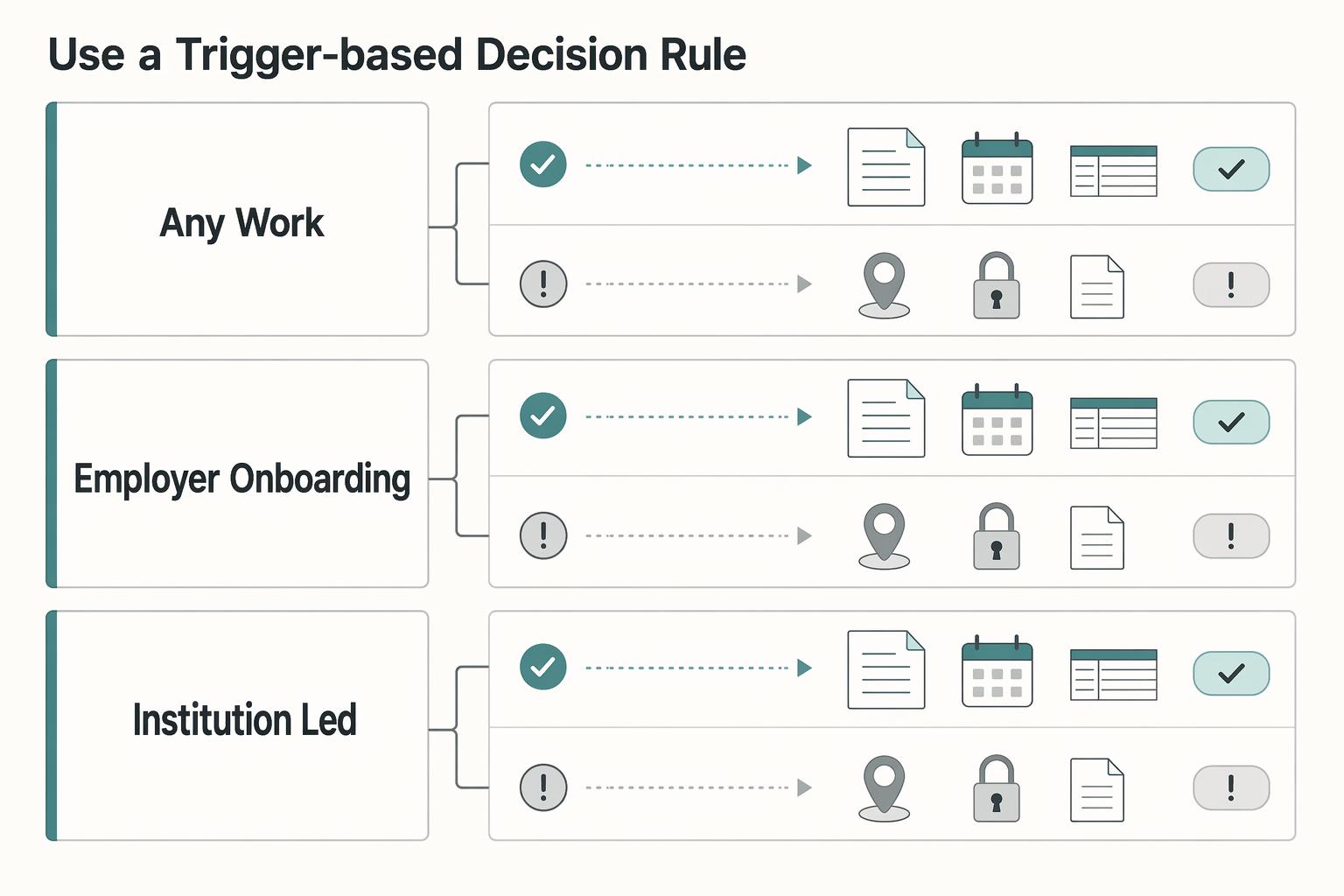
Use a trigger-based decision rule#
If a real counterparty request exists, move forward in a controlled way. If your residency, sourcing, or filing position is still unclear, pause and resolve that first.
| Your path | Typical trigger | What this phase may unlock | Main risk if you rush | Safe-default next action |
|---|---|---|---|---|
| Any work arrangement | A counterparty asks for tax-registration details in writing | Clearer requirements for that specific process | You create records before your cross-border filing position is clear | Get the exact checklist in writing, then confirm implications with authoritative guidance or a qualified adviser |
| Employer onboarding | HR requests local tax or payroll data fields | Progress on employer paperwork | You assume employer setup resolves your personal cross-border filings | Separate employer requirements from personal filing obligations and verify both |
| Institution-led process | An institution requests a tax identifier | Earlier visibility into required data | Reactive prep exposes identity-data inconsistencies late | Request the institution checklist first, then reconcile identity fields before booking |
Do the cross-border check before creating paperwork#
If you may have reporting obligations in more than one country, verify your current position before you register. Do not rely on any single resource for filing triggers, thresholds, or exception rules; confirm those with an authoritative source or qualified preparer.
Write down what you verified, where, and when. If you need broader planning context, use Digital Nomad Taxes in 2026 With a Defensible Filing Plan as a starting point, then validate current rules with an authoritative source or qualified preparer. For reporting-specific background, see A guide to the Foreign Account Tax Compliance Act (FATCA) for individuals.
Build a pre-submission QA checklist (not a document pile)#
Before you book anything, run a simple database, biometric, and document-consistency check.
| QA area | What to verify | Common mismatch risk | Resolve before booking |
|---|---|---|---|
| Database checks | Core identity fields are consistent across records you plan to use | Reordered names, spelling variations, or stale address fields | Pick one anchor record and reconcile conflicting fields |
| Biometric checks | Photo/liveness records are current and clearly tied to your identity profile | Older images or weak captures that do not match current records | Refresh captures and keep one current biometric profile |
| Document checks | IDs and supporting records are valid, readable, and internally consistent | Expired documents, conflicting identifiers, or unreadable scans | Renew or correct records and replace low-quality copies |
Know where self-service stops#
Get qualified help before you proceed if any of these are true:
- Your tax-residency position is unclear across jurisdictions.
- You may have dual-country filing and cannot confirm obligations from authoritative guidance.
- Your income pattern is mixed across multiple countries, pay channels, or contract types.
- Worker classification is still uncertain on the facts.
- Legal-name or government-record mismatches are still unresolved.
Self-service works best when your facts are clean and your trigger is concrete. If the core cross-border picture is still fuzzy, fix that first.
If you want a deeper dive, read Are You an Employee or a Contractor? A Self-Assessment Checklist. Before you lock your timeline, run your travel-day assumptions through the tax residency tracker so your RFC plan matches your wider residency position.
Book, Attend, and Verify Your SAT Appointment#
This step is mostly about execution. Book through official SAT channels, arrive with a document set that matches, and verify every handoff before you leave.
Book on the official SAT portal, then escalate if it stalls#
Use CitaSAT to register, consult, manage, or cancel your appointment. SAT states that services are free, so ignore anyone asking for payment to "get you a slot."
| Situation | Official step | Article detail |
|---|---|---|
| Register, consult, manage, or cancel an appointment | Use CitaSAT | SAT states that services are free |
| Book the in-office RFC service | Book under your own identity | SAT states appointments are intransferable |
| Enter booking details | Use CURP or RFC, full name, and email | Keep every entry consistent from the first screen |
| If your RFC process started in the SAT portal | Bring the original Acuse de preinscripcion en el RFC | Original required |
| If no slots appear | Enter Fila virtual | SAT says it can assign you a turn |
| If the portal behaves inconsistently | Call MarcaSAT | (+52) 55 627 22 728 |
Book the in-office RFC service under your own identity and keep every entry consistent from the first screen. SAT states that appointments are intransferable. In SAT's Oficina Virtual booking guidance, the core fields include CURP or RFC, full name, and email.
If your RFC process started in the SAT portal, bring the original Acuse de preinscripcion en el RFC. If no slots appear, enter Fila virtual; SAT says it can assign you a turn.
If booking stalls, use this escalation order:
- Re-enter your details exactly as shown in your core records.
- Check the official consult flow in case you already have an active booking.
- Use Fila virtual when no appointments are available.
- Call MarcaSAT: (+52) 55 627 22 728 if the portal behaves inconsistently.
In-person walkthrough (what to check at each stage)#
Bring the documents that decide the outcome: your valid documento migratorio vigente, accepted comprobante de domicilio fiscal, and, if applicable, your original acuse de preinscripcion. Bring a USB storage device for the e.firma process.
| Stage | What SAT verifies | What you should confirm | Common blocker |
|---|---|---|---|
| Check-in | Appointment exists and matches your identity | Booking is under your name and for the correct service | Wrong person, wrong module, or unmatched booking |
| Document review | Migration document, fiscal address proof, and pre-registration acknowledgment if applicable | Names and identifiers align across documents | Missing or mismatched records |
| Biometric capture | Fingerprints, face photo, iris photo, signature, and document scans | On-screen identity details are correct before finalization | Proceeding with uncorrected data errors |
| Final handoff | Completion output and e.firma certificate copy (.CER) | You actually received the expected files or output | Leaving without confirming file receipt |
e.firma handoff protocol (before you leave, then same day)#
SAT describes e.firma as unique, encrypted, and valid for four years, so treat it as a core business credential.
Before leaving the office:
- Confirm you received the expected files on your USB storage device.
- Confirm you received the expected certificate copy (.CER).
- Confirm that printed or on-screen identity details match your documents.
Then, later that same day on a trusted device:
- Open the USB and verify the files are readable.
- Create two backups and store them separately.
- Record a short log with the appointment date, office, and what you received.
If something goes wrong#
When a SAT step fails, the fastest fix is usually to identify the exact blocker and correct the root record before you try again.
| Problem | Recommended action | Follow-up detail |
|---|---|---|
| Document mismatch | Ask which exact field blocked completion and fix the root record | Keep the Acuse de presentacion inconclusa if one is issued |
| Queue or booking issue | Return to the official SAT register, consult, cancel, or Fila virtual flows | Do not use paid "fixes" |
| Technical issue (system or USB) | Ask what remains pending and whether an inconclusive acknowledgment applies | Rebook and return with the corrected item |
If you hit repeated blockers, especially identity-data mismatches, get local professional help before another attempt.
Phase 3: What to Set Up Before You Send an Invoice#
Do not treat RFC issuance as the finish line. Before you start billing, verify that your e.firma works, choose your CFDI path, and prepare a bank-ready operating file. The common post-registration risk is execution drift: credentials that are not ready for use, CFDI data mismatches, or payment records you cannot reconcile later.
Immediate post-issuance checklist#
| Task | What to confirm or collect |
|---|---|
| e.firma credentials | Confirm they are accessible and usable for SAT tax operations |
| SAT services test | Test e.firma access in SAT services and confirm your taxpayer identity data appears correctly |
| Constancia de Situación Fiscal | Save it and use its exact name string and registered postcode as your invoicing source of truth |
| CFDI path | Choose SAT's tool or an authorized third-party platform |
| Activation folder | Build one folder with RFC evidence, Constancia, SAT records, and core identity records |
| Monthly archive | Start a monthly archive for issued invoices, payment confirmations, and bank statements |
Work through that list before you send your first invoice.
Lock down your e.firma before you depend on it#
Treat e.firma as a core operating credential. First, confirm it is accessible and accepted where SAT expects it. Second, confirm the identity data tied to it is correct. If your taxpayer data looks wrong, stop and fix it before you issue invoices.
For credential hygiene, keep your e.firma materials and related SAT acknowledgments in a secure, organized place so you can confirm what was issued and when.
If access fails, pause invoicing and use official SAT channels to determine whether the issue is credential access, credential acceptance, or an identity mismatch.
Choose your invoicing path with matching rules in mind#
The main post-registration trap is bad source data. CFDI v4.0 is mandatory, and matching is strict: RFC, taxpayer name, and registered postcode must match your Constancia data exactly, including spaces and symbols. Using a branch or office postcode instead of the registered postcode can break validation.
| Option | Setup effort | Control | Common error risk |
|---|---|---|---|
| SAT tool | Varies by your internal process and data readiness | Direct entry in SAT's environment | Manual entry mismatches in name or postcode |
| Authorized third-party platform | Varies by provider onboarding and data setup | Depends on your provider workflow and permissions | Profile data not aligned with SAT records |
| Either option with weak source data | Fast at first, costly later | Low, because bad source data propagates | Rejected or problematic CFDI due to RFC, name, or postcode mismatch |
If you plan to invoice regularly, decide early who controls the invoicing credentials and any CSD-related configuration tied to issuance.
Make your banking setup account-ready#
Banking setup goes more smoothly when you treat it as a records-matching exercise, not just an account-opening task. RFC can support banking access, including account opening, but each bank sets its own onboarding requirements. Confirm current requirements with the bank first, then bring a compact file with your RFC evidence, Constancia, and the identity records you used for registration.
Define the payment flow before the first transfer. Decide which account receives client payments, what invoice reference clients should include, and how each receipt maps to the CFDI and client agreement. That makes later reporting easier across clients and periods.
Use a tax professional or accountant early if any of these apply:
- You invoice in multiple currencies and are unsure how to keep reporting values consistent.
- You are unsure how Mexico treatment interacts with home-country filing.
- You are unclear whether local operations changed your invoicing, banking, or filing obligations.
You might also find this useful: A Guide to Provincial Sales Tax (PST) for Canadian Freelancers.
The RFC: From Bureaucratic Hurdle to Strategic Asset#
Once your status and documents are in order, the RFC stops being just a registration step and starts shaping how you bill, get paid, and prove compliance in Mexico. In practical terms, it can support compliant invoicing, local payment workflows, and clearer proof of tax status when clients, banks, or platforms ask for it.
| Workflow area | Without RFC | With RFC |
|---|---|---|
| Client billing | You can fall outside standard CFDI flows or rely on limited workarounds, including generic foreign RFC use only in specific cases | You can register with SAT and follow a standard CFDI billing process |
| Payment operations | More friction when a provider or bank asks for fiscal data tied to SAT records | You can present SAT-backed fiscal data for onboarding and account checks |
| Administrative friction | More back-and-forth on tax status, billing fields, and identity consistency | You can show a consistent fiscal profile using SAT documents |
Compliant invoicing#
If you are a taxpayer, SAT requires electronic invoices, and CFDI issuance requires both e.firma and a Certificado de Sello Digital (CSD). Your cédula de datos fiscales is operationally important because it contains the billing fields invoicing systems use: name, RFC, régimen fiscal, and postal code. The generic foreign RFC (XEXX010101000) is not a substitute for your own RFC outside the specific foreign-resident invoicing cases SAT defines.
Before you send the first invoice, build your invoicing setup around your cédula de datos fiscales, e.firma, and CSD.
Routine local banking workflows#
Local banking and payment workflows can depend on SAT-aligned fiscal data, even though requirements vary by institution and product. For example, BBVA instructs users to reconcile bank tax data with their Constancia de Situación Fiscal, and BBVA Openpay lists recent CSF documentation for foreigners.
In practice, keep your Constancia de Situación Fiscal current and use it to reconcile client, bank, and payment-processor records.
Reduced compliance risk#
Your Constancia de Situación Fiscal provides documented tax-status proof, including RFC, CURP, full name, registered address, and régimen fiscal. That gives you a practical way to prove registration instead of informally claiming a Mexican tax ID. For edge cases, RMF 2025 Annex 1-A states that some foreigners without authorization for remunerated activity who still need an RFC must submit a sworn written statement explaining the purpose.
In practice, set a filing support process, a document-storage standard, and a periodic tax-status review cadence.
RFC can support compliant operations in Mexico, but it does not replace a home-country reporting review. For U.S. persons, IRS guidance still requires reporting worldwide income, and FBAR can apply when aggregate foreign financial accounts exceed $10,000. If your cross-border facts are complex, get professional advice.
For another cross-border withholding workflow example, see A Guide to TDS (Tax Deducted at Source) for Payments to Indian Freelancers.
Once your RFC and e.firma are active, standardize how you bill clients with the free invoice generator.
Frequently Asked Questions
Can you get an RFC if you are in Mexico on tourist or visitor status?
Treat status and use case as decision points. Temporary and permanent residents are generally described as required to apply, while visitor-status eligibility is not clearly confirmed. Broad mandatory language is sometimes mixed with a note that many expats may never need an RFC in practice, so verify your case with SAT or a qualified local advisor.
What is the difference between CURP, RFC, and e.firma?
RFC is a taxpayer registration code tied to economic activity and SAT. Reliable detail on CURP or e.firma purpose, sequencing, or setup steps is limited, so verify those directly with SAT before treating the three as interchangeable requirements.
How does an RFC affect your U.S. taxes or home-country filing?
Confirm current cross-border filing and disclosure rules with a qualified advisor before invoicing or moving funds.
What are the most common mistakes to catch before the appointment?
Most avoidable errors are scope errors, not checklist details. Before you act, run this quick check: Your status is within the groups clearly covered (temporary/permanent residents), and visitor-status eligibility has been verified. Your planned activities are checked against contexts linked to RFC use, such as opening a bank account, resident/national property purchase, or FACTURA-related invoicing requirements. You have confirmed current SAT document and appointment requirements directly, since a complete procedural checklist requires direct SAT verification.
Should you hire help, or is DIY reasonable?
DIY can be workable in straightforward cases, but important gaps remain (for example, visitor-status eligibility and CURP/e.firma specifics). A qualified local advisor is usually safer when your case is unclear or when banking, property, and FACTURA 4.0 workflows overlap.
How long does it take to get set up?
Split timing into two parts: appointment availability and completion of registration. Confirm current SAT availability before committing to client start dates, banking deadlines, or invoicing plans.
Try a related tool
Researched and edited by the Gruv editorial team. Gruv builds cross-border billing, payouts, and finance-operations software for global businesses.
Sources
- citas.sat.gob.mxtrusted
- congress.gov/82/crecb/1951/10/08/GPO-CRECB-1951-pt10-4.pdftrusted
- ecfr.gov/current/title-19/chapter-I/part-182trusted
- govinfo.gov/content/pkg/FR-2013-05-29/xml/FR-2013-05-29.xmltrusted
- govinfo.gov/content/pkg/FR-2024-03-12/pdf/FR-2024-03-12.pdftrusted
- irs.gov/businesses/small-businesses-self-employed/re...trusted
- irs.gov/individuals/international-taxpayers/us-citiz...trusted
- nvcogct.gov/wp-content/uploads/2019/03/Former-VCOG-Natur...trusted
Educational content only. Not legal, tax, or financial advice.
Related Posts

Digital Nomad Taxes in 2026 With a Defensible Filing Plan
With digital nomad taxes, the first move is not optimization. It is figuring out where you may be taxable, where filings may be required, and what proof supports that position.
Are You an Employee or a Contractor? A Self-Assessment Checklist
Forget the label. Classification turns on the relationship you actually run, not the title you typed into the contract. It is also much easier to fix before you sign.
Tax Residency in Mexico for Nomads Beyond the Temporary Resident Visa
Start with one conservative call: are you likely becoming a Mexican tax resident this year, and what evidence supports that call today? That decision shapes the rest of your year. If you skip it, every later task turns reactive, from local tax planning to U.S. filing choices.