
Quick Answer
Yes, a mega backdoor roth can be worth using when your 401(k) supports both after-tax funding and a permitted move into a Roth destination. Start by confirming real remaining capacity after employer deposits, then verify how your plan treats source buckets during partial or split distributions. Use a cashflow gate before increasing contributions so retirement moves do not strain near-term obligations. If source handling or transaction steps are unclear, pause until your administrator confirms the process.
Start here with your cashflow-first objective#
Use a mega backdoor Roth to build long-term Roth assets only when your near-term business cashflow can support it. This strategy uses unused room inside a workplace 401(k) plan, but it should not force contributions at the expense of operating flexibility.
This guide is for readers with a workplace 401(k) plan that supports the required features. If your only retirement account is a Traditional IRA, this specific strategy usually does not apply. In that case, a Backdoor Roth IRA may be a more relevant path.
This guide helps you:
- Confirm whether your plan makes you eligible.
- Calculate real after-tax room after employee deferrals and employer contributions.
- Follow the execution order from payroll setup through conversion or rollover.
- Check failure points before adding more money.
Treat this as a plan-dependent strategy, not a universal tax option. Start by verifying your plan document and administrator materials for after-tax 401(k) contributions and the conversion or rollover path you need. If those provisions are missing, this strategy is unavailable.
Flag one execution risk early. With mixed pretax and after-tax balances, you generally cannot distribute only after-tax dollars while leaving pretax dollars in the plan. Same-time distributions to multiple destinations are also treated as one distribution. That is why process and recordkeeping matter as much as the headline idea.
Before you act, verify current Internal Revenue Service (IRS) guidance and current plan materials. Limits and plan features can change, and published summaries can conflict. Use IRS guidance for current-year limits and your plan document for what your plan actually allows. For a separate planning topic, see A Guide to Charitable Remainder Trusts.
Define the Mega Backdoor Roth before tactics#
A mega backdoor Roth is an informal, plan-dependent strategy, not an official IRS program name. In eligible workplace 401(k) plans, it generally works in two steps. First, you make after-tax 401(k) contributions beyond regular elective deferrals. Then you convert eligible amounts to a Roth 401(k) or Roth IRA.
The first constraint is your plan. If it does not allow after-tax contributions beyond regular elective deferrals, or it does not allow the needed conversion or rollover step, this strategy is unavailable.
Do not confuse it with a Backdoor Roth IRA#
A Backdoor Roth IRA is IRA-focused. A mega backdoor Roth starts inside a 401(k) plan and depends on that plan's rules.
For an IRA-focused overview, see A Guide to Backdoor Roth IRAs for High-Earners.
Why people use it#
A common reason is income-based ineligibility for direct Roth IRA contributions. In Fidelity's 2025 example, direct contributions are blocked at or above $165,000 for single filers and $246,000 for married filing jointly, but a plan-based conversion path may still exist.
Before acting, confirm two things in your plan materials: whether after-tax contributions are allowed and where those dollars can go next. Keep the tax tradeoff in view. Earnings that accrue between contribution and an in-plan Roth rollover are taxable, so this is a tax-sensitive move, not an automatic one.
Check plan eligibility before you move any money#
Treat eligibility as a hard go/no-go check before you change payroll. If your 401(k) does not allow after-tax contributions, stop there. Consider an IRA-based alternative, such as A Guide to Backdoor Roth IRAs for High-Earners. Not all workplace plans support the full sequence, so confirm features in your actual plan document first.
| Required plan feature | Why it matters | What to do if missing |
|---|---|---|
| Plan accepts after-tax 401(k) contributions | This is the funding source for the strategy, and those dollars sit in a separate after-tax bucket within the 401(k) before conversion. | Stop. This strategy is unavailable in that plan. |
| In-plan Roth conversion to Roth 401(k) | Lets you move eligible after-tax dollars into a Roth bucket inside the plan. | Check whether a rollover path to a Roth IRA is allowed instead. |
| Rollover path to a Roth IRA | Provides an external Roth destination if the plan permits it. | If neither this nor in-plan conversion exists, the setup is not workable. |
Verify the transaction path, not just one feature#
Once you confirm the plan has the feature set, verify that the transaction path also works in practice. It is easy to hear "after-tax contributions are allowed" and assume everything else is in place. Confirm where after-tax dollars are held and the exact next permitted move: in-plan conversion to Roth 401(k) or rollover to a Roth IRA. If the plan contact cannot clearly confirm that path, pause.
Check contribution room with employer money included#
Feature availability alone is not enough. The total plan limit includes your deferrals, employer contributions, and after-tax contributions, so employer money can reduce your available after-tax room.
Consider a 2026 example: $24,500 employee deferral + $14,000 employer contribution = $38,500, leaving $33,500 under the $72,000 total cap. Review year-to-date employer contributions before setting after-tax elections.
Account for plan-level testing risk#
Even when the features exist, after-tax contributions still face plan-level nondiscrimination testing. So "allowed by plan design" is not always the same as "fully usable in practice." Ask how after-tax contributions are handled in testing and move carefully if the answer is unclear.
Use this stop rule#
Before you fund after-tax contributions, confirm all three: plan permission for after-tax contributions, a working Roth conversion or rollover path, and current visibility into employer contributions against the total limit. If any item is unclear, do not proceed yet. For a related comparison, see A Guide to Salary Sacrificing into Super in Australia.
Calculate your usable contribution room without guesswork#
Treat your contribution room as a working estimate until you verify both current-year limit inputs and your account source balances.
Separate the two inputs first#
Track these inputs separately:
- Current-year limit inputs for your plan year. This guide does not provide those values, so treat missing inputs as unknown until you verify them.
- Account source balances: pretax and after-tax amounts, because IRS distribution math is based on that split.
Build the estimate in a fixed order#
Use this structure before you change elections:
- Collect the current-year limit inputs from payroll, your recordkeeper, or plan documents.
- Confirm current pretax and after-tax balances by source.
- If any input is missing or records disagree, pause and treat remaining room as unknown.
- Finalize your estimate only after payroll and plan records match.
Verify the source mix before scheduling a conversion#
Before any Roth conversion or rollover, confirm the account's current pretax and after-tax split. IRS distribution treatment is based on that mix.
| Checkpoint | What to confirm | Why it matters |
|---|---|---|
| Balances by source | Current pretax and after-tax balances | IRS distribution treatment is based on that mix |
| Transaction type | Whether the transaction is partial or full | A partial distribution is not treated as after-tax only |
| Multiple destinations | Whether simultaneous destinations are processed at the same time | IRS treats same-time distributions as one distribution for pretax/after-tax allocation |
| After-tax earnings | How earnings tied to after-tax contributions are treated | Earnings on after-tax contributions are pretax amounts in the account |
The IRS example shows the mechanics clearly. An account with $100,000 made up of $80,000 pretax and $20,000 after-tax takes a $50,000 distribution. That distribution is treated as $40,000 pretax and $10,000 after-tax. A partial distribution is not treated as "after-tax only." Earnings on after-tax contributions are pretax amounts in the account.
If you send distributions to multiple destinations at the same time, the IRS treats them as one distribution for pretax/after-tax allocation. If your goal is to move all after-tax contributions to a Roth IRA, IRS indicates you may need a full distribution with separate destination handling.
Use this quick pre-conversion check:
- Confirm current pretax and after-tax balances by source.
- Confirm whether the transaction is partial or full.
- Confirm whether simultaneous destinations are processed at the same time as one distribution.
- Confirm how earnings tied to after-tax contributions are being treated in the transaction plan.
Do not run on last year's assumptions#
Do not reuse prior-year assumptions. Confirm current-year IRS updates before you adjust payroll or time a conversion.
Go/no-go rule#
If key inputs are missing or source records conflict, wait. Proceed only after records are reconciled and the transaction path is confirmed. For broader planning context, see How to Create a 5-Year Financial Plan.
Set your cashflow gate before increasing contributions#
Having room in your 401(k) does not automatically mean this is the right month to fund it more aggressively. Set a cashflow gate first so after-tax 401(k) contributions, if your plan allows them, do not compete with core business obligations.
Keep a business reserve separate from retirement intent#
Treat your reserve as non-negotiable before you raise contribution elections. Strong revenue months can still be followed by uneven collections or heavier near-term obligations.
Define your own minimum runway threshold based on fixed obligations, near-term tax payments, and personal draws you cannot pause without stress. If increasing contributions would push you toward borrowing, carrying card balances, or delaying vendor payments, that can be a stop signal.
Before you increase contributions, review these items together:
- Current cash balance
- Unpaid client invoices
- Scheduled payables
- Next major tax due date
If that snapshot does not leave a clear cushion after normal operations, keep contributions where they are.
Match contribution cadence to the way revenue actually lands#
If revenue is lumpy, staged funding can be safer than one large early-year move. Front-loading is not inherently wrong, but it is often more fragile when visibility is low.
When inflows are more predictable, faster funding may be easier to support. When revenue is project-based, reassess before you add more or schedule a Roth conversion. The tradeoff is straightforward: faster funding can move money toward Roth assets sooner, while staged funding preserves flexibility when income timing shifts.
Put a conversion gate on top of the contribution gate#
Do not treat conversion as automatic just because contributions are on track. These decisions can involve tax consequences and drawbacks, and assumptions can shift as earnings and income tax rates fluctuate.
Use a simple rule: if cashflow is volatile or key receivables have not landed, pause. If cash is arriving as expected and your reserve is still intact after obligations, proceed to the next review.
A practical control is a dated pre-conversion snapshot: reserve balance, open receivables, upcoming payables, and, where available, the plan statement for the after-tax source balance you intend to convert. That keeps the decision tied to operating reality, not momentum.
If uneven client payments are your constraint, consider stabilizing collections first so retirement contributions stay sustainable with Gruv for freelancers.
Execute in the right order from payroll to conversion#
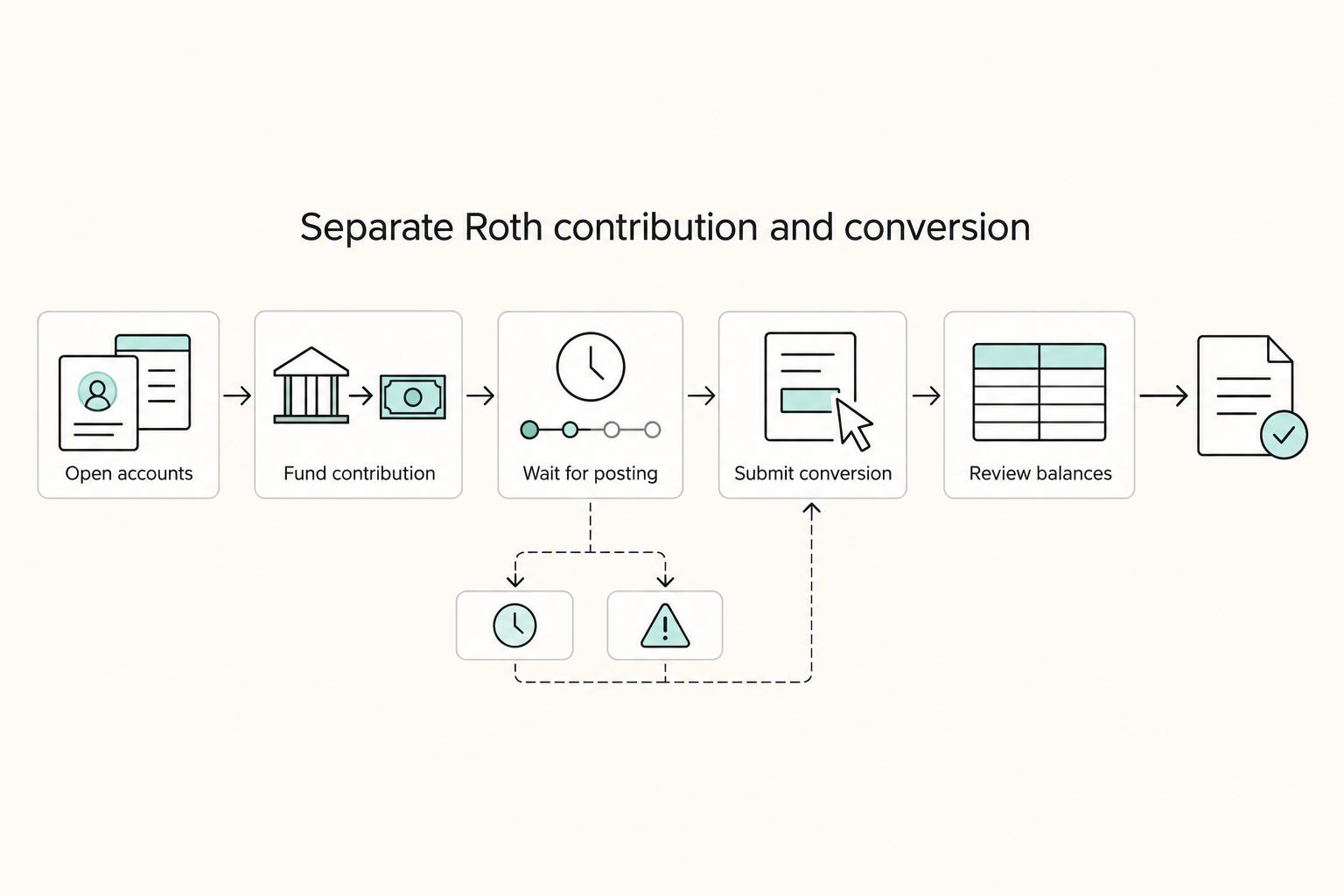
Order matters. Make after-tax contributions first, then convert through the route your plan allows. If a checkpoint is unclear, pause before adding more.
- Set up after-tax 401(k) contributions.
Confirm you still have room under the total annual additions limit before contributing more. For 2026, the cited limits are $72,000 for combined employer and employee contributions and $24,500 for elective deferrals before eligible catch-up amounts. After-tax contributions use remaining space after deferrals and employer contributions are counted.
- Verify contributions are being classified as after-tax.
Check that deposits are landing in the after-tax source, not pre-tax or designated Roth buckets. If posting is wrong, stop and fix setup before making more contributions.
- Convert using the path your plan actually permits.
Use the conversion route your plan supports: an in-plan Roth rollover to a Roth 401(k), or an in-service distribution of nondeductible assets for rollover to a Roth IRA. Some plans allow after-tax contributions but not the conversion step. If that is your plan, pause. After-tax balances without a workable conversion path may be less attractive than taxable investing.
- Check tax exposure at conversion.
Review whether earnings built up between contribution and conversion, since those earnings can be taxable when converted.
If you're comparing this with a Roth conversion ladder, read How to Handle a Roth Conversion Ladder for Early Retirement.
Choose your Roth destination with clear tradeoffs#
Choose the destination your plan can support cleanly each cycle, not the one that sounds best in theory. In practice, the more reliable path is usually the one with fewer manual handoffs.
| Destination | Conversion path | Hard gate | Common execution risk |
|---|---|---|---|
| Roth 401(k) | In-plan Roth conversion | Plan must allow after-tax contributions and in-plan conversions | No automatic conversion or phone-only requests in some plans |
| Roth IRA | Rollover-style IRA conversion | Plan must allow in-service withdrawals for this while-employed workflow | Withdrawal frequency limits and extra transfer coordination |
A Roth 401(k) route keeps assets in the plan. If your plan supports both after-tax contributions and in-plan conversions, this can cut down on process steps. Your key check is source tracking: confirm after-tax contributions and conversions are recorded to the intended sources. That matters because reporting treatment can differ from standard Roth payroll expectations.
A Roth IRA route can also work well, but only when in-service withdrawals are available in your plan. These features are plan-dependent, and some plans limit cadence, for example, up to 4 withdrawals per year in one documented setup. If execution depends on manual requests or multiple parties, treat that as operational risk and verify each handoff before you scale contributions.
If your priority is execution reliability, pick the path with fewer handoffs and use the same destination logic each cycle. Consistency can reduce admin errors, improve reconciliation, and leave a cleaner conversion trail.
Build a tax evidence pack you can defend later#
Build your records so you can prove the tax character and movement for each conversion, not just ending balances. The goal is a clean trail of what was after-tax, what was pretax, where it went, and when.
| Record | What it should show | When to keep it |
|---|---|---|
| Payroll summaries | Posted after-tax 401(k) contributions | One file set per conversion cycle |
| Plan statements near the transaction date | Ideally by source | One file set per conversion cycle |
| Conversion or rollover confirmations | Date, amount, and destination | One file set per conversion cycle |
| Year-end tax and plan reporting | Stored with the transaction records | Year-end |
Keep one file set per conversion cycle, and include items like:
- payroll summaries showing posted after-tax 401(k) contributions
- plan statements near the transaction date, ideally by source
- conversion or rollover confirmations with date, amount, and destination, whether Roth IRA or (if your plan permits) Roth 401(k)
- year-end tax and plan reporting stored with the transaction records
If any link is unclear, rebuild the source breakdown first. When an account includes both pretax and after-tax amounts, distributions generally include both on a pro rata basis. In the IRS example, a $100,000 balance ($80,000 pretax, $20,000 after-tax) yields a $50,000 distribution of $40,000 pretax and $10,000 after-tax, not an after-tax-only withdrawal.
Separate sources before they blur together#
Keep distinct documentation for separate tax-character buckets, including:
- pretax amounts
- after-tax 401(k) contributions
- earnings tied to after-tax contributions
This matters because earnings tied to after-tax contributions are still pretax amounts. If your records show only a generic combined source, request detail before the next conversion.
Reconcile on a schedule, not at filing time#
Use a regular reconciliation cadence, for example quarterly, then run a year-end check. During each reconciliation, match payroll postings to plan statements, then statements to conversion confirmations and destination records. At year-end, match that file set to annual reporting.
If you use split destinations, keep same-time instructions together. Those distributions are treated as a single distribution for pretax and after-tax allocation. If source coding does not match, pause new conversions until the records are corrected.
Avoid the mistakes that trigger rework and stress#
Most problems here come from execution mistakes. Before you move money, confirm plan permissions, calculate real contribution room, and set a repeat check cadence.
Confirm plan permissions in the 401(k) plan first#
Do not assume your plan supports this strategy just because it offers a 401(k). You need both after-tax 401(k) contributions and a valid conversion path, either an in-plan Roth conversion or an in-service distribution.
Use the official plan summary as your checkpoint, not a broad portal label or a quick support answer. Confirm the rules for after-tax contributions, in-service withdrawals, and in-plan conversions, then save that documentation with your conversion records. If the plan does not allow in-service movement while you are employed, you may need to wait until job separation.
Use total-plan math, not just your own payroll election#
A common miscalculation is counting only your own payroll election. Available after-tax room is reduced by employee deferrals and employer contributions.
Base your math on the Section 415(c) total-plan limit. One cited 2026 set is $72,000, with cited catch-up variants of $80,000 and $83,250 (ages 60-63), but verify current limits before acting. Remaining room is the applicable cap minus employee deferrals and employer contributions already made or expected.
Before adding after-tax funds, check:
- year-to-date payroll deductions
- your 401(k) statement by contribution source
- employer contribution timing
If employer funding is uncertain, leave a buffer instead of targeting the ceiling exactly.
Do not run conversions on last year's settings#
Autopilot creates avoidable errors. Recheck current contribution limits and your plan's conversion and distribution rules before each cycle.
If you are comparing this route with a Backdoor Roth IRA, do not assume the paperwork and reporting process is identical.
Treat it as a recurring process#
Handle this as an operating process, not a one-time event. Poor handling can create penalties and cleanup work.
For each cycle, confirm that plan permissions still apply, contribution room is still accurate after employer contributions, funds went to the intended Roth destination, and records support the tax treatment. If any part is unclear, pause and fix it before the next move.
Is a Mega Backdoor Roth still worth it with uneven income#
It can be, but it is not automatic. Whether it is worth it depends on plan features and your ability to complete both steps.
The upside can be meaningful, but only if execution is reliable. After-tax 401(k) contributions do not give an upfront tax deduction. This works best when your plan supports the conversion step you intend to use. If that second step is limited or unclear, the case weakens quickly. Doing only the after-tax contribution step, without completing conversion, may not make sense compared with taxable investing.
A practical middle path can help avoid all-or-nothing behavior. Keep contributions at a level you can sustain, then increase only in stronger months.
Before each increase, confirm:
- your current election and year-to-date amounts by contribution source
- that your plan still supports the conversion path you intend to use
- that you understand how your plan handles contribution sources during withdrawal or conversion steps
Be careful when plan operations are ambiguous. One reported case described a plan that allowed in-service withdrawals but did not let the participant fully specify source, and a $2,200 withdrawal showed $500 taxable. That is not proof every plan behaves this way, but it is a clear warning sign. If source handling is unclear, pause and get written clarification before sending more money through the process.
If you are comparing options, the Backdoor Roth IRA is a separate path with different mechanics.
Add cross-border tax checks if you work internationally#
If you work internationally, treat a mega backdoor Roth as one part of a broader filing process, not a stand-alone move.
| Item | Requirement described | Timing or threshold note |
|---|---|---|
| FBAR (FinCEN Form 114) | A U.S. person with a financial interest in, or signature authority over, foreign financial accounts must file an FBAR | Check first |
| Form 8938 | Reports specified foreign financial assets when thresholds are met, and filing Form 8938 does not replace FBAR when FBAR is otherwise required | Check separately |
| Form 8938 threshold set | IRS guidance includes a $50,000 trigger for certain U.S. taxpayers, with higher thresholds for joint filers and taxpayers residing abroad | Confirm before year-end |
| Form 8938 filing timing | File Form 8938 with your annual return by that return's due date, including extensions | If you are not required to file an income tax return for the year, Form 8938 is not required for that year |
| Record alignment | Make sure the accounts and balances you track match what you report across forms | Keep records aligned with this plan |
Use the table as your checklist, and confirm jurisdiction-specific requirements before final execution.
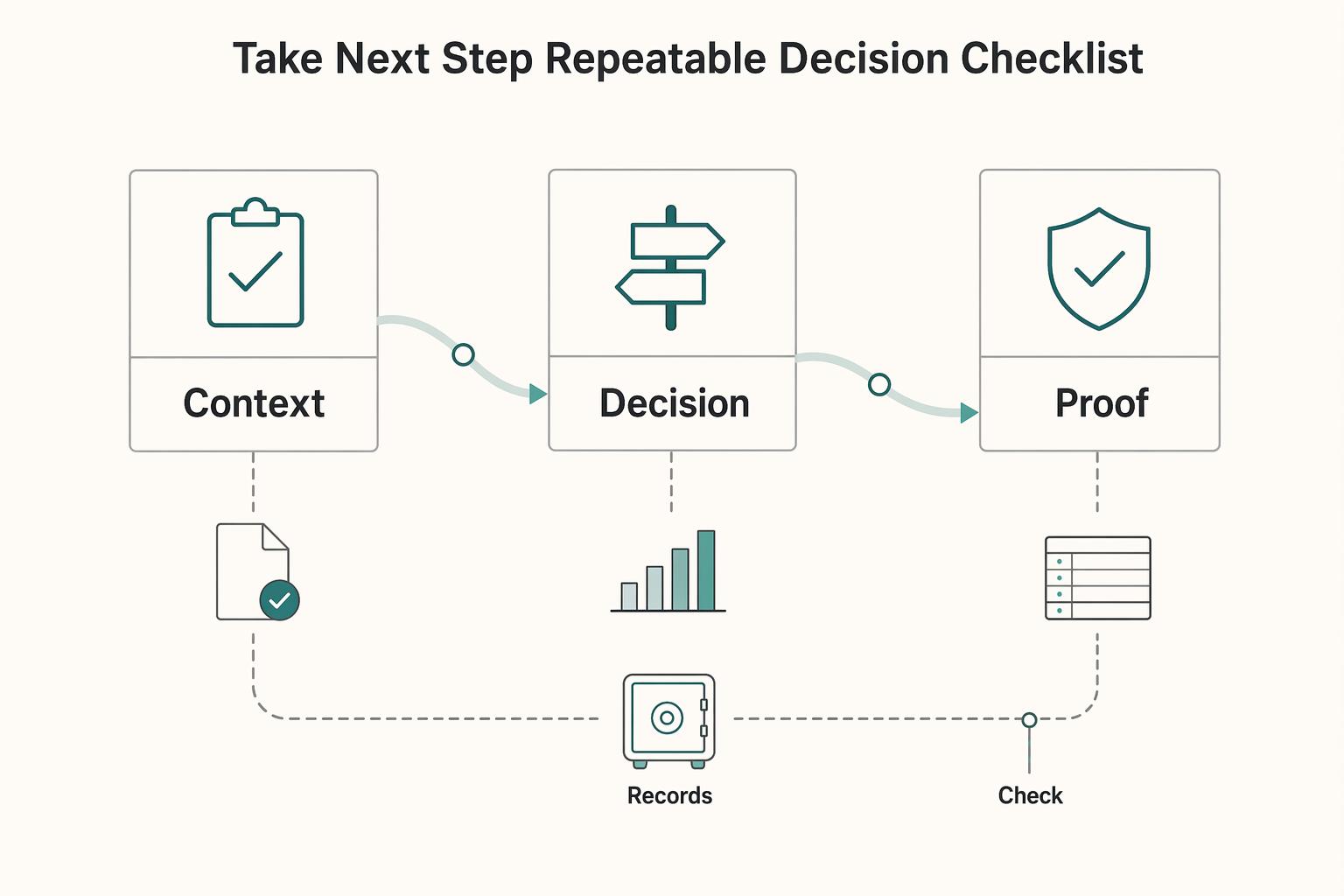
Take the next step with a repeatable decision checklist#
A mega backdoor Roth can make sense when three things are true: your plan supports it, your current-year room is real, and funding it fits near-term operations. Use this same sequence each time: verify plan features, calculate room, set practical cashflow guardrails, execute carefully, and keep clean records.
Start with plan eligibility, because that is the hard gate. Confirm your plan accepts after-tax 401(k) contributions, then confirm the conversion route your plan actually permits. Plan features vary, so treat this as a go/no-go check before you fund.
Next, compute available room using current-year totals, not estimates. The working formula is: total plan limit minus your pre-tax or Roth deferrals minus employer contributions. You may see examples like 2025 limits of $23,500 (employee) and $70,000 (total including employer), but treat examples as context only and use your actual plan-year numbers.
Then apply a cashflow guardrail before increasing contributions. If funding after-tax amounts would force borrowing, delayed obligations, or other short-term stress, reduce or pause. The strategy should support long-term outcomes without weakening business resilience.
Execute in small, verified steps. Set elections only after room is confirmed, verify contributions are posting to the correct bucket, then process conversions through the route your provider supports. Reconcile exact posted amounts, since even small earnings can appear before conversion, for example, 33 cents leading to a $7,000.33 conversion.
Keep documentation complete and separated by bucket and account type. Save payroll summaries, plan statements, conversion confirmations, and year-end tax documents. If untaxed earnings appear during conversion, they can be taxable. If traditional IRA contributions were deducted before conversion, tax can also apply, so confirm reporting and treatment with your tax advisor.
Action checklist for this week#
- Ask your 401(k) provider: does the plan allow after-tax contributions, and what conversion route is actually permitted?
- Pull year-to-date employee and employer contribution totals and calculate remaining room under your plan's total limit.
- Set a minimum cash reserve line for the business before funding additional after-tax contributions.
- Run one small test contribution and verify it lands in the correct contribution bucket.
- Complete the first conversion and match the exact confirmation amount to the plan statement, including any cents of earnings.
- Send your contribution and conversion records to your tax advisor and ask about taxable earnings and reporting implications for your setup.
Proceed only when it improves long-term outcomes without reducing near-term operating stability. After you finalize your checklist, review implementation options and operational details in Gruv Docs.
Frequently Asked Questions
What is a mega backdoor Roth in one sentence?
A mega backdoor Roth is a strategy that moves certain 401(k) contributions into a Roth account, usually a Roth IRA or Roth 401(k). In practice, it can let some people put more money into Roth treatment than direct Roth IRA contributions alone.
How does a mega backdoor Roth work in two steps?
It works in two steps: make after-tax contributions to your workplace plan, then convert that balance to an allowed Roth destination. The destination is plan-specific and may be an in-plan Roth conversion, an in-service rollover to a Roth IRA, or only one of those routes.
Who is the strategy usually best for?
It is usually most relevant for people who want more Roth savings room and have plan access to the required steps. It often comes up for people who cannot make direct Roth IRA contributions because of income or contribution limits, but plan features are still the deciding factor.
What exact 401(k) plan feature determines whether it is possible?
The first gate is whether your plan allows after-tax contributions. Then you must confirm a permitted conversion path, because not all plans allow every step or both Roth destinations.
How do the employee deferral limit and total plan contribution limit affect how much I can move?
This guide does not provide exact current-year limit values. In practice, these plan-year limits affect how much after-tax contribution room you may have, so confirm your current limits and totals with your plan administrator before estimating how much you can move.
Do I need to qualify for direct Roth IRA contributions to use this strategy?
No. This strategy is often considered by people who are ineligible for direct Roth IRA contributions. Fidelity’s 2025 example notes that at $165,000 (single) and $246,000 (married filing jointly), direct Roth IRA contributions are not allowed for that tax year, but a plan-based route may still be possible if the 401(k) permits it.
What is still unknown before acting in my case?
You still need to verify plan documents and confirm with your administrator whether after-tax contributions are allowed, which conversion route is available, and whether conversions are automatic or manual. Some plans require phone-based processing and some allow only one destination path. You should also review tax implications, including potential pro rata complications on in-service moves, and confirm the strategy fits your broader financial goals.
Try a related tool
Researched and edited by the Gruv editorial team. Gruv builds cross-border billing, payouts, and finance-operations software for global businesses.
Sources
Includes 3 external sources outside the trusted-domain allowlist.
- congress.gov/111/crec/2010/07/15/CREC-2010-07-15-senate.pdftrusted
- finance.senate.gov/download/building-on-bipartisan-retirement-l...trusted
- fincen.gov/report-foreign-bank-and-financial-accountstrusted
- irs.gov/retirement-plans/rollovers-of-after-tax-cont...trusted
- irs.gov/businesses/corporations/do-i-need-to-file-fo...trusted
- bogleheads.org/forum/viewtopic.phpexternal
- bogleheads.org/forum/viewtopic.phpexternal
- echelonfinancial.com/the-mega-backdoor-roth-strategy-your-path-to...external
Educational content only. Not legal, tax, or financial advice.
Related Posts

Japan Digital Nomad Visa 2026: Six-Month Planning Runbook
Treat this as your operating model: identify the right mission first, commit to one route, and keep dated records before you make irreversible plans. That is what keeps the rest of your timeline, paperwork, and decisions coherent.
Backdoor Roth IRA SOP for High Earners
A **backdoor Roth IRA** is a strategy, not a separate account. You make a non-deductible contribution to a traditional IRA, then convert that amount to a Roth IRA. This usually matters when your modified AGI limits or blocks a direct Roth IRA contribution, even though Roth conversions are not income-limited.

The Freelance Payment Penalty: A Modeled Audit of Platform Fees, FX Spreads, and Payout Delays
The money rarely disappears through a single, easy-to-spot fee. The real loss is stacked. A marketplace takes its commission, a processor adds a charge for international cards, a bank or payment company converts the currency at a spread, a platform holds the funds before release, and a wire sheds a little to intermediaries on the way in. Each layer looks defensible on its own, but the worker feels the combined result as a smaller deposit and a later payday.