
Quick Answer
Treat google play store submission as a controlled launch sequence: set up the Play Console account, complete App content and Data safety so they match real in-app behavior, and verify current AAB and target API requirements before upload. Budget for the one-time $25 developer account fee, then leave room for testing and policy work. Use a staged rollout and watch App status, Update status, and Item status, because review can run up to seven days or longer in exceptional cases.
Launching an app on the Google Play Store is not just a submission task. It is the release of a business asset. The teams that get through launch cleanly usually do the same thing. They build the operating basics before they upload the build.
This playbook is built around that idea. Instead of treating launch like a technical checklist, treat it like the start of a durable product operation. The goal is simple. Reduce avoidable review friction, protect revenue and brand value, and give yourself cleaner control once the app is live.
Phase 1: The Pre-Launch Foundation#
If you want fewer launch surprises, do the boring work first. Before your google play store submission, set up the parts that create most avoidable risk: your disclosures, your money trail, your brand rights, and your account setup.
You also need the account layer in place early. A Google Play Console developer account is required to upload an Android app, and one cited source puts the opening fee at $25 one time, with no per app submission fee after that. Cheap access does not mean low risk. One launch guide flags content readiness and developer account verification as two main bottlenecks. If you sign up as an individual, your legal name, address, and email may be publicly visible on the Play Store.
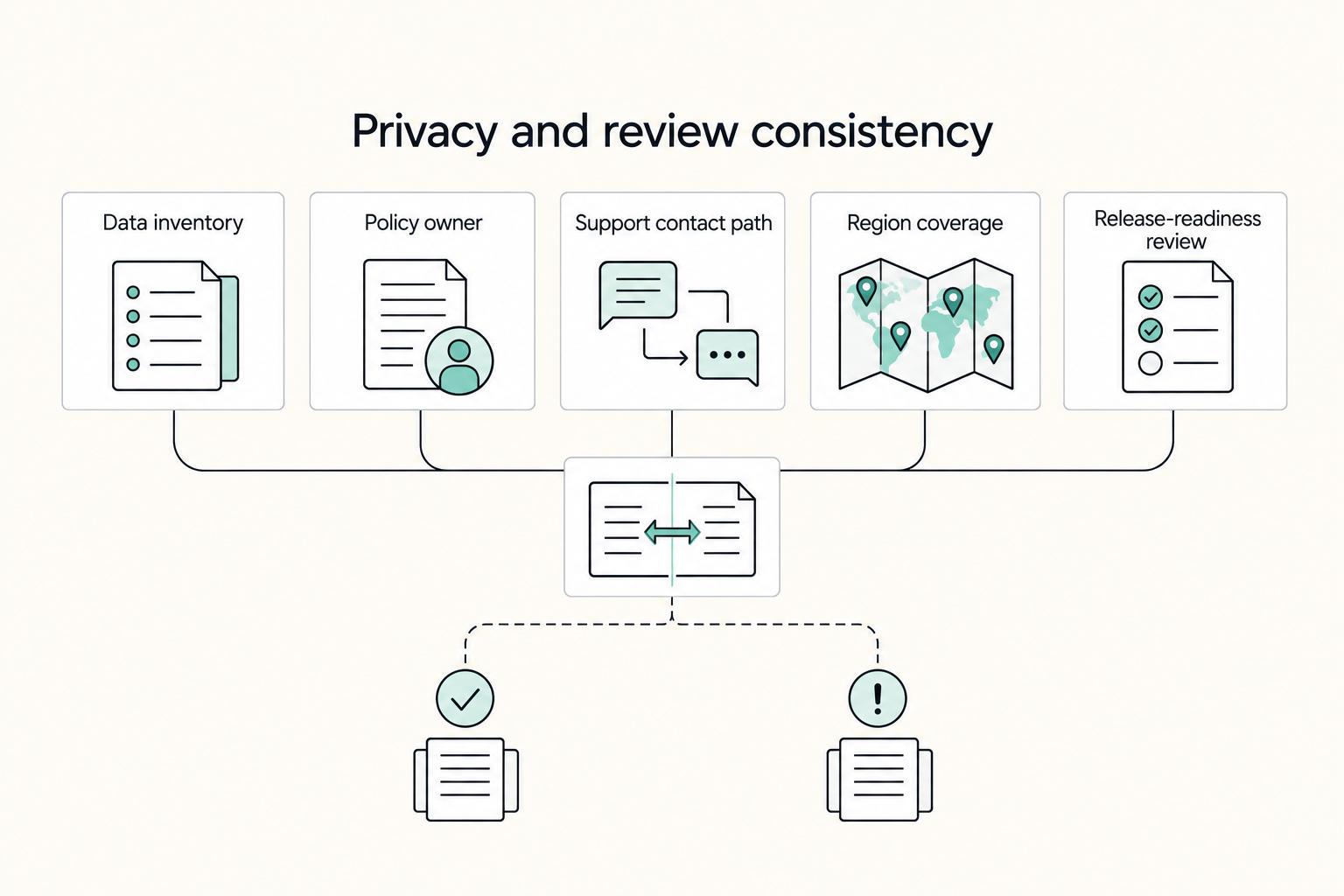
Privacy and review consistency#
Privacy work is really a consistency check. What your app actually collects, what your policy says, and what you declare in Play Console under app content, data safety, and store listing info all need to match. When those drift apart, you create review friction and a user trust problem at the same time.
| Item | What to record or confirm |
|---|---|
| Data inventory | Record each data type, source, purpose, storage location, third party recipient, and retention or deletion trigger. |
| Policy owner | Assign one person or role to own privacy text, release signoff, and change tracking. |
| Support contact path | Publish [support email/form/url], test it, and confirm who handles consent or deletion requests. |
| Region coverage | List [countries/regions] where you plan to distribute first and verify your disclosures and support path fit that scope. |
| Release-readiness review | Complete app content, data safety, and store listing info in Play Console. Review Android project settings, including code signing. Confirm whether closed testing applies to your account and timeline. |
Keep the process simple and specific. Start with data minimization. List every user, device, or usage data point the app touches, why it exists, and what breaks if you remove it. Then test your support and deletion paths in the product, not just in the policy. An avoidable failure mode is promising account deletion or support-based removal in the policy, then shipping an inbox nobody monitors or an in-app path that does not work.
Use this pre-launch checklist and fill in the blanks against current requirements before release.
- Data inventory: record each data type, source, purpose, storage location, third party recipient, and retention or deletion trigger.
- Policy owner: assign one person or role to own privacy text, release signoff, and change tracking.
- Support contact path: publish [support email/form/url], test it, and confirm who handles consent or deletion requests.
- Region coverage: list [countries/regions] where you plan to distribute first and verify your disclosures and support path fit that scope.
- Release-readiness review: complete app content, data safety, and store listing info in Play Console. Review Android project settings, including code signing. Confirm whether closed testing applies to your account and timeline.
That last line matters more than many teams expect. Mandatory closed testing, introduced in 2023 according to one source, can add friction for individual developers. Combined with Android device fragmentation, it raises the testing burden. Do not leave review prep until the week you want to launch.
Money and account separation#
Treat store revenue as business revenue from day one, even if your first payout is small. Financial, tax, and accounting obligations vary by business setup and jurisdiction, so confirm what applies with your accountant and current platform terms.
The practical sequence is straightforward. First, choose the payout destination you want to keep and separate it from personal spending. Second, decide what records you will keep every month: Play Console sales and payout reports, bank deposits, refund notes if relevant, and copies of any tax or advisor guidance you rely on. Third, set a regular reconciliation routine between payouts and console reports. The red flag is co-mingling money and trying to reconstruct it later.
Brand protection before naming gets expensive#
A quick name search is a start, not a decision. Your app name and logo need to hold up in the markets you care about, at the point where you plan to invest in growth, with enough evidence to defend them if challenged.
If you are testing a narrow idea with limited branding spend, basic protection may be enough for launch. If you already know your priority markets, plan paid acquisition, or expect partnership distribution, do the clearance and filing work earlier. Rebranding after reviews, backlinks, screenshots, and user recognition start to accumulate can be expensive and disruptive.
| Protection level | What you do before launch | Good fit | Main risk |
|---|---|---|---|
| Basic launch protection | Search for obvious conflicts, document your findings, secure matching brand assets you need | Small test launch, limited spend, narrow geography | You may discover conflicts later and need to rename |
| Growth-aware protection | Check name and logo against your first priority markets and keep dated evidence of use | Launching with marketing budget or near-term expansion plans | Partial coverage can still leave gaps as you scale |
| Scalable brand protection | Pair clearance work with formal filing plans and an enforcement contact process | Brand-led product, partnerships, serious long-term app business | Higher upfront cost and more admin before launch |
Keep an evidence pack either way. Include dated logo files, store listing drafts, first use screenshots, and the notes behind your naming decision. If a dispute appears later, having your paperwork in one place will matter more than vague confidence that you "already checked."
Phase 2: Professional Execution: Crafting a Premium Store Presence#
Your store presence should do two things at once: convert the right user and survive review without friction. If your promise, visuals, and declarations do not match, you usually lose both trust and conversion.
Lead with the outcome, then support it#
Start with the result the user wants, then show the features that make that result believable. That is the practical shift in ASO 2.0: visibility plus conversion, not visibility alone.
| Search intent | Feature-led snippet | Outcome-led snippet |
|---|---|---|
| habit tracker | "Track habits with reminders, streaks, and charts." | "Stick to one routine at a time with simple reminders, visible streaks, and progress charts you can read quickly." |
| invoice app | "Create invoices, manage clients, and export PDFs." | "Send a professional invoice in minutes, reuse saved client details, and export clean PDFs without extra admin." |
| photo editor | "Includes filters, sliders, and retouch tools." | "Improve everyday photos fast with quick adjustments and focused retouch tools when details matter." |
Use this test: if you remove your app name, can a target user still tell who it helps and what improves for them? If not, your listing is probably still feature-led.
Keep claims policy-safe and specific. Avoid certainty language you cannot prove in product behavior, support handling, or policy documents.
Store listing execution checklist#
Run this before submission so your listing reads like one coherent story, not disconnected fields.
| Listing area | What to check |
|---|---|
| Title + subtitle-style short description | Title identifies the product; short description states the primary outcome in plain language. |
| Description hierarchy | First lines = problem and promise; middle = proof and core capabilities; end = limits, support, and edge cases. |
| Screenshot narrative order | Problem, core action, visible payoff, trust cue, secondary capability. |
| Localization readiness | Localize core copy and screenshots together for each market, or delay that market. |
| Policy-safe claims language | Remove unverifiable superlatives and certainty claims your app or support path cannot substantiate. |
Verify technical readiness against current requirements#
For technical readiness, verify current requirements in Play Console documentation and write them into your release checklist as placeholders you fill only after verification.
- Android App Bundle (AAB): Current requirement pending official Google Play/source verification.
- Target API level and deadlines: Current requirement and deadline pending official Google Play/source verification.
- Testing tracks and eligibility rules: Current eligibility rules pending official Google Play/source verification.
- App content declarations: confirm your listing, declarations, and in-app behavior are consistent.
- Pre-launch quality checks: run real-device checks for your highest-priority flows before wider rollout.
Use a compliance checkpoint tied to the Developer Programme Policies (effective date shown as 4 March 2026 in the referenced policy page): confirm the app is appropriate for Google Play and compliant with local laws. For social or dating apps, verify child safety standards and published standards before release. Treat this as removal-risk control, not optional polish.
Choose pricing and rollout with a feedback loop#
Pick pricing based on user friction and value timing, then adjust with release data.
| Decision area | Option | Use when | Watchouts |
|---|---|---|---|
| Pricing model | Paid upfront | Value is immediate and specific | Higher install friction if value is unclear in the listing |
| Pricing model | Free + in-app purchase | Trust needs to build before payment | Weak onboarding can inflate installs but depress activation |
| Regional rollout | Smaller first-market set | You can support language, response times, and compliance well | Slower surface-area growth, but cleaner learning |
| Expansion timing | Staged expansion | Early signals are stable | Expanding too early can scale listing or onboarding issues |
Use staged-release signals to update both listing and onboarding. If install-to-activation is weak, tighten your first screenshot and short description; if ratings trend weakly (ASO guidance flags sub-4-star performance as a traction risk), investigate bugs, onboarding friction, and promise mismatch before expanding.
If you need a deeper pricing lens, Value-Based Pricing: A Freelancer's Guide is useful. If you want a deeper platform comparison, read A Guide to App Store Submission for iOS.
Phase 3: Beyond the Launch: Managing Your Asset#
After launch, your job is operations: keep payouts traceable, keep disclosures aligned with real behavior, and use Play Console signals to decide what ships next.
Keep payout operations boring and traceable#
Pick a payout workflow on purpose, then document it. First verify the current Play payments rules for your account in Play Console, including supported payout method, currency handling, and payout schedule ([verify current rules in Play Console]), because these can change.
| Payout approach | Control over conversion timing | Fee visibility | Operational complexity |
|---|---|---|---|
| Default bank flow | Low | Low to medium | Low |
| Multi-currency receiving setup | Higher | Medium to high | Medium |
| Intermediary platform before your operating account | Medium to high | Medium | Medium to high |
Run reconciliation against three records every cycle: platform payment statement, receiving account or bank settlement, and your internal revenue ledger. If any figure does not match, treat it as unresolved and investigate before classifying funds as clean revenue.
For failed or delayed payouts, escalate with an evidence pack: payment profile ID, statement period, payout-status screenshots, bank confirmation that funds were not received, and the expected timing window after you re-check current platform rules ([verify current timing in Play Console]).
Treat compliance as a release gate, not a document folder#
Post-launch risk is usually drift, not paperwork. With 10-30 third-party SDKs often present in mobile apps, your disclosures can diverge from runtime behavior unless you check changes continuously; as publisher, you remain responsible for what your app and SDKs do.
Before each release, run the same governance loop:
- Log any new SDK, permission, endpoint, event, or data-sharing change.
- Confirm consent behavior matches actual runtime behavior.
- Verify analytics and ad SDKs do not fire before consent interaction or after refusal.
- Update privacy policy and Play declarations when data use changes.
- Run one DSAR workflow: intake, identity check, data pull, fulfillment, and audit record of what was sent and when.
If an update is rejected for non-compliance, fix and resubmit or appeal. If the app is removed, reinstatement requires a policy-compliant update. If the app is suspended, reinstatement requires a successful appeal.
Use Play Console signals to decide what changes next#
Start with status before roadmap debates. Play Console shows the latest publishing status under your app name and package name, with three lenses: app status, update status, and item status.
| Signal | Next action |
|---|---|
| Update status is In review | Plan for delay. |
| Reviews repeatedly flag confusing setup and early usage looks weak | Fix onboarding first. |
| Product feedback is positive but listing performance is soft | Update screenshots and copy before changing core functionality. |
| Complaints cluster around crashes | Prioritize stability and keep the next release narrow. |
When update status is In review, plan for delay. Some accounts can see review times of up to seven days or longer in exceptional cases, so avoid tying urgent fixes to broad feature bundles.
Then map signals to one next action. If reviews repeatedly flag confusing setup and early usage looks weak, fix onboarding first. If product feedback is positive but listing performance is soft, update screenshots and copy before changing core functionality. If complaints cluster around crashes, prioritize stability and keep the next release narrow. For store-facing improvements, use A Guide to App Store Optimization (ASO) for Mobile Apps.
You might also find this useful: Google Workspace for Freelancers Who Want Cleaner Operations.
Conclusion: From Submission to Asset Management#
Your google play store submission is not the finish line. Once you send a build for review, you are running an ongoing release operation. The useful question is not just "can I publish?" but "how will I verify, time, and manage what happens next?"
| Operating area | Checklist-only mode | Asset-management mode |
|---|---|---|
| Pre-launch controls | Submit when the build compiles and hope review is quick. | Run pre-review checks and submit changes long before your intended release date. |
| Release timing | Let approved changes go live whenever they clear review. | Use Managed publishing if timing matters, and use Save for later when you need some changes reviewed now but held back from release. |
| Status verification | Check once after upload and assume silence means progress. | In Play Console, check the latest publishing status under your app's name and package name, and watch whether you are in internal testing (URL-only, not discoverable) or live in production for your chosen countries or regions. |
| Post-launch response | Treat launch day as done. | If a critical issue appears, use halt release to stop distribution. If an update is rejected for compliance reasons, fix and resubmit or submit an appeal. |
That is the real shift. Before launch, you put controls in place so review risk is lower. At launch, you manage timing instead of leaving publication to chance. After launch, you keep a cadence for status checks, issue response, and update handling, especially because review can take up to seven days or longer in exceptional cases.
Right before you press publish, verify the current status signals, release controls, and review requirements in Play Console. Right after launch, review publishing status, country availability, any approved versus still-in-review changes, and whether you need to halt, fix, or resubmit anything.
Frequently Asked Questions
Do I need a privacy policy for my Android app?
Usually yes, if your app handles personal or sensitive user data, and Play Console gives you a specific place to manage that link on the App content page under Privacy policy. The important part is consistency: your declarations and your real data behavior need to match, or you create a fast path to rejection or later compliance trouble. Before submission, verify the current disclosure prompts in App content, confirm the policy URL works, and check that your consent flow and in-app behavior match what the policy says.
How much does it cost to publish an app on Google Play?
There is a platform entry cost, but you should verify current requirements before budgeting from memory. The bigger risk is underfunding the non-platform work: privacy drafting, testing, store asset production, and any accounting or legal review your app needs. Treat the platform fee as the small line item and build a real launch budget around compliance, crash fixing, and listing quality.
How do I handle taxes for paid apps on Google Play?
Tax handling depends on your country, payout setup, and business structure, and this section does not define exact platform-versus-business tax boundaries. Verify current rules for your setup before launch. In practice, keep payout statements, settlement records, and your internal revenue ledger aligned, and get local accounting advice before revenue starts if your setup crosses borders.
What is the difference between an Android App Bundle and an APK?
They are different release package formats, and you should verify the current accepted format and technical requirements in Play Console before submission. This is an avoidable release blocker, not a cleanup task for later. If you use obfuscation, upload the related deobfuscation or symbol files during release prep so crash investigation and review support are easier later.
How long does the review process take?
Do not plan around a fast approval. Play notes that some accounts can see review times of up to seven days or longer in exceptional cases, so delay risk is real. After submission, check status in Play Console under your app name and package name, and watch all three status types: App status, Update status, and Item status.
What are the most common reasons for an app rejection?
A documented rejection reason is policy or Developer Distribution Agreement noncompliance. If an update is rejected, the documented paths are to fix issues and resubmit or appeal. For risk control, assume checks happen both in your disclosures, such as the App content page, and during update review, not in one single screen. Before submission, prepare a simple evidence pack: the live privacy policy URL, notes showing where key disclosures appear, the exact build submitted, and any ReTrace mapping file if relevant.
Try a related tool
Researched and edited by the Gruv editorial team. Gruv builds cross-border billing, payouts, and finance-operations software for global businesses.
Sources
Includes 6 external sources outside the trusted-domain allowlist.
- federalregister.gov/documents/2025/01/06/2024-30983/hipaa-securi...trusted
- lackawanna.edu/wp-content/uploads/2025/07/25-26-Student-Han...trusted
- appinventiv.com/blog/how-to-submit-app-to-google-play-storeexternal
- blog.appmysite.com/the-google-play-checklist-everything-you-nee...external
- codewithandrea.com/articles/how-to-release-flutter-google-play-...external
- developer.android.com/guide/playcore/asset-deliveryexternal
- dogtownmedia.com/aso-2-0-advanced-app-store-optimization-stra...external
- github.com/Triple-T/gradle-play-publisherexternal
Educational content only. Not legal, tax, or financial advice.
Related Posts

Value-Based Pricing for Freelancers Under Real Payment Risk
Value-based pricing works when you and the client can name the business result before kickoff and agree on how progress will be judged. If that link is weak, use a tighter model first. This is not about defending one pricing philosophy over another. It is about avoiding surprises by keeping pricing, scope, delivery, and payment aligned from day one.
Run App Store Optimization Like an Operator for Mobile Apps
ASO works when you treat it like a recurring operating practice, not a burst of edits when installs dip. If you are working solo or with one helper, keep it to four controls you can actually manage: metadata, creative, experimentation, and risk. Think of this as a practical four-part ASO stack with a simple report card for execution.

The Freelance Payment Penalty: A Modeled Audit of Platform Fees, FX Spreads, and Payout Delays
The money rarely disappears through a single, easy-to-spot fee. The real loss is stacked. A marketplace takes its commission, a processor adds a charge for international cards, a bank or payment company converts the currency at a spread, a platform holds the funds before release, and a wire sheds a little to intermediaries on the way in. Each layer looks defensible on its own, but the worker feels the combined result as a smaller deposit and a later payday.