
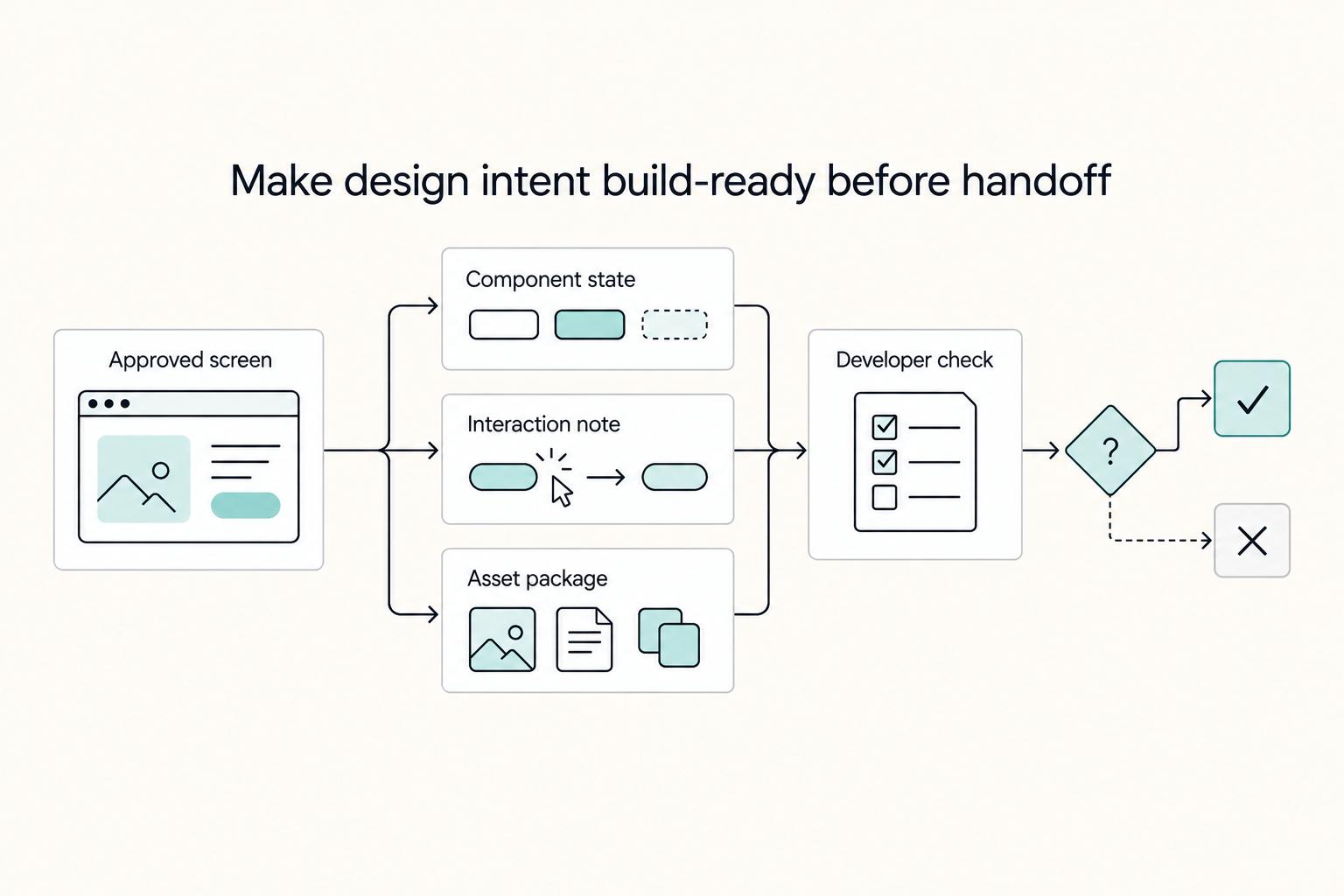
Quick Answer
Start with a risk-based figma design handoff: keep one current file, choose lightweight or full-spec detail based on ambiguity, and only mark screens Ready for development after objective checks pass. Developers should be able to inspect in Dev Mode, follow the prototype path, and identify unresolved decisions without side-channel explanation. If they cannot, treat the package as incomplete and fix states, notes, or ownership before implementation begins.
How to run repeatable, defensible Figma-to-developer handoff without a heavyweight process#
If you freelance or run a small design practice, you do not need a heavyweight process to hand work to developers. You need a repeatable way to handle handoff in Figma so implementation starts with less guesswork and clearer scope. The point is not prettier files. It is making build-ready intent obvious before engineering spends time translating what you meant.
That matters even more when you are the operator, not just the designer. A messy handoff rarely fails in one dramatic moment. It usually shows up as avoidable cleanup and delayed starts when details are unclear. Figma's own guidance is useful because it points to a familiar failure mode. In older export-first approaches, screens and assets could already be outdated by the time they were shared, which left collaborators unable to give meaningful feedback. If your delivery still depends on late exports, scattered notes, or verbal clarification after the fact, you are likely carrying avoidable rework risk.
Figma describes handoff as a way to keep designers and developers aligned and improve communication and consistency. That sounds broad, but it leads to a practical standard. A developer should be able to open the shared file, see the current state, inspect the important details, and understand what is final versus what is still open. Figma also argues that annotated files and visible measurements improve clarity and can speed development. In the best case, the file becomes the working reference, not just a container for mockups.
That collaborative angle matters because handoff is not just a final export step. Figma's best-practices material frames it around how teams involve developers during delivery, not only at the end. One example in Figma's guide describes a Dropbox designer working closely with five developers through a single shared link where comments, prototypes, and iterations remain visible. You do not need Dropbox-scale process to borrow the lesson. You do need one source of truth and a clear point where implementation can begin without constant interpretation.
This guide follows that logic. First, it defines what handoff means in real work and where collaboration starts before final pixels. Then it gives decision rules for choosing the right level of detail, because not every update needs full specs. After that, it moves into the practical work: preparing the file, setting permissions, marking screens ready, and running communication without meeting sprawl. It closes with the failure patterns that create rework and disputes.
One limit up front: this article is grounded mainly in Figma-centric material. It does not claim deep community tactics from r/FigmaDesign, and it is not a full comparison of Figma against every other handoff tool. The aim is narrower and more useful for an independent operator: help you run handoff in a way that is easier to repeat, easier to defend, and harder to misread.
What Figma design handoff means in real work#
In real work, Figma design handoff is not just sharing screens. It means transferring implementation-ready design intent. Developer handoff is the point where implementation can start with minimal ambiguity because the current design, behavior, and constraints are visible in one place.
| Item | Meaning | Developer use |
|---|---|---|
| Figma design handoff | Transferring implementation-ready design intent, not just sharing screens | Shows the design knowledge and specifications needed to build |
| Developer handoff | The point where implementation can start with minimal ambiguity | Shows the current design, behavior, and constraints in one place |
| Dev Mode | The practical inspection view for developers | Lets them inspect designs and translate them into code without changing the design file |
Good handoff starts before final pixels. Figma's guidance contrasts older late-share workflows with earlier designer-developer collaboration, so comments, prototypes, and implementation notes stay with the file instead of getting scattered across chat or memory. The Dropbox example shows the same operating model: one shared Figma link used by one designer and five developers so artifacts and iterations stay visible together.
For developers, Dev Mode is the practical inspection view. Figma describes it as a way to inspect designs and translate them into code without changing the design file, which helps teams check spacing, sizing, and structure during implementation. A simple usability check is whether a developer can open the current frame, inspect it in Dev Mode, follow the prototype path, and find notes on edge states or accessibility.
If you work solo or in a small team, aim for clear enough to ship, not perfect documentation. Red flags are polished screens with no prototype path, unresolved questions, or missing notes for error and loading states. That is a design dump, not a handoff.
Choose the right handoff depth for the job#
Choose handoff depth based on risk: use a lightweight handoff for small iterations on stable components, and switch to full-spec handoff when behavior is new, unclear, or expensive to misbuild.
Wrong depth creates avoidable rework. Late exports and scattered screenshots can go stale, while a single file link with comments, prototypes, and iterations keeps the current context visible when the detail level matches the work.
Pick the lighter or heavier path on purpose#
| Criteria | Lightweight handoff | Full-spec handoff |
|---|---|---|
| Screen complexity | Small edits to existing screens | New flows, branching behavior, or dense screens |
| Component reuse | Mostly established components | New components or meaningful component changes |
| Unknown states | Happy path is clear and edge cases are limited | Error, loading, empty, permission, or other edge states matter |
| Revision risk | Low cost if a detail needs clarification | High cost if behavior, hierarchy, or naming is misread |
| What you include | Current frames, linked prototype, short implementation notes, resolved comments | Everything in lightweight, plus edge states, accessibility annotations, reading/focus order, landmarks, and a handoff checklist |
| Best fit | Polishing, copy updates, layout tweaks, simple additions | Higher-risk work where assumptions can change behavior |
If your file already works as a shared source of truth, lightweight is enough. If a developer would need to infer behavior for validation failures, loading, focus order, or other non-happy paths, move to full-spec before marking it ready.
Use a decision rule you can apply quickly#
Ask two questions before marking a section ready:
- Is this mostly an iteration on known patterns?
- Could a wrong assumption change behavior, not just spacing or copy?
If 1 = yes and 2 = no, use lightweight. If 2 = yes, use full-spec.
A quick check: share the single file link and ask the developer to find the latest frame, follow the prototype path, and explain what happens in error and loading states. If that is not clear quickly, the handoff is too thin.
On tools, be practical about Zeplin. If your team already reviews in Dev Mode, adding another layer for specs can duplicate checks and increase version drift. Use Zeplin when a client requires it or when your team already treats it as the delivery surface.
Do not mark ready if these red flags are present#
- edge states are missing, especially error, loading, or empty screens
- error handling is implied but not explicitly documented
- screen or component naming is unresolved
- comments still contain open questions instead of decisions
- people still ask "What's the latest design?" or "Do you have a prototype?"
Repeated status questions usually signal unclear handoff, not inattentive teammates. Set handoff rules before polish, then treat the file as a shared source of truth. Related: The Best Tools for Creative Collaboration with Remote Teams.
Prepare the file so developers can execute without guessing#
Your file should work as a single source of truth: developers should be able to find the latest screen, understand intent, and see open decisions without guessing. If people need side messages to interpret behavior, the handoff is not ready yet.
Set the order before you annotate#
Use a fixed sequence in Figma so notes stay tied to the right decisions:
- Finalize page structure and group flows logically.
- Lock descriptive naming for pages, frames, and key layers; number frames where flow order matters.
- Link the current prototype path.
- Add implementation notes and annotations after structure and naming are stable.
This keeps comments from drifting onto renamed, duplicated, or outdated frames.
Keep the minimum artifact set together#
For each ready area, keep the essentials in one place:
- Primary frame for the latest approved screen
- Required state coverage (not just the default view)
- Interaction notes that explain what changes and why
- Known constraints (for example, component dependencies or behavior limits)
In practice, group frames, states, prototype links, and annotations so developers can inspect specs and context in Dev Mode without switching surfaces.
Make status and ownership explicit#
Label status clearly (Final, In progress, Needs decision) and assign ownership so updates and questions route correctly. Handoff is collaborative, not one-way, so this labeling reduces expectation gaps before code starts.
Use a simple verification check: ask a developer to locate the latest screens, inspect measurements, and identify open questions from the file alone. If that is hard, fix the file organization before implementation.
Set sharing and permissions before handoff day#
Set permissions before handoff starts, because access errors can block delivery even when the design is ready. In most cases, grant developers can view and reserve can edit for specific people who are expected to update the file directly. This protects your source of truth and reduces accidental drift.
| Access setup | What it gives | Article note |
|---|---|---|
| Invite to a team | Access to that team's projects and files based on the permission assigned | Access at one level can flow to lower levels |
| Invite to one file | Access to that file only | Often cleaner for client handoffs |
| can view | View access for developers | In most cases, grant developers can view |
| can edit | Edit access to update the file directly | Reserve for specific people expected to update the file directly |
Figma sharing is layered across teams, projects, files, and prototypes, and access at one level can flow to lower levels. If you invite someone to a team, they can access that team's projects and files based on the permission assigned. If you invite someone to one file, they get that file only, which is often cleaner for client handoffs.
Use Editor access only when there is a real editing job#
Use a simple rule: if client-side developers are expected to patch copy or layout in the file, grant limited can edit access to named people. Otherwise, default to can view. Unplanned edits inside the design file are a common way handoff history becomes unclear.
Run an access check before the meeting or async send#
Before handoff day, confirm each contributor can:
- open the exact file or project being handed off
- open Dev Mode if your workflow depends on it
- comment in the intended thread so feedback stays in one place
Run this check through the same invite path your client will use, not through your owner account. For independent teams, permission mistakes often get mislabeled as "design problems," when the real issue is simple access failure.
For a step-by-step walkthrough, see Best Figma Plugins for Reliable Client Design Work.
Mark screens ready with objective acceptance checks#
A screen is ready for development only when the implementation path is clear, questions are resolved, and the latest version is explicit. In practice, treat "ready" as a pass/fail decision you can point to, not a visual gut check.
Use a simple pass/fail gate#
Use one checklist before marking anything ready for development:
| Check | Pass | Fail |
|---|---|---|
| Scope confirmed | The screen matches the agreed deliverable | States, variants, or scope are still unsettled |
| Versions compared | Previous and current frames were compared and the change is understood | The latest frame is assumed without comparison |
| Open questions resolved | Blocking comments are closed or moved to a tracked issue | Behavior/content questions remain unresolved |
| Owner assigned | One named person owns design answers during build | No clear responder for implementation questions |
| Sign-off recorded | Approval is documented in the file, comments, or linked task | Approval is only implied or verbal |
Compare versions before you mark anything ready#
Before you mark a section ready, compare versions in Dev Mode so developers can build from the latest specs. Use statuses and annotations to review what is actually ready for development, then decide whether the change is minor cleanup or an implementation-impacting update.
If a change affects behavior or hierarchy, ask for explicit developer re-acknowledgment in the comment thread or linked task. Do not rely on silent updates alone.
Also verify ready status is visible where engineering will work: the Dev Mode icon indicates pages that contain assets marked ready for dev.
Attach evidence, not just polished screens#
For each ready section, attach:
- annotated frames for details a static screen can miss
- a prototype path showing the intended flow
- a short implementation-intent note with the key build constraint or priority
This keeps handoff practical: developers can quickly confirm the latest version, follow the intended path, and know who to ask when implementation questions come up.
Run handoff communication without meeting overload#
Use two communication tracks: keep context async in Figma comments, and use live review only for decisions that stay unclear or high-risk. This keeps handoff fast without losing accountability.
That structure matters because handoff now includes more roles than design alone. In Figma's 2025 shifting-roles research (51 qualitative interviews and a survey of 1,199 participants), 56% of non-designers reported high engagement in at least one design-centric task. More contributors can improve decisions, but only if ownership and decisions stay explicit.
Keep async for context, not extended debate#
Anchor comments to the exact frame, state, or interaction, then use a consistent agenda:
- What changed: what was updated and why it matters
- What is blocked: what dependency or unknown is still open
- What is ready: what engineering can build now
- What needs engineering judgment: where tradeoffs need an implementation call
If a thread cannot clearly show the decision and owner, it is not done.
Escalate ambiguity early#
Set a team rule for escalation: after one async clarification cycle, move unresolved ambiguity to a focused live review. Keep that review narrow to the contested point, make the call, and post the final decision back in Figma so the record stays shared.
Tie design intent to execution#
When a decision creates implementation work, link it to a GitHub issue with the frame URL, a one-line intent summary, and the acceptance note that affects code. This keeps design intent and delivery connected instead of split across comments, chat, and commits.
If you run this pattern consistently, collaboration stays light and traceable: async for context, live review for judgment calls, and GitHub for follow-through. Related reading: Using Figma for Presentations as a Reusable Deck System.
Prevent the mistakes that create rework and disputes#
Most rework and disputes start when handoff is ambiguous, not when visuals are imperfect. If the file is not a clear shared source of truth for both UI and intent, teams drift into conflicting interpretations.
| Failure mode | What it looks like | Likely result |
|---|---|---|
| Unclear final version | Multiple similar frames exist, but it is unclear which one is ready to build | Misaligned expectations and inconsistent implementation |
| Missing edge states | Loading, empty, error, validation, or permission states are not defined | Inconsistent implementation and weaker user experience |
| Mixed naming | Frames, components, and notes use inconsistent labels for the same thing | Conflicting interpretations and team frustration |
| Permission mismatch | Access setup prevents the right people from inspecting or clarifying, or allows direct edits when that was not the plan | Team frustration and inconsistent implementation |
These issues lead to the same outcomes: misaligned expectations, inconsistent implementation, team frustration, and weaker user experience. A complete handoff can include flows, interaction behavior, accessibility notes, data validations, and the business logic behind decisions, not just visuals.
Thin notes can be fine for small updates to established patterns. The tradeoff is revision risk: as a flow gets newer or adds more state changes, validations, or responsive behavior, minimal annotation becomes less reliable.
Use a stop-and-fix rule: if a developer cannot explain expected behavior from Dev Mode and notes alone, handoff is incomplete. Pause and add the missing state, prototype path, or behavior note before implementation starts.
Treat handoff as ongoing collaboration, not a late export. Keep one trusted reference, make intent explicit, and resolve ambiguity before build work begins.
Conclusion#
A professional handoff in Figma is not the moment you paste a link into chat. It is a repeatable operating habit: involve developers early, keep the current source visible, and do not call something ready until another person can build from it without guesswork. That is the difference between a clean delivery and the kind of handoff that creates endless questions, delays, and compromises.
The practical test is simple. If a developer opens the file and still has to ask, "What's the latest design?" or "Where can I find it?", your process is still too loose. A shared Figma file can solve a lot of this because comments, prototypes, and iterations stay visible over time, but only if you use that visibility deliberately. Exporting screens late and treating handoff like a final dump is how teams end up building from outdated artifacts.
For your very next project, do three things before kickoff:
- Use a readiness checklist before you mark any screen Ready for development. Confirm the final frame is obvious, the prototype path is linked, and open questions are resolved or clearly labeled.
- Enforce one handoff-depth rule and stick to it: small updates to stable patterns get lightweight notes; new flows, risky changes, or unclear states get fuller specs and explicit implementation intent.
- Audit access before work starts so assigned developers can inspect and comment, while edit rights stay limited to people responsible for changing the source file.
Those checks sound small, but they catch the failures that get misread as design quality problems when they are really process problems. If the assigned developer cannot inspect the file, cannot tell which frame is final, or cannot explain expected behavior from the file alone, stop and fix that before build work starts. It is usually easier to tighten naming, states, and permissions up front than to debate avoidable rework later.
The part most teams skip is learning from each delivery. After every handoff, write down one failure mode and one fix. Maybe the issue was mixed naming, a missing empty state, or an access setup that slowed inspection. Maybe the file was technically shared, but the important context was buried in comments. That short record turns handoff from a recurring frustration into a practice that gets sharper project by project.
If you want stronger delivery across design and implementation, start with the process you already have. Formalize the checkpoints above, keep one current source of truth, and improve one weak point after each release. That is how handoff becomes reliable, not just available. If you want help tightening that process, Talk to Gruv.
Frequently Asked Questions
What is the difference between Figma design handoff and developer handoff?
Figma design handoff is the design package itself: the file, prototypes, comments, and visible iterations that explain what should be built. Developer handoff is the transition point where design moves into implementation and both sides are aligned enough for build work to start. Put simply, one is the material, and the other is the moment it becomes build-ready.
What should be included before I mark a screen ready for development?
Before you use the Ready for development status, make the final version obvious and name pages descriptively so developers can tell what is current. Keep the needed prototype path, comments, and relevant iterations visible in the shared file rather than scattered across chat. If a developer still has to guess what happens in an edge case or which frame is final, do not mark it ready yet.
How does Dev Mode reduce handoff errors in day-to-day implementation?
Used well, Dev Mode gives developers an inspection view tied to the source file, which can reduce avoidable implementation mismatches. It is still only part of the process: unclear naming, missing states, or weak notes can still create handoff problems.
Should developers get Viewer or Editor access in Figma?
Most developers should start with Viewer or can view access when their job is to inspect, comment, and build from the agreed design. Figma’s guidance is specific here: can view users can access the Inspect panel and the layers list, while can edit users can set up files for developer handoff. Give Editor access only when you intentionally want someone changing the source file, not as a default convenience.
When is a lightweight handoff enough, and when do I need full specs?
A lightweight handoff is usually enough when you are shipping a small update to an existing pattern and the team already shares context. You need fuller specs when the flow is new, states are still easy to miss, or repeated questions show that design intent is not obvious from the file. There is no fixed threshold, so use ambiguity and revision risk as your decision test.
Can I replace Zeplin completely with Figma for handoff?
Sometimes, yes. If your team already works from one shared file, can rely on a single link, and keeps comments, prototypes, and iterations visible there, Figma may cover what you need for handoff. Do not assume it replaces Zeplin for every team, though. If a client or engineering team still depends on Zeplin, keep that requirement explicit.
What should I do first when handoff feedback turns into repeated back-and-forth?
Start by checking the file, not the personalities involved. Confirm the final frame, naming, missing states, and access level before debating implementation choices. Then do a short read-through with the implementing developer. If they cannot point to the ready screen and explain expected behavior from the file alone, the handoff package still needs work.
Try a related tool
Researched and edited by the Gruv editorial team. Gruv builds cross-border billing, payouts, and finance-operations software for global businesses.
Sources
Includes 6 external sources outside the trusted-domain allowlist.
- sec.gov/Archives/edgar/data/1579878/0001628280250337...trusted
- tiffin.edu/wp-content/uploads/AI-Tools-with-Description...trusted
- edana.ch/en/2026/03/03/figma-developer-handoff-a-comp...external
- figma.com/best-practices/guide-to-developer-handoffexternal
- figma.com/blog/2025-shifting-roles-reportexternal
- figmatoazure.com/learn/design-handoffexternal
- help.figma.com/hc/en-us/articles/360040521453-Optimize-desi...external
- help.figma.com/hc/en-us/articles/1500007609322-Guide-to-sha...external
Educational content only. Not legal, tax, or financial advice.
Related Posts

Value-Based Pricing for Freelancers Under Real Payment Risk
Value-based pricing works when you and the client can name the business result before kickoff and agree on how progress will be judged. If that link is weak, use a tighter model first. This is not about defending one pricing philosophy over another. It is about avoiding surprises by keeping pricing, scope, delivery, and payment aligned from day one.
The Best Tools for Creative Collaboration with Remote Teams
As the CEO of your business-of-one, you're not here for vibes; you're here for a repeatable system you can run.
How to Create a Design System in Figma
A **design system in Figma** gives your team shared foundations, reusable assets, and enough documentation to move with fewer repeated decisions. Treat this as a focused v1 build target, not permission to start a side project that drags on for months. The point is not to make files look tidy.