
Quick Answer
Treat deep work as a system for protecting client quality, reducing avoidable risk, and making room for growth. Start with a Return on Focus audit, classify work as high-value, billable, or admin tax, and then design a week that protects focused blocks, contains admin, and sets clear communication boundaries.
How Deep Work Protects Quality and Judgment in Client Work#
If you run a business of one, deep work is not a lifestyle preference or a generic productivity trick. It is part of how you protect quality and judgment in client work. Context switching quickly becomes an operational risk when you are doing delivery, sales, finance, and admin from the same chair.
Cal Newport popularized the term after first using it on Study Hacks in 2012. His core definition is still the useful one: deep work is the ability to focus without distraction on cognitively demanding tasks. That matters here not because focus is fashionable, but because your highest-value work can end up competing with quote writing, invoice follow-up, contract review, and inbox triage.
On a computer, that mix gets worse fast. As Newport notes elsewhere, modern knowledge work happens on what is basically a distraction machine.
| Dimension | Employee-style productivity tactics | Business-of-One operating design |
|---|---|---|
| Objective | Get more done inside a role | Protect the few hours that produce client value and business progress |
| Constraints | Shared schedules, manager-set priorities, narrower scope | You own delivery, pipeline, cash collection, and admin at once |
| Common failure mode | Optimize task completion while staying reactive | Split a hard work block with email, proposals, and back-office tasks |
| Better default | Personal tactics like timers and to-do sorting | Weekly design that separates maker time from operator time |
Use a simple checkpoint before you change anything: look at last week's calendar and browser history and ask whether you protected even one clean two-hour block for demanding work. Newport's Jung example is useful for the same reason: a private office, controlled access, and two hours of undistracted writing. The point is not to copy the cabin. It is to make interruption visible and constrained.
So start with diagnosis, not optimization. Before you redesign your week, audit where your attention actually goes. The next section starts with that focus-allocation audit and then uses it to rebuild your weekly operations.
Related: The Best Personal Productivity Systems for Freelancers (GTD).
Your Focus is a Financial Asset: Auditing Your Return on Focus (ROF)#
Do not redesign your calendar yet. First, run a Return on Focus (ROF) audit so you can see where your attention is creating revenue, supporting delivery, or getting consumed by maintenance work.
Start a simple tracking log in a spreadsheet or app, and keep it for at least a month before drawing conclusions. For each task, capture: task name, start/stop time, category, energy level, and context switches. At the end of each day, verify entries against your calendar, browser history, and sent email so the audit reflects what actually happened.
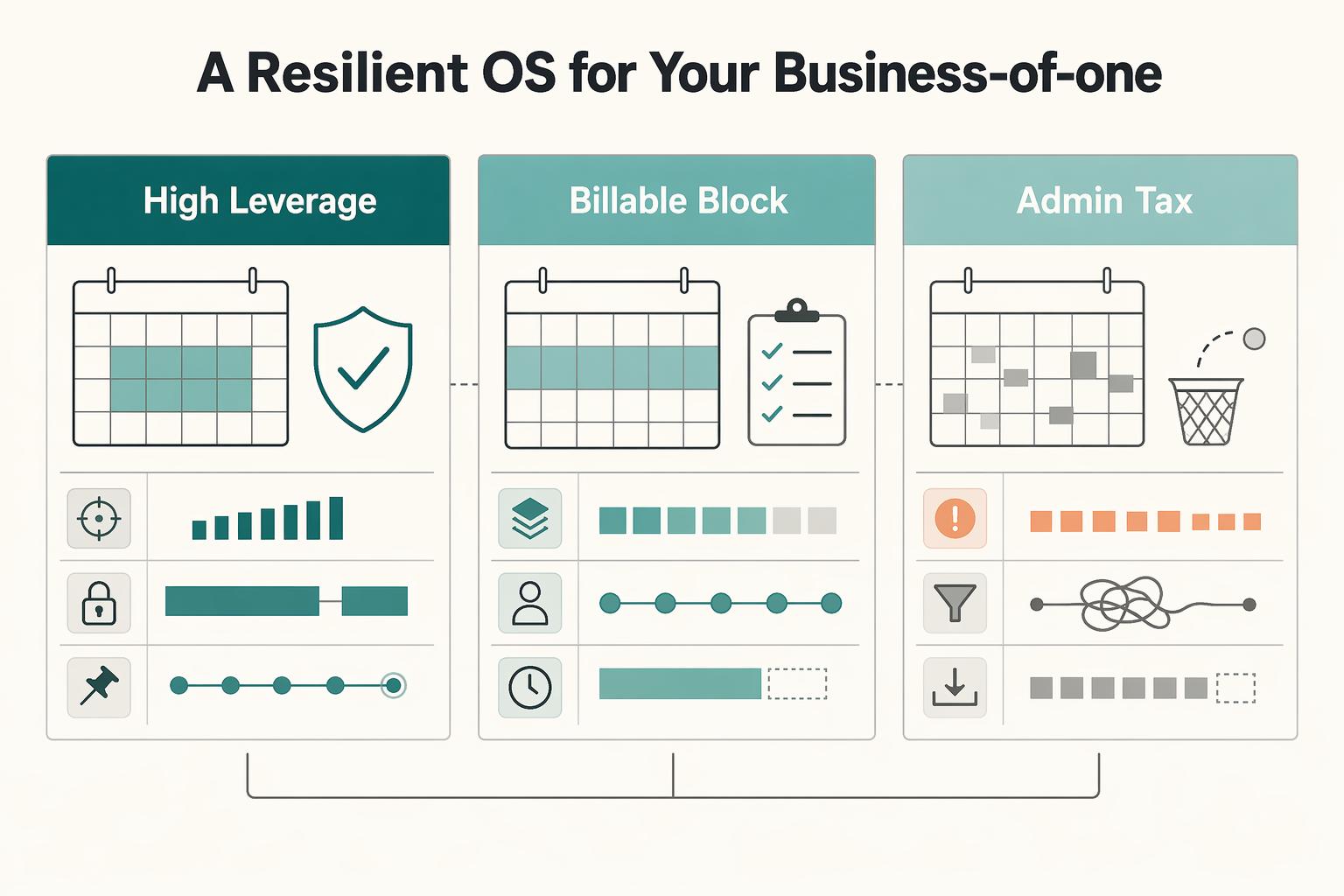
| Category | Use this label when | Decision rule | What to do next |
|---|---|---|---|
| High-Leverage Work | The task can increase future revenue, reduce meaningful business risk, or improve your position beyond this week | If the main payoff is strategic rather than immediate delivery, tag it here | Protect with uninterrupted blocks and place it away from admin-heavy periods |
| Billable Work | The task is core client delivery you are paid to produce | If a focused hour produces a clear client deliverable, tag it here | Batch into longer maker blocks and protect from inbox and meeting spillover |
| Admin Tax | The task is necessary to run the business but does not directly create a deliverable or strategic upside | If it is scheduling, invoicing, routine updates, file chasing, or similar maintenance, tag it here | Contain in smaller windows, batch similar tasks, and keep out of prime focus hours |
Be strict when classifying. Not every client-related activity is billable; status updates, scheduling threads, and invoice follow-ups are usually Admin Tax. Also log refocus cost in your notes. After an interruption, it can take over 20 minutes to get back into deep focus, which makes some "small" interruptions expensive in practice.
Use this worksheet to quantify the pattern:
- Weekly admin hours
- Standard billable rate
- Realistic recovered capacity from better calendar design
- Admin opportunity cost = weekly admin hours x standard billable rate
- Recovered capacity value = recovered capacity x standard billable rate
This is not a guaranteed revenue forecast. It is a decision tool for seeing whether your current focus mix is crowding out paid work or strategic work, and it gives you the inputs to build your Fortress Calendar in the next section.
You might also find this useful: How Freelancers Can Use Time Blocking to Plan a Work Week.
Design a Week That Protects High-Value Work and Contains Admin Tax#
Build your Fortress Calendar from your ROF audit: protect high-value work, protect billable execution, and contain Admin Tax so it does not spill into every day.
Start with themes you can defend in a real week, not a perfect-looking template. You are running maker work and business operations at the same time, so assign each block or day one clear job, then place it where your energy and client load make that job realistic.
| Theme you assign | Main objective | Allowed task types | Common failure mode | Boundary rule |
|---|---|---|---|---|
| High-Leverage block/day | Work on the business | Strategy, planning, skill-building, contract review, compliance checkups | It becomes a catch-up bucket for leftovers | No inbox or routine status replies during this window |
| Billable block/day | Produce client deliverables | Delivery work tied to active client scope | "Quick replies" fragment focus and can trigger a refocus cost that runs over 20 minutes | Only deliverable-producing work stays here; move updates/scheduling out |
| Admin Tax block/day | Keep operations running | Invoicing, scheduling, routine updates, email triage, paperwork | Admin expands because it feels easier than deep work | Batch tightly and stop when the window ends |
Put blocks where your week can hold them#
Do not force fixed weekday names onto a schedule that will not support them. Set recurring, non-negotiable deep-work blocks in your strongest energy window, and set block length based on how long you can sustain useful concentration. Then pressure-test the plan against recent meetings, sent email, and deadlines. If your best focus window keeps getting interrupted, tighten access control: calendar availability, booking links, notifications, and message permissions.
Set communication boundaries before interruptions happen#
Most broken focus blocks start with unclear expectations. Put boundaries where clients already look, and only promise what you can actually maintain.
| Template | Suggested wording | Key fields |
|---|---|---|
| Email signature | I review non-urgent messages during my admin window on business days and reply by the next business day. | Message review window; response window |
| Focus-block auto-reply | I'm in a scheduled focus session until the end of this block. I'll review messages during my next admin window. | Focus end time; next review window |
| Escalation | If this affects a live deadline or project risk, use the verified escalation channel. For everything else, email is best. | Urgent criteria; verified escalation channel |
Use the wording above as a starting point, then adapt the fields before you send it.
Use a short startup and shutdown checklist#
Rituals make focused sessions repeatable and reduce context switching between them.
- Before the block: pick the one task that must move, open only the required files, mute messages, and write the first concrete action.
- After the block: note what was completed, capture the next visible step, save needed files/links, and move follow-ups to the right admin window if needed.
Continuity is the goal: when the next session starts with a clear next step, you spend less time reloading context and more time doing high-value work.
For a step-by-step walkthrough, see The 'Pomodoro Technique' for Focused Work Sessions.
Deploying Deep Work: From Mitigating Risk to Maximizing Profit#
Use your protected blocks in a fixed priority order: reduce preventable risk first, review client agreements second, then build one capability that can strengthen your current offers.
Do not force a universal cadence or session length. Match block size to task complexity: routine checks may need one clean pass, while a new contract or unfamiliar reporting issue may need a longer private session with no inbox, no chat, and no interruptions without your permission.
Run the same risk review every cycle#
Set one recurring compliance block and run the same checklist each cycle so you are not relying on memory.
| Review area | What to update or review | What to keep |
|---|---|---|
| Residency or tax presence | Update your location and work log, note new places you worked from, and record client or entity changes that could affect where obligations may exist. Confirm the current filing trigger, threshold, or test with the tax authority. | Save a dated summary plus open questions. |
| Account reporting | Review accounts opened, closed, or newly accessible to you, including signatory authority changes. Confirm the current reporting triggers and deadlines with the relevant authority. | Keep a simple account register with supporting statements or screenshots. |
| Estimated tax readiness | Update income, expenses, cash reserves, and missing records. Confirm the current payment requirement with the tax authority before comparing reserves. | Keep a one-page snapshot so each cycle starts from current reality. |
In practice, consistency matters more than complexity here: update the log, keep trigger fields pending until they are checked against source records, and save a dated summary after each pass.
Common failure mode: you spend your cognitive capacity fighting interruptions, then skim the surface and miss what matters. End each review with dated notes, a question list, and the next action.
Review contracts when your attention is strongest#
Give each new contract or SOW its own focused block. Review in this order: scope, payment terms, liability, termination, jurisdiction. If wording is unclear, flag it, write the business risk in plain language, and save an annotated copy before replying.
| Order | Review item | If wording is unclear |
|---|---|---|
| 1 | Scope | Flag it, write the business risk in plain language, and save an annotated copy before replying. |
| 2 | Payment terms | Flag it, write the business risk in plain language, and save an annotated copy before replying. |
| 3 | Liability | Flag it, write the business risk in plain language, and save an annotated copy before replying. |
| 4 | Termination | Flag it, write the business risk in plain language, and save an annotated copy before replying. |
| 5 | Jurisdiction | Flag it, write the business risk in plain language, and save an annotated copy before replying. |
| Deep-work use case | Business impact | Common mistake | Minimum documentation to retain |
|---|---|---|---|
| Compliance | Reduces avoidable surprises and last-minute scrambles | Loose checks with no records | Dated review notes, question list, supporting logs/statements |
| Contract review | Improves delivery clarity and payment discipline | Signing after a distracted skim | Annotated contract, redline/comments, approval decision |
| Capability building | Expands what you can sell and how you package it | Chasing too many skills at once | Chosen capability, selection reason, practice notes, first offer angle |
For growth, choose one strategic capability at a time. Prioritize capabilities with clear client demand, stronger margin potential than your current baseline, and fit with services you already deliver. If a skill is interesting but hard to attach to current work, park it and focus on what you can explain, package, and test now. We covered this in detail in Optionality for Freelancers Who Work Across Borders.
Conclusion: Audit Your Focus, Protect It, and Review It Weekly#
Treat your attention like a business asset, not a personal virtue. The practical move is simple: audit where your focus goes, protect the work that needs uninterrupted thinking, contain admin inside set windows, and review the whole system every week.
That matters because time scarcity changes your decisions. If you are maxed out, you do not have a motivation problem. You have a capacity problem, and your calendar, scope, or client expectations need to change. A common failure mode is letting hard tasks, vague deliverables, and expanding client requests derail the blocks you meant to protect.
For a business of one, consistency beats intensity. You do not need a heroic week. You need a repeatable one. Keep a checkpoint that compares your planned blocks against what actually happened, and note why each block failed: client interruption, unclear next step, admin spillover, or underestimated task size. If the same reason shows up twice, fix that first. Also watch the opposite mistake. Too much focus time without admin windows can create its own backlog.
Use your next planning cycle to do this:
- Review the last 5 working days and label each hour as client delivery, admin, or growth.
- Block your next focused sessions first, then place communication and admin windows around them.
- Create one standing weekly operations review entry for paperwork and policy checks, and confirm current policy requirements from the official source.
- Check active retainers or packages for scope caps and write down what is included and what is not.
- Prepare one evidence pack folder for receipts, notes, open questions, and account records.
- End the week with a short review note: what protected focus, what broke it, what changes next week.
If your plan looks right on paper but falls apart across deadlines and overlapping clients, go next to How to Manage Your Time Effectively as a Freelancer. If you want a deeper dive, read How to Manage Multiple Freelance Projects Without Losing Your Mind.
Frequently Asked Questions
How do freelancers protect deep work time from client emergencies across time zones?
Set communication boundaries before the project starts. Define what counts as urgent, name one high-friction channel for true emergencies, and state your normal reply pattern in client-facing documents. Then use that language with new leads and active clients.
What is the financial ROI of deep work for a six-figure freelancer?
Do not assume a universal dollar return. The practical ROI is how much focused time you move out of low-value admin and back into client delivery, pricing, sales, or capability building. Review the last five working days and label each hour so you can see what your focus is actually buying you.
How can deep work be used to manage complex business risks like tax planning?
Use a recurring compliance deep dive and treat it like a real business appointment. Keep records, receipts, account access details, and open questions in one evidence pack so scattered admin does not turn into a bigger mess. Include dated review notes and leave filing triggers or deadlines pending until they are checked against official records.
How does this system evolve as a solo business matures?
Protect billable focus first, stabilize admin second, and delegate selected tasks only after your records and decisions are clean. If you outsource too early, you may spend your best attention fixing a messy handoff. Start by documenting one repeat task and deciding whether to keep it, simplify it, or hand it off.
Beyond app blockers, what tools support a deep work system for a global professional?
Start with categories, not brands. You need one calendar for protected blocks, one task queue for next actions, one communication layer for boundaries, and one admin system for invoices, records, and compliance materials. Pick a single home for each so decisions are not split across email, chat, notes, and memory.
Try a related tool
Researched and edited by the Gruv editorial team. Gruv builds cross-border billing, payouts, and finance-operations software for global businesses.
Sources
Includes 2 external sources outside the trusted-domain allowlist.
- benedict.edu/wp-content/uploads/2026/01/2025-2026-Benedic...trusted
- bepp.wharton.upenn.edu/profile/mitchelotrusted
- peace.edu/wp-content/uploads/2024-2025-Academic-Catalo...trusted
- plazacollege.edu/wp-content/uploads/2023/08/CatalogMarch31_20...trusted
- pmc.ncbi.nlm.nih.gov/articles/PMC12882981trusted
- sunyacc.edu/continuing-education-catalogtrusted
- ameripriseadvisors.com/rod.oliva/insights/strategic-expense-managementexternal
- askamanager.org/2026/03/ask-the-readers-what-do-i-need-to-kn...external
Educational content only. Not legal, tax, or financial advice.
Related Posts
How to Manage Your Time Effectively as a Freelancer
Most freelancers struggle not because they work too few hours, but because they misallocate the hours they have—treating time as an infinite resource rather than a finite business asset with a real cost per unit. The solution is a three-layer operating system: a Time Budget Framework that commits hours to four categories before any client work is booked, a Weekly Operating Template that assigns those categories to specific calendar windows, and a monthly Admin Audit Checklist that reconciles invoicing, bookkeeping, and compliance records. Multi-client orchestration requires a WIP limit, dedicated client windows, and a capacity decision rule run before accepting new engagements. Together, these systems replace reactive decision-making with a repeatable structure that keeps delivery quality consistent, records audit-ready, and the freelance practice operationally durable.

How to Manage Multiple Freelance Projects Without Losing Your Mind
If this feels hard, the issue is often not your craft. It is a lack of operating control: too many open commitments, a calendar filled with delivery blocks, an inbox setting priorities, and tasks that feel urgent because no clear next action exists.

The Best Productivity Systems for Freelancers: GTD, PARA, and Second Brain
**Treat productivity as a system you can run under load, not a vibe you summon on demand.** Client work is messy by default: requests scattered across Gmail and Slack, scope shifting midstream, and the annoying truth that "done" does not always mean "paid."