
Quick Answer
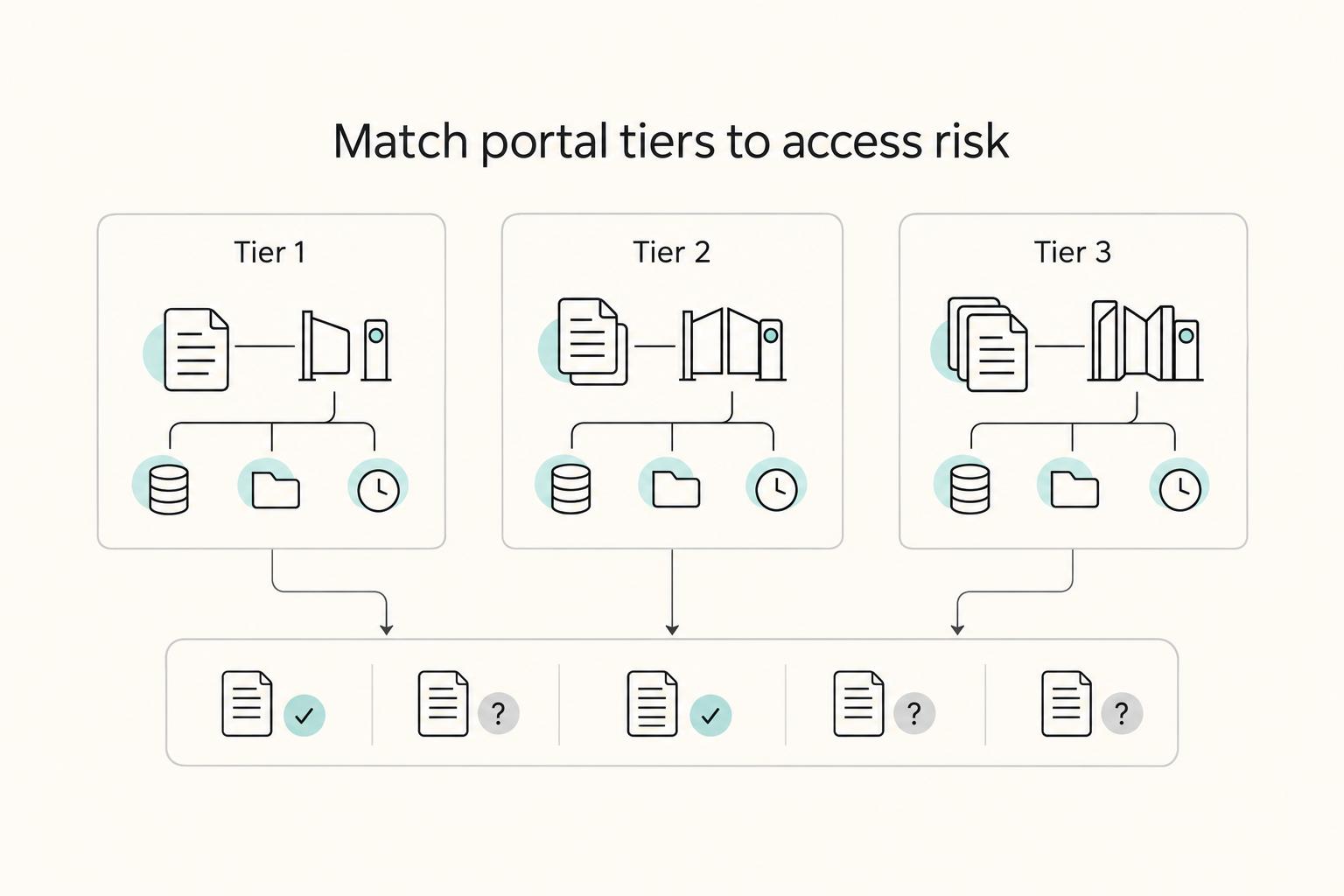
Yes - airtable interfaces for client portals can work, but only when you can prove who sees what at every role level. Use the Tier 1, Tier 2, Tier 3 framework to decide fit: Tier 1 is acceptable for internal or tightly controlled access, while client logins usually require a dedicated external portal layer. Before launch, run role-based tests with real records, confirm write permissions, and resolve any unclear visibility.
Why Your Portal Choice is a Critical Business Risk Decision#
Choosing airtable interfaces for client portals is an operating-risk decision, not a design preference. You are deciding how client access works, how much manual checking your team absorbs, and what your portal says about your business before a client reads a single update.
Use three tests. Security means you can verify client data segregation, not just assume it. In Airtable Interface Designer, owners or creators publish the interface and then assign collaborator permission levels. Your checkpoint is simple: publish a test version, log in as each role, and confirm exactly what that user can see. Scalability means your access model still works when you add more clients, internal reviewers, or paid-only features like timeline visualization. Brand perception means whether the experience feels like a secure, centralized client portal with custom branding, or a useful internal view repurposed for clients.
| Tier | Data access model | Client-facing fit | Operational overhead | Upgrade trigger |
|---|---|---|---|---|
| Tier 1 | Airtable Interface Designer with collaborator permissions set after publish | Good for internal ops, review queues, dashboards, or controlled external access after testing | Low at first, but it requires permission checks and plan-limit review | Consider moving up when separate client experiences or stronger branding become higher priority |
| Tier 2 | Dedicated portal layer for client access rules; current capability details should be confirmed in the selected platform. | Can be a better fit for branded portal experiences and centralized communication | Moderate setup and vendor tradeoffs | Consider moving up when manual access admin starts slowing delivery |
| Tier 3 | Custom or deeply tailored portal stack; current capability details should be confirmed against the selected tools. | Often the strongest fit when client experience is part of your service model | Highest build and maintenance load | Consider moving up when off-the-shelf limits force workarounds |
How to use this framework#
Start by mapping the people who will touch the portal and the records behind it. That makes the later access tests more concrete and much harder to fake with a tidy demo.
- Map every user type first: client, subcontractor, reviewer, account lead.
- Test access with real sample records, not empty tables.
- Flag any shared login workaround immediately. Shared credentials weaken security and remove user-level auditability.
- If a fast block builder solves setup speed, check flexibility next. Some speed-first tools trade away room to grow.
Related: How to Create a Client Portal in Notion.
Tier 1: The Starter System (When Airtable's Native Interface is a Liability)#
Use Tier 1 when your portal is mostly an internal dashboard, or a tightly limited external view you have tested yourself with real sample data and role-based logins. Do not treat Tier 1 as a repeatable client-portal model when multiple paying clients need access or when you must prove client-by-client privacy without manual checks.
The key limitation at this tier is verification. Treat it as unconfirmed whether native setup alone gives the record-level segregation most client portals require. If external users and connector-based workflows touch the same Airtable base, that base becomes the boundary you must actively control. In the connector docs, base limitation is optional through the Schema property, not automatic, so access safety depends on configuration and testing.
Where Tier 1 fits vs where it does not#
| Use case | Access control posture | Privacy boundary | Professional signal |
|---|---|---|---|
| Internal dashboard | Team-oriented access is usually workable | Shared base can be acceptable | Utility-first is usually fine |
| Limited external reviewer access | Manually tested, narrow access can work | Boundary must be re-checked each time | Acceptable for low-stakes, temporary use |
| Multi-client portal | Needs repeatable, provable segregation | Shared-base assumptions require strict review | Clients evaluate this as part of your service quality |
The connector documentation also notes an information schema that can query metadata-style entities, including Bases, Tables, and Users. That does not prove a native interface will expose all of that to clients, but it does reinforce the need to verify visibility instead of assuming it.
Quick risk check before external access#
- Client visibility: Test each user type and confirm exactly what they can see.
- Shared base structure: If multiple clients live in one base, treat that as an explicit risk-review point.
- External user access: If a connector is in play, confirm Schema is set to the intended base. If DisplayObjectIds is
True, use the base ID (not the base name), per docs.
If your decision depends on "they probably cannot see that," or if more than one paying client needs access, move to Tier 2. Treat any unresolved platform limitation as a launch blocker until you have tested it in your own setup. If helpful, see Value-Based Pricing: A Freelancer's Guide.
Tier 2: The Professional System (How to Guarantee Security & Project Authority)#
If clients will log in, Tier 2 is your baseline, not an optional polish step. Your goal is to separate client access from your working base so you can run a clear access model: external app layer, client-scoped records, role-based views, and controlled write permissions.
This is the practical upgrade from Tier 1. Your Airtable base remains your operational source, while clients use a separate portal experience built around their account and workflow.
The access model that matters#
Define these four parts before you design pages:
- External app layer
Use a portal layer for account flows. Softr presents sign-up, login, profile updates, and account settings as core portal functions.
- Client-scoped records
Tie each client account to only that client's records, files, and status items. Do not assume a clean-looking page equals safe access boundaries.
- Role-based views
Set permissions by role so clients, internal leads, and subcontractors do not inherit identical access. Softr describes role-based access, but your exact controls still need verification in your chosen stack.
- Controlled write permissions
Allow only the write actions clients actually need, such as file upload, milestone approval, or profile updates. Test each action with sample accounts before launch.
Airtable's personnel privacy notice (last modified March 13, 2026) applies to employees, contractors, and applicants, not explicitly to client-portal end users. Treat that as a scope note, not proof your client-facing setup is already covered.
| Decision area | Tier 1 shared workspace | Tier 2 external portal layer | What to verify |
|---|---|---|---|
| User entry | Internal-style Airtable access | Separate client login and account area | Sign-up, login, and profile flow |
| Permission boundary | Often broad workspace/base scope | Client-scoped records + role-based views | Test with two client accounts and one internal role |
| Authentication method | Airtable-centered access | Portal-managed access model | Exact login options in your platform |
| Permission granularity | Harder to present as client-specific | Structured around roles and user groups | Whether files, pages, and records can be limited separately |
| Auditability | Often manually reconstructed | May support cleaner event tracking; verify | Which logs, timestamps, or approval history exist |
| Client experience ownership | Airtable-branded environment | More control over client-facing pages | Domain, branding, and support path |
What to implement first#
Start narrow. Softr's guidance to include only the pages and workflows clients actually use helps reduce rollout friction and keeps change management manageable.
- Document exchange
Outcome: clients can upload and download only files intended for them or their group. Verification: test upload, replacement, download, and any required file controls with real sample accounts.
- Approvals and handoffs
Outcome: milestone decisions are captured in one place instead of scattered in email. Verification: confirm whether user identity, timestamps, and status history are recorded before treating it as dispute support.
- Status dashboards
Outcome: clients can see current status, pending actions, and next deadlines without extra check-ins. Verification: confirm each role sees only its own tasks, pages, and comments.
Tier 2 requires more setup and testing up front. In return, you reduce confidentiality risk, improve handoffs, and present a more professional client experience.
For a step-by-step walkthrough, see How to use Airtable's API to Build a Custom Client Dashboard.
Tier 3: The Scaler System (Building an OS That Grows With You)#
You are in Tier 3 when role complexity and repeatable admin work are growing faster than manual coordination can handle. If your portal is still managed by one internal owner with light client updates, stay in Tier 2 and tighten that system first.
Tier 3 means your portal is part of your operating layer, not just a client-facing surface. The shift usually appears when you add internal teammates, assign contractor access, formalize approval ownership, and need less manual follow-up.
Know whether you are actually scaling#
Start with roles and permissions. Once one access model no longer fits internal team members, contractors, and clients, advanced permissions become an operational requirement.
Before you automate, define this governance model in writing:
- Which internal roles can view, edit, approve, or archive records
- Whether contractor access is limited to assigned work only
- How client-level data boundaries are enforced in the external portal
- Who owns each approval and what evidence is retained if decisions are disputed
If those boundaries are unclear, automation will amplify mistakes instead of reducing them.
| Scalability signal | Tier 2 | Tier 3 | What to verify |
|---|---|---|---|
| Role complexity | Client and basic internal roles | Internal team roles, contractor-limited access, client-specific boundaries, explicit approval ownership | Test each role with sample accounts and confirm page, file, and record visibility |
| Process automation depth | Manual handoffs with some structure | Connected flow across intake, routing, prioritization, fulfillment, and offboarding | Confirm current integration capability in the selected toolchain |
| Collaboration workflow maturity | Status viewing and limited write actions | Shared comments, tracked approvals, clear task ownership, fewer side-channel updates | Confirm where comments, files, and approval history are stored |
| Operational handoff readiness | Depends on one person holding context | Work can transfer with less reconstruction | Check whether another team member can take over using portal records only |
Automate the repeatable path#
Use automation only after your workflow is stable. Airtable's operations guidance highlights routing, prioritization, and fulfillment as strong automation checkpoints; use that structure, then verify your actual toolchain supports each step.
- Intake
Capture request details and route to the right owner and priority. Confirm current integration capability in the selected toolchain before relying on automation.
- Provisioning
Create client records, assign roles, connect project context, and expose only relevant pages. Verify with fresh client and contractor logins before launch.
- Delivery updates
Publish status changes in a visible workflow. A Kanban-style board (for example, To Do, Doing, Done) gives you a concrete progress view and helps surface bottlenecks.
- Invoicing
Trigger invoicing or finance handoff when milestone approvals are complete. Confirm current integration capability in the selected toolchain before relying on automation.
- Offboarding
Revoke access, archive records, preserve approval history, and confirm final deliverable visibility is scoped as intended.
Build for use, not just control#
A complex permission model still fails if people avoid it. If clients or teammates cannot or will not use the interface, the interface is not doing its job.
Keep the portal scannable and task-focused: clear status, clear owner, clear next action, and one place for process context. That is how Tier 3 features translate into operational outcomes you can observe over time: fewer handoff errors, less status-chasing, clearer accountability, and stronger continuity as volume grows.
Related: How to Write a Follow-Up Email That Closes the Deal.
Your Final Verdict: A Strategic Framework, Not a Tool List#
Use a checklist you can verify in your own setup today. If client data access is unclear, stop and fix that first. If access is clear, handoff is repeatable, and the portal feels client-ready, move forward.
Run this decision path in order:
- Does your current workflow still fit?
- Can you prove client data access is separated correctly?
- Can someone else run the process without guesswork?
- Does the client-facing experience look trustworthy?
| Pillar | Key question | Low signal you can observe | High signal you can observe | What to do next |
|---|---|---|---|---|
| Security | Can you verify exactly who can access client-facing data? | You are relying on assumptions, old invites, or broad sharing and have not checked current access before launch. | You can review who has access now, clear pending invites, and verify visibility with a client test login. | Treat data segregation as non-negotiable. If access is not provable, pause external rollout and tighten permissions first. |
| Scalability | Will this still work as clients, projects, or collaborators increase? | Each new client adds manual setup, and growth pushes you toward many separate bases just to keep up. | Reporting and handoffs are repeatable, and the structure handles more work without a rebuild. | Remove the biggest operational bottleneck first. If you are splitting across many bases, validate the sync-table overhead before committing. |
| Brand Perception | Does the portal match the service quality you sell? | The portal feels generic or inconsistent with your client experience. | The experience is clear, consistent, and intentionally branded, including domain/visual consistency where your tool supports it. | Upgrade presentation after access and operations are stable. Polish works best when the foundation is reliable. |
One practical checkpoint: if you are on Airtable Business or Enterprise Scale, review the admin Users page before launch. The Active status view shows users who can currently access organization content, and it helps you catch pending user invites before client-facing exposure.
Watch for architectural drift. Community guidance notes that splitting across many bases can require sync tables and introduce unique challenges. Airtable's positioning favors connected workflows in one workspace, so start with consolidation and split only with a clear reason and maintenance plan.
Use this short implementation sequence:
- Evaluate your current setup against the four questions, including a pre-launch access review.
- Identify the biggest risk gap: access risk, handoff friction, or weak client presentation.
- Choose the minimum viable upgrade path: fix access first, then handoff/operations, then presentation polish.
Related: Using Airtable as a CRM for a Solo Marketing Consultant. Want to confirm what's supported in your setup? Talk to Gruv.
Frequently Asked Questions
Is Airtable’s native interface secure for a client portal?
For internal, trusted users, it can be workable if you verify the exact sharing mode and record visibility first. For external client users, treat it as a verify-first risk area, not an assumed fit. A public share link can be accessible to others who have it, and community reports also describe users navigating across records within an interface. If you need a password-protected, read-only public view, one community expert said Airtable did not allow that, so confirm current capability before you rely on it.
Airtable Interface or Softr for a client portal?
Community guidance is mixed. One Airtable community expert says you may not need a separate portal, while another recommends choosing a customer portal early. The practical comparison is access control, branding control, client UX ownership, and maintenance effort. One case example kept Airtable as the backend while moving delivery to Softr for a better user experience.
Can clients update data through the portal?
Potentially, but only if you scope editing tightly to the client’s own records and the few fields they actually need. Test with a fresh client account, because at least one reported issue showed a form appearing while record content still could not be edited. For anything tied to scope, approvals, or billing, use validation rules and a review step instead of direct overwrite.
How much does a proper portal cost?
Start with total cost, not sticker price: tool cost, setup effort, maintenance time, and the value of reducing client-data mistakes. Do not rely on stale plan ranges; confirm current pricing in the tools you are evaluating before budgeting. The useful comparison is not free versus paid, but cheap setup versus the cost of rework, weak client experience, and preventable access mistakes.
Do you need to know how to code?
Not always, but a no-code setup does not make the build risk-free. You still need to design permissions, validate inputs, define a change-review path, and test mobile behavior if clients will use boards or status views on phones.
Try a related tool
Researched and edited by the Gruv editorial team. Gruv builds cross-border billing, payouts, and finance-operations software for global businesses.
Sources
Includes 6 external sources outside the trusted-domain allowlist.
- dspace.mit.edu/bitstream/handle/1721.1/41023/41232351-MIT.pdftrusted
- nepis.epa.gov/Exe/ZyPURL.cgitrusted
- air.tableforums.com/t/two-questions-about-creating-an-interface/...external
- airtable.com/solutions/operationsexternal
- airtable.comexternal
- blog.airtable.com/user-interfaceexternal
- community.airtable.com/interface-designer-12/do-i-need-to-use-porta...external
- community.airtable.com/interface-designer-12/using-airtable-to-crea...external
Educational content only. Not legal, tax, or financial advice.
Related Posts

Value-Based Pricing for Freelancers Under Real Payment Risk
Value-based pricing works when you and the client can name the business result before kickoff and agree on how progress will be judged. If that link is weak, use a tighter model first. This is not about defending one pricing philosophy over another. It is about avoiding surprises by keeping pricing, scope, delivery, and payment aligned from day one.
How to Write a Follow-Up Email That Closes the Deal
**Run every freelance follow-up email like a mini sales process that turns uncertainty into one clear next step.** As the CEO of a business-of-one, your job is to turn messy inbox threads into clean decisions you can actually plan around.
How to Create a Client Portal in Notion
Start with control rules before you design anything. A polished portal helps, but the real win is client confidence without giving up operator control. The main risks are simple: permission drift, unclear ownership, and internal material leaking into a shared view.