
Quick Answer
Start with a minimal Bullet Journal Method built around six pages, then run a repeatable weekly review and strict migration rules. For bullet journaling for freelancers, the practical setup is an index, key, future log, monthly log, weekly spread, and daily log, plus a short end-of-day maintenance pass. If meetings move often, keep timing in a digital calendar and keep execution in the notebook. The goal is not page design; it is clearer priorities, fewer dropped follow-ups, and visible next actions.
How to use bullet journaling to run client work, follow-ups, and business admin#
If you want a bullet journal to run client work, follow-ups, and business admin, treat it as a working notebook, not a craft project. The goal is simple: one place where weekly planning, daily action, and loose notes stop competing with each other.
A Bullet Journal is a blank notebook, often with dotted paper, that you shape around how you actually work. That flexibility matters when your week mixes deliverables, calls, revisions, invoicing, and the small tasks that keep work moving. A fixed planner template may not fit that mix for long.
This guide assumes you want one method that can hold both delivery and operations. By the end, you should have three concrete things: a weekly routine you can repeat, migration rules so unfinished tasks do not drift forever, and a short startup checklist so you can set up the journal without overthinking supplies or page design. If a page does not help you see commitments, choose next actions, or keep admin visible, it probably does not belong in your core setup.
That boundary matters because a bullet journal can get cluttered. One failure mode is building pages that look organized but do not help you decide what to do next. Another is letting ideas, tasks, and appointments scatter across too many places. We will keep returning to one test: does this page help you deliver client work, manage the business side, or protect your priorities for the week?
You do not need a universal or "correct" layout to make this useful. Bullet journals are customizable by design, so the target is not perfection. It is a setup you can still trust when deadlines stack up and admin is easy to ignore. In practice, that can mean starting small, checking the journal at the same times each day, and being honest about what deserves to be carried forward.
One scope note before we get into the pages. This is productivity and operating discipline guidance. It is not legal, tax, or regulatory advice. We are talking about how to track work, plan weeks, and keep business tasks visible, not how to satisfy filing requirements or make compliance decisions.
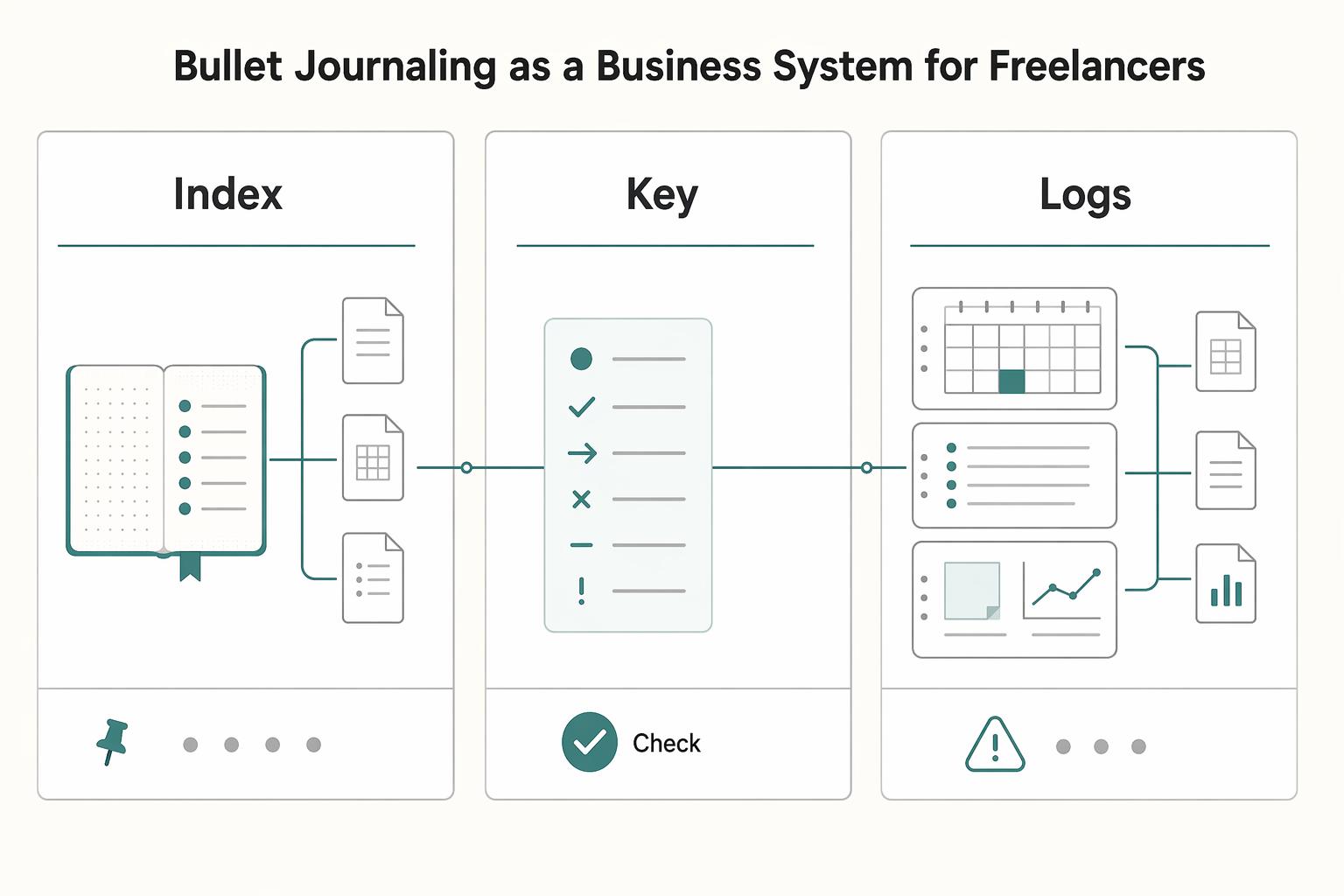
Bullet journaling as a business system for freelancers#
For freelance work, treat the Bullet Journal Method (BuJo), created by Ryder Carroll, as a customizable paper system for planning, notes, and execution. You are not aiming for perfect pages. You are keeping client delivery and business operations visible in one place.
| Part | Role | What it does |
|---|---|---|
| Index | Navigation layer | Maps spreads to page numbers so you can find what you need quickly |
| Key | Status language | Tasks are clearly marked as you work |
| Logs | Operating record | Uses rapid logging to capture tasks, notes, and next actions |
Those three parts do the daily work: the index helps you find spreads, the key shows status, and the logs capture tasks, notes, and next actions.
Set one rule early: if a page does not support delivery, cash flow, or current priorities, it does not stay in your core journal. Keep project tasks, invoice follow-ups, and dated commitments. Move out decorative or vague pages that do not lead to decisions.
Use migration as a decision check, not a rewrite habit. If a task keeps returning, decide whether to schedule it, delegate it, delete it, or name why it is stalled.
You might also find this useful: Best To-Do List Apps for Freelancers Who Need Operational Control.
Build your minimum viable BuJo in one setup session#
Set this up in one short session: time-box it to 10-15 minutes, keep it minimal, and focus on pages that help you capture, schedule, and review real work.
Use one notebook and one pen so the system stays low-friction. A practical starter layout is index, key, future log, monthly log, weekly spread, and daily log. Treat that as a working template, not a design project.
Set one rule for each page#
Write a one-line rule at the top of each spread: only this goes here.
| Page | Keep only this kind of information |
|---|---|
| Index | Page numbers and short labels so you can find spreads quickly |
| Key | Only the status symbols you actually use |
| Future log | Dated commitments for later weeks or months |
| Monthly log | This month's deadlines, follow-ups, and fixed priorities |
| Weekly spread | Current-week work you can review fast |
| Daily log | Short, practical entries from rapid logging |
Keep entries short and practical. If something needs long-form writing, move it to a separate log.
Keep your symbols and capture lane small#
Start with a small key, for example: task, completed, migrated, waiting, and add only when needed. For daily capture, use one clear to-do lane, then run a 3-5 minute end-of-day maintenance pass and migrate only what still matters.
After setup, do one quick check: make sure each core page is numbered, listed in the index, and follows its one-line rule. If new work is hard to place, simplify before you add more structure.
Need the full breakdown? Read Kanban for Freelancers Who Need a Real Operating Dashboard.
Choose analog-only or hybrid before week one#
Decide before week one whether you are running analog-only or hybrid. There is no universal winner, and personal fit matters. What matters most is keeping one current system, because every extra planning layer adds ongoing upkeep.
Compare the two operating models#
| Decision area | Pure BuJo | Hybrid paper planner + digital calendar |
|---|---|---|
| Speed | Quick when you are already in the notebook and capturing in one place. Slows down when plans change while the notebook is not with you. | Quick for appointment changes on phone or desktop. Slower if you keep recopying the same items between tools. |
| Reliability | Strong if you keep the notebook with you and update it consistently. Weakens when updates are delayed. | Strong when timed commitments live in one calendar. Weakens when appointments get tracked in both places. |
| Context switching | Lower switching when planning stays in one notebook. | More switching between screen and paper, which works only if each tool has a strict job. |
If client meetings move often, a hybrid setup is usually easier to run: keep appointments in your digital calendar, and keep execution in your weekly spread and daily log.
Watch for three failure modes#
- Duplicate tracking: the same appointment lives in multiple places, then one version goes stale.
- Missed updates: the time changes in one tool, but the related prep or follow-up does not.
- Planner drift: your to-do list spreads across too many active surfaces, so review gets muddy.
Set a boundary contract#
If you choose hybrid, keep the split simple: calendar for when, journal for what. Then review both at one fixed time each day so time changes and next actions stay aligned.
One freelancer described the downside of a loose split as work being "in various places both on paper and on the computer, but never in a centralized place."
Related: The Best Personal Productivity Systems for Freelancers.
Run a weekly cycle that prevents missed deadlines#
Run the same weekly order every time: weekly review -> task migration -> commitments from the future log -> finalize the weekly spread. This keeps your notebook decision-focused instead of turning into a long copy-forward list.
Start by reviewing last week's weekly spread, recent daily log pages, and your future log. If you run hybrid, check your digital calendar in this step so moved or fixed commitments are visible before you plan on paper.
Then migrate unfinished items deliberately. For each item, decide whether it is done, active, blocked, waiting, or not worth carrying. Migration should reduce noise, not rewrite everything.
| Review area | What to check | What to write |
|---|---|---|
| Delivery deadlines | Deliverables, revision rounds, calls tied to delivery | Due day in the weekly spread + prep/completion action in the daily log |
| Admin tasks | Invoices, payment checks, bookkeeping, proposals, scheduling, renewals | One concrete action (for example, "send invoice") |
| Follow-ups | Replies owed, leads to nudge, pending approvals | Next contact action + owner/person |
| Blocked items | Waiting on assets, decisions, access, or external input | Key status + dependency or follow-up date |
After that, place upcoming commitments from your future log into the week. In pure BuJo, dated commitments can live in the weekly spread; in hybrid, timed events stay in your calendar and the spread holds execution work: prep, delivery, and follow-up.
Keep one planning constraint: limit the must-finish lane to what is realistically achievable. Mark the rest as optional, waiting, or deferred so your weekly page reflects real capacity.
Finish with a verification pass. For every open item you carry forward, confirm one visible status in your key and one clear next action in the daily log. If an item is blocked, the next action should reflect the unblock step, not the full task.
This pairs well with our guide on Deep Work for Freelancers Who Run a Business of One.
Apply task migration rules that force better decisions#
Migration should force a decision, not preserve every open loop. When an item keeps rolling forward, stop rewriting it as if it is still fresh.
Use one explicit action when a task has migrated repeatedly: schedule it, split it, delegate it, or delete it. Make a visible decision instead of carrying the same vague bullet again.
When you migrate an item, add a short rapid-logging note beside it so status is clear at a glance: "waiting on client assets," "blocked until approval," "needs focused work block," or "not a priority this week." That note separates blocked work from stale work.
Mark blocked work differently from work you are avoiding#
Blocked work has a dependency, person, or timing constraint attached to it. Stale work does not. If something is blocked, write the dependency in the entry and mark it with a clear signifier in your key. If your symbols are hard to remember, simplify them so they stay useful during a fast review.
When the same task keeps reappearing without context, your page is recording indecision, not progress. Even in one notebook, information can still become scattered when entries lack clear status.
Make task size visible#
Uneven tasks should not sit as equal bullets in your to-do list. Break large work into comparable units so planning is realistic.
- Quick action: "send revised invoice"
- Medium step: "draft case study outline"
- Deep work block: "edit article draft section"
Use a clear escalation tripwire for repeat items. For example, if a task appears in three consecutive daily log entries, move it to the monthly log and make an explicit call: commit, defer, or drop. That pulls unresolved work out of daily noise and keeps rollover from becoming your default system.
For a step-by-step walkthrough, see The Best Digital Journaling Apps for Freelancers.
Track client delivery and business admin without clutter#
Use a simple weekly layout that separates client deliverables, pipeline follow-ups, and business admin so mixed priorities do not hide each other. When everything sits in one long list, important work is easier to miss, especially in weeks where your workflow changes day to day.
| Weekly block | What to capture |
|---|---|
| Client deliverables | What is due, what is blocked, and the next concrete step |
| Pipeline follow-ups | Proposals, check-ins, and leads waiting on a response |
| Business admin | Invoices, payment checks, bookkeeping tasks, and contract follow-ups |
Keep the spread minimal by using only those three blocks. During your weekly review, force a decision on every open item: place it in one block, clarify it, or cut it.
Keep thinking pages separate from action pages#
Keep messy thinking out of your core action pages. Use a side-kick notebook for brainstorms, rough notes, and problem-solving, then move only decisions and next actions into your weekly spread or daily log. This keeps your main pages usable when you need to scan and act quickly.
Keep goals visible and admin traceable#
Keep a running monthly and annual goal list where you can review it each week, then turn goals into visible weekly actions. Add a light daily evidence habit for operations: log short lines like invoice sent, payment checked, or follow-up done. The practical rule is simple: one place for action, one place for rough thinking, and a small daily record for delivery and cash-flow follow-through.
Related reading: Mind Mapping for Freelancers Who Need a Real System.
Finish your first 14 days and lock the habit#
Use the first 14 days to make the journal repeatable, not perfect. You are checking whether it helps you miss fewer commitments and choose priorities faster.
| Stage | What to do |
|---|---|
| Day 1 setup | Make sure your index, key, future log, monthly log, weekly spread, and first daily log are usable; skip decorative extras |
| Day 2 first weekly plan | Add real commitments only; each line in the weekly spread needs a clear next action |
| Days 3 to 6 daily closeout | Mark done, blocked, and migrated items; if something migrates more than once, make it smaller or schedule it |
| Day 7 reset | Review misses, admin loose ends, and future-log items that still do not have a home |
| Week 2 adjustment | Change one thing only, then test it for the full week |
Use the stages above as your short adoption checklist.
If the notebook starts feeling messy, use a binder clip to separate stale pages from current pages so you open directly to live work.
By the end of week two, check concrete signals: fewer missed commitments, cleaner task migration, and clearer priorities in your weekly spread. If those are improving, keep the system steady. If not, diagnose before adding tools. For expansion, start with Value-Based Pricing: A Freelancer's Guide, then The Best Note-Taking and Knowledge Management Apps for Freelancers, and only then broaden into your wider productivity system.
Conclusion#
The useful test is simple: does your notebook help you make better decisions and finish work, or is it just collecting tasks on paper? If it is doing its job, it should make priorities and next actions easier to see during the week.
Start small. Run one full week before you judge the method. Use that week to map tasks and track deadlines, and, if relevant, client time sheets, and make explicit decisions on unfinished items. Without that follow-through, a notebook can turn into storage instead of control.
Most of the value comes from regular use, not a clever setup. One writer described seeing productivity gains only while they kept up with the practice. In practice, this method helps most when you keep it close to daily work and simple enough to maintain.
So be practical about fit. If writing every day feels heavy, simplify the format, shorten your bullets, or split tools so your calendar holds appointments while your notebook holds execution. If migrated tasks keep reappearing, do not rebuild everything at once. Change one rule and test it.
You do not need perfect habits right away. Missing a day, or even a rough week, does not mean the method is broken. Consistency beats perfection here, and small adjustments are easier to keep than full resets.
If you want the short version, keep this: use the journal to decide, not decorate. Review weekly before you add more complexity. Change one rule at a time. That is how a simple notebook can become a reliable operating tool for freelance work.
Frequently Asked Questions
What pages does a freelancer actually need in a bullet journal?
Start with a small core: an index at the front and only the spreads you will actually use (for example, monthly, weekly, and daily pages). The index matters because it lets you find active spreads by page number instead of flipping blindly. Since the bullet journal method is customizable, add pages only when they help you deliver client work, track admin, or make decisions.
How is bullet journaling different from a digital task app?
A bullet journal is a rapid log that can act as planner, diary, and to-do list in one notebook. A task app keeps work in digital lists and reminders. One writer reported that digital-only planning did not work for their workflow, but that does not mean digital tools are ineffective for everyone.
Can I use a hybrid system with a bullet journal and digital calendar?
Yes. For some freelancers, that split is cleaner than forcing everything into one place. Keep appointments and time-specific commitments in your digital calendar, then keep execution, notes, and task migration in your weekly spread and daily pages. The checkpoint is simple: every meeting or deadline that creates work should also create one clear task entry in the journal, or things fall through the gap.
How do I plan weekly client work without overbooking myself?
Pull hard dates first from your future log and calendar, then fill the week with only a realistic number of must-finish items. Keep separate areas for client deliverables, follow-ups, and business admin so small operational work does not disappear under project bullets. A useful red flag is when every item is marked urgent or must-do, because that often means the week is already overcommitted.
What should I do with tasks that keep rolling over every day?
Stop copying them forward without making a decision. If an item keeps moving, choose one action: schedule it, split it into a smaller next step, delegate it, or delete it. Add a short note beside it if it is blocked, including what you are waiting on, so you can tell the difference between a real dependency and quiet avoidance.
What notebook size is better for freelancers, A5 or pocket-sized?
An A5 notebook is a standard size at 148 x 210 mm and gives you more writing space. Pocket notebooks are easier to carry, but they can feel tight for weekly planning. If you plan at a desk and track both client work and admin in one place, A5 is often easier to use, but there is no single best size for everyone.
How long should I test my setup before changing it?
There is no fixed trial length that fits everyone. Instead, run your setup long enough to review real usage, then do a short monthly reflection on what worked, what did not, and why. Change one thing at a time, because multiple changes at once make it hard to tell what actually improved your planning.
Try a related tool
Researched and edited by the Gruv editorial team. Gruv builds cross-border billing, payouts, and finance-operations software for global businesses.
Sources
Includes 3 external sources outside the trusted-domain allowlist.
- app.leg.wa.gov/ReportsToTheLegislature/Home/GetPDFtrusted
- dam.assets.ohio.gov/image/upload/childrenandyouth.ohio.gov/For%2...trusted
- dcf.wisconsin.gov/manuals/w-2-manual/Production/assets/pdf/W2M...trusted
- interactive.cornish.edu/Resources/auxBdE/4FT286/BulletJournalExample...trusted
- moval.edu/wp-content/uploads/2017/09/2020-21-MVC-CATAL...trusted
- alibaba.com/product-insights/bullet-journaling-vs-notion...external
- alibaba.com/supplier/guide/a5-notebook-vs-bullet-journal...external
- amberturner.com/bullet-journaling-freelancers-self-employedexternal
Educational content only. Not legal, tax, or financial advice.
Related Posts

Value-Based Pricing for Freelancers Under Real Payment Risk
Value-based pricing works when you and the client can name the business result before kickoff and agree on how progress will be judged. If that link is weak, use a tighter model first. This is not about defending one pricing philosophy over another. It is about avoiding surprises by keeping pricing, scope, delivery, and payment aligned from day one.
The Best Note-Taking and Knowledge Management Apps for Freelancers
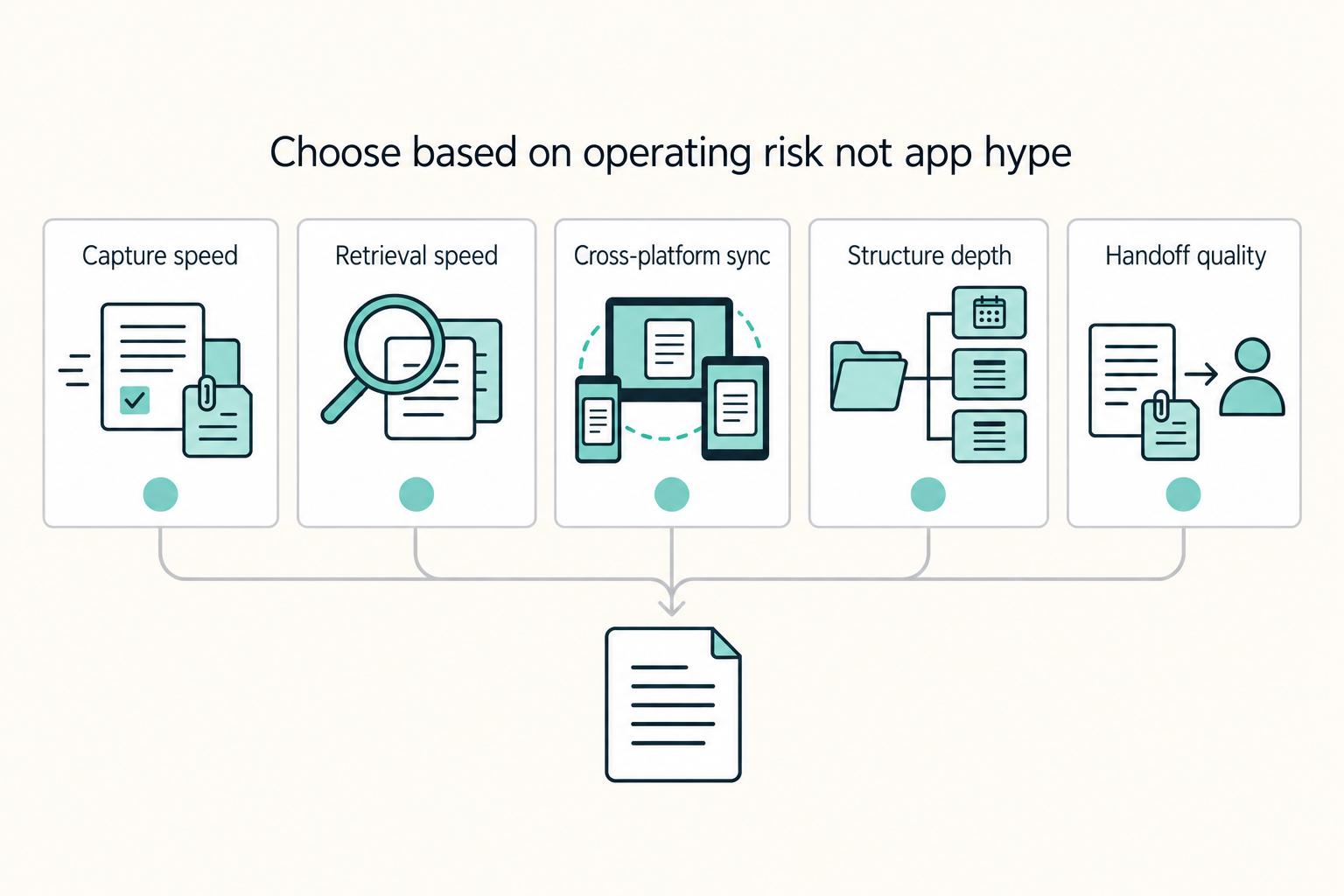
Make this decision in one sitting, then move on. One primary note app, used as the default place for client decisions, follow-ups, and reference notes, does more to cut missed details, messy handoffs, and tool churn than another week of comparing screenshots ever will.

The Best Productivity Systems for Freelancers: GTD, PARA, and Second Brain
**Treat productivity as a system you can run under load, not a vibe you summon on demand.** Client work is messy by default: requests scattered across Gmail and Slack, scope shifting midstream, and the annoying truth that "done" does not always mean "paid."