
Quick Answer
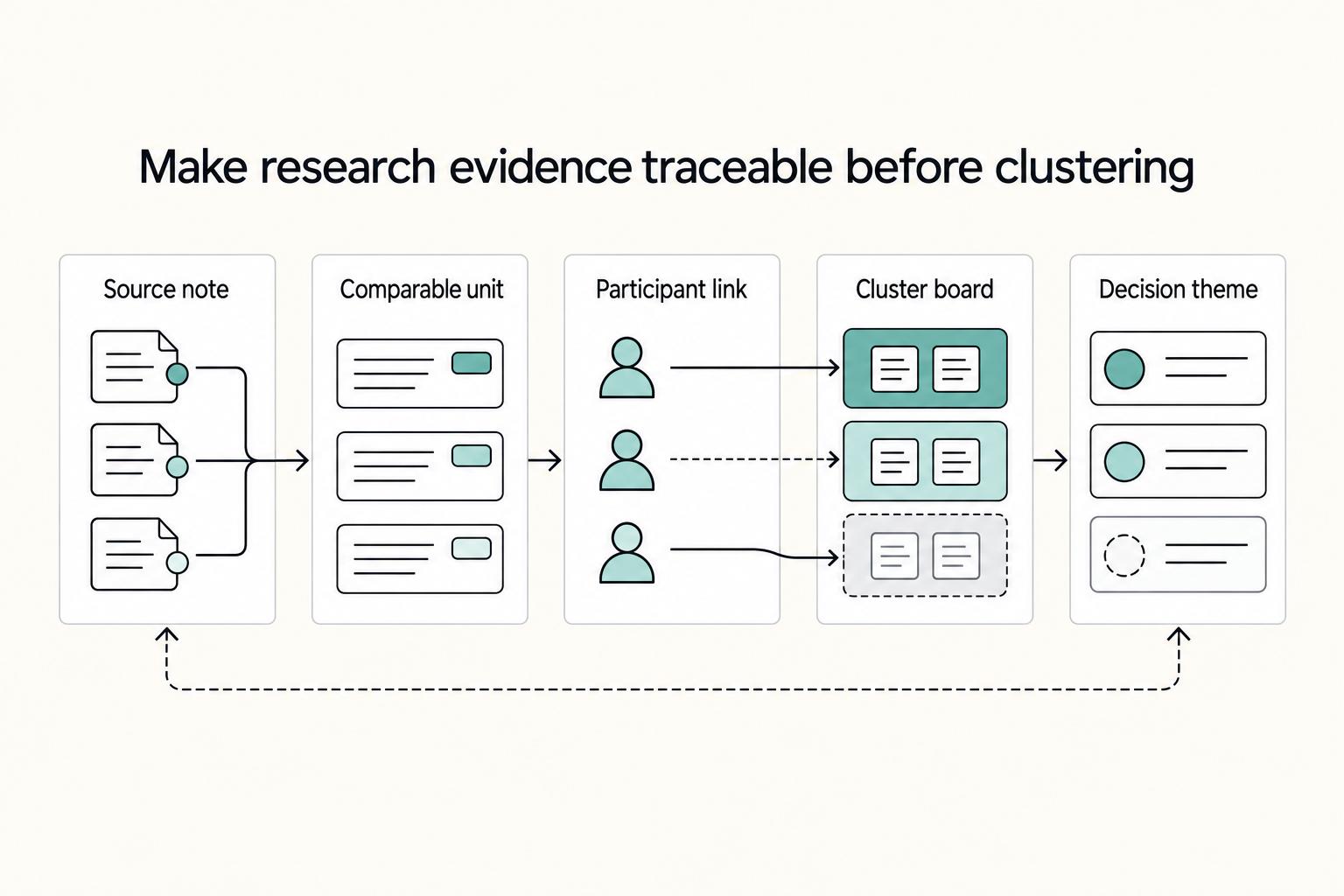
Build an affinity diagram from normalized evidence cards, then use source checks before making recommendations. In practice, pull notes from User Interviews, Usability Testing, and User Feedback into one pack, keep one idea per card, and tag each card to its source. Group by similarity first, keep labels provisional, and promote only clusters that hold up across inputs. If a cluster cannot be traced back to original notes or excerpts, keep it as a hypothesis instead of a product decision.
Why Affinity Mapping Helps Teams Make Better Decisions#
The research itself usually is not what breaks. Independent consultants and small teams can run solid interviews, usability studies, and feedback review, then stall when it is time to explain what the evidence means. That stall can be costly in a client setting. Once notes pile up, ambiguity creeps in, confidence drops, and the loudest interpretation can start to win.
Affinity mapping helps because it gives you a disciplined way to sort information with an affinity diagram. UX researchers use it for a simple reason: people do not interpret the same piece of information in the same way. One person may see a usability issue, another may see a messaging problem, and a third may treat it as an edge case. Without a visible sorting method, research synthesis can become a private judgment call instead of shared, reviewable work.
This guide focuses on a practical way to turn raw research notes into themes you can defend. Not just a wall of sticky notes, and not vague summaries that sound polished but are hard to support. The point is to move from scattered excerpts to clearer, decision-ready understanding, so your recommendations are tied to evidence rather than memory, preference, or meeting dynamics.
For an independent professional, that traceability matters as much as the insight itself. A client often does not want to hear only that "users were confused." They want to know what users struggled with, where that pattern showed up, and why you believe it matters. A good affinity diagram can keep that chain visible. You can show how a theme emerged from interview excerpts, usability observations, or recurring feedback, which makes your conclusions easier to explain and easier to challenge in a useful way.
Start with one practical rule. Treat the map as working evidence, not the final answer. If a cluster cannot be described in plain language or linked back to the source material that created it, it is not ready to become a recommendation. That checkpoint can help you avoid a common failure mode in research synthesis: themes can sound convincing in a readout, then collapse when someone asks, "What did people actually say or do?"
The goal here is simple. Reduce ambiguity, produce practical insights, and leave an audit trail that shows how you got from raw notes to a decision someone can act on. To do that well, it helps to be clear on what affinity mapping can do, and what it cannot do on its own.
For a step-by-step walkthrough, see A guide to writing a 'User Research' plan.
What affinity mapping is and what it is not#
Affinity mapping is a synthesis technique for qualitative research data: you sort evidence by shared meaning to surface patterns you can act on. It is not a free-form note shuffle.
| Term | Meaning |
|---|---|
| Affinity mapping | A synthesis technique for qualitative research data: you sort evidence by shared meaning to surface patterns you can act on. |
| Affinity diagramming | The process of categorizing and sorting qualitative inputs by similarity. |
| Affinity diagram | The visually sorted, labeled output you can review, revise, and present. |
Affinity diagramming is the process of categorizing and sorting qualitative inputs by similarity. The affinity diagram is the output: a visually sorted, labeled wall of research data you can review, revise, and present.
Use it to distill patterns and practical insights from user interviews, usability studies, and incoming user feedback. Treat each cluster as a draft until it clearly links back to the excerpts, observations, or feedback items that support it.
What it is not:
- Not random sticky-note clustering.
- Not a complete substitute for deeper thematic analysis when evidence is dense, contradictory, or high stakes.
- Not proof on its own that your synthesis is sound; a tidy board can still hide weak reasoning.
Choose the right synthesis method before you start#
Choose your synthesis method based on how defensible the outcome needs to be, not just how much data you collected. Start with a lighter pass when you are orienting, use affinity diagramming when you need a collaborative view of patterns, and plan a deeper synthesis pass if patterns are still ambiguous or likely to be challenged.
Affinity mapping is a middle-ground method: it helps teams organize qualitative research inputs by similarity so patterns become visible and discussable. That usually includes interviews, usability studies, feedback, notes, and transcripts. The affinity diagram is the output, not the final insight, so treat it as a working structure that still needs evidence checks.
| Method | Best use case | Common failure mode | Output quality threshold |
|---|---|---|---|
| Light note grouping | Early scan of raw material and prep for discussion | First impressions treated as findings | Useful only if it clarifies what needs fuller synthesis next |
| Affinity diagramming | Collaborative sorting of UX findings and design ideas into a reviewable structure | Labels get broad too early and lose ties to source material | Clusters stay traceable to concrete excerpts, observations, or feedback items |
| Deeper synthesis pass (for example, thematic analysis) | Higher-stakes decisions or ambiguous patterns after initial clustering | Polished themes that hide conflicting evidence | Themes still hold when checked against underlying data, including edge cases |
When most evidence comes from observation and usability studies, start by clustering what users did: where they hesitated, what they missed, and which tasks broke down. Add broader opinion labels only when they are clearly supported by repeated behavior or direct excerpts.
Before you finalize, test a few cluster labels against the cards under them. If a label cannot be supported by the underlying material, it is too abstract or too early.
We covered this in detail in How to Recruit for User Research Without Wasting Study Time.
Prepare your evidence pack before clustering#
Build the evidence pack before you open the board. Affinity mapping works best when inputs are comparable and traceable, not just numerous.
Affinity diagrams are meant to synthesize mixed inputs, so gather your material in one place first: excerpts from User Interviews, Usability Studies, Usability Testing, and current User Feedback. You can also include related facts, opinions, needs, insights, and design issues if they are relevant to the same decision.
Normalize before you sort#
At this stage, focus on clarity, not conclusions. A practical approach is to convert raw material into small, plain-language cards with a visible source reference so similar signals are easier to group.
| Card element | Guidance |
|---|---|
| Observation, quote, or issue | Use one clear observation, quote, or issue per card when possible. |
| Source tag | Include a source tag such as interview, usability test, study note, or feedback item. |
| Card wording | Keep wording brief and state what happened or what was said, without forcing a theme too early. |
Useful card structure:
- one clear observation, quote, or issue per card when possible
- a source tag (for example: interview, usability test, study note, feedback item)
- brief wording that states what happened or what was said, without forcing a theme too early
Set boundaries so themes stay useful#
Define scope up front so clusters map to one decision space. In practice, that usually means being explicit about the research question, audience segment, and product area you are analyzing in this pass.
If a card does not clearly belong to that scope, move it to a separate pack. Organized clustering is most useful when the groupings are deliberate.
Keep traceability intact#
Keep each card connected to its original source artifact. Traceability is what makes your synthesis defensible when stakeholders ask how a theme was formed or when you need to re-check edge cases.
A common failure mode is over-cleaning cards until source context disappears. Keep the pack structured, but close enough to the original evidence that someone else could retrace your reasoning.
Run a collaborative sorting session that produces signal#
A collaborative sorting session produces stronger signal when you group evidence first, keep labels provisional, and check contested clusters against the original objective and source notes.
An affinity diagram is built to organize many ideas, facts, and observations into natural relationships. When you have dozens or even hundreds of cards, the main risk is rushing to neat summaries and missing patterns that are not obvious at first glance.
Group by similarity before you lock labels#
Sort cards into rough clusters based on what is actually similar in the evidence. Treat early labels as temporary and data-close, then refine them after the grouping is stable.
If a label sounds broader than the cards inside it, split or rename the cluster. This helps prevent naming bias from turning a quick interpretation into a weak finding.
Keep the room focused on evidence, not momentum#
As discussion grows, keep bringing the group back to the same question: does this cluster reflect what the cards actually show? The goal is pattern detection, not fast agreement.
When a grouping is disputed, reopen the underlying notes or interview excerpts tied to those cards. Merge clusters when they reflect the same underlying pattern across sources, and split them when the similarity is mostly wording.
Resolve disagreement by working backward from the objective#
Use the objective you defined before sorting as the decision anchor. If a cluster does not help answer that objective, it is probably out of scope or not ready yet.
Leave uncertain groupings provisional instead of forcing early priority calls. You will get cleaner, more defensible themes once clusters are stable and traceable to source evidence.
Turn clusters into decision-ready outputs#
Once your board is stable, turn clusters into decision records so teams can act on them. This is where affinity mapping shifts from raw notes to prioritized, evidence-based insights.
| Cluster field | Include |
|---|---|
| Theme statement | A plain theme statement tied to observed behavior. |
| Evidence count | A count from cards or excerpts in the cluster. |
| Likely impact | The likely impact if the issue stays unresolved. |
| Confidence level | A confidence level based on source quality and consistency. |
| Next action | The next action, for example a copy update, design change, or follow-up study. |
Use one repeatable format for each major affinity diagram cluster so themes are easier to compare and defend:
- a plain theme statement tied to observed behavior
- an evidence count from cards or excerpts in the cluster
- the likely impact if the issue stays unresolved
- a confidence level based on source quality and consistency
- the next action (for example, copy update, design change, or follow-up study)
This structure holds up whether you are synthesizing 50-100 workshop notes, 2,000 NPS comments, or 10,000+ open-text responses. A larger cluster (for example, 150 comments) shows recurring signal, but count alone should not decide priority. Keep every recommendation traceable to the underlying interview excerpt, usability note, or feedback item.
Promote clusters that survive source checks#
Not every cluster should become a recommendation. Promote clusters when the pattern is supported across multiple inputs, and treat convergence across User Interviews and Usability Testing as especially strong support.
If a cluster appears in only one input, keep it visible but label it as a hypothesis, risk, or open question. That prevents teams from turning a single anecdote into a roadmap commitment too early.
Add tradeoff notes next to each recommendation so decisions stay practical:
- speed vs confidence
- short-term patch vs systemic fix
- expected customer impact vs build effort
Assign ownership before the meeting ends#
A cluster without an owner usually stalls. For each recommendation, assign a decision owner, define the next experiment, and choose one verification metric.
| Cluster name | Decision owner | Next experiment | Verification metric |
|---|---|---|---|
| Pricing language causes hesitation | Product marketing lead | Update billing page copy and test in usability work | Fewer hesitations or clarification questions on billing |
| Export feature is hard to find | Product designer | Test revised navigation label and placement | Higher completion rate for export-discovery tasks |
| Policy details reduce trust near sign up | Product manager | Improve policy visibility and review in upcoming interviews | Fewer trust-related objections in sign-up discussions |
Finish with a short prioritized list of Practical Insights that teams can execute without reinterpreting the board:
- Address billing page wording first. The pattern is recurring and fast to test through copy changes.
- Run a focused navigation test for export discoverability. This is best validated through observed behavior.
- Treat trust concerns as a broader product question. Start with clearer policy visibility, then follow with targeted research if needed.
Quality checks and red flags before you publish findings#
Before you publish, run one core check: can another person trace each finding from raw notes to the final theme in your affinity diagramming archive?
Check for recency and confirmation drift#
When recent User Feedback conflicts with earlier Qualitative UX Research, treat that as a conflict to inspect, not a conclusion to publish. Reopen the earlier material and compare what users said with what they did in task-based sessions. This matters because moderated testing is meant to uncover why users act as they do, not only what they clicked.
If newer comments are easier to remember but older behavior evidence points elsewhere, keep both signals visible in your draft. State the tension plainly so stakeholders can decide whether to ship a change or run follow-up research.
Two red flags worth catching early#
- A theme built on one vivid quote without supporting cards or behavior evidence.
- A polished cluster that cannot be traced back to source cards or excerpts.
Strong quotes are useful, but they are not enough on their own. Raw findings are often scattered across notes, spreadsheets, and transcripts, so traceability is the quality gate: every published theme should map back to the underlying evidence.
Verification checkpoint#
Use a peer review pass before publishing. Give a reviewer the same evidence pack and check whether they reach roughly the same strongest insights. If they cannot, pause and fix the weak point first, usually missing source links, over-labeled clusters, or conclusions that moved faster than the evidence.
Related: How to Price a UI/UX Audit for a SaaS Company.
How to do this as a solo professional without losing rigor#
If you work solo, treat synthesis as two distinct steps so your decisions stay evidence-led: cluster first in your Affinity Mapping board, then review and prioritize in a separate pass. In that second pass, use Thematic Analysis checks to separate repeated patterns from first impressions.
This matters most when you are both researcher and decision maker. Confirmation bias is a common analysis risk, and solo workflows can make early interpretations feel stronger than they are. Do the grouping, pause, then return later to decide what becomes a recommendation.
On your review pass, keep one rule: every final theme should be traceable to a source card, excerpt, or observation. If sources point in different directions, name that tension directly instead of forcing one clean story.
Keep documentation lightweight but auditable. At minimum, save:
- source links or transcript references for each final theme
- rejected or merged clusters, with a short reason
- final recommendations linked to the evidence behind them
That audit trail is practical, not bureaucratic. User research analysis turns observations into decisions teams can act on, yet many insights still fail to influence product decisions. Clear traceability makes your synthesis easier for clients to trust, reuse, and challenge when needed.
Conclusion#
Strong affinity mapping earns trust when you treat it as disciplined research synthesis, not a creative sorting exercise. The wall of notes is not the result you are really after. The result is a small set of decisions you can defend, explain, and trace back to evidence.
That traceability is the part worth protecting. Start with qualitative UX research data from user interviews, usability studies, and incoming user feedback. Normalize it into an evidence pack, group it into an affinity diagram, then promote only the strongest patterns into actions. Some guides frame the method in 5 steps, but the more important point is that your sequence stays visible from raw input to final recommendation.
If you want findings that people will actually use, keep a few checkpoints non-negotiable. Each card should still point back to a source artifact. Each cluster should be clear enough that someone outside the session can understand why those notes belong together. And each recommendation should answer three plain questions: what evidence supports it, how much support it has, and what action it suggests now.
The main failure mode is not messy sorting. It is false confidence. Teams can create a tidy cluster, give it a polished label, and start talking as if the label itself were the insight. That is when weak themes slip into roadmaps. If a pattern depends on one memorable quote, or if you cannot trace a cluster back to source notes, do not turn it into a product call. Keep it as a follow-up question, a risk to monitor, or an item for another round of research.
This is also where collaborative sorting helps, if you use it with discipline. Affinity diagramming is associated with collaboratively sorting UX findings and design ideas, which can expose disagreement before decisions harden. But collaboration is only helpful if the group is still answering to the evidence. When opinions outrun the notes, the board becomes decoration.
The practical recommendation is simple. Run one focused session this week on a single research question, with a tight evidence pack and a clear review pass at the end. Then look beyond the board: which themes led to product changes, copy updates, or follow-up studies, and which ones went nowhere? That review is how affinity mapping stops being a workshop activity and becomes a reliable way to turn research into decisions people can trust and act on.
Related reading: A Guide to Business Process Mapping for a Small Agency.
Frequently Asked Questions
What is affinity mapping in user research?
Affinity mapping is a way to synthesize qualitative data by grouping notes, quotes, and findings by similarity. The point is not to make a pretty wall of sticky notes. It is to surface patterns you can label, review, and turn into decisions.
Is there a real difference between affinity mapping and affinity diagramming?
In UX research practice, not much. “Affinity mapping” and “affinity diagramming” are commonly used for the same sorting technique, while the affinity diagram is the output you create from that process. If you want to be precise, mapping is the activity and the diagram is the grouped, labeled result.
When should I use affinity mapping instead of another synthesis method?
Use it when you have qualitative findings and need to see patterns across many notes. It works especially well when you want collaborative sorting, not just one person’s summary. If the research is high stakes or the patterns are still ambiguous after clustering, do not stop at the wall. Add a deeper review pass rather than treating first-round groups as final truth.
What data can I include in an affinity mapping session?
Use qualitative research material that can be expressed as individual evidence cards: quotes, observations, notes, feedback excerpts, and other UX findings. The practical check is simple. Each card should contain one idea and still trace back to its source. If a card already contains your conclusion, rewrite it before grouping or you will bias the clusters.
What should the final output of an affinity mapping exercise look like?
The final output is an affinity diagram: a visually sorted and labeled set of grouped research data. For working use, each cluster should have a clear label and enough underlying evidence that someone else can inspect the cards and understand why that theme exists. If you are delivering findings to a client or product team, the useful version can also include what the theme means, how confident you are, and what action it suggests.
How many steps does an affinity mapping process usually take?
There is no single required step count. One commonly referenced approach frames it in 5 steps, which is a good reminder to keep the process structured without pretending every study needs the same sequence. In practice, a session can include preparing the cards, grouping them, labeling clusters, reviewing merges or splits, and then turning the strongest themes into recommendations.
What are the most common mistakes in affinity mapping sessions?
A common mistake is treating any neat-looking cluster as valid even when it cannot be traced back to source notes. Published guidance also points to recurring pitfalls in affinity diagramming, and a reliable response is consistent: keep source traceability, challenge weak themes, and do not confuse grouped notes with finished insight.
Try a related tool
Researched and edited by the Gruv editorial team. Gruv builds cross-border billing, payouts, and finance-operations software for global businesses.
Sources
Includes 5 external sources outside the trusted-domain allowlist.
- pmc.ncbi.nlm.nih.gov/articles/PMC12476339trusted
- pmc.ncbi.nlm.nih.gov/articles/PMC11419124trusted
- scad.edu/sites/default/files/scadask/scad-ai-insights...trusted
- articos.com/blog/user-research-analysisexternal
- atlassian.com/work-management/project-management/affinity-...external
- blog.logrocket.com/product-management/affinity-mapping-definiti...external
- business.adobe.com/blog/how-to/affinity-diagramexternal
- creately.com/guides/affinity-diagram-examplesexternal
Educational content only. Not legal, tax, or financial advice.
Related Posts

Thailand's Long-Term Resident (LTR) Visa for Professionals
For a long stay in Thailand, the biggest avoidable risk is doing the right steps in the wrong order. Pick the LTR track first, build the evidence pack that matches it second, and verify live official checkpoints right before every submission or payment. That extra day of discipline usually saves far more time than it costs.

How to Price a UI/UX Audit for a SaaS Company
If you need to price UI/UX audit work for a SaaS client, the job is not finding a magic market number. It is turning uncertain scope into a quote you can defend, a Statement of Work (SOW) the client can approve, and payment terms that do not leave you carrying the risk.
How to Conduct Effective User Interviews
If you want a practical answer to **how to conduct user interviews** for client work, split the job in two. Use the first call to test fit and reduce scope risk. Then, once the work is signed, use deeper interviews to understand the problem well enough to recommend action without guessing.