
Quick Answer
Start by naming the decision you need today, then run the review against the Design Brief, not taste alone. For presenting design work to clients, keep the deck focused on one recommended direction, attach a PDF with plain-language rationale, and set a Feedback Window so comments stay actionable. Close by recording the outcome in a Decision Log with owners and next actions. Compare requests with included revisions and corrections. Agree added deliverables or extra work in writing before starting them.
Start with the outcome and decision you need from the client#
A client presentation should end with a decision, not a show-and-tell. The core question is simple: what do you need the client to approve, choose, or confirm today?
That shift matters more than most freelancers admit. You are not just showing craft or taste. You are trying to get a clear choice, document the next step, and reduce room for scope drift and unplanned revisions later. If the meeting ends with praise but no explicit outcome, you usually leave with more ambiguity, not more momentum.
Make the ask explicit before you show the work#
Before you open your presentation deck, write a one-line decision target. It might be "approve this direction for refinement," "confirm the concept meets the brief," or "decide whether we proceed to revisions or finalization." If you cannot state that sentence cleanly, the meeting likely is not ready.
Put that purpose in the meeting agenda and, where useful, send a short pre-read so people arrive prepared around the same objective. Clear objectives make the meeting easier to manage and help keep discussion on track. A good checkpoint is this: can every slide help the client make today's decision? If not, it is probably noise.
Project scope is the other boundary you need in place early. Scope defines what is included, what is excluded, and how the final outcome will be delivered. Compare requests for new formats, concepts, or a different strategic direction with the agreed deliverables and revision allowance. Some are included feedback; others need a scope change. Make that distinction before promising extra work.
Bring records, not just visuals#
Keep a small set of artifacts with you. They focus the meeting and leave a clean record after it ends:
| Artifact | What it does |
|---|---|
| Prep checklist | Confirms the decision target, scope boundary, meeting purpose, and what material the client needs in advance. |
| Presentation deck | Shows only the work needed for today's decision, not every exploration you made. |
| Feedback rubric | Gives you a shared way to sort comments into useful feedback versus preference, confusion, or out-of-scope requests. |
| Decision log | Records key project decisions and the rationale behind them, so later reviews do not reset settled choices. |
These tools do not guarantee approval, but they keep alignment visible and make follow-through easier to record. Your checkpoint after the meeting is whether you can send a summary that names the decision made, the next steps, the timing, and who owns each action. If you cannot do that, the meeting probably stayed at the level of reaction instead of producing a real decision.
Build the mental model before you open your deck#
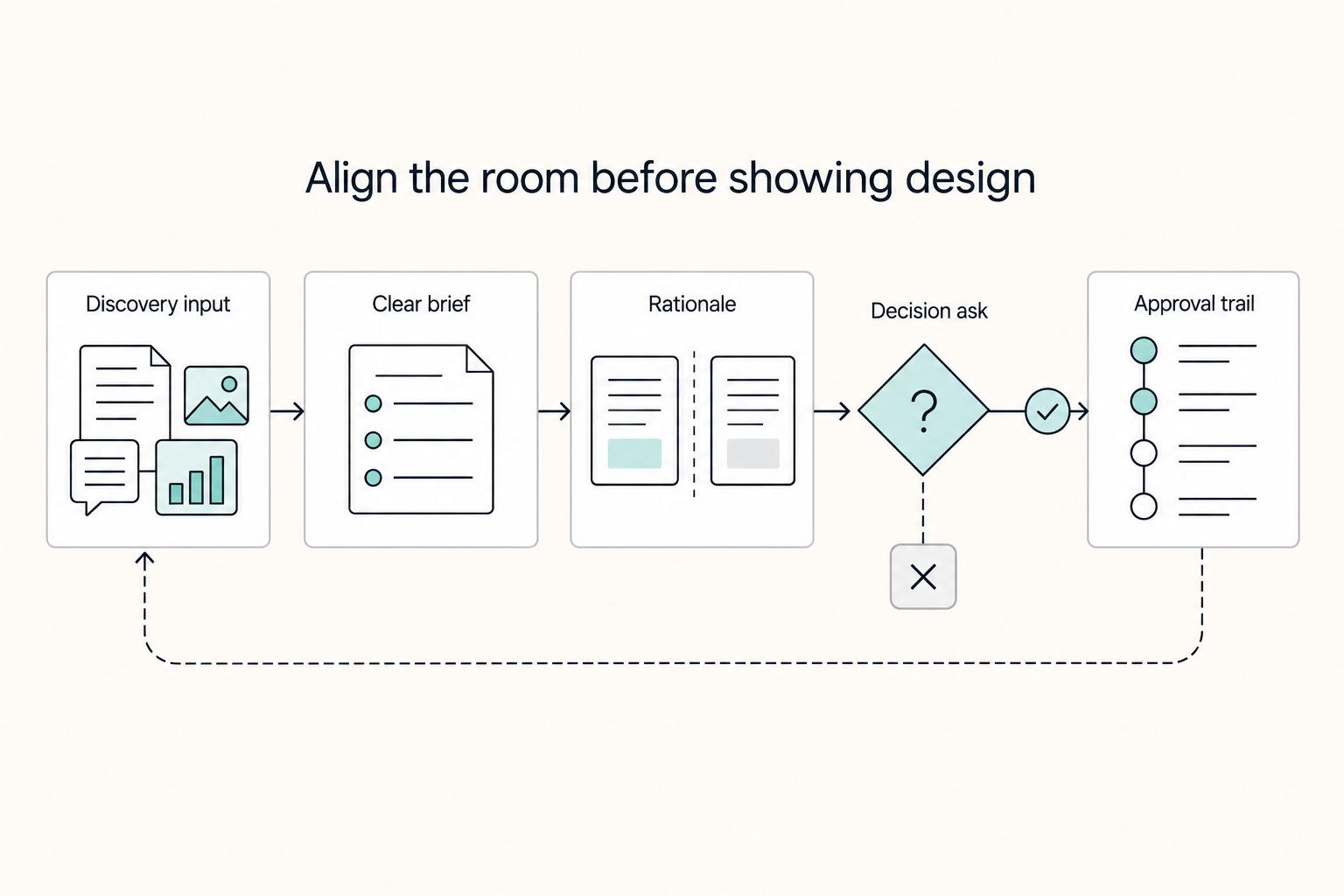
Before you present visuals, align the room on four basics: discovery inputs, a clear brief, design rationale, and approval traceability.
| Element | What to align before review |
|---|---|
| Discovery phase | Confirm goals, stakeholder inputs, constraints, and success criteria before you ask for a decision on design. |
| Design brief | Treat it as the alignment document for goals, scope, and strategy; define what the work must achieve, what is in scope, which constraints are fixed, and how success will be judged. |
| Design rationale | Translate choices into plain language tied to outcomes; explain what problem each choice solves, what tradeoff it introduces, and how it connects back to the brief. |
| Approval traceability | Record what was approved, why, and which version was reviewed. Record timing impacts of included revisions; route work beyond agreed scope or revision allowance through the scope-change process. |
For a step-by-step walkthrough, see How to Watermark Your Creative Work Before Sending to Clients.
Prepare the pre-meeting evidence pack#
Send a focused evidence pack before the call so stakeholders align on context, decision target, and ownership before the discussion expands.
Start with a short pre-read (often one page, but not a universal rule) that includes the Design Brief, agreed Project Scope, success criteria, and one sentence naming today's decision target. Write that target so the meeting has a clear finish line, not a vague review request.
Before sending, pressure-test the pre-read with three questions: what are we deciding, what constraints are fixed, and who can approve it? If those answers are unclear, the meeting will spend time on alignment instead of a decision.
Attach a review PDF with key visuals and brief rationale notes beside each one. Keep the notes plain and structured: what problem this choice solves and what tradeoff it introduces. Short commentary reduces misinterpretation and helps clients revisit the logic after the call.
Use Contextual Mockup examples selectively. Designs shown only in isolation are harder for non-designers to judge, so include realistic context where it helps the decision. Do not include every exploration; extra branches pull feedback toward options you already ruled out.
Assign role ownership in the agenda:
- Decision-maker: approves or rejects the direction
- Reviewers: give input against brief and scope
- Note owner: captures decisions and updates the Decision Log
If an item does not help the client make today's choice, cut it.
This pairs well with our guide on Best Figma Plugins for Reliable Client Design Work.
Decide how many options to present and when to narrow#
Use a tight decision rule: present one strong direction when the Design Brief is specific, and keep two Creative Concept directions only when real strategy uncertainty remains.
Use the brief to set the option count#
Showing extra options "for choice" often turns a decision meeting back into exploration. It can also expand perceived Project Scope, even when written scope has not changed.
Use one concept when the brief is settled and you can defend it clearly. Keep two only when unresolved strategy questions still matter. In that case, present one recommended concept and one controlled fallback, not a gallery.
Use the option count the decision needs. A settled brief can support one recommendation; unresolved strategy can justify a small comparison. Presenting more concepts is a deliberate choice about the review, not a guarantee of better feedback.
Compare concepts using fixed criteria#
If you present more than one concept, set criteria before the meeting and keep them visible in the review PDF. Use criteria such as brand fit, implementation risk, and revision risk so discussion stays tied to decision logic.
| Criteria | Recommended concept | Fallback concept | What to check |
|---|---|---|---|
| Brand fit | How directly it matches the tone, audience, and goals in the Design Brief | Where it still fits and where it stretches the brief | Can you point to brief language that supports it? |
| Implementation risk | Delivery effort, production complexity, or technical constraints | Whether the fallback is easier or harder to execute | Are known constraints likely to cause issues? |
| Revision risk | Likelihood of subjective debate or repeated refinements | Whether it may reduce back-and-forth while meeting the brief | Can you name likely objections in advance? |
Add criteria only if the project requires them, and avoid inventing criteria live in the room.
Verify each concept before the meeting#
Before the review, confirm every option can be defended with clear Design Rationale and a relevant Contextual Mockup. If you cannot explain why a concept should win, cut it before the meeting.
If client confidence is low, do not respond with more options. Show one recommendation and one controlled fallback that still aligns with the brief. This keeps confidence up without reopening discovery.
Related: How to Present a Creative Concept to an Enterprise Client.
Structure the presentation so clients can say yes with confidence#
Once options are narrowed, structure the review around a decision, not a gallery. Your Presentation Deck should move from the Design Brief and constraints to one clear approval ask, so feedback stays focused on fit, implications, and next steps.
| Deck step | What to include |
|---|---|
| Brief recap | Audience, objective, and tone. |
| Constraints | Non-negotiable constraints. |
| Concept | The concept as a direct response to those conditions. |
| Rationale | One sentence on why this direction fits the brief and one sentence on the main risk or tradeoff. |
| Usage context | Contextual Mockup views, then plain views when needed so structure and legibility are easy to assess. |
| Decision ask | One clear approval ask. |
A practical flow is: brief recap, constraints, concept, rationale, usage context, decision ask. This keeps the problem and goals visible before style reactions take over and helps stakeholders evaluate the work as problem-solving.
Lead with the brief, then show the concept#
Start with a short recap of audience, objective, tone, and non-negotiable constraints. Then present the concept as a direct response to those conditions. If someone missed earlier context, they should still be able to explain what problem this work is solving from the opening slides.
Put rationale and tradeoffs next to each key visual#
For each major visual, include:
- One sentence on why this direction fits the brief.
- One sentence on the main risk or tradeoff (execution, readability, audience fit, or revision impact).
Use Contextual Mockup views so stakeholders can judge real-world use, then include plain views when needed so structure and legibility are easy to assess without presentation effects.
Make the decision boundary explicit#
End the deck or review PDF with a compact status table so approval and scope are unambiguous.
| Status | What belongs here | Why it matters |
|---|---|---|
| Approved now | The concept or specific screens/assets up for sign-off | Creates a clear record of what is approved |
| Pending | Items waiting on input or contracted deliverables scheduled for a later review | Prevents assumptions that everything shown is final |
| Outside agreed scope | Requests beyond the agreed deliverables or revision allowance | Identifies extra work before agreeing its price and timing |
Keep labels specific, and keep the same status labels in your exported PDF and meeting notes. If new requests appear, route them through change control instead of treating them as implied approval.
We covered this in detail in A UX/UI Designer's Guide to Drafting a Handover Clause for Figma Assets.
Run feedback like an operator, not a debate moderator#
Run the review as a bounded decision process: define practical feedback up front, log comments live against the brief, and close with explicit revision ownership. Once the approval boundary is visible, protect it by setting a clear Feedback Window and defining practical feedback as comments that are clear, direct, and specific enough to guide revisions.
Use a simple Feedback Rubric that ties comments to the Design Brief, shared goals, audience fit, constraints, or a visible issue in the work. You can set that expectation in one line: "Please give feedback in terms of objective, audience, hierarchy, tone, or execution risk. If something feels off, tell me what outcome it hurts." This keeps critique operational, especially with multiple stakeholders.
Keep a live log on screen as people speak. The tool matters less than making each comment visible, classified, and anchored to the brief.
| Tag | When to use it | What to record beside it |
|---|---|---|
| Accept | The comment improves the work and fits the brief | The specific change and which brief goal it supports |
| Clarify | The comment is too vague to act on yet | The question you need answered, such as what feels weak and where |
| Defer | The point may matter, but another decision or dependency comes first | What is blocking action, such as copy, stakeholder input, or production detail |
| Reject | A request assessed against the brief and obligations, then confirmed as not proceeding | Explain the disposition; assess required corrections and authorized changes even after an earlier approval |
This tagging model is not magic, but it keeps the meeting from turning into a debate and helps prevent messy multi-stakeholder feedback cycles. A practical checkpoint is to read captured notes back after each major screen or concept and confirm the tag out loud, so misheard requests do not become accidental change commitments.
When someone says "make it pop," do not argue or guess. Translate it into testable language by asking whether they mean stronger contrast, clearer hierarchy, different tone, or better audience fit. If they cannot answer yet, mark it Clarify, not Accept.
End by naming the next Revision Round trigger and owner: what starts the round, who consolidates feedback, and where action items are recorded. If that stays fuzzy, iteration becomes open-ended, so record the trigger in your notes or Decision Log before the call ends.
Handle pushback, scope creep, and late stakeholders without drama#
Compare conflicting requests with the agreed brief and revision allowance before classifying them. A refinement within an included revision round, or correcting work that misses the brief, is different from adding a deliverable. For example, adjusting logo contrast in an included round is ordinary feedback; adding packaging artwork to a logo-only engagement may need a separate scope and fee agreement.
Use this decision rule in order:
- Compare the request to the approved Design Brief, current deliverables, and the Decision Log.
- Distinguish included revisions and corrections from changes outside the agreed deliverables or revision allowance.
- Record what is requested, why, expected impact, and who must authorize it.
This keeps review calls from turning into informal approvals that later create delay, budget pressure, and confusion about who decided what.
Route late stakeholder comments through the brief and decision log. Correct a genuine missed requirement within your obligations. If the client asks for additional scope or a newly chosen direction, record the request and agree its impact before starting that extra work.
Use neutral client language: "This change is possible; here is the impact on timeline, fee, and next Revision Round."
Close the loop with approvals and records#
Closeout is only complete when approvals are clear, traceable, and hard to reinterpret later.
Send a same-day summary with the approved concept, open items, and dated Decision Log entries from the meeting. If someone cannot quickly see what was decided, what is still open, and who owns the next action, tighten the record before work moves forward.
Keep Approval Traceability in one place: the versioned PDF, structured meeting notes or minutes, and one explicit sign-off message tied to the reviewed version. Avoid relying on verbal approval, because that is where older files and conflicting comments resurface.
Add a one-line post-mortem at project close: what feedback pattern repeated, and what you will tighten in the next Discovery Phase.
If the client has a formal procurement or approval process, ask who can sign off and which written change record they require. Keep that process with the project documents before final production.
Use a repeatable system that protects quality and scope#
Treat every Client Presentation as a decision checkpoint, not a performance. The goal is to support decisions, clarify progress, and align expectations, so each review answers three things clearly: what was reviewed, what was decided, and what happens next.
Use the same four artifacts on every engagement so scope and quality stay stable from discovery through approval:
- Design Brief: your baseline. It should capture project details, deliverables, timelines, and scope so expectations are shared before review starts.
- Presentation Deck: keep a consistent order: brief recap, constraints, concept, rationale, usage context, and decision ask. Someone who missed the call should still understand the recommendation and the decision required.
- Feedback Rubric: define what useful feedback looks like. A clear system keeps comments tied to criteria instead of broad reactions.
- Decision Log: record each decision with its context and consequences. That makes prior decisions easy to retrieve and reduces re-litigation later.
Link presentation approvals to the actual agreement and its change process. Record the approved version and any agreed amendment so a meeting note does not silently add deliverables or override the contract.
Use the agreement to distinguish included refinements and corrections from added scope. Record the impact of a requested change, then agree any extra deliverable, fee or timetable before starting that additional work.
For traceability, avoid verbal-only approvals. Log the exact reviewed version, the decision entry, and the sign-off message in one place so later stakeholders do not reopen settled work based on memory.
Frequently Asked Questions
How do I present design work to clients without triggering endless revisions?
Treat the meeting as a decision point, not a gallery review. Start from the design brief, name the problem being solved, and state the decision you need today before you show visuals. A common risk is showing polished work without shared criteria, which can invite taste-based comments and reopen scope discussions.
How many design options should I show in one client presentation?
Show only the amount of choice the decision actually needs. If the brief is tight and the direction is already aligned, lead with one recommended concept and explain why it fits. If real strategic uncertainty remains, a small comparison can help. Too many options can make the project feel more open than it is and can create feedback on ideas you never intended to pursue.
What should I include in a presentation deck or PDF for client review?
Your presentation deck or PDF should help a stakeholder make a clear decision. Include a brief recap, the goal, the constraints, the concept, the rationale, and the decision ask. Also mark what is in scope, what is pending, and what is out of scope so comments do not drift. A good checkpoint is whether someone who missed the call can open the PDF and understand what problem the design answers.
How do I respond when a client says "make it pop"?
Do not argue with the phrase. Translate it. Ask what they want to feel or notice first, then turn that into specific variables such as contrast, hierarchy, tone, or audience fit. “Make it pop” is not useful on its own because it does not point to a clear action.
How do I defend design decisions without sounding defensive?
Anchor your explanation in the agreed goal, not your personal preference. Say what the choice is doing for the audience or business, then name any tradeoff plainly. Confidence usually sounds like calm reasoning plus a willingness to test a concern, not like winning an argument.
What should happen before, during, and after the presentation meeting?
Before the call, send a pre-read with the design brief, review PDF, and the decision required so stakeholders arrive with the same context. During the meeting, frame the problem first, walk through the rationale, and capture comments live in a decision log with clear next actions. Afterward, send a summary with the approved direction, open items, and the exact version reviewed.
How do I collect feedback that is specific enough for the next revision round?
Ask for feedback against named criteria, not broad reactions. Helpful feedback is specific enough that you can take a clear, measurable action, while vague suggestions without direction are not. A simple prompt works well: “What should change, where exactly, and why relative to the brief?” That keeps the next revision round tied to evidence instead of opinion.
Try a related tool
Researched and edited by the Gruv editorial team. Gruv builds cross-border billing, payouts, and finance-operations software for global businesses.
Sources
Includes 6 external sources outside the trusted-domain allowlist.
- ocw.mit.edu/courses/15-783j-product-design-and-developme...trusted
- web.sas.upenn.edu/sasc-pmt/roles-in-meetingstrusted
- asana.com/resources/design-briefexternal
- asana.com/resources/meeting-agendaexternal
- atlassian.com/itsm/change-management/change-control-processexternal
- atlassian.com/work-management/project-management/project-s...external
- blog.readymag.com/presenting-design-concepts-to-clientsexternal
- clickup.com/blog/decision-log-project-managementexternal
Educational content only. Not legal, tax, or financial advice.
Related Posts
How to Present a Creative Concept to an Enterprise Client
Treat the meeting as a decision checkpoint, not a taste review. Your job is to move the concept through clear questions, decision ownership, and risk ownership before execution starts.

The Freelance Payment Penalty: A Modeled Audit of Platform Fees, FX Spreads, and Payout Delays
The money rarely disappears through a single, easy-to-spot fee. The real loss is stacked. A marketplace takes its commission, a processor adds a charge for international cards, a bank or payment company converts the currency at a spread, a platform holds the funds before release, and a wire sheds a little to intermediaries on the way in. Each layer looks defensible on its own, but the worker feels the combined result as a smaller deposit and a later payday.

How to Respond to a Subpoena for Business Records
Move fast, but do not produce records on instinct. If you need to **respond to a subpoena for business records**, your immediate job is to control deadlines, preserve records, and make any later production defensible.